Cloud Region
A geographic area containing one or more data centers (availability zones). Choosing the right region reduces latency and satisfies data residency requirements.
What is Cloud Region?
In short
A cloud region is a named geographic area where a cloud provider clusters its data centers, such as AWS us-east-1 in Northern Virginia or Google europe-west1 in Belgium. Each region contains multiple isolated availability zones, and you pick a region to put your servers and data physically close to your users and inside the legal jurisdiction you need.
What a cloud region actually is
A region is the top-level location unit in every major cloud. AWS, Google Cloud, and Azure all divide the world into a few dozen regions, and each one is a separate physical footprint in a specific part of the world. AWS calls them things like us-east-1 (Northern Virginia), eu-west-1 (Ireland), and ap-south-1 (Mumbai). Azure uses names like East US and West Europe. Google uses asia-southeast1, us-central1, and so on.
Inside a region there are multiple availability zones. An availability zone is one or more physically separate data centers with their own power, cooling, and network. AWS regions usually have 3 to 6 zones. The zones in a region are close enough to talk over a fast private network with single-digit millisecond latency, but far enough apart that a fire, flood, or power failure in one zone does not take down the others.
The key mental model: a region is where your stuff lives on the map, and availability zones are the independent failure domains inside that map location. When you launch a server or create a database, you almost always pick a region first, then a zone.
How regions work under the hood
Most cloud services are regional, meaning the resource exists only in the region you created it in and is invisible from other regions unless you set up replication. An S3 bucket created in eu-west-1 stores its objects in Ireland. A database in ap-south-1 keeps its data in Mumbai. Networking is also regional: a virtual private network (a VPC in AWS) spans the zones of one region but does not stretch across regions on its own.
Regions are deliberately isolated from each other so that a problem in one cannot cascade into another. They run on separate control planes, and the provider routes traffic between them over its own backbone. The famous us-east-1 outages at AWS stayed mostly contained to that region precisely because of this design, though some global services that depend on us-east-1 have been dragged down with it.
To go cross-region you replicate on purpose. You enable S3 cross-region replication, set up a database read replica in a second region, or front everything with a global DNS service like Route 53 or a CDN like CloudFront that steers each user to the nearest healthy region.
Choosing a region and the trade-offs
Three forces decide the region. Latency: put compute near your users, because the speed of light means a request from Mumbai to a server in Virginia adds roughly 200 milliseconds of round trip before any work happens. Data residency and compliance: rules like the EU GDPR, India's data localization requirements, and various banking regulations force certain data to physically stay inside a country, so you must use a region in that country. Cost: prices vary by region, and the same instance can cost 10 to 30 percent more in places like Sao Paulo or some Asia Pacific regions than in us-east-1.
The trade-offs are real. A single region is simpler and cheaper but means a regional outage takes you fully offline. Going multi-region buys you resilience and lower global latency, but cross-region data transfer is billed per gigabyte, replication adds lag, and keeping data consistent across regions is genuinely hard. Most teams start in one region close to their main users and add a second region only when uptime or latency demands it.
A common default is to launch in us-east-1 because it is the oldest, cheapest, and has the widest service support, but that is also the busiest region and the one most affected by large AWS incidents.
A concrete example
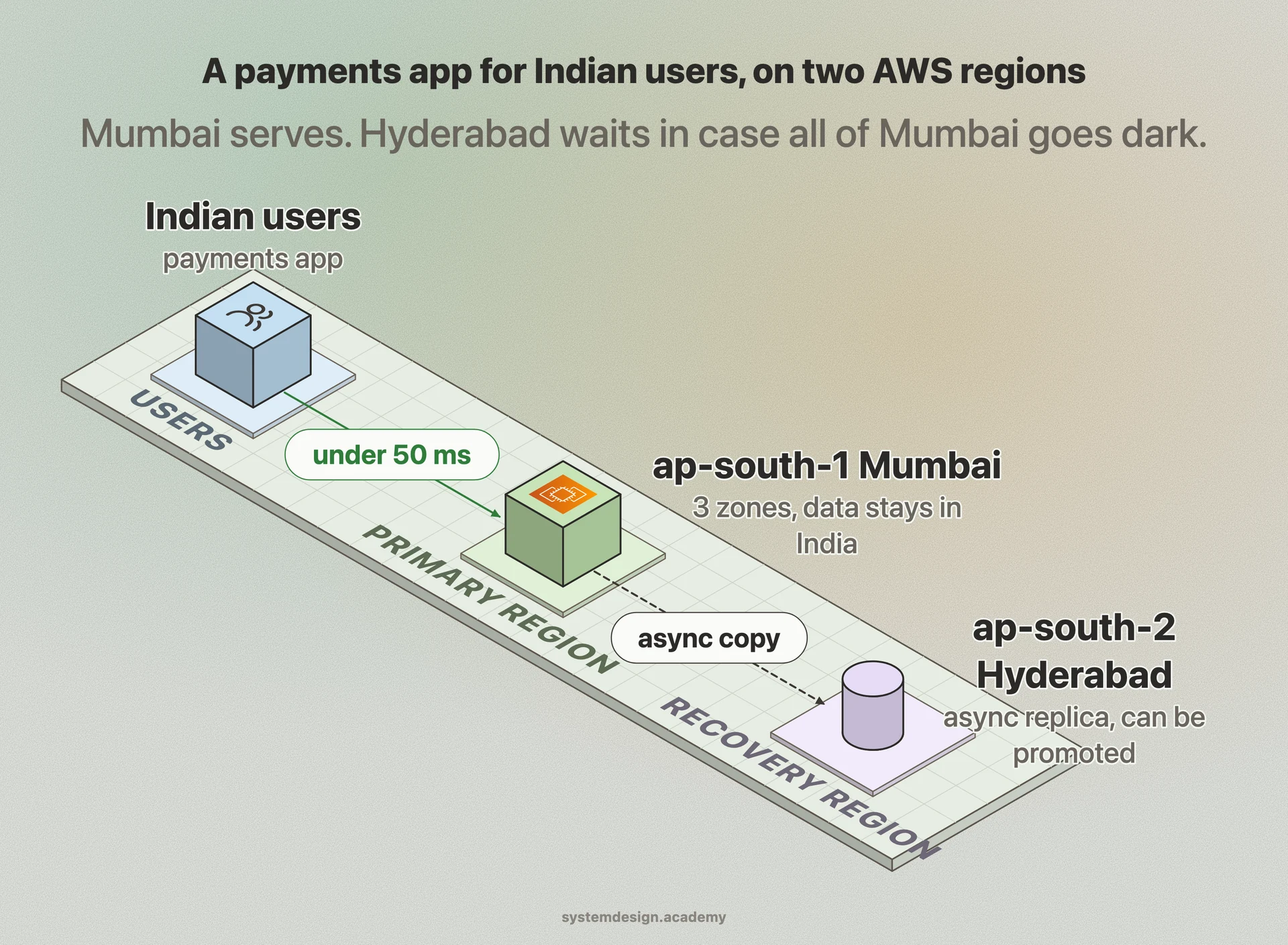
Say you run a payments app for Indian users. You pick ap-south-1 (Mumbai) as your primary region so latency to users stays under 50 milliseconds and customer data stays in India to satisfy RBI localization rules. You spread your servers across the three Mumbai availability zones so a single data center failure does not take you down.
For disaster recovery you keep an asynchronous database replica in ap-south-2 (Hyderabad) and store backups in another region. If all of Mumbai goes dark, you can promote the Hyderabad replica and redirect traffic. Netflix runs this pattern at scale across three AWS regions and can evacuate an entire region in under an hour by shifting traffic to the others.
Where it is used in production
Amazon Web Services
Operates 30+ regions worldwide, each with multiple availability zones; region names like us-east-1 and ap-south-1 are the industry reference point.
Netflix
Runs across three AWS regions and regularly practices evacuating a full region, shifting all user traffic to the others within an hour.
Cloudflare
Uses its global edge network to route each user to the nearest region or point of presence, masking single-region latency.
Google Cloud
Offers regions such as us-central1 and europe-west1, with most services scoped to a region and a private backbone linking them.
Frequently asked questions
- What is the difference between a region and an availability zone?
- A region is a geographic location like Northern Virginia or Mumbai. An availability zone is one or more isolated data centers inside that region with independent power and networking. A region contains multiple zones so that one zone failing does not take down the others.
- Can a single resource span multiple regions?
- Usually no. Most cloud resources, like servers, databases, and storage buckets, live in exactly one region. To span regions you set up replication or use a global layer like a CDN or DNS-based routing that directs users to the nearest regional copy.
- Which region should I choose first?
- Pick the region closest to most of your users for low latency, while making sure it satisfies any data residency law that applies to you. After that compare prices, since the same instance can cost 10 to 30 percent more in some regions than in us-east-1.
- Why is us-east-1 mentioned so often?
- AWS us-east-1 in Northern Virginia is the oldest and largest AWS region, the cheapest, and the first to get new services. It is also the busiest, so large AWS outages frequently start or hit hardest there, and some global services depend on it.
- Does multi-region make my app fully fault tolerant?
- It greatly improves resilience against a regional outage, but it is not free. You pay for cross-region data transfer, replication introduces lag, and keeping data consistent across regions is hard. Many teams run a single region until uptime or latency requirements justify the added complexity.
Learn Cloud Region hands-on
This page explains the idea. The full lesson lets you step through the ring as servers join and leave, read the implementation, and check yourself with a quiz. It is one of 760+ lessons in the System Design Masterclass, from your first API call to distributed consensus. Eleven Foundation lessons are free, no signup. Lifetime access is ₹499 in India or $7.99 worldwide, one payment, no subscription.
Related lessons
Lessons that touch on Cloud Region as part of a larger topic.
See also
Related glossary terms you might want to look up next.
Availability Zone
An isolated data center within a cloud region, with independent power, cooling, and networking. Deploying across multiple AZs protects against single-facility failures.
Latency
The time delay between sending a request and getting a response. Amazon found every 100ms of extra latency costs 1% in sales.
CDN
A network of servers distributed globally that caches content close to users. Netflix uses CDNs to stream video from servers near you, not from one central location.
Virtual Machine
A software emulation of a physical computer running its own OS on shared hardware. Heavier than containers but provides stronger isolation.
Hypervisor
Software that creates and manages virtual machines by abstracting physical hardware. Type 1 (bare-metal) runs directly on hardware; Type 2 runs on an OS.
Auto Scaling
Automatically adding or removing compute instances based on current demand. Scales out during traffic spikes and scales in during quiet periods to save cost.