Virtual Machine
A software emulation of a physical computer running its own OS on shared hardware. Heavier than containers but provides stronger isolation.
What is Virtual Machine?
In short
A virtual machine (VM) is a software-based computer that runs its own operating system and applications on top of shared physical hardware, isolated from other VMs by a hypervisor. Each VM behaves like a real machine with its own virtual CPU, memory, disk, and network, even though many of them share one physical server.
What a virtual machine actually is
A physical server has real CPUs, RAM, disks, and network cards. A virtual machine takes a slice of those resources and presents them to a guest operating system as if they were a dedicated physical computer. The guest OS boots, installs drivers, and runs programs without knowing it is sharing the box with other VMs.
The piece of software that creates and manages VMs is called a hypervisor. A Type 1 hypervisor (also called bare metal) runs directly on the hardware, like VMware ESXi, Microsoft Hyper-V, KVM on Linux, or Xen. A Type 2 hypervisor runs as an application inside a host OS, like VirtualBox or VMware Workstation on your laptop. Cloud providers run Type 1 hypervisors because they are faster and more secure for multi-tenant use.
Each VM gets a virtual disk (a file like a .vmdk or .qcow2), a configured amount of RAM, a set of virtual CPU cores, and one or more virtual network interfaces. You can pause a VM, snapshot it, copy it, or move it to another physical host while it keeps running, which is called live migration.
How it works under the hood
The core job of a hypervisor is to give each guest the illusion of owning the hardware while keeping them apart. When a guest tries to run a privileged instruction, like talking to a disk or reconfiguring memory, the hypervisor intercepts it and handles it safely. Early virtualization did this with slow software trapping and binary translation.
Modern VMs rely on hardware assistance built into CPUs: Intel VT-x and AMD-V add a separate execution mode so guest code runs almost at native speed and the hypervisor only steps in for sensitive operations. Intel EPT and AMD NPT add nested page tables so the CPU translates guest memory addresses to real machine addresses in hardware instead of the hypervisor doing it by hand.
Memory is partitioned so one VM cannot read another VM's RAM. CPU time is scheduled across VMs much like an OS schedules threads. Devices are either fully emulated, paravirtualized with guest-aware drivers like virtio for much better throughput, or passed through directly with SR-IOV and IOMMU for near-native I/O.
Because the whole machine state lives in files and configuration, a VM is portable. You can snapshot its disk and memory, roll back to that exact point after a bad deploy, or clone it a hundred times to build an autoscaling fleet.
When to use a VM and the trade-offs
Use a VM when you need strong isolation, a full operating system, or a kernel different from the host. A VM can run Windows on a Linux host, run an old kernel a legacy app depends on, or give a hostile tenant a hard security boundary. Each guest has its own kernel, so a crash or compromise inside one VM stays inside it.
The cost is weight. A VM carries an entire OS, so it boots in tens of seconds to minutes, uses gigabytes of RAM and disk before your app even starts, and has a thin but real performance overhead, usually a few percent. Containers, by contrast, share the host kernel, start in milliseconds, and pack far more density on the same hardware.
A common pattern in production is to combine them: run lightweight containers, but place those containers inside VMs so the kernel boundary still protects tenants from each other. Tools like Firecracker and Kata Containers push this further with microVMs that boot in around 125 milliseconds and use only a few megabytes of overhead, getting close to container speed while keeping VM-grade isolation.
A concrete real-world example
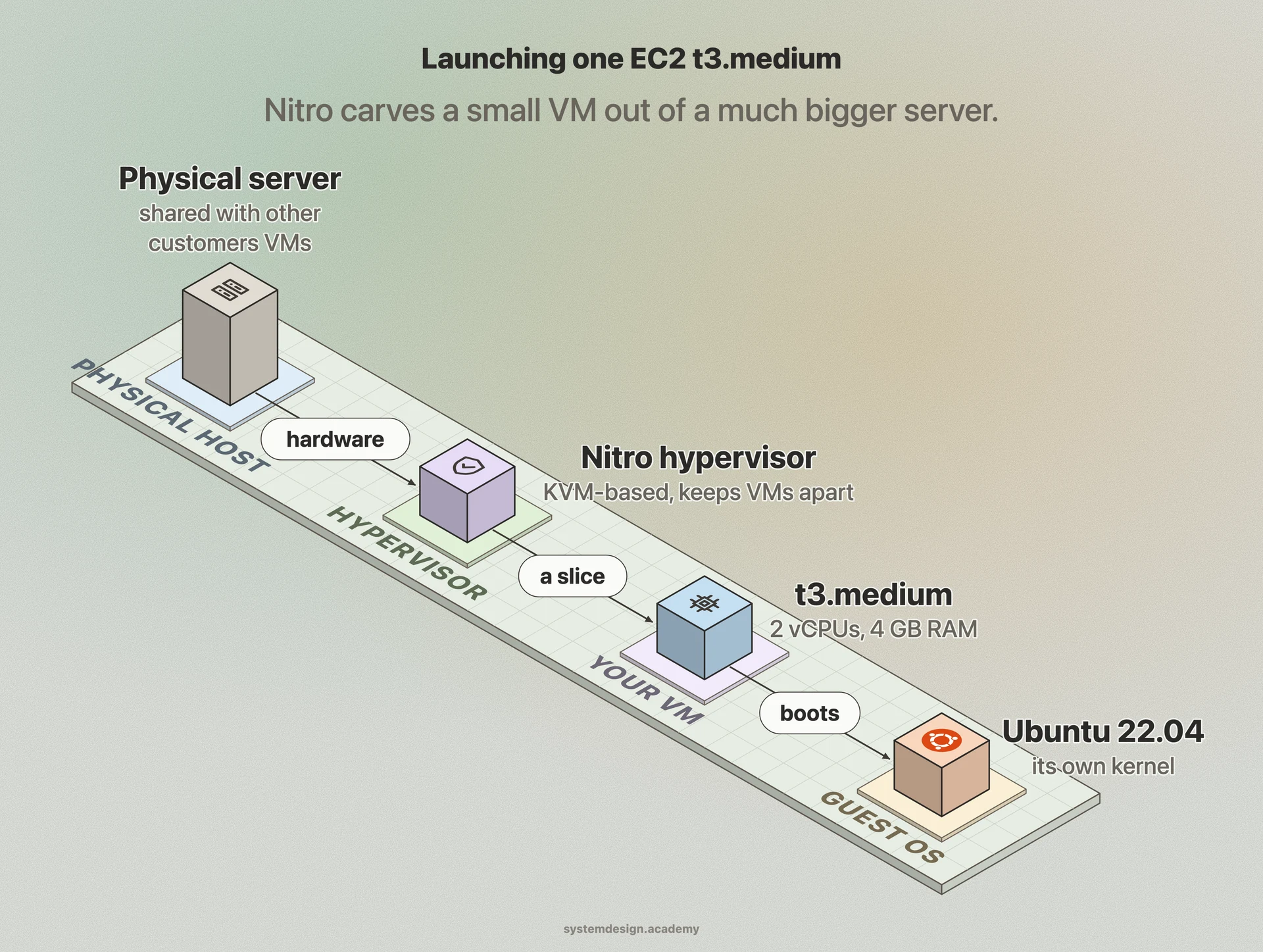
When you launch an Amazon EC2 t3.medium instance, AWS is creating a VM for you. Behind the scenes the Nitro hypervisor, a lightweight KVM-based design, carves out 2 vCPUs and 4 GB of RAM from a much larger physical server in a specific Availability Zone and boots your chosen image, say Ubuntu 22.04.
Dozens of other customers' VMs may live on that same physical host, but Nitro keeps them isolated through hardware virtualization and dedicated Nitro cards that offload networking and storage. You can snapshot the root volume to an AMI, launch fifty identical copies behind a load balancer, and resize from t3.medium to t3.large with a stop and start, all because the machine is software-defined rather than physical.
Where it is used in production
Amazon EC2
Every EC2 instance is a VM; the custom Nitro hypervisor runs millions of them across AWS data centers.
VMware vSphere
The ESXi Type 1 hypervisor runs enterprise data center VMs with live migration via vMotion.
Google Compute Engine
Runs customer VMs on a KVM-based hypervisor and supports live migration during host maintenance.
AWS Firecracker
Open-source microVM monitor that boots VMs in about 125 ms to back Lambda and Fargate workloads.
Frequently asked questions
- What is the difference between a virtual machine and a container?
- A VM virtualizes the hardware and runs its own full operating system with its own kernel, so it isolates strongly but starts slowly and uses gigabytes of resources. A container virtualizes the OS and shares the host kernel, so it starts in milliseconds and is far lighter, but the shared kernel makes the isolation boundary weaker.
- What is a hypervisor?
- A hypervisor is the software that creates and runs virtual machines, dividing one physical machine's CPU, memory, and devices among many guests. Type 1 hypervisors like ESXi, KVM, and Hyper-V run directly on the hardware; Type 2 hypervisors like VirtualBox run as an app inside a host OS.
- Are virtual machines slower than physical machines?
- Slightly. With modern CPU support like Intel VT-x and AMD-V, guest code runs at near-native speed and overhead is usually only a few percent. The bigger cost is memory and disk used by the extra OS, plus slower boot times measured in seconds to minutes rather than milliseconds.
- Can a virtual machine run a different operating system than the host?
- Yes. Because the guest has its own kernel, you can run Windows on a Linux host, run an old Linux kernel for a legacy app, or run several different OSes side by side on the same physical server, as long as they share the same CPU architecture.
- What is a VM snapshot used for?
- A snapshot captures a VM's disk and optionally its memory at a point in time. You take one before a risky upgrade so you can roll back instantly if it breaks, and you clone snapshots to spin up many identical machines for autoscaling or testing.
Learn Virtual Machine hands-on
This page explains the idea. The full lesson lets you step through the ring as servers join and leave, read the implementation, and check yourself with a quiz. It is one of 760+ lessons in the System Design Masterclass, from your first API call to distributed consensus. Eleven Foundation lessons are free, no signup. Lifetime access is ₹499 in India or $7.99 worldwide, one payment, no subscription.
Related lessons
Lessons that touch on Virtual Machine as part of a larger topic.
See also
Related glossary terms you might want to look up next.
Docker
A platform for packaging applications into lightweight, portable containers. 'Works on my machine' becomes 'works everywhere.'
Kubernetes
An orchestration platform that automates deploying, scaling, and managing containerized applications. K8s is the operating system for your cloud.
Hypervisor
Software that creates and manages virtual machines by abstracting physical hardware. Type 1 (bare-metal) runs directly on hardware; Type 2 runs on an OS.
Cloud Region
A geographic area containing one or more data centers (availability zones). Choosing the right region reduces latency and satisfies data residency requirements.
Availability Zone
An isolated data center within a cloud region, with independent power, cooling, and networking. Deploying across multiple AZs protects against single-facility failures.
Auto Scaling
Automatically adding or removing compute instances based on current demand. Scales out during traffic spikes and scales in during quiet periods to save cost.