Hypervisor
Software that creates and manages virtual machines by abstracting physical hardware. Type 1 (bare-metal) runs directly on hardware; Type 2 runs on an OS.
What is Hypervisor?
In short
A hypervisor is software that creates and runs virtual machines by sitting between physical hardware and one or more guest operating systems, giving each guest its own slice of CPU, memory, storage, and network while keeping them isolated. Type 1 hypervisors run directly on the bare metal (like VMware ESXi, KVM, Xen, Hyper-V), and Type 2 hypervisors run as an application on top of a host OS (like VirtualBox or VMware Workstation).
What a hypervisor actually is
A physical server has one set of CPUs, one block of RAM, and one set of disks and network cards. A hypervisor lets that single machine pretend to be many machines. Each pretend machine is a virtual machine, or VM, and it runs its own full operating system that thinks it owns the hardware.
The hypervisor is the layer that makes that lie work. It hands out time slices of the real CPU, carves the real RAM into per-VM regions, and presents virtual disks and virtual network cards to each guest. The guest OS boots and runs normally, unaware that it is sharing the box with a dozen others.
The other name for a hypervisor is a Virtual Machine Monitor (VMM). The two terms mean the same thing. Its whole job is multiplexing one set of hardware across many isolated guests and stopping any guest from reaching into another guest's memory or crashing the host.
Type 1 versus Type 2, and how it works under the hood
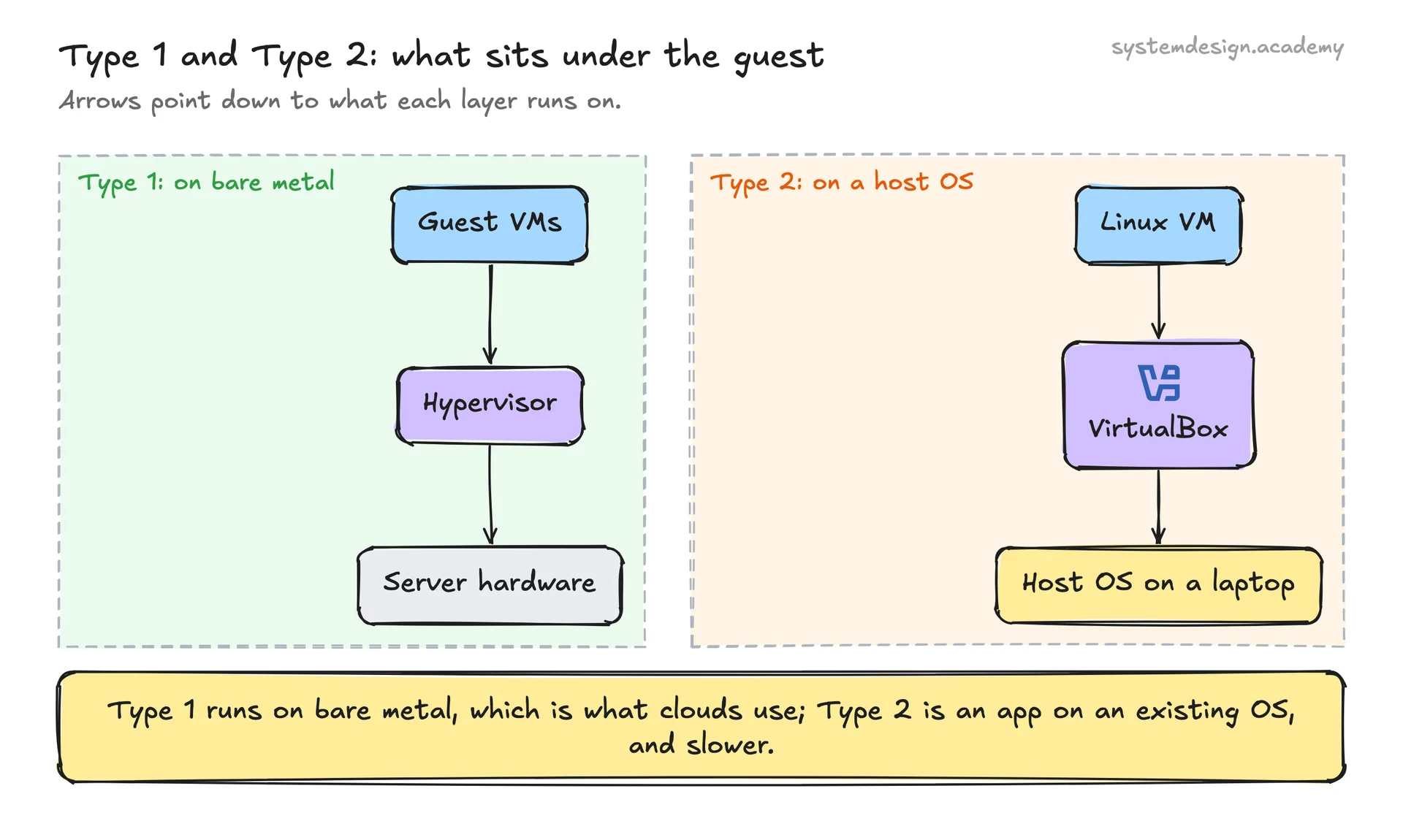
A Type 1 hypervisor runs directly on the hardware with no operating system underneath it. The hypervisor itself is the lowest layer of software. VMware ESXi, the open-source KVM and Xen, and Microsoft Hyper-V are the common ones. This is what every cloud provider runs, because there is no host OS stealing resources and the attack surface is smaller.
A Type 2 hypervisor runs as a normal program on top of an existing OS like Windows or macOS. VirtualBox, VMware Workstation, and Parallels are examples. It is convenient for running a Linux VM on your laptop, but it is slower because guest instructions pass through both the hypervisor and the host OS.
Under the hood, modern hypervisors lean on hardware support: Intel VT-x and AMD-V let the CPU run guest code at near-native speed and trap only the privileged instructions the hypervisor must handle. Intel EPT and AMD RVI handle memory address translation in hardware so the hypervisor does not have to shadow every page table. For devices, the hypervisor either emulates a virtual NIC and disk, or uses paravirtualized drivers (virtio on KVM) where the guest knows it is virtualized and talks to the host efficiently, or passes a real device straight through with SR-IOV and IOMMU.
When to use one, and the trade-offs
Reach for a hypervisor when you need strong isolation between workloads, want to run different operating systems on one box, or need to consolidate many underused servers onto fewer machines. A VM gives you a full kernel boundary, so a compromised or crashed guest cannot easily touch its neighbors. That is why multi-tenant clouds are built on hypervisors rather than shared OS kernels.
The cost is overhead. Each VM carries a full guest OS, which means gigabytes of RAM and disk per instance and minutes to boot. The hypervisor itself burns some CPU on trap-and-emulate work and context switching between guests. Density is good but not free.
This is the core difference from containers. Containers share the host kernel and isolate at the process level, so they start in milliseconds and pack tighter, but the isolation is weaker. Hypervisors give heavier, stronger isolation; containers give lighter, faster, weaker isolation. Production systems often combine them: VMs for the tenant boundary, containers inside those VMs for packaging. AWS Firecracker is a microVM hypervisor built specifically to get VM-grade isolation with container-grade startup times.
A concrete example
When you launch an EC2 instance on AWS, you are not getting a physical server. You are getting a VM scheduled by a hypervisor onto a shared physical host alongside other customers. For years AWS ran a customized Xen hypervisor. Since around 2017 most instance types run on the Nitro system, which moves networking, storage, and security work onto dedicated hardware cards and leaves a thin KVM-based hypervisor (Nitro Hypervisor) on the main CPU. That thin layer is why Nitro instances run at close to bare-metal speed.
Concretely, a single modern host might pack 64 to 192 physical CPU cores and a terabyte of RAM. The hypervisor can slice that into dozens of customer VMs, oversubscribing where workloads are idle, while keeping each tenant's memory and devices walled off from the others. When you stop your instance and start it later, the hypervisor may place that VM on an entirely different physical machine, and your guest OS never notices.
Where it is used in production
VMware ESXi
The dominant Type 1 hypervisor in enterprise data centers, running production VM fleets on bare metal under vSphere management.
KVM
The Linux kernel's built-in Type 1 hypervisor; powers Google Cloud, the AWS Nitro Hypervisor, and most OpenStack deployments.
AWS (Nitro / Xen)
EC2 instances are VMs scheduled by a hypervisor; older instances ran Xen, newer Nitro instances use a lightweight KVM-based hypervisor.
Microsoft Hyper-V
Type 1 hypervisor shipped with Windows Server and the engine behind Azure's virtual machines.
AWS Firecracker
Open-source microVM hypervisor that boots VMs in around 125ms, used under AWS Lambda and Fargate for per-function isolation.
Frequently asked questions
- What is the difference between a hypervisor and a virtual machine?
- The hypervisor is the software layer that creates, isolates, and schedules virtual machines. A virtual machine is one of the guests it runs: a complete OS with its own virtual CPU, memory, and disk. One hypervisor manages many VMs.
- Is a Type 1 or Type 2 hypervisor better?
- For servers and clouds, Type 1 is better because it runs directly on hardware with less overhead and a smaller attack surface. Type 2 is better for desktops and laptops where you just want to run a VM on top of your normal OS without dedicating the machine.
- What is the difference between a hypervisor and Docker containers?
- A hypervisor virtualizes the hardware so each VM runs its own kernel, giving strong isolation but gigabytes of overhead and slow boot. Docker containers share the host kernel and isolate at the process level, so they start in milliseconds and pack tighter but isolate more weakly. They solve different points on the isolation-versus-efficiency curve.
- Does a hypervisor slow down performance?
- There is some overhead, but with hardware assist from Intel VT-x or AMD-V plus EPT or RVI for memory and SR-IOV for devices, modern VMs run within a few percent of bare metal for most workloads. The biggest costs are the RAM and disk consumed by each full guest OS, not raw CPU speed.
- Why do cloud providers use hypervisors instead of just giving you a server?
- Hypervisors let them safely share one physical machine across many customers with hard isolation, place and move your VM onto any available host, oversubscribe idle capacity, and bill by the hour. Without virtualization they would have to dedicate a whole physical box per customer, which is far more expensive and far less elastic.
Learn Hypervisor hands-on
This page explains the idea. The full lesson lets you step through the ring as servers join and leave, read the implementation, and check yourself with a quiz. It is one of 760+ lessons in the System Design Masterclass, from your first API call to distributed consensus. Eleven Foundation lessons are free, no signup. Lifetime access is ₹499 in India or $7.99 worldwide, one payment, no subscription.
See also
Related glossary terms you might want to look up next.
Virtual Machine
A software emulation of a physical computer running its own OS on shared hardware. Heavier than containers but provides stronger isolation.
Docker
A platform for packaging applications into lightweight, portable containers. 'Works on my machine' becomes 'works everywhere.'
Cloud Region
A geographic area containing one or more data centers (availability zones). Choosing the right region reduces latency and satisfies data residency requirements.
Availability Zone
An isolated data center within a cloud region, with independent power, cooling, and networking. Deploying across multiple AZs protects against single-facility failures.
Auto Scaling
Automatically adding or removing compute instances based on current demand. Scales out during traffic spikes and scales in during quiet periods to save cost.
Serverless
A cloud execution model where the provider manages all infrastructure and you pay only for actual compute time. AWS Lambda, Vercel Functions, and Cloudflare Workers are serverless.