Availability Zone
An isolated data center within a cloud region, with independent power, cooling, and networking. Deploying across multiple AZs protects against single-facility failures.
What is Availability Zone?
In short
An availability zone (AZ) is one or more physically separate data centers inside a single cloud region, each with its own independent power, cooling, and network connectivity. By running copies of your application across two or three AZs in the same region, you stay online even if one entire data center loses power or floods, while keeping latency between zones low enough (usually under 2 ms) to replicate data synchronously.
What an availability zone actually is
A cloud region is a geographic area, like AWS us-east-1 in Northern Virginia or Azure West Europe in the Netherlands. Inside that region the provider builds several isolated failure domains, and each one is an availability zone. AWS regions typically have three to six AZs. Each AZ is one or more buildings spaced a few kilometers apart from the others in the region.
The whole point of the separation is independence. Each AZ has its own utility power feed plus backup generators, its own cooling, and its own network links. A fire, a flood, a power substation failure, or a switch meltdown in one AZ is engineered to have no effect on the others. They are close enough that a fiber round trip between them stays in the single-digit millisecond range, but far enough that one physical disaster does not take out two of them.
An AZ is not the same as a region and not the same as a single rack or server. It sits in the middle: bigger than a rack, smaller than a region. When you launch a virtual machine, a managed database, or a disk volume, the provider places it in a specific AZ, and you usually get to choose which one or let the provider spread your resources for you.
How multi-AZ deployment works under the hood
You make your system resilient by running redundant copies in different AZs and putting a load balancer in front of them. AWS Application Load Balancers, Azure Load Balancers, and Google Cloud load balancers are themselves zone-redundant, so they keep routing traffic to healthy zones when one goes dark. If AZ-a fails, the balancer health checks notice within seconds and send all traffic to the instances still running in AZ-b and AZ-c.
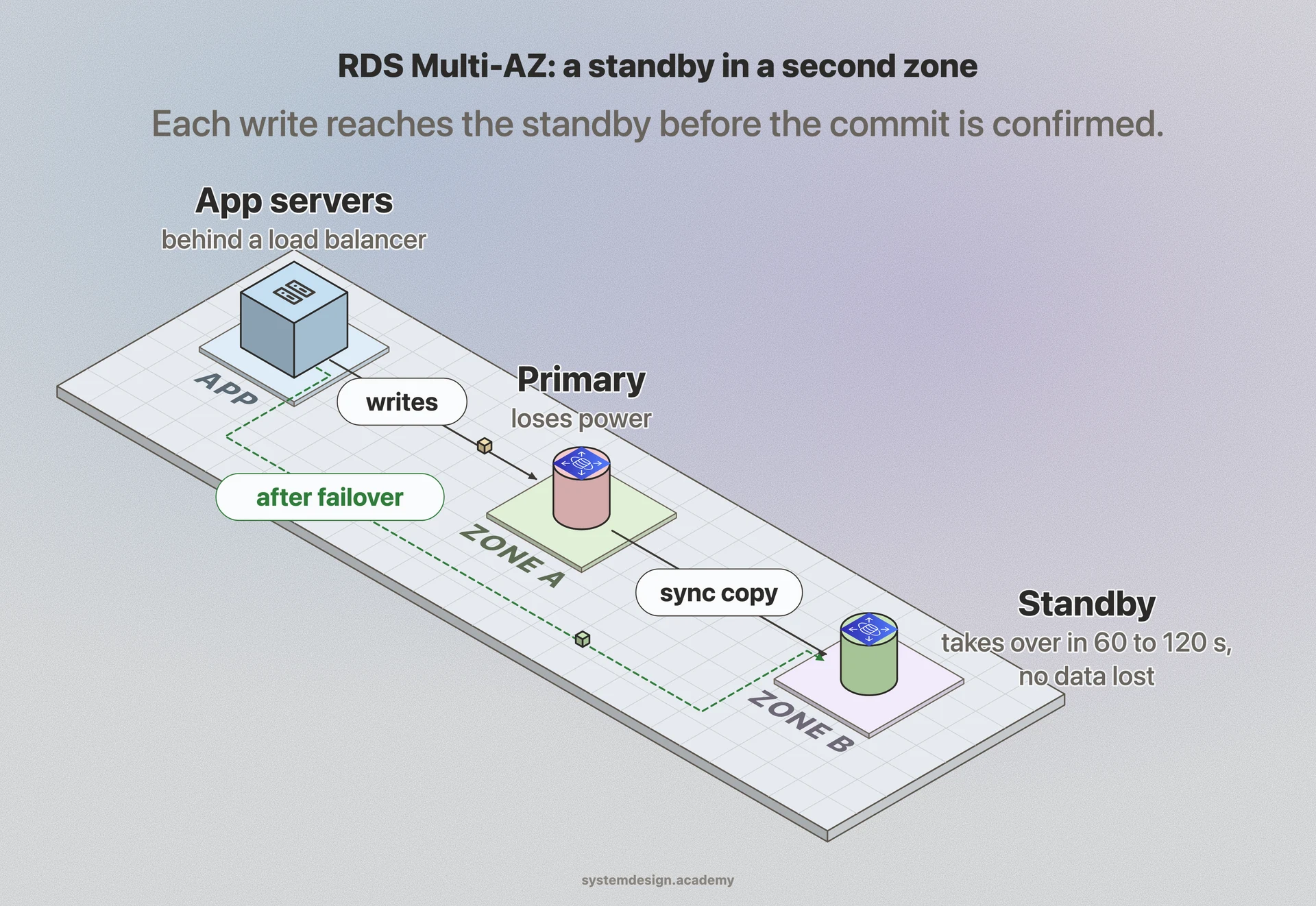
For databases the pattern is a primary in one AZ and a synchronous standby in another. Amazon RDS Multi-AZ keeps a hot standby replica in a second zone and replicates every write to it before acknowledging the commit. If the primary AZ dies, RDS flips the DNS record to the standby, typically completing failover in 60 to 120 seconds with no data loss. Aurora goes further and stores six copies of your data across three AZs.
Inter-AZ latency is low but not zero, usually well under 2 ms within a region. That is small enough for synchronous replication of most databases, which is why multi-AZ gives you strong durability without the consistency headaches of replicating across regions thousands of kilometers apart.
When to use AZs and the trade-offs
Spreading across AZs is the baseline for any production workload that needs to survive a data center outage. It costs you redundant compute and storage plus inter-AZ data transfer fees, which on AWS run about 1 to 2 cents per GB in each direction. For a chatty microservice that shuffles a lot of traffic between zones, that bill adds up, so teams often pin tightly coupled, high-throughput services to the same AZ and only go multi-AZ at the boundaries that matter.
Multi-AZ protects against a single facility failure but not against a whole-region failure or a bad software deploy that you push to every zone at once. The famous AWS outages, like the us-east-1 events in 2020 and 2021, took down control planes that spanned the entire region, so multi-AZ alone did not save everyone. For protection against losing a whole region you need multi-region, which is far more expensive and forces you to deal with cross-region latency of 50 to 150 ms.
A common mistake is assuming the provider spreads things for you. It often does not. If you launch three instances and they all land in AZ-a, one zone failure wipes out all three. You have to explicitly request placement across zones or use an auto scaling group configured with multiple subnets.
Where it is used in production
Amazon Web Services
Coined the term; every region has multiple AZs, and services like RDS Multi-AZ, Aurora, and Auto Scaling groups are built to span them.
Netflix
Runs across three AZs per region and uses its Chaos Monkey and Chaos Kong tools to deliberately kill zones and even regions to prove the system survives.
Google Cloud
Exposes zones within each region and offers regional managed instance groups and regional persistent disks that replicate synchronously across two zones.
Microsoft Azure
Offers Availability Zones in most regions, with zone-redundant storage and zone-redundant services that keep copies of data across three zones.
Frequently asked questions
- What is the difference between a region and an availability zone?
- A region is a broad geographic location like London or Tokyo. An availability zone is one of several isolated data center clusters inside that region. A region contains multiple AZs. Failing over between AZs is fast and cheap because they are a few kilometers apart, while failing over between regions means dealing with much higher latency and data transfer costs.
- How many availability zones should I deploy across?
- Three is the common recommendation for production. Two AZs survive a single zone failure but leave you running at half capacity, and some quorum-based systems like etcd or ZooKeeper need an odd number of nodes to avoid split-brain, which three zones satisfy cleanly.
- Does using multiple AZs cost more?
- Yes. You pay for redundant compute and storage in each zone plus inter-AZ data transfer charges, typically a cent or two per GB on the major clouds. A standby database doubles its compute cost. For most production systems the protection against a data center outage is worth it, but very chatty internal services are sometimes kept in one AZ to avoid the transfer bill.
- Does multi-AZ protect me from a full region outage?
- No. Multi-AZ only protects against the loss of a single data center within a region. Region-wide failures, often caused by control plane or networking problems that span all zones, still take you down. To survive those you need a multi-region architecture, which is significantly more complex and expensive.
- Will my cloud provider automatically spread my servers across AZs?
- Not by default in most cases. If you launch several instances without specifying placement, they can all land in the same zone. You have to configure auto scaling groups with multiple subnets, choose zones explicitly, or use zone-redundant managed services to guarantee the spread.
Learn Availability Zone hands-on
This page explains the idea. The full lesson lets you step through the ring as servers join and leave, read the implementation, and check yourself with a quiz. It is one of 760+ lessons in the System Design Masterclass, from your first API call to distributed consensus. Eleven Foundation lessons are free, no signup. Lifetime access is ₹499 in India or $7.99 worldwide, one payment, no subscription.
Related lessons
Lessons that touch on Availability Zone as part of a larger topic.
See also
Related glossary terms you might want to look up next.
Cloud Region
A geographic area containing one or more data centers (availability zones). Choosing the right region reduces latency and satisfies data residency requirements.
Fault Tolerance
A system's ability to keep operating correctly even when some of its components fail. Achieved through redundancy, replication, and graceful degradation.
Redundancy
Duplicating critical components or functions so that if one fails, a backup takes over. The reason planes have two engines and databases have replicas.
Virtual Machine
A software emulation of a physical computer running its own OS on shared hardware. Heavier than containers but provides stronger isolation.
Hypervisor
Software that creates and manages virtual machines by abstracting physical hardware. Type 1 (bare-metal) runs directly on hardware; Type 2 runs on an OS.
Auto Scaling
Automatically adding or removing compute instances based on current demand. Scales out during traffic spikes and scales in during quiet periods to save cost.