Health Check (LB)
Periodic probes a load balancer sends to backend servers to verify they're alive. Unhealthy servers get pulled from the rotation until they recover.
What is Health Check (LB)?
In short
A load balancer health check is a periodic probe the load balancer sends to each backend server to confirm it can serve traffic. Servers that fail the check are removed from the pool so no new requests get routed to them, and they are added back automatically once they start passing again.
What a health check actually is
A load balancer sits in front of a group of backend servers and spreads incoming requests across them. The problem is that any one of those servers can die at any moment: it can crash, run out of memory, get stuck in a deploy, or lose its database connection. If the load balancer keeps sending traffic to a dead server, users get errors or timeouts.
A health check is how the load balancer finds out which servers are actually able to do work. On a fixed interval, usually every 5 to 30 seconds, the load balancer reaches out to each server and asks a simple question: are you alive and ready? If the server answers correctly, it stays in the rotation. If it fails enough times in a row, the load balancer pulls it out and stops routing requests to it.
This is the difference between a server being up and a server being healthy. A process can be running and still be unable to serve a single useful request because the thing it depends on is broken. A good health check measures readiness to serve, not just whether the process responds to a ping.
How it works under the hood
Most health checks fall into one of three layers. A TCP check just opens a connection to a port and closes it; if the connection succeeds, the server passes. An HTTP check sends a GET request to a path like /health or /healthz and expects a 200 status code in the response. An application check goes further: the /health endpoint runs real logic, such as pinging the database and checking a cache connection, before it returns 200.
The load balancer tracks a small state machine per server using thresholds. A typical config is interval 10 seconds, timeout 5 seconds, healthy threshold 2, unhealthy threshold 3. That means a passing server needs 2 consecutive good checks before it is added back, and a failing one needs 3 consecutive failures before it is removed. The thresholds exist so a single slow response or a brief network blip does not flap a server in and out of rotation.
There is an important split between liveness and readiness. A liveness signal answers 'is the process alive', and a readiness signal answers 'can it take traffic right now'. During a rolling deploy, a new instance is alive long before it has loaded config, warmed its cache, and connected to dependencies. The readiness check is what holds traffic back until that startup work finishes, which is why a server can be live but deliberately reporting unhealthy.
When to use it and the trade-offs
You want health checks on essentially every load balanced service, but the design of the check matters more than people expect. A check that is too shallow, like a plain TCP open, will happily keep a broken server in rotation because the process answers even though every request 500s. A check that is too deep can take down your whole fleet at once: if every server's /health pings the same database and the database hiccups, all of them fail the check simultaneously and the load balancer has nothing left to route to.
Frequency is a real trade-off. Short intervals catch failures fast but add load, and with thousands of backends the checks alone become meaningful traffic. Long intervals are cheap but mean a dead server can keep receiving requests for many seconds before it is pulled. The thresholds soften this: you do not want to evict a server on one bad response, but you also do not want to wait a full minute to react to a genuine outage.
A subtle failure mode is the cascading or retry storm. When one server is pulled, its traffic is spread over the survivors, which raises their load, which can push them past their own limits and into failing checks too. Good practice is to check something the server genuinely controls, fail open in some designs rather than evict the entire pool, and pair health checks with circuit breakers and connection draining so removal is graceful instead of abrupt.
A concrete example
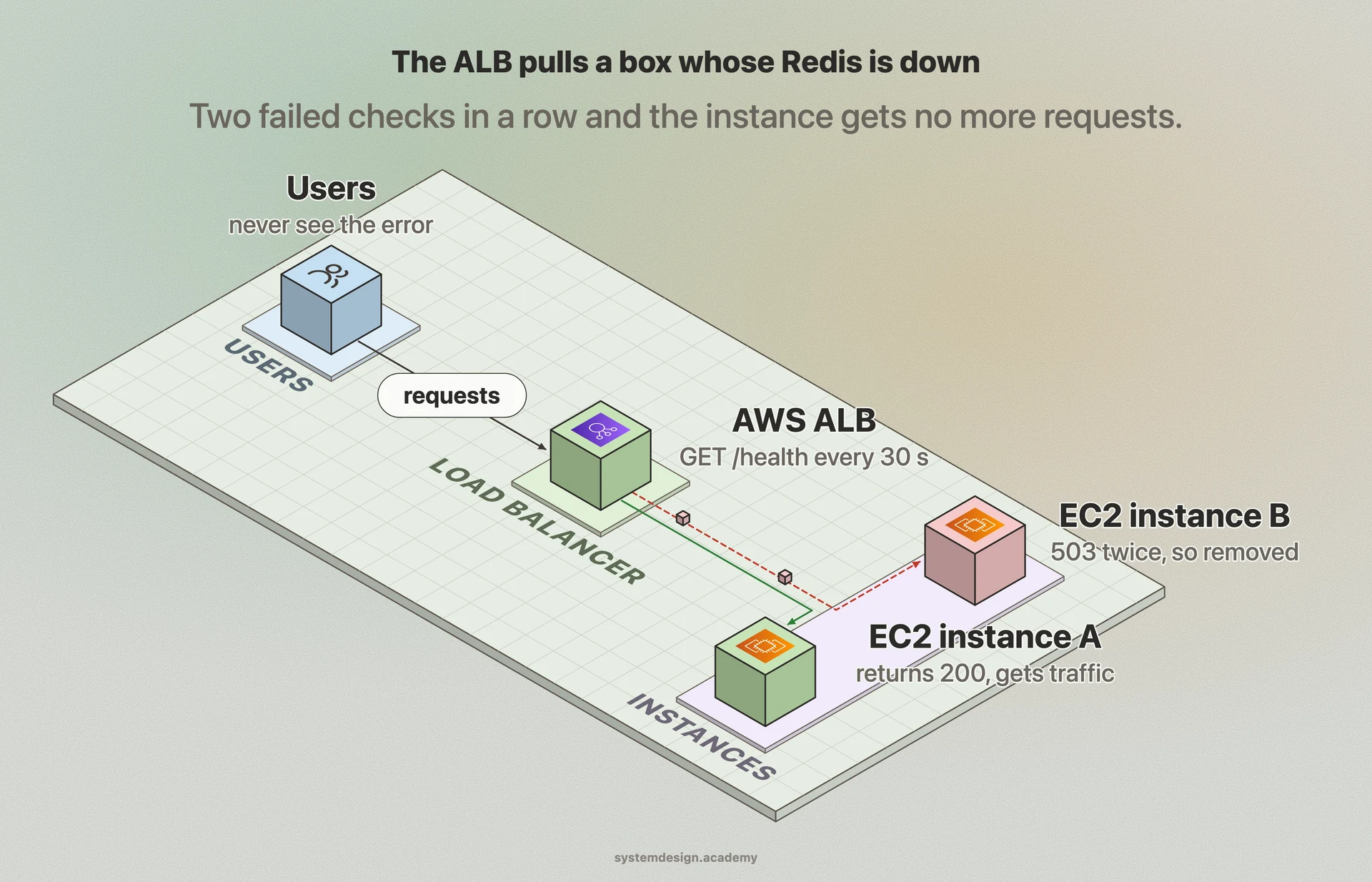
An AWS Application Load Balancer in front of an Auto Scaling group of web servers is the textbook case. You configure the target group to send an HTTP GET to /health every 30 seconds with a 5 second timeout, healthy threshold 5 and unhealthy threshold 2. When one EC2 instance fails 2 checks in a row, the ALB marks it unhealthy and stops sending it requests. The Auto Scaling group, watching the same health state, can then terminate the bad instance and launch a fresh one to replace it.
The /health endpoint on each server is written to do real work: it checks that the app can reach its Postgres database and its Redis cache, and only then returns 200. If Redis goes down on one box, that box returns 503, the ALB removes it within a minute, and users never see the error because their traffic was quietly shifted to the healthy instances. When the operator fixes Redis and the endpoint starts returning 200 again, the ALB sees 5 good checks and slides the instance back into rotation on its own, with no manual step.
Where it is used in production
AWS Elastic Load Balancing
ALB and NLB target groups probe each registered target on a configurable path and interval, and route only to targets in the healthy state.
NGINX
Both open source passive checks and NGINX Plus active checks mark upstream servers down when they fail, removing them from the upstream pool.
Kubernetes
Liveness and readiness probes act as health checks: a failing readiness probe pulls the pod out of the Service endpoints so kube-proxy stops sending it traffic.
HAProxy
Uses the check directive to run TCP or HTTP health checks on each backend server and disables servers that fail the configured rise and fall thresholds.
Frequently asked questions
- What is the difference between a liveness check and a readiness check?
- A liveness check answers whether the process is alive and should be restarted if it is not. A readiness check answers whether the server can take traffic right now. During startup or a deploy, a server can be alive but not ready, so the load balancer holds traffic back until readiness passes.
- How often should a load balancer run health checks?
- Common defaults are every 5 to 30 seconds. Shorter intervals catch failures faster but add load and check traffic; longer intervals are cheaper but let a dead server receive requests for longer. Pair the interval with thresholds, such as 3 consecutive failures, so a single slow response does not evict a healthy server.
- Should a health check test the database and other dependencies?
- Sometimes, but be careful. A deep check that pings a shared database catches broken servers, but if that database hiccups, every server fails its check at once and the load balancer has nothing left to route to. A common compromise is to check critical dependencies but design the system so a shared outage does not evict the entire pool simultaneously.
- Why does my server keep flapping in and out of the load balancer?
- Flapping usually means the healthy and unhealthy thresholds are too low or the timeout is too tight for your real response times. Raise the consecutive-failure threshold, give the check a longer timeout, and make sure the /health endpoint is fast and not blocked by the same slow work that is failing the check.
- What status code should a health endpoint return?
- Return 200 when the server is ready to serve traffic, and a non-2xx code like 503 when it is not. Load balancers treat any expected success code as healthy and everything else, including timeouts and connection errors, as a failure that counts toward the unhealthy threshold.
Learn Health Check (LB) hands-on
This page explains the idea. The full lesson lets you step through the ring as servers join and leave, read the implementation, and check yourself with a quiz. It is one of 760+ lessons in the System Design Masterclass, from your first API call to distributed consensus. Eleven Foundation lessons are free, no signup. Lifetime access is ₹499 in India or $7.99 worldwide, one payment, no subscription.
See also
Related glossary terms you might want to look up next.
Load Balancer
Distributes incoming traffic across multiple servers so no single server gets overwhelmed. Like a traffic cop directing cars to different lanes.
Fault Tolerance
A system's ability to keep operating correctly even when some of its components fail. Achieved through redundancy, replication, and graceful degradation.
Health Check
An endpoint or mechanism that reports whether a service is running and healthy. Load balancers use health checks to route traffic away from unhealthy instances.
DNS
The phonebook of the internet. Translates human-readable domain names (google.com) into IP addresses that computers understand.
Proxy
An intermediary server that sits between the client and the destination server. Forward proxies act on behalf of clients; reverse proxies act on behalf of servers.
Reverse Proxy
A server that sits in front of your backend servers and forwards client requests to them. Handles SSL termination, caching, and load balancing.