SSL/TLS
Cryptographic protocols that encrypt data in transit between client and server. TLS is the modern successor to SSL. The 'S' in HTTPS.
What is SSL/TLS?
In short
SSL/TLS are cryptographic protocols that encrypt data sent between a client and a server so nobody in between can read or tamper with it. TLS (Transport Layer Security) is the modern, secure version; SSL (Secure Sockets Layer) is its deprecated predecessor, and TLS is what puts the S in HTTPS.
What SSL/TLS actually is
SSL/TLS is the security layer that sits between your application and the raw network connection. When your browser talks to a website over HTTPS, TLS wraps the HTTP traffic so that anyone watching the wire (your ISP, a coffee shop router, a compromised switch) sees only scrambled bytes instead of your passwords, cookies, and credit card numbers.
SSL was the original protocol, created by Netscape in the mid 1990s. SSL 2.0 and 3.0 are both broken and disabled everywhere. The protocol was renamed TLS in 1999, and the versions that matter today are TLS 1.2 (2008) and TLS 1.3 (2018). People still say SSL out of habit, but every real deployment is running TLS.
TLS gives you three guarantees at once. Confidentiality means the data is encrypted. Integrity means tampering is detected, because each message carries an authentication tag. Authentication means the server proves who it is using a certificate signed by a trusted Certificate Authority, so you know you are really talking to your bank and not an impostor.
How the handshake works under the hood
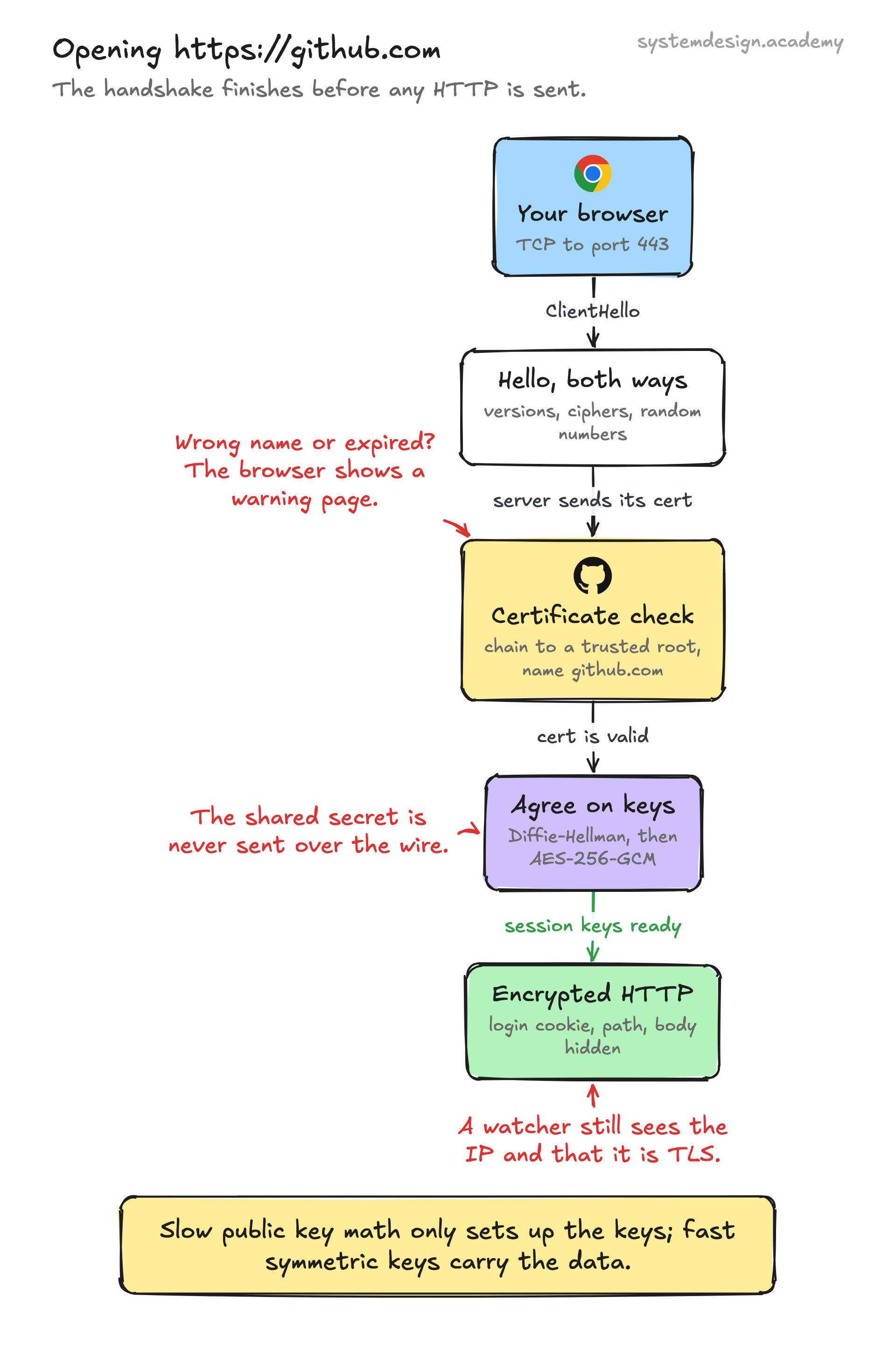
Before any application data flows, the client and server run a handshake. The client sends a ClientHello listing the TLS versions and cipher suites it supports plus a random number. The server replies with its choice of cipher, its own random number, and its certificate chain.
The client verifies the certificate against the CA trust store built into the operating system or browser. It checks the signature, the expiry date, and that the hostname matches. If anything is wrong you get the familiar red warning page. Both sides then run a key exchange, almost always Elliptic Curve Diffie-Hellman, to agree on a shared secret without ever sending that secret over the network.
From the shared secret they derive symmetric session keys, typically for AES-GCM or ChaCha20-Poly1305. Asymmetric crypto is slow, so it is used only to bootstrap the handshake; the bulk traffic is encrypted with fast symmetric keys. TLS 1.2 needs two network round trips for this. TLS 1.3 trimmed the handshake to a single round trip, and with session resumption it supports 0-RTT, where the client can send data in its very first message.
When to use it and the trade-offs
The honest answer is to use TLS for everything. Browsers mark plain HTTP pages as Not Secure, search engines rank HTTPS higher, and free certificates from Let's Encrypt removed the cost excuse years ago. Internal service-to-service traffic should use TLS too, often through mutual TLS where both sides present certificates.
The trade-off used to be CPU cost and latency, but modern hardware has AES instructions built in and TLS 1.3 cut the round trips, so the overhead is now small for most workloads. The real cost is operational: certificates expire, usually every 90 days with Let's Encrypt, and an expired cert takes the whole site down. Automating renewal with tools like certbot or your cloud load balancer is essential.
A common pattern is TLS termination at the edge. A load balancer or CDN decrypts incoming TLS, inspects and routes the request, then forwards it to backends over the internal network. This centralizes certificate management but means traffic inside your network may be plaintext unless you re-encrypt it.
A concrete example
Type https://github.com into your browser. Your machine opens a TCP connection to GitHub on port 443, then starts a TLS handshake. GitHub presents a certificate signed by a CA such as DigiCert or Sectigo. Your browser confirms the chain leads to a root it trusts and that the name on the certificate is github.com.
The two sides agree on AES-256-GCM and derive session keys. Only now does your actual HTTP request, including your login cookie, travel across the internet, fully encrypted. Anyone capturing the packets sees the destination IP and that it is TLS traffic, but not the URL path, the headers, or the body.
You can inspect all of this yourself. Run openssl s_client -connect github.com:443 to see the certificate chain and negotiated cipher, or click the padlock in your browser to view the certificate details, issuer, and expiry date.
Where it is used in production
Cloudflare
Terminates TLS at its global edge for millions of sites and offers free universal SSL certificates, including modern TLS 1.3 and post-quantum key exchange.
Let's Encrypt
A nonprofit CA that issues free 90-day TLS certificates through the automated ACME protocol, which is why most of the web is now HTTPS.
AWS
Application Load Balancers and CloudFront terminate TLS, and AWS Certificate Manager provisions and auto-renews certificates for free.
nginx
Widely deployed as a TLS-terminating reverse proxy where you configure cert files, ciphers, and protocol versions in the server block.
Frequently asked questions
- What is the difference between SSL and TLS?
- They are the same idea at different ages. SSL is the original 1990s protocol and all its versions are now broken and disabled. TLS is the modern successor; TLS 1.2 and 1.3 are what every secure connection uses today. People still say SSL out of habit, but the actual protocol running is TLS.
- Is HTTPS the same as TLS?
- Not quite. HTTPS is just HTTP running on top of a TLS connection. TLS is the general purpose encryption layer and can also secure email (SMTP, IMAP), databases, and other protocols. HTTPS is the specific case of using TLS for web traffic on port 443.
- What does a certificate actually prove?
- It proves the server controls the domain name you are connecting to, and it binds that name to a public key. A trusted Certificate Authority signs it after verifying domain ownership. It does not vouch for the company being honest, only that you are talking to the real owner of that domain and not an impostor.
- Why did TLS 1.3 get faster than TLS 1.2?
- TLS 1.3 cut the handshake from two network round trips to one by removing legacy negotiation steps and pinning the protocol to modern, secure cipher suites. It also added 0-RTT resumption, where a returning client can send data in its first message, removing handshake latency entirely for repeat connections.
- Can someone still see what site I am visiting over HTTPS?
- They can see the destination IP address and, historically, the hostname sent in the TLS handshake. They cannot see the URL path, headers, or content. Encrypted ClientHello (ECH) hides the hostname too, closing that last gap, though it is still rolling out across browsers and servers.
Learn SSL/TLS hands-on
This page explains the idea. The full lesson lets you step through the ring as servers join and leave, read the implementation, and check yourself with a quiz. It is one of 760+ lessons in the System Design Masterclass, from your first API call to distributed consensus. Eleven Foundation lessons are free, no signup. Lifetime access is ₹499 in India or $7.99 worldwide, one payment, no subscription.
Related lessons
Lessons that touch on SSL/TLS as part of a larger topic.
See also
Related glossary terms you might want to look up next.
HTTP
The protocol powering the web. A request-response model where clients ask for resources and servers respond. Stateless by design.
TCP
A reliable transport protocol that guarantees data arrives in order and without errors. It uses a three-way handshake to establish connections.
OAuth
An authorization framework that lets users grant third-party apps limited access to their accounts without sharing passwords. Powers 'Sign in with Google.'
Throttling
Slowing down the rate of processing requests instead of rejecting them outright. The gentler cousin of rate limiting.
JWT
JSON Web Token: a compact, self-contained token for transmitting claims between parties. The server can verify it without a database lookup.
CORS
Cross-Origin Resource Sharing: a security mechanism that controls which domains can access your API. The browser enforces it; the server configures it.