CORS
Cross-Origin Resource Sharing: a security mechanism that controls which domains can access your API. The browser enforces it; the server configures it.
What is CORS?
In short
CORS (Cross-Origin Resource Sharing) is a browser security mechanism that lets a server declare which other origins are allowed to read its responses. The browser blocks cross-origin reads by default, and the server opts specific origins back in by sending Access-Control-Allow-Origin and related HTTP headers.
What CORS Actually Is
An origin is the combination of scheme, host, and port. https://app.example.com and https://api.example.com are different origins because the host differs, and so are http://example.com and https://example.com because the scheme differs. Even a different port, like :3000 versus :8080, counts as a separate origin.
Browsers enforce the same-origin policy, which means a page loaded from one origin cannot read responses from another origin by default. This stops a malicious site from quietly reading your bank's API while you are logged in. CORS is the controlled exception to that rule. The server says, in effect, "these specific origins are allowed to read my responses," and the browser obeys.
The key thing to understand is who does what. The browser enforces CORS. The server only configures it by sending response headers. Tools like curl or Postman have no same-origin policy, so a request that fails in the browser with a CORS error will often succeed from the command line. That is normal and expected.
How It Works Under the Hood
For simple requests (GET, HEAD, or a POST with a basic content type like text/plain or application/x-www-form-urlencoded), the browser sends the request directly and adds an Origin header. The server replies with Access-Control-Allow-Origin set to either the requesting origin or a wildcard *. If that header is missing or does not match, the browser throws away the response and the JavaScript sees a CORS error, even though the server already ran the request.
For anything more involved (a PUT or DELETE, a JSON body with Content-Type: application/json, or custom headers like Authorization or X-Api-Key), the browser first sends a preflight request. This is an OPTIONS request that asks the server what is allowed. The server answers with Access-Control-Allow-Methods, Access-Control-Allow-Headers, and Access-Control-Allow-Origin. Only if the preflight passes does the browser send the real request.
Credentials add a strict rule. If the request sends cookies or HTTP auth, the server must send Access-Control-Allow-Credentials: true and must echo back the exact origin in Access-Control-Allow-Origin. A wildcard * is forbidden with credentials. To avoid repeating preflights, the server can send Access-Control-Max-Age, which tells the browser to cache the preflight result for a number of seconds (Chrome caps this at 7200 seconds, or 2 hours).
When To Use It And The Trade-offs
You need CORS whenever a browser-based frontend on one origin calls an API on another origin. A React app on app.example.com hitting api.example.com is the classic case. If both live on the same origin, or you proxy the API through your own server so the browser only ever talks to one origin, you do not need CORS at all.
The most common mistake is reaching for Access-Control-Allow-Origin: * to make the error go away. That works for public, unauthenticated APIs, but it is wrong for anything using credentials, and it silently disables a real protection. The correct pattern is an allowlist: keep a set of trusted origins on the server, and echo back the request's Origin only when it is in that set.
CORS is not a substitute for authentication or authorization. It controls which web pages a browser will let read your responses, nothing more. An attacker with curl bypasses it entirely. You still need API keys, tokens, and server-side checks. Treat CORS as one layer that protects browser users, not as your security boundary.
A Concrete Example
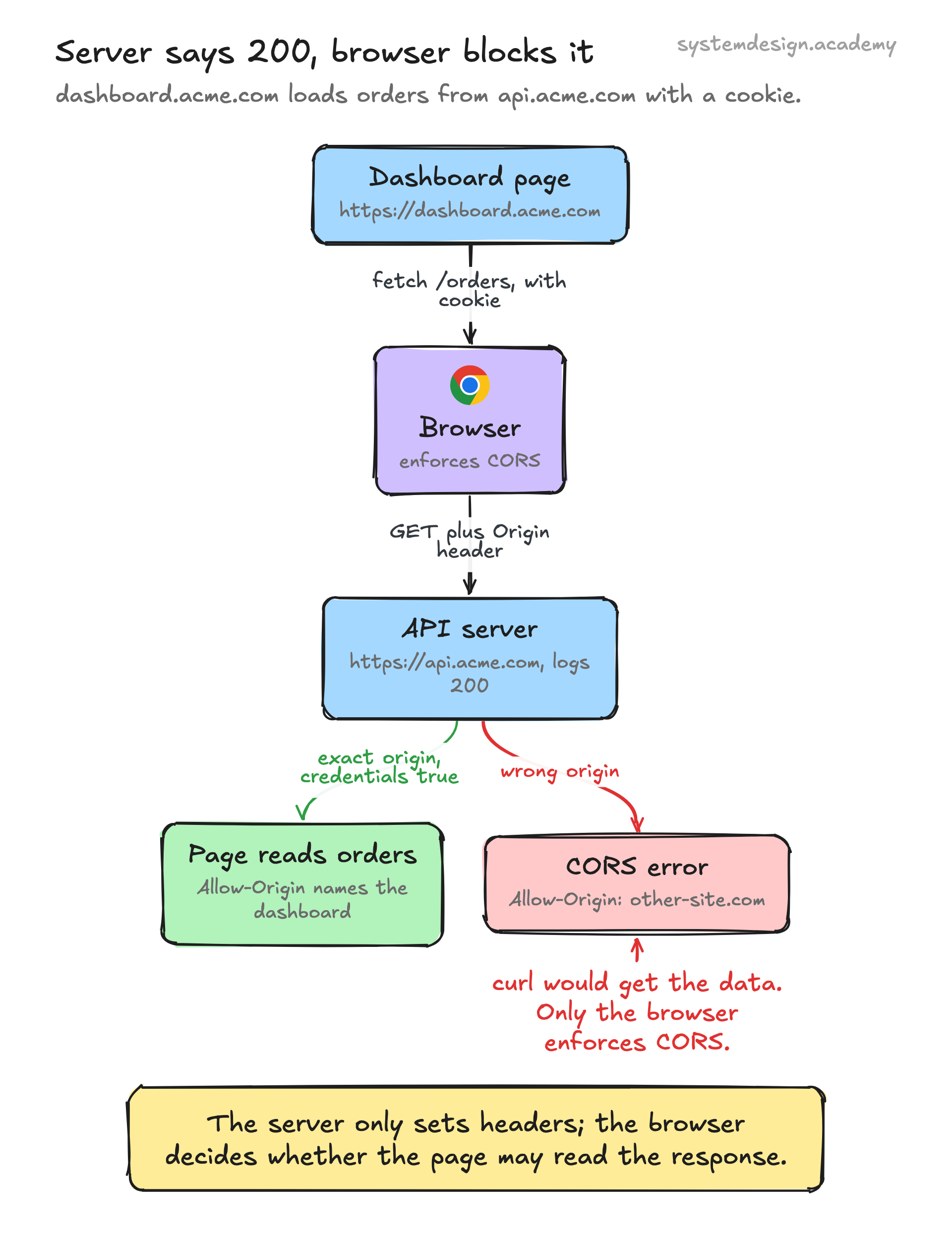
Say you run a single-page app at https://dashboard.acme.com and an API at https://api.acme.com. The app calls fetch('https://api.acme.com/orders', { credentials: 'include' }) to load orders with the user's session cookie.
Because the request includes credentials and the origins differ, the browser sends a preflight OPTIONS request. The API must respond with Access-Control-Allow-Origin: https://dashboard.acme.com, Access-Control-Allow-Credentials: true, and Access-Control-Allow-Methods listing GET. The exact origin is required here; a * would cause the browser to reject the response.
If the API instead returned Access-Control-Allow-Origin: https://other-site.com, the browser would block the response and the dashboard would see a CORS error in the console, even though the API server logged a successful 200. That distinction, server success but browser block, is what trips up most engineers debugging CORS for the first time.
Where it is used in production
Cloudflare
Lets you configure CORS headers at the edge through Transform Rules or Workers, so origins can be allowlisted without touching the backend.
Amazon API Gateway
Has a built-in CORS setting per resource that auto-generates the OPTIONS preflight handler and the Access-Control-Allow-* headers.
Express (Node.js)
The widely used cors middleware sets the headers and answers preflights; you pass an origin allowlist and credentials flag in one config object.
Nginx
Commonly used as a reverse proxy to add Access-Control-Allow-Origin headers and short-circuit OPTIONS preflights in front of an API.
Frequently asked questions
- Why does my request work in Postman but fail with a CORS error in the browser?
- CORS is enforced only by browsers. Postman and curl ignore the same-origin policy, so they send the request and read the response regardless. The browser, by contrast, blocks the response when the server's Access-Control-Allow-Origin header is missing or does not match. The fix is on the server, not in your client code.
- Does CORS make my API more secure?
- Not really. CORS protects browser users from other web pages reading your responses, but it does nothing against direct requests from curl, scripts, or servers. It is not authentication. You still need tokens, API keys, and server-side authorization. Think of CORS as a browser-side guardrail, not a security boundary.
- What is a preflight request and when does the browser send one?
- A preflight is an automatic OPTIONS request the browser sends before the real request to check what the server permits. It fires for non-simple requests: methods like PUT or DELETE, a Content-Type of application/json, or custom headers such as Authorization. The server answers with the allowed methods, headers, and origin, and only then does the real request go through.
- Can I just set Access-Control-Allow-Origin to a wildcard?
- You can for public APIs that do not use cookies or auth. But a wildcard is forbidden when the request sends credentials, and it disables a real protection for everything else. The safer pattern is an allowlist: store trusted origins on the server and echo back the request's Origin only when it matches.
- How do I stop the browser from sending a preflight on every request?
- Set the Access-Control-Max-Age response header so the browser caches the preflight result. Chrome caps it at 7200 seconds (2 hours). You can also avoid preflights entirely by keeping requests simple, for example using a basic content type instead of application/json, though that is rarely practical for real APIs.
Learn CORS hands-on
This page explains the idea. The full lesson lets you step through the ring as servers join and leave, read the implementation, and check yourself with a quiz. It is one of 760+ lessons in the System Design Masterclass, from your first API call to distributed consensus. Eleven Foundation lessons are free, no signup. Lifetime access is ₹499 in India or $7.99 worldwide, one payment, no subscription.
Related lessons
Lessons that touch on CORS as part of a larger topic.
See also
Related glossary terms you might want to look up next.
HTTP
The protocol powering the web. A request-response model where clients ask for resources and servers respond. Stateless by design.
REST API
An architectural style for building APIs using standard HTTP methods (GET, POST, PUT, DELETE). Resources are identified by URLs.
SSL/TLS
Cryptographic protocols that encrypt data in transit between client and server. TLS is the modern successor to SSL. The 'S' in HTTPS.
Throttling
Slowing down the rate of processing requests instead of rejecting them outright. The gentler cousin of rate limiting.
OAuth
An authorization framework that lets users grant third-party apps limited access to their accounts without sharing passwords. Powers 'Sign in with Google.'
JWT
JSON Web Token: a compact, self-contained token for transmitting claims between parties. The server can verify it without a database lookup.