OAuth
An authorization framework that lets users grant third-party apps limited access to their accounts without sharing passwords. Powers 'Sign in with Google.'
What is OAuth?
In short
OAuth is an authorization framework that lets a user grant a third-party app limited access to their account on another service without handing over their password. Instead of the password, the app receives a scoped, expiring access token that says exactly what it is allowed to do, which is the mechanism behind buttons like "Sign in with Google" and "Connect your GitHub account."
What OAuth Actually Solves
Before OAuth, if an app wanted to read your Gmail contacts or post to your Twitter feed, you had to type your actual username and password into that app. The app then stored your credentials and logged in as you. This is the password anti-pattern. The third party now has full control of your account, can change your password, and you cannot revoke its access without changing your password everywhere.
OAuth replaces that with delegated authorization. You authenticate directly with the service you already trust (Google, GitHub, Facebook), and that service issues the app a token. The token carries scopes, which are narrow permissions like read your email address but not send mail. The app never sees your password.
One point that trips people up: OAuth is about authorization (what an app is allowed to do), not authentication (proving who you are). The current standard is OAuth 2.0, defined in RFC 6749. OpenID Connect is a thin layer built on top of OAuth 2.0 that adds proper login identity, and that is what most Sign in with X buttons actually use under the hood.
How the Flow Works Under the Hood
The most common and most secure variant is the Authorization Code flow. There are four parties: the resource owner (you), the client (the app asking for access), the authorization server (Google's login system), and the resource server (the Google API holding your data).
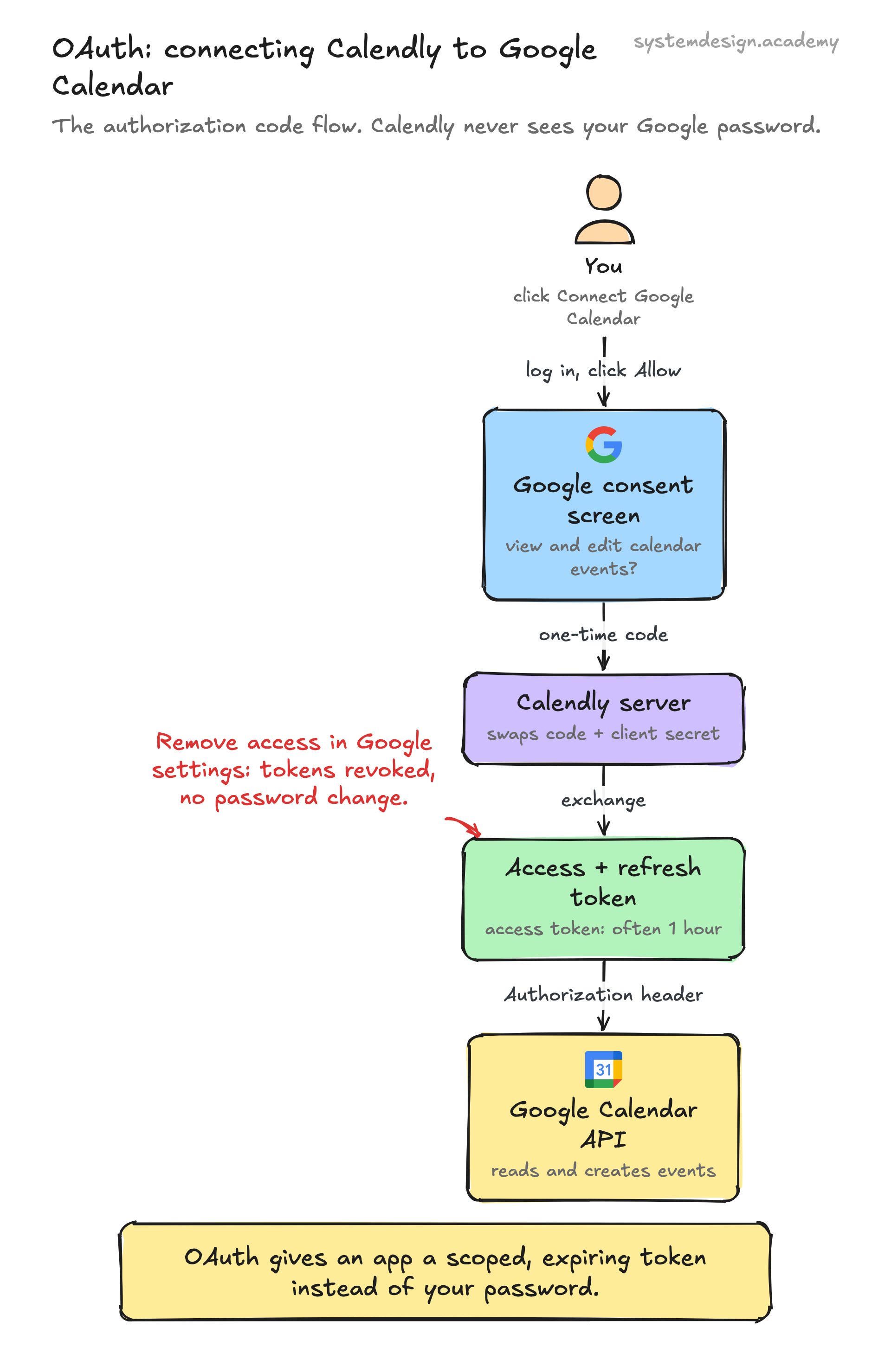
It runs roughly like this. The app redirects your browser to the authorization server with its client ID and the scopes it wants. You log in and see a consent screen listing those scopes. If you approve, the authorization server redirects back to the app with a short-lived authorization code in the URL. The app then makes a server-to-server call, swapping that code plus its client secret for an access token. It uses the access token in the Authorization header on every API request.
Access tokens are deliberately short-lived, often 1 hour, so a leaked token expires fast. To avoid forcing the user to log in again, the server also issues a refresh token, which the app exchanges quietly for new access tokens. For mobile and single-page apps that cannot keep a client secret private, you add PKCE (Proof Key for Code Exchange, RFC 7636), which ties the code exchange to a one-time secret the app generates, blocking attackers who intercept the code.
When To Use It and the Trade-offs
Use OAuth whenever an app needs to act on a user's behalf against an API it does not own, or when you want users to log in with an existing account instead of creating a new password. It is the default for public APIs from Google, GitHub, Stripe Connect, Slack, and almost every consumer platform.
The trade-off is real complexity. OAuth has several flows (authorization code, client credentials for machine-to-machine, device code for TVs and CLIs) and getting redirect URIs, token storage, and refresh handling right is fiddly. The classic mistakes are storing tokens in browser local storage where cross-site scripting can steal them, skipping the state parameter and opening yourself to CSRF, and requesting far broader scopes than you need.
If your app only ever talks to its own backend, you do not need OAuth at all. A plain session cookie or your own token system is simpler. Reach for OAuth specifically when a third party is in the picture or when you are deliberately outsourcing identity.
A Concrete Example
Say you sign up for a calendar tool like Calendly and click Connect Google Calendar. Calendly redirects you to accounts.google.com with a scope of https://www.googleapis.com/auth/calendar.events. Google shows you a consent screen: Calendly wants to view and edit events on your calendars. You click Allow.
Google sends your browser back to Calendly with an authorization code. Calendly's server exchanges it for an access token and a refresh token, stores the refresh token, and from then on creates and reads calendar events through Google's API using fresh access tokens. Calendly never learned your Google password.
Months later you decide to stop using it. You go to your Google Account security settings, find Calendly under Third-party apps, and click Remove access. Its tokens are revoked instantly and it loses all access to your calendar, no password change required. That revocability is one of the biggest practical wins OAuth gives you over the old share-your-password approach.
Where it is used in production
Issues OAuth 2.0 tokens for Sign in with Google and for API access to Gmail, Drive, and Calendar, with a consent screen listing requested scopes.
GitHub
Uses OAuth so apps and CI tools (and GitHub Apps) get scoped tokens to read repos or open pull requests on your behalf without your password.
Stripe Connect
Runs an OAuth flow so a platform can act on a connected merchant's Stripe account with permissions that merchant explicitly granted.
Slack
Bots and integrations request granular OAuth scopes like chat:write or channels:read, and the workspace admin approves them before any token is issued.
Frequently asked questions
- Is OAuth the same as logging in with my password?
- No. OAuth is authorization, deciding what an app is allowed to do, not authentication. You still log in with your password directly at the trusted provider, but the app only ever receives a scoped token, never your password. The login identity part comes from OpenID Connect, a layer built on top of OAuth 2.0.
- What is the difference between an access token and a refresh token?
- An access token is sent with every API request and is short-lived, often around 1 hour, so a leak expires quickly. A refresh token is long-lived and stored securely by the app; it is used only to silently obtain new access tokens so the user does not have to log in again.
- Why do single-page apps and mobile apps need PKCE?
- Those apps cannot safely store a client secret because their code runs on the user's device where anyone can inspect it. PKCE (Proof Key for Code Exchange) replaces the secret with a one-time code-verifier the app generates per request, so even if an attacker intercepts the authorization code they cannot exchange it for a token.
- Can a user take away an app's access later?
- Yes, and this is a core benefit. The user goes to their provider's account security settings, finds the connected app, and revokes it. The tokens are invalidated immediately and access stops, with no need to change the account password.
- What is the state parameter and why does it matter?
- The state parameter is a random value the app sends at the start of the flow and verifies when the provider redirects back. It ties the response to the original request, which prevents CSRF attacks where an attacker tricks your browser into completing an authorization the attacker started.
Learn OAuth hands-on
This page explains the idea. The full lesson lets you step through the ring as servers join and leave, read the implementation, and check yourself with a quiz. It is one of 760+ lessons in the System Design Masterclass, from your first API call to distributed consensus. Eleven Foundation lessons are free, no signup. Lifetime access is ₹499 in India or $7.99 worldwide, one payment, no subscription.
Related lessons
Lessons that touch on OAuth as part of a larger topic.
OpenID Connect
An identity layer built on OAuth 2.0, the modern protocol for 'Sign in with Google/GitHub/Apple'
intermediate · security architecture
Agent Identity and Authorization: Whose Authority Is It?
When an agent acts, whose authority does it use? Give agents scoped, short-lived, delegated identity with OAuth token exchange, audience-bound tokens, and workload identity instead of one broad ambient key.
ml-advanced · security
Authentication
Verifying who someone is, the foundation of every security system
intermediate · security architecture
See also
Related glossary terms you might want to look up next.
JWT
JSON Web Token: a compact, self-contained token for transmitting claims between parties. The server can verify it without a database lookup.
SSL/TLS
Cryptographic protocols that encrypt data in transit between client and server. TLS is the modern successor to SSL. The 'S' in HTTPS.
Session
A way to maintain state across multiple HTTP requests. The server stores data about a user and gives them a session ID (usually in a cookie).
Throttling
Slowing down the rate of processing requests instead of rejecting them outright. The gentler cousin of rate limiting.
CORS
Cross-Origin Resource Sharing: a security mechanism that controls which domains can access your API. The browser enforces it; the server configures it.
RBAC
Role-Based Access Control: assigns permissions to roles (admin, editor, viewer), then assigns roles to users. Simpler to manage than per-user permissions.