Windowing
Grouping stream events into finite time-based or count-based windows for aggregation. Tumbling windows don't overlap; sliding windows do; session windows group by activity gaps.
What is Windowing?
In short
Windowing is the technique of slicing an unbounded stream of events into finite chunks, called windows, so you can run aggregations like counts, sums, and averages over them. The three common shapes are tumbling windows that never overlap, sliding windows that overlap and recompute on a fixed step, and session windows that group events separated by gaps of inactivity.
What windowing actually is
A stream never ends. Events from clicks, payments, sensors, or logs keep arriving forever, so you can never ask a question like "sum all of them" because there is no final event. Windowing fixes this by drawing boundaries that turn an infinite stream into a series of finite buckets you can aggregate.
Each window has a start and an end. When the window closes, the stream processor emits a result for everything that landed inside it. "Clicks in the last 5 minutes" or "average temperature per 30 second window" are both windowed aggregations.
The boundary can be defined two ways. Time-based windows use the clock, for example every 1 minute. Count-based windows use a number of events, for example every 1000 records. Time-based is far more common because most real questions are about rates and trends over time.
The three window shapes
Tumbling windows are fixed size and never overlap. A 1 minute tumbling window produces buckets for 12:00 to 12:01, 12:01 to 12:02, and so on. Every event belongs to exactly one window. Use these for non-overlapping reports like "orders per hour".
Sliding windows have a size and a slide step, and they overlap. A window of size 5 minutes that slides every 1 minute emits a fresh 5 minute result every minute, so each event can appear in up to 5 windows at once. Use these for smoothed moving metrics like a rolling 5 minute error rate that updates every minute.
Session windows have no fixed size. They group events that are close together and close the window after a gap of inactivity, for example 30 minutes of silence. The window length depends entirely on user behavior. These model real sessions, like one visit to a website or one game-play session.
How it works under the hood: event time and watermarks
The hard part is not slicing time, it is deciding which clock to slice by. Processing time is when an event reaches the processor. Event time is when the event actually happened, carried as a timestamp inside the record. Networks delay things and mobile devices go offline, so an event stamped 12:00 can arrive at 12:03. If you bucket by processing time you put it in the wrong window.
Serious stream engines window by event time and use watermarks to handle the lag. A watermark is a marker that says "I believe I have now seen all events up to time T". When the watermark passes a window's end, the engine knows the window is complete and emits the result. Watermarks are usually heuristic, computed as the max event time seen minus an allowed lateness like 10 seconds.
Events that arrive after the watermark are late. You choose how to handle them: drop them, send them to a side output for separate processing, or let the window stay open a bit longer and re-emit a corrected result. This is the classic trade-off in windowing. Wait longer and you get more correct, more complete results but higher latency. Close fast and you get low latency but risk dropping stragglers.
Because a window holds state until it closes, windowing costs memory. Sliding windows are the most expensive since one event lives in many overlapping windows, and very large or very long windows can blow up state size. Engines mitigate this with incremental aggregation, keeping a running sum per window instead of storing every raw event.
A concrete example
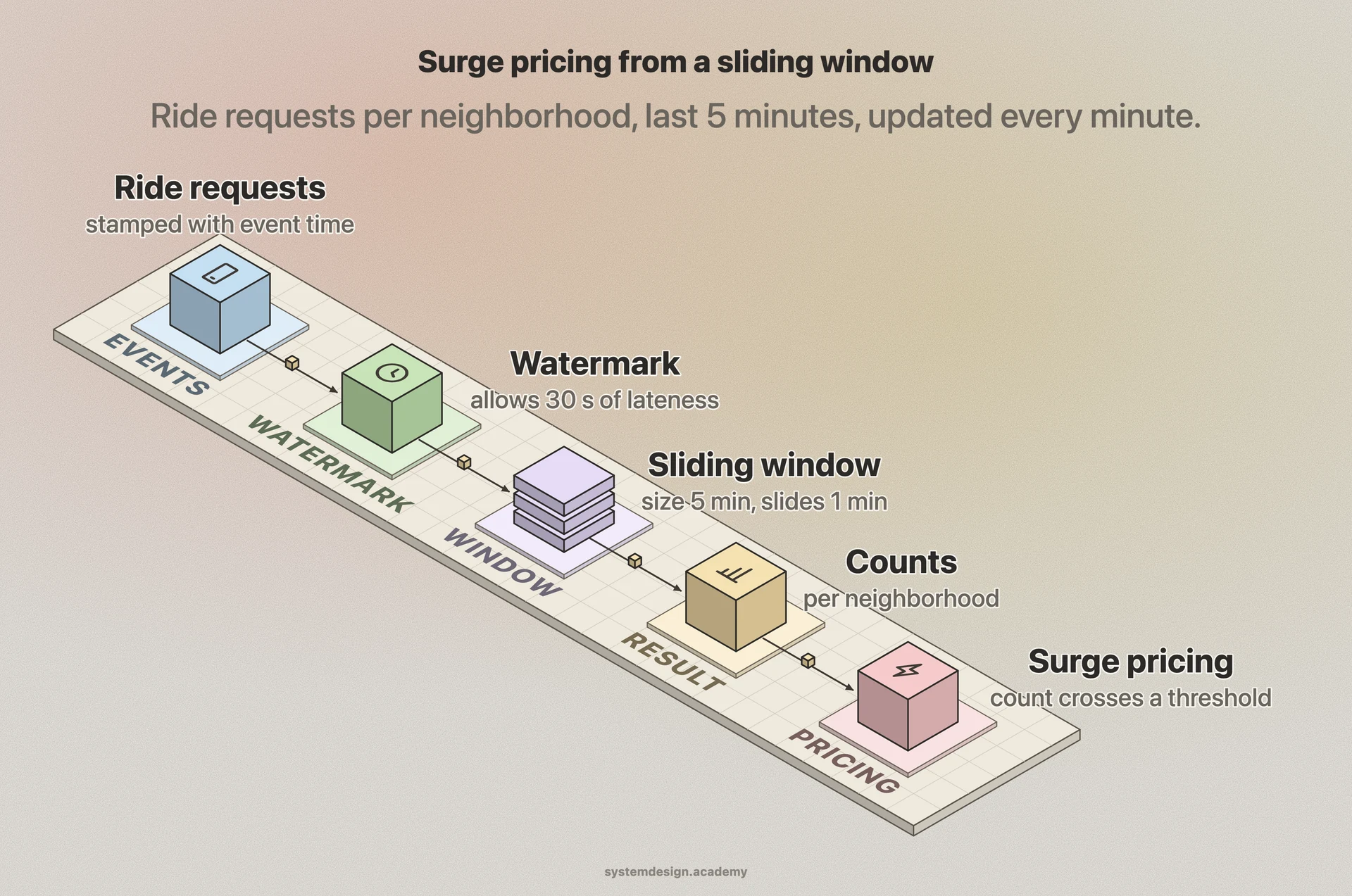
Imagine a ride-hailing app computing surge pricing per neighborhood. Raw events are ride requests, each tagged with a neighborhood id and an event-time timestamp. You want "requests per neighborhood in the last 5 minutes, updated every minute" so prices react quickly.
That is a sliding window: size 5 minutes, slide 1 minute, keyed by neighborhood. A driver in a tunnel might send a request whose timestamp is 20 seconds old, so you set a watermark allowing 30 seconds of lateness. Every minute the engine emits a count per neighborhood; surge kicks in when a count crosses a threshold.
If instead you wanted clean hourly demand reports for analysts, you would switch to a 1 hour tumbling window so each request is counted once. And if you wanted to measure how long a typical user spends searching for a ride before booking, you would use a session window that closes after a few minutes of no activity from that user.
Where it is used in production
Apache Flink
First-class windowing API with tumbling, sliding, and session windows, all driven by event time and watermarks.
Apache Kafka Streams
Provides time and session windows over Kafka topics, with a grace period to admit late records before a window is final.
Google Cloud Dataflow
Built on the Apache Beam model that defined the modern windowing, watermark, and trigger vocabulary used everywhere today.
Apache Spark Structured Streaming
Supports tumbling and sliding windows on event-time columns with watermarks to bound how long late data is retained.
Frequently asked questions
- What is the difference between a tumbling and a sliding window?
- A tumbling window is fixed size and never overlaps, so each event lands in exactly one window. A sliding window has a size plus a smaller slide step and overlaps, so one event can appear in several windows and you get a moving, recomputed result on every slide.
- When should I use a session window instead of a fixed window?
- Use a session window when the natural unit of analysis is a burst of activity with no fixed length, like one website visit or one gaming session. It groups events that are close in time and closes after a configured gap of inactivity, so window length follows real user behavior.
- Why does windowing need watermarks?
- Events arrive out of order and late because of network delays and offline devices. A watermark estimates that all events up to a given event time have probably arrived, which tells the engine it is safe to close a window and emit results without waiting forever.
- Should I window by event time or processing time?
- Window by event time for correct results, since it reflects when things actually happened regardless of arrival delay. Processing time is simpler and lower latency but produces wrong buckets whenever events arrive late, so it is only acceptable when exact bucketing does not matter.
- What happens to events that arrive after their window closed?
- They are late events. Depending on configuration the engine drops them, routes them to a side output for separate handling, or keeps the window open within an allowed lateness or grace period and re-emits a corrected result.
Learn Windowing hands-on
This page explains the idea. The full lesson lets you step through the ring as servers join and leave, read the implementation, and check yourself with a quiz. It is one of 760+ lessons in the System Design Masterclass, from your first API call to distributed consensus. Eleven Foundation lessons are free, no signup. Lifetime access is ₹499 in India or $7.99 worldwide, one payment, no subscription.
See also
Related glossary terms you might want to look up next.
Stream Processing
Processing data continuously as it arrives, rather than in batches. Powers real-time analytics, fraud detection, and live dashboards.
Watermark
A timestamp that tracks how far a stream processing system has progressed through event time. Tells the system when it's safe to close a window and emit results, even with late-arriving data.
Apache Flink
A distributed stream processing framework that handles both real-time streams and batch data with exactly-once guarantees. Used by Alibaba, Netflix, and Uber at massive scale.
Batch Processing
Processing large volumes of data in scheduled chunks rather than in real time. Think nightly reports, ETL jobs, and data warehouse loads.
Exactly-Once Processing
A processing guarantee where each message is processed exactly one time, even in the face of failures. Achieved through idempotent consumers and transactional producers.
Checkpointing
Periodically saving the state of a stream processing job so it can recover from failures without reprocessing everything from the beginning. Flink and Spark use distributed checkpoints.