Why Read the Same Rules Again?
Most real apps send the same long opening with every request. A support bot sends its rules. A document assistant sends the same contract every time someone asks about it. A coding helper sends the same files. Only the question at the end changes.
Lesson 5 showed that reading is what makes a person wait: a prompt of about 7,900 tokens kept them waiting over half a minute before the first word. If every request starts with the same 4,000 tokens, that is a lot of reading repeated for nothing.
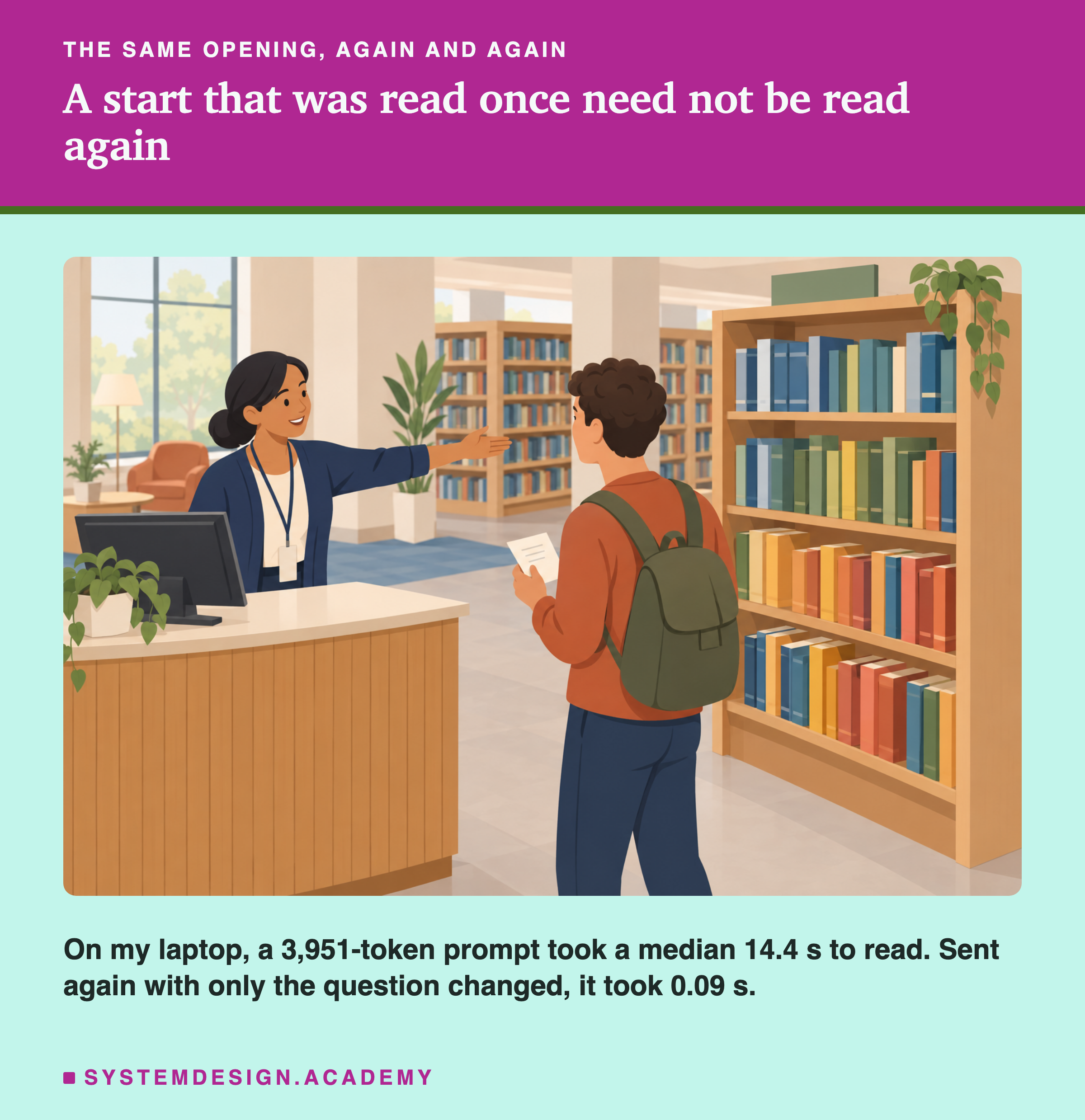
Think of a librarian. On the first day in a new library, answering "where is the book on ?" means walking the shelves and learning the layout. After that, the layout is remembered, and each new question only needs the question itself to be read. A language model server can do the same with the start of a prompt, and in lesson 5 we saw it do so by accident.
This lesson uses that on purpose. It measures how much reading is saved, finds out exactly which part of a prompt can be reused, and turns the finding into one rule you can apply to any app: put what changes last.
Words You Need First
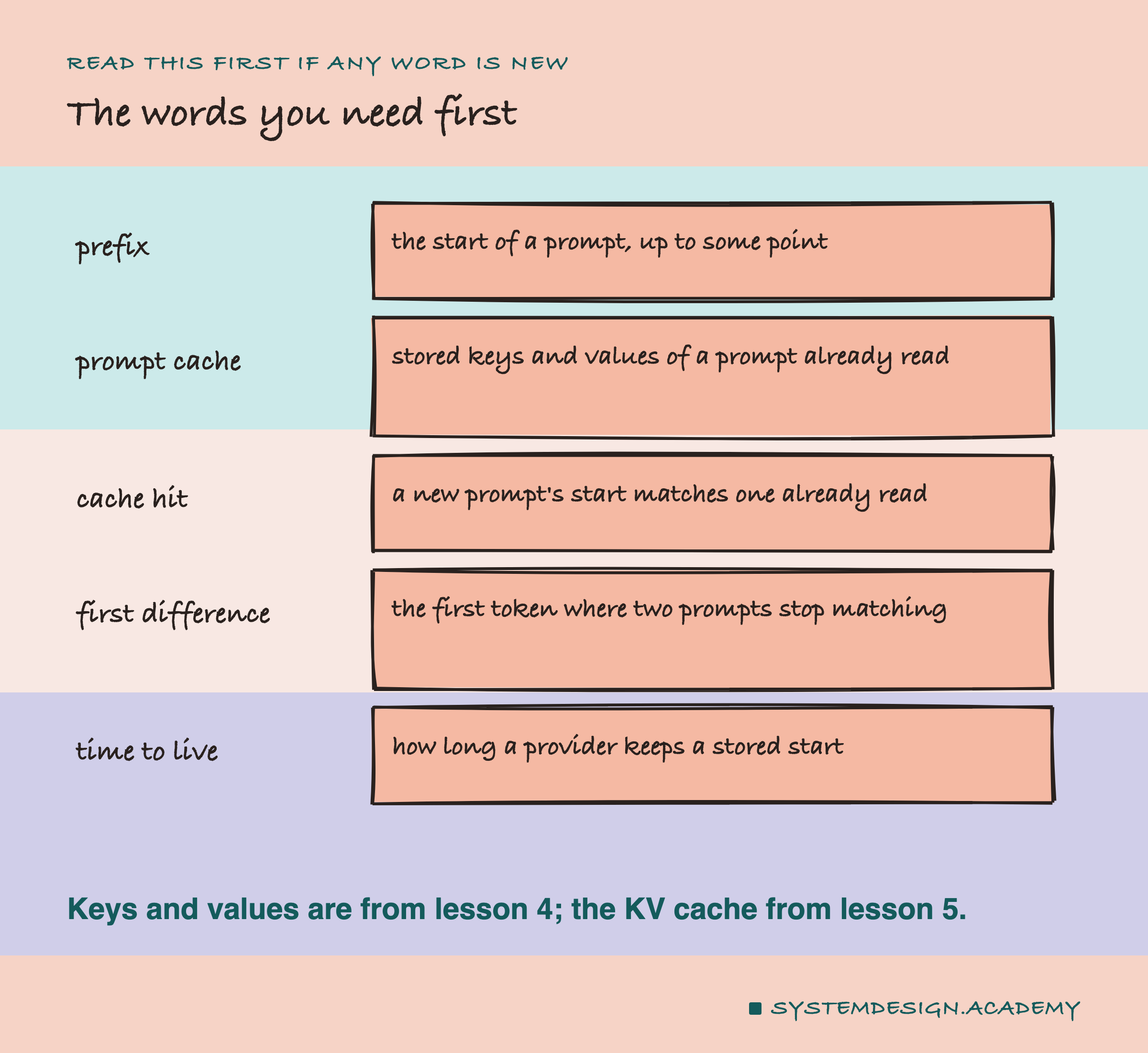
Prefix. The start of a prompt, up to some point. "Prefix" is the word engineers use; this lesson mostly says "start".
Prompt cache. In lesson 5, the model kept the keys and values of every token it had read, so it could write without reading again. A prompt cache keeps those keys and values after the request is finished, so a later request can use them. Hosted providers call the feature "prompt ".
Cache hit. A new prompt starts the same way as one whose keys and values are still stored, so that part does not need to be read again.
First difference. Line two prompts up token by token. The first difference is the first place where they stop matching. It decides how much can be reused, as this lesson shows.
Time to live. How long a stored start is kept before it is thrown away. Engineers shorten it to .
The Effect, Measured
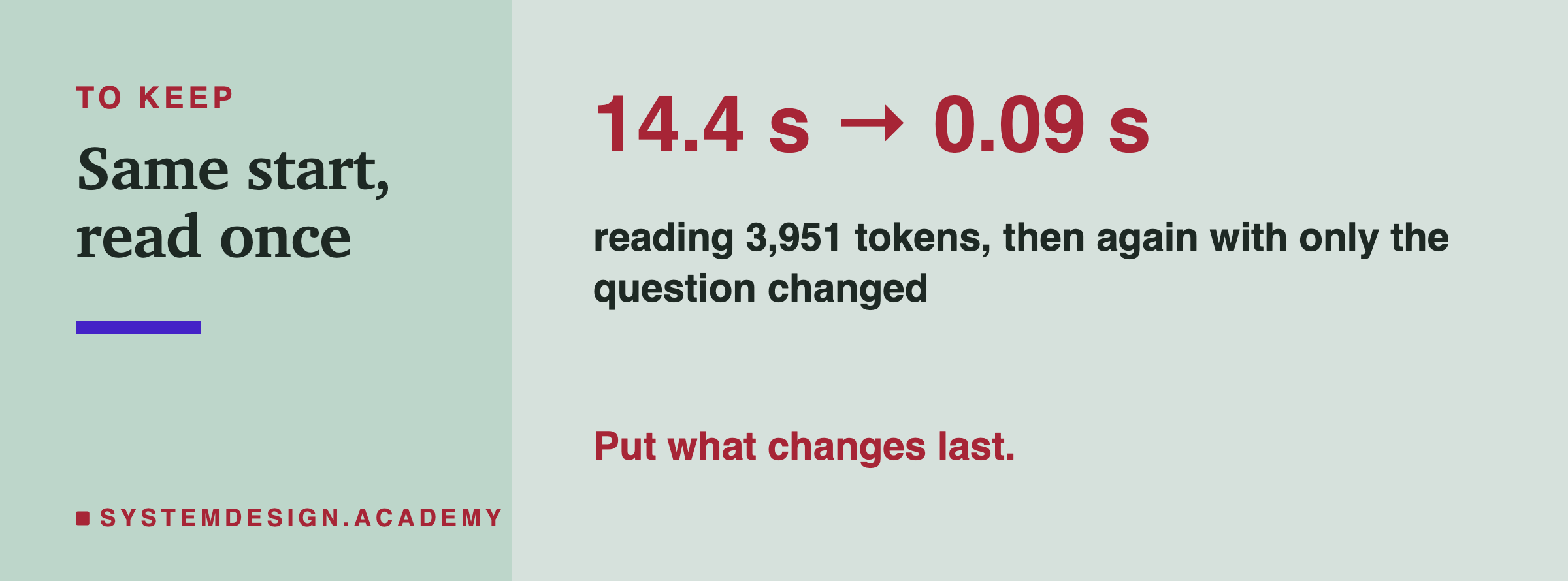
The lab sent a prompt of 3,951 tokens, built from this course's lesson text, and then sent it again with only the question after it changed.
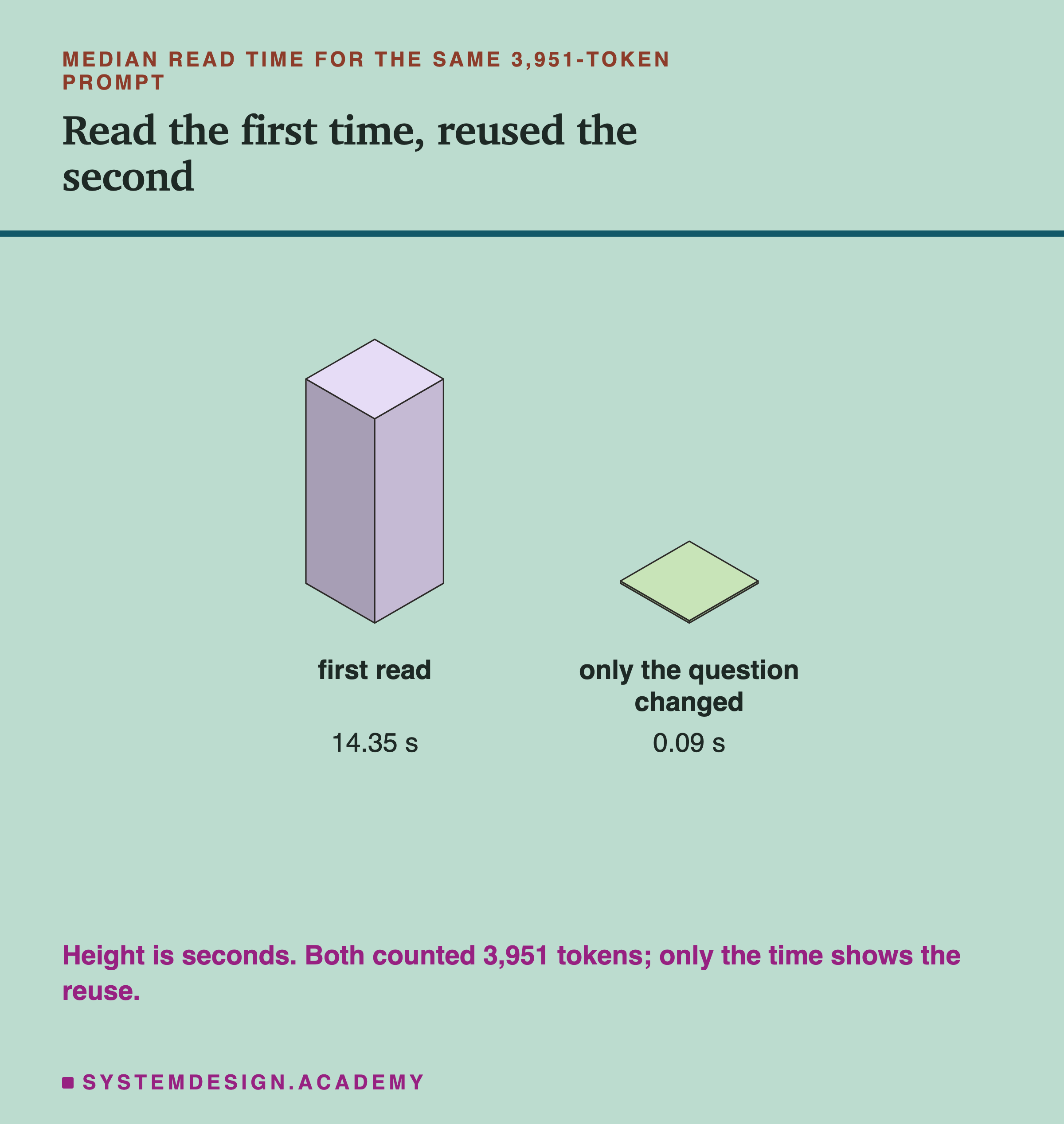
Across 25 trials, the first read of the prompt took a median 14.35 seconds. In the 5 trials where the same start came back with only the question changed, the second read took a median 0.09 seconds. Comparing each of those second reads with its own first read gives a median of 0.006, less than one hundredth of the time.
Both reads reported the same count, 3,951 tokens. Lesson 5 found this too: Ollama counts every token of the prompt whether it read it or reused it, and only the time shows the difference. So if you want to know whether reuse happened, look at the time, not the count.
For a person waiting, this is the difference between a wait of about 14 seconds and one too short to notice.
See It on Your Own Machine
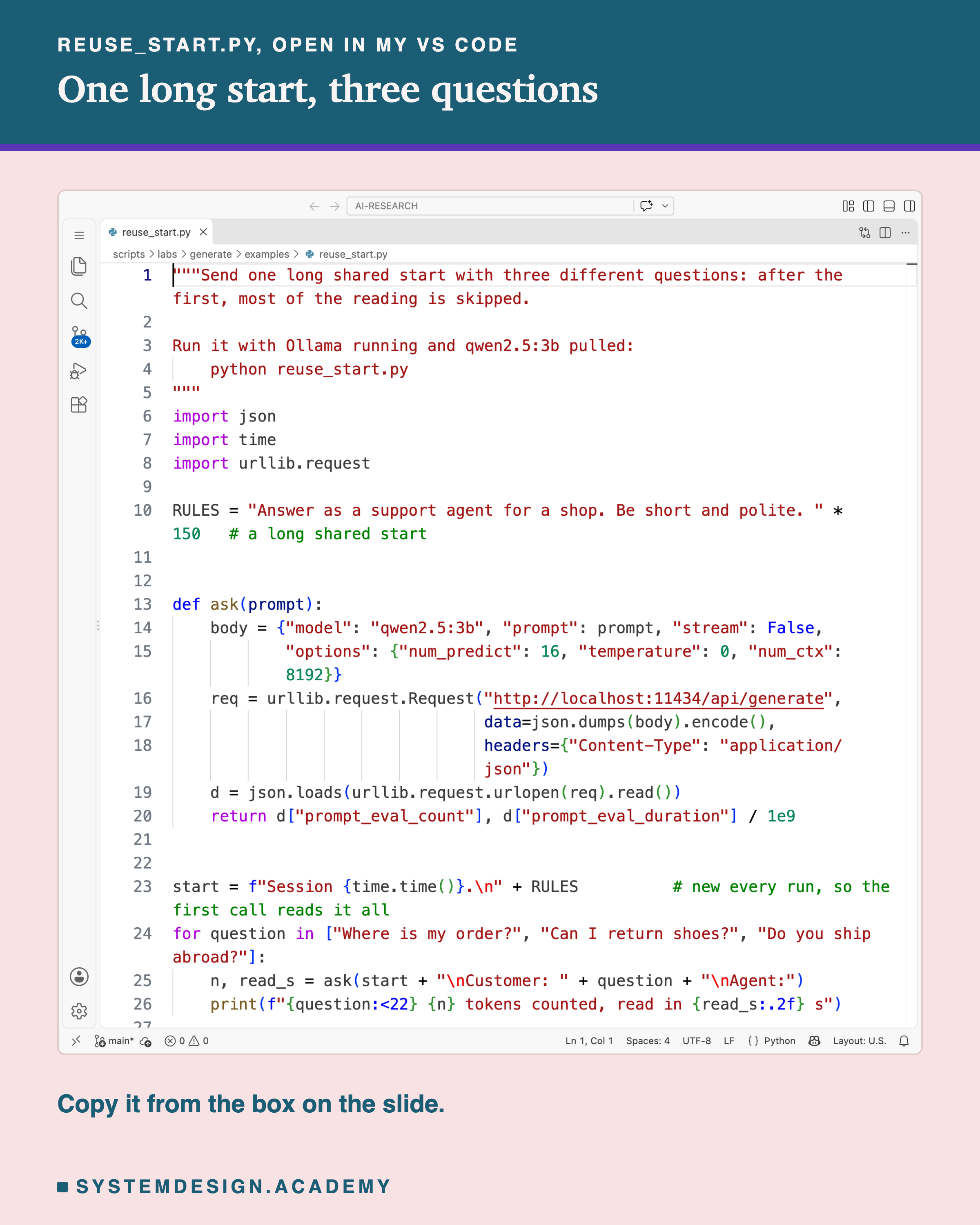
This script sends one long shared start with three different questions and prints the count and the reading time of each.
"""Send one long shared start with three different questions: after the first, most of the reading is skipped.

Run it with Ollama running and qwen2.5:3b pulled:
    python reuse_start.py
"""
import json
import time
import urllib.request

RULES = "Answer as a support agent for a shop. Be short and polite. " * 150   # a long shared start


def ask(prompt):
    body = {"model": "qwen2.5:3b", "prompt": prompt, "stream": False,
            "options": {"num_predict": 16, "temperature": 0, "num_ctx": 8192}}
    req = urllib.request.Request("http://localhost:11434/api/generate",
                                 data=json.dumps(body).encode(),
                                 headers={"Content-Type": "application/json"})
    d = json.loads(urllib.request.urlopen(req).read())
    return d["prompt_eval_count"], d["prompt_eval_duration"] / 1e9


start = f"Session {time.time()}.\n" + RULES          # new every run, so the first call reads it all
for question in ["Where is my order?", "Can I return shoes?", "Do you ship abroad?"]:
    n, read_s = ask(start + "\nCustomer: " + question + "\nAgent:")
    print(f"{question:<22} {n} tokens counted, read in {read_s:.2f} s")
This is a real run in VS Code's terminal.
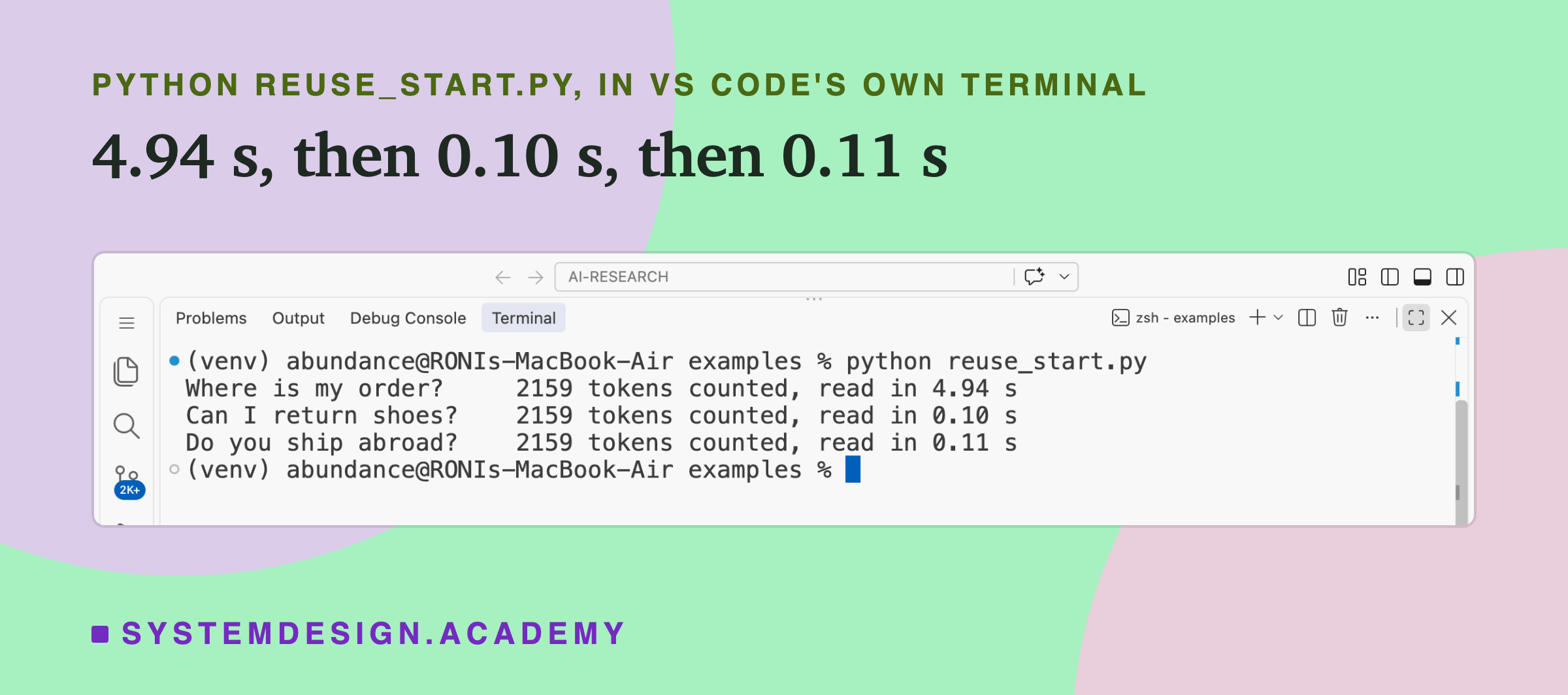
The first question read all 2,159 tokens in 4.94 seconds. The second and third took 0.10 and 0.11 seconds, because only the few tokens of their question were new. The count stayed at 2,159 for all three.
Notice the first line of the start: Session {time.time()}. It is there so that the first question of each run really reads everything. Without it, a second run of the script would find the start still stored from the first run and all three questions would be fast. Lessons 3 and 5 used the same trick to stop reuse from spoiling a timing; here it makes sure the first request is a fair "before".
Why Only the Start Can Be Reused
Why the start, and not any shared piece of the prompt? The answer comes from lesson 4.
In lesson 4, every word could look back at the words before it, never ahead. So the keys and values a token gets in each layer depend on that token and every token before it, and on nothing after it. Two prompts that share their first 2,000 tokens therefore have exactly the same keys and values for those 2,000 tokens, whatever comes after. That is what makes it safe to reuse them.
The first token that differs gets different keys and values. So does every token after it, even ones that are word for word the same as before, because each of them looked back at the changed token. From the first difference on, everything must be read again.
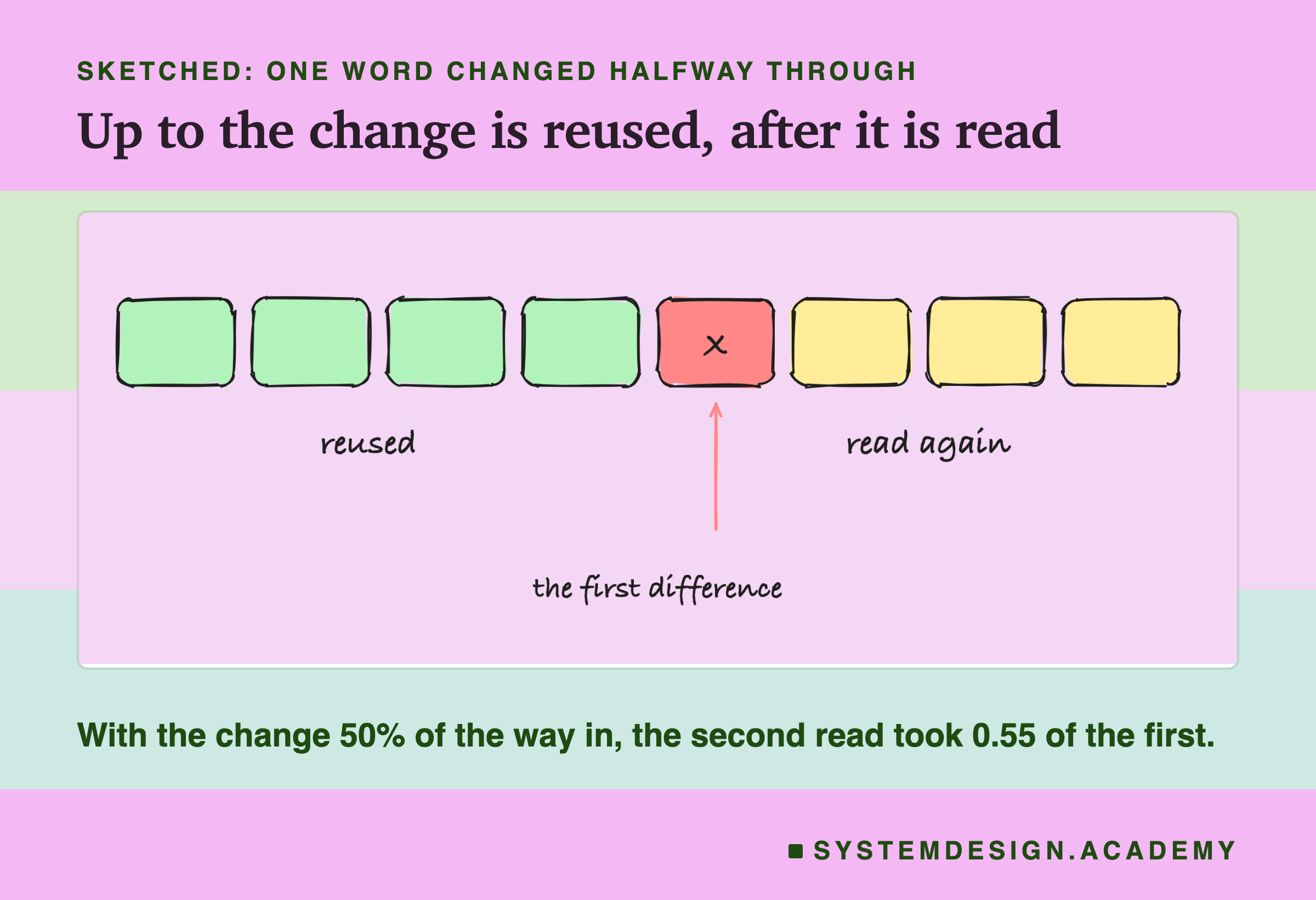
This is why, with standard prompt , a shared paragraph in the middle of two otherwise different prompts saves nothing. It has to be a shared start.
Where the Difference Sits Decides the Saving
If this explanation is right, you can predict the saving. When the first difference is a fraction f of the way into the prompt, the part before it is reused and the rest is read again, so the second read should take about 1 − f of the first. The lab tested that.
For each trial it sent the 3,951-token prompt once, from a new start, and then sent it again with one word replaced by "CHANGED" at 0%, 25%, 50% or 75% of the way in, or with only the question after the prompt changed, which it counts as 100%. There were 5 trials at each place, 25 in all, in one shuffled order.
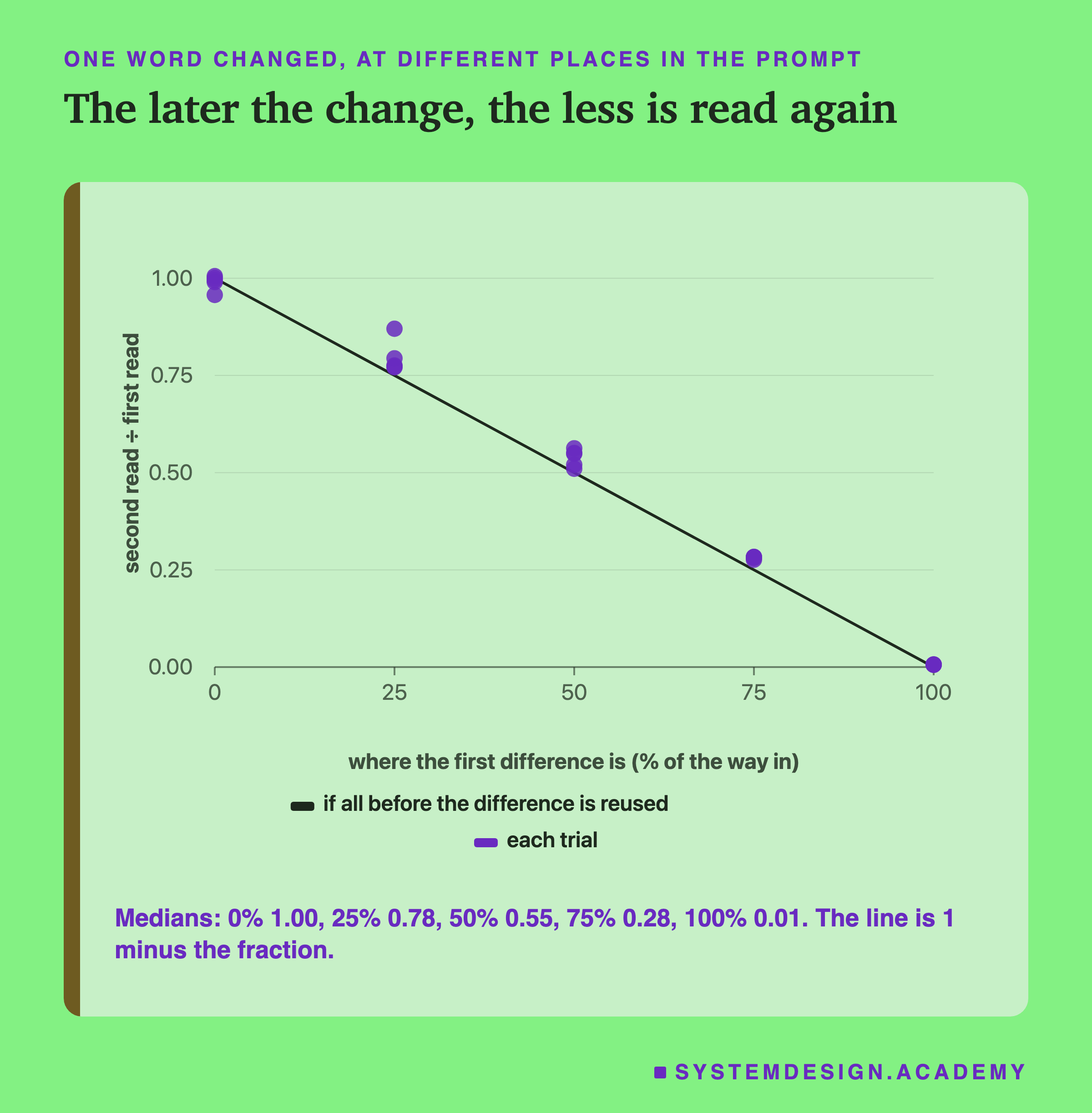
The medians were 1.00, 0.78, 0.55, 0.28 and 0.01. The prediction was 1.00, 0.75, 0.50, 0.25 and 0. At 25%, 50% and 75%, every dot sits above the line. At 0% the dots scatter around 1.00, one as low as 0.96, and at 25% one trial reached 0.87.
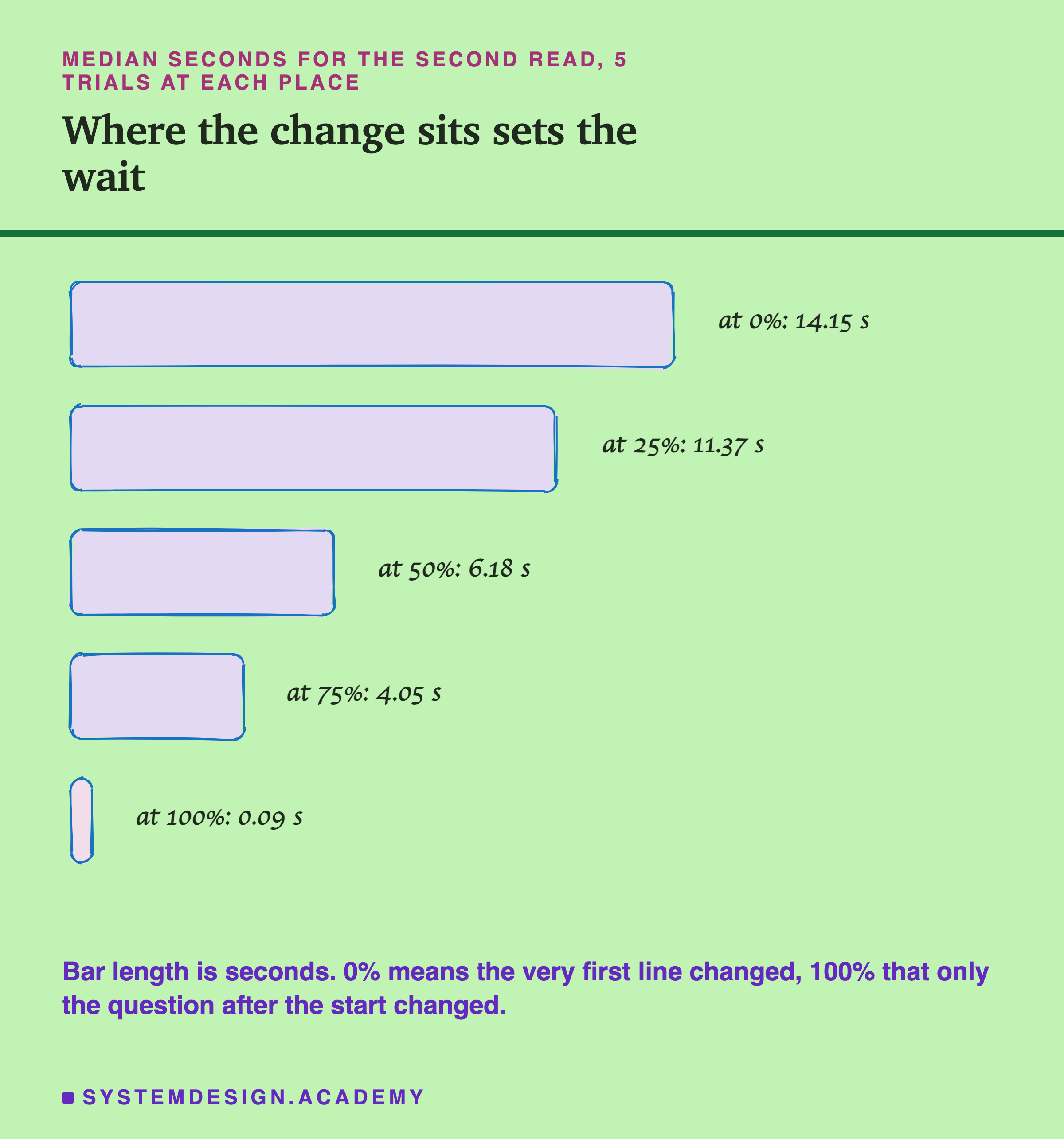
In seconds, the second read took a median 14.15 with the first line changed, 11.37 at 25%, 6.18 at 50%, 4.05 at 75% and 0.09 when only the question changed.
Why the Dots Sit a Little Above the Line
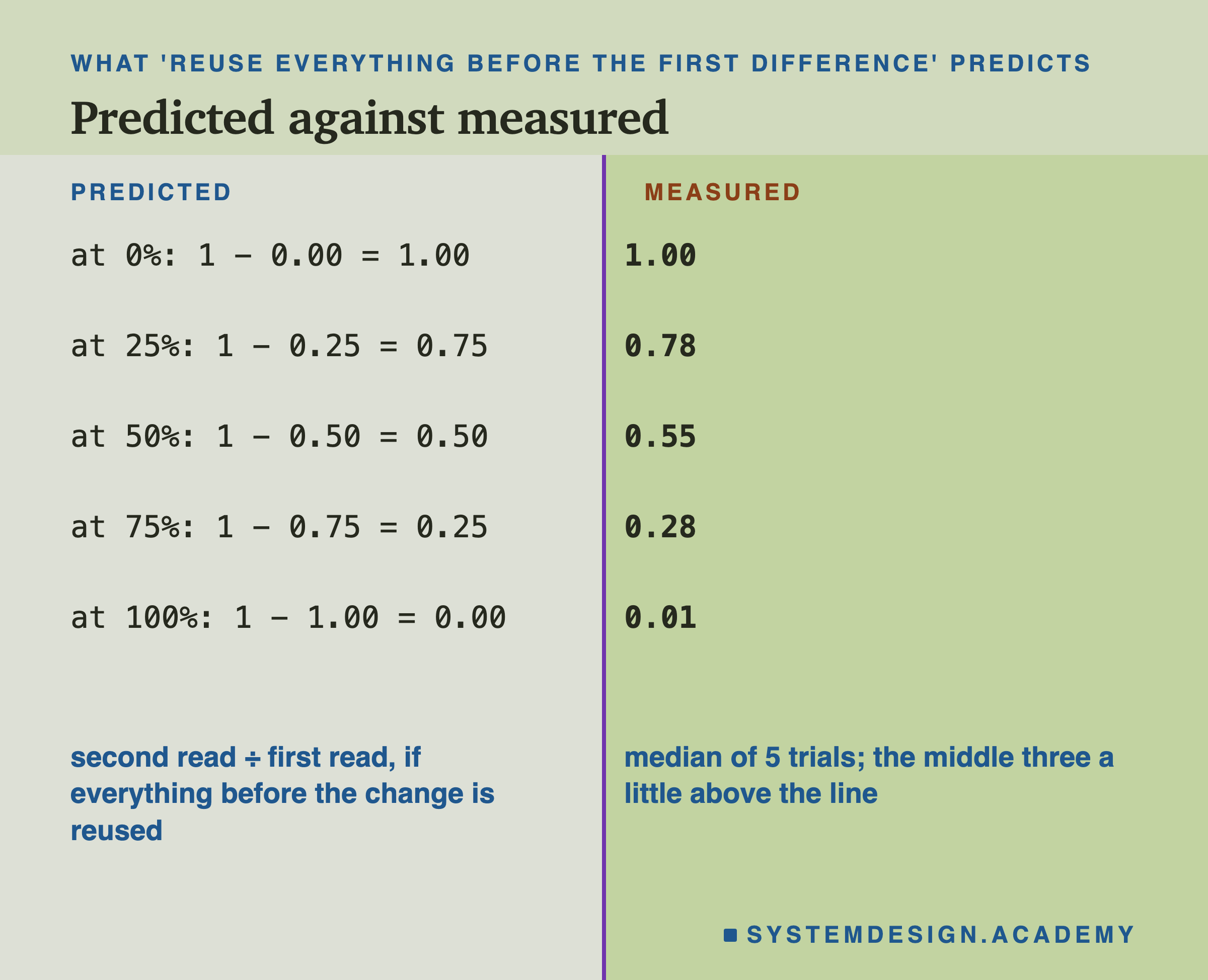
The medians at 25%, 50% and 75% are a few hundredths above the prediction. At 50%, the second read took 0.55 of the first, not 0.50. I did not measure why. Part of it is a small fixed cost: even when only the question changed, the second read took about 0.09 seconds, about 0.006 of a first read, and every second read carries something like it. Another likely part: lesson 5's fit suggested that reading gets a little slower per token as the prompt grows, and a likely reason is that each token looks back at more tokens before it. The tokens in the second half of a prompt look back at more than the tokens in the first half, so the second half takes a little more than half of the reading time. When the second half is the part read again, the ratio lands a little above 0.50.
Either way, the prediction is close enough to use. If the first difference in your prompts is 90% of the way in, expect to read roughly a tenth of it again, perhaps a little more.
The lab design matters here. The laptop slowed during the run: the first reads took 9.7 seconds at the start and about 14.5 by the end. Each trial compared its second read with its own first read, sent straight before it, so the slowing affects both halves of each ratio almost equally. Comparing a second read with some average first read from earlier in the run would have mixed the slowing into the answer.
Does Another Prompt in Between Wipe It?
A real server does not get one prompt at a time from one user. If prompt B arrives between two requests that share a start, is the shared start still stored?
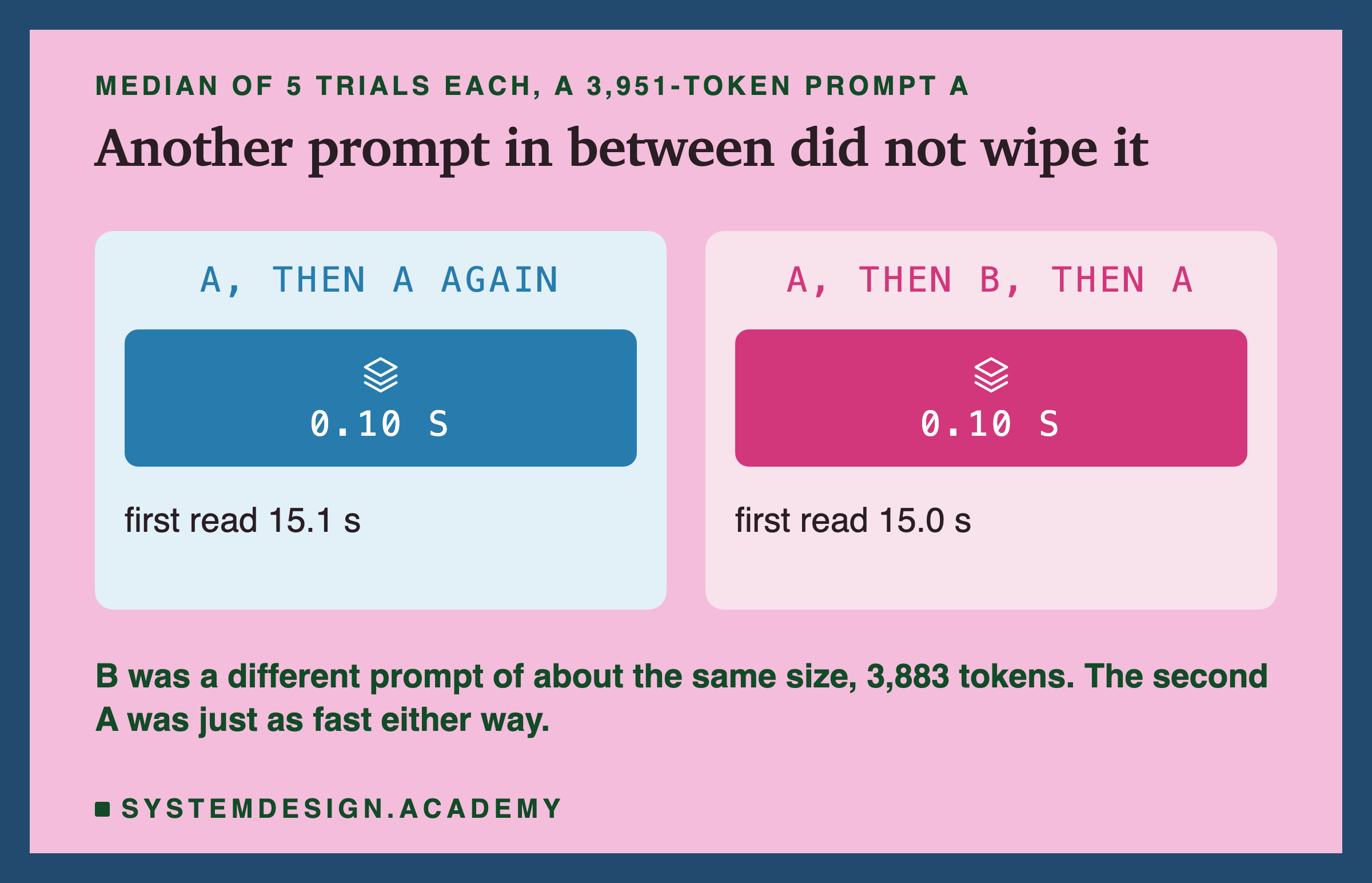
The lab tried both orders, 5 trials each. With A then A again, the second A read in a median 0.10 seconds. With A, then a different prompt B of about the same size (also 3,000 words of course text, 3,883 tokens), then A again, the second A also read in 0.10 seconds. B did not wipe A.
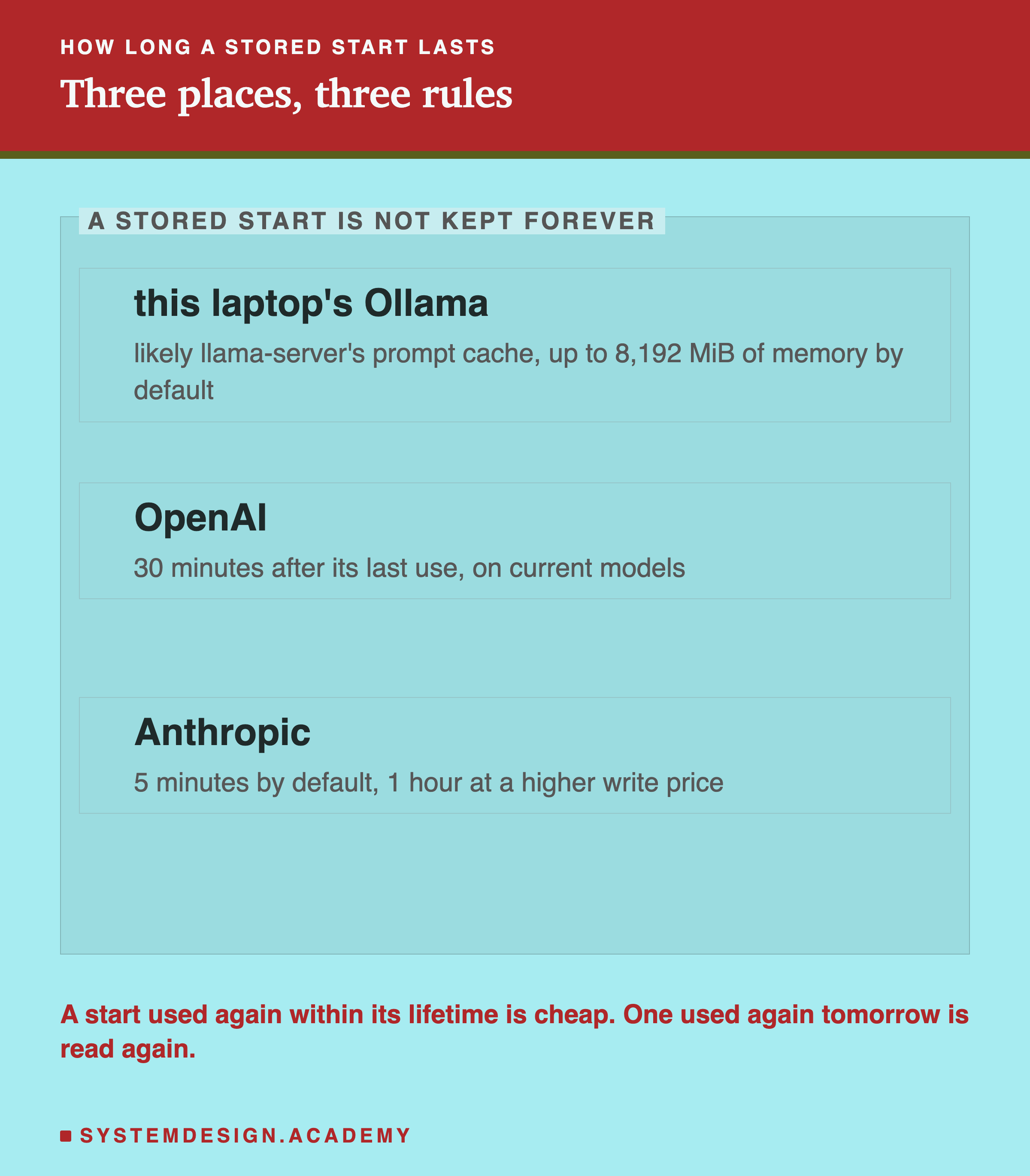
That was a surprise to me, because the server Ollama started on this laptop had only one working slot. Its command line shows -np 1, which lets one request run at a time. The likely reason is a second store: the llama-server program that Ollama runs has a prompt cache in ordinary memory, and its help text says it holds up to 8,192 MiB by default. A MiB is 1,048,576 bytes, so that is about 8.6 GB. Ollama did not pass a setting to change that. I did not look inside the cache during this lab; it only shows that A survived one other prompt. Later, while building lesson 7, I read the server's own log, and it shows this store exists: during the lesson 7 lab it listed "cache state: 7 prompts, 270.144 MiB (limits: 8192.000 MiB ...)", each saved prompt with its length. That lab's prompts were built never to share a start, so the line shows the store holding prompts, not reusing one.
It also did not test how many different starts fit before the oldest is thrown away. At about 19.6 KB of keys and values per token on this laptop (lesson 5), a 4,000-token start takes roughly 4,000 × 19.6 KB ≈ 78 MB, so roughly a hundred could fit in 8,192 MiB, in theory, if the cache stores them at that size. A busy server with thousands of users will still throw starts away, and a start that was thrown away is read again in full.
Put What Changes Last
The measurements lead to one practical rule. Anything that changes between requests should come after everything that does not.
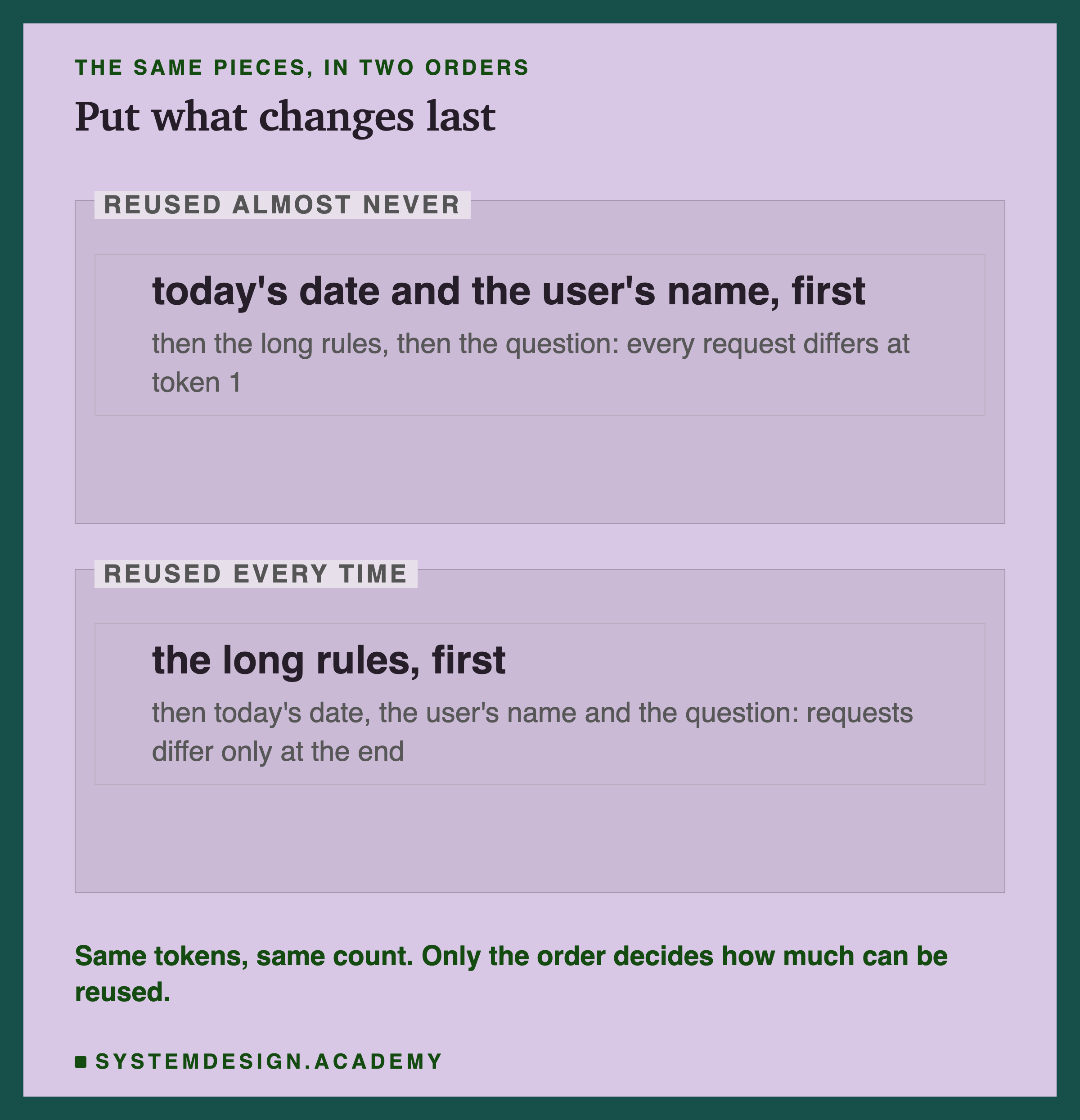
A common pattern starts the prompt with "Today is 27 September 2026. You are talking to Priya." followed by 4,000 tokens of rules. Every user and every day differs at the very first tokens, so the first difference is at 0% and almost nothing is reused. The lab measured exactly this case: with the first line changed, the second read took 1.00 of the first.
Move the date and the name below the rules and the first difference moves to near 100%. The rules are read once and reused for every user, every question, for as long as they stay stored. The prompt contains the same tokens in both orders; only the order changed.
The same applies to anything else that varies: a request id, a random example picked for each call, a list of search results that differs per question, a tool list that changes order. Keep the stable parts in the same order, word for word, at the top.
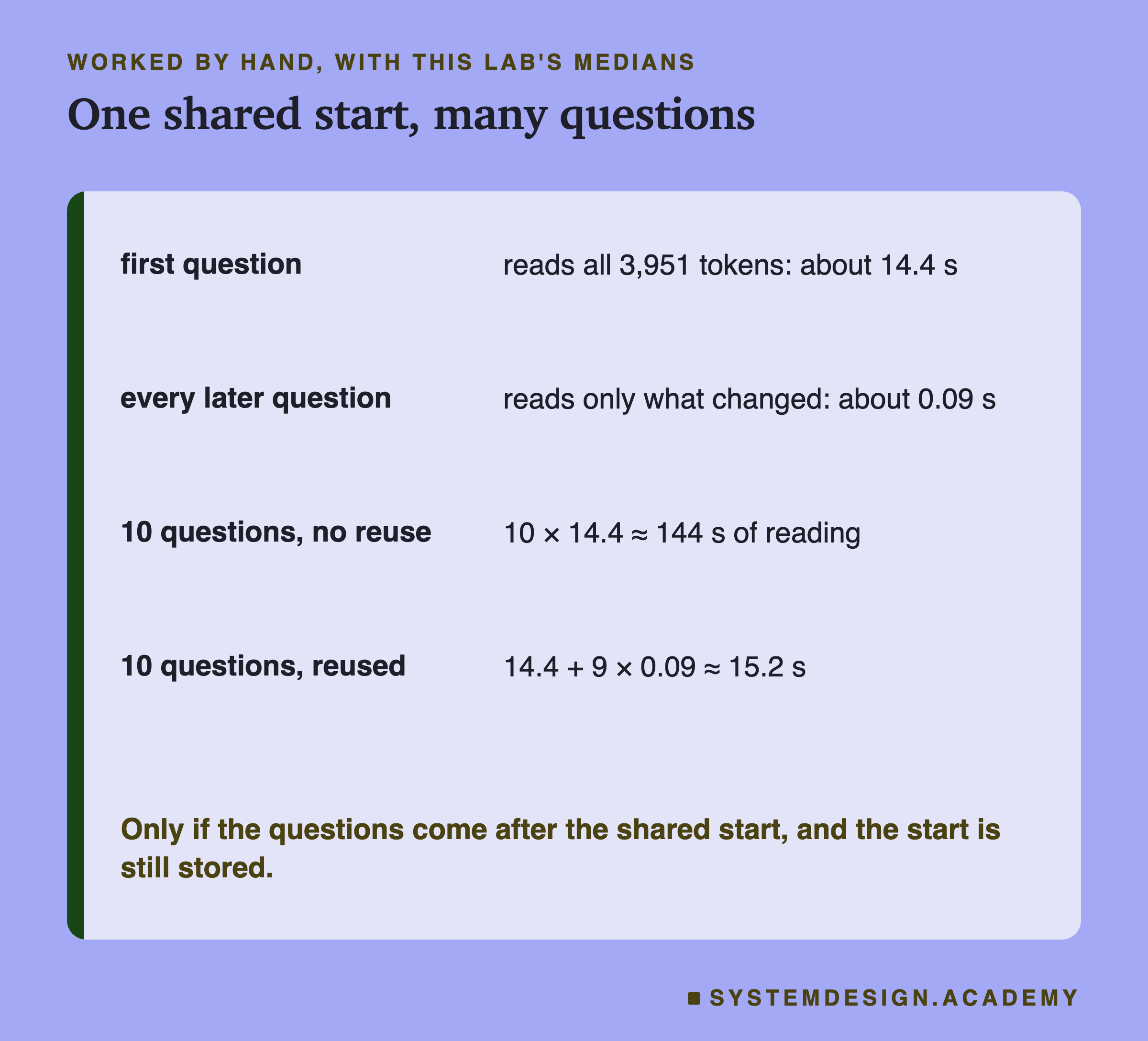
With this lab's medians, ten questions about the same 3,951-token start cost 10 × 14.35 ≈ 144 seconds of reading without reuse, and 14.35 + 9 × 0.09 ≈ 15.2 seconds with it.
Why Chats Are Mostly Reused
A chat is the most common case of a shared start, and you get it without trying. The model does not remember the conversation, so your app sends the whole conversation again on every turn: the instructions, every earlier question and every earlier answer, and then the new message at the end.
So turn 10 of a chat starts with exactly the same text as turn 9 sent, plus turn 9's answer and the new question. The first difference is near the very end. By this lesson's rule, almost all of turn 10 can be reused, and at most the last answer and the new message need reading. The lab did not measure a chat; this follows from the rule, and it also depends on the chat being turned into the same text every time.
That only holds while the earlier turns come back word for word. Three things break it. An app that trims or summarises old turns to save space changes the start, so the next turn is read again from the point of the change. An app that puts the time or a changing status line in the instructions at the top breaks it at the first token. And a server that has thrown the conversation away, because too long passed or too many other users came in between, reads it all again. A later lesson in this chapter looks at chat templates, the exact text a chat is turned into before the model reads it.
The Lab Report
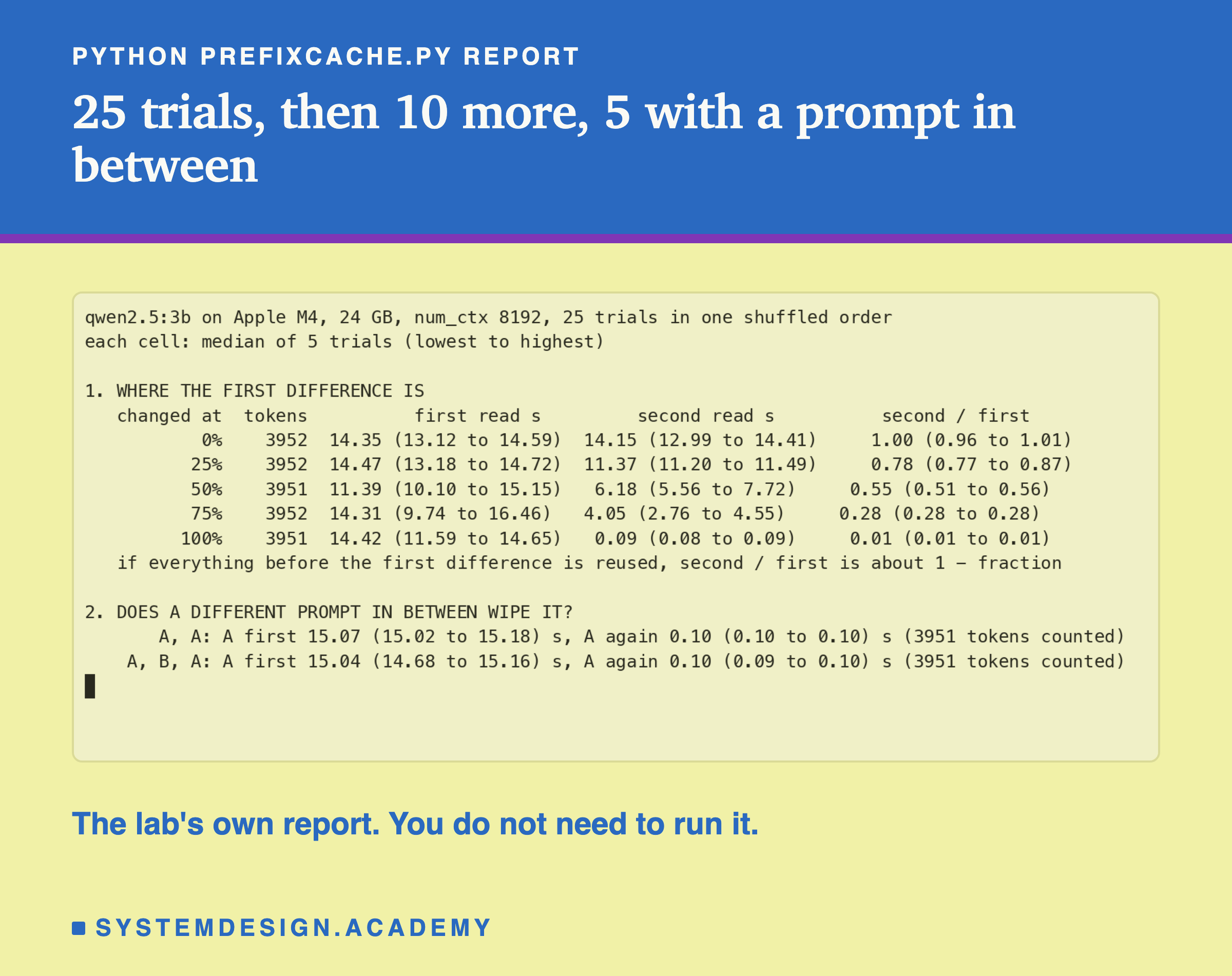
The lab is scripts/labs/generate/prefixcache.py. It builds a prompt of 3,000 words of course text, which came to 3,951 tokens, with a unique first line per trial so that no trial reuses an earlier one. For section 1, it runs the 25 trials in one shuffled order with a fixed shuffle, so the order can be repeated. For section 2, it alternates five "A, A" trials with five "A, B, A" trials.
Two checks guard the numbers. Every first read in section 1 must be slower than 2,000 tokens a second, the reuse check from lesson 5, so a first read that was accidentally reused would stop the lab. And the counts are printed, so you can see they stayed at 3,951 or 3,952 (in some trials the changed word, or the changed session line at 0%, came out as one more token than the text it replaced).
Hosted APIs Do the Same
You do not need your own server to use this. The large hosted providers have prompt too, with their own rules. I read their documentation on 27 September 2026; these details change, so check the page for your model.
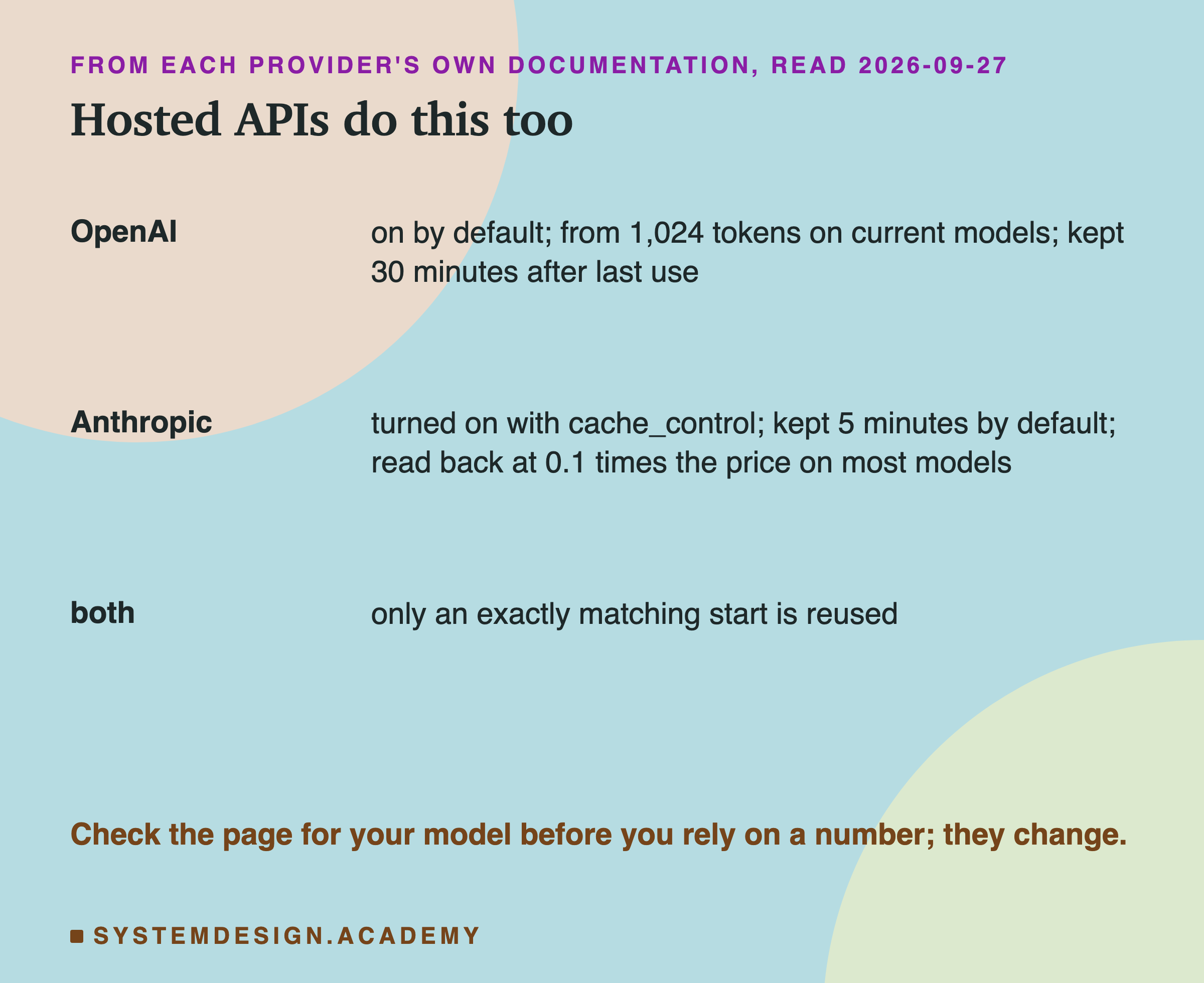
OpenAI's guide says prompt caching "is enabled by default for supported OpenAI models", that a start must be at least 1,024 tokens on its current models, and that a cached start "remains eligible for reuse for 30 minutes after its most recent write or reuse". Its advice is the same rule this lesson found: "Put stable developer instructions and shared reference material first," and put timestamps and user-specific content at the end.
Anthropic's guide turns caching on with a cache_control field, keeps a stored start for 5 minutes by default, and says "Cache hits require 100% identical prompt segments". It prices writing a start to the cache at 1.25 times the normal input price and reading it back at 0.1 times on most models; its pricing table lists exceptions for some models.
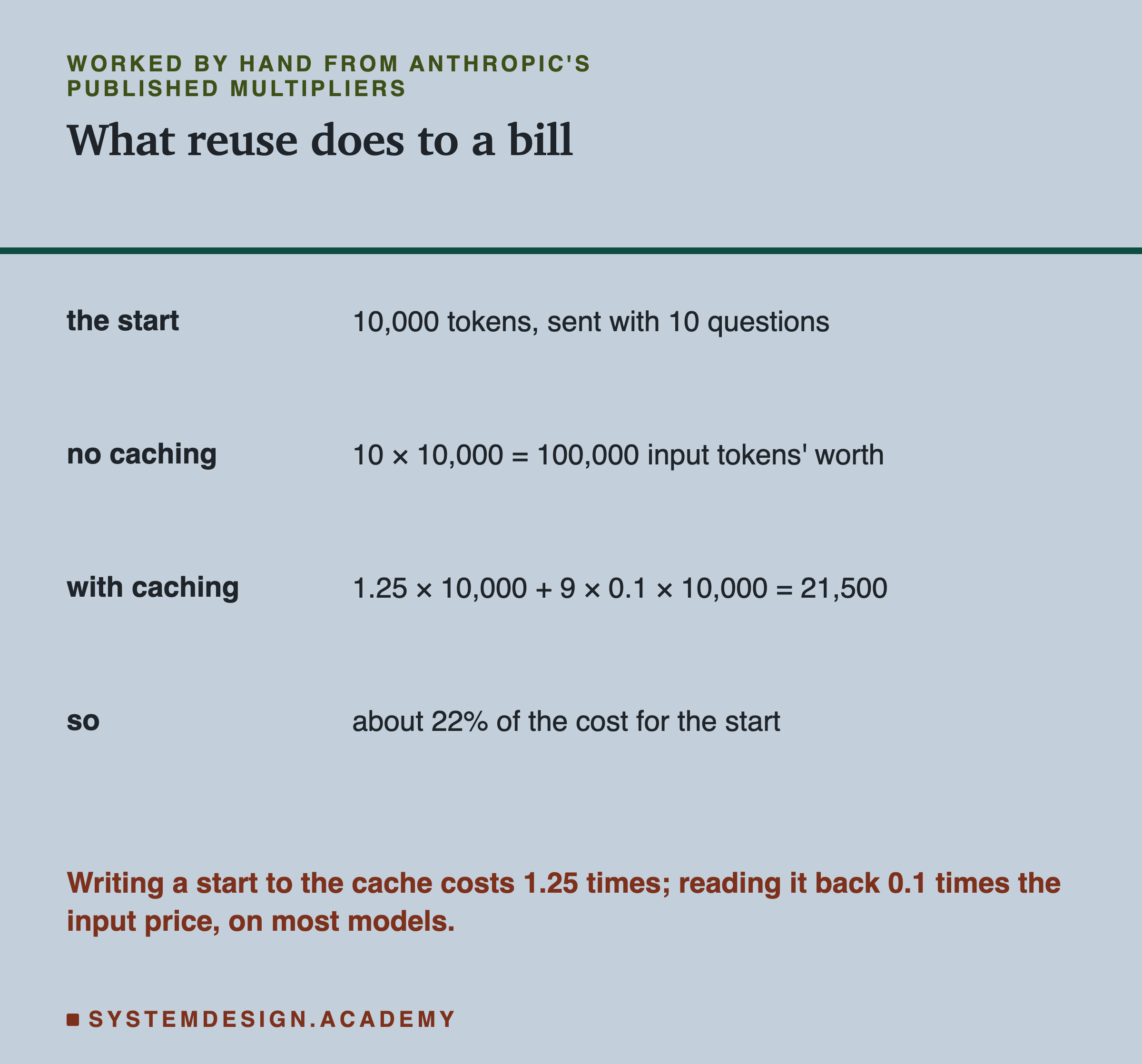
Worked with those multipliers: a 10,000-token start sent with 10 questions costs 10 × 10,000 = 100,000 input tokens' worth without caching. With caching, the first request writes it at 1.25 × 10,000 = 12,500, and the other nine read it at 9 × 0.1 × 10,000 = 9,000, so 21,500 in all, about 22% of the cost for that start. That assumes all ten requests arrive within the stored start's lifetime.
What the Server Does, Step by Step
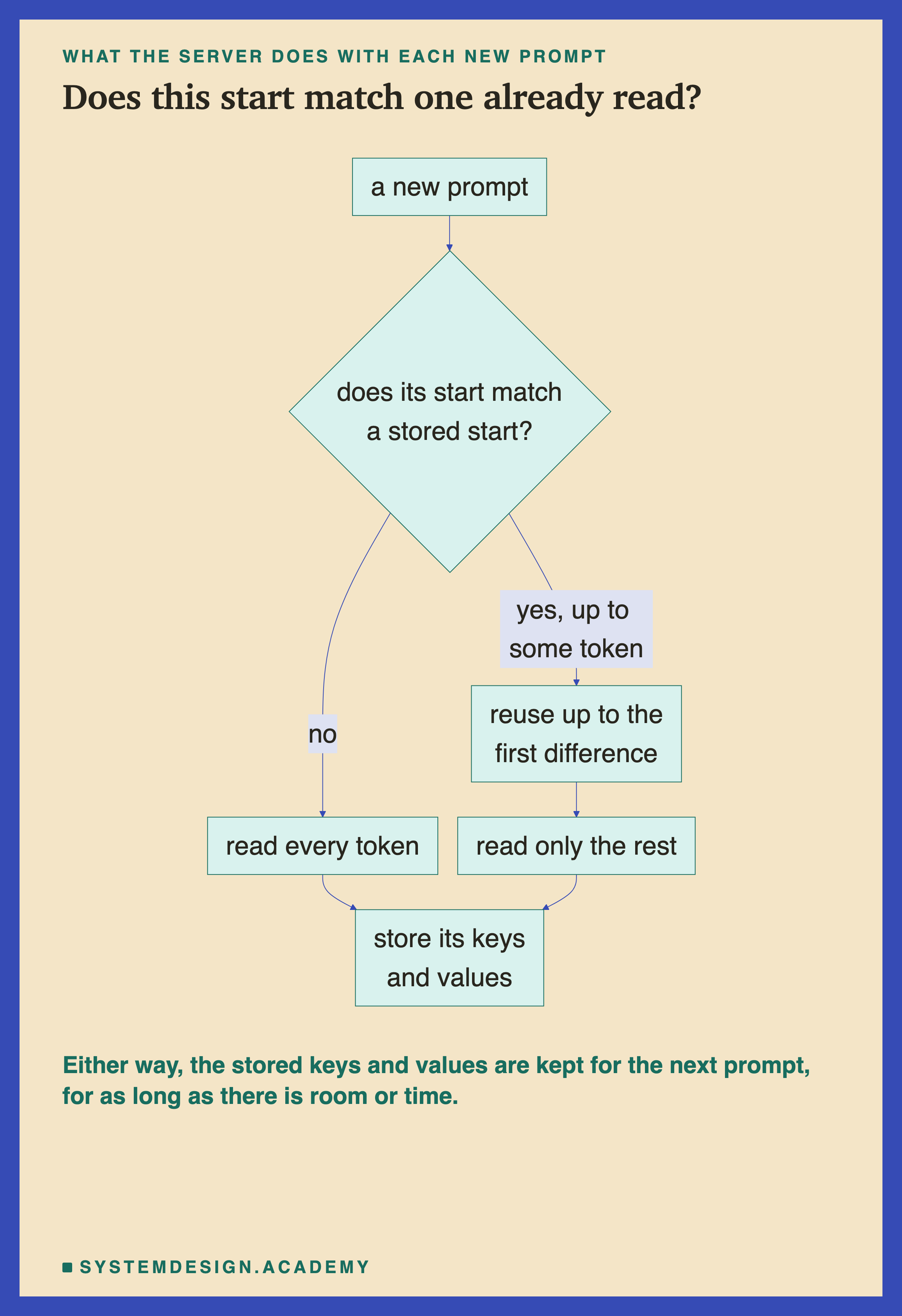
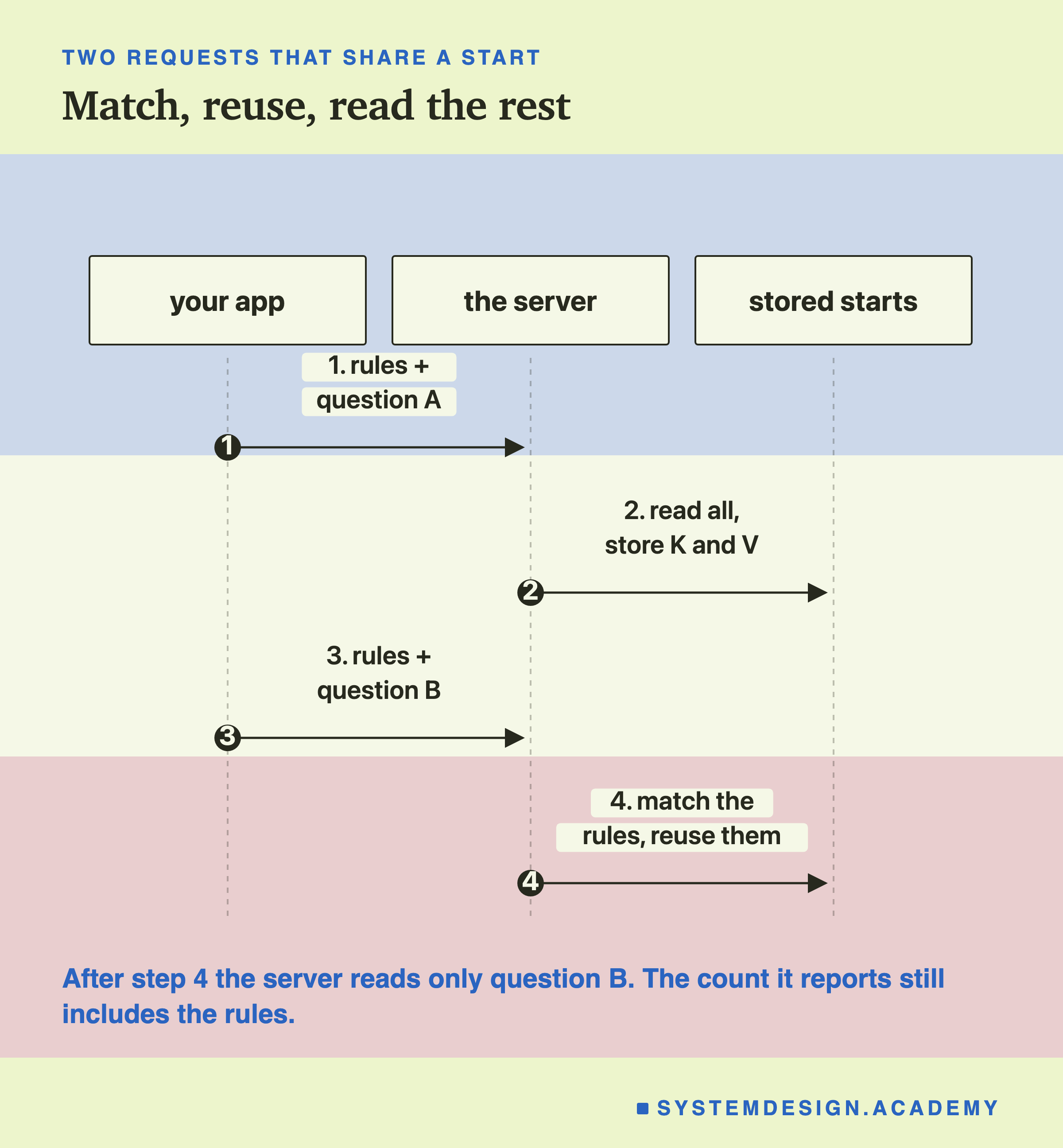
When a prompt arrives, the server looks for a stored start that matches the beginning of the new prompt. If it finds one, it reuses the keys and values up to the first difference and reads only the rest. If not, it reads everything. Either way, it stores the keys and values of the new prompt, so the next prompt may reuse them.
Your part is only the order of your prompt. You cannot make a server keep your start longer than its rules allow, but you can make sure your start is identical, word for word, every time, so that it can be reused at all.
Estimate the Saving in Your Browser
This box has no model. It uses this lab's reading speed and the published multipliers to estimate the time and the bill for a shared start.
With a 4,000-token start whose first difference is 90% of the way in, it prints about 14.5 seconds for the first request, about 1.5 seconds for each later one, 145 seconds against 28 seconds for ten requests, and a bill of 11,740 input tokens' worth instead of 40,000, 29%. Set CHANGE_AT to 0.0 to see what a date on the first line does to both, and to 1.0 for the best case. The bill assumes the cache marker sits at the end of the shared part; with a date on the first line and switched on, each request would also pay the 1.25 times write, so the real bill could be above 100%. The time uses the simple 1 − f rule, so it will be slightly optimistic, as the dots above the line showed.
The Code, Part by Part
The shared start. RULES repeats one sentence 150 times to make a start of about 2,000 tokens. In a real app this would be your instructions, a document or a set of examples.
The unique first line. start = f"Session {time.time()}.\n" + RULES makes the start new on every run of the script, so the first request cannot reuse anything from an earlier run. The start is built once, then shared by all three questions, so within one run the questions do reuse it.
The question last. Each prompt is start + "\nCustomer: " + question + "\nAgent:". The part that changes comes after the part that does not, which is the whole point.
The two numbers. prompt_eval_count is the count of prompt tokens, which does not drop on reuse. prompt_eval_duration is the reading time in nanoseconds, divided by 1,000,000,000 to get seconds. The time is the one that shows reuse.
The lab. prefixcache.py builds each trial with build(session, body, question). For a change at a fraction f, it replaces the word at position int(3000 * f) with "CHANGED". A change at 0% gives the second prompt a different session line, and 100% changes only the question. It reports medians and ranges of each trial's second read divided by its own first read.
Common Mistakes
A date, a name or an id at the top. The first difference moves to the first few tokens and almost nothing is reused. The lab measured this case: 1.00 of the first read.
Checking the token count to see whether worked. Ollama reported 3,951 tokens whether it read them or reused them. Check the time, or the provider's own cached-token field if it has one.
A shared block in the middle. Keys and values depend on everything before them, so a shared paragraph after a varying one is not reusable.
Rebuilding the start in a slightly different way each time. An extra space, a reordered list or a different example makes it a different start from that point on.
Expecting reuse after the lifetime. A start sent again after the provider's time to live, or after a busy server threw it away, is read again in full.
Timing a benchmark without a unique start. The reverse of this lesson: a timing test that repeats its prompt measures reuse, not reading. Lessons 3 and 5 both guard against this.
What This Lab Can and Cannot Tell You
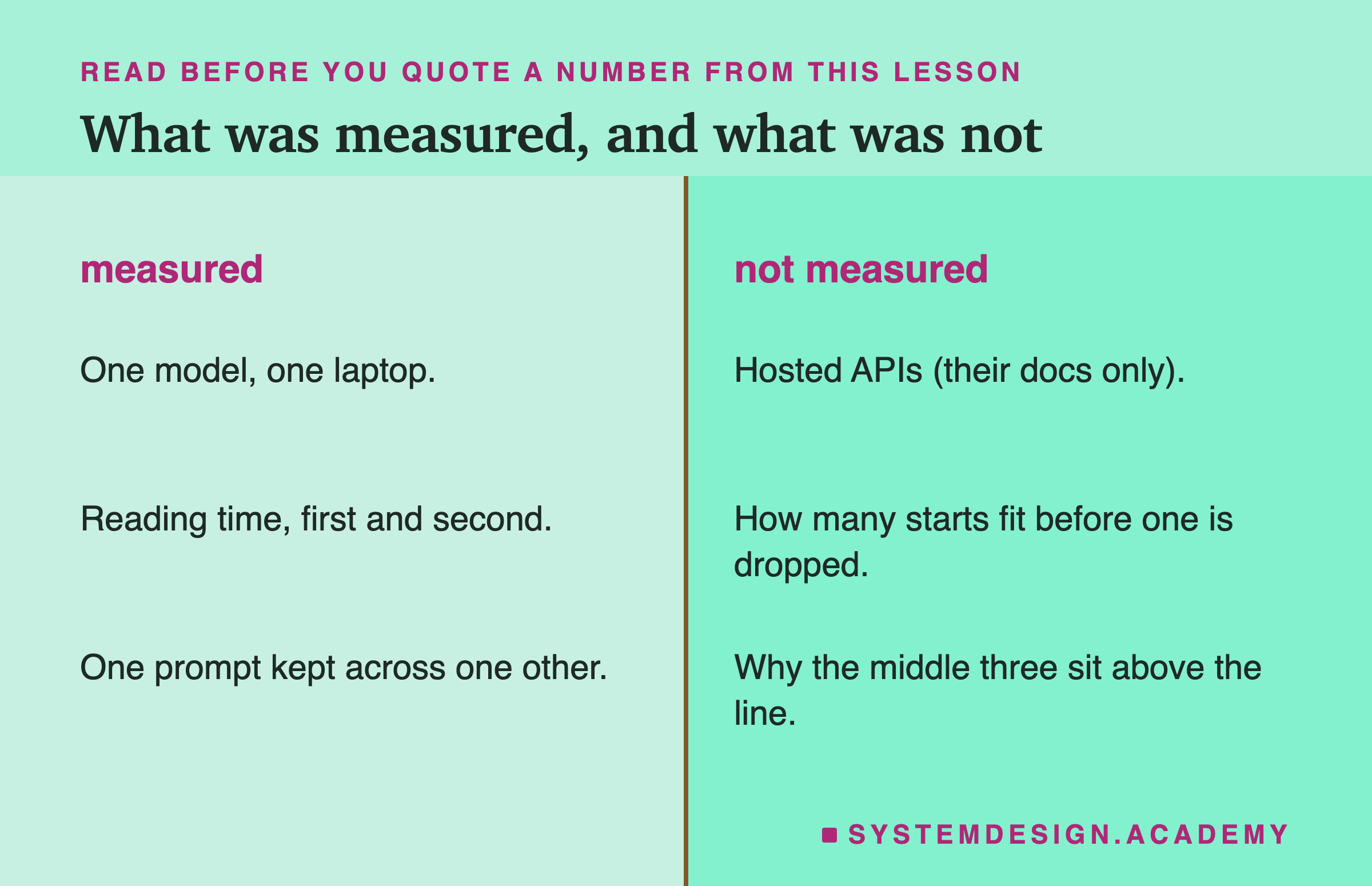
The lab measured one model on one laptop, reading times only, and whether one start survived one other prompt. It did not measure a hosted API; everything said about OpenAI and Anthropic comes from their documentation. It did not measure how many different starts fit before one is thrown away, and it did not confirm why the middle three ratios land a little above the line.
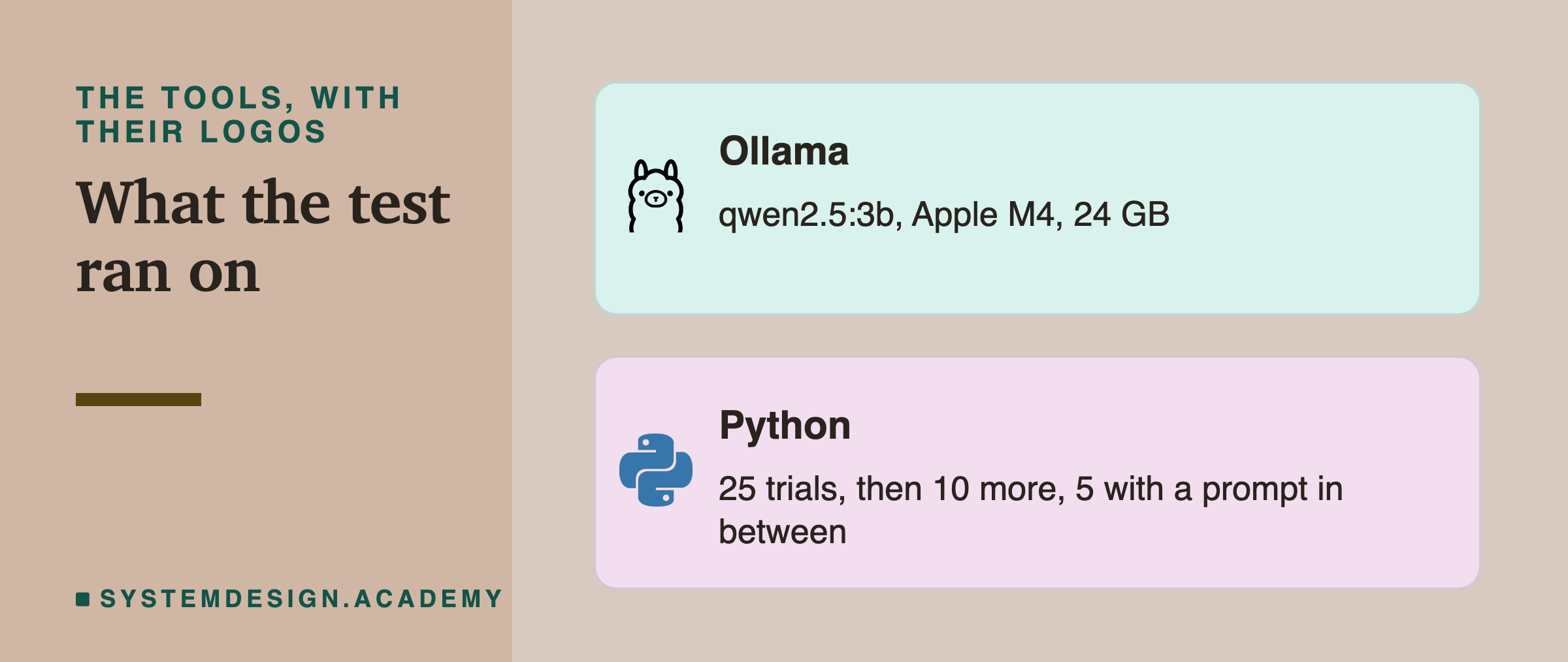
Everything ran locally with Ollama and Python, so you can repeat it on your own machine.
What to Do on Monday
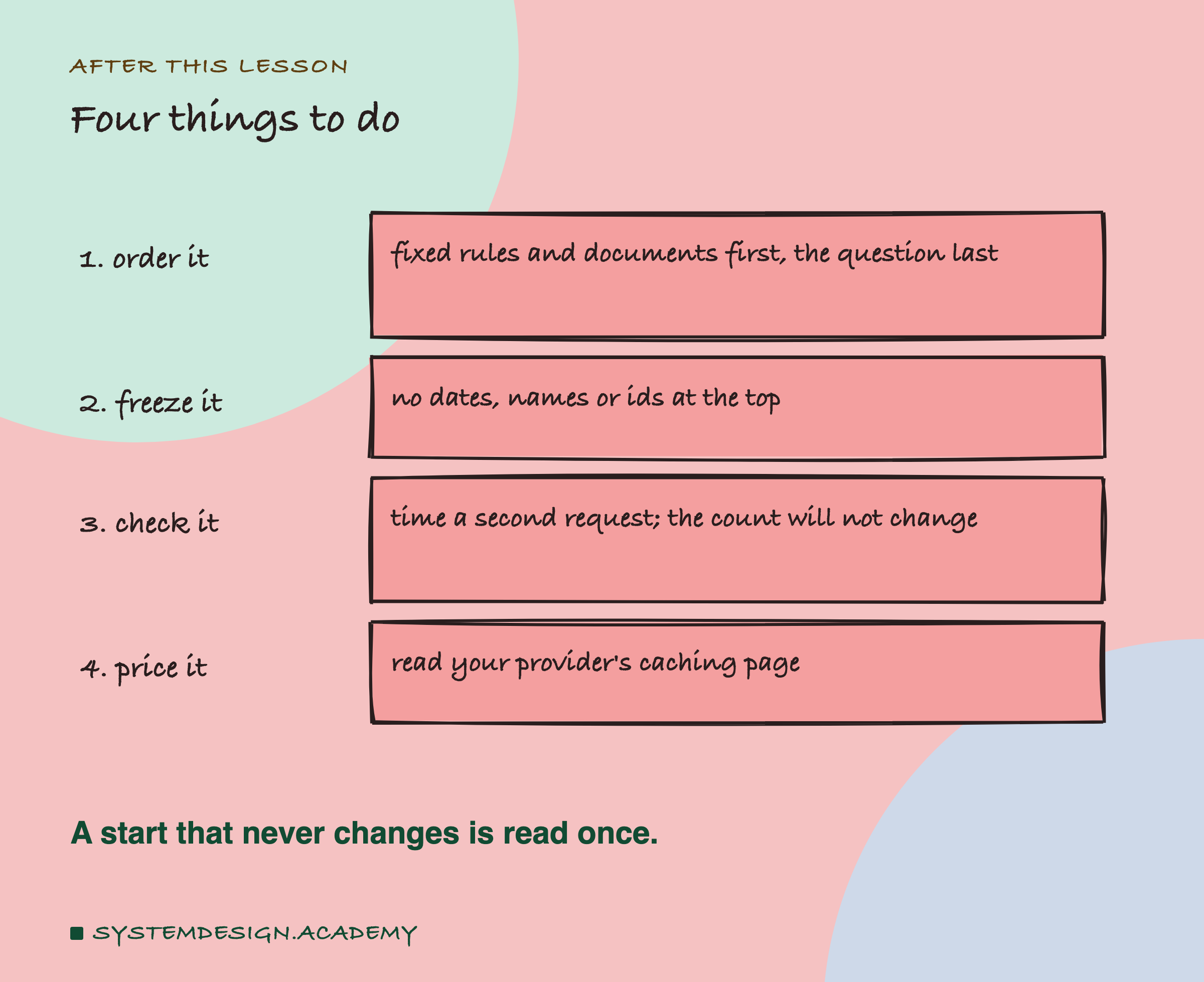
Open the code that builds your prompt and write down, in order, every piece that goes into it. Mark each piece as fixed or changing. If any changing piece comes before a fixed one, move it down. Then send two requests in a row and compare their reading times, not their counts. If the second is not much faster, look for something at the top that still changes, such as a date, a user name, a request id or a list that is built in a different order each time. On a hosted API, read the page for your provider and model, and check how long a stored start is kept against how often your requests arrive.
Knowledge Check
Knowledge Check
4 questions - Score 80% to pass
Two prompts share their first 3,000 tokens, then differ. Why can the server reuse the stored keys and values for those 3,000 tokens?
In the lab, one word of a 3,951-token prompt was changed 75% of the way in. About what fraction of the first reading time did the second read take?
A prompt starts with 'Today is 27 September. User: Priya.' and then has 4,000 tokens of rules. What change lets the rules be reused?
After a prompt was reused, Ollama still reported 3,951 prompt tokens. How do you tell that reuse happened?