API Key
A simple token passed with API requests to identify the calling project or application. Not a substitute for user authentication but useful for rate limiting and usage tracking.
What is API Key?
In short
An API key is a long, unique string that an application sends with each API request to identify which project or app is calling. It tells the server who is making the request so it can track usage, enforce rate limits, and bill the right account, but it identifies the calling application, not the human user, and it is not a substitute for real user authentication.
What an API Key Actually Is
An API key is a secret token, usually a random string of 32 to 64 characters like AIzaSyD-9tSrke72... or sk_live_4eC39H..., that an application includes with every request to an API. When the server sees the key, it looks it up in its database, finds the project it belongs to, and decides whether to serve the request.
The key answers one question: which application is calling? It does not answer who is the logged-in person. That distinction matters. A weather app that calls the OpenWeatherMap API uses one key for all of its users combined. The API has no idea which individual end user triggered the call, only that this app made it.
Keys are issued from a developer console. You sign up, create a project, and the platform generates a key you paste into your code or config. Stripe, Google Maps, OpenAI, SendGrid, and almost every paid API work this way.
How It Works Under the Hood
On request, the client attaches the key. The common patterns are an HTTP header (Authorization: Bearer sk_live_... or x-api-key: ...), a query string parameter (?api_key=...), or a request body field. Headers are preferred because URLs get logged in server access logs, proxies, and browser history, leaking the key.
The server receives the key, hashes or looks it up against its store, and resolves it to an account, a set of permissions (scopes), and a quota. If the key is missing, unknown, revoked, or over its rate limit, the server returns 401 Unauthorized or 429 Too Many Requests. If valid, the request proceeds and the server increments that key's usage counter for billing and analytics.
Good platforms store only a hash of the key, not the raw value, the same way they store passwords. They show you the full key once at creation and never again. They also let you create multiple keys per project so you can rotate or revoke one without breaking everything, and restrict keys by IP address, referrer domain, or allowed API method.
The fundamental weakness is that a key is a bearer token. Anyone who has the string can use it. There is no challenge, no signature over the request body, no proof of identity beyond possession. If the key leaks, the holder is you as far as the API is concerned, until you revoke it.
When to Use It and the Trade-offs
Use API keys for server-to-server calls, usage metering, rate limiting per project, and identifying first-party or partner applications. They are simple, stateless on the client, and easy to generate and revoke. For a backend service calling Stripe or Twilio, a key is the right tool.
Do not use an API key as user authentication. It cannot tell users apart and it grants the same access to anyone holding it. For that you need OAuth tokens, JWTs, or sessions that identify and authorize a specific person. A common mistake is shipping a secret key inside a mobile app or frontend JavaScript bundle, where anyone can extract it with browser dev tools or by decompiling the app.
When a key must live in client code, use a restricted publishable key (Stripe calls these pk_, Google restricts Maps keys by referrer) that can only do safe, public operations, and keep the powerful secret key on your server. Always send keys over HTTPS, store them in environment variables or a secrets manager rather than committing them to Git, and rotate them on a schedule. GitHub and others now scan public repos for leaked keys and auto-notify providers like AWS to disable them.
A Concrete Example
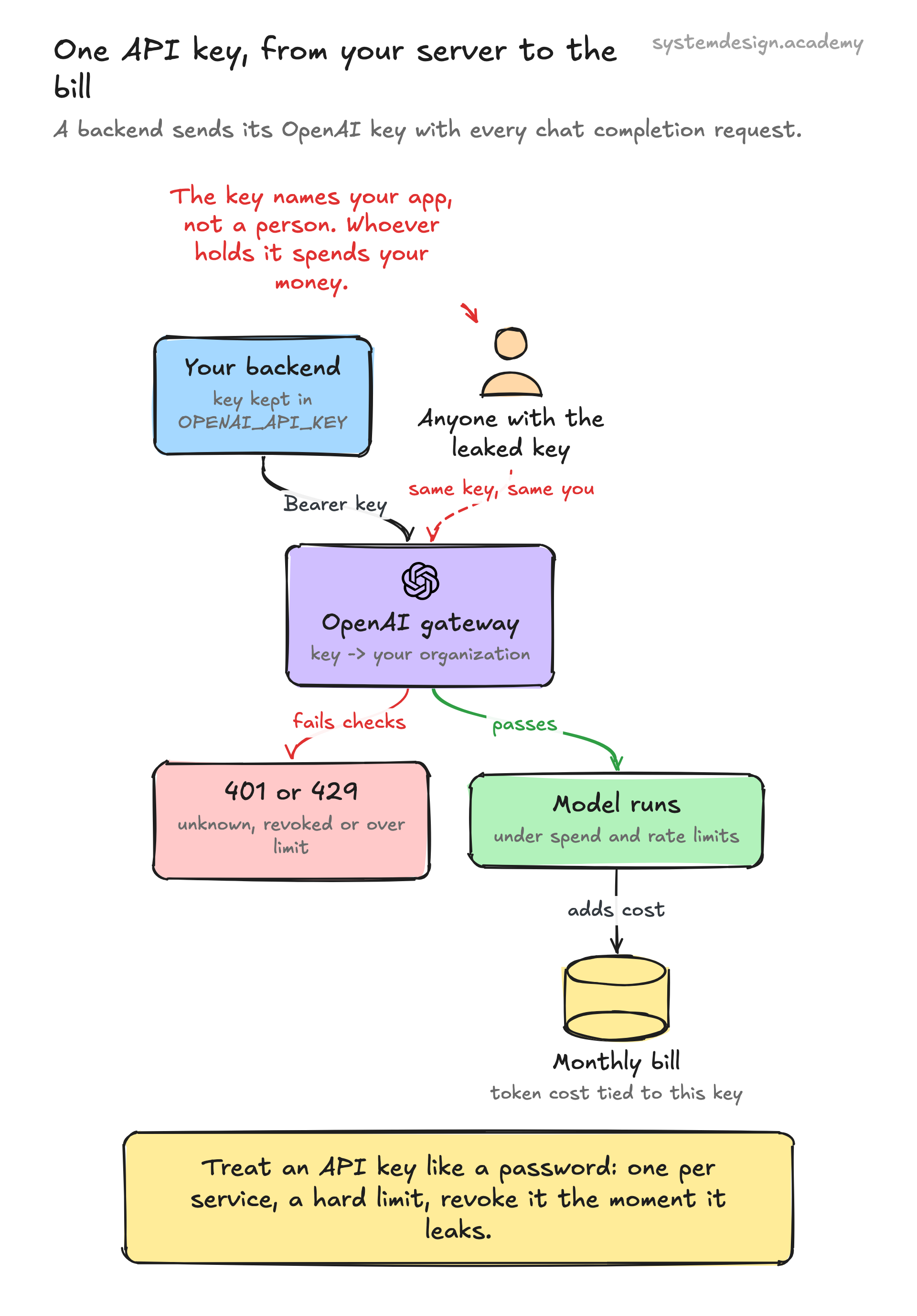
Say you build a backend that generates email summaries using OpenAI. You create a key sk-proj-abc123 in the OpenAI dashboard and store it as the OPENAI_API_KEY environment variable on your server. Your code reads it and sends it as Authorization: Bearer sk-proj-abc123 with each chat completion request.
OpenAI's gateway resolves that key to your organization, checks you are under your spending limit and your requests-per-minute cap, runs the model, and adds the token cost to your monthly bill tied to that key. At month end you can look in the dashboard and see exactly how many requests and dollars that one key consumed.
If your server is compromised and the key leaks to GitHub, an attacker can run up thousands of dollars in charges in hours. That is why you would scope a separate key per service, set a hard usage limit, and revoke and regenerate the moment anything looks wrong. The key is your identity to the API, so it is treated like a password.
Where it is used in production
Stripe
Issues paired keys: secret keys (sk_) for server-side charges and publishable keys (pk_) safe to embed in the browser, both prefixed by mode so test and live cannot be confused.
Google Maps Platform
Every Maps, Geocoding, and Places call requires an API key that Google restricts by HTTP referrer or IP and meters for per-call billing.
OpenAI
API keys (sk-...) authenticate and bill every model request to a project, with per-key usage limits and the ability to revoke a leaked key instantly.
AWS
API Gateway can require API keys to identify clients and attach usage plans that throttle and quota each key independently.
Frequently asked questions
- What is the difference between an API key and a token?
- An API key is a long-lived secret that identifies a calling application and rarely changes. An access token (like an OAuth or JWT bearer token) usually identifies a specific user, carries scopes, and expires quickly so it can be refreshed. Keys are for app identity and metering; tokens are for user authentication and authorization.
- Is an API key secure enough on its own?
- For server-to-server calls over HTTPS, a key plus good secret management is acceptable. But a key is a bearer credential, so anyone who copies the string can use it. It provides no proof of identity beyond possession and is easily stolen if exposed in client code, URLs, or logs. For anything sensitive, combine it with IP restrictions, scopes, short rotation, and real user auth.
- Where should I store my API key?
- On the server, in environment variables or a dedicated secrets manager such as AWS Secrets Manager, HashiCorp Vault, or your platform's encrypted config. Never commit it to Git, never put it in frontend JavaScript or a mobile app, and never pass it in a query string. Use .gitignore and secret-scanning to catch accidental leaks.
- What happens if my API key leaks?
- Anyone with it can make requests as you and run up charges or pull data until you act. Revoke or regenerate the key immediately in the provider's dashboard, deploy the new one, and review usage logs for unauthorized calls. Setting a hard spending limit per key and using separate keys per service limits the blast radius.
- Why do some keys have a prefix like sk_ or pk_?
- Prefixes signal the key's type and power. Stripe uses sk_ for secret server keys and pk_ for publishable client keys, and includes live or test in the prefix. The prefix makes it obvious at a glance which keys are safe to expose, helps secret scanners detect leaks, and prevents mixing test and production credentials.
Learn API Key hands-on
This page explains the idea. The full lesson lets you step through the ring as servers join and leave, read the implementation, and check yourself with a quiz. It is one of 760+ lessons in the System Design Masterclass, from your first API call to distributed consensus. Eleven Foundation lessons are free, no signup. Lifetime access is ₹499 in India or $7.99 worldwide, one payment, no subscription.
Related lessons
Lessons that touch on API Key as part of a larger topic.
API Keys
The simplest way to identify and authenticate API consumers, a shared secret with limits
intermediate · api design protocols
API Keys
Simple tokens for identifying and authenticating API clients, not users
intermediate · security architecture
Service-to-Service Authentication
How microservices prove their identity to each other, mTLS, JWTs, API keys, and SPIFFE
intermediate · security architecture
Secrets Management
Storing, accessing, and rotating sensitive credentials. API keys, database passwords, tokens, and certificates
intermediate · security architecture
See also
Related glossary terms you might want to look up next.
JWT
JSON Web Token: a compact, self-contained token for transmitting claims between parties. The server can verify it without a database lookup.
OAuth
An authorization framework that lets users grant third-party apps limited access to their accounts without sharing passwords. Powers 'Sign in with Google.'
Rate Limiting
Controlling how many requests a client can make in a given time window. Protects your API from abuse and ensures fair usage.
Throttling
Slowing down the rate of processing requests instead of rejecting them outright. The gentler cousin of rate limiting.
SSL/TLS
Cryptographic protocols that encrypt data in transit between client and server. TLS is the modern successor to SSL. The 'S' in HTTPS.
CORS
Cross-Origin Resource Sharing: a security mechanism that controls which domains can access your API. The browser enforces it; the server configures it.