Block Storage
Storage that splits data into fixed-size blocks, each with its own address. Used for databases and boot volumes where low-latency random I/O matters. AWS EBS is block storage.
What is Block Storage?
In short
Block storage is a storage method that splits data into fixed-size chunks called blocks, each with a unique address but no metadata of its own. An operating system or database reads and writes these blocks directly over a low-latency connection, which makes block storage the standard choice for boot disks, databases, and any workload that needs fast random reads and writes. Amazon EBS, Google Persistent Disk, and a SAN array are all block storage.
What block storage actually is
A block is a fixed-size piece of raw storage, typically 512 bytes or 4 KB. Block storage carves a volume into millions of these blocks and gives each one an address. There is no filename, no folder, and no metadata attached to a block. It is just numbered slots that hold bytes.
Because the blocks carry no structure, something above them has to impose structure. That is the job of a filesystem like ext4, XFS, or NTFS, or of a database that manages its own on-disk layout. The filesystem maps your files and directories onto block addresses, then asks the block device to read or write specific blocks.
This is the opposite of object storage like Amazon S3, where you store whole objects by key and the system tracks rich metadata for you. Block storage gives you the rawest, lowest level the operating system can talk to, which is exactly what you want when you are running a disk.
How it works under the hood
When an application writes a file, the filesystem translates that into a set of block writes addressed by Logical Block Address (LBA). The request travels over a protocol to the storage device. Locally that is SATA, SAS, or NVMe. Across a network it is iSCSI, Fibre Channel, or NVMe over Fabrics, where blocks move over TCP or a dedicated fabric to a remote array.
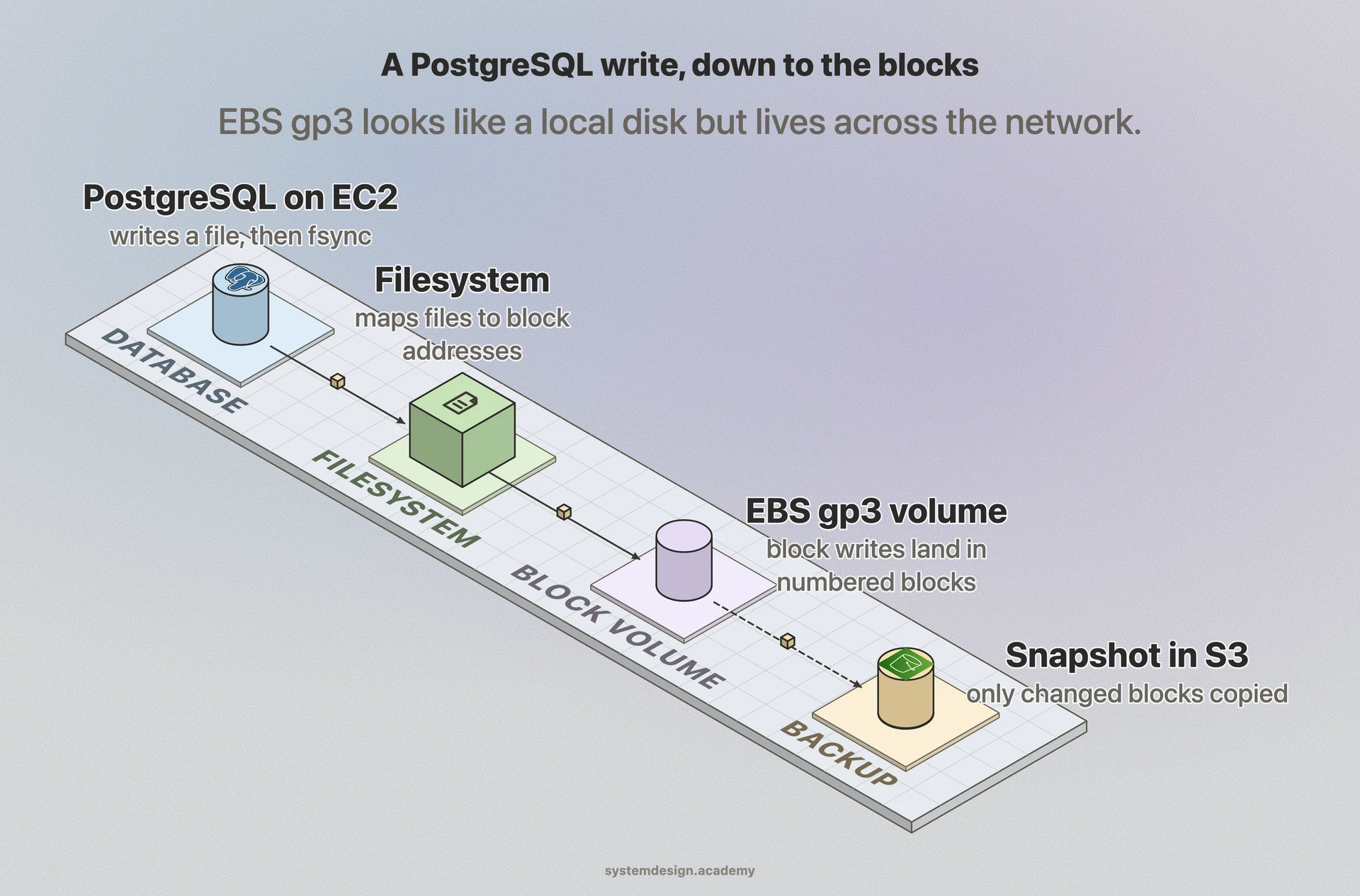
In the cloud the volume is virtual. Amazon EBS, for example, presents a volume that looks like a local disk to your EC2 instance, but the blocks actually live on a replicated storage backend reached over the network. The instance sees a normal /dev/xvdf device and has no idea the bytes are elsewhere.
Performance is measured in IOPS (input/output operations per second), throughput in MB/s, and latency in milliseconds or microseconds. A local NVMe SSD can hit hundreds of thousands of IOPS at sub-100-microsecond latency. A network-attached EBS gp3 volume gives a baseline of 3,000 IOPS and 125 MB/s, and you can provision up to 16,000 IOPS and 1,000 MB/s per volume.
When to use it and the trade-offs
Reach for block storage when a single machine needs fast, random, read-write access to its own disk. Databases like PostgreSQL, MySQL, and MongoDB live on block volumes because they constantly seek to small offsets and rewrite pages in place. Boot volumes and virtual machine disks are block storage for the same reason.
The main trade-off is sharing. A block volume normally attaches to one server at a time, the way a physical disk plugs into one motherboard. You cannot have ten servers mount the same EBS volume and write to it safely. For shared access you use file storage like NFS or EFS, or object storage like S3 for unstructured data and backups.
Block storage is also the most expensive per gigabyte of the three. AWS EBS gp3 runs about 0.08 dollars per GB-month versus roughly 0.023 dollars per GB-month for S3 standard. You pay for provisioned capacity whether you fill it or not, and resizing or snapshotting is your responsibility. Use it for hot, latency-sensitive data, not for cold archives.
A concrete example
Picture a production PostgreSQL database on an EC2 instance. The data and write-ahead log sit on an EBS gp3 volume mounted at /var/lib/postgresql. Every transaction flushes WAL records to specific blocks and fsyncs them, so the database depends on consistent low-latency block writes to guarantee durability.
To back this up safely you take an EBS snapshot. The snapshot copies the changed blocks to S3 behind the scenes and is incremental, so only blocks modified since the last snapshot are stored again. Restoring creates a new volume from those blocks, and the database comes back exactly as it was.
If the database grows, you increase the volume size and provisioned IOPS without moving the data, then expand the filesystem to use the new space. The application never knows the disk got bigger or faster. That live, in-place control over a single fast disk is the whole point of block storage.
Where it is used in production
Amazon EBS
Provides network-attached block volumes (gp3, io2) for EC2 instances, used for databases, boot disks, and stateful workloads.
Google Persistent Disk
Block volumes for Compute Engine VMs and GKE persistent volumes, with regional replication across zones.
VMware vSAN
Pools the local block storage of a cluster of servers into a single shared datastore for virtual machine disks.
Ceph RBD
Open-source distributed block device that powers OpenStack Cinder volumes and Kubernetes persistent volumes at scale.
Frequently asked questions
- What is the difference between block storage and object storage?
- Block storage exposes raw numbered blocks that a filesystem or database manages directly, giving low-latency random read-write access for one machine. Object storage like S3 stores whole files as objects retrieved by key over HTTP, with rich metadata and effectively unlimited scale, but higher latency. Use block storage for databases and disks, object storage for media, backups, and static files.
- What is the difference between block storage and file storage?
- Block storage gives you raw blocks and you put a filesystem on top, usually attached to a single server. File storage hands you a ready-made filesystem you mount over a network protocol like NFS or SMB, and many servers can share it at once. EBS is block storage, EFS and NFS are file storage.
- Can two servers attach to the same block volume?
- Usually no. A block volume is designed to attach to one instance at a time like a physical disk. Some systems support multi-attach with a cluster-aware filesystem, such as EBS io2 multi-attach, but ordinary filesystems like ext4 will corrupt data if two servers write to the same volume without coordination. For shared access use file or object storage instead.
- What are IOPS and why do they matter for block storage?
- IOPS is input/output operations per second, the count of read or write requests a volume can handle. Databases issue many small random I/Os, so high IOPS directly controls how fast they run. Cloud volumes let you provision IOPS, for example AWS EBS gp3 starts at 3,000 IOPS and can scale to 16,000, while local NVMe SSDs reach hundreds of thousands.
- Is block storage faster than object storage?
- For small random reads and writes, yes. Block storage measures latency in microseconds to low milliseconds, while object storage adds tens of milliseconds of HTTP overhead per request. Object storage can match or beat block storage on large sequential throughput and parallel transfers, but it is the wrong tool for a database that seeks constantly.
Learn Block Storage hands-on
This page explains the idea. The full lesson lets you step through the ring as servers join and leave, read the implementation, and check yourself with a quiz. It is one of 760+ lessons in the System Design Masterclass, from your first API call to distributed consensus. Eleven Foundation lessons are free, no signup. Lifetime access is ₹499 in India or $7.99 worldwide, one payment, no subscription.
Related lessons
Lessons that touch on Block Storage as part of a larger topic.
See also
Related glossary terms you might want to look up next.
Object Storage
A storage architecture that manages data as objects (file + metadata + ID) rather than blocks or files. S3 is the gold standard. Infinitely scalable, cheap, and durable.
Database
An organized collection of data that can be easily accessed, managed, and updated. The backbone of almost every application.
Virtual Machine
A software emulation of a physical computer running its own OS on shared hardware. Heavier than containers but provides stronger isolation.
Hypervisor
Software that creates and manages virtual machines by abstracting physical hardware. Type 1 (bare-metal) runs directly on hardware; Type 2 runs on an OS.
Cloud Region
A geographic area containing one or more data centers (availability zones). Choosing the right region reduces latency and satisfies data residency requirements.
Availability Zone
An isolated data center within a cloud region, with independent power, cooling, and networking. Deploying across multiple AZs protects against single-facility failures.