Helm
A package manager for Kubernetes that bundles K8s manifests into reusable charts. Lets you install complex applications with a single command and manage versioned releases.
What is Helm?
In short
Helm is the package manager for Kubernetes. It bundles the many YAML manifests that make up an application (Deployments, Services, ConfigMaps, and more) into a single versioned package called a chart, so you can install, upgrade, roll back, and uninstall a whole app with one command instead of applying dozens of files by hand.
What Helm actually is
Running a real application on Kubernetes means writing a lot of YAML. A typical web service needs a Deployment, a Service, an Ingress, a ConfigMap, a Secret, maybe a HorizontalPodAutoscaler and a ServiceAccount. That is six to ten files for one app, and most of them repeat the same image name, replica count, and labels in slightly different places.
Helm wraps all of those files into a chart. A chart is a directory with a Chart.yaml (name and version), a values.yaml (the default settings), and a templates folder full of manifest files that have placeholders in them. You install a chart with one command and Kubernetes ends up with every object the app needs.
Helm is to Kubernetes roughly what apt is to Ubuntu or npm is to Node. You can pull a published chart from a registry (for example the official PostgreSQL or Redis chart) and have a working install in under a minute, or you can write your own chart for your own services and reuse it across dev, staging, and production.
How it works under the hood
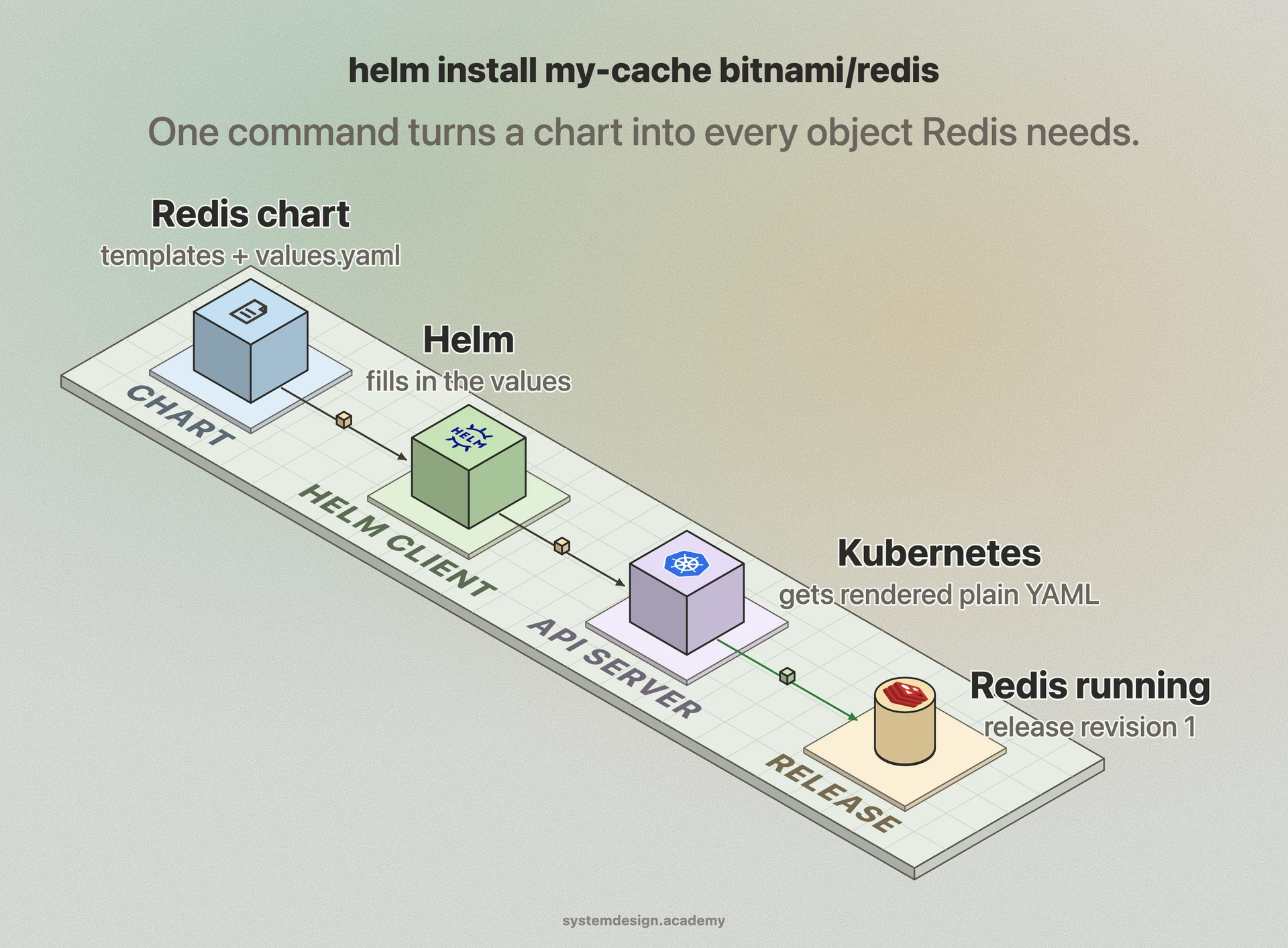
Helm charts are Go templates. A template file looks like normal Kubernetes YAML except values are filled in with double-brace expressions like {{ .Values.replicaCount }}. When you run helm install, the helm client reads your chart, merges the default values.yaml with any overrides you pass on the command line or in a custom values file, renders every template into final plain YAML, and sends the result to the Kubernetes API server.
Each install or upgrade creates a release, which is a named, versioned instance of a chart running in your cluster. Helm 3 stores the rendered manifests and metadata for every release revision in a Kubernetes Secret inside the same namespace as the release. Because it keeps the history, helm rollback can re-apply the manifests from any previous revision, and helm upgrade computes a three-way merge between the old chart, the new chart, and the live cluster state so it only changes what needs changing.
Charts can depend on other charts. A dependency list in Chart.yaml lets a parent chart pull in subcharts (a frontend chart that needs Redis can declare the Redis chart as a dependency), and helm dependency update fetches them into a charts subfolder. Helm 2 needed a server-side component called Tiller for all of this; Helm 3 removed Tiller entirely and now talks to the cluster directly using your kubeconfig, which closed a major security hole.
When to use it and the trade-offs
Helm is the right tool when you ship the same application to several environments or several clusters and you want a single source of truth with per-environment overrides. It is also the standard way third parties distribute software for Kubernetes, so if you want to run Prometheus, Grafana, cert-manager, or an ingress controller, there is almost always an official chart.
The main cost is the templating. Go template syntax mixed into YAML gets ugly fast, whitespace and indentation bugs are common, and a rendered manifest that looks fine can still be invalid until the API server rejects it. Tools like helm template (render without installing) and helm lint help, but debugging a large chart is real work.
The alternatives matter. Kustomize, which is built into kubectl, takes a different approach: instead of templates it patches plain YAML with overlays, so there is no new templating language to learn, but it has no release history or rollback. Many teams use both, rendering with Helm and then patching with Kustomize, or skip Helm for their own apps and only use it to install other people's software.
A concrete example
Say you want Redis in your cluster. You add the Bitnami repository, then run helm install my-cache bitnami/redis. Helm renders the chart, creates a StatefulSet, a Service, a Secret with the password, and a few config objects, and within a minute Redis is running. To change the memory limit or turn on replication you do not edit any YAML; you pass helm upgrade my-cache bitnami/redis --set replica.replicaCount=3 and Helm computes the diff and applies it.
If the upgrade misbehaves, helm rollback my-cache 1 puts you back on the first revision exactly as it was. helm list shows every release in the namespace with its chart version and status, and helm uninstall my-cache removes every object the chart created, with no orphaned ConfigMaps left behind.
For your own service the flow is the same. You keep one chart in your repo, a values-staging.yaml and a values-prod.yaml for the differences, and your CI pipeline runs helm upgrade --install with the right values file per environment. The chart version in Chart.yaml becomes the version of your deployment, which makes it easy to see exactly what shipped where.
Where it is used in production
Bitnami
Publishes one of the most widely used chart catalogs, packaging PostgreSQL, Redis, Kafka, and dozens of other applications as production-ready Helm charts.
Prometheus and Grafana
The kube-prometheus-stack chart installs Prometheus, Grafana, Alertmanager, and all the exporters and dashboards together, which is how most teams get monitoring onto a cluster.
Argo CD and Flux
Both GitOps tools natively render and deploy Helm charts, letting teams keep chart values in Git and have the cluster continuously reconcile to match.
Amazon EKS and Microsoft AKS
Managed Kubernetes providers document Helm as the standard install path for add-ons such as ingress controllers, the AWS Load Balancer Controller, and cluster autoscaler.
Frequently asked questions
- What is the difference between Helm and Kubernetes?
- Kubernetes is the platform that runs your containers and manages objects like Deployments and Services. Helm is a tool that sits on top of Kubernetes and packages those objects into installable charts. Kubernetes does the actual running; Helm just makes it easier to ship and version the YAML that tells Kubernetes what to run.
- What is the difference between Helm and Kustomize?
- Helm uses Go templates with variables, supports versioned releases, and can roll back to a previous revision. Kustomize, built into kubectl, patches plain YAML with overlays and has no templating language and no release history. Helm is better for distributing reusable packages; Kustomize is simpler for managing per-environment differences in YAML you own.
- What is a Helm chart?
- A chart is a packaged Kubernetes application: a directory containing a Chart.yaml with the name and version, a values.yaml with default settings, and a templates folder of manifest files with placeholders. Installing a chart creates all the Kubernetes objects the app needs, with values filled in from the defaults plus any overrides you provide.
- Do I still need Tiller with Helm?
- No. Tiller was the in-cluster server component in Helm 2 and was a known security risk because it ran with broad permissions. Helm 3 removed it entirely. The Helm 3 client talks directly to the Kubernetes API using your kubeconfig and stores release history in Secrets inside the cluster.
- Where does Helm store release information?
- In Helm 3, each release revision is stored as a Kubernetes Secret in the same namespace as the release. That Secret holds the rendered manifests and metadata, which is what lets helm rollback restore a previous revision and helm list report the status of everything installed.
Learn Helm hands-on
This page explains the idea. The full lesson lets you step through the ring as servers join and leave, read the implementation, and check yourself with a quiz. It is one of 760+ lessons in the System Design Masterclass, from your first API call to distributed consensus. Eleven Foundation lessons are free, no signup. Lifetime access is ₹499 in India or $7.99 worldwide, one payment, no subscription.
Related lessons
Lessons that touch on Helm as part of a larger topic.
Backpressure for Resilience
Signal upstream to slow down when overwhelmed, flow control that prevents cascading overload
advanced · reliability resilience
Back Pressure
When a system is overwhelmed, push back on the sender instead of silently drowning, the flow control of distributed systems
intermediate · microservices architecture
DDoS Protection
Defending against distributed denial-of-service attacks that overwhelm your infrastructure with traffic
intermediate · security architecture
See also
Related glossary terms you might want to look up next.
Kubernetes
An orchestration platform that automates deploying, scaling, and managing containerized applications. K8s is the operating system for your cloud.
Kubernetes Deployment
A K8s resource that manages rolling updates and rollbacks for a set of pods. You declare the desired state and K8s converges to it.
Infrastructure as Code
Managing servers, networks, and cloud resources through declarative configuration files instead of manual setup. Terraform, Pulumi, and CloudFormation are IaC tools.
Docker
A platform for packaging applications into lightweight, portable containers. 'Works on my machine' becomes 'works everywhere.'
Container
A lightweight, isolated environment that packages an application with its dependencies. Shares the host OS kernel, unlike VMs. Starts in milliseconds.
Kubernetes Pod
The smallest deployable unit in Kubernetes: one or more containers sharing network and storage. Pods are ephemeral; if one dies, K8s creates a replacement.