Kubernetes Pod
The smallest deployable unit in Kubernetes: one or more containers sharing network and storage. Pods are ephemeral; if one dies, K8s creates a replacement.
What is Kubernetes Pod?
In short
A Kubernetes Pod is the smallest deployable unit in Kubernetes: a wrapper around one or more containers that share the same network address and storage volumes and are always scheduled together onto a single node. Pods are disposable. When one dies, Kubernetes does not repair it, it creates a fresh replacement with a new IP.
What a Pod actually is
You do not run a container directly in Kubernetes. You run a Pod, and the Pod runs the container. A Pod is a thin layer around one or more containers that tells the cluster: these containers belong together, schedule them on the same machine, and let them share a few things.
Most Pods hold exactly one container. The reason the Pod can hold more than one is the sidecar pattern: a main container plus a helper that does logging, a service mesh proxy, or config reloading. Every container in the same Pod shares one IP address, one set of ports, and any volumes you attach, so they can talk to each other over localhost.
A Pod is the unit of scheduling and the unit of replacement. Kubernetes never moves a running Pod to another node and never restarts a Pod in place when the node fails. It deletes the old Pod and creates a brand new one, with a new name and a new IP. That is why Pods are called ephemeral.
How it works under the hood
When you submit a Pod, the API server stores its spec in etcd. The scheduler picks a node that has enough CPU and memory and matches any rules you set, like node selectors or affinity. The kubelet on that node sees the assignment and asks the container runtime, usually containerd, to pull the images and start the containers.
Before your app containers start, the kubelet sets up the shared network namespace. Historically a tiny pause container held this namespace open so all the real containers could join it. The Pod gets one IP from the cluster network, and a CNI plugin like Calico or Cilium wires it up so any Pod can reach any other Pod directly, no NAT.
Each container can declare resource requests and limits. Requests drive scheduling decisions, limits get enforced at runtime, and a container that exceeds its memory limit is killed with an OOMKilled status. Liveness and readiness probes let the kubelet restart a stuck container or pull a not-ready Pod out of the load balancer rotation.
When to use it and the trade-offs
In practice you almost never create a bare Pod yourself. A bare Pod has no self-healing: if its node dies, the Pod is gone for good. Instead you create a Deployment, StatefulSet, or DaemonSet, and the controller creates and recreates Pods for you to match a desired count.
The big trade-off is that Pods are cattle, not pets. You cannot rely on a Pod's IP or name staying the same, so you put a Service in front of a set of Pods to get a stable address. You do not write important data to the Pod's local disk because it vanishes on restart, so you mount a PersistentVolume for anything that must survive.
Keep Pods small and single-purpose. Stuffing three unrelated apps into one Pod means they scale together, fail together, and get redeployed together, which is rarely what you want. Use multiple containers in one Pod only when they are tightly coupled and genuinely need to share localhost or a volume.
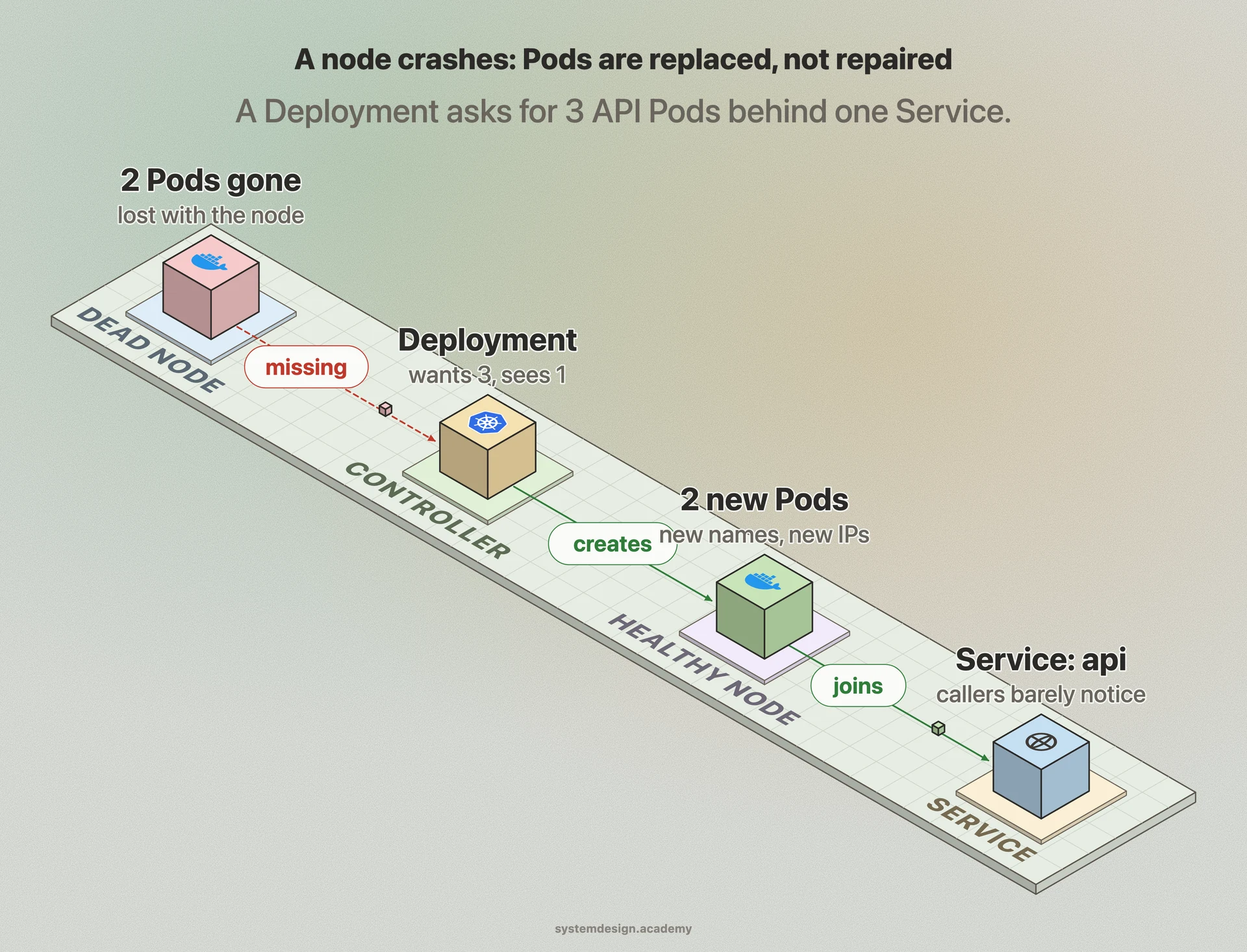
A concrete example
Say you run a web API. You create a Deployment that asks for 3 replicas. Kubernetes creates 3 Pods, each with your API container, spread across nodes. A Service named api groups them under one DNS name so callers hit api.default.svc.cluster.local without caring which Pod answers.
One night a node crashes. Two of your Pods die with it. Within seconds the Deployment controller notices it has 1 Pod instead of 3 and creates 2 new Pods on healthy nodes. The Service automatically routes around the dead ones because they failed their readiness probes. No human intervention, and users barely notice.
If you add a sidecar, say an Envoy proxy for a service mesh like Istio, it lives in the same Pod as your API container and shares its network. Your app sends traffic to localhost and the proxy handles encryption and routing, all inside the same Pod boundary.
Where it is used in production
Kubernetes
The Pod is Kubernetes' native primitive; every workload type, from Deployments to Jobs, ultimately produces Pods.
Google Kubernetes Engine
Google runs production Pods at massive scale; the design comes from Borg, Google's internal cluster manager that inspired Kubernetes.
Istio
Injects an Envoy sidecar container into each Pod so application traffic is proxied over localhost for mTLS and routing.
Amazon EKS
Schedules Pods onto EC2 or Fargate, where each Fargate task maps to a single isolated Pod.
Frequently asked questions
- What is the difference between a Pod and a container?
- A container is a single running process image. A Pod is the Kubernetes wrapper that schedules one or more containers together, gives them a shared IP and shared volumes, and is the smallest thing Kubernetes can deploy. You run Pods, and Pods run containers.
- Can a Pod have more than one container?
- Yes. All containers in a Pod share the same network and can talk over localhost, plus any mounted volumes. This is used for the sidecar pattern, like a logging agent or a service mesh proxy. Most Pods still hold just one container.
- Why do Pods get a new IP when they restart?
- Pods are ephemeral. Kubernetes does not repair a failed Pod, it deletes it and creates a fresh one, which gets a new IP from the cluster network. Because IPs are not stable, you put a Service in front of Pods to get a fixed address and DNS name.
- Should I create Pods directly?
- Almost never. A bare Pod has no self-healing, so if its node dies it is gone permanently. Use a Deployment, StatefulSet, or DaemonSet, which create and recreate Pods automatically to keep the desired number running.
- Where should a Pod store data that must survive a restart?
- Not on the Pod's local disk, which is wiped when the Pod is recreated. Mount a PersistentVolume backed by network or cloud storage so the data outlives any single Pod.
Learn Kubernetes Pod hands-on
This page explains the idea. The full lesson lets you step through the ring as servers join and leave, read the implementation, and check yourself with a quiz. It is one of 760+ lessons in the System Design Masterclass, from your first API call to distributed consensus. Eleven Foundation lessons are free, no signup. Lifetime access is ₹499 in India or $7.99 worldwide, one payment, no subscription.
Related lessons
Lessons that touch on Kubernetes Pod as part of a larger topic.
See also
Related glossary terms you might want to look up next.
Kubernetes
An orchestration platform that automates deploying, scaling, and managing containerized applications. K8s is the operating system for your cloud.
Container
A lightweight, isolated environment that packages an application with its dependencies. Shares the host OS kernel, unlike VMs. Starts in milliseconds.
Kubernetes Service
A stable network endpoint that load-balances traffic across a set of pods. Pods come and go, but the Service's IP and DNS name stay constant.
Docker
A platform for packaging applications into lightweight, portable containers. 'Works on my machine' becomes 'works everywhere.'
Kubernetes Deployment
A K8s resource that manages rolling updates and rollbacks for a set of pods. You declare the desired state and K8s converges to it.
Kubernetes Ingress
A K8s resource that manages external HTTP/HTTPS access to services inside the cluster. Routes traffic by hostname or URL path to different backend services.