Container
A lightweight, isolated environment that packages an application with its dependencies. Shares the host OS kernel, unlike VMs. Starts in milliseconds.
What is Container?
In short
A container is a unit of software that packages an application together with everything it needs to run (code, runtime, libraries, and config) into one isolated process that shares the host machine's operating system kernel. Because it does not boot its own OS like a virtual machine, a container starts in milliseconds and uses far less memory and disk.
What a container actually is
A container is just a normal Linux process that the kernel has fenced off so it behaves as if it has the machine to itself. It sees its own filesystem, its own process tree, its own network interface, and a capped slice of CPU and memory, but it is still running directly on the host kernel. There is no second operating system inside it.
This is the key difference from a virtual machine. A VM runs a full guest OS on top of a hypervisor, so it carries its own kernel, system services, and gigabytes of disk. A container ships only the application and its dependencies, often 10 to 200 MB, and reuses the kernel already running on the host. That is why a container can start in under a second while a VM takes tens of seconds to boot.
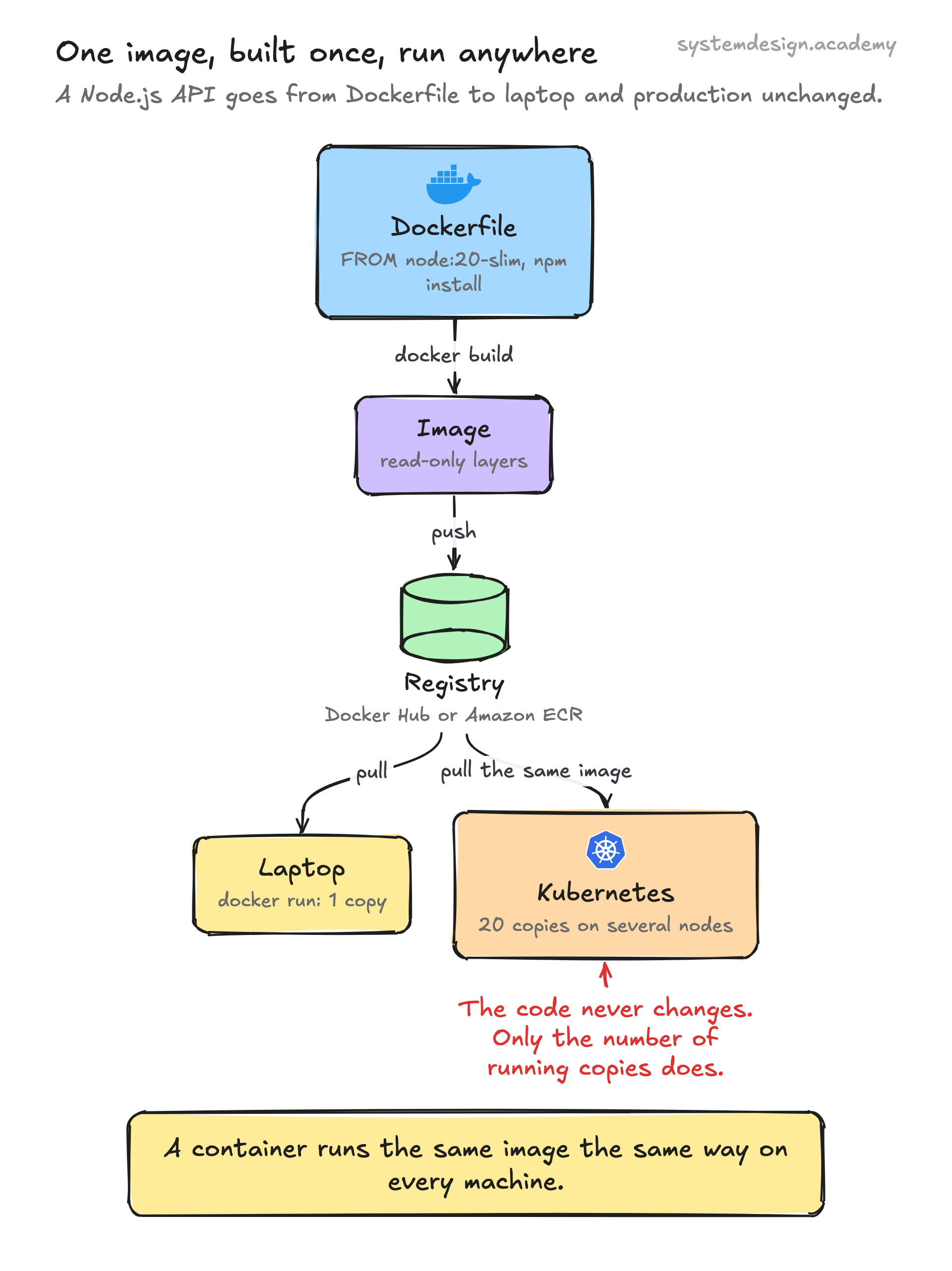
A container starts from an image, which is a read-only, layered snapshot of a filesystem. The image is built once and runs the same way on a laptop, a CI server, or production. This is what people mean when they say containers solve the works on my machine problem.
How it works under the hood
Isolation comes from two Linux kernel features. Namespaces give each container its own view of system resources: the PID namespace makes the container's first process look like PID 1, the mount namespace gives it a private filesystem, and the network namespace gives it its own IP stack. Cgroups (control groups) enforce limits, so a container can be capped at, say, 0.5 CPU and 256 MB of RAM and cannot starve its neighbors.
The image itself is built in layers. Each instruction in a Dockerfile (install a package, copy your code) creates a new layer stacked on the previous one using a union filesystem like overlayfs. Layers are content-addressed and cached, so if two images both start from the same Ubuntu base, that base is stored and pulled only once.
At runtime a container engine such as containerd or CRI-O talks to a low-level runtime like runc, which calls the kernel to set up the namespaces and cgroups and then execs your process. Docker is the most familiar tool, but it is a friendly wrapper around these same standardized pieces defined by the Open Container Initiative (OCI).
When to use containers and the trade-offs
Containers are the right tool when you want fast, repeatable deployments, dense packing of many services onto one host, and a clean handoff between development and operations. They are the foundation of microservices and the unit that orchestrators like Kubernetes schedule, scale, and restart.
The trade-offs are real. Because containers share the host kernel, a kernel-level exploit can in theory break out of the isolation, which is weaker than a VM's hardware-enforced boundary. Multi-tenant platforms that need stronger separation use lightweight VMs such as Firecracker or gVisor underneath. Containers are also designed to be stateless and disposable, so stateful workloads like databases need explicit volumes and care.
A container should run one main process and write logs to stdout rather than acting like a tiny server you SSH into. If you find yourself running an init system and three daemons inside one container, you probably want either separate containers or a VM.
A concrete example
Say you have a Node.js API. You write a Dockerfile that starts FROM node:20-slim, copies in your package.json, runs npm install, copies your source, and sets the start command. You run docker build to produce an image, push it to a registry like Docker Hub or Amazon ECR, and now any machine can pull and run that exact image.
On your laptop you run one copy with docker run. In production, Kubernetes pulls the same image and runs twenty copies across several nodes, restarts any that crash, and rolls out a new version by swapping the image tag with zero downtime. The application code never changed between those environments; only the number of running copies did.
Where it is used in production
Docker
Made containers mainstream with a simple build, ship, run workflow and the image format most teams still use.
Kubernetes
Schedules and manages containers across fleets of machines, handling scaling, restarts, and rollouts.
Runs everything in containers internally via Borg, launching over two billion containers a week, the system Kubernetes was modeled on.
AWS
Runs containers through ECS, EKS, and Fargate, and built the Firecracker micro-VM to isolate them safely in Lambda.
Frequently asked questions
- What is the difference between a container and a virtual machine?
- A VM runs a full guest operating system on a hypervisor, so it has its own kernel and takes gigabytes of disk and tens of seconds to boot. A container shares the host's kernel and packages only the app and its dependencies, so it is far smaller and starts in milliseconds. VMs give stronger isolation; containers give speed and density.
- Is a container the same as Docker?
- No. A container is the underlying concept, an isolated process built from Linux namespaces and cgroups. Docker is one popular tool for building and running containers. Other tools like Podman, containerd, and CRI-O run the same OCI-standard containers without Docker.
- What is the difference between an image and a container?
- An image is a read-only, layered template containing your app and its dependencies. A container is a running instance of that image. You can start many containers from one image, the same way you can create many objects from one class.
- Can I run a database in a container?
- Yes, but you must attach a persistent volume so the data survives when the container is replaced. Containers are disposable by default, so anything written inside the container's own filesystem is lost when it stops. Many teams still prefer managed database services for production state.
- Do containers work on Windows and Mac?
- Containers are a Linux kernel feature, so on Windows and macOS tools like Docker Desktop run a lightweight Linux VM in the background and run your containers inside it. Windows also has native Windows containers for Windows-based workloads.
Learn Container hands-on
This page explains the idea. The full lesson lets you step through the ring as servers join and leave, read the implementation, and check yourself with a quiz. It is one of 760+ lessons in the System Design Masterclass, from your first API call to distributed consensus. Eleven Foundation lessons are free, no signup. Lifetime access is ₹499 in India or $7.99 worldwide, one payment, no subscription.
Related lessons
Lessons that touch on Container as part of a larger topic.
Container Registry
Centralized storage for container images, the Docker Hub, ECR, and GHCR of the world
intermediate · kubernetes containers
Init Containers
Running setup tasks before the main container starts: migrations, config fetching, dependency checks
intermediate · kubernetes containers
Container Security
Securing containers from image to runtime, scanning, hardening, least privilege, and runtime protection
intermediate · kubernetes containers
Containerization
Packaging applications with their dependencies into isolated, portable units that run anywhere
intermediate · kubernetes containers
Adapter Container Pattern
Standardize the output of your application, transform logs, metrics, and data into formats your infrastructure expects
intermediate · microservices architecture
See also
Related glossary terms you might want to look up next.
Docker
A platform for packaging applications into lightweight, portable containers. 'Works on my machine' becomes 'works everywhere.'
Kubernetes
An orchestration platform that automates deploying, scaling, and managing containerized applications. K8s is the operating system for your cloud.
Virtual Machine
A software emulation of a physical computer running its own OS on shared hardware. Heavier than containers but provides stronger isolation.
Kubernetes Pod
The smallest deployable unit in Kubernetes: one or more containers sharing network and storage. Pods are ephemeral; if one dies, K8s creates a replacement.
Kubernetes Service
A stable network endpoint that load-balances traffic across a set of pods. Pods come and go, but the Service's IP and DNS name stay constant.
Kubernetes Deployment
A K8s resource that manages rolling updates and rollbacks for a set of pods. You declare the desired state and K8s converges to it.