Kubernetes
An orchestration platform that automates deploying, scaling, and managing containerized applications. K8s is the operating system for your cloud.
What is Kubernetes?
In short
Kubernetes is an open source platform that automates deploying, scaling, and running containerized applications across a cluster of machines. You describe the state you want in YAML, and Kubernetes continuously works to make the cluster match that state, restarting failed containers, rescheduling them when a machine dies, and load balancing traffic across them.
What Kubernetes Actually Is
A container packages your application and its dependencies into one runnable unit, usually built with Docker. One container is easy to run by hand. The problem starts when you have 200 containers spread across 30 servers and you need them to stay healthy, talk to each other, and survive a server crash at 3 AM without a human watching.
Kubernetes is the system that runs those containers for you. You tell it I want five copies of this web server, each with 512 MB of memory, reachable at this address. It finds machines with spare capacity, starts the containers there, and keeps five running. If one crashes, it starts a replacement. If a whole machine dies, it moves that machine's containers somewhere else. Nobody gets paged.
The word comes from Greek for helmsman. People shorten it to k8s, with the 8 standing in for the eight letters between k and s. Google released it as open source in 2014, based on an internal system called Borg, and it is now governed by the Cloud Native Computing Foundation.
How It Works Under The Hood
A Kubernetes cluster has two kinds of machines. The control plane is the brain. It holds the API server that every command talks to, etcd which is a distributed key value store that records the entire desired and actual state of the cluster, the scheduler that decides which machine a new container should run on, and controllers that watch for differences between what you asked for and what is actually running. Worker nodes are the machines that run your containers. Each worker runs a kubelet agent that takes orders from the control plane and a container runtime like containerd that actually starts the containers.
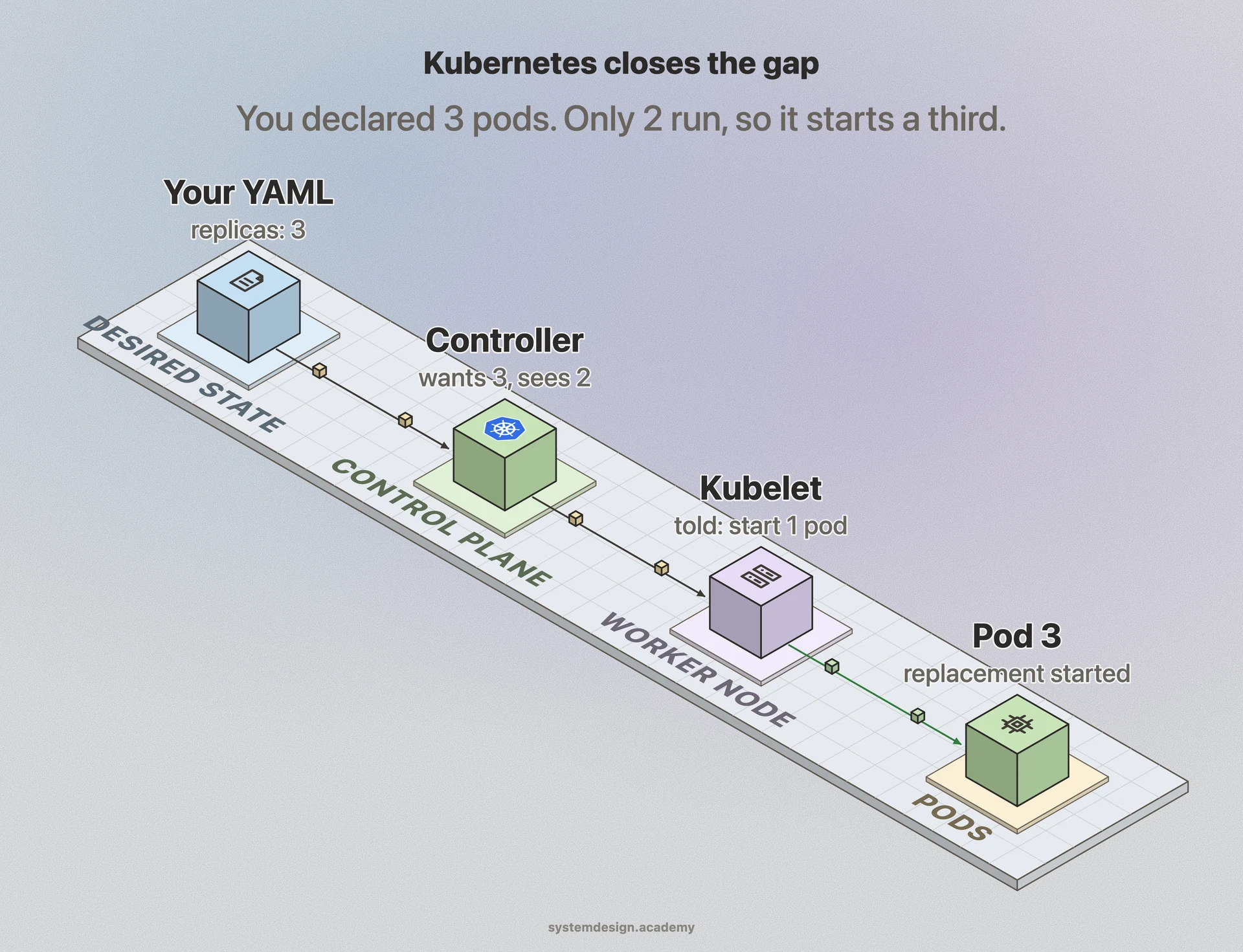
The core idea is the reconciliation loop. You declare the desired state, for example three replicas of a Deployment. A controller constantly compares desired against actual. If only two pods are running, it creates a third. If four are running because of a stale request, it kills one. This control loop runs forever, which is why Kubernetes is described as declarative rather than imperative. You never say start a container, you say there should be three, and the system figures out the steps.
The smallest unit you deploy is a Pod, which is one or more containers that share a network address and storage. You rarely create Pods directly. Instead you create a Deployment, which manages Pods and handles rolling updates. A Service gives a stable address and load balances across the Pods behind it, because individual Pods get new IP addresses every time they restart.
When To Use It And The Trade-offs
Kubernetes pays off when you run many services that need to scale independently, self heal, and roll out updates without downtime. A team running 20 microservices across a fleet of servers gets real value from automated scheduling, rolling deployments, and health checks that would otherwise be hand rolled scripts.
It is overkill for a single application on one or two servers. The learning curve is steep, the YAML is verbose, and a real production cluster pulls in networking plugins, ingress controllers, monitoring, and secrets management. Many small teams are better served by a platform as a service like Heroku, Render, or Fly.io, or by a simpler container service like AWS ECS, where the orchestration is hidden from you.
The other cost is operational. Running your own cluster means patching, upgrading, and debugging the control plane, etcd backups, and certificate rotation. Most teams avoid this by using a managed offering such as Amazon EKS, Google GKE, or Azure AKS, where the cloud provider runs the control plane and you only manage worker nodes and your applications.
A Concrete Example
Say you run an online store. Black Friday hits and traffic jumps ten times. You set a HorizontalPodAutoscaler that watches CPU usage on your checkout service. When average CPU crosses 70 percent, Kubernetes adds more Pods, up to a limit you set, say 50. When traffic drops that night, it scales back down to 5 so you stop paying for idle machines.
During the sale you also ship a bug fix. You update the Deployment with a new container image. Kubernetes does a rolling update: it starts new Pods with the fixed code, waits for each to pass its health check, then removes old Pods one at a time. If the new version starts crashing, you run a one line rollback and it returns to the previous image. Customers never see an error page, and you did all of this by editing a few lines of YAML rather than by SSHing into servers.
Where it is used in production
Google Kubernetes Engine
Google's managed Kubernetes service, built by the same team that created Borg, the internal system Kubernetes was based on.
Amazon EKS
AWS runs the Kubernetes control plane for you so teams only manage worker nodes and apps; used by companies like Snap and HSBC.
Spotify
Migrated its microservices onto Kubernetes to standardize deployment and now runs thousands of services across its clusters.
OpenAI
Runs large machine learning training and inference workloads on Kubernetes clusters scaled to thousands of nodes.
Frequently asked questions
- What is the difference between Docker and Kubernetes?
- Docker builds and runs individual containers on one machine. Kubernetes orchestrates many containers across many machines, deciding where they run, restarting them when they fail, and load balancing traffic. They are complementary: you build images with Docker and Kubernetes runs them at scale, usually through the containerd runtime.
- What is a Pod in Kubernetes?
- A Pod is the smallest deployable unit. It is one or more containers that share the same network address and storage and always run together on the same node. Most of the time a Pod holds a single container, with extra sidecar containers only for helpers like logging or proxies.
- Do I need Kubernetes for a small project?
- Usually no. For one app on a couple of servers the YAML and cluster maintenance cost more than they save. A platform like Render, Fly.io, or AWS ECS is simpler. Reach for Kubernetes when you run many services that must scale independently and self heal.
- What does declarative mean in Kubernetes?
- You describe the end state you want, such as three replicas of a service, rather than the steps to get there. A control loop continuously compares desired state against actual state and makes changes to close the gap, so the cluster keeps fixing itself without you issuing commands.
- What is etcd and why does it matter?
- etcd is the distributed key value store that holds the entire state of the cluster, both what you asked for and what is actually running. If etcd is lost without a backup, the cluster loses its memory, which is why etcd backups and high availability are a top priority in production.
Learn Kubernetes hands-on
This page explains the idea. The full lesson lets you step through the ring as servers join and leave, read the implementation, and check yourself with a quiz. It is one of 760+ lessons in the System Design Masterclass, from your first API call to distributed consensus. Eleven Foundation lessons are free, no signup. Lifetime access is ₹499 in India or $7.99 worldwide, one payment, no subscription.
Related lessons
Lessons that touch on Kubernetes as part of a larger topic.
Declarative vs Imperative
Two fundamentally different approaches to managing infrastructure, and why Kubernetes chose declarative
intermediate · kubernetes containers
Orchestration
Coordinating hundreds of containers across dozens of machines, the problem Kubernetes was built to solve
intermediate · kubernetes containers
Volume Management
Giving ephemeral containers access to persistent data through Kubernetes volume abstractions
intermediate · kubernetes containers
Jobs and CronJobs
Running one-off tasks and scheduled batch work in Kubernetes
intermediate · kubernetes containers
Controllers
The control loop pattern that makes Kubernetes self-healing: watching, comparing, and reconciling state
intermediate · kubernetes containers
See also
Related glossary terms you might want to look up next.
Docker
A platform for packaging applications into lightweight, portable containers. 'Works on my machine' becomes 'works everywhere.'
Microservices
An architecture where an application is split into small, independent services that communicate over the network. Each service owns its own data and can be deployed separately.
Service Discovery
The mechanism by which microservices find and communicate with each other. Services register themselves and others can look them up by name.
Container
A lightweight, isolated environment that packages an application with its dependencies. Shares the host OS kernel, unlike VMs. Starts in milliseconds.
Kubernetes Pod
The smallest deployable unit in Kubernetes: one or more containers sharing network and storage. Pods are ephemeral; if one dies, K8s creates a replacement.
Kubernetes Service
A stable network endpoint that load-balances traffic across a set of pods. Pods come and go, but the Service's IP and DNS name stay constant.