Docker
A platform for packaging applications into lightweight, portable containers. 'Works on my machine' becomes 'works everywhere.'
What is Docker?
In short
Docker is a platform that packages an application together with its libraries, runtime, and configuration into a single portable unit called a container, so the same image runs identically on a laptop, a CI server, and production. It uses Linux kernel features to isolate each container while sharing the host operating system, which makes containers start in milliseconds and far lighter than virtual machines.
What Docker actually is
Docker is a tool for building and running containers. A container is a process that runs in its own isolated view of the filesystem, network, and process tree, but shares the host machine's kernel. You describe what goes inside with a Dockerfile, build that into an image, and run the image to get a container.
An image is a read-only template: a stack of filesystem layers holding your code, the language runtime, system packages, and a startup command. A container is a running instance of an image with a thin writable layer on top. The same nginx image you pull on a Mac runs byte-for-byte the same on a Linux server, which is what kills the 'works on my machine' problem.
Docker is often confused with virtual machines. A VM ships an entire guest operating system and boots in tens of seconds, often using gigabytes of RAM. A container ships only your app and its dependencies, shares the host kernel, starts in well under a second, and a typical Alpine-based image is 10 to 50 MB instead of several gigabytes.
How it works under the hood
On Linux, Docker leans on three kernel features. Namespaces give each container its own isolated view of process IDs, network interfaces, mount points, and hostnames, so a process inside thinks it owns the machine. Control groups, called cgroups, cap how much CPU, memory, and I/O a container can use. Union filesystems like OverlayFS stack the read-only image layers and the writable container layer into one view.
Images are built layer by layer. Each instruction in a Dockerfile, such as RUN apt-get install or COPY, creates a new layer that is cached and content-addressed by a SHA-256 hash. If a layer has not changed, Docker reuses the cache and skips the work, which is why a rebuild after a one-line code change finishes in seconds instead of minutes. Layers are also shared across images, so ten images built on the same base only store that base once.
On macOS and Windows there is no Linux kernel, so Docker Desktop runs a lightweight Linux VM in the background and your containers run inside it. The day-to-day commands are the same: docker build, docker run, docker push to a registry like Docker Hub, and docker pull to fetch an image somewhere else.
When to use it and the trade-offs
Reach for Docker when you want one artifact that runs the same everywhere: local development, continuous integration, staging, and production. It shines for microservices where each service has different dependency versions, for reproducible CI builds, and as the unit that orchestrators like Kubernetes schedule and scale.
The trade-offs are real. Containers share the host kernel, so isolation is weaker than a VM; a kernel exploit can cross the boundary, which is why untrusted multi-tenant workloads sometimes add a sandbox like gVisor or Firecracker. Persistent data needs deliberate handling through volumes because a container's writable layer is thrown away when it stops. Stateful services and GPU or kernel-module workloads need extra care.
Docker by itself runs containers on one host. Running them across a fleet, restarting failed ones, rolling out new versions, and load balancing is the job of an orchestrator. In practice teams build images with Docker and then hand them to Kubernetes, AWS ECS, or Nomad to run at scale.
A concrete example
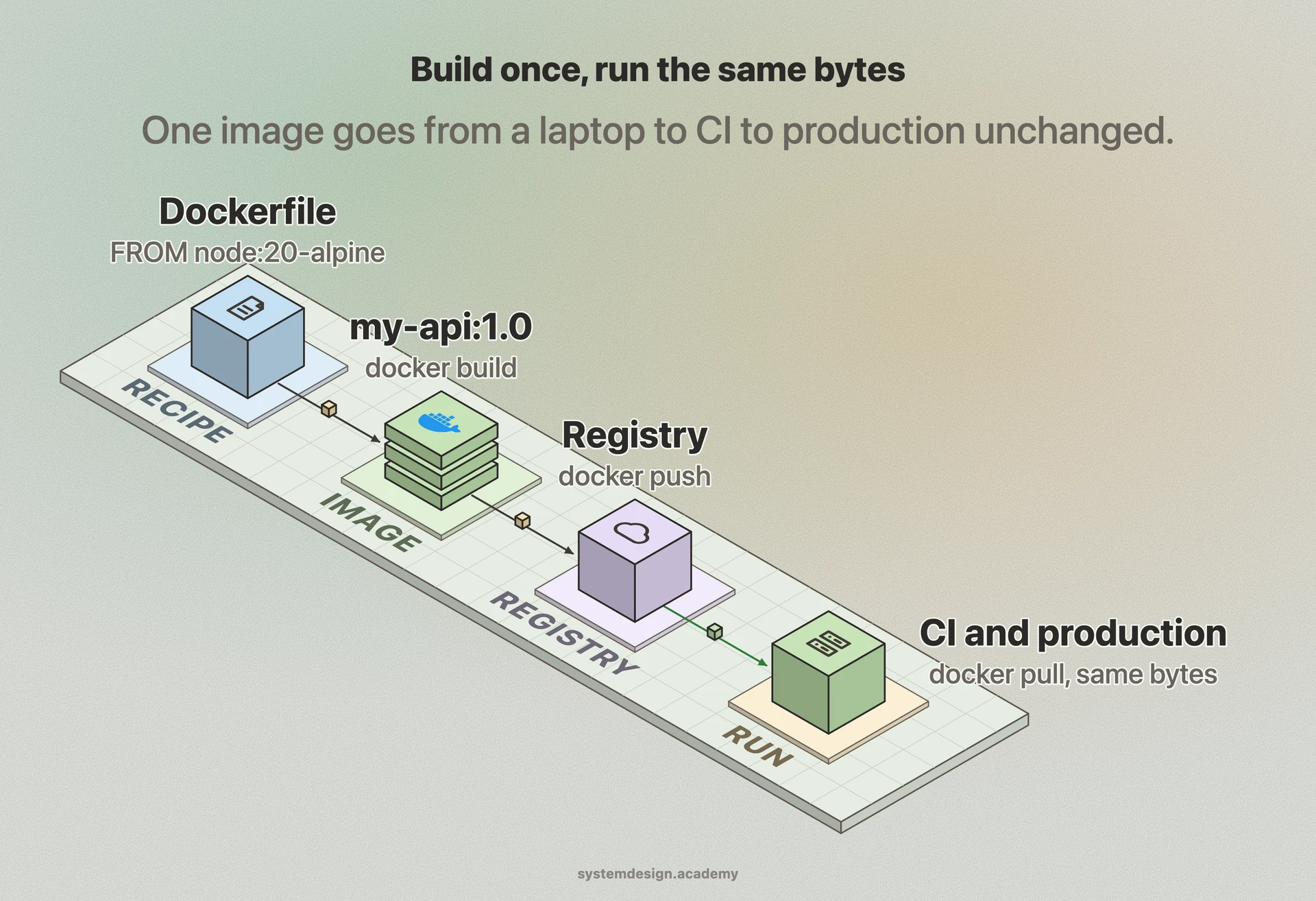
Say you have a Node.js API. A Dockerfile starts FROM node:20-alpine, copies package.json, runs npm install, copies the source, and ends with CMD node server.js. You run docker build -t my-api:1.0 . and get an image. docker run -p 3000:3000 my-api:1.0 starts it and maps port 3000 to your machine. A teammate on Windows pulls the same image and gets an identical runtime, no Node version mismatch and no missing system library.
Push that image to a registry and your CI pipeline pulls the exact same bytes to run tests, then production pulls the exact same bytes to serve traffic. There is no separate build for each environment, which removes a whole class of deployment bugs.
This is the model behind nearly every modern deployment. A 50 MB image starting in under a second lets a platform pack hundreds of containers onto one server and spin up new copies in response to traffic spikes far faster than booting new virtual machines.
Where it is used in production
Kubernetes
Schedules and scales Docker-built container images across a cluster, handling restarts, rollouts, and load balancing.
Amazon Web Services
Runs container images through ECS and EKS, and lets Lambda package functions as container images up to 10 GB.
GitHub Actions
Builds Docker images in CI and runs job steps inside containers so every build uses an identical, reproducible environment.
Docker Hub
The default public registry where official base images like nginx, postgres, and redis are pulled billions of times a month.
Frequently asked questions
- What is the difference between a Docker image and a container?
- An image is a read-only template made of filesystem layers holding your code and dependencies. A container is a running instance of an image with a thin writable layer added on top. You build one image and can run many containers from it.
- How is Docker different from a virtual machine?
- A VM ships a full guest operating system and boots in tens of seconds using gigabytes of RAM. A Docker container shares the host kernel, ships only your app and its dependencies, starts in under a second, and is often tens of megabytes. The trade-off is weaker isolation than a VM.
- Do I need Kubernetes to use Docker?
- No. Docker alone builds and runs containers on a single machine, which is enough for local development and small deployments. Kubernetes and similar orchestrators come in when you need to run containers across many servers with automatic restarts, scaling, and rolling updates.
- Does data survive when a Docker container stops?
- Not by default. A container's writable layer is discarded when it is removed. To keep data you mount a volume or bind mount, which stores files outside the container's lifecycle so databases and uploads persist across restarts.
- Why is a second Docker build so much faster than the first?
- Docker caches each layer and keys it by a content hash. If a Dockerfile instruction and its inputs have not changed, Docker reuses the cached layer instead of rerunning it. Ordering the Dockerfile so dependencies install before source is copied maximizes cache hits on code-only changes.
Learn Docker hands-on
This page explains the idea. The full lesson lets you step through the ring as servers join and leave, read the implementation, and check yourself with a quiz. It is one of 760+ lessons in the System Design Masterclass, from your first API call to distributed consensus. Eleven Foundation lessons are free, no signup. Lifetime access is ₹499 in India or $7.99 worldwide, one payment, no subscription.
Related lessons
Lessons that touch on Docker as part of a larger topic.
CaaS
Containers as a Service, run Docker containers without managing the underlying cluster
intermediate · cloud infrastructure
Artifact Repository
Storing and managing build outputs. Docker images, binaries, and packages, in a versioned, access-controlled registry
intermediate · devops cicd
Model Packaging and Containerization: Killing 'Works On My Machine' for ML
Why a pickle file is not a deployable model, and how Docker, image layering, and BentoML seal a model, its exact dependencies, and its inference code into one content-addressed image that runs anywhere
ml-foundation · core
Containerization
Packaging applications with their dependencies into isolated, portable units that run anywhere
intermediate · kubernetes containers
Image Versioning
Tagging, semantic versioning, and immutable deployments for container images
intermediate · kubernetes containers
See also
Related glossary terms you might want to look up next.
Kubernetes
An orchestration platform that automates deploying, scaling, and managing containerized applications. K8s is the operating system for your cloud.
Microservices
An architecture where an application is split into small, independent services that communicate over the network. Each service owns its own data and can be deployed separately.
Container
A lightweight, isolated environment that packages an application with its dependencies. Shares the host OS kernel, unlike VMs. Starts in milliseconds.
Kubernetes Pod
The smallest deployable unit in Kubernetes: one or more containers sharing network and storage. Pods are ephemeral; if one dies, K8s creates a replacement.
Kubernetes Service
A stable network endpoint that load-balances traffic across a set of pods. Pods come and go, but the Service's IP and DNS name stay constant.
Kubernetes Deployment
A K8s resource that manages rolling updates and rollbacks for a set of pods. You declare the desired state and K8s converges to it.