Kubernetes Deployment
A K8s resource that manages rolling updates and rollbacks for a set of pods. You declare the desired state and K8s converges to it.
What is Kubernetes Deployment?
In short
A Kubernetes Deployment is a controller object where you declare the desired state for a set of identical pods (which container image, how many replicas, what update strategy), and Kubernetes continuously works to make the running cluster match that declaration. It handles rolling out new versions, rolling back bad ones, and replacing pods that crash, all without you touching individual pods by hand.
What a Deployment actually is
A Deployment is a record of intent. You write a YAML file that says "run 4 copies of my-api version 2.3, listening on port 8080," and you hand it to the cluster. From then on, Kubernetes treats that file as the source of truth and keeps the cluster matching it.
You almost never create pods directly in production. A bare pod has no self-healing: if the node it runs on dies, the pod is gone for good. A Deployment fixes that by sitting one level above your pods and owning their lifecycle.
Under the covers, a Deployment does not manage pods directly either. It creates and manages a ReplicaSet, and the ReplicaSet creates the pods. The Deployment's job is to manage ReplicaSets over time, which is exactly what makes versioned rollouts possible.
How it works under the hood
The Deployment controller runs inside the Kubernetes control plane in a constant reconciliation loop. It compares the desired state (your spec) against the observed state (what is actually running) and takes action to close the gap. If you asked for 4 replicas and only 3 are healthy, it tells the ReplicaSet to start one more.
When you change the pod template, for example by bumping the image tag, the Deployment creates a brand new ReplicaSet for the new version and scales it up while scaling the old one down. With the default RollingUpdate strategy you can tune this with maxSurge (how many extra pods can exist during the rollout) and maxUnavailable (how many can be missing). Typical defaults are 25 percent each, so a 4 replica Deployment will spin up 1 extra pod and take down 1 at a time.
Because the old ReplicaSet is kept around (Kubernetes retains 10 by default via revisionHistoryLimit), a rollback is just pointing back at a previous ReplicaSet. Running kubectl rollout undo reverses a bad release in seconds without rebuilding anything.
Readiness probes are what make the rollout safe. The controller will not route traffic to a new pod, and will not proceed to the next batch, until that pod reports ready. A pod that never passes its readiness check stalls the rollout instead of taking the service down.
When to use it and the trade-offs
Use a Deployment for stateless workloads: web servers, REST and gRPC APIs, background workers, anything where one replica is interchangeable with another. This covers the large majority of services people run on Kubernetes.
Do not use a Deployment when pod identity or stable storage matters. Databases, Kafka brokers, and anything needing stable network names or per-pod persistent volumes belong in a StatefulSet. Node-level agents like log shippers or monitoring sidecars belong in a DaemonSet, and run-to-completion jobs belong in a Job or CronJob.
The main trade-off of the RollingUpdate strategy is that two versions of your code run at the same time during a rollout, so your app and database schema must tolerate that overlap. If you cannot, you can set the strategy to Recreate, which kills all old pods before starting new ones, accepting a short downtime in exchange for never mixing versions.
Deployments also do not give you advanced release patterns out of the box. Canary and blue-green rollouts are possible by juggling multiple Deployments and Services, but most teams reach for tools like Argo Rollouts or Flagger once they need fine-grained traffic shifting.
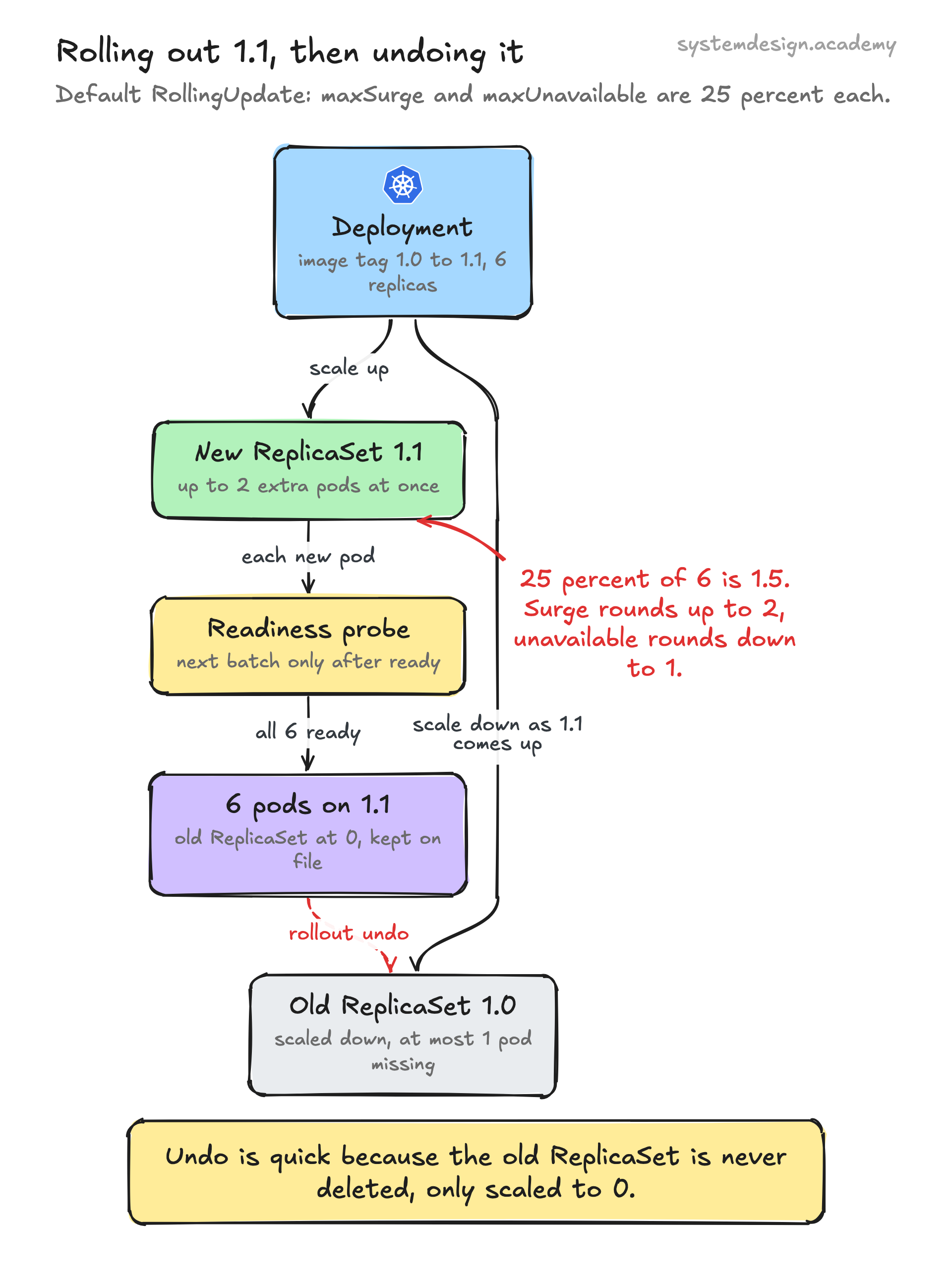
A concrete example
Say you run an API at version 1.0 with 6 replicas and you want to ship version 1.1. You edit the image tag in the Deployment spec and apply it. Kubernetes creates a new ReplicaSet for 1.1 and, with default settings, starts roughly 1 to 2 new pods while removing the same number of old ones, waiting for each new pod to pass its readiness probe before continuing.
Within a minute or two all 6 pods are running 1.1 and the old ReplicaSet is scaled to 0 but kept on file. If alerts fire because 1.1 is throwing 500s, you run kubectl rollout undo deployment/api and Kubernetes scales the old 1.0 ReplicaSet back up while draining 1.1. Traffic never has to stop, and you never had to manually recreate a single pod.
Where it is used in production
Kubernetes
Deployment is a built-in core API object (apps/v1), the standard way every cluster runs stateless apps.
Spotify
Runs thousands of microservices on Kubernetes, using Deployments to roll out service updates across its backend fleet.
Argo CD and Argo Rollouts
GitOps tooling that drives Kubernetes Deployments from Git and extends them with canary and blue-green strategies.
Helm
The Kubernetes package manager templates Deployment manifests so teams can version and parameterize releases.
Frequently asked questions
- What is the difference between a Deployment and a Pod?
- A Pod is a single running instance of one or more containers and has no self-healing on its own. A Deployment is a controller that manages a set of identical Pods, recreating them when they die and handling versioned rollouts and rollbacks. In practice you define Deployments and let them create the Pods.
- What is the difference between a Deployment and a ReplicaSet?
- A ReplicaSet only keeps a fixed number of identical Pods running. A Deployment manages ReplicaSets over time, creating a new one for each version so it can roll forward and roll back. You normally create Deployments and let them manage ReplicaSets for you rather than creating ReplicaSets directly.
- How do I roll back a Deployment?
- Run kubectl rollout undo deployment/<name>, which switches back to the previous ReplicaSet. To go to a specific older version, add --to-revision=N. Kubernetes keeps up to 10 old ReplicaSets by default, controlled by revisionHistoryLimit, so the rollback is near instant.
- When should I use a StatefulSet instead of a Deployment?
- Use a StatefulSet when pods need stable, unique identities or their own persistent storage, such as databases, Kafka, or ZooKeeper. Use a Deployment for stateless workloads where any replica is interchangeable, like web servers and APIs.
- Does a rolling update cause downtime?
- No, if configured correctly. With the default RollingUpdate strategy and proper readiness probes, new pods only receive traffic once they are ready and old pods are drained gradually, so the service stays available. The Recreate strategy, by contrast, does cause brief downtime because it stops all old pods before starting new ones.
Learn Kubernetes Deployment hands-on
This page explains the idea. The full lesson lets you step through the ring as servers join and leave, read the implementation, and check yourself with a quiz. It is one of 760+ lessons in the System Design Masterclass, from your first API call to distributed consensus. Eleven Foundation lessons are free, no signup. Lifetime access is ₹499 in India or $7.99 worldwide, one payment, no subscription.
See also
Related glossary terms you might want to look up next.
Kubernetes Pod
The smallest deployable unit in Kubernetes: one or more containers sharing network and storage. Pods are ephemeral; if one dies, K8s creates a replacement.
Kubernetes
An orchestration platform that automates deploying, scaling, and managing containerized applications. K8s is the operating system for your cloud.
Rolling Deployment
Gradually replacing old instances with new ones, a few at a time. No downtime, but both versions run simultaneously during the rollout.
Docker
A platform for packaging applications into lightweight, portable containers. 'Works on my machine' becomes 'works everywhere.'
Container
A lightweight, isolated environment that packages an application with its dependencies. Shares the host OS kernel, unlike VMs. Starts in milliseconds.
Kubernetes Service
A stable network endpoint that load-balances traffic across a set of pods. Pods come and go, but the Service's IP and DNS name stay constant.