Kubernetes Service
A stable network endpoint that load-balances traffic across a set of pods. Pods come and go, but the Service's IP and DNS name stay constant.
What is Kubernetes Service?
In short
A Kubernetes Service is a stable network endpoint that load-balances traffic across a set of Pods selected by labels. Pods are created and destroyed constantly with changing IPs, but the Service keeps one fixed virtual IP and DNS name so other workloads can reach the group reliably.
What a Service actually is
In Kubernetes the smallest deployable unit is a Pod, and Pods are disposable. When a Deployment scales up, rolls out a new version, or reschedules a Pod onto another node, the Pod gets a brand new IP address. If your frontend hard-coded a backend Pod IP, it would break within minutes. A Service solves that by giving the group a name and address that never change for the life of the Service.
A Service is defined by a label selector, for example app=payments. Any Pod carrying that label automatically becomes a target. You do not list IPs by hand. The Service watches the cluster and keeps its target list current as Pods come and go.
Each Service gets a stable ClusterIP (a virtual IP that only exists inside the cluster) and a DNS name like payments.default.svc.cluster.local. Code talks to that name, and Kubernetes spreads the requests across whatever healthy Pods currently match the selector.
How it works under the hood
Behind every Service is an Endpoints object (or the newer EndpointSlice) that holds the live list of Pod IPs and ports matching the selector. The control plane updates this list automatically whenever Pods become ready or fail their readiness probe, so traffic only goes to Pods that can actually serve it.
On each node a component called kube-proxy programs the data plane to route the virtual ClusterIP to those real Pod IPs. Classic kube-proxy writes iptables or IPVS rules; newer setups use eBPF via a CNI like Cilium. The result is the same: a packet sent to the ClusterIP gets rewritten to one of the backing Pods, picked roughly at random or round-robin.
There are several Service types. ClusterIP is the default and is reachable only inside the cluster. NodePort opens a fixed port on every node so outside traffic can reach the Service. LoadBalancer asks the cloud provider for an external load balancer (an AWS NLB, a GCP forwarding rule) that forwards to the NodePort. A headless Service (clusterIP: None) skips load balancing and returns the Pod IPs directly through DNS, which stateful systems use to address individual Pods.
When to use it and the trade-offs
Use a Service any time one set of Pods needs to talk to another, or anything needs a stable address into a workload. It is the standard way to do internal east-west routing and basic L4 load balancing inside a cluster, and it costs nothing extra.
The main limitation is that a plain Service operates at L4 (TCP and UDP). It does not understand HTTP, so it cannot route by hostname or path, terminate TLS, or do retries based on status codes. For external HTTP traffic you usually put an Ingress or a Gateway API resource in front, and that Ingress controller still routes to a Service.
Load balancing is also per-connection at the kube-proxy layer, not request-aware. For long-lived gRPC or HTTP/2 connections, all requests can pin to one Pod because the connection never reopens. Teams that need request-level balancing, mTLS, or fine traffic shaping reach for a service mesh such as Istio or Linkerd, which still builds on top of Services. Creating a LoadBalancer Service per app also gets expensive in cloud bills, which is another reason a single shared Ingress is common.
A concrete example
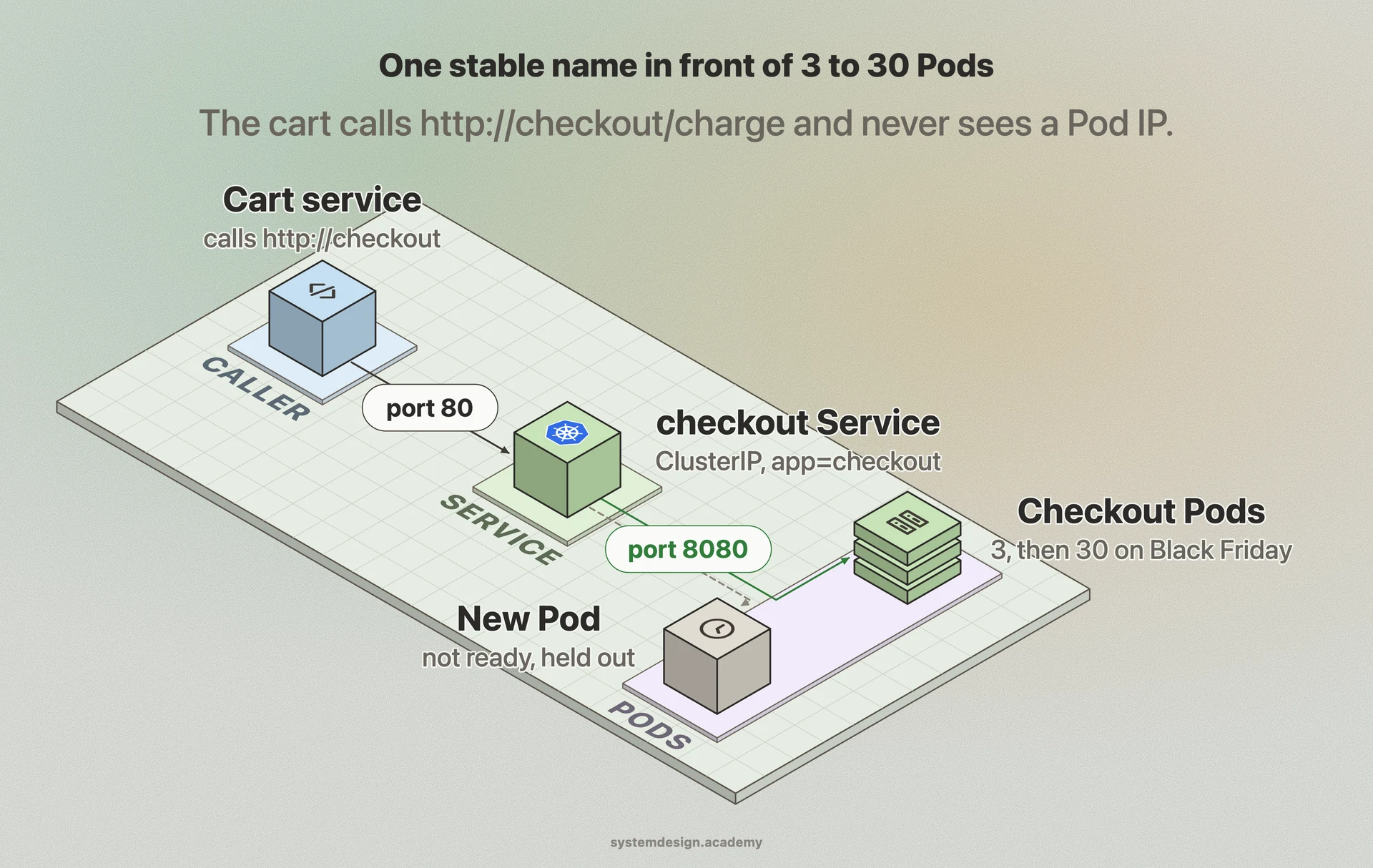
Imagine an online store running a Deployment of three checkout Pods. You create a ClusterIP Service named checkout with selector app=checkout on port 80 targeting the Pods on port 8080. The cart service now just calls http://checkout/charge and never thinks about IPs.
During a Black Friday spike the autoscaler grows checkout from 3 Pods to 30. The Endpoints list expands automatically and kube-proxy starts spreading load across all 30, with no config change anywhere else. When the rollout of a new build replaces those Pods one by one, readiness probes hold each new Pod out of the Endpoints list until it can serve, so requests never hit a Pod that is still booting.
If checkout instead exposed a public API, you would front it with an Ingress that terminates TLS and routes store.example.com/checkout to the same Service, keeping the internal contract identical.
Where it is used in production
Kubernetes
Service is a core built-in object; every multi-Pod workload on Kubernetes uses one for stable addressing and L4 load balancing.
Amazon EKS
A LoadBalancer Service provisions an AWS Network or Application Load Balancer via the AWS Load Balancer Controller to expose workloads.
Cloudflare
Runs internal platforms on Kubernetes where Services provide cluster-internal routing in front of its edge and control-plane workloads.
Spotify
Uses Kubernetes Services for service-to-service discovery across thousands of microservices instead of hard-coding Pod addresses.
Frequently asked questions
- What is the difference between a Service and a Deployment?
- A Deployment manages the lifecycle of Pods: how many run, which image, and how rollouts happen. A Service is the network layer that gives those Pods one stable IP and DNS name and load-balances traffic to them. You almost always pair them: the Deployment creates Pods with a label, and the Service selects that label.
- What is a ClusterIP vs NodePort vs LoadBalancer?
- ClusterIP gives an internal-only virtual IP reachable just inside the cluster and is the default. NodePort opens the same port on every node so traffic from outside the cluster can reach the Service. LoadBalancer asks the cloud provider for an external load balancer that forwards into the Service, which is how you expose apps to the public internet on a managed cluster.
- How does a Service know which Pods to send traffic to?
- Through a label selector. The Service matches Pods that carry the labels it specifies, and Kubernetes keeps an Endpoints or EndpointSlice list of their current IPs. Pods that fail a readiness probe are removed from that list, so traffic only reaches Pods that are ready to serve.
- Why is my gRPC traffic all hitting one Pod through a Service?
- Standard Service load balancing happens per connection at L4, and gRPC uses one long-lived HTTP/2 connection. Once that connection lands on a Pod it stays there, so every request rides the same Pod. Fix it with a headless Service plus client-side balancing, or a service mesh that balances per request.
- Do I still need an Ingress if I have a Service?
- For internal cluster traffic, a Service alone is enough. For external HTTP routing by hostname or path, TLS termination, or sharing one external entry point across many apps, you add an Ingress or Gateway API resource, and it routes to your Services. The two work together rather than replacing each other.
Learn Kubernetes Service hands-on
This page explains the idea. The full lesson lets you step through the ring as servers join and leave, read the implementation, and check yourself with a quiz. It is one of 760+ lessons in the System Design Masterclass, from your first API call to distributed consensus. Eleven Foundation lessons are free, no signup. Lifetime access is ₹499 in India or $7.99 worldwide, one payment, no subscription.
Related lessons
Lessons that touch on Kubernetes Service as part of a larger topic.
See also
Related glossary terms you might want to look up next.
Kubernetes Pod
The smallest deployable unit in Kubernetes: one or more containers sharing network and storage. Pods are ephemeral; if one dies, K8s creates a replacement.
Load Balancer
Distributes incoming traffic across multiple servers so no single server gets overwhelmed. Like a traffic cop directing cars to different lanes.
Service Discovery
The mechanism by which microservices find and communicate with each other. Services register themselves and others can look them up by name.
Docker
A platform for packaging applications into lightweight, portable containers. 'Works on my machine' becomes 'works everywhere.'
Kubernetes
An orchestration platform that automates deploying, scaling, and managing containerized applications. K8s is the operating system for your cloud.
Container
A lightweight, isolated environment that packages an application with its dependencies. Shares the host OS kernel, unlike VMs. Starts in milliseconds.