Redundancy
Duplicating critical components or functions so that if one fails, a backup takes over. The reason planes have two engines and databases have replicas.
What is Redundancy?
In short
Redundancy is the practice of running duplicate copies of a critical component so that if one fails, another takes over and the system keeps working. It is why databases run replicas, why servers sit behind load balancers in pairs, and why an aircraft carries two engines instead of one.
What redundancy actually means
Redundancy means you have more than one of something that matters, on purpose. If a single web server, disk, network link, or database can take your whole system down when it dies, that component is a single point of failure. Redundancy removes that single point by adding one or more standby or active duplicates.
The key idea is that hardware and software fail constantly at scale. A disk has a roughly 1 to 2 percent annual failure rate, so in a fleet of 10,000 disks you expect a few failures every week. A single server might offer 99.9 percent uptime, which sounds great until you realize that is almost 9 hours of downtime a year. Redundancy is how you turn unreliable parts into a reliable whole.
Redundancy is not the same as backup. A backup is a copy you restore from after something goes wrong, often hours later. Redundancy is a live duplicate that takes over in seconds or less, with no data lost. You usually want both.
How it works under the hood
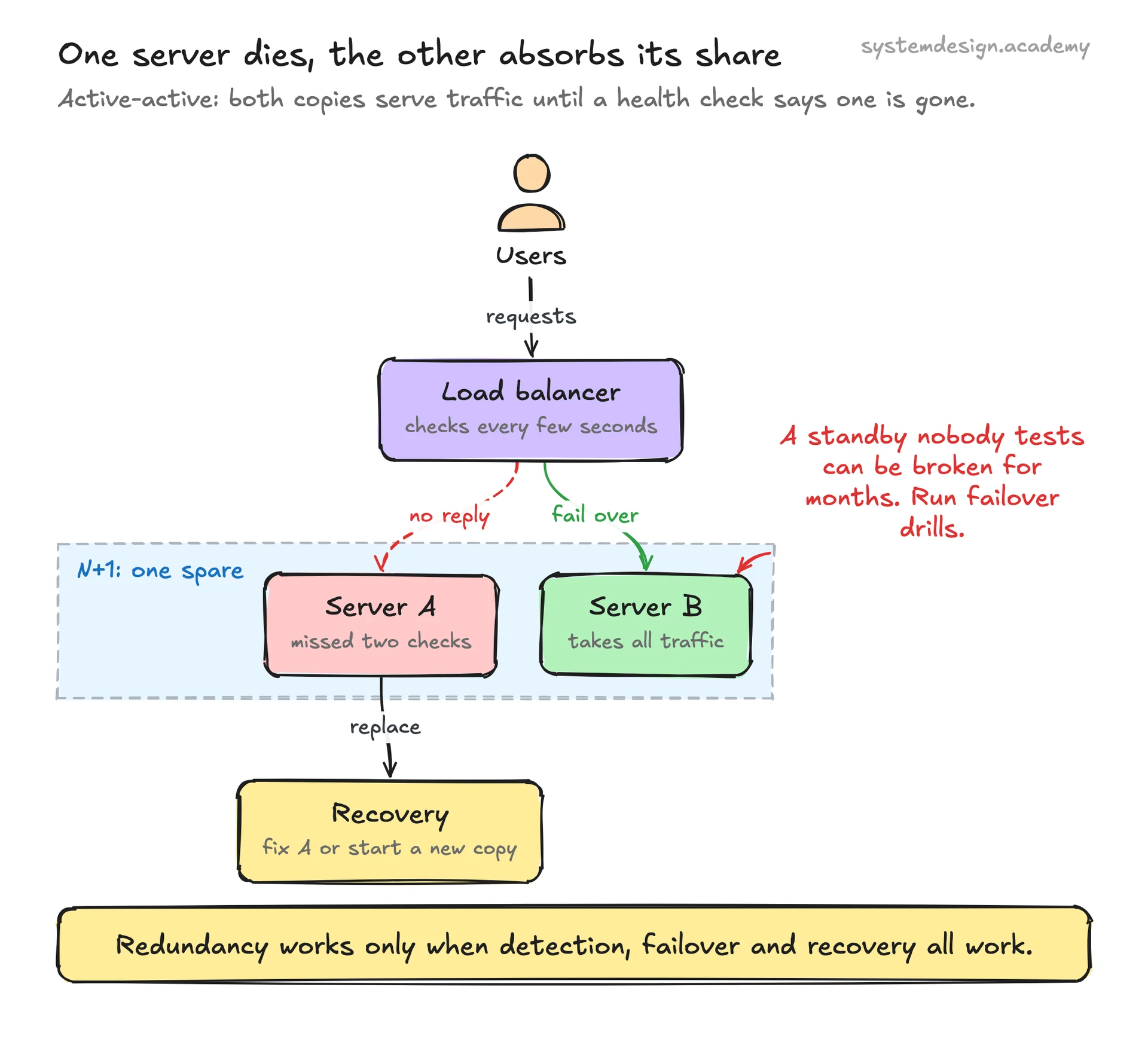
There are two main flavors. Active-active means every copy serves traffic at the same time, and a load balancer spreads requests across them. If one dies, the others simply absorb its share. Active-passive means one copy serves traffic while a standby waits idle, ready to be promoted when the primary fails. Active-active gives you extra capacity for free, while active-passive is simpler and avoids conflicts on writes.
Redundancy needs three pieces to work: detection, failover, and recovery. Health checks detect that a component is down, usually by pinging it every few seconds and marking it unhealthy after a couple of missed responses. Failover routes traffic away from the dead copy to a healthy one. Recovery brings the failed copy back, or spins up a fresh one, so you are protected again.
The hard part is state. Stateless web servers are easy to duplicate because any copy can handle any request. Databases are harder because the copies must agree on the data. Systems solve this with replication, where writes flow from a primary to replicas, and with consensus protocols like Raft or Paxos that let a group of nodes elect a new leader and stay consistent when one fails.
When to use it and the trade-offs
Add redundancy to anything whose failure would take down the service or lose data: load balancers, application servers, databases, message queues, and the network paths between them. The standard pattern is N+1, meaning you run one more instance than you strictly need so you can lose one and still serve full load. For higher tiers you go N+2 or spread copies across separate availability zones and regions.
The cost is real. Two of everything roughly doubles your infrastructure bill, and active-active setups add complexity because you must handle data conflicts, split-brain scenarios where two nodes both think they are the leader, and the latency of keeping copies in sync. Synchronous replication is safe but slow because every write waits for the replica; asynchronous replication is fast but can lose the last few writes if the primary dies.
Redundancy also fails silently if you never test it. A standby that has quietly been broken for months is worthless. This is why teams run failover drills and tools like Netflix's Chaos Monkey, which kills production instances at random to prove the redundancy actually works.
Where it is used in production
Amazon Web Services
Every region is split into multiple Availability Zones with independent power and networking so you can run redundant copies that survive a whole data center failure.
PostgreSQL
Streaming replication keeps one or more standby servers in sync with the primary, and a tool like Patroni promotes a standby automatically when the primary dies.
Apache Kafka
Each partition is copied to several brokers via a replication factor, commonly 3, so the cluster keeps serving messages even if a broker goes offline.
Cloudflare
Runs the same services across hundreds of points of presence, so if one location goes down traffic reroutes to the next nearest one with anycast.
Frequently asked questions
- What is the difference between redundancy and backup?
- Redundancy is a live duplicate that takes over almost instantly with no data lost, like a replica database promoted on failure. A backup is a stored copy you restore from later, often minutes or hours after a failure. Redundancy protects against component failure; backups protect against data corruption, accidental deletion, and ransomware. You want both.
- What is N+1 redundancy?
- N+1 means you provision one more instance than the minimum needed to handle your load. If you need 3 servers to serve peak traffic, you run 4. When any one fails, the remaining 3 still cover full demand. For higher reliability you use N+2 or spread copies across separate availability zones.
- Does redundancy slow down my system?
- It can. Synchronous replication, where a write must reach the replica before it is confirmed, adds latency to every write. Asynchronous replication is fast but risks losing the most recent writes if the primary fails before they copy over. Active-active read replicas, by contrast, can speed reads up by spreading them across copies.
- What is split-brain in a redundant system?
- Split-brain happens when a network partition makes two nodes both believe they are the primary, so both accept writes and the data diverges. Consensus protocols like Raft and quorum rules prevent this by requiring a majority of nodes to agree before any one node acts as leader.
- How do I know my redundancy actually works?
- Test it on purpose. Run scheduled failover drills where you kill the primary and confirm a standby takes over within your target time. Tools like Netflix's Chaos Monkey terminate production instances at random so untested failure paths surface in normal hours instead of during a real outage.
Learn Redundancy hands-on
This page explains the idea. The full lesson lets you step through the ring as servers join and leave, read the implementation, and check yourself with a quiz. It is one of 760+ lessons in the System Design Masterclass, from your first API call to distributed consensus. Eleven Foundation lessons are free, no signup. Lifetime access is ₹499 in India or $7.99 worldwide, one payment, no subscription.
Related lessons
Lessons that touch on Redundancy as part of a larger topic.
Fault Tolerance
Design systems that continue operating when components fail, redundancy, isolation, and graceful degradation
advanced · reliability resilience
Data Redundancy
Store multiple copies of data to survive hardware failures, replication strategies and trade-offs
advanced · reliability resilience
Geographic Redundancy
Distribute systems across geographic regions to survive regional outages
advanced · reliability resilience
Database Normalization
1NF through 3NF, eliminating redundancy, update anomalies, and data corruption the structured way
foundation · database fundamentals
Database Denormalization
Intentionally adding redundancy for read performance, when breaking the rules is the right call
foundation · database fundamentals
See also
Related glossary terms you might want to look up next.
Replication
Keeping copies of the same data on multiple servers. Improves read performance and provides fault tolerance if one server goes down.
Fault Tolerance
A system's ability to keep operating correctly even when some of its components fail. Achieved through redundancy, replication, and graceful degradation.
Load Balancer
Distributes incoming traffic across multiple servers so no single server gets overwhelmed. Like a traffic cop directing cars to different lanes.
Latency
The time delay between sending a request and getting a response. Amazon found every 100ms of extra latency costs 1% in sales.
Throughput
The number of operations a system can handle per unit of time. Think of it as how many cars a highway can move per hour.
Bandwidth
The maximum amount of data that can be transferred over a network in a given time. It's the width of the pipe, not how fast the water flows.