Blue-Green Deployment
A deployment strategy using two identical environments. Traffic switches from blue (current) to green (new) instantly, with easy rollback.
What is Blue-Green Deployment?
In short
Blue-green deployment is a release strategy that runs two identical production environments, called blue and green, where only one serves live traffic at a time. You deploy the new version to the idle environment, test it, then flip a router or load balancer to send all traffic there, giving you instant cutover and instant rollback by switching back.
What it actually is
You keep two complete copies of your production stack. At any moment one is live (say blue) and the other is idle (green). Blue is the version your users are hitting right now. Green sits there ready, either empty or running the previous release.
To ship a new version, you deploy it to green while blue keeps serving every request. Nothing your users do touches green yet, so a broken build or a bad migration there cannot hurt anyone. You run smoke tests, health checks, and maybe a synthetic transaction or two against green directly.
Once green looks healthy, you change one thing: the traffic router. That can be a load balancer target group, a DNS record, a service mesh route, or a reverse proxy upstream. The instant the switch flips, every new request goes to green. Green is now live, blue becomes the idle standby, and you have a tested rollback target already warmed up.
The name comes from the two-color labeling. There is nothing special about the colors. Some teams call them slot 1 and slot 2, or active and inactive.
How the cutover works under the hood
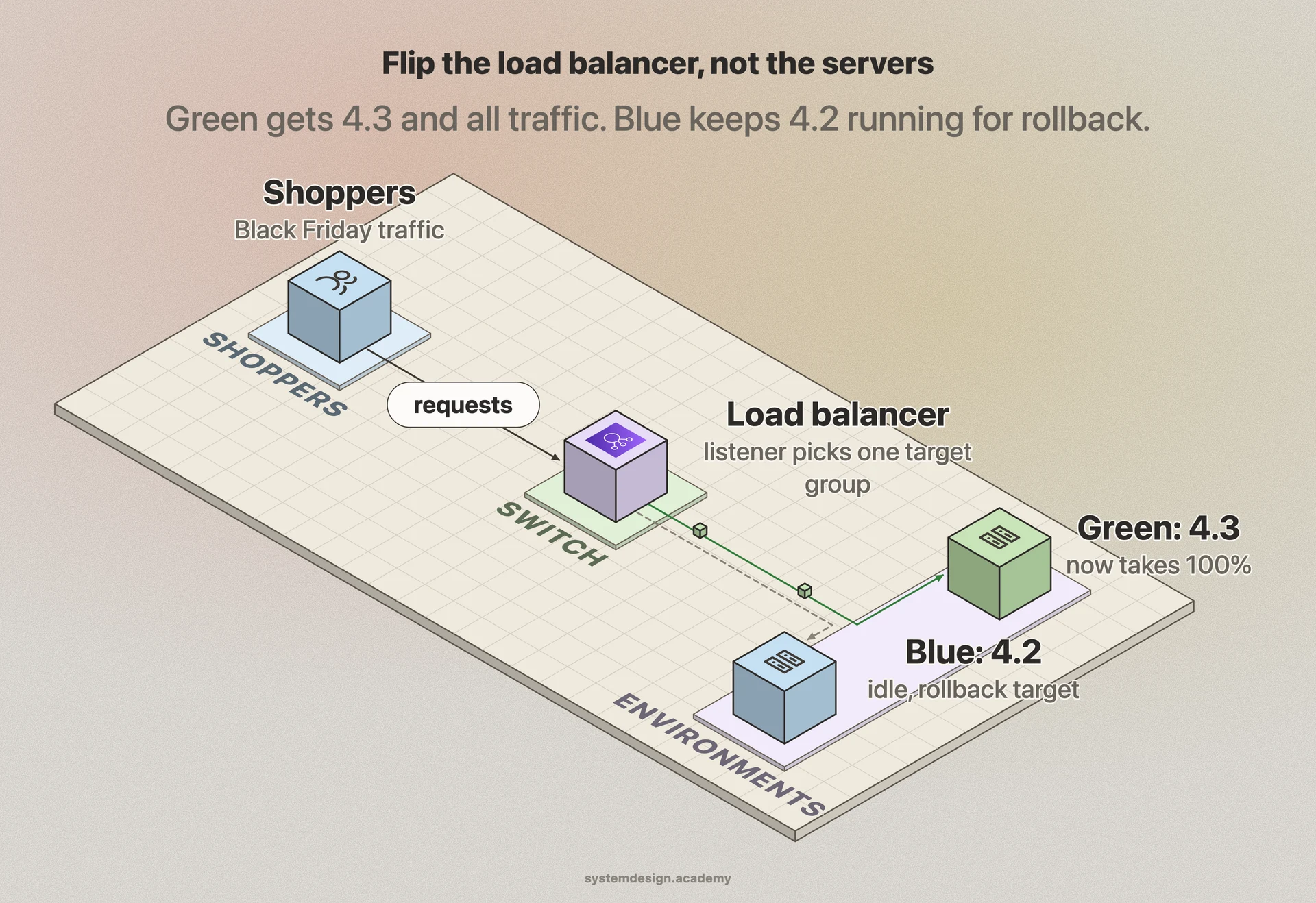
The whole strategy hinges on having a single switching point that decides which environment receives traffic. The most common implementations put that switch in a load balancer. On AWS you point an Application Load Balancer listener at the green target group instead of the blue one. The change takes effect in seconds and is atomic from the user's view.
Other teams switch at the DNS layer by repointing a record from the blue IP to the green IP. DNS is simpler but slower and messier because of TTL caching and resolver behavior, so clients can keep hitting blue for minutes or hours after the change. For that reason load balancer or proxy switching is usually preferred over DNS.
Kubernetes does this with a Service selector. Blue pods carry the label version: blue and green pods carry version: green. The Service initially selects blue. To cut over you patch the Service selector to green, and kube-proxy reroutes every connection to the green pods. Rolling back is patching the selector back to blue.
The hard part is shared state. Both environments usually talk to the same database, so a schema change in green has to be backward compatible with blue, or the rollback breaks. Teams handle this with expand-and-contract migrations: add the new column first, deploy code that works with old and new, then remove the old column in a later release.
When to use it and what it costs
Reach for blue-green when you need near-zero downtime releases and a rollback you can trigger in seconds rather than minutes. It shines for stateless web services and APIs where a clean instant cutover matters and where a bad release is expensive.
The obvious cost is money. You run two full production environments, so at the moment of switching you are paying for roughly double the compute. Cloud autoscaling and tearing the idle environment down between releases softens this, but it is never free.
The other cost is data. Long-running connections, in-flight requests, and sticky sessions on blue need to drain gracefully or get migrated, and any write that hit blue must be visible from green. Database migrations, message queues, and caches all need to stay compatible across both versions during the window when either could be live.
Compare it to two relatives. A canary release sends a small slice of traffic, say 5 percent, to the new version and grows it slowly, which catches problems with real users at low blast radius but does not give you the clean instant flip. A rolling update replaces instances a few at a time with no second environment, which is cheaper but means both versions serve traffic for the whole rollout and rollback is slower. Blue-green trades extra cost for the cleanest cutover and rollback story.
A concrete example
Picture an e-commerce API running on AWS behind an Application Load Balancer with two target groups, blue and green, each backed by an Auto Scaling group. Blue is serving Black Friday traffic on version 4.2.
Engineering deploys version 4.3 to the green target group. The CI pipeline waits for all green instances to pass ALB health checks, then fires a scripted checkout against green's direct DNS name to confirm payments work. Everything is green, literally and figuratively.
The pipeline modifies the ALB listener rule to forward 100 percent of traffic to the green target group. New shoppers are now on 4.3 within a few seconds, and blue is still fully running and untouched.
Ten minutes later, error rates on 4.3 spike because of a bad pricing calculation. An on-call engineer flips the listener back to blue. Traffic returns to the known-good 4.2 in seconds, no redeploy needed, and the team debugs 4.3 on green at their own pace. That instant, low-stress rollback is the core reason teams adopt blue-green.
Where it is used in production
AWS
CodeDeploy has a built-in blue-green mode for EC2, ECS, and Lambda that provisions a green fleet, shifts traffic at the load balancer, and auto-rolls back on CloudWatch alarms.
Kubernetes
Teams implement blue-green by labeling pods version blue and version green and patching the Service selector to flip which set receives traffic.
Netflix Spinnaker
Netflix's open-source delivery platform calls it red-black and bakes immutable images for the new color, then cuts over and keeps the old color hot for fast rollback.
NGINX
Used as the switching proxy in self-hosted setups by swapping the upstream block between blue and green backend pools and reloading the config.
Frequently asked questions
- What is the difference between blue-green and canary deployment?
- Blue-green flips 100 percent of traffic from the old environment to the new one in a single instant switch. Canary moves a small percentage at a time, like 5 percent then 25 percent, watching metrics before increasing. Blue-green gives the cleanest rollback, canary gives lower blast radius if the new version is bad.
- How do you roll back a blue-green deployment?
- You switch the traffic router back to the previous environment, which is still running. There is no redeploy or rebuild, so rollback takes seconds. The main constraint is that any database or shared-state changes must stay compatible with the old version, otherwise switching back can break.
- How do database migrations work with blue-green?
- Use backward-compatible, expand-and-contract migrations. First add new columns or tables without removing anything, so both old and new code work against the same schema. Deploy code that handles both. Only after the new version is confirmed stable do you run a later migration to drop the old structures.
- Does blue-green deployment cost twice as much?
- At the moment of cutover you run two full environments, so peak cost roughly doubles. Many teams reduce this by tearing down the idle environment between releases and spinning the green one up only during a deploy, or by relying on cloud autoscaling so the idle side scales to a minimum.
- Can you do blue-green deployment with no downtime?
- Yes, that is the main reason to use it. Because the new environment is fully running and health-checked before any user traffic hits it, the switch causes no downtime. You do need to drain in-flight requests and long-lived connections on the old environment gracefully during the flip.
Learn Blue-Green Deployment hands-on
This page explains the idea. The full lesson lets you step through the ring as servers join and leave, read the implementation, and check yourself with a quiz. It is one of 760+ lessons in the System Design Masterclass, from your first API call to distributed consensus. Eleven Foundation lessons are free, no signup. Lifetime access is ₹499 in India or $7.99 worldwide, one payment, no subscription.
Related lessons
Lessons that touch on Blue-Green Deployment as part of a larger topic.
See also
Related glossary terms you might want to look up next.
CI/CD
Continuous Integration and Continuous Deployment: automating the process of testing and deploying code. Push code, tests run, and it ships to production automatically.
Canary Deployment
Rolling out a new version to a small percentage of users first, then gradually increasing. Like sending a canary into a coal mine to test for danger.
Rolling Deployment
Gradually replacing old instances with new ones, a few at a time. No downtime, but both versions run simultaneously during the rollout.
GitOps
Using Git as the single source of truth for infrastructure and application configuration. Changes are made via pull requests and automatically reconciled by tools like ArgoCD or Flux.
Immutable Infrastructure
Servers are never modified after deployment. To update, you build a new image and replace the old instance entirely. Eliminates configuration drift.
Artifact Registry
A repository for storing build outputs like Docker images, JAR files, and npm packages. Docker Hub, GitHub Container Registry, and Artifactory are common registries.