Canary Deployment
Rolling out a new version to a small percentage of users first, then gradually increasing. Like sending a canary into a coal mine to test for danger.
What is Canary Deployment?
In short
A canary deployment releases a new version of software to a small slice of real traffic first (often 1 to 5 percent of users), watches its error rate and latency against the old version, and only rolls it out to everyone once the metrics look healthy. If the new version misbehaves, you route traffic back to the old version and almost nobody is affected.
What a canary deployment actually is
A canary deployment is a release strategy where you run the new version of your service alongside the current stable version and send it only a fraction of live traffic at first. The name comes from coal miners who carried a canary underground: if dangerous gas built up, the bird reacted before the miners did, giving them time to get out. Your small slice of users plays the same role for a risky deploy.
The key difference from a normal full deploy is exposure. In a standard rollout every user hits the new code at the same moment, so a bug hits 100 percent of traffic. In a canary, a bug in the new version hits maybe 1 percent of requests, you catch it on your dashboards, and you stop before it spreads.
It is also different from blue-green deployment. Blue-green keeps two full environments and flips all traffic from old to new in one switch. A canary instead splits traffic by percentage and ramps it up in steps, so you get a gradual, measured rollout rather than an all-or-nothing flip.
How it works under the hood
The traffic split usually happens at a load balancer, service mesh, or ingress layer. Tools like NGINX, Envoy, Istio, or a cloud load balancer weight requests so that, say, 95 percent go to the stable version and 5 percent go to the canary. On Kubernetes this is often two Deployments behind one Service, with a controller like Argo Rollouts or Flagger adjusting the weights.
While traffic flows to the canary, you watch the same signals on both versions side by side: HTTP 5xx error rate, request latency at the p95 and p99 percentiles, CPU and memory, and business metrics like checkout success. The comparison matters more than the raw numbers. If the canary's error rate is 0.2 percent while the stable version sits at 0.1 percent, that doubling is a signal even though both look small.
If the canary stays healthy, an automated controller or a human ramps the weight up in stages, for example 5 then 25 then 50 then 100 percent, pausing at each step. If a metric crosses a threshold, the system rolls back by setting the canary weight to zero, and traffic returns to the version that was already proven stable in production.
When to use it and the trade-offs
Reach for canary deployments when a bad release is expensive and you have enough traffic to get a meaningful sample quickly. A payments service, a search backend, or a high-traffic API are good fits. A tiny internal tool with three users a day is not, because 1 percent of almost no traffic tells you nothing.
The big win is blast radius control. You limit damage to a small group and you test with real production traffic, real data, and real load, which staging environments rarely reproduce. You also get a fast, clean rollback because the old version is still running and serving most users.
The cost is complexity. You need solid metrics, sensible thresholds, and routing infrastructure that can split traffic, and for a while you run two versions at once, which means both must tolerate the same database schema. A schema migration that the old version cannot read will break the canary approach, so additive, backward-compatible migrations are a hard requirement.
A concrete example
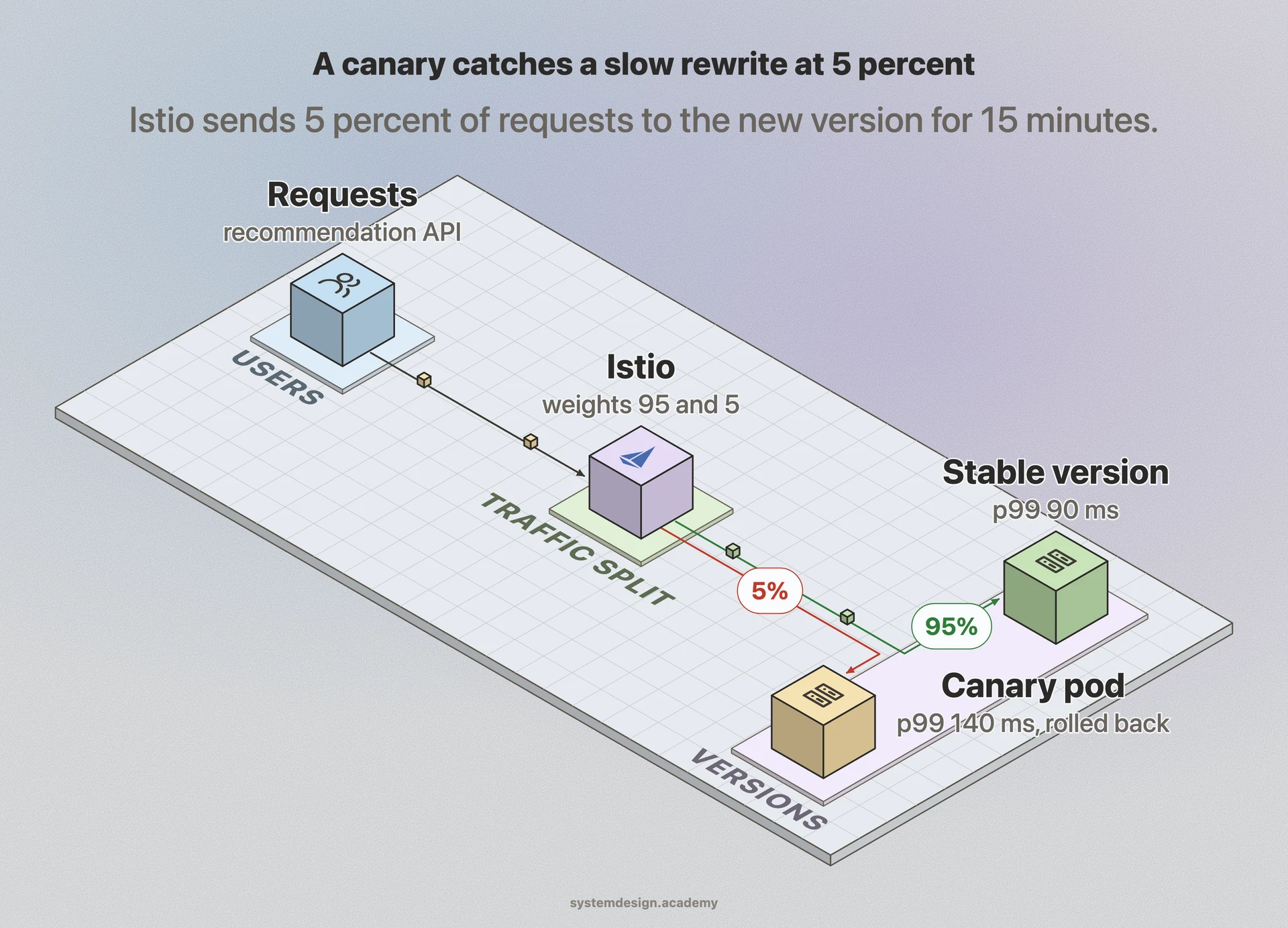
Imagine a team ships a rewrite of their recommendation API. They deploy the new version to a single pod and configure Istio to route 5 percent of requests to it. For 15 minutes they compare dashboards: p99 latency on the canary is 140 ms versus 90 ms on stable, and the click-through rate is flat.
That latency jump trips their alert threshold, so the rollout controller drops the canary weight back to zero automatically. Only 5 percent of users saw the slower responses for 15 minutes, and no full outage happened. The team finds an N plus 1 query in the new code, fixes it, and runs the canary again, this time clearing all stages up to 100 percent with healthy numbers.
Where it is used in production
Pioneered the canary term in production and runs canary analysis as part of its release tooling, including the open-source project Kayenta for automated metric comparison.
Netflix
Uses Spinnaker with automated canary analysis to compare a small set of new instances against a control baseline before promoting a release.
Kubernetes plus Argo Rollouts and Flagger
These controllers progressively shift traffic weights between stable and canary pods and auto-rollback on bad metrics.
Istio and Envoy
Service mesh layer that weights traffic between versions, which is what makes the percentage-based split possible.
Frequently asked questions
- What is the difference between canary and blue-green deployment?
- Blue-green keeps two full environments and switches all traffic from old to new in one flip. A canary instead sends a small percentage of traffic to the new version and ramps it up gradually while watching metrics, so the exposure is incremental rather than all-or-nothing.
- How much traffic should the canary get?
- Usually 1 to 5 percent at the start, then stepped up through stages like 25, 50, and 100 percent. The right starting number is whatever gives you a statistically meaningful sample of errors and latency within a few minutes for your traffic volume.
- How is a rollback handled?
- You set the canary's traffic weight back to zero, which sends all requests to the stable version that was already running. Because the old version never went away, rollback is fast and does not require a redeploy.
- Is canary deployment the same as feature flags?
- No. A canary controls which infrastructure version receives traffic at the routing layer. A feature flag toggles a code path inside a single running version. They are often combined: ship the code dark behind a flag, then use a canary to roll out the new build, then flip the flag for a subset of users.
- What can break a canary deployment?
- The most common problem is a non-backward-compatible database change. Since the old and new versions run at the same time against the same database, a schema migration the old version cannot handle will break it. Keep migrations additive and backward compatible.
Learn Canary Deployment hands-on
This page explains the idea. The full lesson lets you step through the ring as servers join and leave, read the implementation, and check yourself with a quiz. It is one of 760+ lessons in the System Design Masterclass, from your first API call to distributed consensus. Eleven Foundation lessons are free, no signup. Lifetime access is ₹499 in India or $7.99 worldwide, one payment, no subscription.
Related lessons
Lessons that touch on Canary Deployment as part of a larger topic.
See also
Related glossary terms you might want to look up next.
CI/CD
Continuous Integration and Continuous Deployment: automating the process of testing and deploying code. Push code, tests run, and it ships to production automatically.
Blue-Green Deployment
A deployment strategy using two identical environments. Traffic switches from blue (current) to green (new) instantly, with easy rollback.
Rolling Deployment
Gradually replacing old instances with new ones, a few at a time. No downtime, but both versions run simultaneously during the rollout.
GitOps
Using Git as the single source of truth for infrastructure and application configuration. Changes are made via pull requests and automatically reconciled by tools like ArgoCD or Flux.
Immutable Infrastructure
Servers are never modified after deployment. To update, you build a new image and replace the old instance entirely. Eliminates configuration drift.
Artifact Registry
A repository for storing build outputs like Docker images, JAR files, and npm packages. Docker Hub, GitHub Container Registry, and Artifactory are common registries.