Secret Management
Securely storing and distributing credentials, API keys, and certificates. Tools like Vault, AWS Secrets Manager, and SOPS prevent secrets from leaking into code or logs.
What is Secret Management?
In short
Secret management is the practice of storing, distributing, rotating, and auditing sensitive credentials such as database passwords, API keys, TLS certificates, and encryption keys so they never sit in plaintext inside source code, config files, or logs. Dedicated systems like HashiCorp Vault, AWS Secrets Manager, and SOPS hold the secrets encrypted, hand them to applications at runtime through authenticated requests, and record who accessed what.
What it actually is
Every running system needs secrets: the password your service uses to reach Postgres, the API key for Stripe, the private key behind your TLS certificate, the token that lets one microservice call another. A secret is any value that grants access and must stay confidential. If it leaks, an attacker gets the same access your code has.
The old habit was to paste these values straight into the codebase, a .env file, or a Kubernetes manifest. That fails badly. Anyone with read access to the repo sees production credentials, the secret gets copied into CI logs and laptop backups, and rotating it means editing files across dozens of services. The 2016 Uber breach happened exactly this way: AWS keys were committed to a private GitHub repo, attackers found them, and pulled data on 57 million users.
Secret management replaces all of that with a single source of truth. The secret lives encrypted in a dedicated store. Applications fetch it at startup or on demand over an authenticated channel, and it is never written to disk in plaintext. The store keeps a full audit trail and can revoke or rotate a secret without anyone touching code.
How it works under the hood
A secrets manager keeps everything encrypted at rest using a master key, and that master key is itself protected. HashiCorp Vault, for example, starts sealed: the unseal key is split into several shares using Shamir's Secret Sharing, so no single operator can decrypt the store alone. Cloud managers like AWS Secrets Manager back the master key with a hardware security module through KMS.
To read a secret, a client must first prove who it is. This is the hard part, because the credential you use to authenticate is itself a secret, the so called secret zero problem. Real systems solve it with workload identity that is not a long lived password: an AWS IAM role attached to the instance, a Kubernetes service account token, or a short lived cloud identity token. The manager checks that identity against a policy, then hands back the secret over TLS.
Two features make these tools more than encrypted databases. Rotation lets the manager generate a brand new value on a schedule and update the downstream system, so a leaked secret is only useful for a short window. Dynamic secrets go further: Vault can create a fresh, unique database username and password for each client on request, valid for an hour, then delete it. There is no shared standing credential to steal.
When to use it and the trade-offs
Use a secret manager the moment more than one person or more than one machine needs the same credential, which is almost immediately in any real deployment. It is not optional for production systems handling user data, payments, or anything regulated by SOC 2, PCI DSS, or HIPAA, all of which expect access control and audit logs on credentials.
The cost is operational complexity and a new dependency in your critical path. If your application reads its database password from Vault at startup and Vault is down, your service cannot boot. Teams mitigate this with high availability clusters, caching, and sidecar agents that keep a recent copy in memory. There is also latency: an extra authenticated network round trip on cold start, which is why most apps fetch secrets once and cache them rather than per request.
A lighter approach for small teams is encrypted files committed to git, using SOPS or git-crypt. The secret stays encrypted in the repo and is decrypted at deploy time with a KMS key. This needs no running server, but it gives you no rotation, no audit trail, and no dynamic secrets, so most organizations graduate to a managed service as they scale.
A concrete real-world example
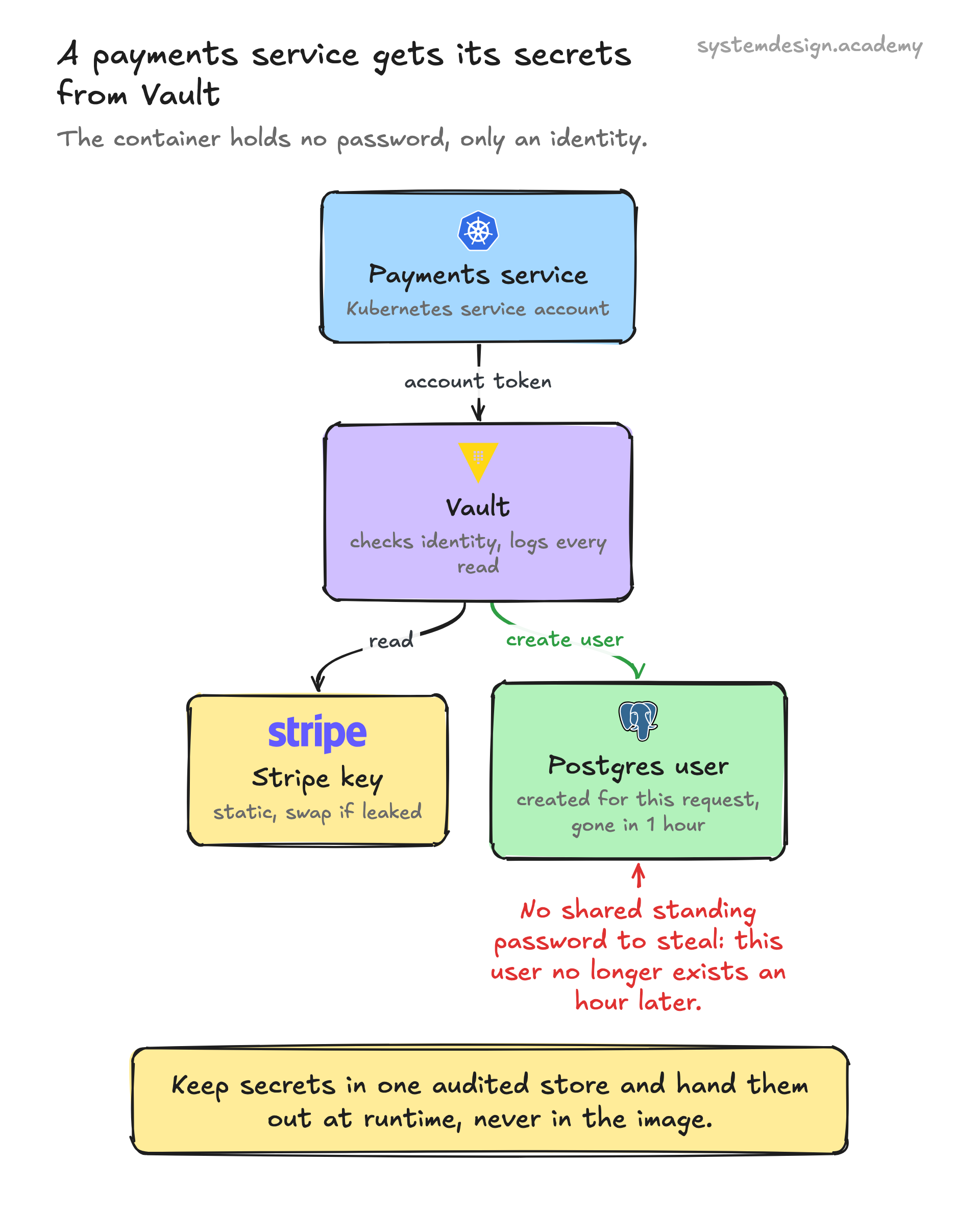
Picture a payments service that needs to read from Postgres and call the Stripe API. Without secret management, both the database password and the Stripe key sit in an environment variable baked into the container image. When an engineer leaves the company, you would have to rebuild and redeploy every service to rotate those values, and most teams simply never do.
With Vault, the container starts with only a Kubernetes service account. It exchanges that token for a Vault token, then requests two things. For Stripe it reads a static secret, and Vault logs the read with a timestamp and the workload identity. For Postgres it requests a dynamic credential, and Vault connects to the database, creates a one hour user, and returns it. The service connects, and an hour later that database user no longer exists.
Now rotation is a config change, not a redeploy. If the Stripe key ever leaks, you revoke and replace it in one place and every consumer picks up the new value on its next fetch. The audit log tells your security team exactly which service read which secret and when, which is the evidence an auditor asks for.
Where it is used in production
HashiCorp Vault
Central secrets store with dynamic database credentials, automatic rotation, and Shamir-split unseal keys; widely run on Kubernetes via the Vault Agent sidecar.
AWS Secrets Manager
Managed store backed by KMS that rotates RDS database passwords on a schedule and serves secrets to Lambda and EC2 via IAM roles.
Kubernetes
Native Secret objects hold credentials for pods, and external operators sync from Vault or cloud managers so secrets are not hardcoded in manifests.
Mozilla SOPS
Encrypts secrets inside YAML and JSON files committed to git, decrypting at deploy time with a KMS, GCP, or age key for teams without a running secrets server.
Frequently asked questions
- Why not just use environment variables for secrets?
- Environment variables are better than hardcoding, but they leak easily. They show up in process listings, crash dumps, and child processes, get logged by debug tooling, and offer no rotation or audit trail. A secrets manager keeps the value encrypted, controls who reads it, and lets you rotate without redeploying. Many teams use both: the manager fetches the secret, then injects it as an env var at runtime.
- What is the secret zero problem?
- To read secrets from a manager, a client must authenticate, but that authentication credential is itself a secret, so you seem to need a secret to get secrets. The fix is to bootstrap from an identity that is not a stealable password: an AWS IAM role on the instance, a Kubernetes service account token, or a short lived cloud identity token that the platform issues automatically.
- What is the difference between static and dynamic secrets?
- A static secret is a fixed value you store and hand out, like a Stripe API key, and it stays the same until you rotate it. A dynamic secret is generated fresh for each request and expires quickly. Vault, for example, can create a unique database username and password per client valid for one hour, then delete it, so there is no shared standing credential to leak.
- How often should secrets be rotated?
- It depends on sensitivity and exposure. Common practice is 30 to 90 days for static credentials like API keys, immediately after any suspected leak or staff departure, and continuously for dynamic secrets that may live only minutes to hours. Automated rotation matters more than the exact interval, because manual rotation rarely happens on schedule.
- Is a secrets manager a single point of failure?
- It can be, since services that fetch secrets at startup cannot boot if the manager is unreachable. Teams reduce the risk with high availability clusters, local caching, and sidecar agents that hold a recent copy in memory. Most applications fetch and cache secrets once rather than on every request, so a brief outage affects new deployments more than running traffic.
Learn Secret Management hands-on
This page explains the idea. The full lesson lets you step through the ring as servers join and leave, read the implementation, and check yourself with a quiz. It is one of 760+ lessons in the System Design Masterclass, from your first API call to distributed consensus. Eleven Foundation lessons are free, no signup. Lifetime access is ₹499 in India or $7.99 worldwide, one payment, no subscription.
See also
Related glossary terms you might want to look up next.
Data Encryption
Transforming data into an unreadable format using cryptographic algorithms. Encryption at rest protects stored data; encryption in transit protects data over the network.
API Key
A simple token passed with API requests to identify the calling project or application. Not a substitute for user authentication but useful for rate limiting and usage tracking.
Zero Trust
A security model that never trusts any request by default, even from inside the network. Every request must be authenticated, authorized, and encrypted regardless of origin.
Throttling
Slowing down the rate of processing requests instead of rejecting them outright. The gentler cousin of rate limiting.
OAuth
An authorization framework that lets users grant third-party apps limited access to their accounts without sharing passwords. Powers 'Sign in with Google.'
JWT
JSON Web Token: a compact, self-contained token for transmitting claims between parties. The server can verify it without a database lookup.