Smoke Test
A quick, basic test run after deployment to verify the most critical paths still work. If the smoke test fails, the deployment is rolled back immediately.
What is Smoke Test?
In short
A smoke test is a small, fast set of checks that runs right after a build or deployment to confirm the most critical paths of an application still work, such as the service starting, the homepage loading, and a user being able to log in. If any of these basic checks fail, the build is rejected or the deployment is rolled back before deeper testing or real traffic ever reaches it.
What a Smoke Test Actually Is
A smoke test answers one question: is this build alive enough to bother testing further? It does not check edge cases, it does not validate every feature, and it does not measure performance. It checks that the application boots, the main pages respond, and one or two business-critical flows succeed. Think of it as a heartbeat check, not a full physical exam.
The name comes from electronics and plumbing. When engineers powered up a new circuit board or pressurized a new pipe, they watched for smoke or leaks. If smoke came out, you stopped immediately because nothing else mattered until that was fixed. Software borrowed the idea: run the cheapest possible check first, and if it fails, do not waste time on anything else.
A typical smoke test for a web app might be five to fifteen assertions: the server process is up, the health endpoint returns 200, the login page renders, a test user can authenticate, and the database connection works. The whole thing usually runs in seconds to a couple of minutes, which is what makes it useful as a gate.
How It Works in a Pipeline
In a CI/CD pipeline, the smoke test sits at a deliberate spot: after the build and deploy step, but before the full test suite or before real users are routed to the new version. The pipeline deploys the new build to a staging environment or a canary instance, then fires the smoke test against that running instance over HTTP, not against mocked components.
If every smoke assertion passes, the pipeline continues: it might run the full integration suite, or in a blue green deployment it flips the load balancer to point at the new version. If any assertion fails, the pipeline stops and triggers a rollback, swapping traffic back to the previous known-good version. Because the test ran against a canary and not all production traffic, only a small fraction of users (or zero) ever saw the broken build.
Smoke tests are usually written as end-to-end checks because their whole point is to verify the deployed system as a black box. Tools like Playwright, Cypress, or a simple set of curl and shell assertions are common. Many teams tag a subset of their existing end-to-end tests with a smoke label so the pipeline can run just those quickly.
When to Use It and the Trade-offs
Use a smoke test as the first gate after every deployment, on every environment, including production. It is cheap to run and it catches the embarrassing failures fast: a missing environment variable, a broken database migration, a bad config that makes the app refuse to start, or a deploy that shipped the wrong artifact. These are exactly the failures a unit test never sees because they only show up in a real running deployment.
The trade-off is coverage. A passing smoke test does not mean the release is good, only that it is not obviously dead. A checkout bug, a wrong calculation, or a broken feature deep in the app will sail right past it. Treating a green smoke test as full validation is the classic mistake, so it complements your regression and integration tests rather than replacing them.
Keep smoke tests short and stable. If a smoke test is flaky or takes ten minutes, people start ignoring its failures or disabling the gate, which defeats the purpose. A good rule is that the smoke test should be reliable enough that a failure almost always means a real problem, not a test environment hiccup.
A Concrete Example
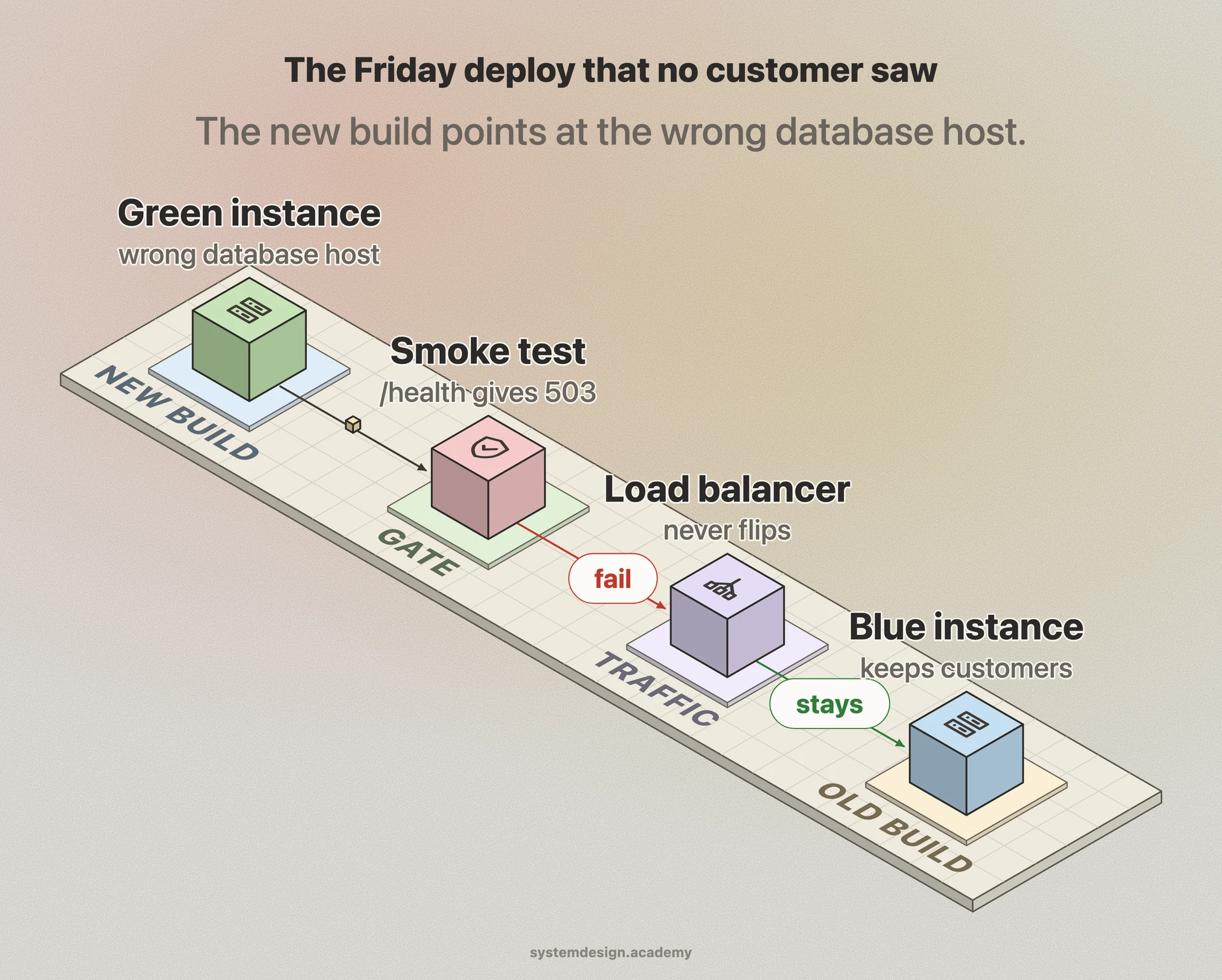
Imagine an online store deploys a new build behind a blue green setup. After deploy, the pipeline runs a smoke test against the green (new) instance: hit /health and expect 200, load the homepage and check the product grid renders, log in as a synthetic test account, add one item to the cart, and confirm the cart total updates. That sequence takes about 30 seconds.
On a Friday deploy, the new build shipped with a database connection string pointing at the wrong host. The /health check returns 503 within seconds. The smoke test fails, the pipeline never flips the load balancer, and traffic stays on the blue (old) instance. No customer ever hit the broken version. An engineer fixes the config and redeploys, and this time the smoke test goes green before any real traffic moves over.
Where it is used in production
Netflix
Runs automated smoke and canary checks on new builds against a small slice of traffic before promoting a deployment fleet-wide, rolling back automatically if the canary signals fail.
Kubernetes
Readiness and liveness probes act as a continuous smoke test; a pod only receives traffic once its readiness probe passes, and a failing liveness probe gets it restarted.
GitHub Actions
Teams add a smoke-test job that deploys to a staging URL then runs a handful of Playwright or curl checks as a required gate before the production deploy step runs.
AWS CodeDeploy
Supports validation lifecycle hooks where a smoke test script runs against the new version and, on failure, triggers an automatic rollback to the last good deployment.
Frequently asked questions
- What is the difference between a smoke test and a regression test?
- A smoke test is a small, fast check that the build is basically working at all, run first as a gate. A regression test is a much larger suite that verifies existing features still behave correctly after a change. Smoke is shallow and quick; regression is broad and slower. You run smoke first, and only if it passes do you bother with the full regression suite.
- What is the difference between a smoke test and a sanity test?
- The terms overlap and many teams use them interchangeably. The common distinction: a smoke test broadly checks that critical paths across the whole app work after a new build, while a sanity test narrowly verifies that one specific feature or bug fix works after a small change. Smoke is wide and shallow; sanity is narrow and focused.
- Should smoke tests run against production?
- Yes, running smoke tests against production right after a deploy is a common and good practice, often called production smoke testing or post-deploy verification. You use a synthetic test account and read-only or reversible actions so you do not pollute real data, and you confirm the live system is actually serving correctly to real users.
- How long should a smoke test take?
- Keep it under a couple of minutes, ideally seconds. The whole value of a smoke test is that it is the cheapest, fastest gate in the pipeline. If it grows slow or flaky, people stop trusting it and start bypassing failures, which removes the protection it was supposed to provide.
- What happens when a smoke test fails?
- The deployment stops immediately. In a blue green or canary setup, traffic is never moved to the new version, or it is rolled back to the previous known-good build. The pipeline marks the release as failed and alerts the team, so the broken build never reaches the full user base.
Learn Smoke Test hands-on
This page explains the idea. The full lesson lets you step through the ring as servers join and leave, read the implementation, and check yourself with a quiz. It is one of 760+ lessons in the System Design Masterclass, from your first API call to distributed consensus. Eleven Foundation lessons are free, no signup. Lifetime access is ₹499 in India or $7.99 worldwide, one payment, no subscription.
Related lessons
Lessons that touch on Smoke Test as part of a larger topic.
See also
Related glossary terms you might want to look up next.
CI/CD
Continuous Integration and Continuous Deployment: automating the process of testing and deploying code. Push code, tests run, and it ships to production automatically.
Canary Deployment
Rolling out a new version to a small percentage of users first, then gradually increasing. Like sending a canary into a coal mine to test for danger.
Rolling Deployment
Gradually replacing old instances with new ones, a few at a time. No downtime, but both versions run simultaneously during the rollout.
Blue-Green Deployment
A deployment strategy using two identical environments. Traffic switches from blue (current) to green (new) instantly, with easy rollback.
GitOps
Using Git as the single source of truth for infrastructure and application configuration. Changes are made via pull requests and automatically reconciled by tools like ArgoCD or Flux.
Immutable Infrastructure
Servers are never modified after deployment. To update, you build a new image and replace the old instance entirely. Eliminates configuration drift.