Trunk-Based Development
A branching model where developers commit to a single main branch frequently with small changes. Feature flags replace long-lived feature branches.
What is Trunk-Based Development?
In short
Trunk-based development is a source control practice where every developer integrates small changes into one shared branch (the trunk, usually called main) at least once a day, instead of working for days or weeks on separate long-lived feature branches. Incomplete work is hidden behind feature flags so the trunk always stays releasable.
What it is
Trunk-based development is a branching model with one rule at its center: there is a single shared branch, the trunk, and everyone commits to it constantly. A developer either commits straight to the trunk or opens a short-lived branch that lives for a few hours and merges back the same day. Branches that survive for a week or more are exactly what this model is built to avoid.
The problem it solves is merge pain. When five people each work on a private branch for two weeks, the code they all started from has drifted apart. Merging those branches at the end means resolving conflicts across thousands of lines that nobody has looked at together. This is sometimes called merge hell or integration debt. Trunk-based development attacks it by merging tiny pieces continuously, so each merge is small and the conflict surface stays near zero.
Because work lands before a feature is finished, the trunk would normally be full of half-built code. The answer is feature flags: the new code ships but stays switched off in production until it is ready. The branch becomes a runtime toggle instead of a Git branch.
How it works under the hood
A typical loop looks like this. A developer pulls the latest trunk, makes a change of maybe 50 to 200 lines, runs the tests locally, and pushes a short-lived branch. A continuous integration pipeline builds the change and runs the test suite within a few minutes. A teammate reviews it quickly, and it merges into the trunk the same day. The trunk is rebuilt and the gate keeping it green is the automated test suite.
The trunk must always be in a releasable state, which only works if the test pipeline is fast and trustworthy. Teams lean on unit tests for speed, a smaller set of integration tests, and pre-merge checks that block any commit that breaks the build. Some teams add automated merge tools or merge queues, where GitHub or GitLab serially tests each pending change against the current trunk before letting it in, so two changes that pass individually but conflict together cannot both land.
Feature flags are managed in code or in a flag service. A flag wraps the new path, for example a check like if flags.checkoutV2 is on. The code is in production from day one but dark. The team turns it on for internal users, then 1 percent of traffic, then everyone. When the rollout is done and stable, the flag and the old code path are deleted, which is a step teams often forget and which is the main source of flag clutter.
When to use it and the trade-offs
Trunk-based development is the default for teams that practice continuous integration and want to deploy often, including many times a day. It is one of the practices the DORA research program found correlates with high software delivery performance. If your goal is short lead time and frequent, low-risk releases, this is the model that supports it.
The cost is discipline and infrastructure. It does not work without a fast, reliable automated test suite, because the trunk is shared and a broken commit blocks everyone. It also requires a feature flag habit and the cleanup work that comes with flags. Teams that skip flag deletion accumulate dead toggles that make the code hard to reason about and can cause incidents when a stale flag flips.
It is a poorer fit when many of your contributors cannot be trusted to push directly, which is the classic case of large open source projects. Those projects use forks and pull requests with maintainer gatekeeping instead, sometimes called GitHub Flow or a fork-and-pull model. Trunk-based development assumes a closed team that shares ownership of one codebase.
A concrete real-world example
Google runs almost its entire codebase in a single giant monorepo on one trunk, with tens of thousands of engineers committing to it. There are effectively no long-lived branches. Every change is reviewed and gated by automated tests, and unfinished features sit behind flags. Google has described this trunk-based, flag-gated style for years, including in the book Software Engineering at Google.
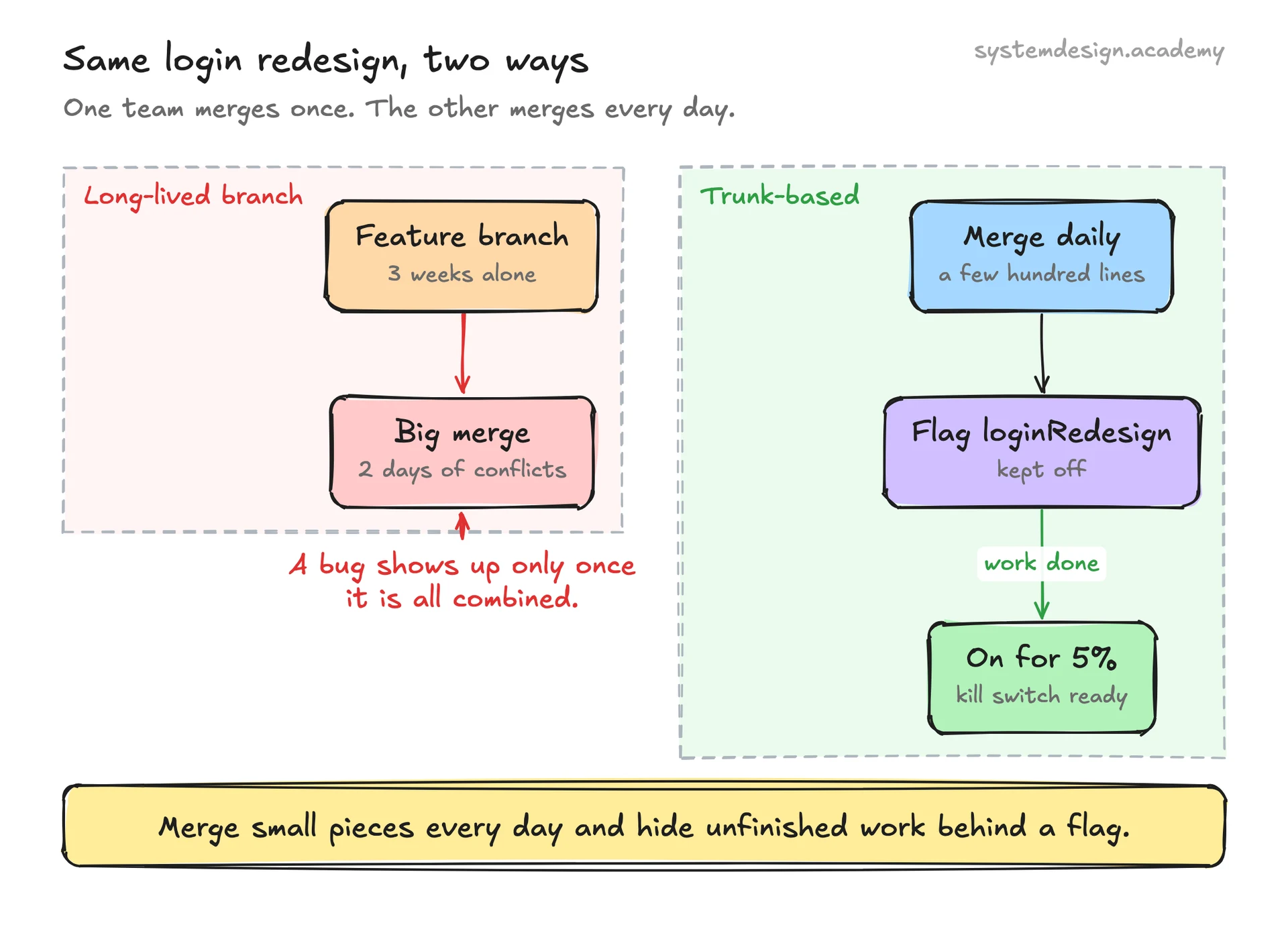
Compare two teams shipping the same login redesign. The branch-heavy team works for three weeks on a feature branch, then spends two days untangling merge conflicts and finds a regression that only appears once everything is combined. The trunk-based team merges a few hundred lines a day behind a flag called loginRedesign, keeps the flag off, and once the work is complete flips it on for 5 percent of users to watch the metrics. The first team integrates once, painfully; the second integrates continuously and ships when ready, with a kill switch in hand.
Where it is used in production
Runs nearly the whole company on a single monorepo trunk with no long-lived branches; unfinished features live behind flags.
Meta (Facebook)
Engineers commit continuously to a shared trunk and ship via feature flags and staged rollouts rather than feature branches.
GitHub merge queue
Provides a merge queue that serially tests each pending change against the current trunk so the main branch stays green.
LaunchDarkly
A feature flag platform teams pair with trunk-based development to keep dark code off in production until rollout.
Frequently asked questions
- What is the difference between trunk-based development and Git Flow?
- Git Flow uses several long-lived branches such as develop, release, and feature branches, and integration happens at the end. Trunk-based development uses one shared branch that everyone merges into at least daily, with at most short-lived branches that last hours. Trunk-based development trades the structure of Git Flow for faster, lower-risk integration.
- How do you ship unfinished features without breaking the trunk?
- You wrap the new code in a feature flag so it ships to production turned off. The trunk stays releasable because the new path is dark until you flip the flag on, often gradually from internal users to 1 percent of traffic to everyone.
- Does trunk-based development mean no code review?
- No. Most teams still review every change, just in small, fast pull requests from short-lived branches that merge the same day. The difference from other models is the size and lifetime of the branch, not whether review happens.
- What do you need before adopting trunk-based development?
- A fast and reliable automated test suite, continuous integration that blocks broken commits, and a feature flag habit including the discipline to delete flags once a rollout is done. Without those, a shared trunk becomes fragile because one bad commit blocks everyone.
- Is trunk-based development good for open source projects?
- Usually not for projects with many untrusted contributors. Those rely on forks and maintainer-reviewed pull requests instead. Trunk-based development assumes a closed team that shares ownership and can be trusted to push to the same branch.
Learn Trunk-Based Development hands-on
This page explains the idea. The full lesson lets you step through the ring as servers join and leave, read the implementation, and check yourself with a quiz. It is one of 760+ lessons in the System Design Masterclass, from your first API call to distributed consensus. Eleven Foundation lessons are free, no signup. Lifetime access is ₹499 in India or $7.99 worldwide, one payment, no subscription.
See also
Related glossary terms you might want to look up next.
CI/CD
Continuous Integration and Continuous Deployment: automating the process of testing and deploying code. Push code, tests run, and it ships to production automatically.
Feature Flag
A toggle in code that enables or disables a feature without redeploying. Lets you ship code to production behind a flag and turn it on for a percentage of users.
GitOps
Using Git as the single source of truth for infrastructure and application configuration. Changes are made via pull requests and automatically reconciled by tools like ArgoCD or Flux.
Blue-Green Deployment
A deployment strategy using two identical environments. Traffic switches from blue (current) to green (new) instantly, with easy rollback.
Canary Deployment
Rolling out a new version to a small percentage of users first, then gradually increasing. Like sending a canary into a coal mine to test for danger.
Rolling Deployment
Gradually replacing old instances with new ones, a few at a time. No downtime, but both versions run simultaneously during the rollout.