The Search Box That Returns Twelve Answers
You have decided to run a language model yourself. You open the model hub, type the family name you have heard about, and press enter. Here is what actually comes back, in download order, on the day this lesson was written:
Qwen/Qwen3.6-35B-A3B-FP8
nvidia/Qwen3.6-35B-A3B-NVFP4
Qwen/Qwen3.6-27B-FP8
Qwen/Qwen3.6-27B
unsloth/Qwen3.6-27B-NVFP4
cyankiwi/Qwen3.6-27B-AWQ-INT4
Lorbus/Qwen3.6-27B-int4-AutoRound
Qwen/Qwen3-Embedding-0.6B
unsloth/Qwen3-Coder-30B-A3B-Instruct-GGUF
Nine results. They are not nine versions of the same thing with different polish. Two of them cannot run on the server you were planning to use. One of them does not generate text at all. Three were not made by the company whose name is at the front. One will happily load and then produce nonsense in a chat interface, because it was never taught to hold a conversation.
Nothing on that list is labelled "the one you want." The information is all there, but it is written in a shorthand nobody sits you down and explains.
This matters more than it looks. In the lab that runs later in this chapter, we rented a GPU instance at $2.2421 an hour, downloaded a model, and started the server. Choosing the wrong line from that list would have meant paying for a thirty gigabyte download and then watching the server refuse to start, at which point you pay again to download the right one. The name is the only thing you get to read before you spend the money.
So this lesson teaches one skill: look at a model name and predict what it will do to your hardware. By the end you will be able to glance at Qwen/Qwen3.6-27B-FP8 and say, out loud, roughly how many gigabytes it will occupy, what kind of card it needs, whether it will answer a question or just continue your sentence, and which serving software will accept it.
Here is that string taken apart in the order you should read it. Click any part for what it commits you to.
First, What Is a Parameter?
Every other number in a model name depends on this one, so it is worth getting right rather than nodding along.
A parameter is a single number that the model learned during training. That is the whole definition. Not a fact, not a word, not a piece of knowledge you could look up. Just a number, usually something like 0.0317 or -1.2044.
Think of a very large mixing desk in a recording studio. It has dials. Turning a dial changes how loudly one instrument comes through. Training a model is the process of turning every dial, over and over, until the sound coming out matches what you wanted. Once training stops, the dials are frozen in place. Shipping a model means shipping the positions of all its dials.
A model with 27 billion parameters is a mixing desk with 27 billion dials.
Where do the dials come from? They come from the arithmetic the model does. When a model processes text, it repeatedly multiplies lists of numbers by grids of numbers. Each cell in each grid is one parameter. Stack a few hundred of those grids and the count reaches billions quickly.
You can count them yourself on something small enough to see. The code below builds a network with three layers and counts every learned number in it.
Run it. The tiny network has 130 parameters, and you can verify that by hand: four inputs times eight outputs is thirty two weights, plus eight biases, and so on. Nothing mysterious is happening. A production model does exactly this, with grids of several thousand by several thousand, repeated across dozens of layers.
So what does the parameter count tell you? Two things, and it is important to keep them separate.
It is a rough for capability. More dials means more capacity to represent patterns, which is why a 27B model generally reasons better than a 0.6B model. Rough, not reliable: training data and technique matter enormously, and a well trained small model routinely beats a badly trained large one.
It is an exact predictor of memory. This one is arithmetic, not judgement, and it is the reason the number is in the name at all. That is the next slide.
From Parameter Count to Gigabytes: The Only Formula You Need
A parameter is a number, and a number has to be stored in some quantity of bytes. So:
memory for the weights = number of parameters x bytes per parameter
The second term is a choice. The same 27 billion learned values can be written down at different precisions, the way you can write pi as 3.14159265 or as 3.14. Fewer digits means less storage and a small loss of exactness.
| Format | Bytes per parameter | 27B model | What it is |
|---|---|---|---|
| FP32 | 4 | 108 GB | Full precision. Almost never used for serving. |
| BF16 / FP16 | 2 | 54 GB | The default a model ships in. |
| FP8 | 1 | 27 GB | Eight-bit floats. Needs a recent GPU. |
| INT4 / NVFP4 | 0.5 | 13.5 GB | Four-bit integers. Cheapest, most lossy. |
That table is the reason a model name carries both a size and a format. 27B tells you how many numbers. tells you how big each number is. You need both to know whether it fits.
The Anatomy of a Model Name
Model names look arbitrary until you notice they are built from the same slots in the same order. Not every model fills every slot, and the slots are separated by hyphens, but the order is remarkably consistent across publishers.
publisher / family version - size [ -A active ] [ -specialisation ] [ -post-training ] [ -precision ] [ -format ]

Qwen     /  Qwen3.6      -  27B                                                        -  FP8
unsloth  /  Qwen3        -  30B    -A3B        -Coder            -Instruct                          -GGUF
Qwen     /  Qwen3        -  0.6B              -Embedding
nvidia   /  Qwen3.6      -  35B    -A3B                                                -  NVFP4
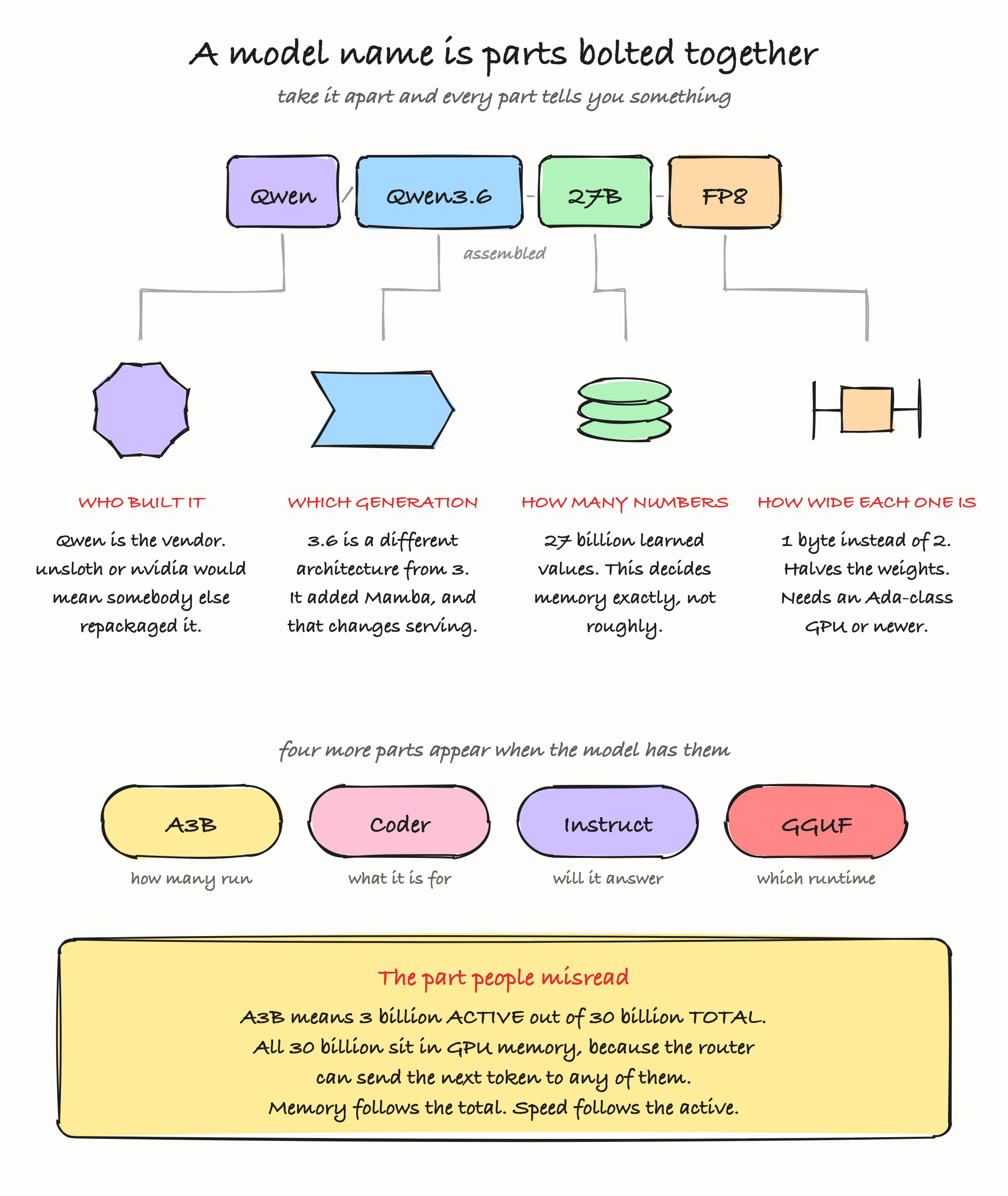
Reading this figure. At the top the name is one string. Below it, the same string is pulled apart into its four parts, each drawn as a different shape so you can tell them apart at a glance: a seal for who built it, a chevron for which generation, a stack of discs for how many numbers, and a caliper for how wide each number is. The four rounded chips near the bottom are the extra parts that appear on longer names.
Publisher. The text before the slash is the account that uploaded it, and it answers a question that matters: is this the original, or somebody's re-release? Qwen/Qwen3.6-27B-FP8 is the vendor's own quantized build. cyankiwi/Qwen3.6-27B-AWQ-INT4 is a community member's four-bit conversion of the same base model. The community build may be excellent. It may also have been quantized with a calibration set that suits somebody else's workload and quietly damages yours. Prefer the vendor's own build when one exists, and when you use a community build, read what they say about how they made it.
The A3B Trap: Total Parameters Are Not Active Parameters
Look at these two models side by side:
Qwen/Qwen3.6-27Breads as twenty seven billion parameters.Qwen/Qwen3.6-35B-A3Breads as thirty five billion parameters, thenA3B.
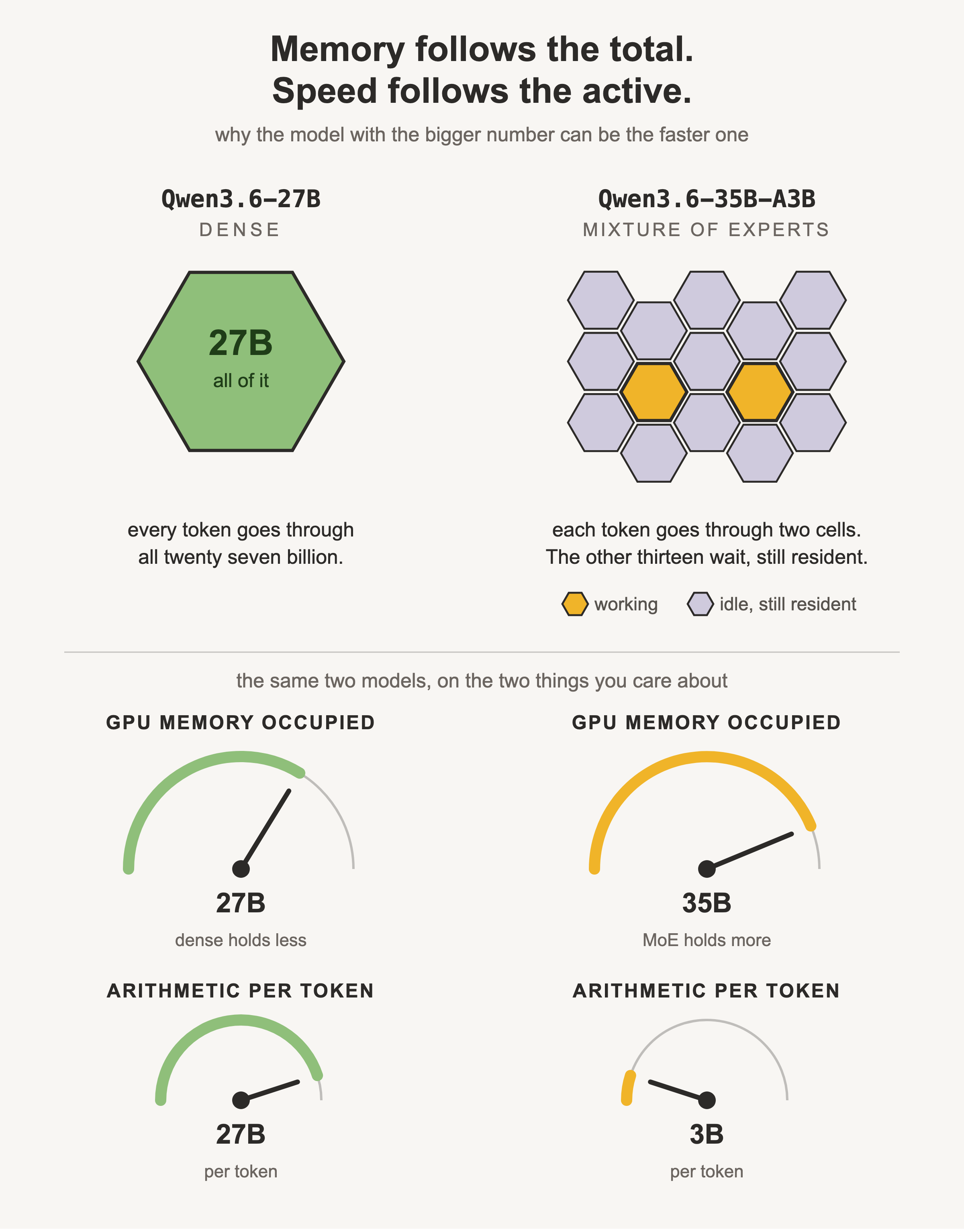
A3B means three billion active parameters. The model has 35 billion in total, but any single token only passes through about 3 billion of them.
This is a mixture-of-experts model. Instead of one large block of arithmetic that every token goes through, the layer is split into many smaller specialist blocks, and a small router network picks a couple of them per token. The rest sit idle for that token, then get used for a different token later.
Go back to the mixing desk. A dense model is one enormous desk, and every song is mixed through all of it. A mixture-of-experts model is a room containing thirty desks, where each song is routed to the two most suitable ones. You still had to buy thirty desks, and they all still take up floor space, but each song only occupies two.
That analogy carries the exact consequence you need:
Memory is set by the total. Speed is set by the active.
You must hold all 35 billion parameters in GPU memory, because the router might send the next token to any expert and there is no time to fetch one from disk. But the arithmetic per token is only what 3 billion parameters cost, so generation is much faster than the total size suggests.
Base, Instruct, Thinking: What the Model Was Taught to Do Last
Two models can have identical architecture, identical parameter count and identical file size, and behave completely differently, because of what happened in the final stage of training. That stage is what this slot in the name records.
Base. Trained only to continue text. Give it "The capital of France is" and it will produce "Paris." Give it "What is the capital of France?" and it may produce three more questions, because a document containing that question plausibly continues with more questions. A base model is not broken when it does this. It is doing exactly its job, which is not the job you wanted. Base models are raw material for , not for products.
Instruct (also Chat, also -it for "instruction tuned"). The same model after being taught to treat your text as a request and respond to it. This is what you want for essentially every application. When a name has no post-training suffix at all, check the model card, because publishers increasingly ship the instruct-tuned version as the default and only mark the base version explicitly.
Thinking (also Reasoning). Trained to produce a chain of intermediate reasoning before its final answer. This is worth knowing about before you deploy one, because the reasoning is emitted as tokens. You pay for those tokens, they take time, and by default they may appear in the response.
We saw this directly in the lab. Asked a two sentence question with a 120 token limit, the model spent its entire budget thinking and never reached the answer:
reply : Here's a thinking process:

1.  **Analyze User Input:**
   - **Topic:** KV cache in an LLM server
   - **Question:** What is it? Why does it grow with conversation length?
   - **Constraint:** Exactly two sentences.

2.  **Define KV Cache (Key-Value Cache):**
   - In transformer-based LLMs, attention mechanisms compute keys (K) and values (V)...

tokens: 33 in / 120 out
Thirty three tokens in, one hundred and twenty out, and not one of them was the answer. The fix is a serving parameter that disables thinking for requests that do not need it, and once we set it the same question answered directly:
Precision and Format: FP8, AWQ, GGUF and Who Made Them
The last slots on a name are the ones people most often get wrong, because two different ideas share the same territory.
Precision is how many bits each parameter uses. FP8 is eight-bit floating point. INT4 and NVFP4 are four-bit. Lower precision means less memory and faster arithmetic, at some cost in accuracy that ranges from unmeasurable to serious depending on the method and the workload.
Format is how the file is packaged and therefore which software can open it. This is the part that silently wastes an afternoon.
| Marker | Precision | Made by | Runs on |
|---|---|---|---|
| (none) | BF16 | the vendor | anything |
FP8 | 8-bit float | usually the vendor | vLLM, TensorRT-LLM, on a recent data centre GPU |
NVFP4 |
The Real Decision, on Real Hardware
Everything above becomes concrete the moment you rent a card. Here is exactly what happened when we did.
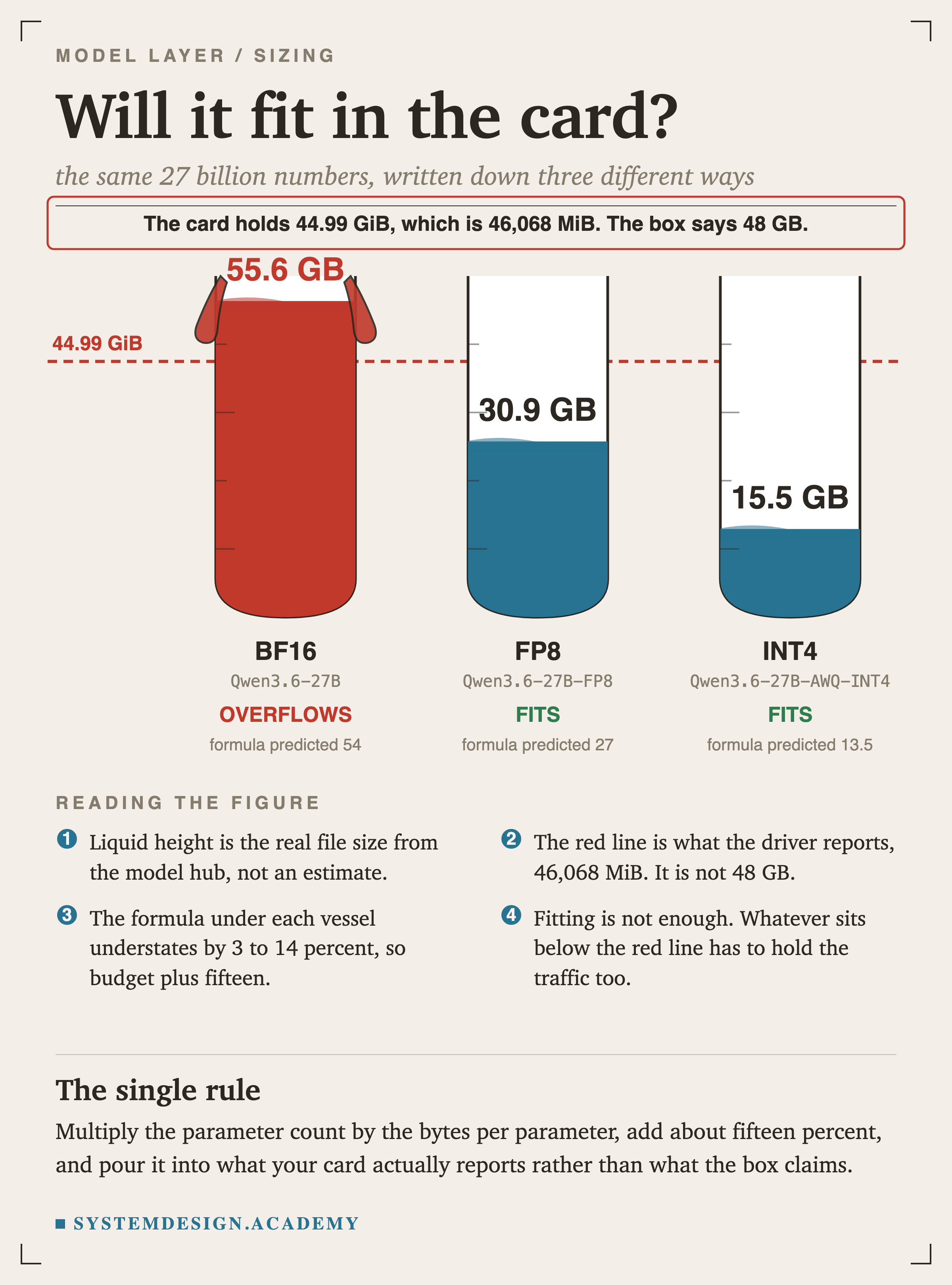
We rented a g6e.2xlarge on AWS, which carries a single NVIDIA L40S. The marketing figure for that card is 48 GB. What the driver actually reports is different:
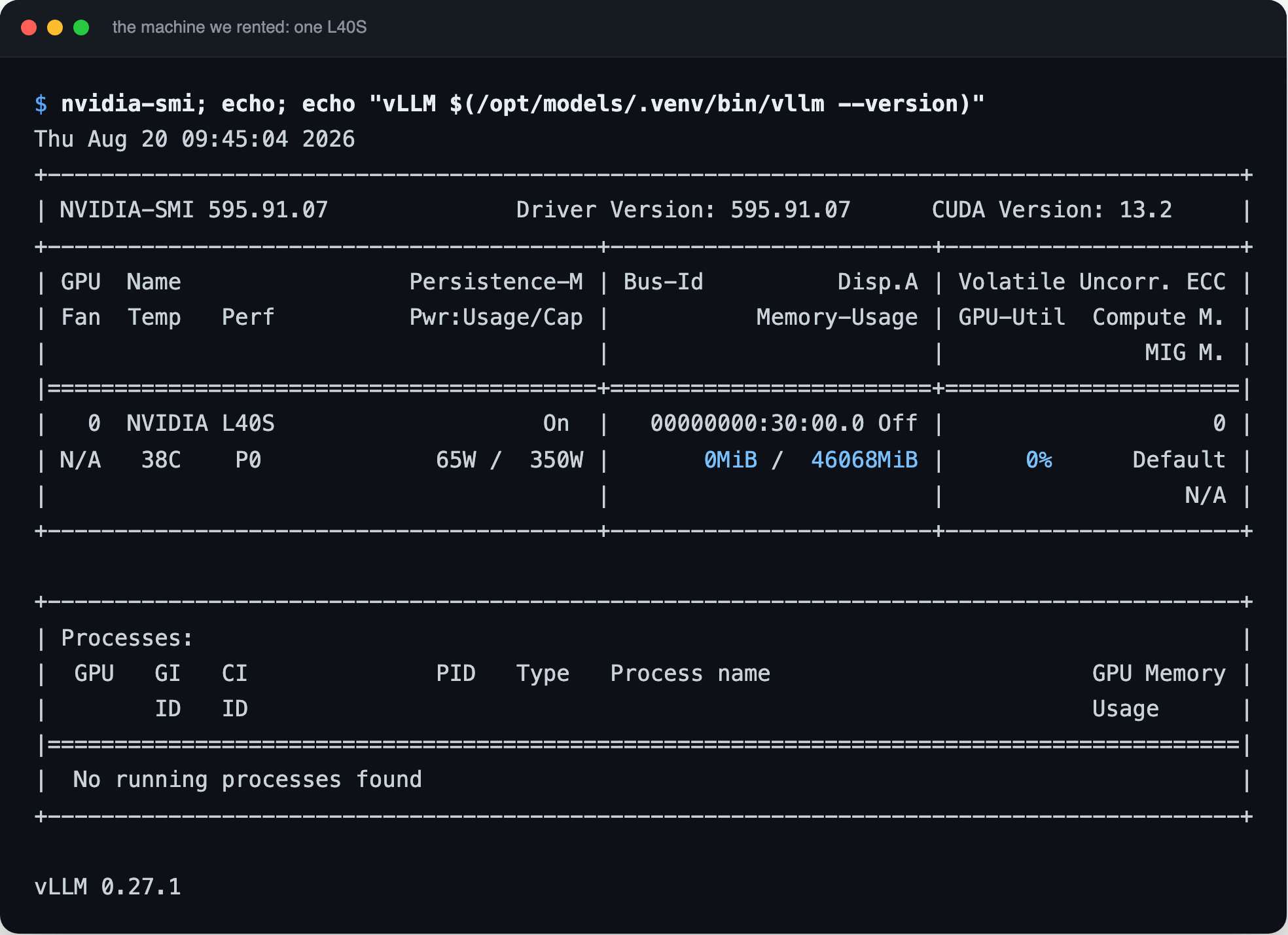
Reading this figure. The output of nvidia-smi on the rented machine. The number that matters is 46,068 MiB of memory, which is what the driver reports rather than the 48 GB printed on the spec sheet. The last line is the serving software version.
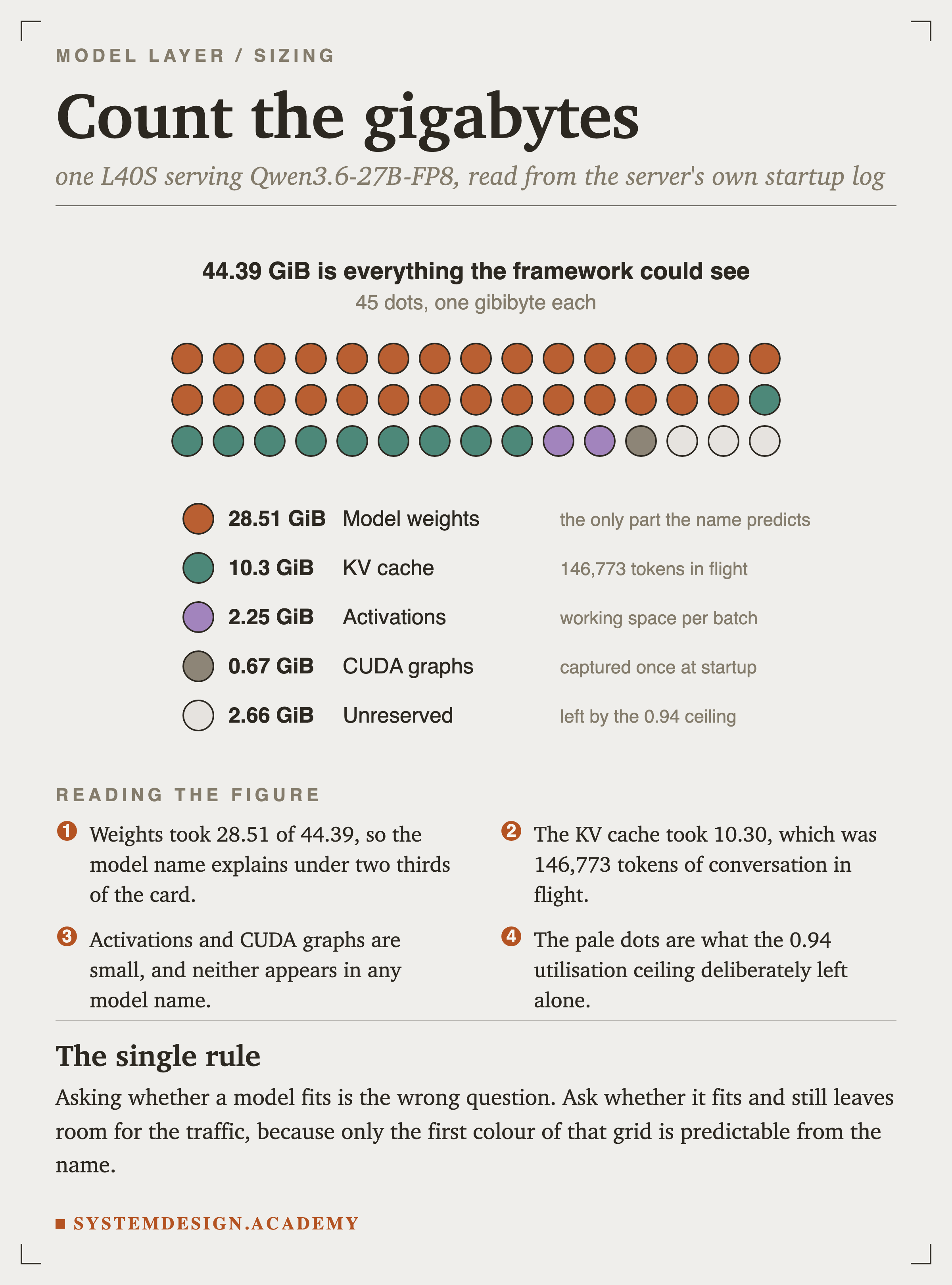
46,068 MiB, which is 44.99 GiB. The gap between 48 and 45 is the usual difference between a marketing gigabyte and a binary gibibyte. Once the driver and CUDA context take their share, the serving framework reported only 44.39 GiB actually available.
Now apply the lesson. Qwen/Qwen3.6-27B is 55.6 GB. It cannot fit, and no amount of configuration changes that. Qwen/Qwen3.6-27B-FP8 is 30.9 GB. It fits. So the FP8 build was not a performance optimisation or a nice-to-have, it was the only one of the two that was possible on this card.

Reading this figure. First the downloaded model as it sits on disk, then the card it has to fit into, then the arithmetic for both builds side by side. This is the entire sizing decision on one screen.
Here is where every gigabyte went once the server was running. These are measured values from the server's own startup log, not estimates:
What Getting It Wrong Looks Like
Names carry information, but they do not carry all of it. Here is a failure that no amount of name reading would have predicted, and it is instructive precisely because of that.
With the right model, the right precision and a card with room to spare, the server refused to start:
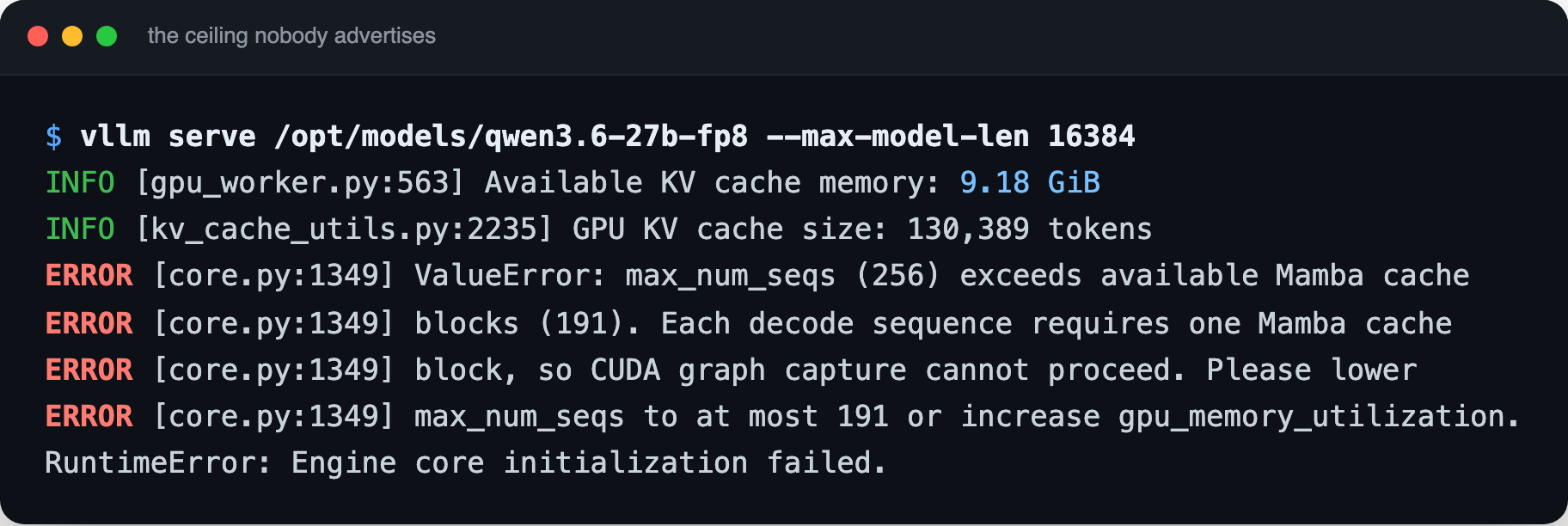
Reading this figure. The server refusing to start. It reports how much memory it found, then explains that this model needs one Mamba cache block for every concurrent request, that there is room for 191 of them, and that it had been told to accept 256.
Read the error. It says each concurrent request needs one Mamba cache block, and there is room for 191, but the server was configured to accept 256 at once.
Mamba is not a transformer component. It is a different mechanism for handling sequences, and Qwen3.6 is a hybrid: partly attention, partly Mamba. Nothing in the string Qwen3.6-27B-FP8 tells you that. You find out from the model card, or from the error.
The consequence is worth carrying forward. The maximum number of simultaneous requests this model can serve was set by its architecture, not by the size of the GPU. Lowering the concurrency limit to 128 fixed it immediately. But if you had planned capacity by dividing GPU memory by expected conversation size, your plan was wrong before you started.
This is also the point of the version slot in the name. Qwen3 was a conventional transformer. Qwen3.6 is a hybrid. Same family, one decimal apart, and a serving constraint that did not exist before.
What the Name Costs You Per Million Tokens
The name determines the hardware, the hardware has an hourly price, and the hourly price only becomes a per-token price once you know how busy the box is. This is where self-hosting is either brilliant or a mistake, and the name alone will not tell you which.
We benchmarked the running server at four concurrency levels. Every number below is measured on the box described above, at $2.2421 per hour:
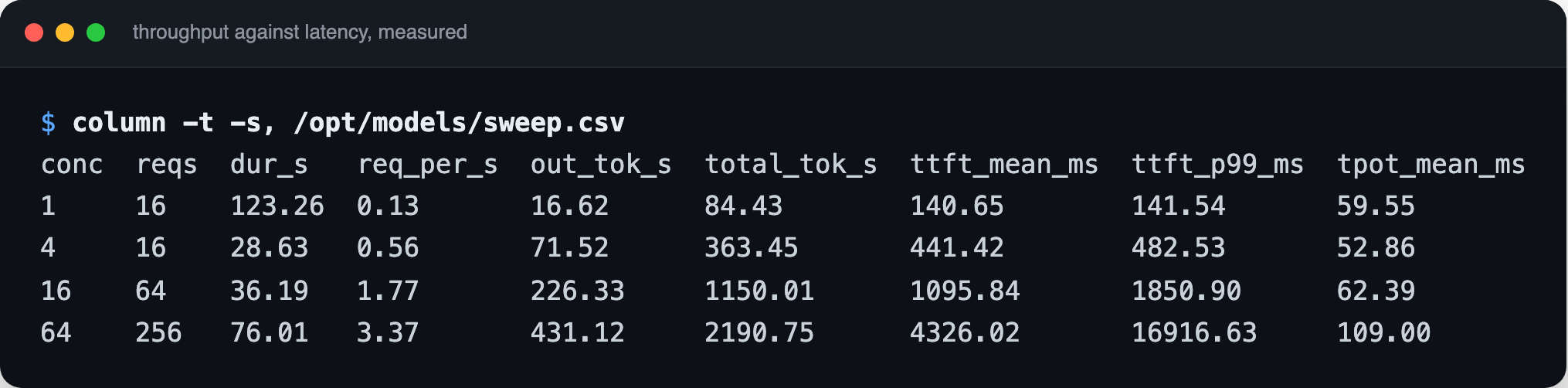
Reading this figure. One row per concurrency level. Read down the throughput columns and the numbers climb; read down the columns and they climb too. The top and bottom rows of this table are the entire argument for and against self-hosting.
| Concurrent requests | Output tokens/sec | P99 time to first token | Cost per 1M output tokens |
|---|---|---|---|
| 1 | 16.62 | 142 ms | $37.47 |
| 4 | 71.52 | 483 ms | $8.71 |
| 16 | 226.33 | 1.85 s |
Reading Nine Names
Go back to the search results from the first slide. You can now read all of them.
| Name | What it tells you |
|---|---|
Qwen/Qwen3.6-27B | Vendor build, 27B dense, BF16 by default, 55.6 GB. Needs more than one 48 GB card. |
Qwen/Qwen3.6-27B-FP8 | Vendor build, same model at 8 bits, 30.9 GB. Fits one L40S. Needs Ada or newer. |
Qwen/Qwen3.6-35B-A3B-FP8 | Vendor, mixture-of-experts, 35B held in memory, ~3B active. Bigger and faster. |
nvidia/Qwen3.6-35B-A3B-NVFP4 | NVIDIA's 4-bit build. Smallest of the MoE options, newest hardware required. |
cyankiwi/Qwen3.6-27B-AWQ-INT4 | Community 4-bit build, ~14 GB. Check how it was calibrated. |
Lorbus/Qwen3.6-27B-int4-AutoRound |
Knowledge Check
Knowledge Check
5 questions - Score 80% to pass
You have a GPU that reports 46,068 MiB. Which of these will fit its weights with room left over for a KV cache?
Qwen3.6-35B-A3B has more total parameters than Qwen3.6-27B. Compared to the 27B dense model, what should you expect?
You download unsloth/Qwen3-Coder-30B-A3B-Instruct-GGUF onto a GPU server running vLLM and it will not load. What is the most likely reason?
A model card says the file is 30.9 GB, but 27 billion parameters at one byte each should be 27.0 GB. Why the extra 3.9 GB?
Your self-hosted server costs $2.2421 an hour and sustains 16.62 output tokens per second with one user, or 431.12 with sixty four. What does this tell you about when self-hosting makes sense?