A Notebook and a Bookmark
Let me start with a notebook, like the one in the picture.
Imagine a cook who keeps one notebook for a single dish. Every time she changes the recipe, she does not rub out the old page. She writes the new recipe on a fresh page, with a number, the date, what she changed and how the guests liked it. Then she puts a bookmark in the page the kitchen should cook today.

The kitchen never asks "which page number?". It asks "where is the bookmark?". If the new recipe goes badly, she moves the bookmark back one page. No page is rewritten, and nobody in the kitchen has to learn anything new. They just open the notebook at the bookmark again.
A works in the same way for trained models. In this lesson I run a real one on my laptop and write three versions of a model into it. Then I move the bookmark back and forth, and measure what really happens on disk each time. I also try to break it, and I show the real error messages.
Where This Lesson Starts
This lesson uses the model from the features chapter. If it is new to you, please read what a feature is first. That lesson built six features for each customer of a real online shop, from the customer's past invoices. It asked one question: at the start of a month, will this customer buy something in the next 30 days? The model is a gradient boosted tree model from scikit-learn, and it scored a test AP of 0.5450. AP, average precision, is a score from 0 to 1 for how well the model ranks the buyers above the others.
Earlier lessons of this chapter matter here. Saving formats compared showed that skops refuses some tree types until you name them. Skops is a safe format for scikit-learn models. Pinning dependencies showed why the exact library versions must be written down.
The survey lesson on model registry and versioning explains a registry in words: versions, stages and promotion. The lifecycle chapter measured the promotion gate and lineage and rollback. I do not repeat them. Here I run a real registry and look inside it.
The Words You Need First
Please read this slide slowly if any word is new. Every slide after it uses these words.
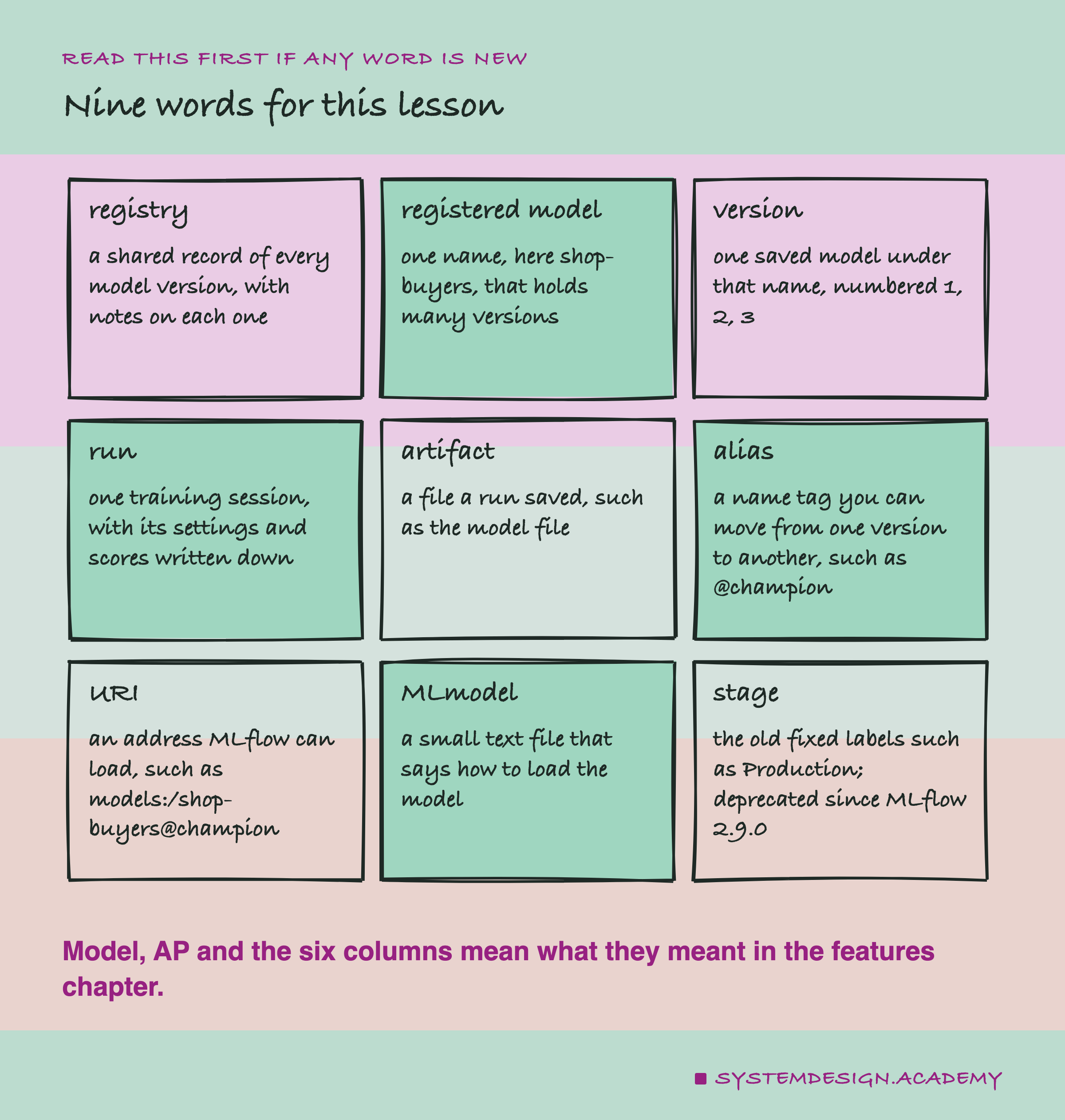
MLflow is a free, open-source tool for keeping track of machine learning work. One part of it is a : the notebook from the first slide. A registered model is one name in that notebook. Mine is called shop-buyers. Under one name there are many versions, numbered 1, 2, 3, and a version never changes once it is written.
A run is one training session. MLflow writes down its params, the settings I chose, and its metrics, the scores. Files the run saved, like the model itself, are called artifacts.
An alias is the bookmark: a name such as @champion that points at one version, and that I can move. A URI is an address that MLflow knows how to open. models:/shop-buyers@champion means "the version the champion alias points to, right now".
A stage is the older way of doing the same job, with fixed names like Production and Staging. MLflow now calls stages deprecated: they still work, but they will be removed, and new code should not use them.
What the Documentation Says
Before running anything, I read what MLflow itself says. Every quote here was found word for word in the source of MLflow's documentation at the commit of release 3.16.1, and all of them are in results/reg-factcheck.json.
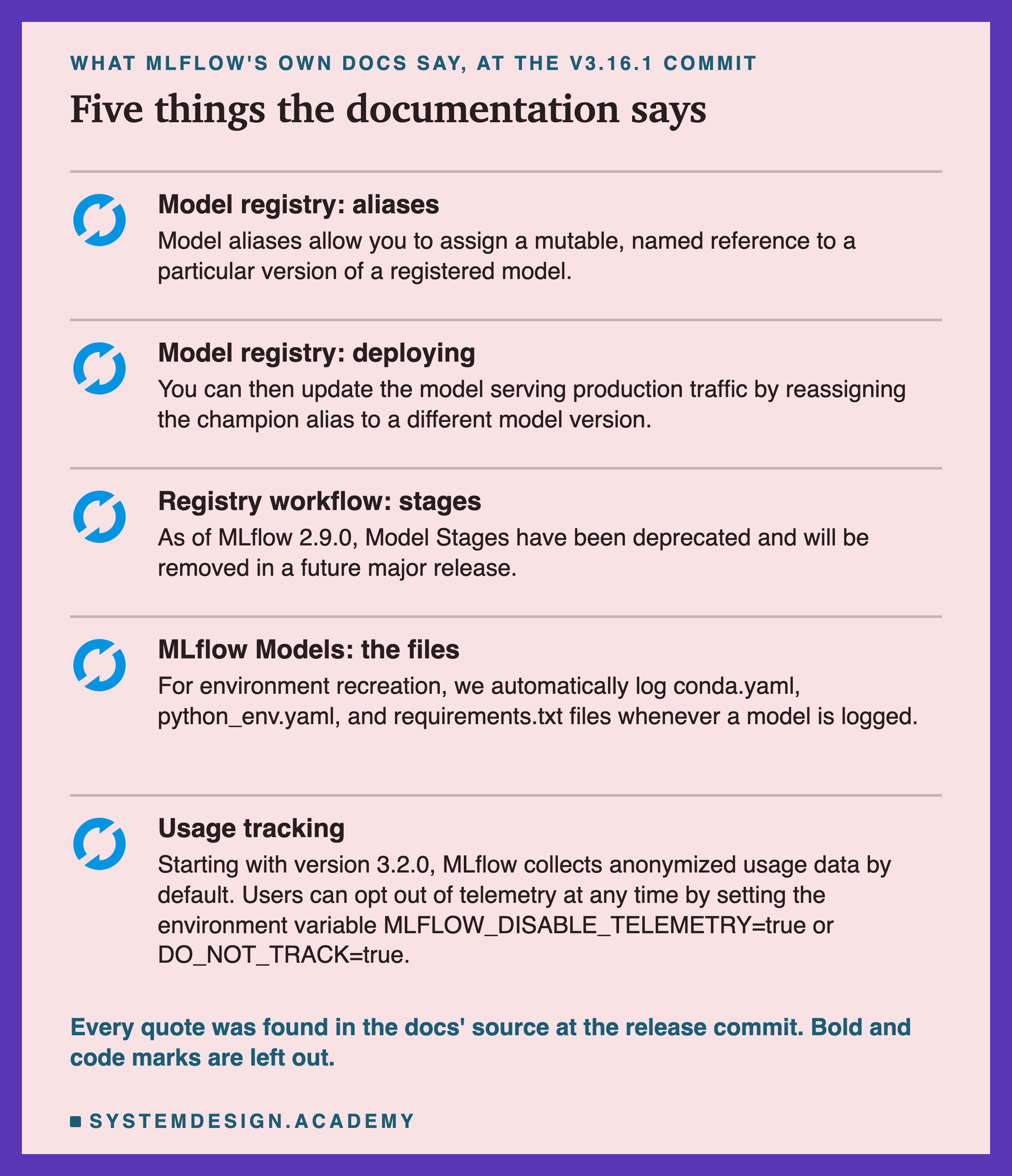
The registry page says: "Model aliases allow you to assign a mutable, named reference to a particular version of a registered model." Mutable means it can change. It also gives the use: "You can then update the production traffic by reassigning the champion alias to a different model version."
The workflow page says: "As of MLflow 2.9.0, Model Stages have been deprecated and will be removed in a future major release." Many teams still use stages, so the survey lesson describes them. This lesson uses aliases, the way MLflow now asks you to.
The page on MLflow Models says that every logged model gets three files that describe its environment: conda.yaml, python_env.yaml and requirements.txt. I check what they really contain.
And one thing I did not expect. MLflow's usage tracking page says: "Starting with version 3.2.0, MLflow collects anonymized usage data by default." This is called telemetry. The page says it holds no personal data, and that setting MLFLOW_DISABLE_TELEMETRY=true or turns it off. My lab, my loader and the demo all set both, so nothing was sent.
How the Lab Was Built
I wrote the design into the docstring of scripts/labs/packaging/model_registry.py before it first ran. Before that, I had installed MLflow and read its source code and docs pages, but I had not logged, registered or loaded any model.
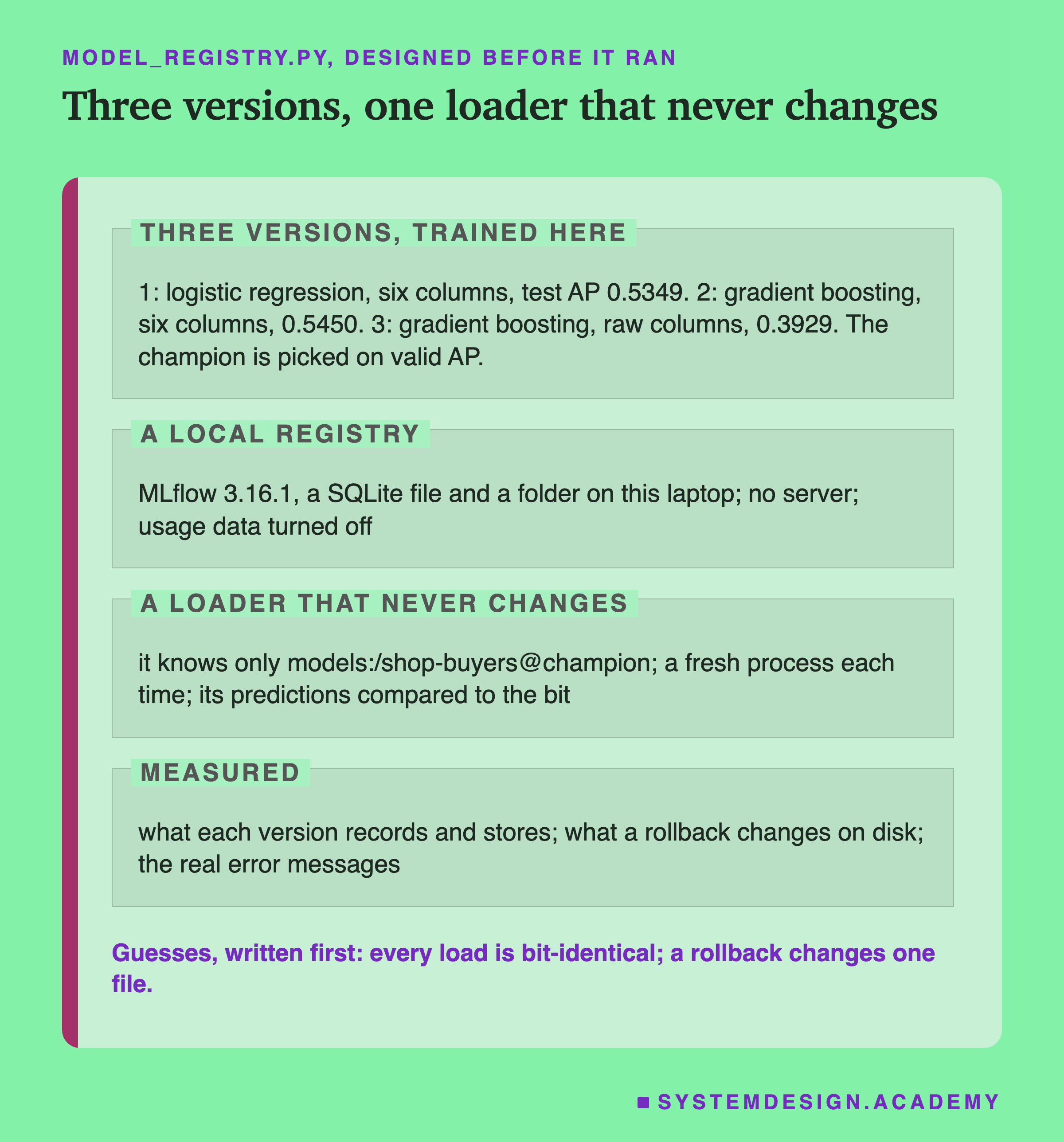
Its own environment. MLflow lives in a separate venv, ~/lab-data/venv-pkg-reg, with Python 3.13.15 and MLflow 3.16.1. Its scikit-learn, numpy, scipy and pandas versions are the same as in the rest of the chapter. A venv is a folder with its own Python packages, so this install cannot disturb anything else.
A local registry. MLflow can keep its records in a SQLite file, a small database stored as one file. The model files go in a plain folder. Both live outside the repository. No server runs: the Python code talks to the SQLite file directly.
Three versions. Each model is trained in this venv, and each must give exactly the test AP the features chapter stored, or the lab stops. Version 1 is a logistic regression on the six columns, a simple straight-line model. Version 2 is the chapter model. Version 3 is the same boosted model on the raw columns, the customer's last invoice line, which the features chapter showed is a worse input. The champion is picked by AP on the three validation months, never on the test months.
A loader that never changes. A short file, load_champion.py, knows only the address . It is my stand-in for the serving code. The lab runs it in a fresh Python process each time the alias moves, always with the same input: the 26,851 test rows, as the six columns.
The Lab's Report, Running
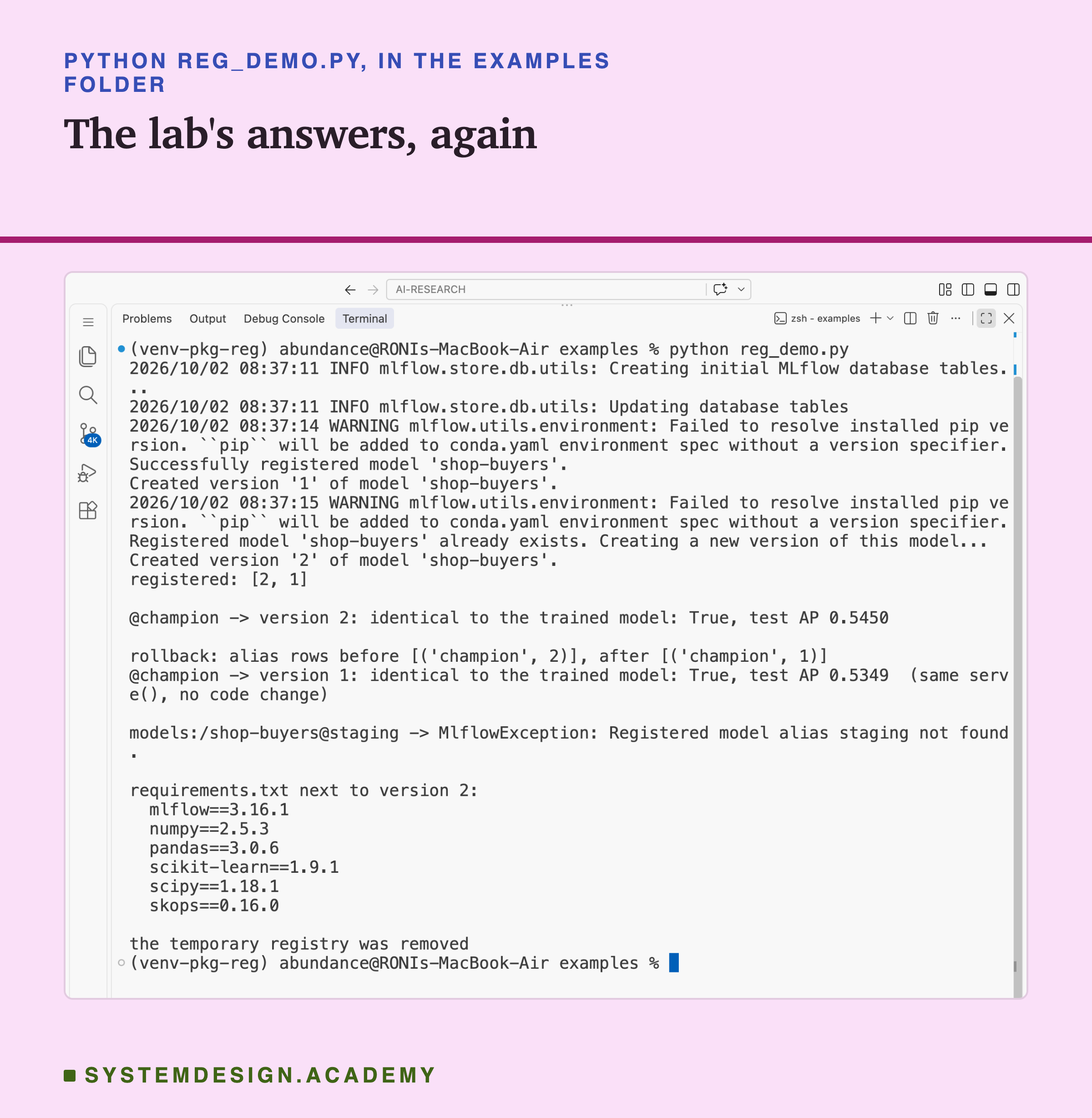
This is a real recording of the report script, reg_report.py, on the laptop where the lab ran.
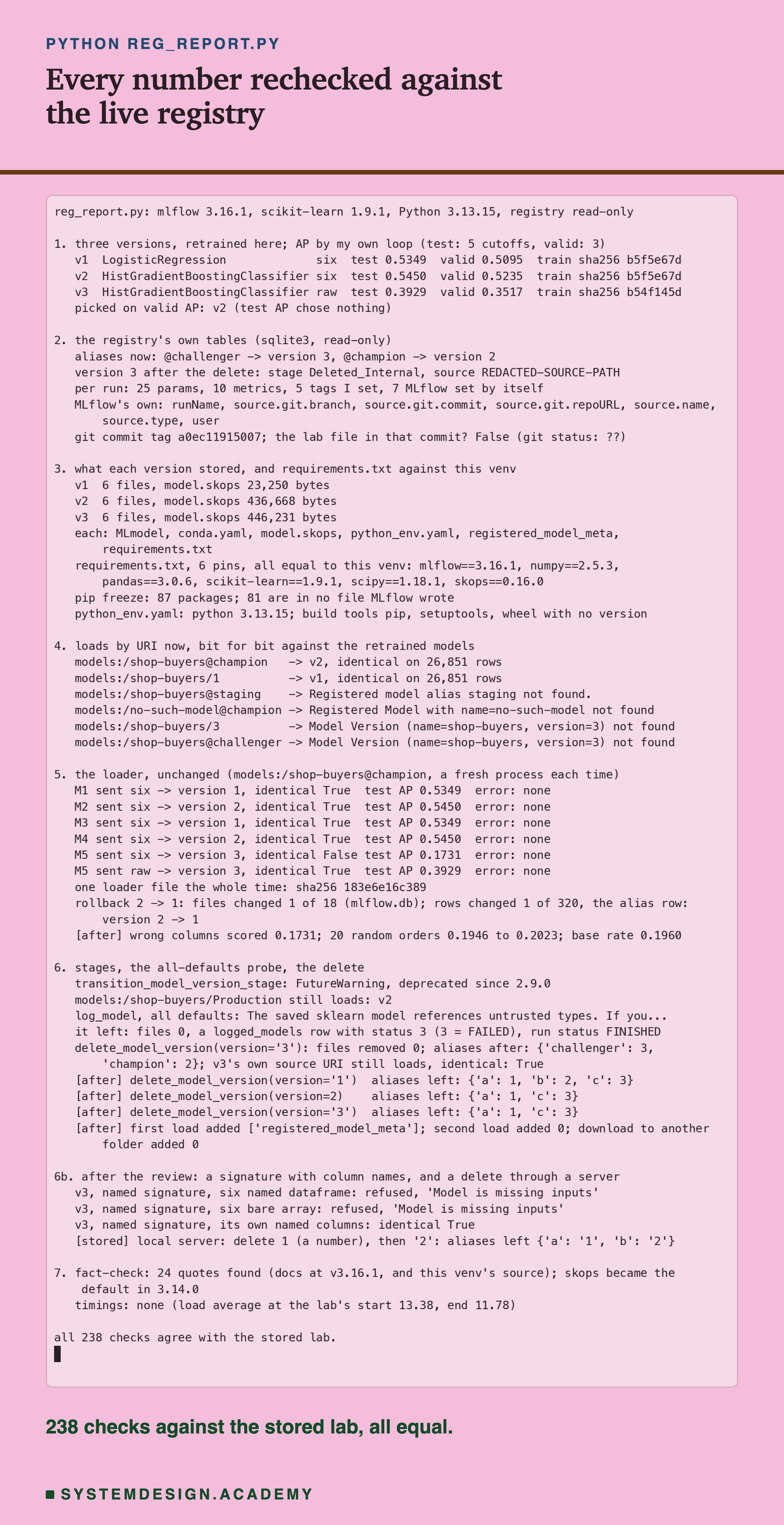
The report does not trust the lab. It trains all three models again and computes every AP with its own loop, written apart from scikit-learn's. It opens the registry's SQLite file with Python's own sqlite3 module, read-only, and checks every alias, version, param, metric and tag the lab says it wrote. It re-reads every stored file. Then it loads models by address through MLflow, compares the predictions bit for bit, and repeats each failing load to compare the error text. It also repeats the named-signature test from the review, in a temporary folder. All 238 checks agreed.
The last line of section 7 matters for honesty: no timings. Nothing in this lesson was timed, so you will see no seconds.
What One Run Wrote Down
The first half of the question: what does a registry record? Here is version 2, the chapter model.
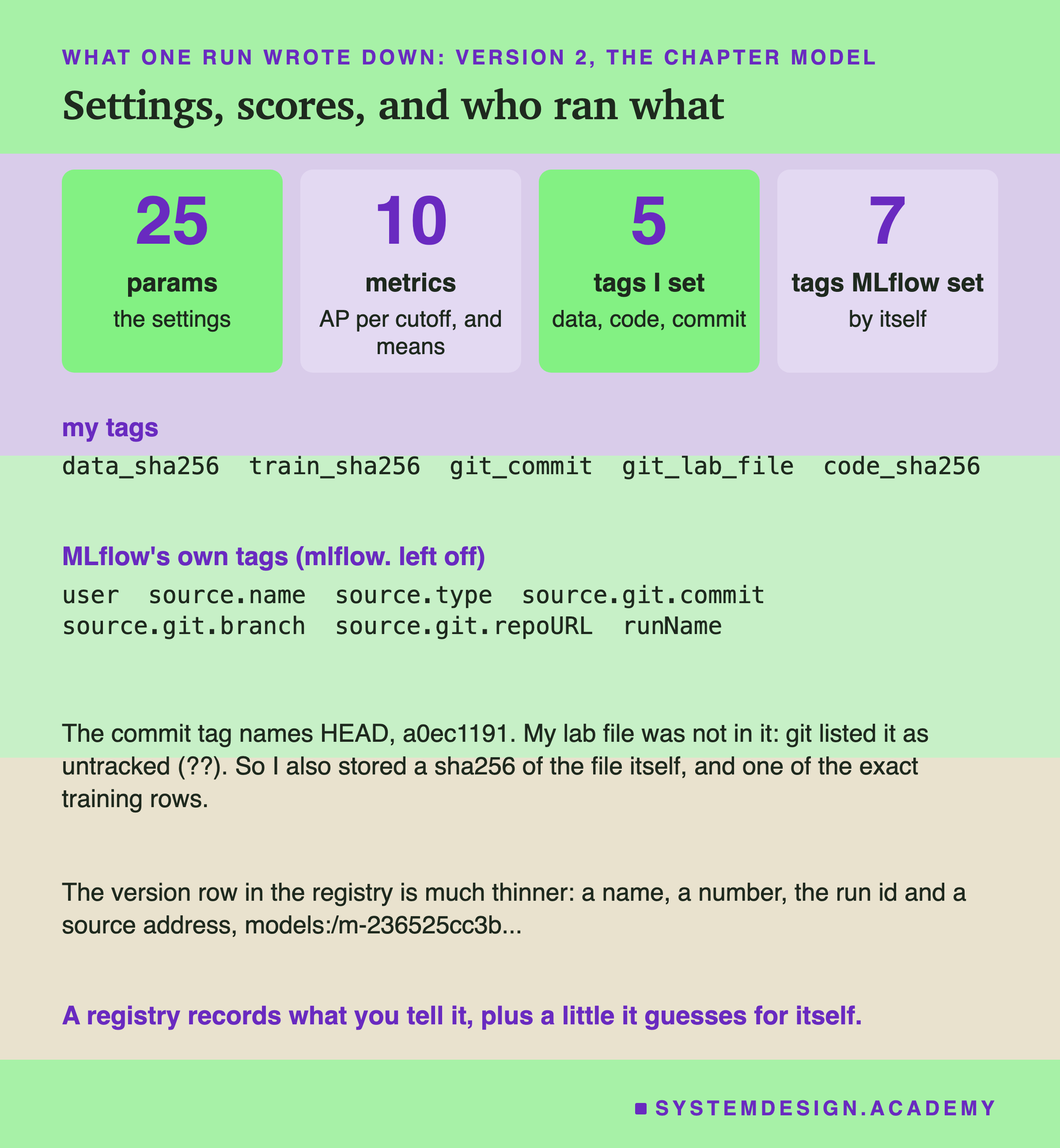
The run held 25 params: the model's name, its input columns, its random seed, how many trees it built, and every setting of the model. It held 10 metrics: test AP for each of the 5 test months, valid AP for each of the 3 validation months, and the two means.
Tags are short labels made of a key and a value. I set 5. data_sha256 is the sha256 of the shop data file, a fingerprint of its exact bytes. train_sha256 is a fingerprint of the exact training rows the model saw. code_sha256 is a fingerprint of my lab file.
MLflow set 7 tags by itself, without being asked. They hold my login name, the file that ran, the git commit, the branch, the address of my git repository, and the run's name. Git is the tool that keeps the history of my code, and a commit is one saved point in it.
Here is the catch I found. The commit tag pointed at the newest commit, but my lab file was not inside that commit at all. Git listed it as untracked, ??, because I had not committed it yet. So the commit alone could not bring back the code that trained this model. The fingerprint of the file could at least prove which file it was. The lesson shows what goes wrong when such a record is missing.
The Default Refused to Log the Model
My first step, before any careful setup, was to log the chapter model with every default: mlflow.sklearn.log_model(model, name="model") and nothing else. It failed.
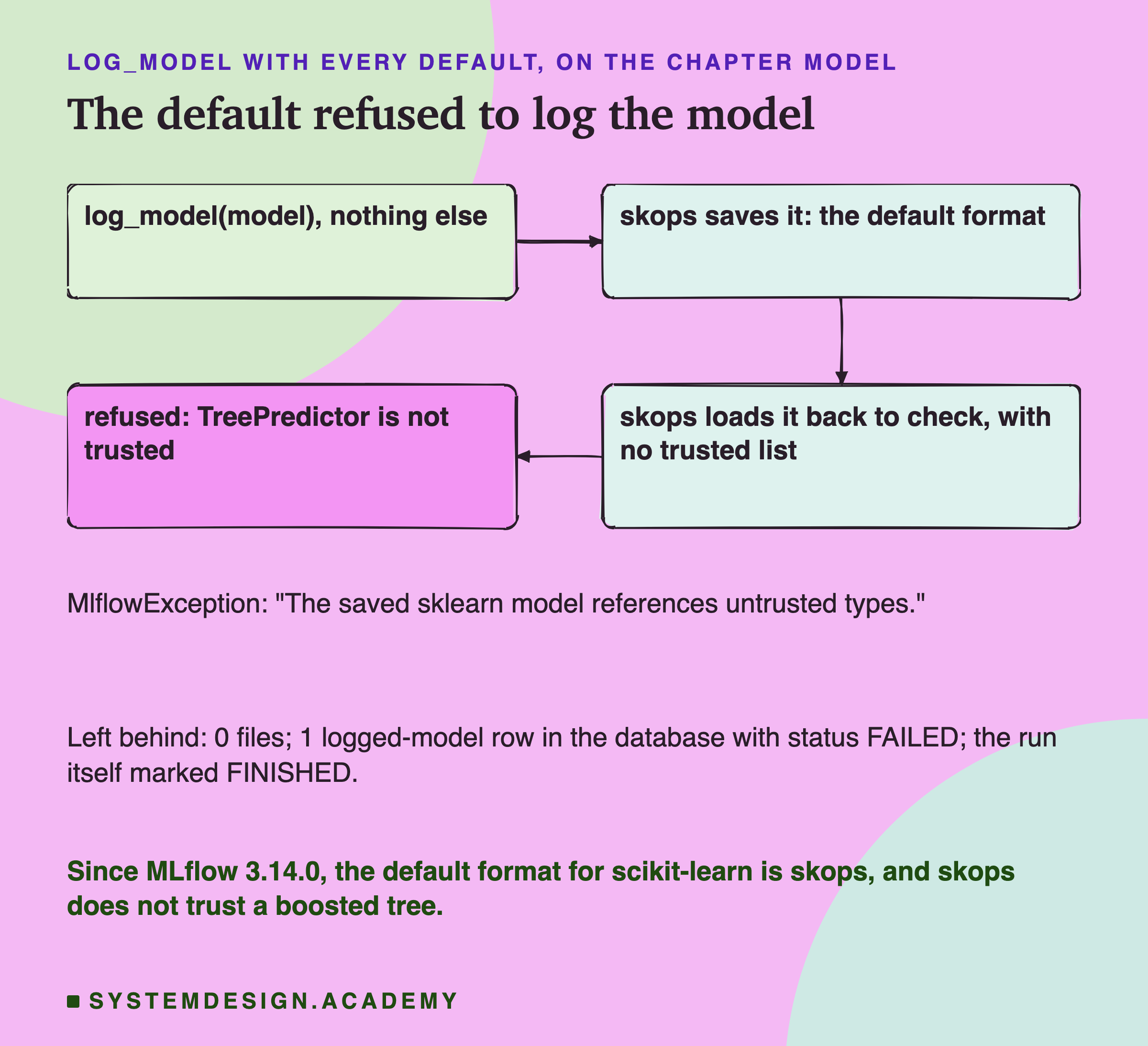
The error said: "The saved sklearn model references untrusted types." I had guessed this from reading the source, and here is why. Since MLflow 3.14.0, its changelog says, the default format for scikit-learn models is skops, no longer cloudpickle, a pickle variant that can run code when it loads. MLflow saves the model with skops and then loads it straight back to check it. In lesson 2, skops refused this exact model until I named one type, TreePredictor, the class that holds one boosted tree. With no list of trusted types, the check failed.
The error message also explains why skops is careful. A tree stores numbers that point to other places in memory, and a crafted file could make them point outside it. It ends with good advice: "Only add the specific types you have reviewed and trust".
The failure left something behind. No files, but the database kept a record of a logged model with status FAILED. And the run around it was marked FINISHED, because my code caught the error. A registry that looks tidy can still hold failed attempts.
What I Had to Trust, Version by Version
So I named the trusted types myself, for each version, by hand. My design said the lab should stop if skops listed anything I had not named. It did stop, on its first run.
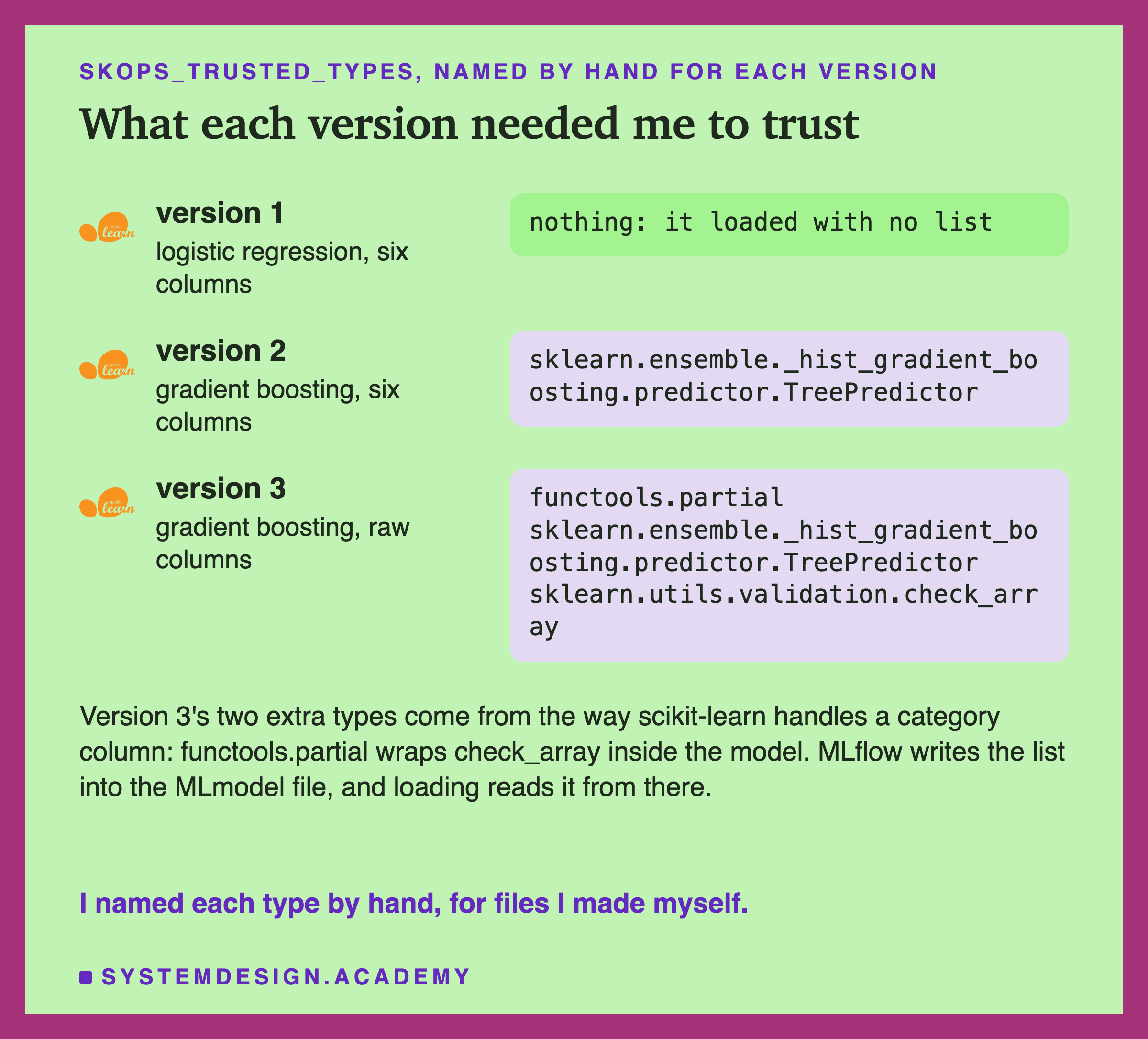
Version 1 needed nothing. Version 2 needed TreePredictor, as in lesson 2. But version 3 needed three types. It has a category column, the country, and scikit-learn handles that column with a small helper built from functools.partial and check_array. I read the scikit-learn source to see where they came from, and added them to version 3's list. I wrote that change into the lab's docstring, labelled as made after the first run. Nothing else changed: the first run had trained the same models with the same APs.
functools.partial deserves a moment. It wraps any function with some of its arguments filled in, so trusting it is broader than trusting one tree class. Here skops listed the wrapped function, check_array, as a type of its own, so I had to name it as well.
One more thing I read in MLflow's source: it writes this list into the model's MLmodel file, and load_model reads the list from that same file. So the file carries its own permission to load. I trust that only because I wrote the file. Lesson 10 of this chapter returns to the question of how you know a file is yours.
What Registering a Version Does
With the trusted types named, each model logged and registered. Here is what happened, step by step, for version 2.
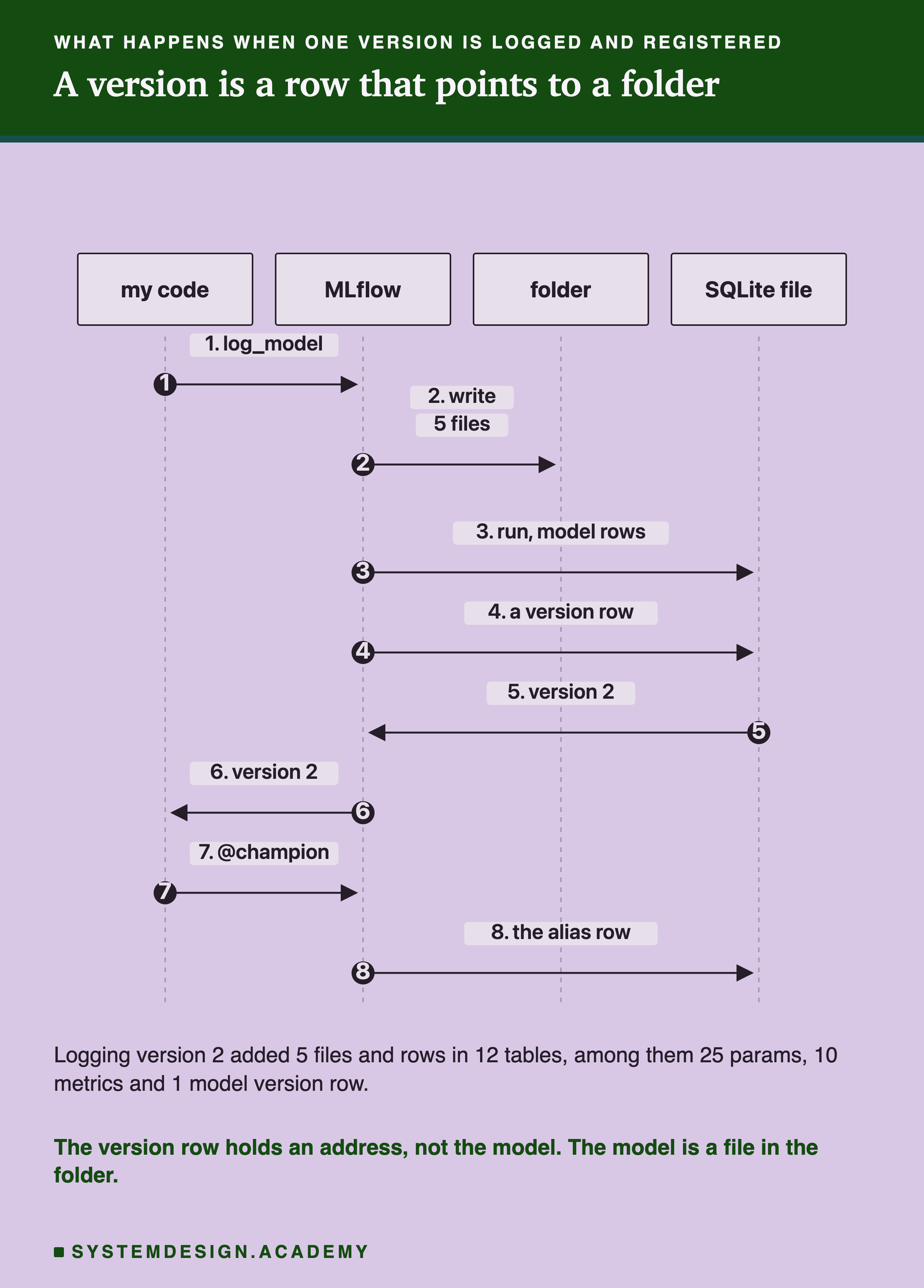
The lab took a snapshot before and after each logging step: every file with its size and fingerprint, and every row of every table in the database. Logging version 2 added 5 files to the folder and rows to 12 tables. Most of those rows were the params and metrics, stored twice. One copy belongs to the run, and one to the logged model, a record MLflow 3 keeps for each saved model.
The version row itself is small. It holds the name, the number 2, the run's id, and a source address that starts with models:/m- followed by a long id. That address points to the folder of files. So a registered version is a row that points to a folder, and the alias, as we will see, is a row that points to a version.
Three Versions, Two Tags
After all three were registered, the registry looked like this.
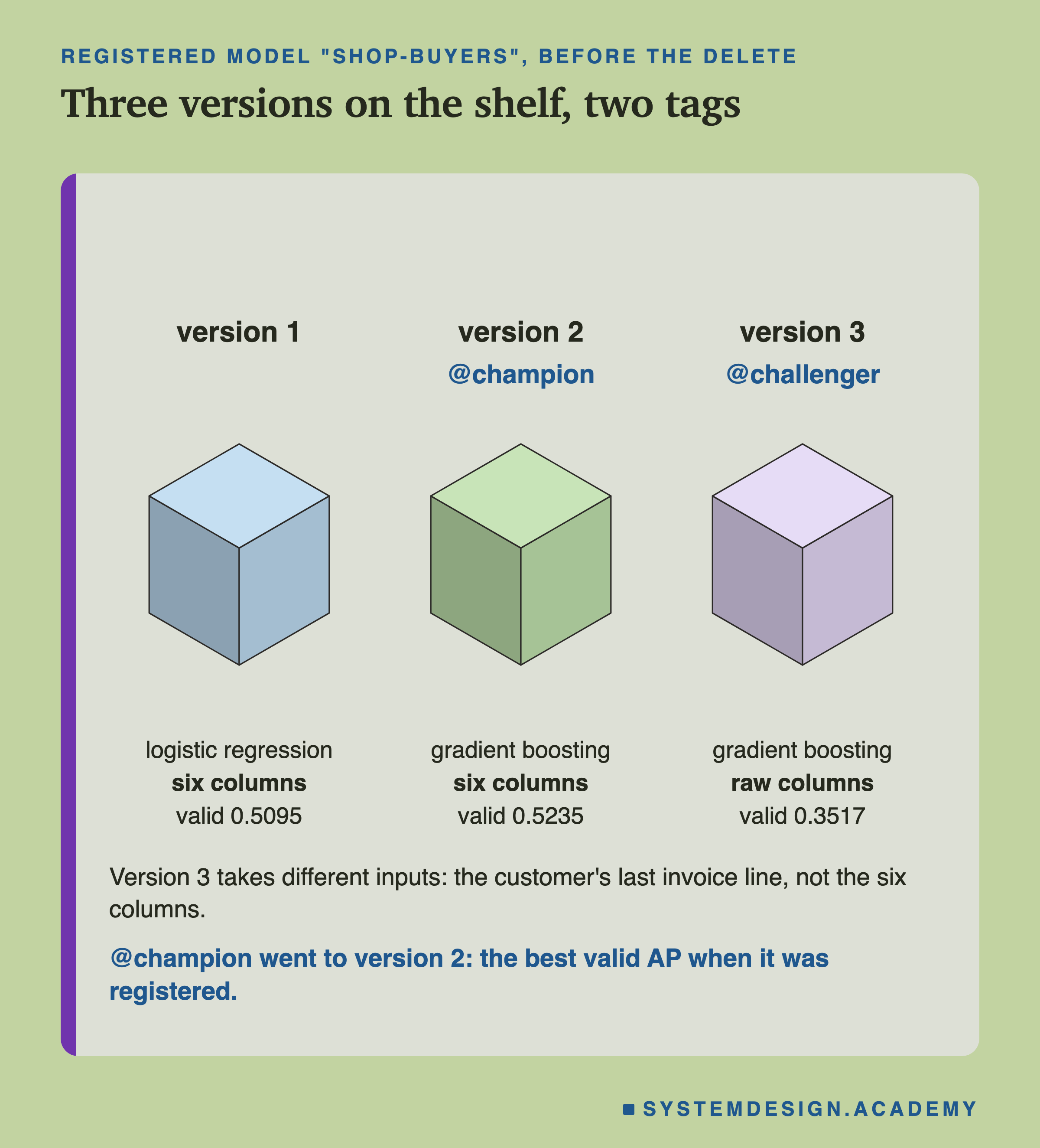
The lab followed one rule for @champion: after each new version, point it at the version with the best mean AP on the validation months. When version 1 was alone, it got the alias. When version 2 arrived with valid AP 0.5235 against 0.5095, the alias moved to version 2. Version 3, at 0.3517, did not win, so it got a second alias, @challenger, the usual name for a candidate under test.
Notice the inputs. Versions 1 and 2 both take lesson 1's six columns. Version 3 takes six other columns, all from the customer's last invoice line. They are the quantity, price and amount, the country, whether it was a return, and the hours since then. Keep that in mind; it matters on a later slide.
The Loader Got Whatever the Alias Pointed To
Now the second half of the question: how does "load the production model" actually work? The loader file asks for models:/shop-buyers@champion. MLflow looks up the alias row, finds the version and follows its source address to the folder. There it reads the MLmodel file, and loads model.skops with the trusted list written there.
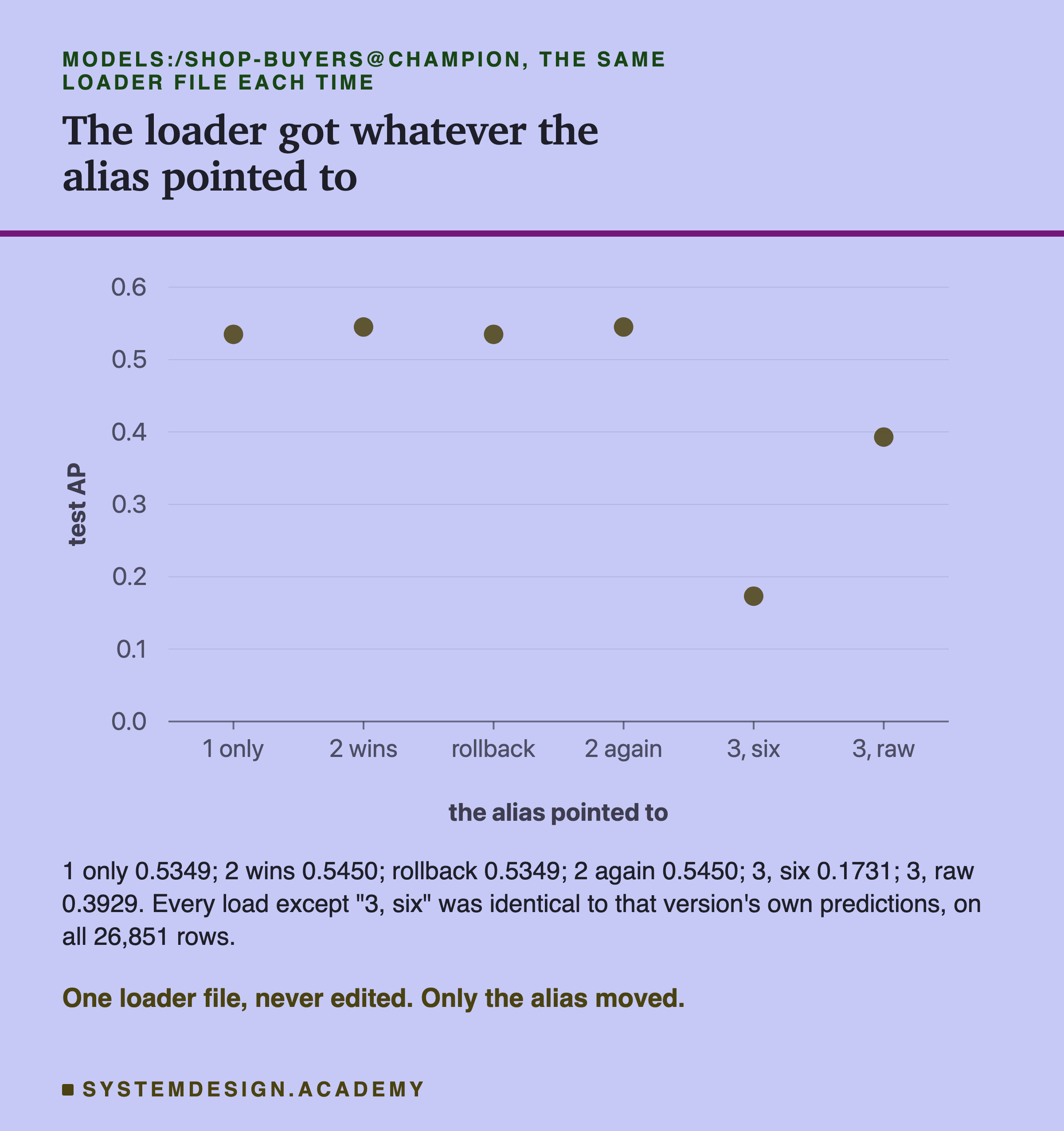
I ran the same loader file at six moments, each in a fresh Python process. Its fingerprint was the same every time, so the code never changed. What changed was only where the alias pointed.
When the alias pointed at version 1, the loader got version 1. Its predictions were identical, to the last bit, to the model I had trained in memory: test AP 0.5349. When it pointed at version 2, the loader got version 2, identical again, 0.5450. Then I rolled back to version 1 and forward to version 2, and both loads were identical once more.
Bit-identical means every one of the 26,851 predicted chances was exactly equal, down to the last binary digit, not just close. The two "3" moments come later, on their own slide.
A Rollback Changed One Row in One File
The question I most wanted to measure: when you roll back, what actually changes? I took the full snapshot just before and just after moving @champion from version 2 to version 1.
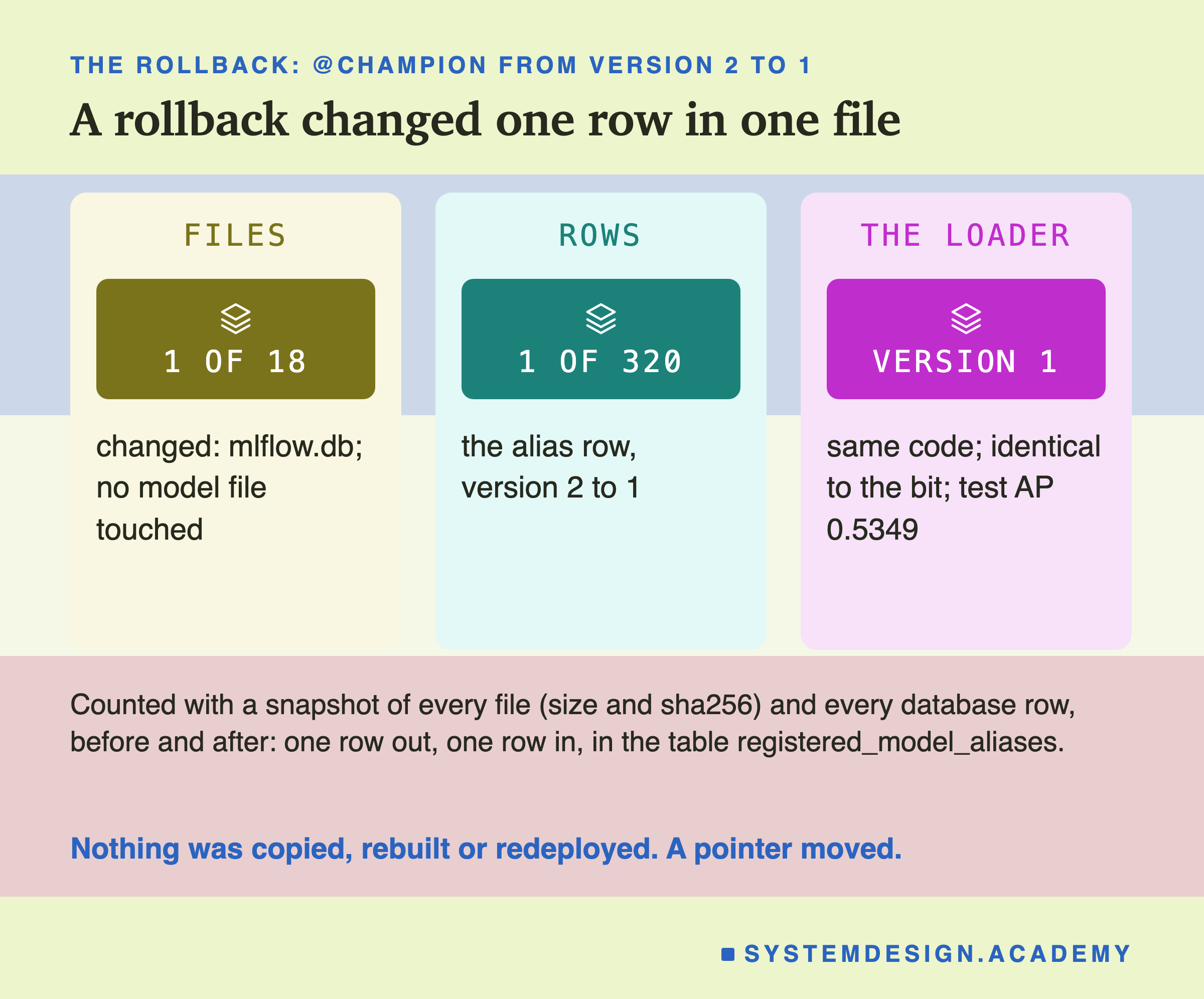
One file of 18 changed: the database file, mlflow.db. Not one model file was touched. Inside the database, one row of 320 changed: in the table registered_model_aliases, the row "champion, version 2" became "champion, version 1".
My guess before the run was close but not exact. I guessed the alias row would change, plus a "last updated" time on the registered model. The time did not change. The alias row was the only one.
So a rollback in a registry is as small as an edit can be. It is the bookmark being moved. This is also why it can be done in a moment, even at night under pressure. There is nothing to copy and nothing to build. The serving side picks up the change the next time it loads the model by its alias.
What Is Stored for Each Version
Now the files. Here is the folder for version 2.
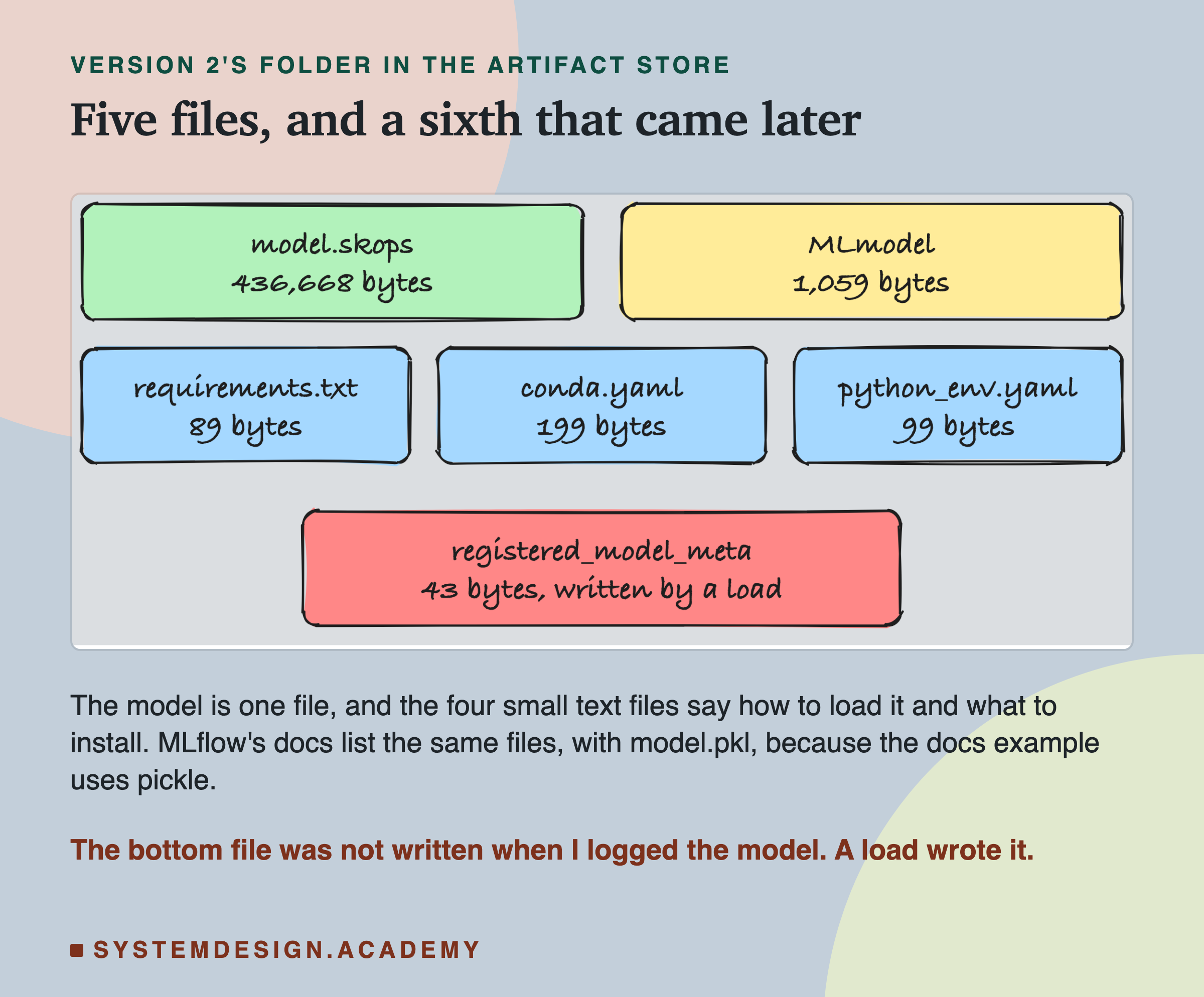
Each version's folder held the model in model.skops: 436,668 bytes for version 2 and 446,231 for version 3. The logistic regression took only 23,250, because it stores a handful of numbers instead of 54 trees. Next to it were four small text files.
The sixth file, registered_model_meta, was not there when I logged the model. It appeared later. I come back to it on its own slide, because it surprised me.
The documentation's example lists the same files with model.pkl instead of model.skops. That is because the docs example uses pickle. Here the default was skops, so the file name was different.
The File That Says How to Load the Model
The most important small file is MLmodel. It is short, so here are its real lines, in order.
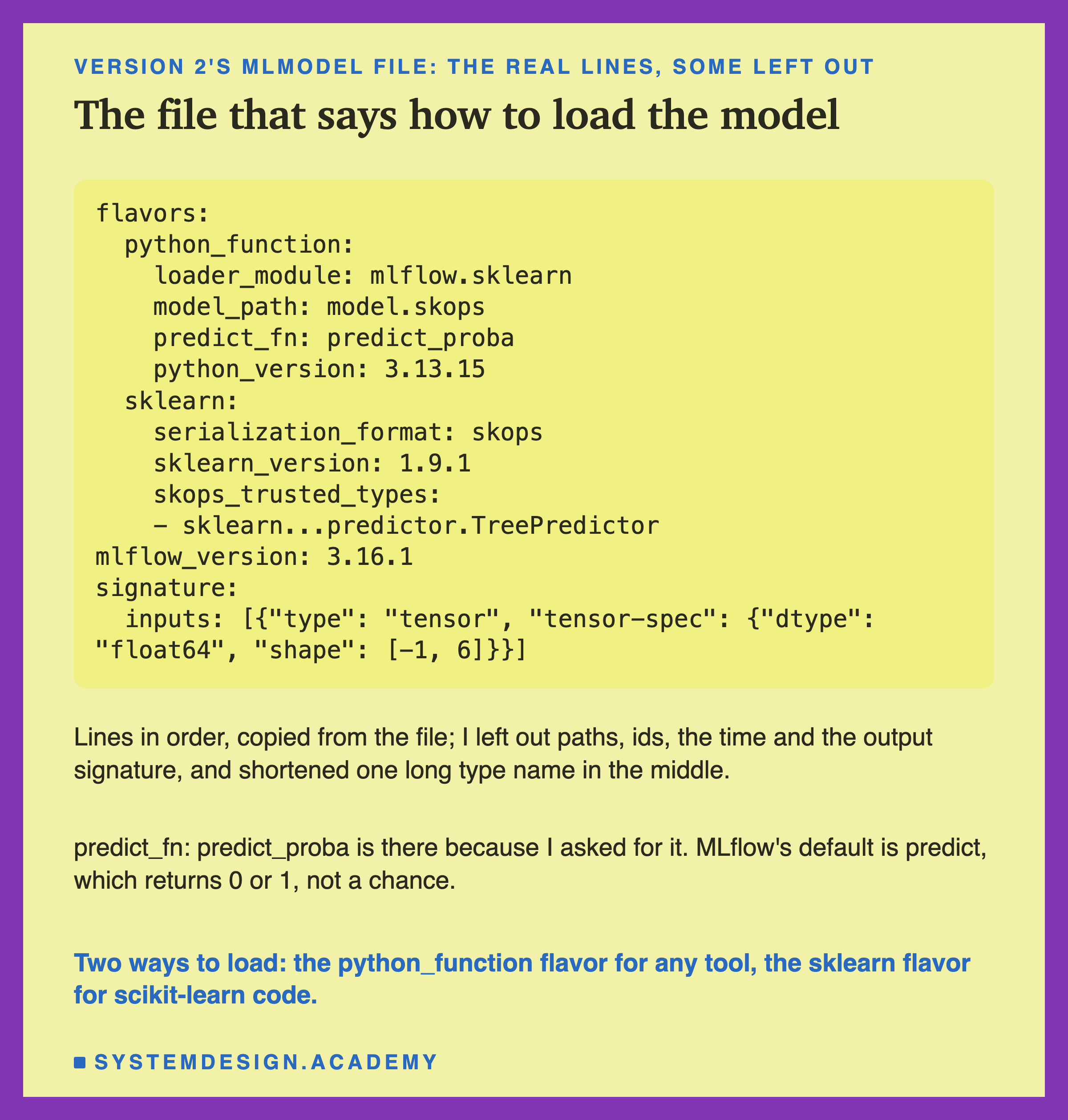
The file lists two flavors, two ways to load the same model. The python_function flavor is the general one: any tool can call predict on it without knowing scikit-learn. The sklearn flavor gives back the real scikit-learn object. The lab loaded the sklearn flavor too, and its predictions were identical as well.
Two lines need care. predict_fn: predict_proba is there only because I asked for it when logging. MLflow's default is predict, which for this model returns 0 or 1, buy or not buy, instead of a chance. A model that only says 0 or 1 cannot rank customers, so its AP would be poor. If you log a classifier with the defaults, check this line.
The signature line says what the model accepts: a tensor, which here means a table of numbers, of type float64, with any number of rows and 6 columns. Lesson 8 of this chapter is about signatures. In this lesson one fact about it matters: it names no columns.
What MLflow Wrote Down About the Environment
Lessons 3 and 4 of this chapter showed that a model needs the exact library versions it was trained with. So did MLflow write them down?
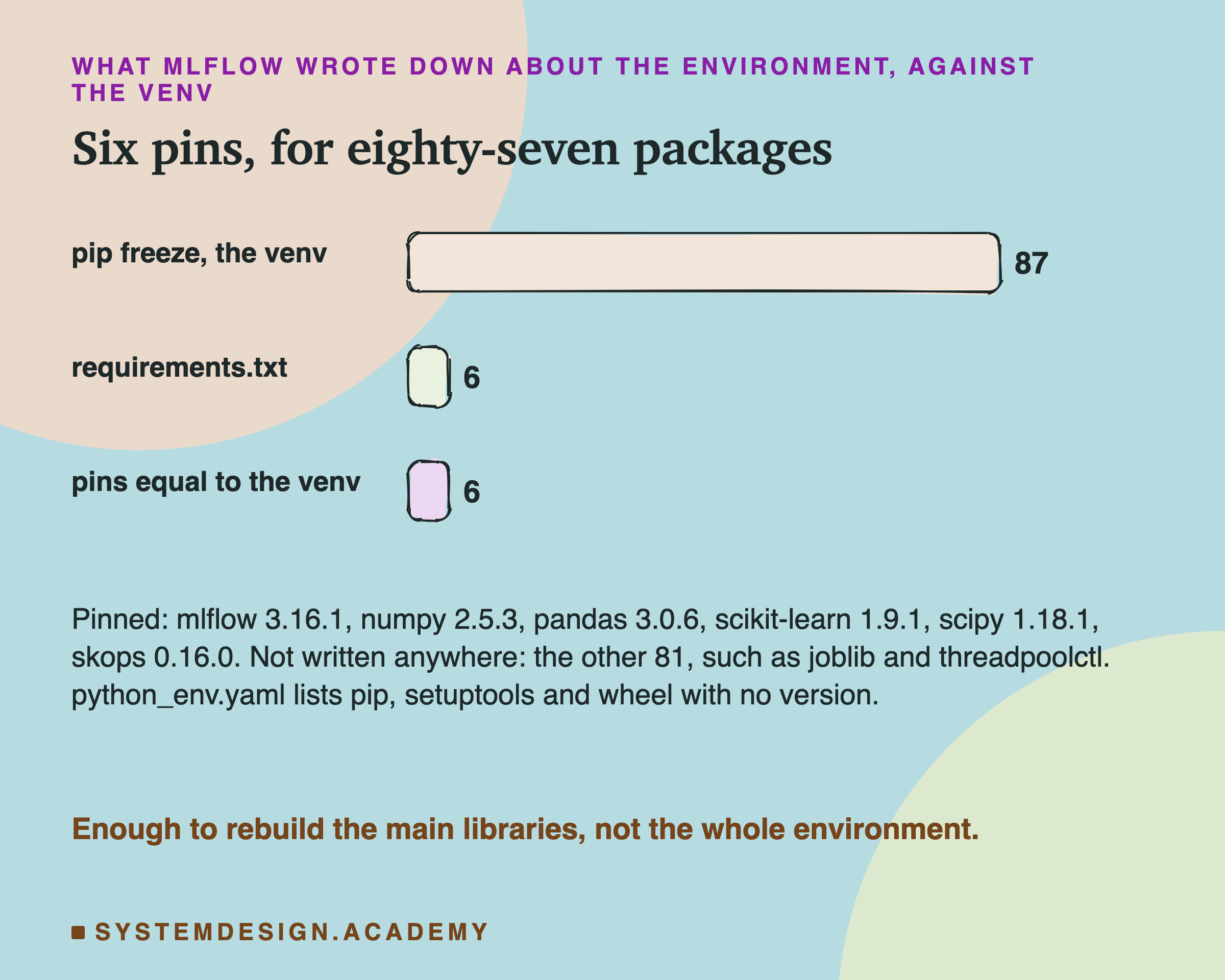
requirements.txt held 6 pins, and all 6 equalled the versions in my venv exactly: mlflow, numpy, pandas, scikit-learn, scipy and skops. A pin is a line like scikit-learn==1.9.1 that names one exact version. python_env.yaml named Python 3.13.15. My guesses were right on both.
But pip freeze lists every package in the venv, and it showed 87 packages. 81 of them appear in no file MLflow wrote. Some are helpers the main libraries need, such as joblib and threadpoolctl. When someone installs from this requirements.txt later, pip will choose any helper the six need by itself, at whatever version is newest that day. Lesson 4 measured what that drift looks like. python_env.yaml also lists pip, setuptools and wheel with no version at all. And MLflow warned that it could not find pip's version. My venv was made by uv, a different installer, and has no pip in it, which is the likely reason.
So MLflow's files are a good start: the libraries that touch the model are pinned. For a model you must be able to rebuild exactly, keep a full lock file from lesson 4 next to the model as well.
Right Shape, Wrong Columns, No Error
Now the planned test of what a registry does not check. I moved @champion to version 3 on purpose, while the loader kept sending the six columns that versions 1 and 2 expect.
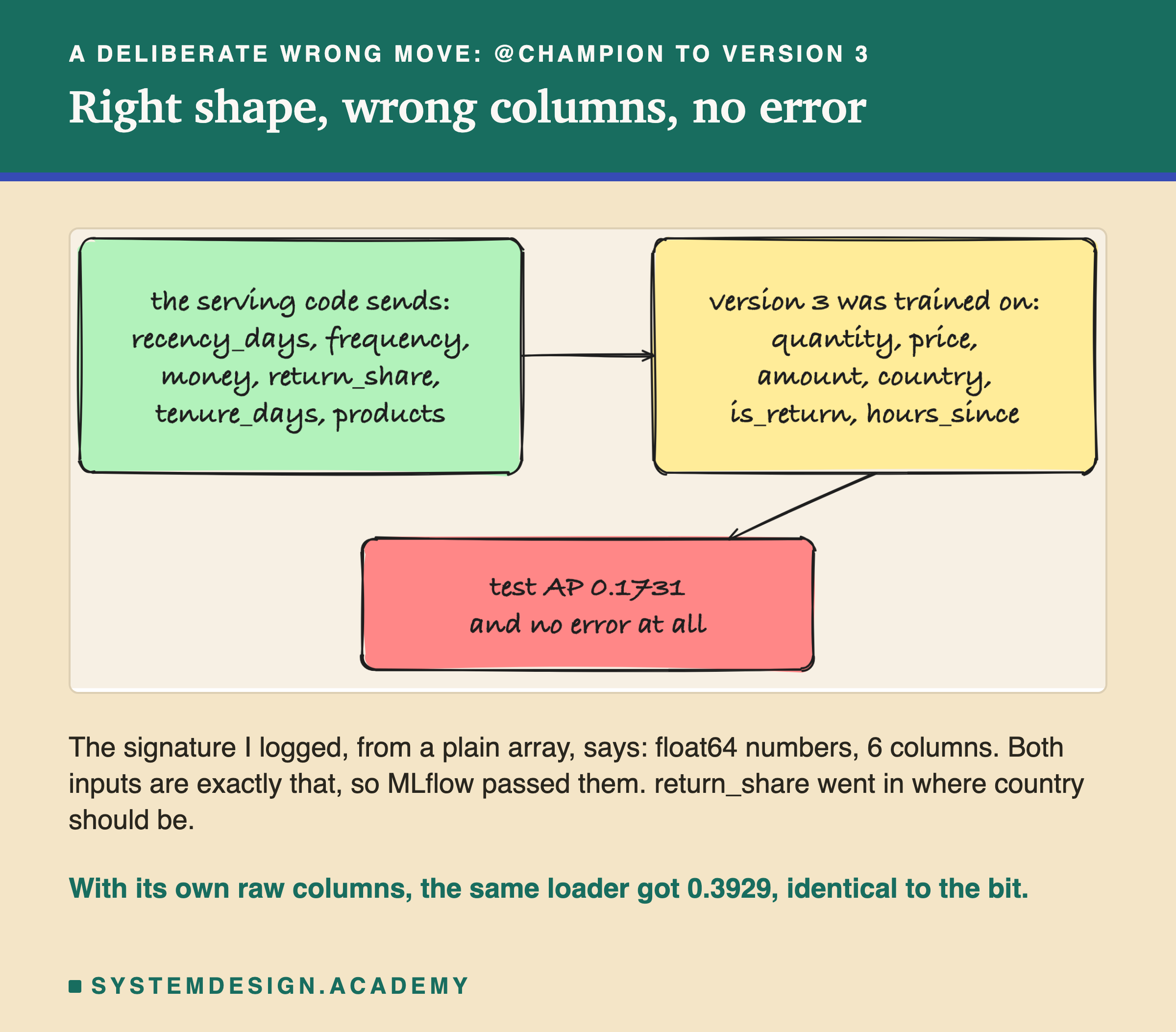
MLflow raised no error, and the model raised no error. The loader got predictions for all 26,851 rows, and their test AP was 0.1731. My guess before the run was "no error, and an AP far below 0.3929". It was right.
Why no error? The signature I logged only says "float64 numbers, 6 columns". The six columns the loader sent are float64 numbers, 6 columns. So the check passed. Inside the model, each column was read as something else. The share of returned lines went in where the country should be. Money went in where the amount of one invoice line should be.
The missing check comes from a choice I made: I logged the signature from a plain number array, so it has no column names. After an independent review, I tested the other choice and labelled it so in the lab. I logged version 3 again with a signature made from a table with its column names. It refused the six columns, both as a named table and as a bare array, with "Model is missing inputs". Lesson 8 of this chapter goes further. Even then, names cannot tell you whether a column means the same thing.
Then the same loader, with version 3's own raw columns, got 0.3929, identical to the bit. So the model was fine. The registry was fine. The mistake was moving an alias between two versions that take different inputs, and nothing in the registry knows what the inputs mean.
Worse Than a Random Order
After seeing 0.1731, I asked one more question, and the lab labels it as added after the results. How does that compare with no model at all?
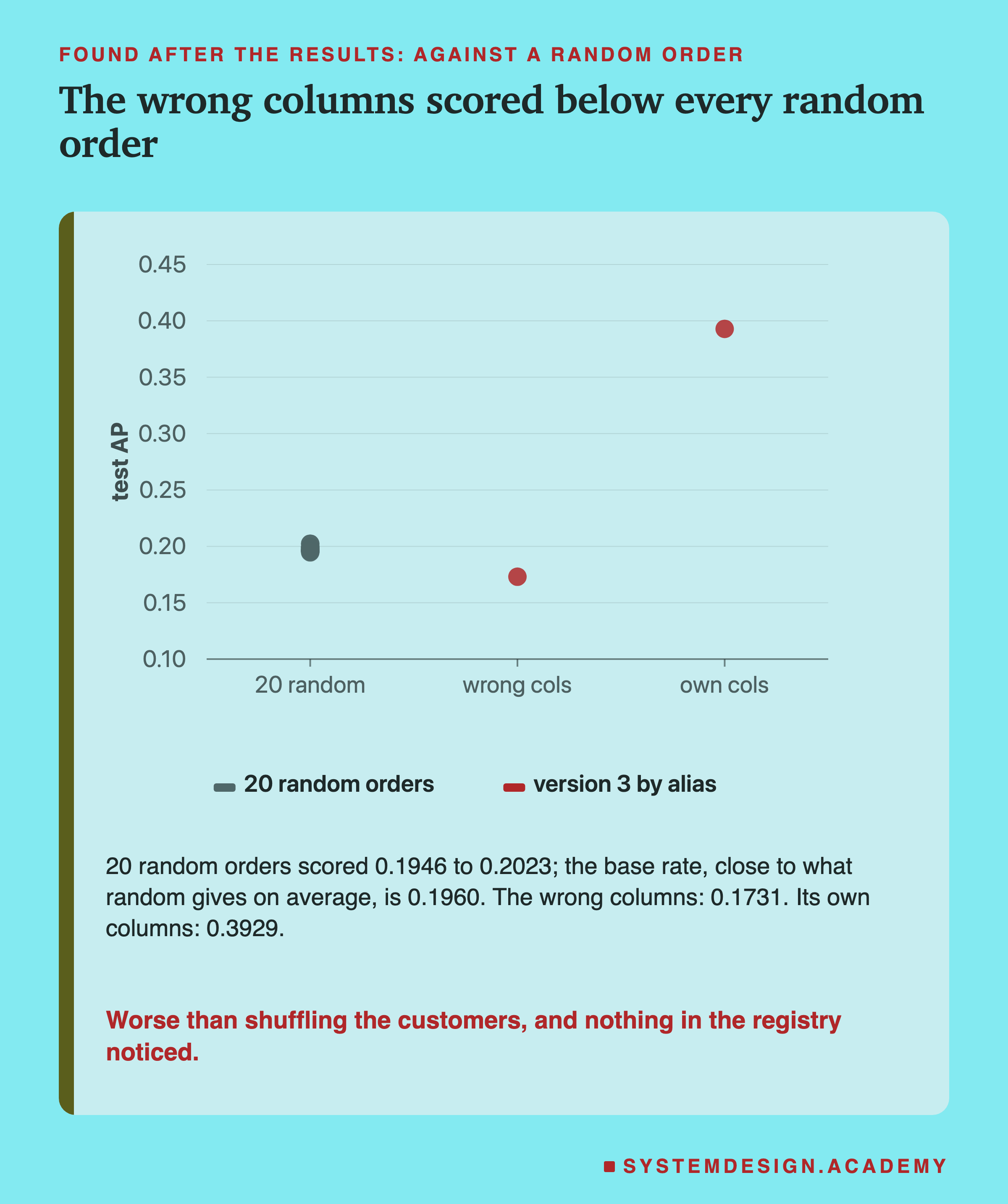
A random order ranks the customers by a coin toss. Its AP, on average, is close to the base rate, the share of customers who really bought: 0.1960 here, over the 5 test months. I drew 20 random orders, with 20 different seeds, so one lucky draw could not fool me. They scored from 0.1946 to 0.2023, with a mean of 0.1975.
The wrong columns scored 0.1731, below all 20 random orders. The model was not just useless with those inputs; it ranked buyers lower than chance would. One possible reason: some of the six columns, read in the wrong slots, push the ranking the wrong way. I did not trace which.
In real serving, this would look like a quiet drop in results, with every log line saying "loaded, predicted, no error". The fix is not in the registry. It is a check after every alias move. Send stored rows through the newly loaded model, and compare its predictions with the ones you saved when you trained it.
The Old Way Still Works, and Warns
The survey lesson describes stages, so I tried them too. MLflow 3.16.1 still has the old call, transition_model_version_stage.
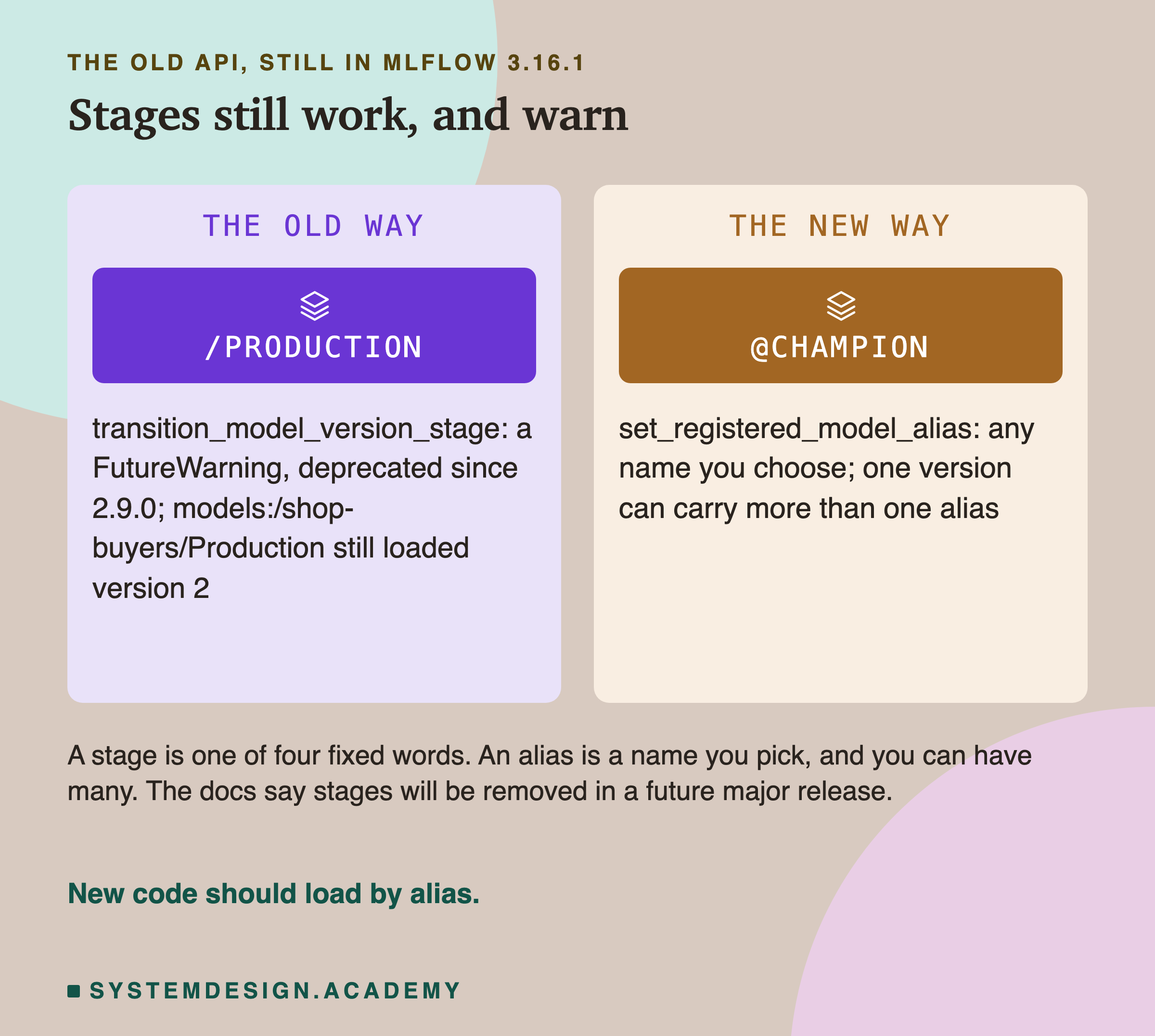
Moving version 2 to "Production" worked, and the address models:/shop-buyers/Production still loaded version 2. But the call raised a FutureWarning, Python's way of saying "this will stop working". In MLflow's own words, the call "is deprecated since 2.9.0. stages will be removed in a future major release."
The difference is more than a name. A stage is one of four fixed words: None, Staging, Production and Archived. An alias is any name you choose, and one version can carry several. The docs give the reason: "Unlike model registry stages, more than one alias can be applied to any given model version". They also show the swap for serving code: the address models:/regression_model/Production becomes one that ends in @champion.
If your serving code loads by stage today, it still works. Plan the move to an alias before the stage API is removed.
A Deleted Version Left Its Alias Behind
Version 3 lost, so I deleted it with delete_model_version("shop-buyers", "3"). My guess was that its alias, @challenger, would go with it. It did not.
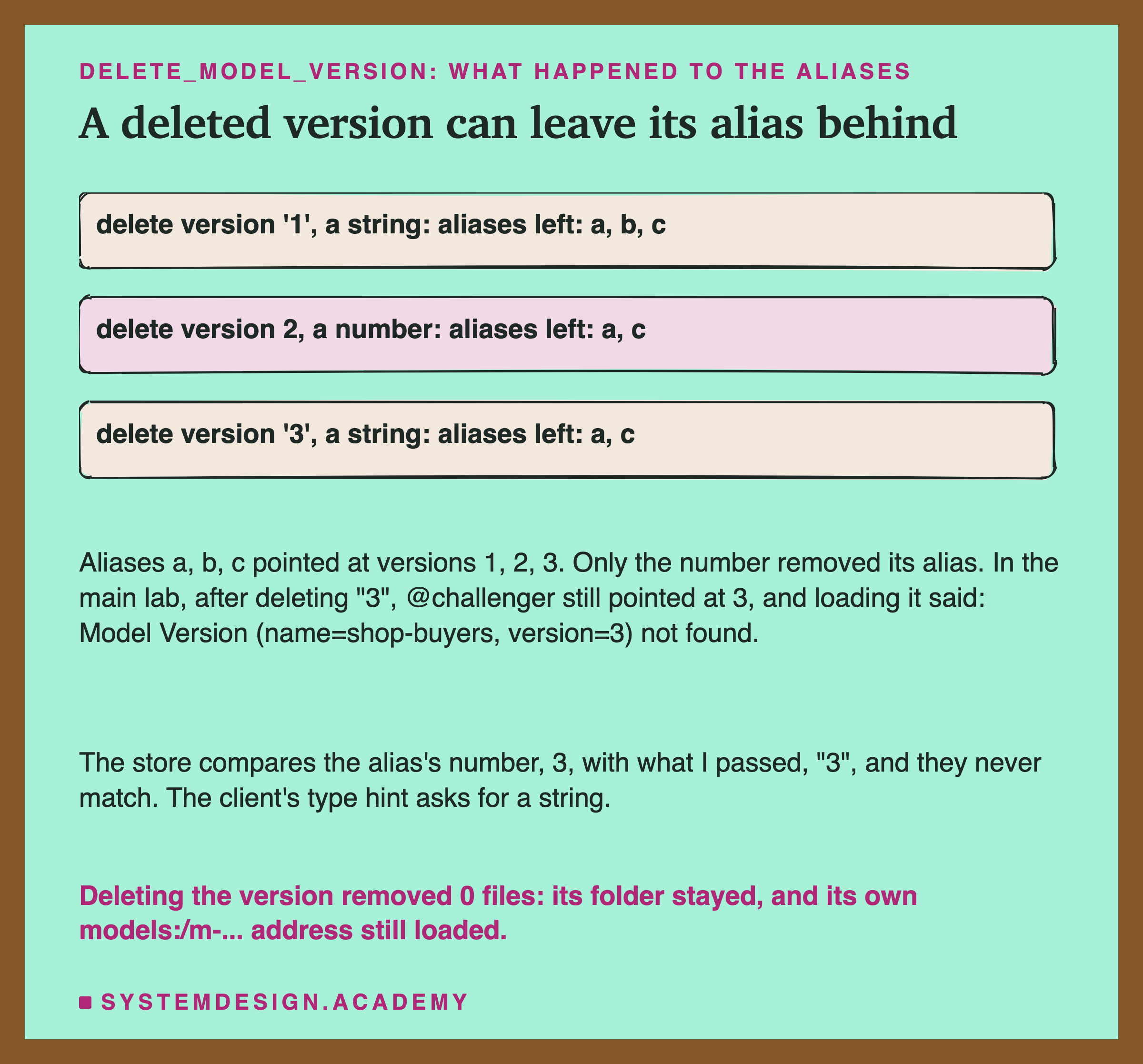
After the delete, @challenger still pointed at version 3, and loading models:/shop-buyers@challenger failed with "Model Version (name=shop-buyers, version=3) not found". A dangling alias is one that points at nothing.
I read MLflow's source to find out why. When a version is deleted, the SQLite store removes each alias whose version equals the one passed in. But the alias holds the number 3, and I passed the text "3", as the function's own type hint asks. In Python, 3 and "3" are not equal, so no alias matched.
After the results, I tested this in a separate scratch registry. Deleting with the text "1" left its alias. Deleting with the number 2 removed its alias, and the text "3" left its alias again.
Through a tracking server the version always travels as text, so there the alias stayed even when I passed a number. I checked that after the review, with a scratch server that the lab started on this laptop and stopped again. So this is an inconsistency between the ways of calling MLflow, and I make no claim beyond what I measured.
Two more surprises. The delete did not really delete the row: it kept it, marked Deleted_Internal, with its source and run id replaced by the word REDACTED. And it . Version 3's folder stayed on disk, and its own address still loaded, with predictions identical to the bit. The docs call a delete "irrevocable". For the version number, it was. For the model files, it was not.
A Load Wrote Into the Store
One more thing I found after the results. That sixth file in each folder, registered_model_meta: who wrote it?
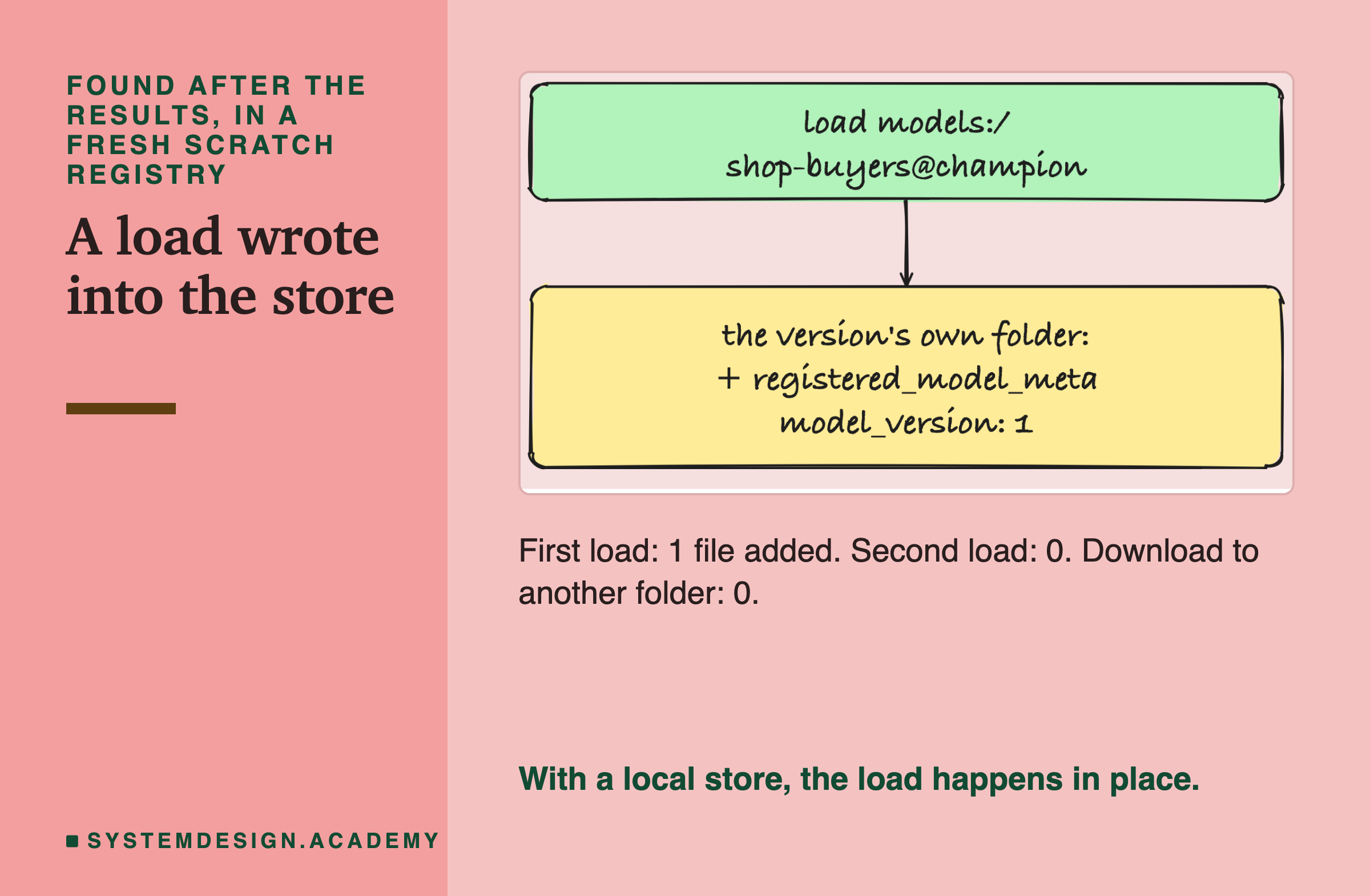
I tested it in a fresh scratch registry, with a snapshot around each step. The first load by alias added one file to the version's own folder in the store: registered_model_meta, 43 bytes, holding the model's name and version number. A second load added nothing. Downloading the model to another folder changed nothing in the store either. Then I removed that file and loaded the model by its models:/m-... address instead; the file came back, this time with the name and version left empty.
The docs say this file is added "on the downloader's side". With a local folder as the store, MLflow loads the files where they are, so the downloader's side is the store itself. It is harmless here. But it means a load is not always read-only, and on a shared folder the serving machine would need permission to write. A store on a server or in the cloud may act differently; I did not test one.
One last oddity from the same check: listing versions with search_model_versions showed no aliases at all, while asking for version 2 directly showed champion. If you list versions to see which one is live, ask for each version, or read the aliases from the registered model.
My Guesses Before the Run, Checked
I wrote eight guesses into the lab before it ran. Here they are against the results.
-
"the all-defaults probe raises an MlflowException naming TreePredictor, and leaves no model file behind." Right. I did not guess that it would leave a FAILED record in the database.
-
"every load by alias gives predictions bit-identical to the in-memory model of the version it resolved to." Right for all five loads that sent a version its own columns. The sixth load sent the wrong columns on purpose.
-
"the rollback changes exactly one file, mlflow.db; the alias row's version goes 2 to 1 and nothing else changes except a last-updated time." Half right: one file and one row, and not even the time changed.
-
"requirements.txt pins about 4 to 6 packages, each equal to this venv; the venv has about 100 packages." Right: 6 pins, all equal, and 87 packages.
-
"python_env.yaml names Python 3.13.15." Right.
-
"the stage transition warns (FutureWarning) and models:/shop-buyers/Production still loads v2." Right.
-
"a missing alias and a deleted version raise MlflowException; deleting v3 also removes @challenger; v3's files stay on disk, and its logged-model URI still loads." Wrong in the middle: the alias stayed. The rest was right.
-
"M5: MLflow raises nothing, and the test AP falls far below v3's own 0.3929." Right: 0.1731, and no error.
And one thing I did not guess at all: version 3 needed three trusted types, which stopped the lab's first run.
Try It Yourself
The full lab registers three versions, moves aliases seven times and takes many snapshots. I wrote a small demo that does the heart of it.
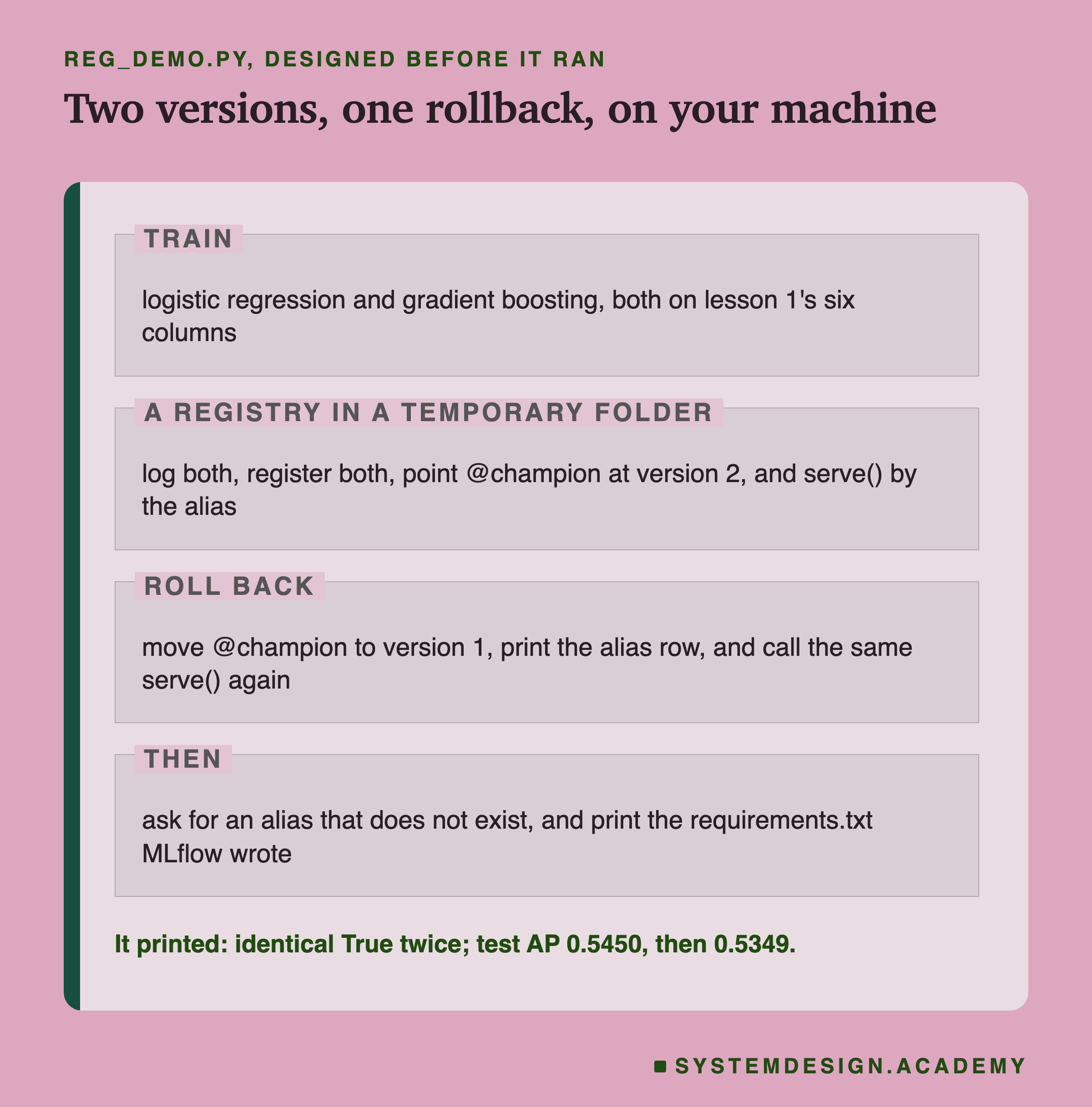
I wrote the demo's design into its docstring after the lab had run and before the demo first ran. It trains two models on the six columns, makes a registry in a temporary folder, and registers both. Then it serves by the alias, rolls back, serves again with the same function, asks for an alias that does not exist, and prints the requirements.txt MLflow wrote. At the end the temporary folder is removed. It starts no server, and it turns off MLflow's telemetry.
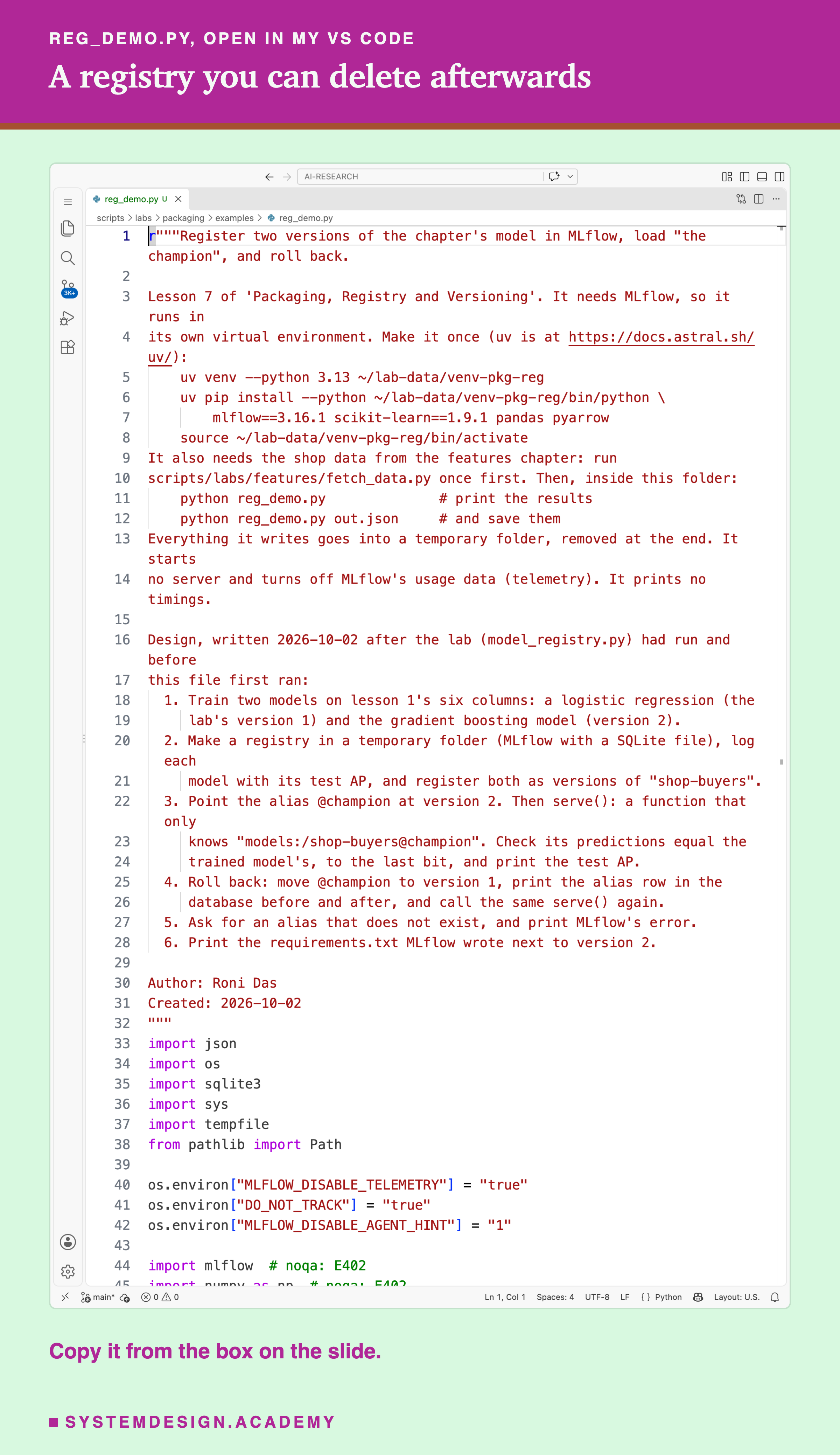
Before you run this lab. This demo needs MLflow, so it runs in its own venv. Install uv, then run uv venv --python 3.13 ~/lab-data/venv-pkg-reg and uv pip install --python ~/lab-data/venv-pkg-reg/bin/python mlflow==3.16.1 scikit-learn==1.9.1 numpy==2.5.3 scipy==1.18.1 pandas==3.0.6 pyarrow. The demo's docstring gives a shorter line; it works too, but newer numpy, scipy or pandas may move the APs in the last digits. Activate it with source ~/lab-data/venv-pkg-reg/bin/activate (on Windows, ~\lab-data\venv-pkg-reg\Scripts\activate). Then run python fetch_data.py once from the folder; it downloads the shop data, about 46 MB. Then, inside the folder, run .
Move the Alias Yourself
This box holds the real results from the lab. It needs nothing but Python, so it runs in your browser. It has no MLflow inside; it looks up what the lab measured.
Press Run. It shows what the loader got with @champion on version 2. Change CHAMPION to 1 or 3, and ROWS to "raw", and run again. Then set DELETED = 3 with CHAMPION = 3.
The report script writes this box from the lab's stored results, runs it for several settings, and checks what it prints against the lab. Try CHAMPION = 3 with ROWS = "six": the box prints MLflow's "ok" next to a score below every random order.
The Lab's Code, Piece by Piece
The lab is one file, scripts/labs/packaging/model_registry.py, and the loader sits next to it in reg_files/load_champion.py.
build trains the three models with the features chapter's own code, and stops if any test AP differs from what that chapter stored, to the last bit. snapshot records every file in the store with its size and sha256, and every row of every table in the SQLite file, read-only. diff compares two snapshots: files added, removed and changed, and rows added and removed per table.
capture runs one MLflow call and keeps whatever happens: the return value, or the error's type and message, plus every log line and warning. That is how the failures in this lesson are word for word.
main does the steps in order. It checks the trusted types, runs the all-defaults probe, logs and registers the three versions, and moves the aliases. After each move, its inner load runs the loader in a fresh process and compares the predictions. Then it lists the stored files, tries the stage API and the failures, and writes results/reg-result.json.
review holds the two checks added after an independent review. One is the signature with column names. The other is a delete through a tracking server bound to this laptop only, which the code starts and stops.
How to Ship a New Model Version
Here is how I would use a registry for a model like this one, using only what this lab measured.
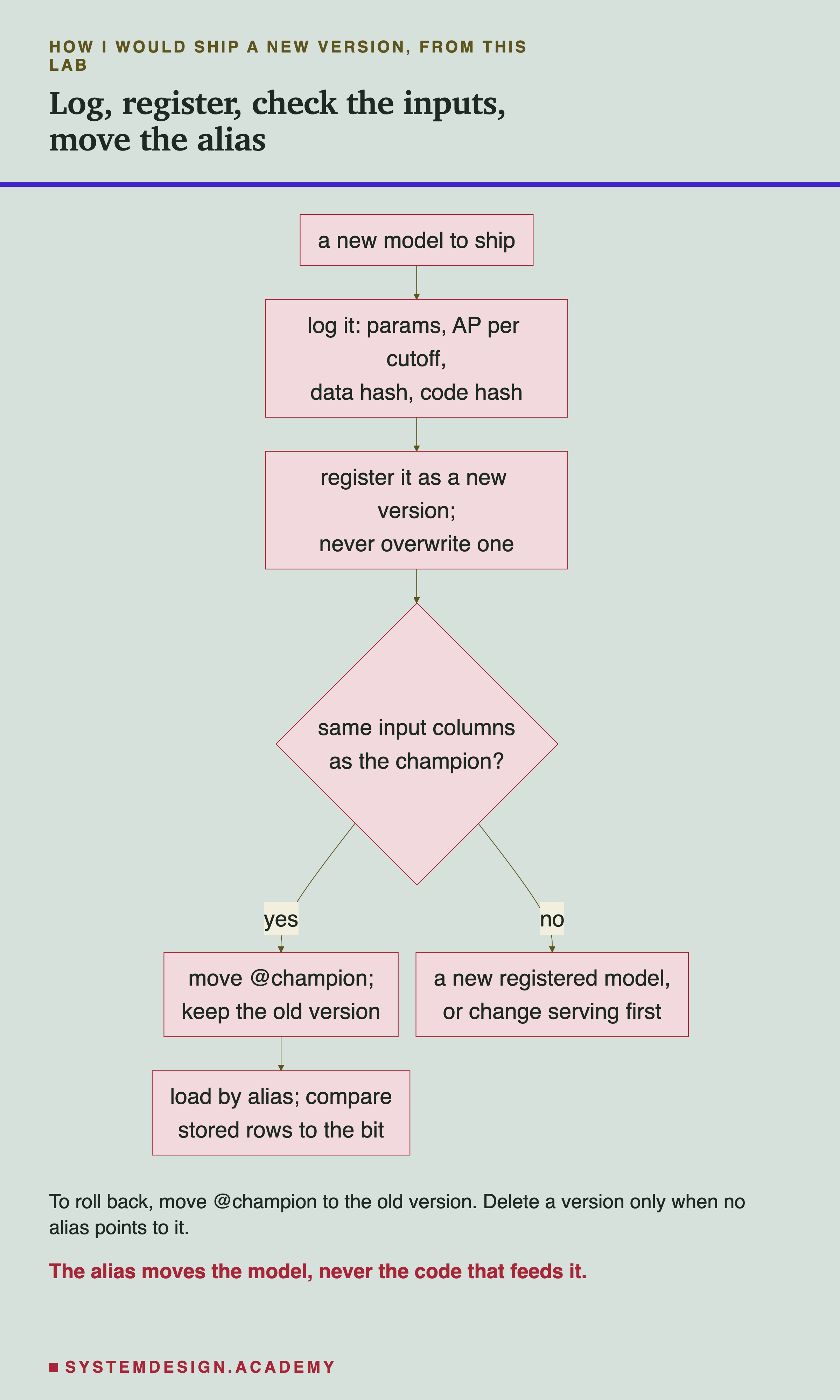
The chart starts from a new model and ends with a check after the alias moves. The one question in the middle, about the input columns, is the one this lab showed a registry never asks. Here are the same steps in words, each with the number from this lab behind it.
-
Log more than the scores. Here MLflow guessed the git commit, but my code was not in it. Store a fingerprint of the training data and of the code file as tags.
-
Register every model as a new version. Never overwrite one. A version is cheap: here, one version row (plus its run's records) and five files.
-
Before moving the alias, check the inputs. Here a model with other columns took the champion's place with no error and scored below chance. Give a model with different inputs its own registered name, or change the serving code first.
-
Serving loads by alias, never by version number. Here the same loader file followed the alias through five moves.
-
After every move, check. Send stored rows through the newly loaded model and compare with the predictions saved at training time. Here every right move was identical to the bit, so exact equality is a fair test in the same environment.
-
It changed one row here. Keep old versions, so there is something to roll back to.
When a Registry Helps, and When It Does Not
Use a registry when more than one model version could be live, or when someone other than the trainer deploys it. The alias gives every team one name for "the model in use", and moving it was a one-row change here.
Use it when you need to roll back fast. Here the rollback touched one row and no model file, and the loader followed it at once.
Use it to keep the record of how each version was made: params, scores per month, and the fingerprints of the data and code. But the record holds only what you put in, plus a few guesses.
Do not expect a shape-only signature to catch other columns. Here it let a model with other columns become the champion. My signature checked the shape and type, not the names or the meaning.
Do not expect it to pin your whole environment. Here it pinned 6 packages of 87.
Do not treat a delete as cleanup. Here the files stayed and the alias stayed. To free disk space or retire a model fully, remove the alias, delete the version, and then remove its folder yourself, carefully.
For one model trained once by one person, a registry is more than you need. A saved file, its fingerprint and a pinned lock file, from the earlier lessons of this chapter, are enough.
What This Lab Cannot Tell You
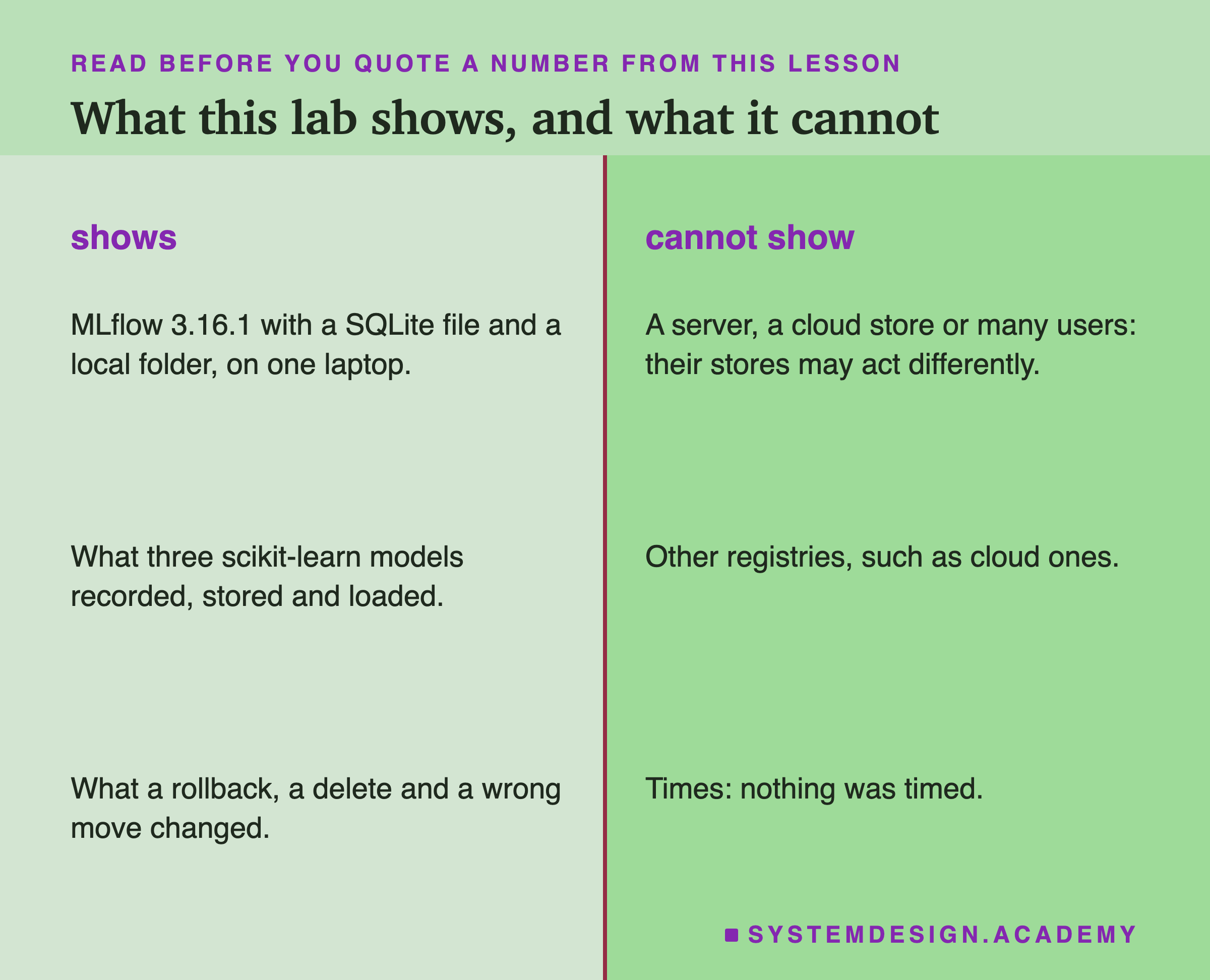
One MLflow release, one kind of store. Everything here is MLflow 3.16.1 with a SQLite file and a local folder. A tracking server, a store in the cloud or a database like PostgreSQL may act differently. The dangling alias, for example, comes from one line in the SQLite store's code, and I did not test the others.
One registry product. Cloud platforms have their own registries with their own rules. I did not test any of them.
Three scikit-learn models. A deep learning model would store other files, and may need other trusted types or another format.
One user, no permissions. A real team adds sign-in and access rules. I tested none of that.
No timings. Nothing was timed, so this lesson says nothing about speed.
Labelled additions. Four questions were asked after the main results. They are the delete with text and with a number, the file a load writes, aliases in a search, and the random orders. Two more checks were added after an independent review: the signature with column names, and the delete through a tracking server. One change was made after the first run: version 3's trusted types. All are labelled in the lab, the report and here.
What to Do on Monday
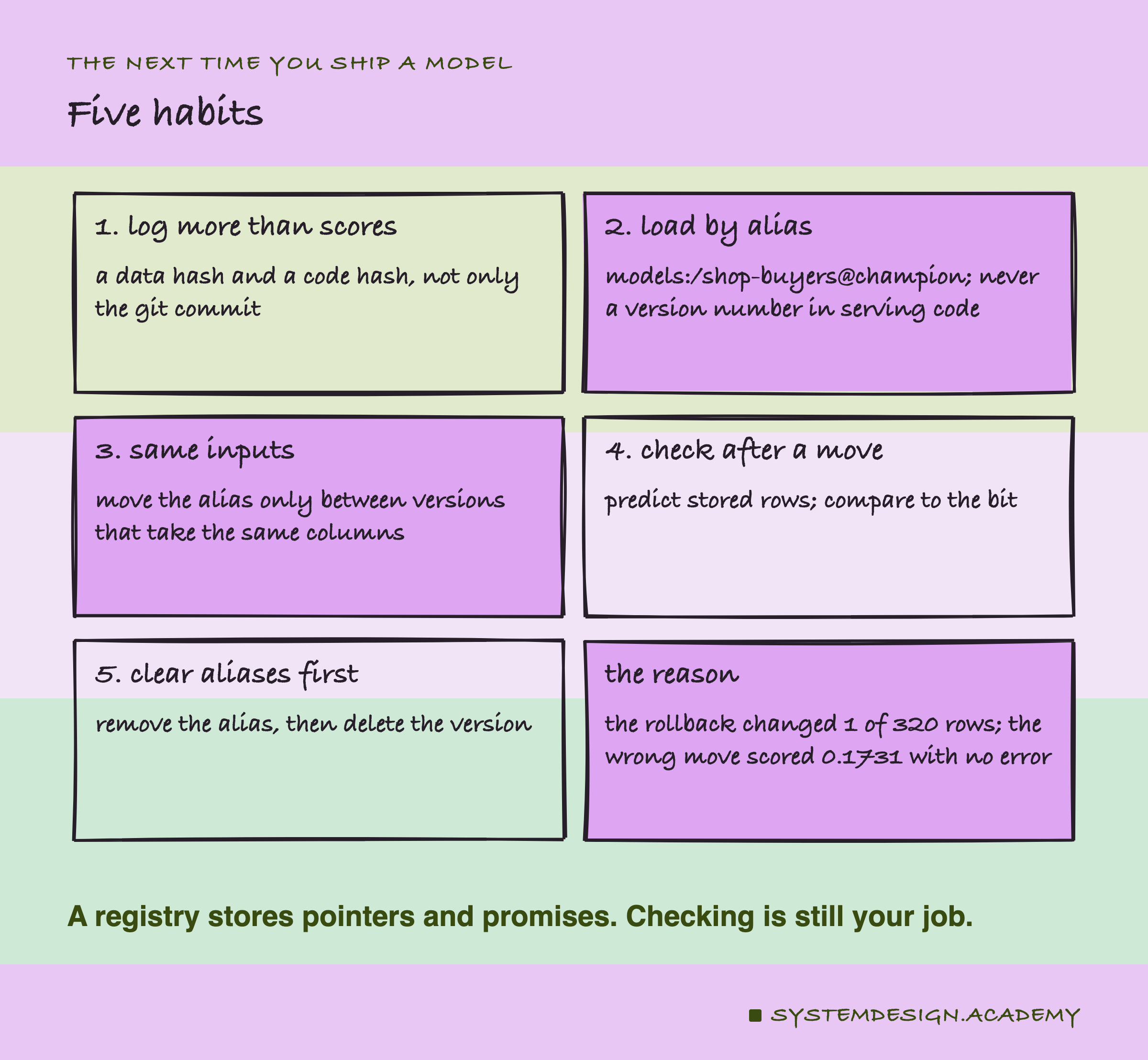
If you take one thing to work on Monday, open the code that loads your model in production and find the line that names it. If it names a file path or a version number, change it to load by an alias, so a rollback becomes a one-row change instead of a deploy.
Then add the check that the registry does not do. Keep a few hundred input rows and the predictions the model gave on them when you trained it. After every alias move, load the model by its alias, predict those rows and compare. It would have caught the wrong move in this lab at once.
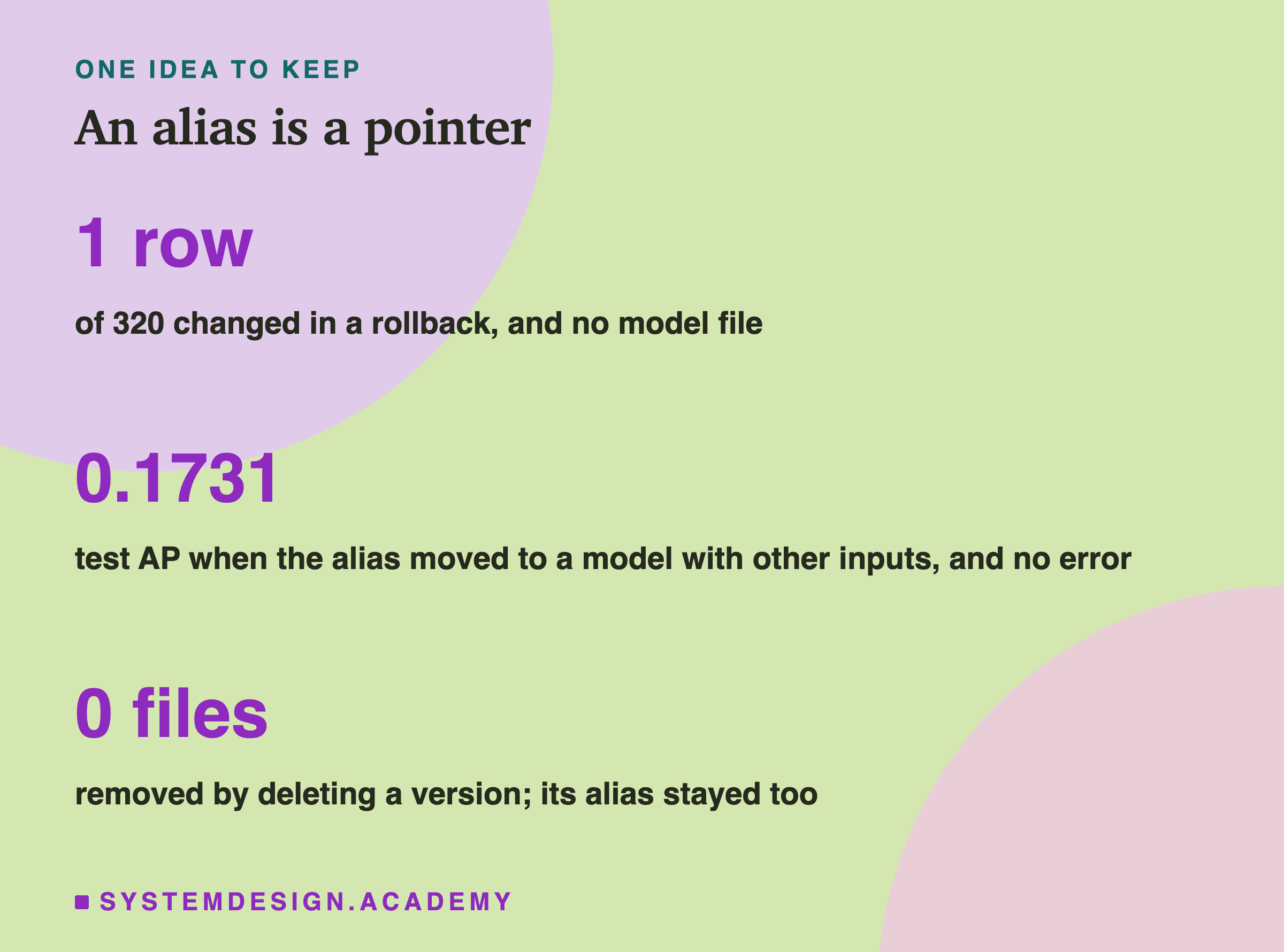
The one idea to keep: a registry is a notebook of versions plus movable bookmarks. Loading "the production model" means following a bookmark to a row, then to a folder, then to a file. Moving the bookmark is tiny and fast, and the same loader followed it every time. But the bookmark knows nothing about what the model needs as input, and deleting a page left the bookmark and the files where they were. The registry makes moves easy; checking them is still your job.
Knowledge Check
Knowledge Check
4 questions - Score 80% to pass
The lab rolled back by moving @champion from version 2 to version 1. What changed on disk?
The lab moved @champion to version 3 while the loader sent the six columns. What happened?
Logging the chapter model with every default failed in MLflow 3.16.1. Why?
The lab deleted version 3 with delete_model_version and the version passed as "3". What did it find?