Container Image
A lightweight, immutable package containing everything needed to run an application: code, runtime, libraries, and config. Built with a Dockerfile and stored in a registry.
What is Container Image?
In short
A container image is a read-only, layered package that bundles an application together with everything it needs to run: the code, the language runtime, system libraries, and default configuration. You build it from a Dockerfile, store it in a registry like Docker Hub or Amazon ECR, and a container runtime turns it into a running container.
What a container image actually is
A container image is a frozen snapshot of a filesystem plus the metadata needed to start a process from it. Inside you will find a minimal Linux userland (or a stripped-down base like Alpine or Debian slim), your compiled binary or interpreted code, the runtime such as Node 20 or Python 3.12, the shared libraries those depend on, and a default command to run on startup.
The image is immutable. Once built and tagged, its content never changes. If you need a new version of the app, you build a new image with a new tag. This is the property that makes deployments predictable: the image that passed tests on a laptop is byte-for-byte the same image that runs in production.
An image is not a container. The image is the template on disk; a container is a running instance created from it, with its own writable layer on top. You can start a hundred containers from one image, the same way you start many processes from one executable.
How it works under the hood: layers and the manifest
Images are built from layers. Each instruction in a Dockerfile that changes the filesystem (RUN, COPY, ADD) produces a new layer, which is a tarball of the files that changed relative to the layer below it. Layers stack using a union filesystem like OverlayFS, so the running container sees one merged view.
Layers are content-addressed by their SHA256 digest. That means two images that share a base layer store and transfer that layer only once. If a base image layer is already on a node, pulling a new app image only downloads the small top layers that differ. This is why a 5 MB code change does not force a 900 MB redownload.
Tying it together is the image manifest: a JSON document listing the digests of each layer plus a config blob that holds the entrypoint, environment variables, exposed ports, and architecture. A multi-arch image uses a manifest list so the same tag (say my-app:1.4) can resolve to an amd64 image on an Intel server and an arm64 image on an Apple Silicon laptop.
All of this follows the OCI (Open Container Initiative) image spec, which is why images built with Docker run under containerd, Podman, or CRI-O without modification.
When to use it and the trade-offs
Reach for container images whenever you want the same artifact to run identically across a developer machine, CI, and production. They are the unit of deployment for Kubernetes, AWS ECS, Google Cloud Run, and almost every modern CI pipeline. They solve the classic problem of an app working in one environment and breaking in another because of a missing library or a different OS version.
The cost is image size and supply-chain risk. A careless Dockerfile that installs a full build toolchain can produce a 1.5 GB image that is slow to pull and ships dozens of vulnerable packages. The fixes are well known: use small base images, use multi-stage builds so compilers are not shipped, and scan images with tools like Trivy or Grype before pushing.
Images are also only as trustworthy as where they came from. Pull from a known registry, pin to a digest rather than a floating tag like latest in production, and sign images with cosign so a node can verify provenance before running them.
A concrete example
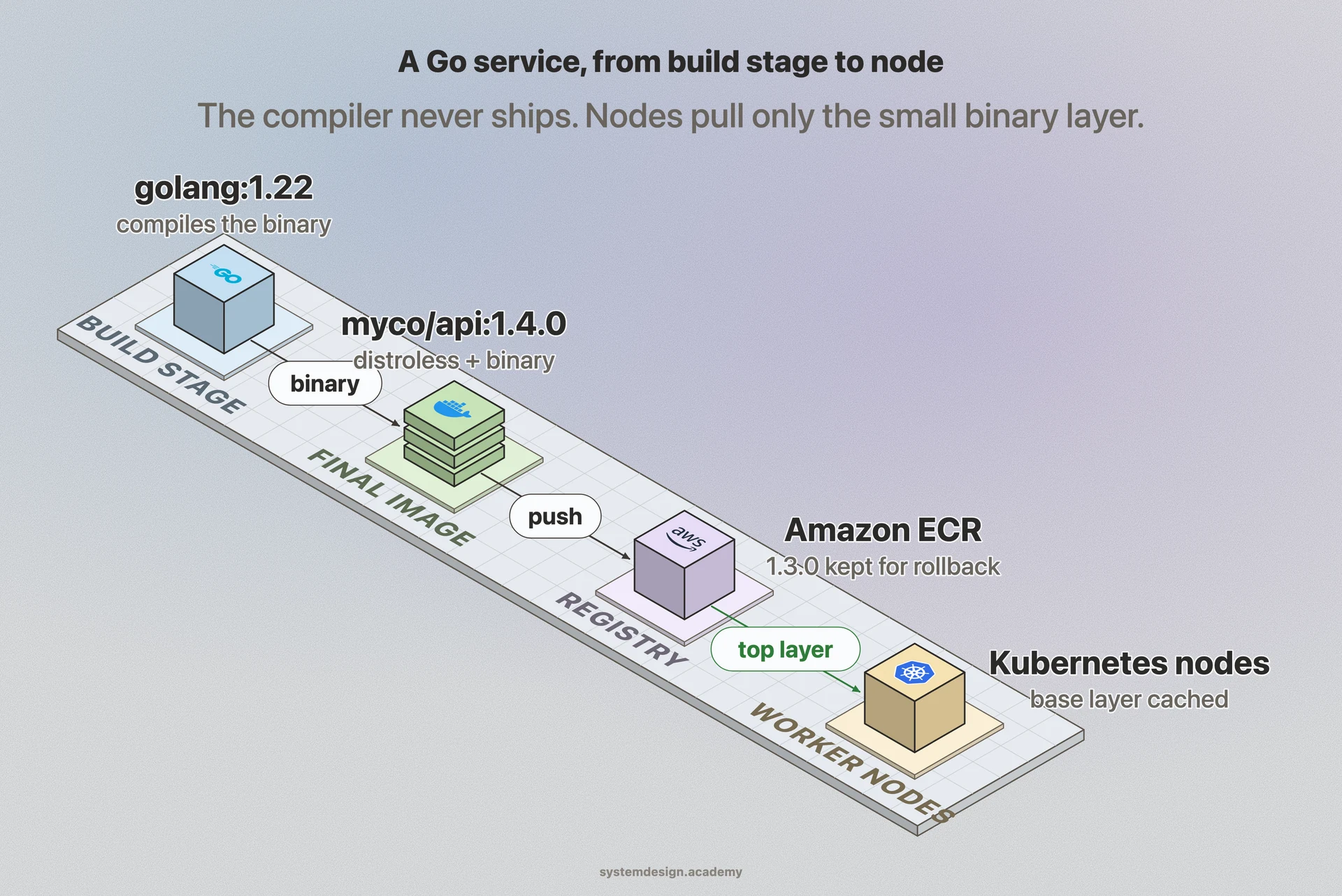
Say you have a Go web service. A multi-stage Dockerfile uses a golang:1.22 image to compile the binary, then copies just that binary into a tiny base such as gcr.io/distroless/static. The compiler, the Go module cache, and the source code never make it into the final image, so it ships at around 10 to 20 MB instead of several hundred.
You tag it as myco/api:1.4.0, push it to Amazon ECR, and Kubernetes pulls it onto worker nodes. Because the distroless base layer is already cached on those nodes from earlier deploys, only the few-megabyte binary layer transfers. Each new release is a new immutable tag, so a rollback is simply pointing the deployment back at myco/api:1.3.0, which is still sitting in the registry.
Where it is used in production
Docker Hub
The most widely used public registry; hosts official base images like nginx, postgres, and python that most other images build on top of.
Amazon Elastic Container Registry
Stores private images for AWS workloads; ECS and EKS pull from it to launch tasks and pods.
Kubernetes
Schedules containers onto nodes by pulling the image named in a Pod spec, then runs it through containerd or CRI-O.
Google Cloud Run
Takes a container image and runs it as a serverless, autoscaling service with no cluster to manage.
Frequently asked questions
- What is the difference between a container image and a container?
- The image is the read-only template stored on disk or in a registry. A container is a running instance created from that image, with its own writable layer on top. One image can spawn many containers, just like one executable file can run as many processes.
- What is the difference between an image and a Dockerfile?
- A Dockerfile is the recipe: a text file of instructions like FROM, RUN, COPY, and CMD. The image is the built result of running those instructions. You edit the Dockerfile, run docker build, and get an image out.
- Why are container images built in layers?
- Layers are reused and cached by their content hash. Shared base layers are downloaded and stored only once across many images, and a small code change rebuilds only the top layers. This keeps builds fast and pulls small.
- How do I make a container image smaller?
- Start from a small base like Alpine or distroless, use multi-stage builds so compilers and build tools are left out of the final stage, combine RUN steps to avoid extra layers, and delete package manager caches. A typical Go or Rust service can ship under 20 MB this way.
- Should I use the latest tag in production?
- No. The latest tag is a moving target that can point at different content over time, which breaks reproducibility and rollbacks. Pin to an explicit version tag, or better, to the image digest (the SHA256), so every node runs exactly the bytes you tested.
Learn Container Image hands-on
This page explains the idea. The full lesson lets you step through the ring as servers join and leave, read the implementation, and check yourself with a quiz. It is one of 760+ lessons in the System Design Masterclass, from your first API call to distributed consensus. Eleven Foundation lessons are free, no signup. Lifetime access is ₹499 in India or $7.99 worldwide, one payment, no subscription.
Related lessons
Lessons that touch on Container Image as part of a larger topic.
See also
Related glossary terms you might want to look up next.
Docker
A platform for packaging applications into lightweight, portable containers. 'Works on my machine' becomes 'works everywhere.'
Container
A lightweight, isolated environment that packages an application with its dependencies. Shares the host OS kernel, unlike VMs. Starts in milliseconds.
Artifact Registry
A repository for storing build outputs like Docker images, JAR files, and npm packages. Docker Hub, GitHub Container Registry, and Artifactory are common registries.
Kubernetes
An orchestration platform that automates deploying, scaling, and managing containerized applications. K8s is the operating system for your cloud.
Kubernetes Pod
The smallest deployable unit in Kubernetes: one or more containers sharing network and storage. Pods are ephemeral; if one dies, K8s creates a replacement.
Kubernetes Service
A stable network endpoint that load-balances traffic across a set of pods. Pods come and go, but the Service's IP and DNS name stay constant.