Artifact Registry
A repository for storing build outputs like Docker images, JAR files, and npm packages. Docker Hub, GitHub Container Registry, and Artifactory are common registries.
What is Artifact Registry?
In short
An artifact registry is a versioned storage service that holds the binary outputs of your build process, such as Docker images, JAR files, npm packages, and OS packages, so other systems can pull them by name and version. Docker Hub, GitHub Container Registry, JFrog Artifactory, and Google Artifact Registry are common examples.
What it is
When your CI pipeline finishes compiling code, it produces files you actually ship: a Docker image, a compiled JAR, a Python wheel, an npm tarball, a .deb package. These are called artifacts. An artifact registry is the server that stores them, tags each one with a version, and hands them out when something asks for a specific name and version.
Think of it as a package warehouse with an inventory system. Git stores your source code; the registry stores the compiled result of building that source. You push an artifact in after a build, and later you pull it out during deployment, during another build that depends on it, or when a teammate runs npm install.
A single registry usually speaks several protocols at once. The same Artifactory or Google Artifact Registry instance can act as a Docker registry, a Maven repository, an npm registry, and a PyPI index, each behind its own URL path so the standard client tools talk to it without modification.
How it works under the hood
Most modern artifacts are content addressed. A Docker image is a manifest that lists layers, and each layer is identified by a SHA256 digest of its contents. When you push an image, the client uploads only the layers the registry does not already have, then uploads a small manifest pointing at them. Because layers are deduplicated by digest, ten images built on the same base layer store that base only once.
Tags like v1.4.0 or latest are mutable pointers to an immutable digest. The digest never changes once content is stored, which is why production systems often pin to a digest (image@sha256:abc...) instead of a tag, so a rebuild of latest cannot silently change what runs.
Registries expose a standard HTTP API. The OCI distribution spec defines endpoints for blobs and manifests; Maven uses plain GET and PUT over HTTP; npm uses its own JSON metadata format. The registry layers access control, quotas, and retention on top: who can push to a repo, how many old versions to keep, and which artifacts to garbage collect once nothing references them.
Many registries also run as proxy caches. You point npm or pip at the registry, and on a cache miss it fetches from the public source, stores a copy, and serves it. The next build pulls from the local cache, which protects you from a public package being deleted or going offline.
When to use it and the trade-offs
Use a registry the moment more than one machine needs the same build output. CI builds an image once and pushes it; staging and production both pull that exact image, so you test and ship the same bytes. Without a registry teams rebuild on each box and drift apart, or pass artifacts around by hand.
A private registry is worth running when you have proprietary code, need to control supply chain risk, or want fast pulls inside your own network. The cost is operational: storage grows quickly because image layers and old versions pile up, so you need retention policies and garbage collection or bills balloon. A registry is also a hard dependency in your deploy path, so it needs high availability and a pull-through cache for the public ecosystems you depend on.
The main trade-off is convenience versus control. Public Docker Hub is free and zero setup but has pull rate limits and you do not own uptime. A managed cloud registry like Google Artifact Registry or Amazon ECR removes the ops burden but ties you to that provider and charges for storage and egress. Self-hosting Artifactory or Harbor gives full control and on-prem speed at the price of running the service yourself.
A concrete example
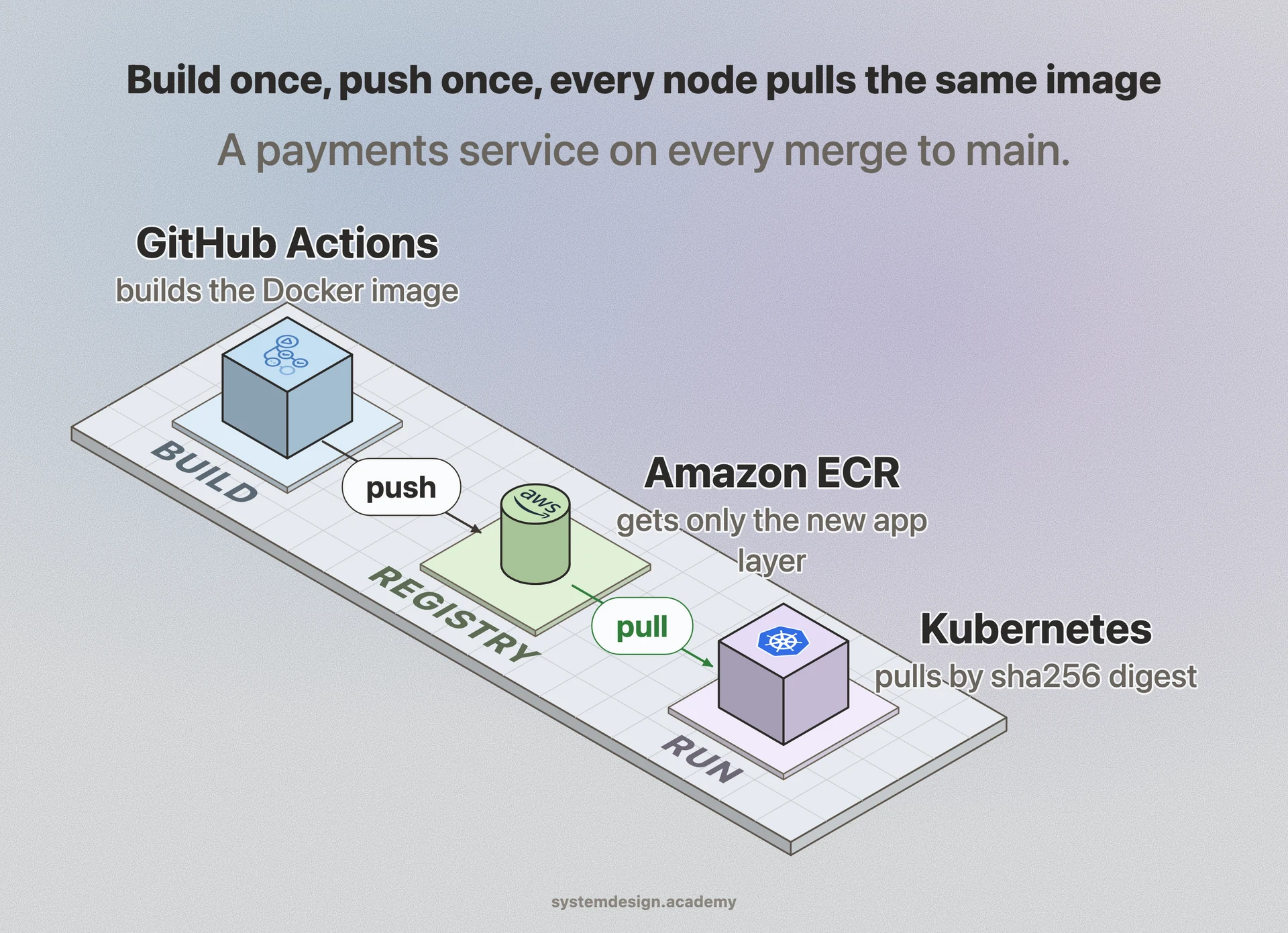
A team building a payments service runs GitHub Actions on every merge to main. The job builds a Docker image, tags it payments-api:git-sha-3f9a2c1, and pushes it to Amazon ECR. The push uploads only the application layer because the Python base layer already exists in the registry from earlier builds, so it finishes in a few seconds.
The deploy step then updates the Kubernetes Deployment to reference payments-api@sha256:... by digest. Every node that schedules a pod pulls that exact image from ECR. Because the cluster lives in the same AWS region, pulls are fast and free of public rate limits.
A retention rule keeps the last 30 tagged images and deletes untagged ones after 14 days, so storage stays bounded even though dozens of builds happen daily. If a rollback is needed, the operator points the Deployment at last week's digest, which is still in the registry, and the old version is running again in under a minute.
Where it is used in production
Docker Hub
The default public registry for Docker images, hosting official base images like nginx and postgres that most builds start from.
Amazon ECR
Managed private container registry that integrates with ECS and EKS so deployments pull images from within the same AWS account and region.
Google Artifact Registry
Single service that stores Docker, Maven, npm, Python, and OS packages, replacing Container Registry across Google Cloud build and deploy pipelines.
JFrog Artifactory
Self-hostable universal registry used by large enterprises to store every artifact type and proxy public repositories behind one controlled gateway.
Frequently asked questions
- What is the difference between an artifact registry and a Git repository?
- Git stores source code and its history. An artifact registry stores the compiled output of building that source, such as Docker images, JARs, or npm packages, versioned and ready to deploy. You commit source to Git and push the resulting build artifacts to a registry.
- Is a Docker registry the same as an artifact registry?
- A Docker registry is a specialized artifact registry that only handles container images. A general artifact registry like Artifactory or Google Artifact Registry can store Docker images plus Maven, npm, PyPI, and OS packages in one place using the same access control and retention features.
- Why pin to an image digest instead of a tag?
- A tag like latest is a mutable pointer that can be reassigned to new content by a later push, so the same tag can mean different bytes over time. A digest is a SHA256 hash of the exact content and never changes, so pinning to image@sha256:... guarantees production runs the precise build you tested.
- How do registries avoid storing the same data twice?
- Artifacts are content addressed by a hash of their contents. Docker images are split into layers, each identified by a digest, so a base layer shared by many images is stored only once. On push the client uploads only the layers the registry does not already have.
- What is a pull-through cache and why use one?
- A pull-through cache makes your registry proxy a public source like Docker Hub or npm. On a cache miss it fetches the artifact, stores a copy, and serves future requests from that local copy. This speeds up builds, avoids public rate limits, and protects you if an upstream package is deleted.
Learn Artifact Registry hands-on
This page explains the idea. The full lesson lets you step through the ring as servers join and leave, read the implementation, and check yourself with a quiz. It is one of 760+ lessons in the System Design Masterclass, from your first API call to distributed consensus. Eleven Foundation lessons are free, no signup. Lifetime access is ₹499 in India or $7.99 worldwide, one payment, no subscription.
See also
Related glossary terms you might want to look up next.
Docker
A platform for packaging applications into lightweight, portable containers. 'Works on my machine' becomes 'works everywhere.'
CI/CD
Continuous Integration and Continuous Deployment: automating the process of testing and deploying code. Push code, tests run, and it ships to production automatically.
Helm
A package manager for Kubernetes that bundles K8s manifests into reusable charts. Lets you install complex applications with a single command and manage versioned releases.
Blue-Green Deployment
A deployment strategy using two identical environments. Traffic switches from blue (current) to green (new) instantly, with easy rollback.
Canary Deployment
Rolling out a new version to a small percentage of users first, then gradually increasing. Like sending a canary into a coal mine to test for danger.
Rolling Deployment
Gradually replacing old instances with new ones, a few at a time. No downtime, but both versions run simultaneously during the rollout.