Kubernetes Secret
A K8s resource for storing sensitive data like passwords, tokens, and certificates. Base64-encoded by default; use encryption at rest and RBAC to properly secure them.
What is Kubernetes Secret?
In short
A Kubernetes Secret is a built-in API object that stores small pieces of sensitive data, like database passwords, API tokens, TLS certificates, and SSH keys, so that pods can read them at runtime without baking the values into container images or plain manifests. By default the data is only base64-encoded, not encrypted, so production clusters add encryption at rest and RBAC to actually keep it private.
What a Kubernetes Secret actually is
A Secret is a namespaced object in the Kubernetes API, the same way a Pod or a ConfigMap is. It holds a map of key-value pairs under a data field, where each value is a base64 string. The point is to separate sensitive configuration from your code and your pod specs, so a database password lives in one managed place instead of being copy-pasted into ten Deployment files.
There are typed Secrets for common cases. Opaque is the generic catch-all. kubernetes.io/tls holds a cert and private key for ingress. kubernetes.io/dockerconfigjson holds registry credentials so the kubelet can pull private images. kubernetes.io/service-account-token used to mint tokens for in-cluster API access, though modern clusters issue short-lived projected tokens instead.
A single Secret is capped at 1 MiB. That limit is deliberate. Secrets are not a file store. They are for small credentials, and packing large blobs in them puts pressure on etcd, where every Secret in the cluster is stored.
How pods read a Secret, and why base64 is not security
A pod consumes a Secret in one of two ways. You can mount it as a volume, where each key becomes a file under a directory like /etc/secrets, which the kubelet keeps in a tmpfs RAM-backed filesystem so the value never touches the node disk. Or you can inject keys as environment variables with valueFrom.secretKeyRef. Volume mounts are generally preferred because mounted Secrets update when the source Secret changes, while environment variables are frozen at pod start, and env values are easier to leak through logs or a crashed process dump.
The base64 encoding trips up almost everyone. It is encoding, not encryption. Anyone who can run kubectl get secret mysecret -o yaml and pipe the value through base64 -d sees the plaintext instantly. The real protection comes from three layers around the Secret, not from the encoding itself.
First, RBAC, so only the service accounts and humans that need a Secret can get or list it. Second, encryption at rest, configured with an EncryptionConfiguration so the API server encrypts Secret data before writing it to etcd, ideally backed by a KMS provider like AWS KMS or Google Cloud KMS rather than a static local key. Third, locking down etcd access and node access, since a Secret mounted into a pod is readable by anyone who can exec into that pod or reach the node.
When to use them and the trade-offs
Use a Secret for any value you would not want printed in a build log or checked into git: passwords, tokens, TLS material, signing keys. Use a ConfigMap, which is the unencrypted sibling, for non-sensitive config like feature flags and log levels. The two have nearly identical APIs, so the choice is purely about sensitivity.
The main trade-off is that native Secrets store the actual value in etcd inside your cluster, and that value still has to come from somewhere. If you commit raw Secret YAML to git, you have just leaked the credential. Teams solve this with Sealed Secrets, which encrypt the value so it is safe to commit and only the in-cluster controller can decrypt it, or with the External Secrets Operator, which leaves the real value in a dedicated manager and syncs it into a Kubernetes Secret on demand.
For higher-security setups, many teams skip the etcd copy entirely. The Secrets Store CSI Driver mounts values straight from HashiCorp Vault, AWS Secrets Manager, or Azure Key Vault into the pod at runtime, so the source of truth is an external vault with audit logging and rotation, and Kubernetes is just the delivery mechanism.
A concrete example
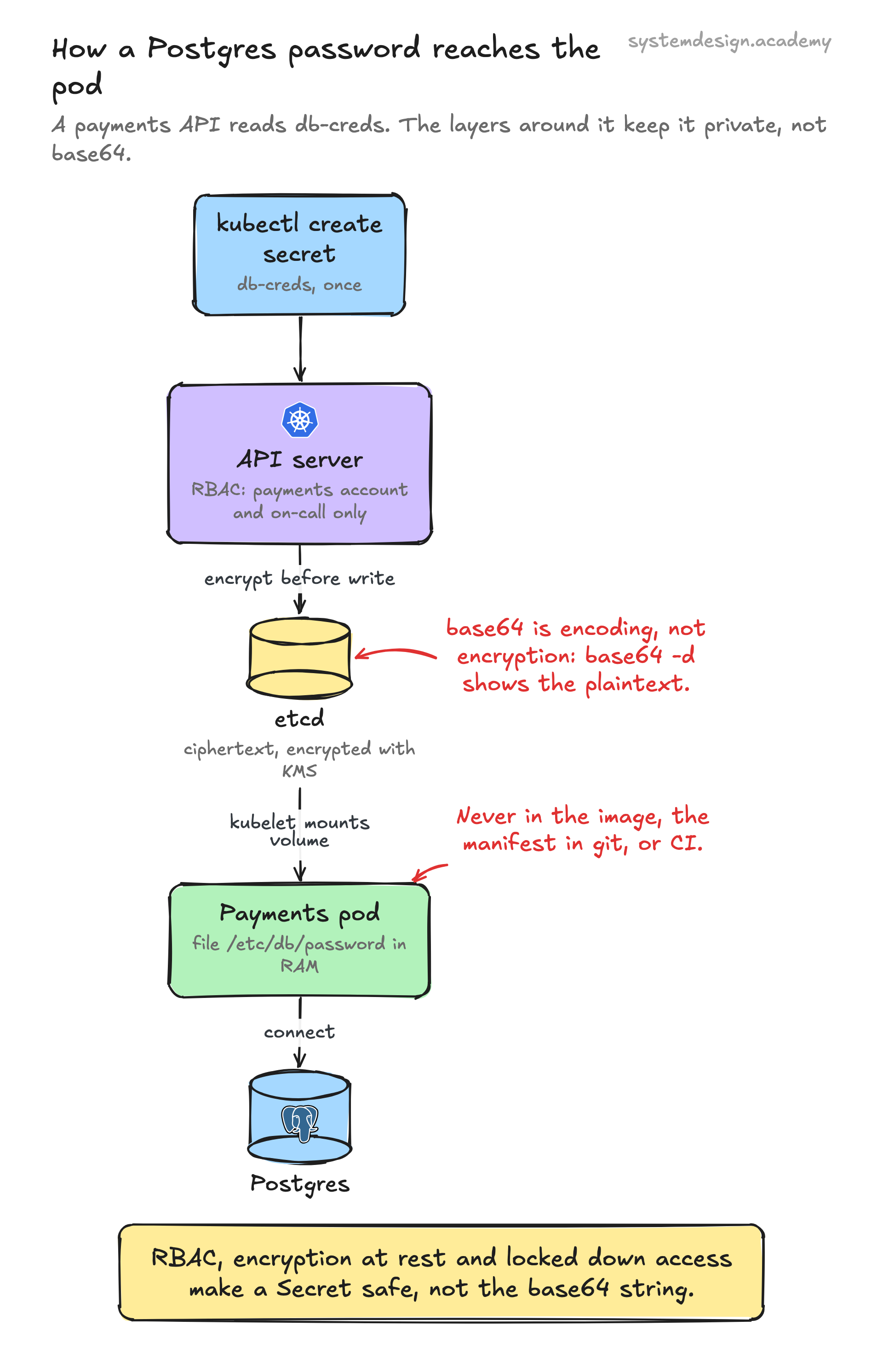
Say you run a payments API that needs a Postgres password. You create the Secret once with kubectl create secret generic db-creds --from-literal=password=s3cr3t. Kubernetes stores it as base64 in etcd, and with KMS encryption configured, the bytes in etcd are ciphertext.
In the Deployment, the container references it as a volume mount at /etc/db/password or as an env var DB_PASSWORD via secretKeyRef. The app reads it at startup and connects to Postgres. When you rotate the password, you update the Secret, and pods using a volume mount pick up the new value within about a minute without a redeploy.
Crucially the password never appears in the container image, the Deployment manifest in git, or the CI pipeline. RBAC limits get secret db-creds to the payments service account and the on-call team, and an audit log records every read. That layered setup, not the base64 string, is what makes the Secret safe.
Where it is used in production
Kubernetes / kubelet
The kubelet mounts Secrets into pods as tmpfs RAM-backed files and uses dockerconfigjson Secrets to pull images from private registries.
HashiCorp Vault
Integrated through the Secrets Store CSI Driver or the External Secrets Operator so the real credential stays in Vault and is synced or mounted into the cluster on demand.
AWS Secrets Manager and AWS KMS
KMS encrypts Secret data at rest in etcd via the EncryptionConfiguration, and Secrets Manager acts as the external source synced into Kubernetes Secrets.
Bitnami Sealed Secrets
Encrypts Secret values into SealedSecret objects that are safe to commit to git, with an in-cluster controller decrypting them into real Secrets.
Frequently asked questions
- Are Kubernetes Secrets encrypted by default?
- No. By default the values are only base64-encoded inside etcd, which is trivial to decode. You must enable encryption at rest with an EncryptionConfiguration, ideally backed by a KMS provider, to get real encryption.
- What is the difference between a Secret and a ConfigMap?
- They have almost the same API and both inject data into pods as files or env vars. The difference is intent and handling: Secrets are for sensitive data and can be encrypted at rest and tightly controlled with RBAC, while ConfigMaps are for plain non-sensitive configuration.
- Should I mount a Secret as a volume or use environment variables?
- Prefer a volume mount. Mounted Secrets update automatically when the Secret changes and are less likely to leak, while environment variables are fixed at pod start and can show up in logs, crash dumps, or child processes.
- Is it safe to commit Secret YAML to git?
- Not raw Secrets, since base64 is not encryption and you would be publishing the credential. Use Sealed Secrets to commit an encrypted form, or the External Secrets Operator to keep the real value in an external manager like Vault.
- How big can a Kubernetes Secret be?
- Up to 1 MiB per Secret. Secrets live in etcd and are meant for small credentials, not for storing large files or blobs.
Learn Kubernetes Secret hands-on
This page explains the idea. The full lesson lets you step through the ring as servers join and leave, read the implementation, and check yourself with a quiz. It is one of 760+ lessons in the System Design Masterclass, from your first API call to distributed consensus. Eleven Foundation lessons are free, no signup. Lifetime access is ₹499 in India or $7.99 worldwide, one payment, no subscription.
See also
Related glossary terms you might want to look up next.
Kubernetes ConfigMap
A K8s resource that stores non-sensitive configuration data as key-value pairs. Pods read ConfigMaps as environment variables or mounted files, decoupling config from code.
Secret Management
Securely storing and distributing credentials, API keys, and certificates. Tools like Vault, AWS Secrets Manager, and SOPS prevent secrets from leaking into code or logs.
Kubernetes
An orchestration platform that automates deploying, scaling, and managing containerized applications. K8s is the operating system for your cloud.
Docker
A platform for packaging applications into lightweight, portable containers. 'Works on my machine' becomes 'works everywhere.'
Container
A lightweight, isolated environment that packages an application with its dependencies. Shares the host OS kernel, unlike VMs. Starts in milliseconds.
Kubernetes Pod
The smallest deployable unit in Kubernetes: one or more containers sharing network and storage. Pods are ephemeral; if one dies, K8s creates a replacement.