Kubernetes ConfigMap
A K8s resource that stores non-sensitive configuration data as key-value pairs. Pods read ConfigMaps as environment variables or mounted files, decoupling config from code.
What is Kubernetes ConfigMap?
In short
A Kubernetes ConfigMap is a built-in resource that stores non-sensitive configuration as key-value pairs, so you can keep settings like database hosts, feature flags, and log levels out of your container image. Pods consume a ConfigMap as environment variables, command-line arguments, or files mounted into a volume, which lets you change configuration without rebuilding or rebuilding the application.
What a ConfigMap actually is
A ConfigMap is a Kubernetes API object whose whole job is to hold configuration data separately from the code that uses it. You define it once, store key-value pairs in it (for example LOG_LEVEL=info or a full nginx.conf file), and then point one or more Pods at it. The container image stays generic and the environment-specific values live in the cluster.
This solves a real problem. Without ConfigMaps you end up baking config into the image, which means a separate image per environment, or you pass dozens of flags at deploy time and lose track of them. With a ConfigMap, the same image runs in dev, staging, and production, and only the ConfigMap differs.
ConfigMaps are for non-sensitive data only. Anyone with read access to the namespace can read them in plain text, and they are not encrypted at rest by default. Passwords, API keys, and TLS certificates belong in a Secret, which has the same shape but is treated as confidential.
How Pods consume one under the hood
There are three ways a Pod reads a ConfigMap. First, as environment variables: you map individual keys to env vars, or pull every key in at once with envFrom. Second, as command-line arguments built from those env vars. Third, mounted as a volume, where each key becomes a file and the value becomes the file contents inside the container.
The mount method matters because of how updates behave. Environment variables are read once when the container starts, so changing the ConfigMap does nothing to a running Pod, you have to restart it. A mounted volume is different: the kubelet periodically syncs the files, and an updated ConfigMap propagates into the volume on its own, typically within about 60 to 90 seconds. Your application still has to notice the changed file and reload, since Kubernetes only updates the bytes on disk.
One sharp edge: if you mount a single key using subPath, that file will not update when the ConfigMap changes. Only full-volume mounts get live updates. ConfigMap data is also stored in etcd and is capped at 1 MiB per object, because etcd is built for small metadata, not large blobs.
When to use it and the trade-offs
Reach for a ConfigMap whenever a value would differ between environments or might need changing without a code release: service endpoints, timeouts, feature flags, log verbosity, or an entire config file like prometheus.yml. It is the standard Kubernetes way to externalize configuration and keep the twelve-factor separation of config from code.
The main trade-off is around updates. A mutable ConfigMap means Kubernetes watches it, which adds a little API server and kubelet load, and live volume updates can surprise an app that does not expect its config file to change underneath it. Setting immutable: true on a ConfigMap blocks all edits (you must delete and recreate to change it) and in return reduces watch load and protects against accidental changes. This is valuable in large clusters with thousands of ConfigMaps.
A common pattern to force a clean rollout is to include the ConfigMap into the Deployment, then change a hash annotation on the Pod template when the ConfigMap changes. That makes Kubernetes do a normal rolling update and restart Pods with the new config, instead of relying on the slow and partial volume sync.
A concrete example
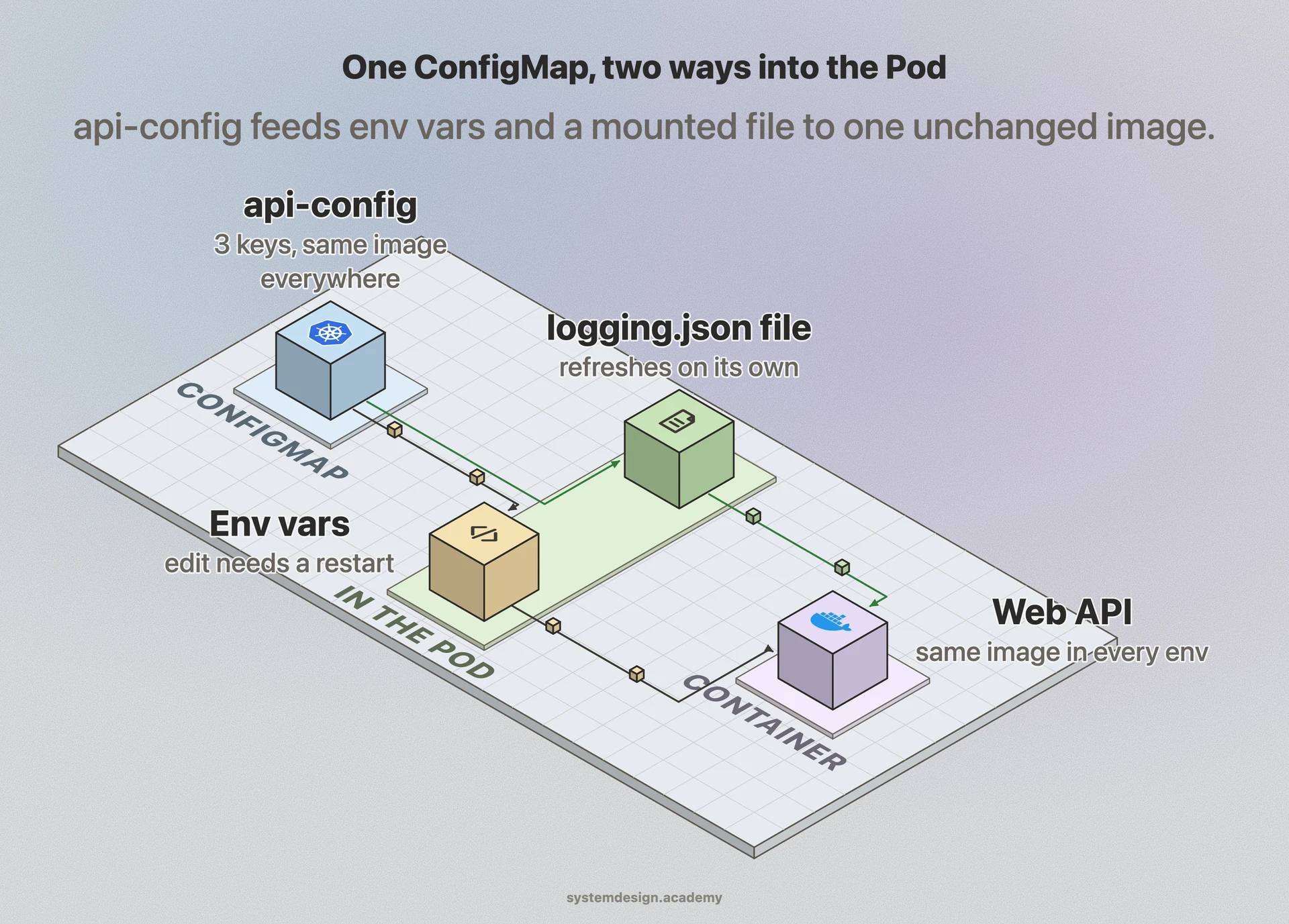
Say you run a web API that reads DATABASE_HOST, CACHE_TTL_SECONDS, and a logging.json file. You create a ConfigMap named api-config with those three keys. In the Deployment you set DATABASE_HOST and CACHE_TTL_SECONDS as env vars from the ConfigMap, and you mount logging.json into /etc/app/ as a volume.
To move from staging to production you do not touch the image at all. You apply a different api-config in the production namespace pointing DATABASE_HOST at the production database. The same container image runs in both places. If you later raise CACHE_TTL_SECONDS, you edit the ConfigMap and trigger a rolling restart so the env var change takes effect, while the logging.json file would refresh on its own through the mounted volume.
Where it is used in production
Kubernetes
Ships ConfigMap as a core API object; kubelet syncs mounted ConfigMap files into running Pods and the API server enforces the 1 MiB etcd limit.
Helm
Templates ConfigMaps per release so the same chart deploys with different values across dev, staging, and production environments.
Prometheus Operator
Stores scrape and alerting configuration in ConfigMaps that the operator mounts into Prometheus Pods, letting you change monitoring rules without rebuilding the image.
NGINX Ingress Controller
Reads a single ConfigMap to tune global settings like proxy buffer sizes and timeouts, applying them to the NGINX process without a new container build.
Frequently asked questions
- What is the difference between a ConfigMap and a Secret?
- Both store key-value configuration and are consumed the same way, but a Secret is meant for sensitive data like passwords and tokens. Secret values are base64-encoded and can be encrypted at rest and access-controlled more tightly, while ConfigMap values are stored in plain text. Use a ConfigMap for non-sensitive config and a Secret for anything confidential.
- Does changing a ConfigMap automatically update my running Pods?
- Only partially. Values mounted as a volume refresh on their own, usually within about 60 to 90 seconds, but your app still has to reload the file. Values injected as environment variables are read once at container start and never change until you restart the Pod. To be safe, trigger a rolling restart after editing a ConfigMap.
- Is there a size limit for a ConfigMap?
- Yes. A single ConfigMap cannot exceed 1 MiB because it is stored in etcd, which is built for small metadata. If you need more, split the data across multiple ConfigMaps or mount large files from a PersistentVolume or an init container instead.
- What does setting a ConfigMap to immutable do?
- Setting immutable: true blocks all future edits to that ConfigMap; to change it you must delete and recreate it. In return, the kubelet and API server stop watching it for changes, which lowers load in clusters with many ConfigMaps and prevents accidental updates. ConfigMaps are mutable by default.
- Why does my ConfigMap file not update when I mount it with subPath?
- subPath mounts are resolved once at Pod start and are not kept in sync, so changes to the ConfigMap never reach a subPath-mounted file. To get live updates, mount the whole ConfigMap as a directory volume instead, or restart the Pod after each change.
Learn Kubernetes ConfigMap hands-on
This page explains the idea. The full lesson lets you step through the ring as servers join and leave, read the implementation, and check yourself with a quiz. It is one of 760+ lessons in the System Design Masterclass, from your first API call to distributed consensus. Eleven Foundation lessons are free, no signup. Lifetime access is ₹499 in India or $7.99 worldwide, one payment, no subscription.
See also
Related glossary terms you might want to look up next.
Kubernetes
An orchestration platform that automates deploying, scaling, and managing containerized applications. K8s is the operating system for your cloud.
Kubernetes Pod
The smallest deployable unit in Kubernetes: one or more containers sharing network and storage. Pods are ephemeral; if one dies, K8s creates a replacement.
Kubernetes Secret
A K8s resource for storing sensitive data like passwords, tokens, and certificates. Base64-encoded by default; use encryption at rest and RBAC to properly secure them.
Docker
A platform for packaging applications into lightweight, portable containers. 'Works on my machine' becomes 'works everywhere.'
Container
A lightweight, isolated environment that packages an application with its dependencies. Shares the host OS kernel, unlike VMs. Starts in milliseconds.
Kubernetes Service
A stable network endpoint that load-balances traffic across a set of pods. Pods come and go, but the Service's IP and DNS name stay constant.