Log Aggregation
Collecting logs from all services into a central searchable store. The ELK stack (Elasticsearch, Logstash, Kibana) and Grafana Loki are common solutions.
What is Log Aggregation?
In short
Log aggregation is the practice of collecting log lines from every server, container, and service in a system, shipping them to one central store, and indexing them so you can search and analyze them in one place instead of SSH-ing into individual machines. Common stacks are ELK (Elasticsearch, Logstash, Kibana), Grafana Loki, and hosted services like Datadog or Splunk.
What it is
A log is a timestamped line of text a program writes when something happens: a request came in, a query took 800ms, a payment failed. On one machine you can read these with tail or grep. But a modern system runs hundreds of containers across dozens of hosts, each writing its own logs, and each container can disappear at any moment when it gets rescheduled. Logging into each box one by one to find a problem does not scale.
Log aggregation solves this by pulling every log line off every machine and sending it to a central store. Once the logs are in one place, you can search across all of them at once: "show me every error from the checkout service in the last 15 minutes" returns results from every replica, even ones that have already been killed and replaced.
The pieces are usually a collector (an agent on each host), a transport or buffer, a storage and indexing layer, and a query and visualization UI. In the ELK stack those map to Beats or Logstash, then Elasticsearch for storage, then Kibana for search and dashboards.
How it works under the hood
A lightweight agent runs on every node and watches log files or the container runtime's log stream. Filebeat, Fluent Bit, Fluentd, Vector, and Promtail are common agents. The agent tails new lines, attaches metadata such as host, pod name, and service, and forwards them.
Before logs land in storage they often pass through a parsing and buffering stage. Raw lines get turned into structured fields (level, status code, latency, trace ID), and a message queue like Kafka or a memory buffer absorbs bursts so a traffic spike does not overwhelm the store. JSON-formatted logs make this parsing trivial, which is why most teams log in JSON.
Storage works one of two ways. Elasticsearch indexes the full text of every field, so any term is searchable fast, at the cost of large indexes and heavy disk and memory use. Grafana Loki takes the opposite approach: it indexes only a small set of labels (service, level, namespace) and stores the log bodies compressed, so it is cheap to run but you filter by label first, then grep within. Loki was designed to be "like Prometheus but for logs" for exactly this cost reason.
When to use it and the trade-offs
You want log aggregation the moment you have more than one server, and you need it badly once you run containers or autoscaling, because the machine that produced an error may not exist by the time you go looking. It is one of the three pillars of observability alongside metrics and traces.
The main trade-off is cost and volume. Logs are high cardinality and high volume; a busy service can emit terabytes a day, and full-text indexing that volume in Elasticsearch gets expensive in disk, RAM, and engineering time. Teams control this with retention policies (keep 7 to 30 days hot, archive the rest to S3), sampling of noisy debug logs, and choosing label-only indexing like Loki when full-text search is not required.
The other trade-off is that aggregation is best-effort, not transactional. If a node dies before the agent flushes its buffer, those last few lines can be lost. For data you cannot lose, like an audit trail, write it to a durable store directly rather than relying only on the log pipeline.
A concrete example
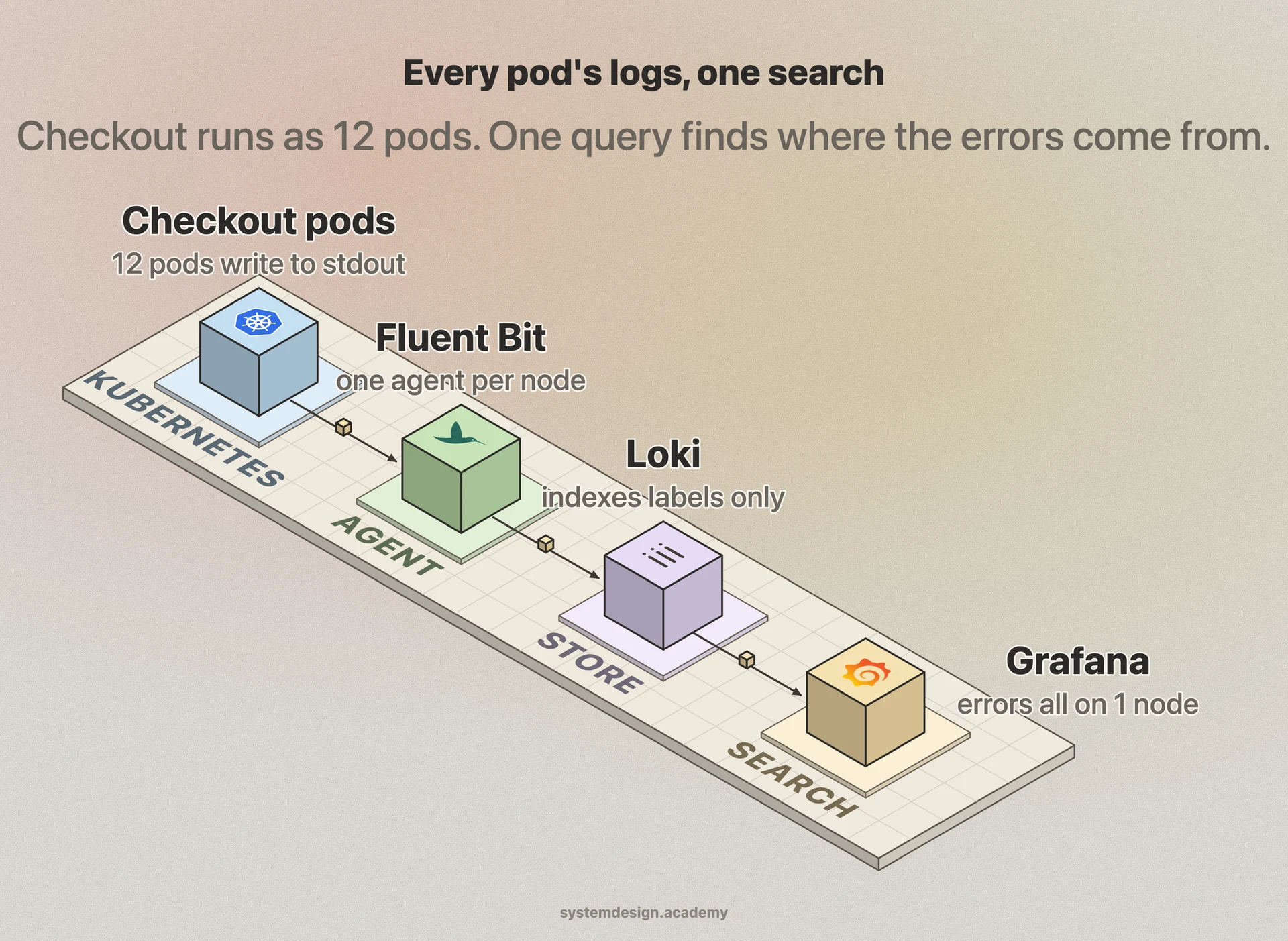
Picture an online store running the checkout service as 12 pods on Kubernetes. A customer reports that payments randomly fail. Without aggregation you would have to guess which pod served their request and hope it is still alive.
With aggregation in place, Fluent Bit on each node ships every container's stdout to Loki, tagged with service=checkout and the pod name. In Grafana you run a query for level=error and service=checkout over the last hour. Instantly you see the errors are all coming from pods on one specific node, all with the same message about a database connection timeout. You have found the failing node in seconds, across pods that have already been restarted, without touching a single machine by hand.
Where it is used in production
Elastic (ELK Stack)
Elasticsearch indexes logs full-text, Logstash and Beats ship and parse them, and Kibana provides search and dashboards; the most widely deployed self-hosted stack.
Grafana Loki
Indexes only labels and stores compressed log bodies, making it far cheaper to run at high volume; queried alongside metrics in Grafana.
Datadog
Hosted log management with live tail, automatic parsing, and tiered retention so teams ingest everything but only index a searchable subset.
Splunk
Enterprise platform that indexes and searches huge log volumes; common in finance and security teams for audit and SIEM use.
Frequently asked questions
- What is the difference between log aggregation and monitoring?
- Monitoring usually means metrics: numeric time series like CPU percent or request rate that tell you something is wrong. Log aggregation collects the actual text records that tell you why it is wrong. They are complementary, and most teams use both plus distributed tracing as the three pillars of observability.
- What is the difference between ELK and Loki?
- ELK (Elasticsearch) indexes the full text of every log field, so any term is fast to search but storage and memory costs are high. Loki indexes only a few labels and stores the bodies compressed, so it is much cheaper to run, but you filter by label first and then grep within the matching streams rather than searching arbitrary text instantly.
- Should I log in JSON or plain text?
- JSON. Structured JSON logs let the aggregation pipeline extract fields like status, latency, and trace ID automatically, so you can filter and aggregate on them. Plain text forces fragile regex parsing later. Log a JSON object per line with a consistent set of keys.
- How do I keep log aggregation from getting expensive?
- Set retention so recent logs stay searchable (7 to 30 days) and older ones move to cheap object storage like S3 or get deleted. Sample or drop noisy debug logs, log at appropriate levels in production, and consider label-only indexing such as Loki when you do not need full-text search.
- Can I lose logs with aggregation?
- Yes. The pipeline is best-effort, so if a node crashes before its agent flushes the buffer, the last lines can be lost. Buffering through Kafka reduces this, but for data you truly cannot lose, like financial audit records, write it to a durable store directly instead of relying only on the log pipeline.
Learn Log Aggregation hands-on
This page explains the idea. The full lesson lets you step through the ring as servers join and leave, read the implementation, and check yourself with a quiz. It is one of 760+ lessons in the System Design Masterclass, from your first API call to distributed consensus. Eleven Foundation lessons are free, no signup. Lifetime access is ₹499 in India or $7.99 worldwide, one payment, no subscription.
See also
Related glossary terms you might want to look up next.
Logging
Recording discrete events with timestamps, severity levels, and context. Structured logs (JSON) are searchable; unstructured logs (plaintext) are not. Ship them to a central system.
Elasticsearch
A distributed search and analytics engine built on Apache Lucene. Powers full-text search, log analysis, and real-time analytics at scale.
Observability
The ability to understand a system's internal state from its external outputs. Built on three pillars: metrics, logs, and traces.
Health Check
An endpoint or mechanism that reports whether a service is running and healthy. Load balancers use health checks to route traffic away from unhealthy instances.
Distributed Tracing
Tracking a request as it flows through multiple services in a distributed system. Each service adds its trace, creating a full picture of the request journey.
Metrics
Numerical measurements collected over time that describe system behavior: request rate, error rate, latency percentiles, CPU utilization. Prometheus is the standard collector.