Metrics
Numerical measurements collected over time that describe system behavior: request rate, error rate, latency percentiles, CPU utilization. Prometheus is the standard collector.
What is Metrics?
In short
Metrics are numerical measurements sampled over time that describe how a system behaves, such as requests per second, error rate, p99 latency, and CPU utilization. Each data point is a number with a timestamp and a set of labels, stored in a time series database like Prometheus so you can chart trends, set alerts, and answer questions like "is the API slower than it was an hour ago".
What metrics actually are
A metric is a number you measure repeatedly and record with the time you measured it. Three hundred requests in the last second, 12 errors in the last minute, 740 milliseconds at the 99th percentile, 63 percent CPU. On their own these are just numbers. The value comes from collecting them every few seconds and watching how they move.
Almost every metric falls into one of four shapes. A counter only goes up, like total requests served since the process started. A gauge goes up and down, like memory in use or queue depth right now. A histogram buckets observations so you can compute percentiles, like the distribution of request durations. A summary is similar but computes the percentiles on the client side.
Each metric also carries labels, which are key value pairs that split one metric into many. A single metric http_requests_total might have labels method=GET, status=200, route=/checkout. That lets you ask narrow questions later, like the error rate only for POST requests to /checkout, without defining a separate metric for every combination up front.
How collection works under the hood
There are two ways data gets in. In the pull model, used by Prometheus, your app exposes a plain text endpoint at /metrics and the monitoring server scrapes it on a fixed interval, often every 15 seconds. In the push model, used by StatsD and many hosted agents, your app sends data points out to a collector as events happen. Pull is easier to operate at scale because the server controls the rate and can tell instantly when a target stops responding.
Counters are deliberately stored as ever increasing totals rather than per second rates. The collector records the raw running total at each scrape, and the query layer computes the rate by taking the difference between two samples and dividing by the time between them. This survives restarts and missed scrapes far better than trying to send a rate directly.
Storage is a time series database tuned for this exact shape of data. It compresses long runs of similar numbers aggressively, so a value that barely changes costs only a few bits per sample. Prometheus, InfluxDB, and VictoriaMetrics all do this. Old high resolution data is usually downsampled, keeping one point per hour after a few weeks instead of one every 15 seconds, which keeps storage bounded.
When to use metrics and the trade-offs
Reach for metrics when you want to know the overall health and trend of a system: error rate climbing, latency creeping up, a queue backing up, a disk filling. They are cheap to store, fast to query, and perfect for dashboards and alerts because a number aggregated across millions of requests still costs almost nothing.
The cost of that cheapness is that metrics throw away detail. A p99 latency of 2 seconds tells you something is slow but not which user, which trace, or why. That is where logs and distributed traces take over. The common practice is to alert on metrics, then jump to traces and logs to find the root cause of the specific request that misbehaved.
The main failure mode is cardinality explosion. Cardinality is the number of unique label combinations, and each one is a separate time series the database must hold in memory. Putting a high variety value like user ID, email, or full URL in a label can create millions of series and crash the monitoring system. Keep labels low cardinality, with bounded values like status code or region, and never put raw identifiers in them.
A concrete example
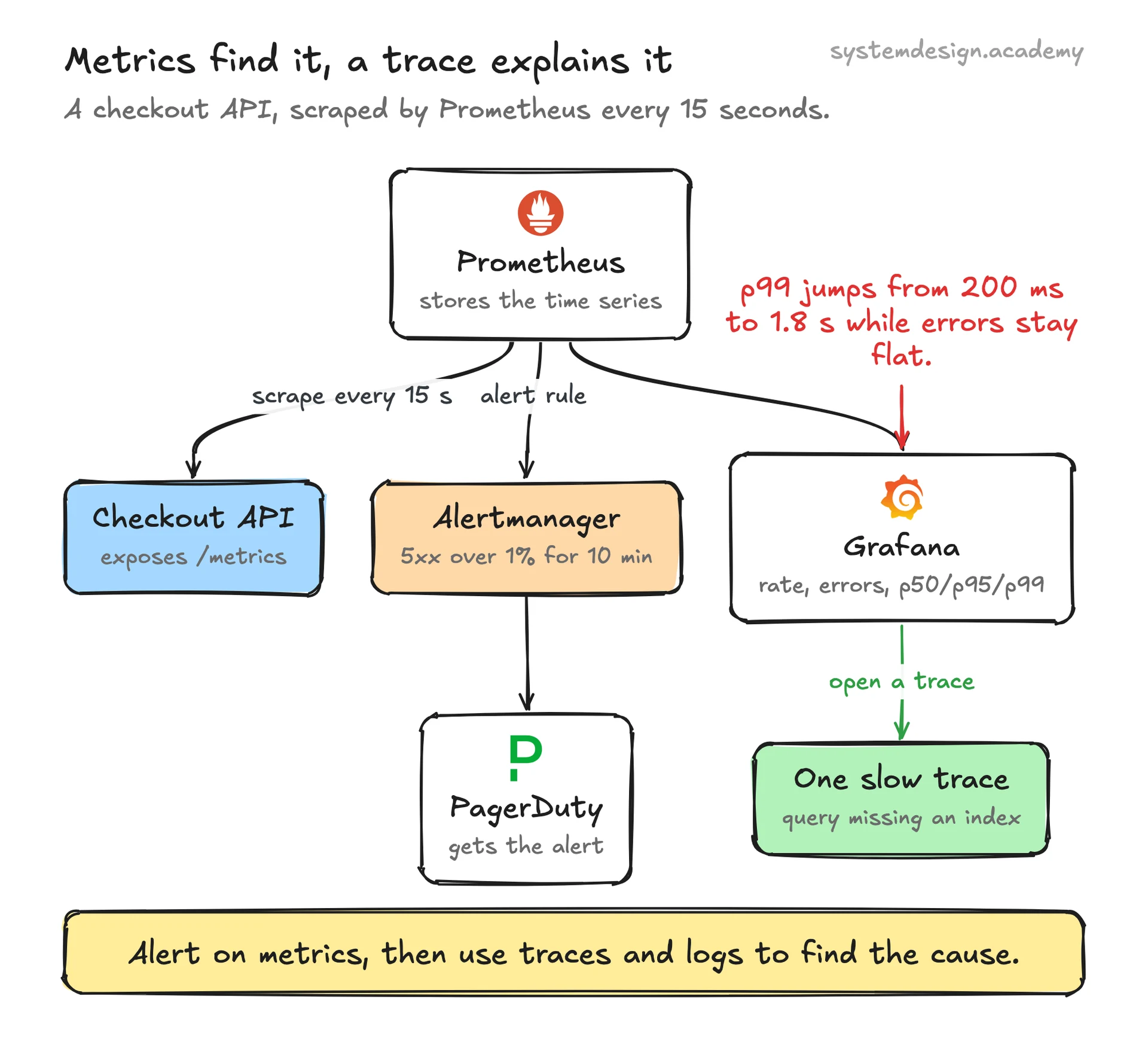
Say you run a checkout API. You instrument it with a counter http_requests_total labeled by route and status, and a histogram http_request_duration_seconds. Your app exposes these at /metrics, and Prometheus scrapes it every 15 seconds.
An alert rule watches the rate of 5xx responses over the last 5 minutes divided by the rate of all responses. When that ratio crosses 1 percent for 10 minutes, an alert fires through Alertmanager to PagerDuty. A Grafana dashboard plots request rate, error rate, and p50, p95, and p99 latency side by side, which is a common pattern often called the RED method: rate, errors, duration.
One morning p99 latency jumps from 200 milliseconds to 1.8 seconds while the error rate stays flat. The metric does not say why, but it points you straight at the slow path. You then open a trace for one of those slow requests and find a database query missing an index. Metrics found the problem fast, tracing explained it.
Where it is used in production
Prometheus
The de facto open source standard for metrics. Pulls a /metrics endpoint on a scrape interval, stores time series locally, and queries them with PromQL.
Grafana
The dashboarding layer most teams point at Prometheus or other time series stores to visualize rate, error, and latency metrics.
Datadog
Hosted monitoring that ingests metrics from an agent on each host and charges largely based on the number of unique metric time series.
Kubernetes
Exposes container and node metrics through cAdvisor and kube-state-metrics, and uses metrics from the metrics server to drive the Horizontal Pod Autoscaler.
Frequently asked questions
- What is the difference between metrics, logs, and traces?
- Metrics are aggregated numbers over time, like error rate or p99 latency, cheap to store and great for alerts and trends. Logs are timestamped text records of individual events with full detail. Traces follow one request across services to show where time was spent. You alert on metrics, then use traces and logs to find the cause.
- What is the difference between a counter and a gauge?
- A counter only increases, like total requests served, and you usually look at its rate of change rather than the raw value. A gauge can go up or down and represents a value at a moment in time, like current memory usage or queue depth. Counters reset to zero on process restart, which is why rates are computed from differences between samples.
- What is cardinality and why does high cardinality break metrics?
- Cardinality is the count of unique label combinations for a metric, and each combination is a separate time series the database keeps in memory. Putting high variety values like user ID or full URL into labels can create millions of series, blowing up memory and slowing queries. Keep labels to bounded values such as status code, route, or region.
- Why does Prometheus pull metrics instead of having apps push them?
- With pull, the monitoring server scrapes each target on a schedule it controls, so it can rate limit itself, detect a dead target the moment a scrape fails, and avoid being overwhelmed by a misbehaving client. Push still makes sense for short lived batch jobs that may finish before any scrape, which Prometheus handles through a separate Pushgateway.
- What is p99 latency and why not just use the average?
- p99 latency is the value below which 99 percent of requests complete, so only the slowest 1 percent are above it. Averages hide pain because a few very slow requests get diluted by many fast ones. Percentiles like p95 and p99 surface the tail latency that real users actually feel, which is why they are standard on latency dashboards.
Learn Metrics hands-on
This page explains the idea. The full lesson lets you step through the ring as servers join and leave, read the implementation, and check yourself with a quiz. It is one of 760+ lessons in the System Design Masterclass, from your first API call to distributed consensus. Eleven Foundation lessons are free, no signup. Lifetime access is ₹499 in India or $7.99 worldwide, one payment, no subscription.
Related lessons
Lessons that touch on Metrics as part of a larger topic.
Metrics Aggregation
Combining metrics across instances, time windows, and dimensions, from raw data to actionable dashboards
intermediate · observability monitoring
Metrics Collection
Gathering numerical measurements from your systems, the raw data behind every dashboard
intermediate · observability monitoring
Counter Metrics
Monotonically increasing numbers that count events, requests served, errors thrown, bytes transferred
intermediate · observability monitoring
Gauge Metrics
Values that go up and down, temperature readings for your systems
intermediate · observability monitoring
Time-Series Metrics
Data points indexed by time, the heartbeat of every monitoring system
intermediate · observability monitoring
See also
Related glossary terms you might want to look up next.
Observability
The ability to understand a system's internal state from its external outputs. Built on three pillars: metrics, logs, and traces.
SLI
Service Level Indicator: a quantitative measure of service behavior, like the proportion of requests faster than 300ms. The raw metric that feeds SLOs.
Alerting
Automatically notifying engineers when metrics cross predefined thresholds. Good alerts are actionable, not noisy. PagerDuty and Opsgenie route alerts to the right on-call person.
Health Check
An endpoint or mechanism that reports whether a service is running and healthy. Load balancers use health checks to route traffic away from unhealthy instances.
Distributed Tracing
Tracking a request as it flows through multiple services in a distributed system. Each service adds its trace, creating a full picture of the request journey.
Logging
Recording discrete events with timestamps, severity levels, and context. Structured logs (JSON) are searchable; unstructured logs (plaintext) are not. Ship them to a central system.