A Card Behind the Wrong Divider
Let me start with a box of index cards, like the one in the picture.
Imagine an office that keeps one card for every customer in a long box. The box has dividers with letters on them: A, B, C and so on. Every card goes behind the divider for the first letter of the customer's name. When someone needs a customer, they go to the right divider and pull the card.

Now one card goes behind the wrong divider. The card is fine. The name on it is right and so is the phone number. The box still closes. Nothing beeps. The mistake shows up much later, when someone looks for that customer and finds the wrong person, or no one.
A trained model reads its inputs the same way. It does not read the name of each number. It reads the slot the number sits in. In this lesson I put the right numbers into the wrong slots, on purpose, and in other wrong shapes too. Then I measure two things: what the model does, and which checks notice.
Where This Lesson Starts
This lesson uses the model from the features chapter. If it is new to you, please read what a feature is first.
That lesson built six features for each customer of a real online shop. They are recency in days, frequency, money, the share of returned lines, tenure in days, and the number of different products. It asked one question: at the start of a month, will this customer buy something in the next 30 days? The model is a gradient boosted tree model from scikit-learn, and it scored a test AP of 0.5450. AP, average precision, is a score from 0 to 1 for how well the model ranks the buyers above the others.
The last lesson, a model registry, hands on, ended with a warning. I pointed the registry's champion alias at a model that takes other columns. The serving code kept sending the six columns. Nothing raised an error, and the test AP fell to 0.1731. The model's signature only said "six float64 numbers", and the wrong columns were six float64 numbers too.
This lesson takes that one finding and goes deep on it. I do not repeat the registry walkthrough. The features chapter's lesson on online and offline consistency showed that two correct pieces of code can compute a feature a little differently. Here the values are exactly right, and only their shape is wrong.
The Words You Need First
Please read this slide slowly if any word is new. Every slide after it uses these words.
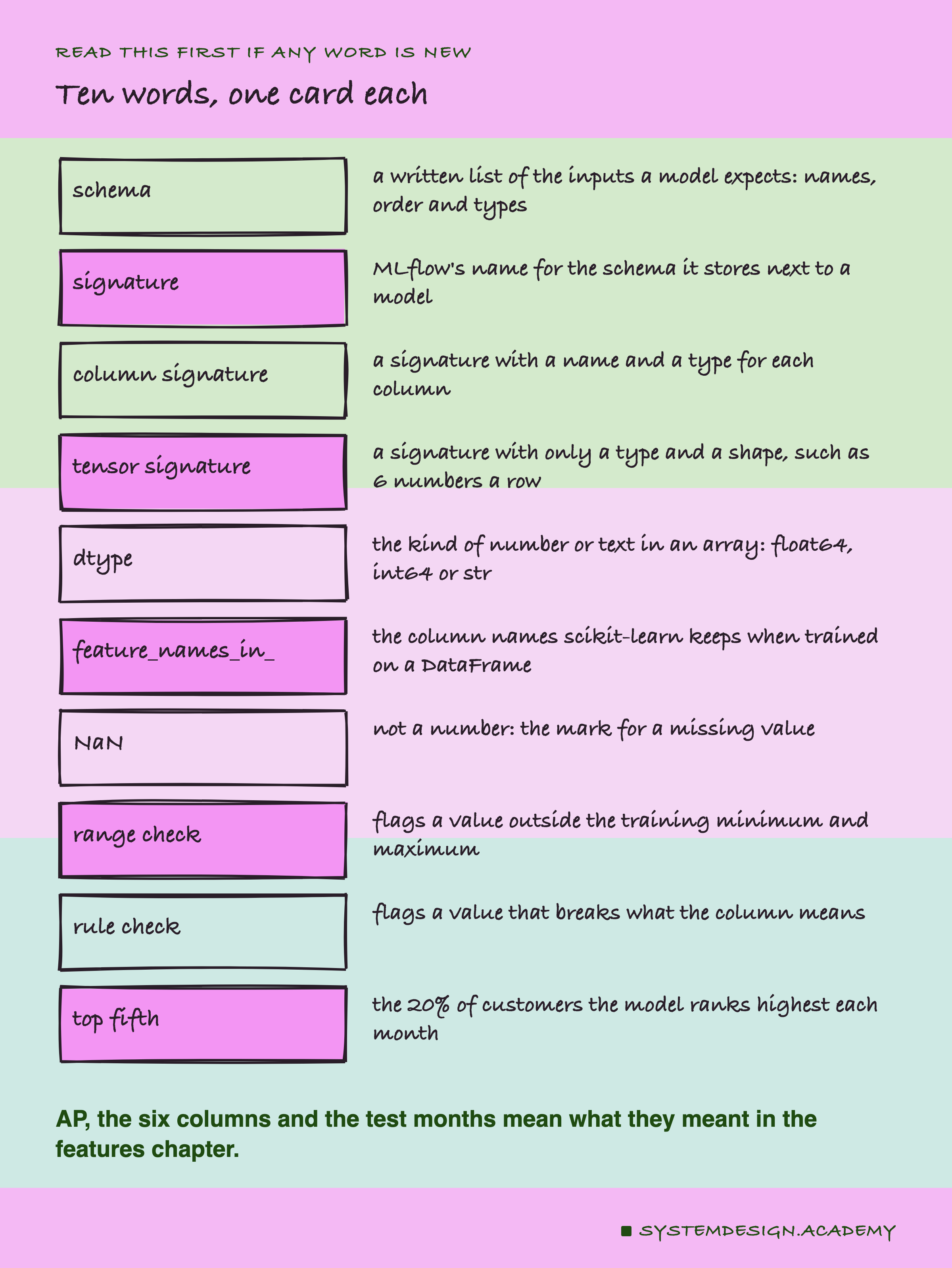
A schema is a written list of what a model expects as input: the names of the columns, their order, and their types. MLflow, the tool from the last lesson, calls the schema it saves next to a model a signature. There are two kinds. A column signature gives each column a name and a type. A tensor signature gives only a type and a shape, such as "any number of rows, 6 numbers each". A tensor here simply means a table of numbers with no names.
A dtype, short for data type, says what kind of values an array holds. float64 is a number with a decimal point, such as 245.65. int64 is a whole number, such as 245. str is text, such as "245.65" in quotes.
numpy is the Python library for plain arrays of numbers, with no column names. pandas is the library for tables with named columns, called DataFrames. When a scikit-learn model is trained on a DataFrame, it keeps the column names in an attribute called feature_names_in_.
NaN means "not a number", the usual mark for a missing value. The top fifth is the 20 percent of customers the model ranks highest in a month: the people a shop would contact first.
What the Two Libraries Say
Before running anything, I read what scikit-learn and MLflow say about checking inputs. Every quote here was found word for word, in the docs at each library's release commit or in the source code installed on my laptop. All of them are in results/sig-factcheck.json.
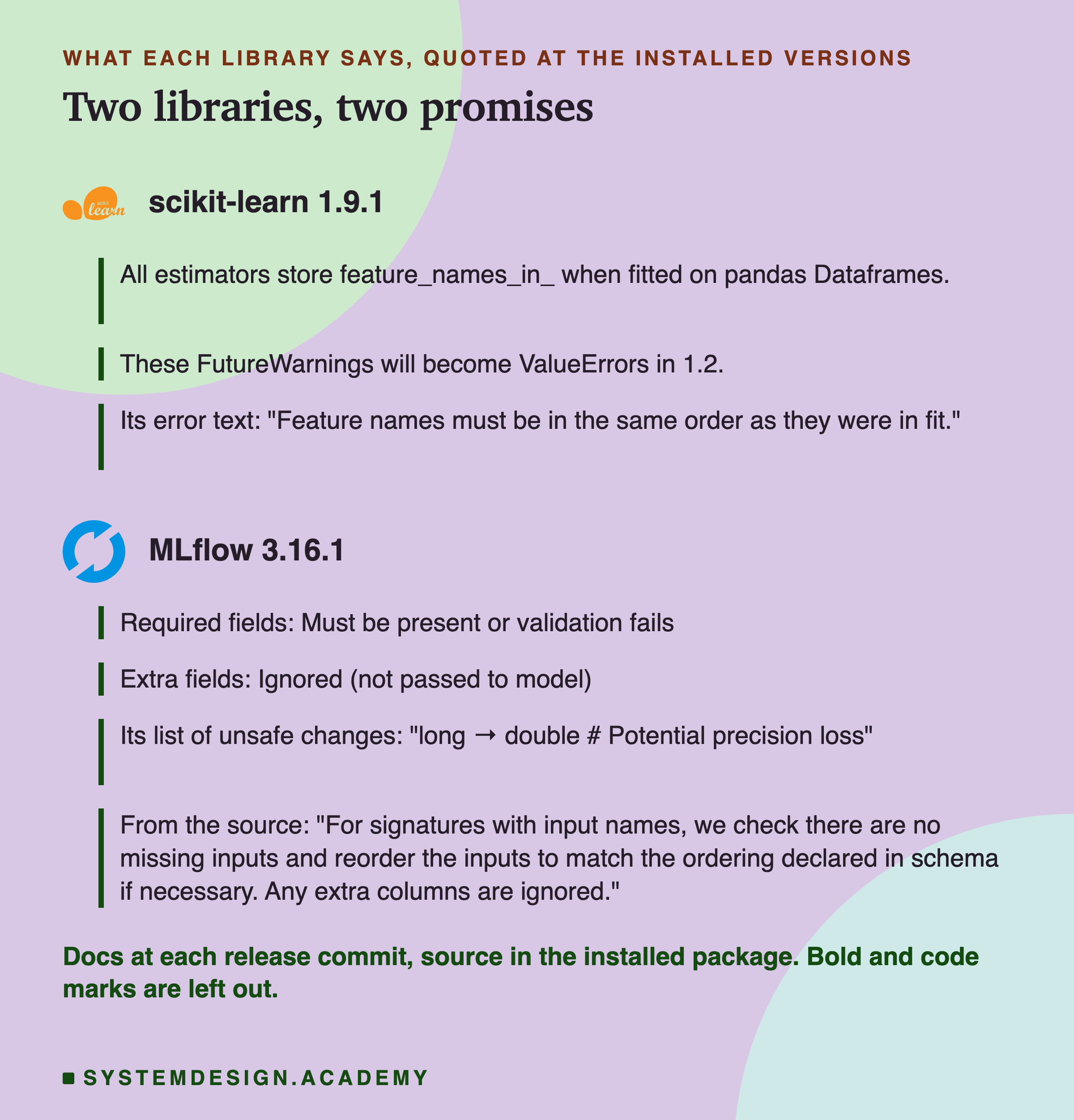
scikit-learn's release notes for version 1.0 say: "All estimators store feature_names_in_ when fitted on pandas Dataframes." The names are compared later, at prediction time. At first a mismatch only gave a warning; the same notes say "These FutureWarnings will become ValueErrors in 1.2." A ValueError is a Python error that stops the call.
MLflow's page on signatures lists its rules. "Required fields: Must be present or validation fails." "Extra fields: Ignored (not passed to model)." Its list of type changes it will not make includes "long → double", where long is MLflow's word for int64 and double its word for float64. In the source code I found one more promise, which the docs page does not spell out. MLflow will "reorder the inputs to match the ordering declared in schema if necessary".
So, on paper, both libraries check names. Neither says a word about units or meaning. I wanted to see what that looks like in numbers.
How the Lab Was Built
I wrote the design into the docstring of scripts/labs/packaging/model_signatures.py before it first ran. Before that, I had read the source of the checks I test, in scikit-learn 1.9.1 and MLflow 3.16.1. I had not sent any fault to any model.
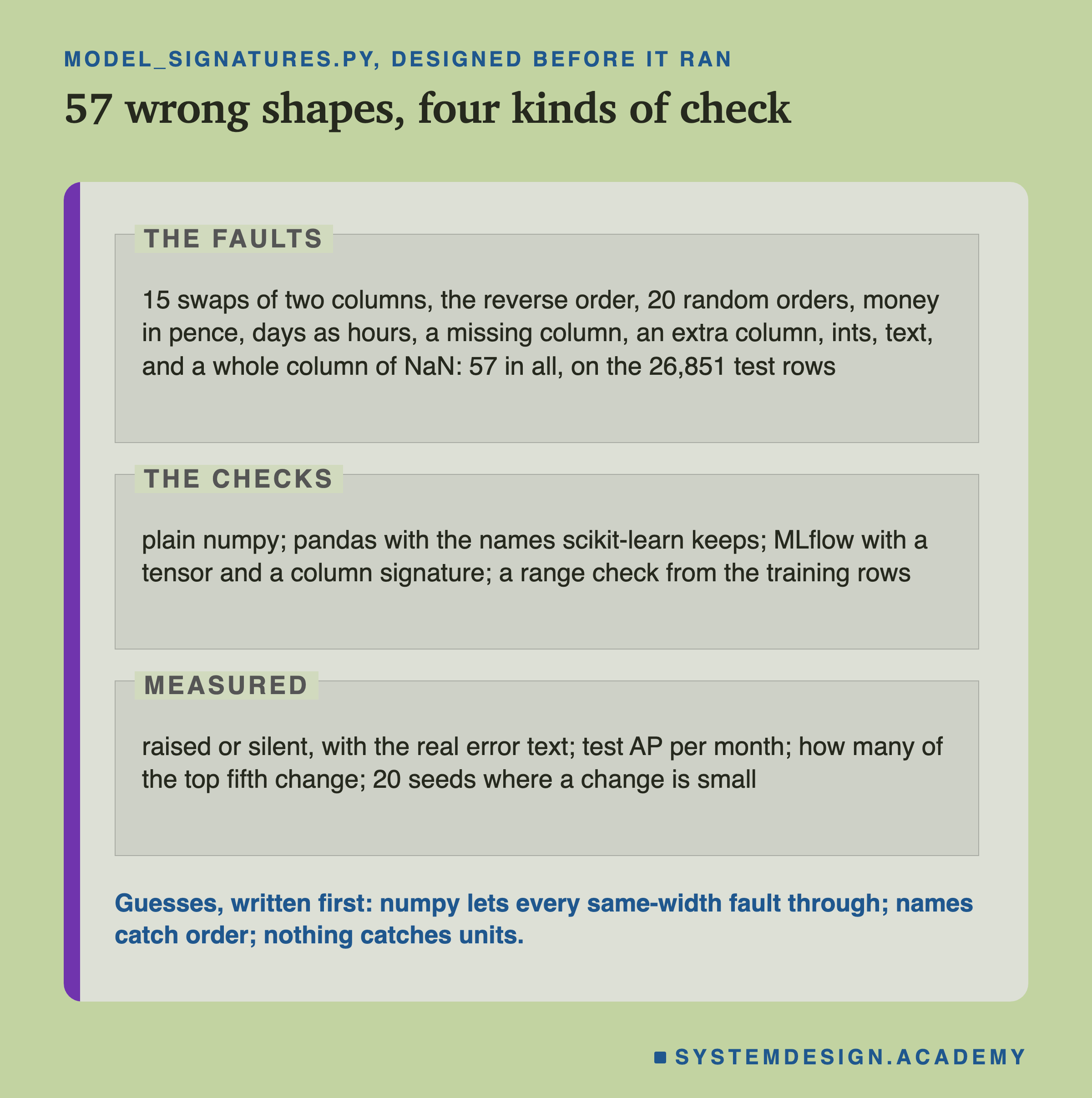
The model. The chapter model, trained twice: once on a plain numpy array, exactly as the features chapter did, and once on a DataFrame, so it keeps the six names. The lab stops unless both give test AP 0.5450 and the very same predictions.
The faults. Each fault changes how the 26,851 test rows are sent, never the values themselves.
Every pair of columns swapped: 15 pairs. The whole order reversed. 20 random orders, the only random fault, so it gets 20 draws. Money times 100, as if sent in pence instead of pounds. The day columns times 24, as if sent in hours: both together, and each one alone, three faults. One column left out, for each of the six. An extra column, the customer's id, at the end or at the front. All values as whole numbers, int64. All values as text. Money as text with a pound sign. And one whole column as NaN, for each of the six. That is 57 faults.
The checks. Plain numpy. pandas with the names the model keeps. MLflow with both kinds of signature. And a range check I wrote. It takes each column's smallest and largest value in the training rows and adds 10 percent of the range on each side. Then it flags any row with a value outside. A month alarms when more than 1 percent of its rows are flagged.
What is measured. Whether each call raised an error, with the exact text. The test AP per month and its mean. And how many of the 5,368 top-fifth places change.
The Lab's Report, Running
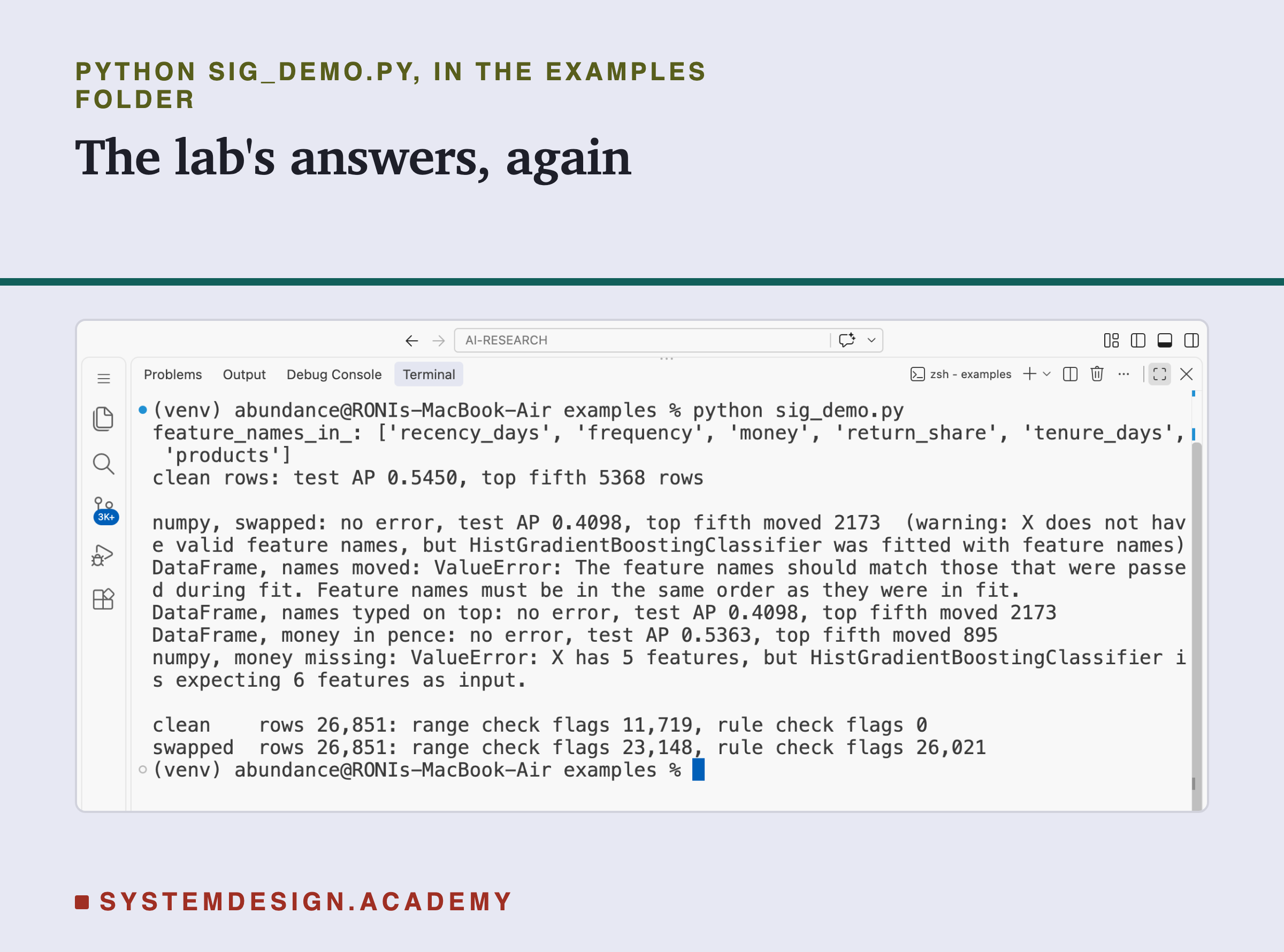
This is a real recording of the report script, sig_report.py, on the laptop where the lab ran.
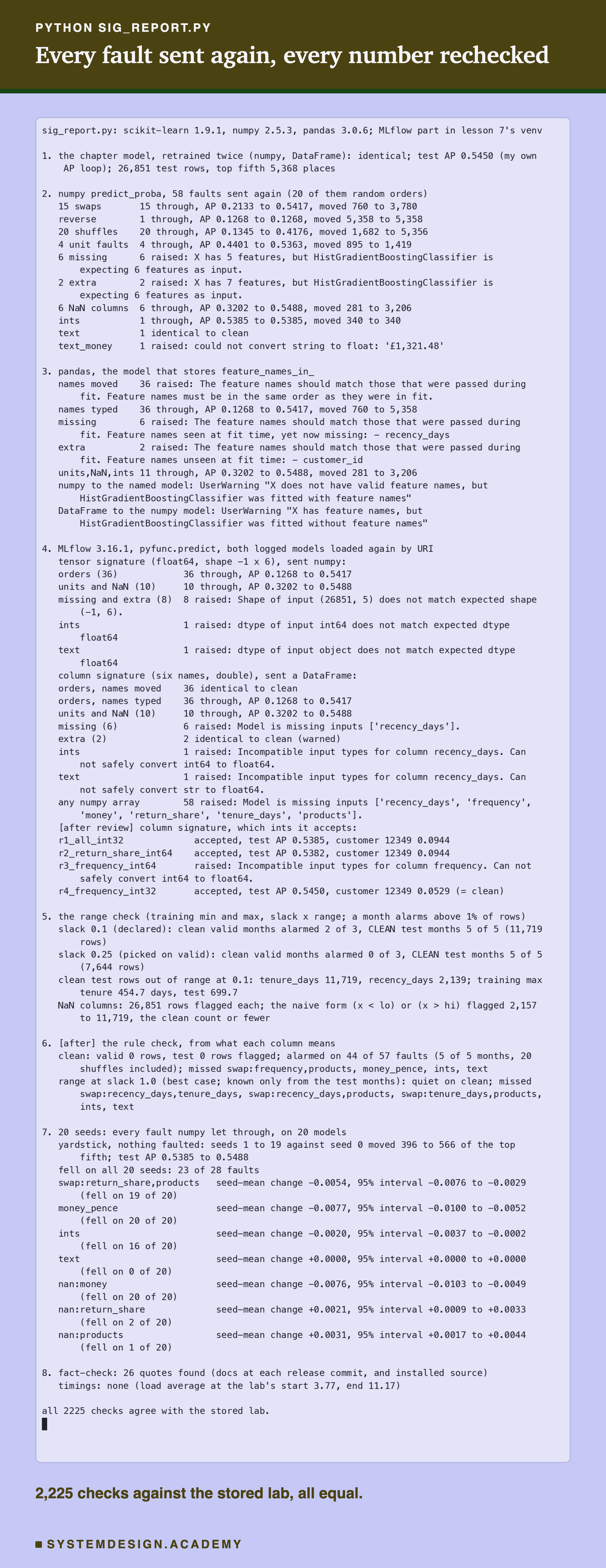
The report does not trust the lab. It builds every fault again from its name with its own code, trains the model again, and sends every fault again through numpy and pandas. It computes every AP with its own loop, written apart from scikit-learn's. For the MLflow part it starts itself in the separate MLflow environment, loads the two logged models, and sends every fault once more. It also recounts both value checks, trains the 20 seeds again, and redoes every bootstrap interval. All 2,225 checks agreed.
The second to last line matters for honesty: no timings. My laptop was busy, and nothing in this lesson was timed.
One Customer, Two Orders
Before the averages, here is one real person. The features chapter used customer 12349 as its example, at the first test month, July 2011. Here are that customer's six numbers, sent twice.
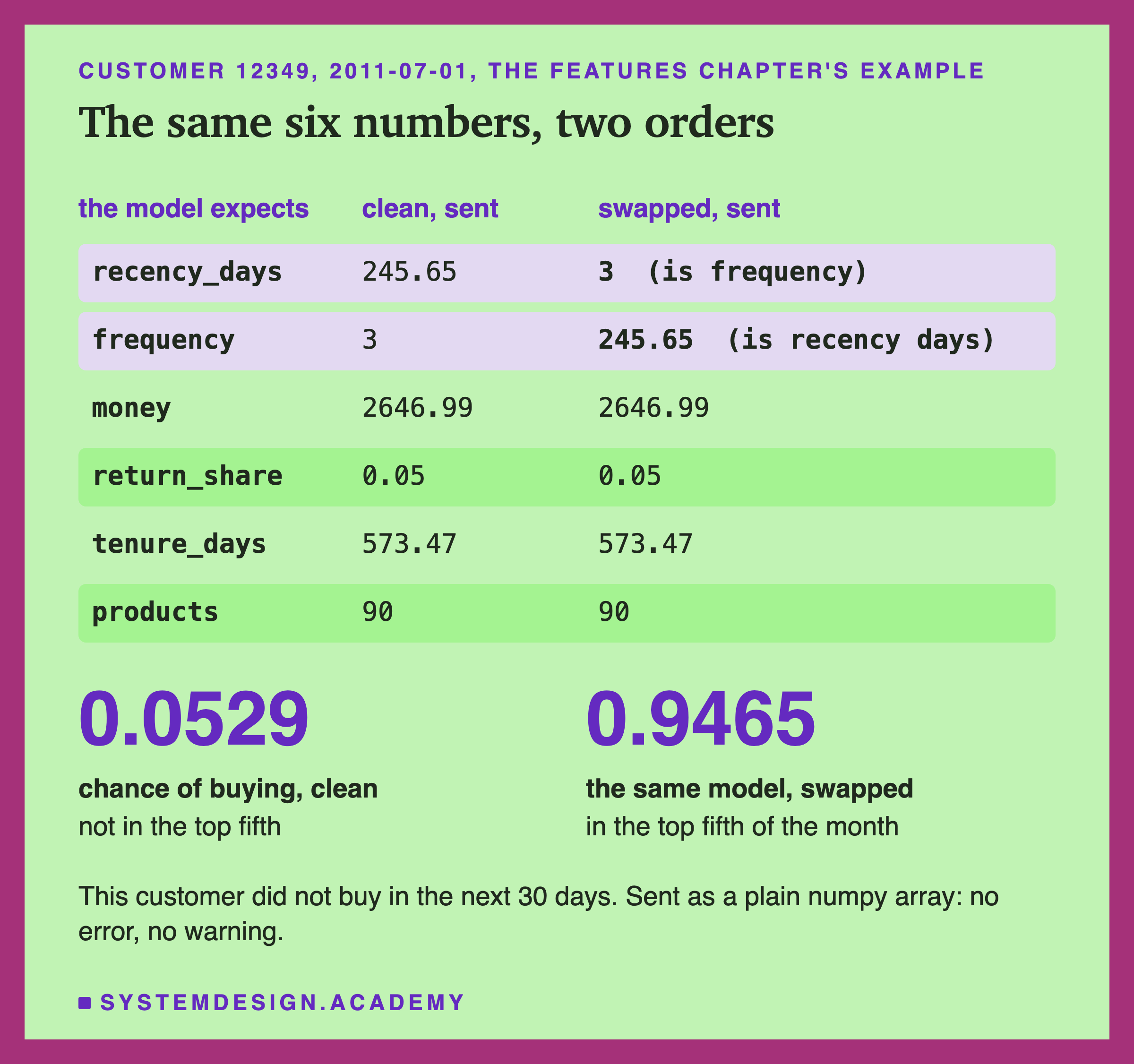
The clean row says this customer last bought 245.65 days ago and has made 3 purchases. The model gives a chance of buying of 0.0529, about 5 in 100. That is low, and it was right: the customer did not buy.
In the swapped row, the two values traded places. The model now reads "last bought 3 days ago, 245 purchases". To the model, that is one of its best customers. It gives 0.9465, about 95 in 100, and puts this person in the top fifth of the month.
Nothing raised an error and nothing warned. The array still had six float64 numbers per row. I added this slide after the main results, from a small --example mode of the lab that only describes the data. It shows what a single average hides: for some people, a swap turns the answer upside down.
The Headline: Wrong Order, No Error, Lower Score
Now all 36 wrong orders, each sent as a plain numpy array to the model, on every test row.
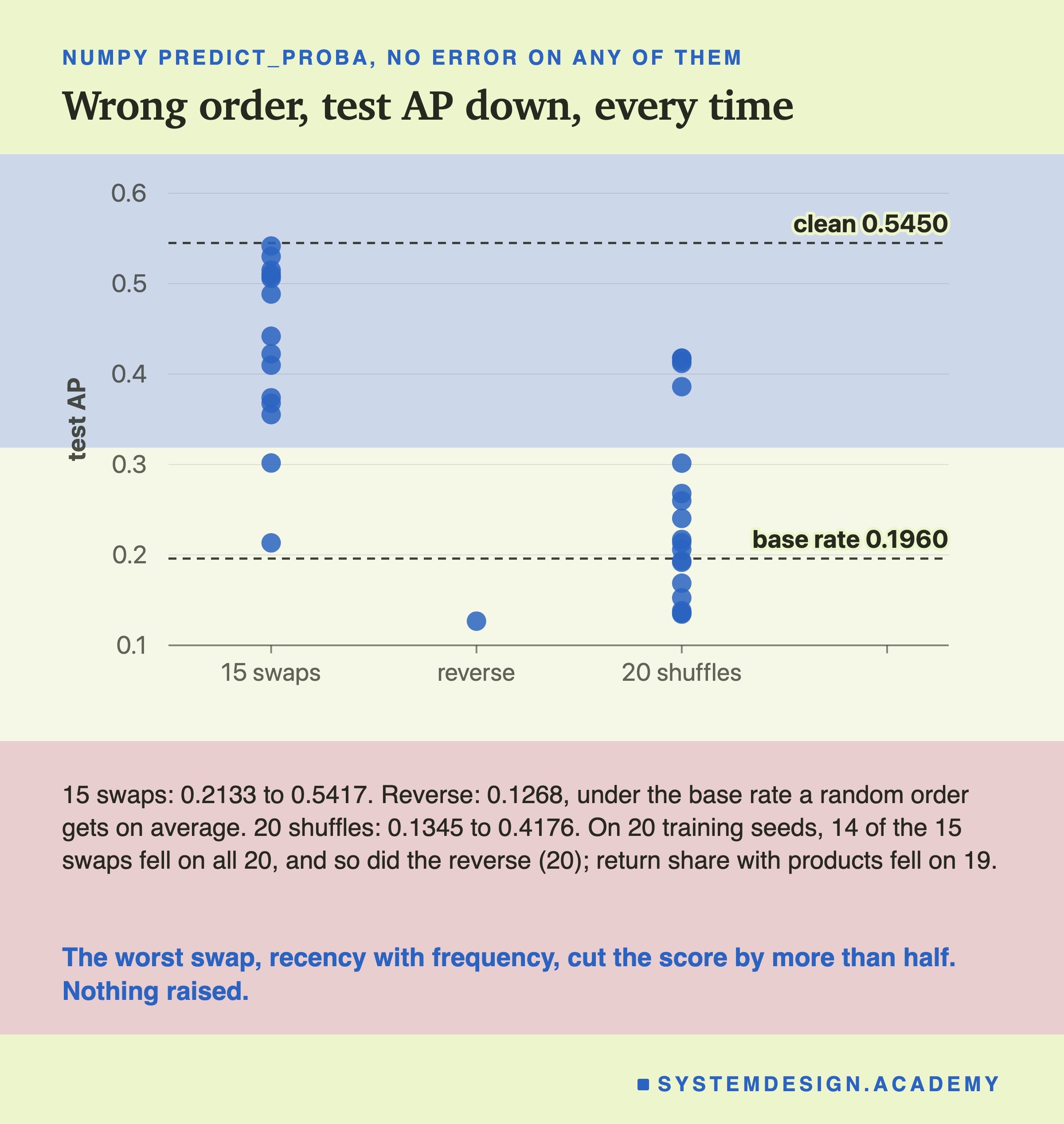
Not one of the 36 raised an error. Every call returned 26,851 chances, as it would for clean rows. And every one scored lower than clean.
The 15 swaps scored from 0.2133 to 0.5417. The worst was recency with frequency, at 0.2133. The mildest was return share with products, at 0.5417, a small drop because those two columns matter least to this model. The reverse order scored 0.1268. The base rate is the share of customers who really bought, 0.1960 here, and it is what a random order scores on average. The reversed model ranked buyers worse than random. I did not trace why.
The 20 random orders scored from 0.1345 to 0.4176. Not one random order came close to clean.
Are these drops just one model's luck? I trained the same model with 20 different seeds, a seed being the number that fixes the random parts of training. 14 of the 15 swaps and the reverse lowered the AP on all 20. Return share with products lowered it on 19 of 20, by 0.0054 on average. A paired bootstrap of that 20-seed mean, which resamples customers 1,000 times, put it between -0.0076 and -0.0029, clear of zero.
Why a Tree Gets a Unit Wrong
To understand the next faults, it helps to see how this model reads a number. A decision tree asks a chain of yes or no questions, such as "is recency_days below 52.5?". The model is 54 such trees added together. Each question compares a value with a fixed number, called a split, learned in training. I added this slide after the results: it reads the splits straight out of the saved model.
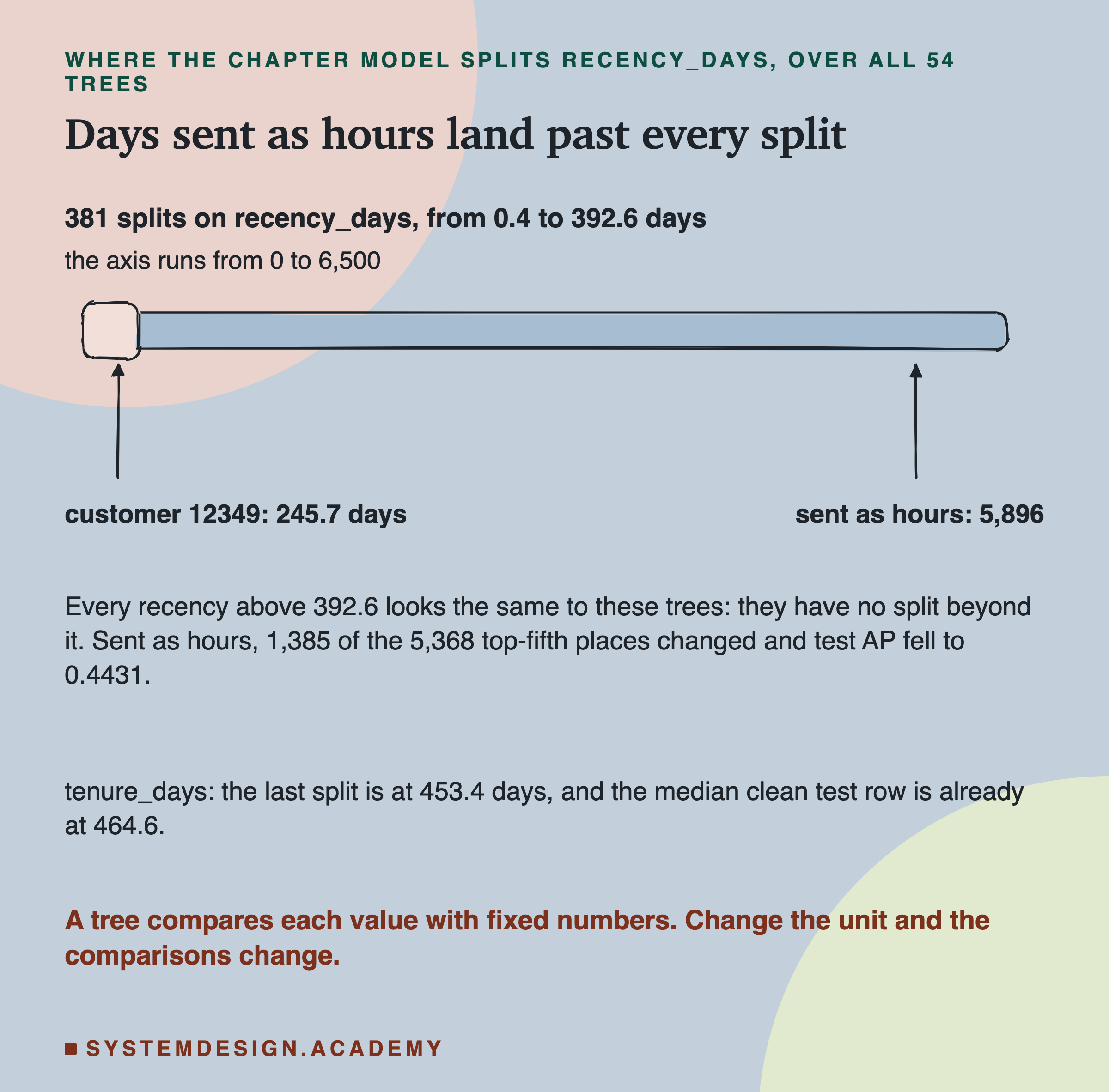
The model has 381 questions about recency_days, with splits from 0.4 to 392.6 days. Customer 12349's real value, 245.7 days, sits among them. Sent as hours, the same value is 5,896. For almost every customer, every question about recency now answers "more than the split". Every customer who bought more than about 16.4 days ago lands past the last split. The trees see them all as the same: the most lapsed customers there are.
That is how a unit change works on a tree. The tree does not care how big a number is. It cares on which side of each split the number falls. Multiply by 24 and almost every value moves to the far side.
One more detail from the same table: tenure_days has no split above 453.4 days, because no training row had more. The middle clean test row already has 464.6. I come back to that on a later slide.
Units: No Error, a Smaller Cost
The unit faults keep the right columns in the right order. Only the unit is wrong.
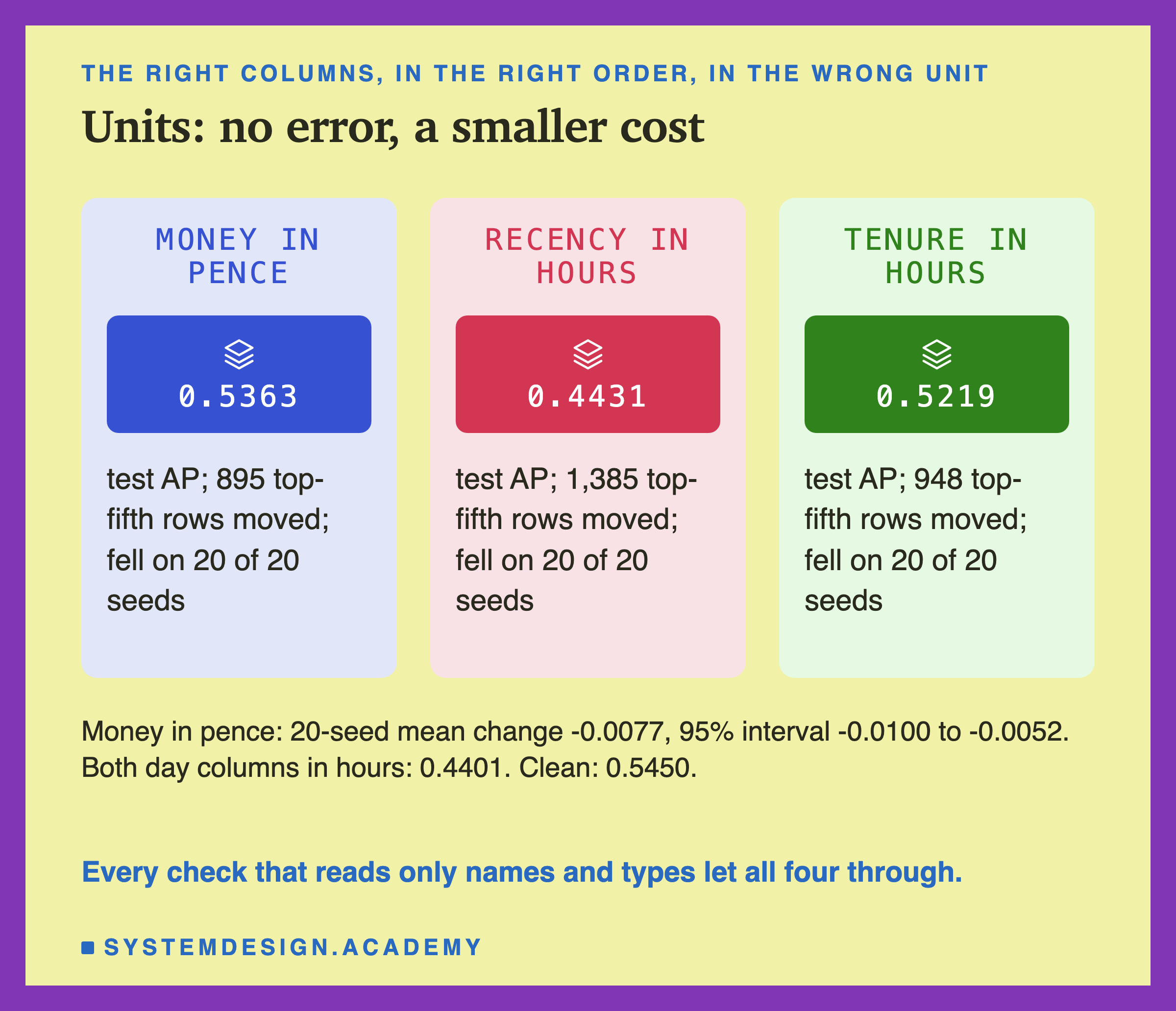
Money in pence scored 0.5363 against 0.5450. On all 20 seeds it was lower; the 20-seed mean drop was 0.0077, with an interval of -0.0100 to -0.0052. It is the smallest cost of the unit faults, and still, 895 of the 5,368 top-fifth places changed hands.
Recency in hours scored 0.4431, for the reason on the last slide. Tenure in hours scored 0.5219. Both day columns in hours scored 0.4401.
My guesses were wrong here in both directions. I guessed money in pence would cost 0.02 to 0.08 of AP; it cost less than 0.01. I guessed days as hours would fall below 0.35; it fell to 0.4401. A tree model is less hurt by a big money value than I expected, because money splits stop at 20,402.96, so very large sums all look alike.
The important point is not the size. It is that these four faults passed every check that looks at names and types, in every library I tried. The names were right. The types were right. Only the meaning was wrong.
A Column of NaN: From a Large Cost to a Small Gain
What if the service that fills one column breaks, and sends NaN for every row? I tried each of the six columns.
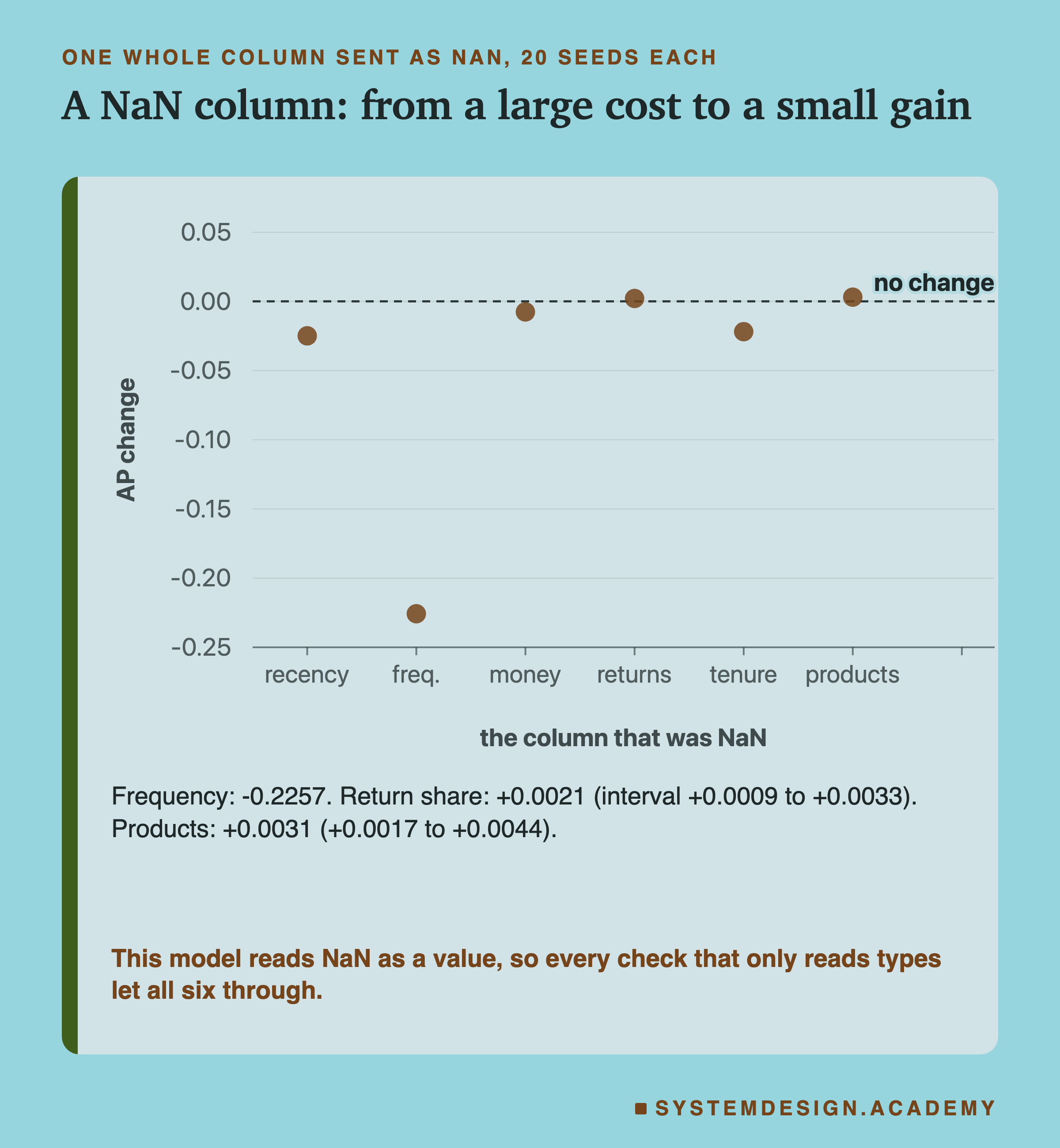
None of the six raised an error. This model accepts NaN by design: scikit-learn's gradient boosting learns, at each split, which side missing values should go to. So NaN is not an error to it. It is just another value.
Frequency as NaN cost the most, -0.2257 on average over 20 seeds. My guess said recency would cost the most; it cost -0.0248. Money cost -0.0076. Tenure cost -0.0219.
Two columns did the opposite. With return share as NaN, AP rose by 0.0021, and with products as NaN by 0.0031. Both intervals sit above zero. The features chapter saw the same thing another way. A model trained without return share, or without products, scored a little higher than the full model (0.5460 and 0.5459, one seed). One possible reason is that these two columns add a little noise for this model. I did not test it further.
The lesson for serving is the first point, not the gain. A broken feed that sends NaN looks perfectly valid to every check that reads types, because NaN is a float64. The features chapter's lesson on missing values at serving goes deeper into what a missing value should be.
Ints, Text, and Text With a Pound Sign
Three faults keep the values but change their type.
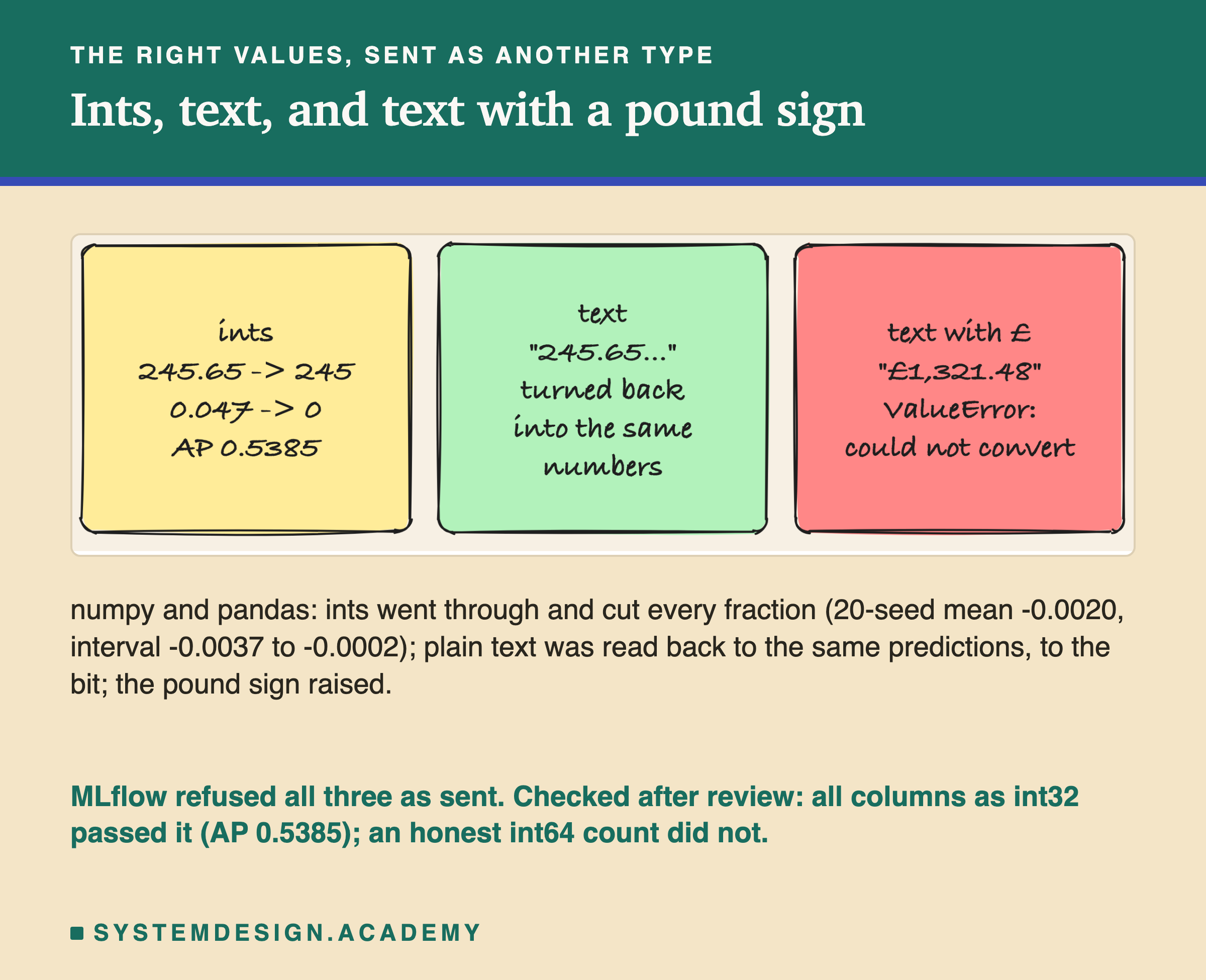
Ints. Turning a float into an int in numpy cuts off the part after the decimal point. 245.65 days became 245, and a return share of 0.047 became 0. numpy and pandas both passed it to the model with no error. Test AP was 0.5385. Over 20 seeds the mean drop was 0.0020, with an interval of -0.0037 to -0.0002: small, but it does not cross zero.
Text. I sent every value as text, such as "245.65069444444444". scikit-learn quietly turned the text back into numbers, because this model asks for float64 inputs, and the predictions were identical to clean, to the last bit. Harmless here, but only because the text held the full number.
Text with a pound sign. Money as "£1,321.48" could not be turned into a number, and both numpy and pandas raised: could not convert string to float: '£1,321.48'. This is one of the few faults that stopped on its own.
MLflow refused all three as I sent them, with both kinds of signature. For the column signature, the reason is narrower than it looks. Its rules refuse int64 to float64, which matches the "long → double" line in its docs. The same docs list "int → double" as safe, and the source allows it for integers of 6 bytes or less. An int64 column holding only 0s and 1s is also let through.
After an independent review of this lesson, I tested that, and the lab labels it as added after the review. With all six columns cut to int32, MLflow accepted them: test AP 0.5385, and customer 12349 went from 0.0529 to 0.0944. With only return_share cut to int64, every value became 0 or 1, and MLflow accepted that too: 0.5382. Frequency alone as an honest int64 count, with nothing lost, was refused. The same count as int32 was accepted, and gave the clean predictions. It is not a rule about rounding: int32, or an int64 column of only 0s and 1s, is converted silently, and an honest int64 count is refused.
Names That Moved, Names Typed on Top
Now the first real check: the model trained on a DataFrame, which keeps the six names. I sent it the same swap of frequency and money in two ways.
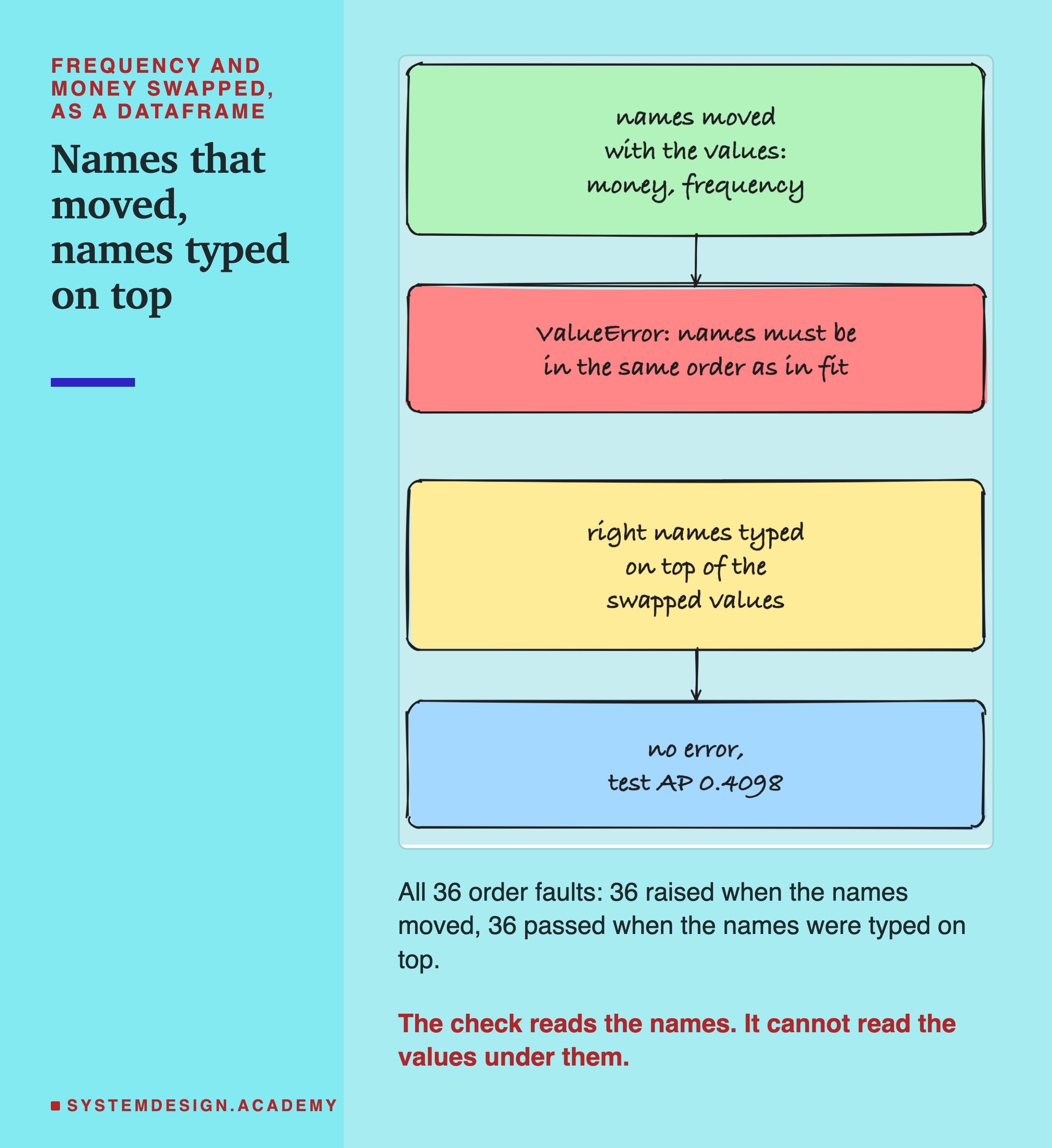
First, the names moved with the values. This is what happens when serving code builds the DataFrame from named values, and the columns end up in another order. scikit-learn compared the names with the ones it kept and raised a ValueError: "The feature names should match those that were passed during fit. Feature names must be in the same order as they were in fit." It did this for all 36 order faults.
Second, the right names were typed on top. This is what happens when serving code builds a plain array in the wrong order and then writes pd.DataFrame(array, columns=[the six names]). The names now look perfect. scikit-learn saw nothing wrong, and test AP was 0.4098, the same as plain numpy. All 36 order faults went through this way.
The names check also caught every missing and extra column, with clear text such as "Feature names seen at fit time, yet now missing: - money". Mixing the two styles only warns. A plain array sent to the named model gave a UserWarning, "X does not have valid feature names, but HistGradientBoostingClassifier was fitted with feature names", and then predicted anyway.
So names help only if they are attached where the values are made. Names typed on later are a label, not a check.
What MLflow Does With a Column Signature
Next, MLflow. I logged the same model twice in the venv from the last lesson. One copy has a tensor signature, as lesson 7 did. The other has a column signature, inferred from a DataFrame. Then I loaded each back with mlflow.pyfunc.load_model and sent every fault. Here is the path a DataFrame takes through the column signature, as I read it in MLflow's source and then saw it in the results.
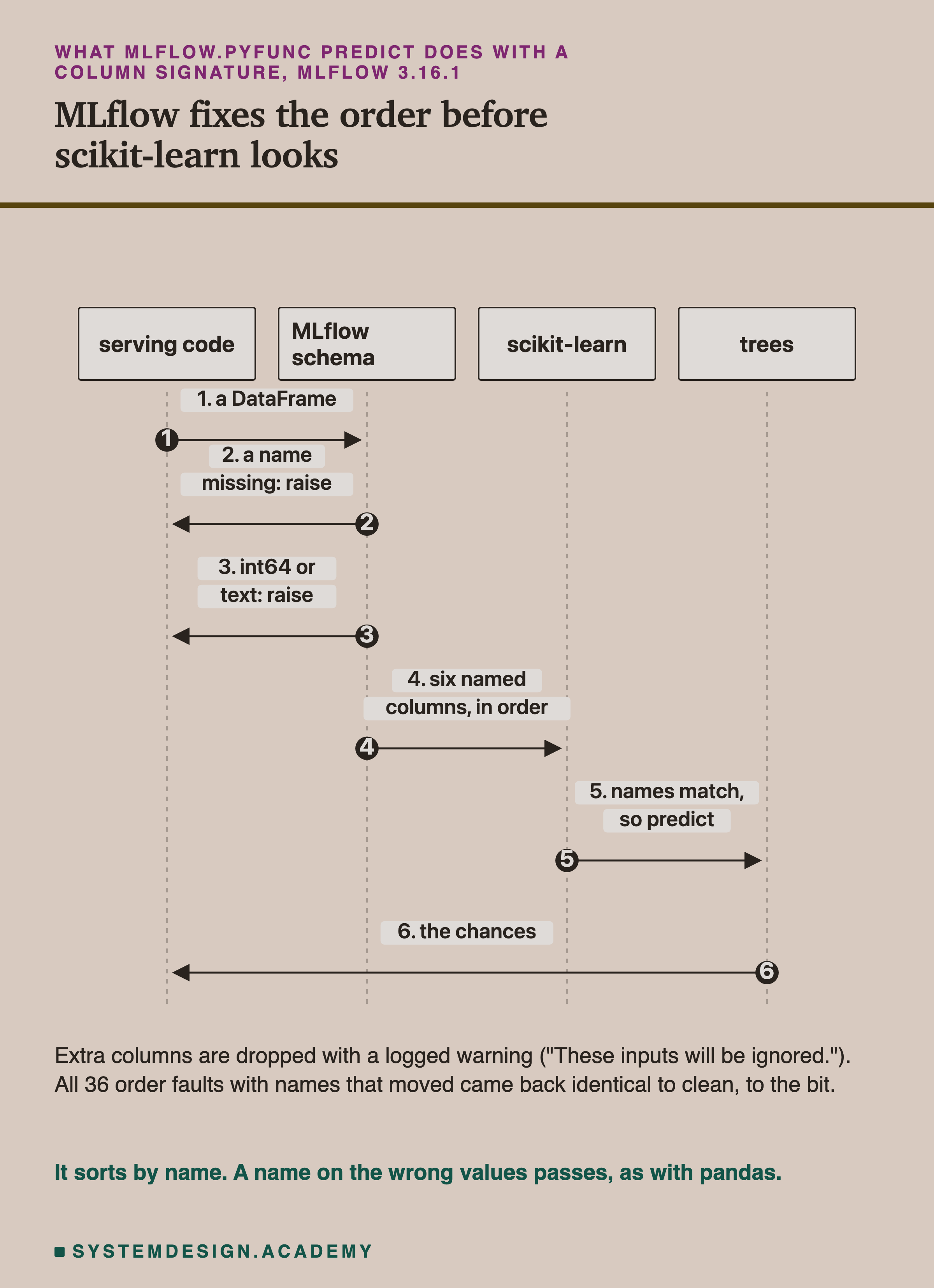
MLflow first looks for every name the signature lists. If one is missing, it raises: "Model is missing inputs ['money']." If there are extra names, it logs a warning, "Found extra inputs in the model input that are not defined in the model signature: ['customer_id']. These inputs will be ignored.", and drops them. Then it checks each column's type. Then it puts the columns in the signature's order and hands them to the model.
That reordering step surprised me most. For all 36 order faults with moved names, MLflow put the columns back, and the predictions were identical to clean, to the bit. The extra column was dropped, and those predictions were identical too. Where pandas raised an error, MLflow quietly fixed the input.
But it sorts by name. When the right names were typed on top of swapped values, MLflow had nothing to fix, and all 36 went through, wrong, exactly as in pandas.
Two Kinds of Signature, Side by Side
Here are the two MLflow models next to each other, on the faults where they differ.
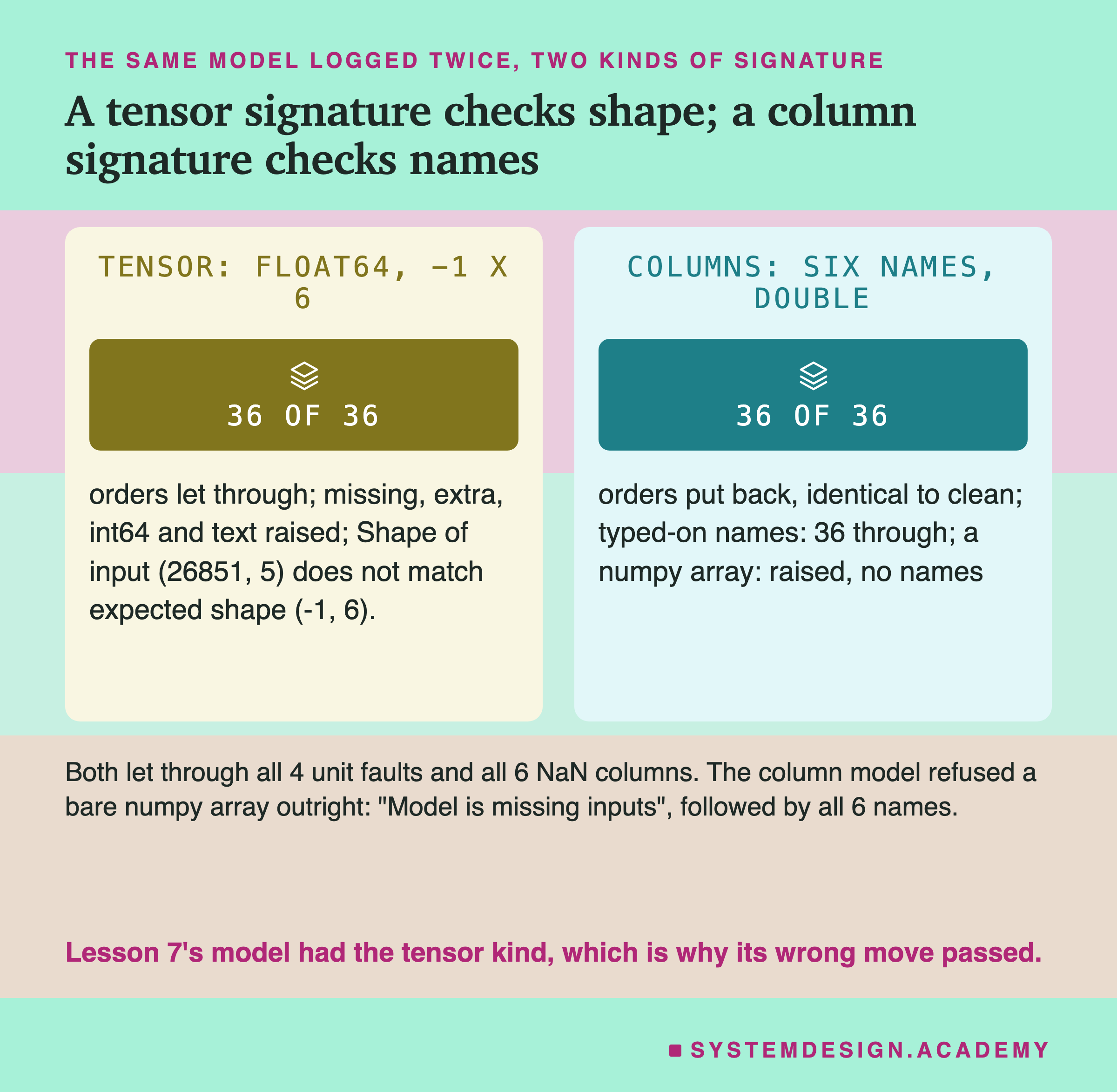
The tensor signature checks the shape and the dtype, nothing else. A missing or extra column raised "Shape of input (26851, 5) does not match expected shape (-1, 6)." Ints raised "dtype of input int64 does not match expected dtype float64". But all 36 wrong orders went through, with the same wrong scores as plain numpy. This is the kind of signature lesson 7's model had, and it is why the wrong alias move there passed.
The column signature checks names and types, and fixes the order. It refused int64 columns with "Incompatible input types for column recency_days. Can not safely convert int64 to float64." and plain text with a similar message.
One more behaviour of the column signature is worth knowing. When I sent it a plain numpy array, even a clean one, it refused: "Model is missing inputs", followed by all six names. An array has no names, so MLflow cannot match it. For safety, that is a good thing. It forces the serving code to send names.
Both kinds let through all four unit faults and all six NaN columns.
What Each Check Caught
This table puts every fault against every check. It is the main result of the lesson.
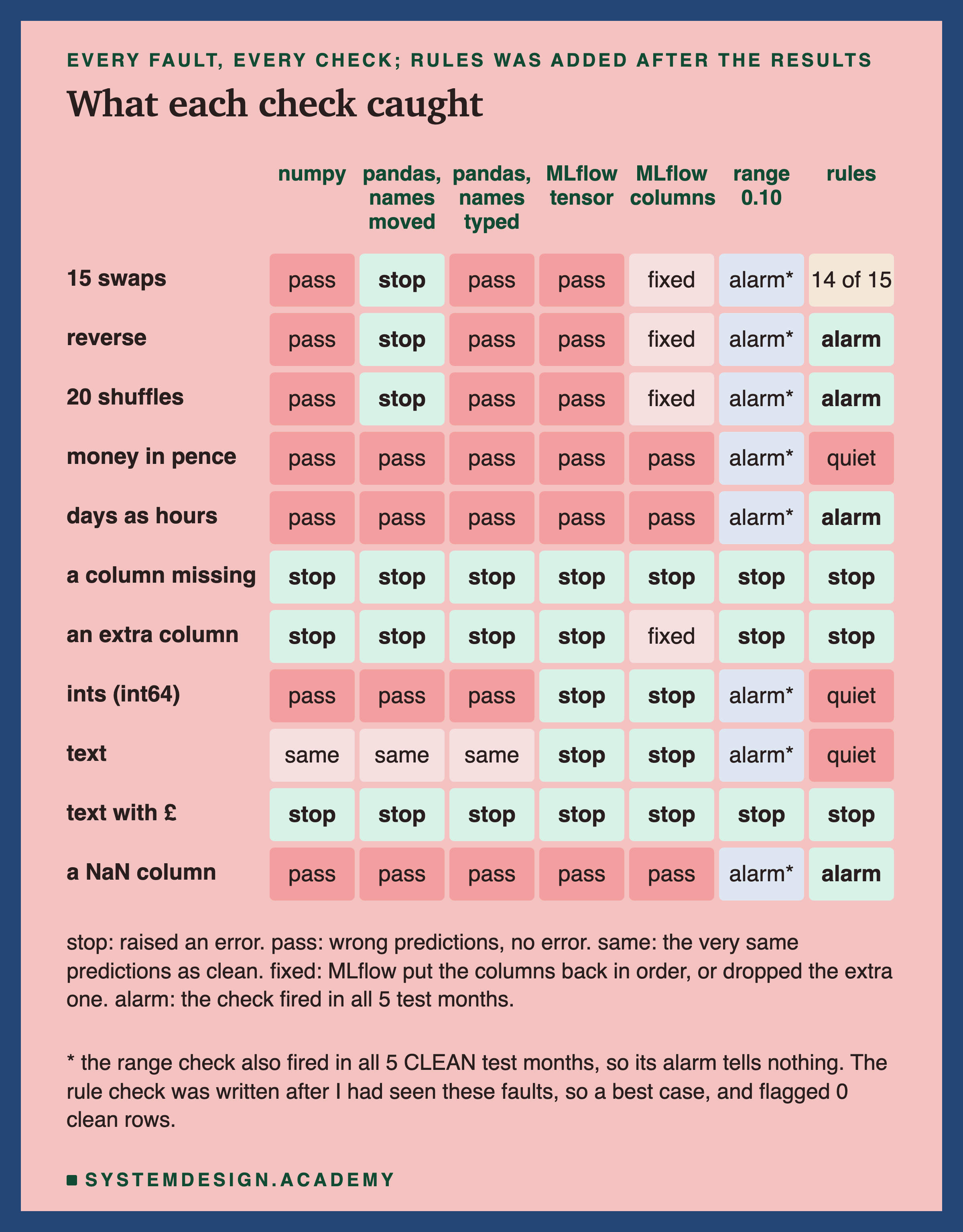
Read it row by row. A missing column and the pound sign were stopped by everything. These are the loud faults: the input cannot even be read.
Wrong orders were stopped only by checks that read names, and only when the names travelled with the values. Plain numpy, typed-on names and the tensor signature all passed them.
Units and NaN passed every check that reads names and types. Nothing in scikit-learn or MLflow looks at what a value means.
Ints, sent as int64, were stopped by MLflow alone; sent as int32 they passed MLflow too. Text was harmless to numpy and pandas, and MLflow refused it anyway.
The two right-hand columns are value checks: the range check and the rule check. They look very different from each other, and the next three slides explain why.
The Range Check Fired on Clean Months
The range check was my own guard, declared before the run. It looked simple and sensible: values outside what training ever saw are suspicious.
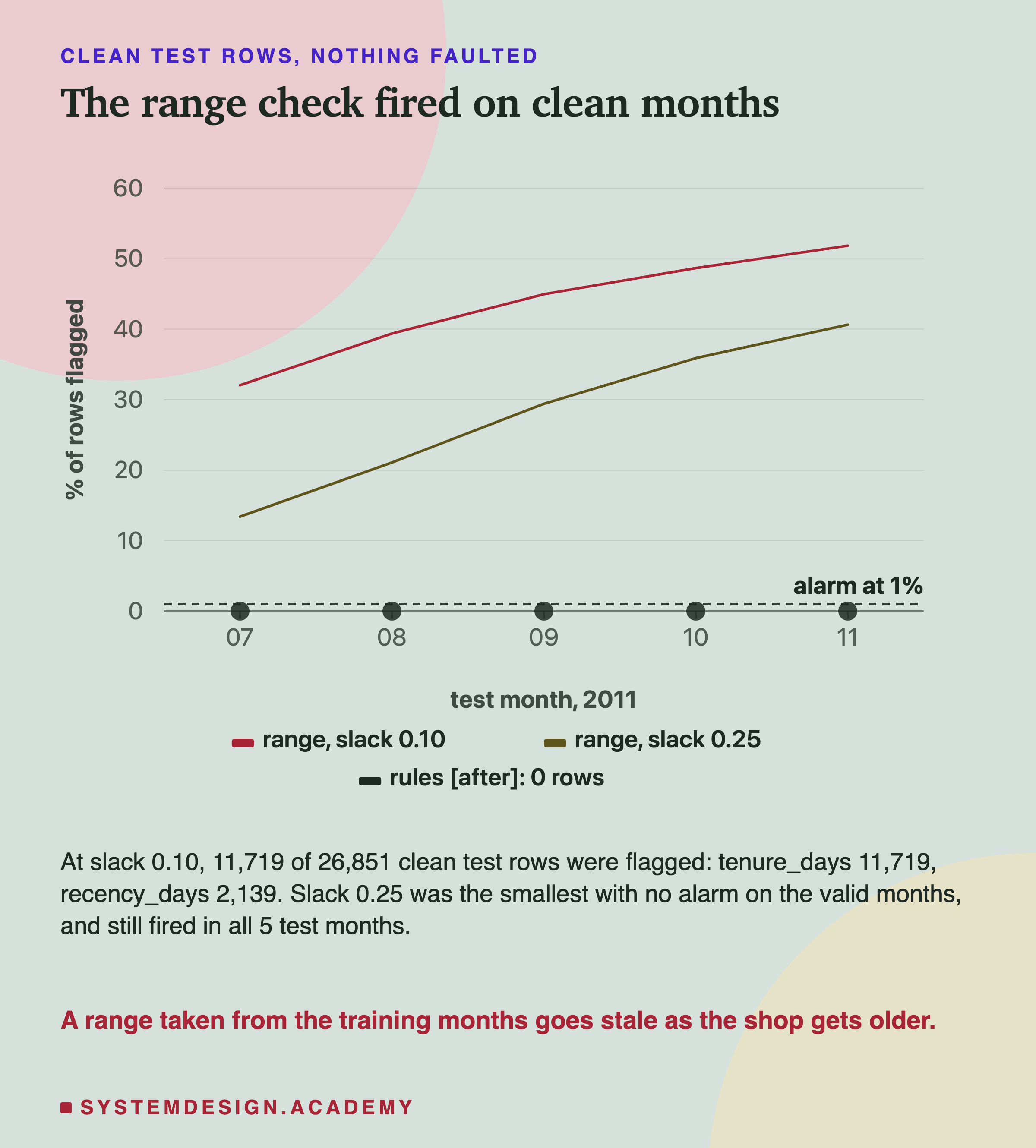
On the clean test rows, with nothing wrong at all, the range check flagged 11,719 of 26,851 rows, and alarmed in all 5 test months. A false alarm is an alarm when nothing is wrong, and every alarm here was one.
The chapter's rule is to choose settings on the validation months, never the test months. So, as declared, I also tried the smallest slack in my list with no alarm on the three clean validation months. That was 0.25, a quarter of the training range on each side. It still flagged 7,644 clean test rows and alarmed in all 5 test months.
Because it alarmed on clean data, it alarmed on every fault too, and those alarms mean nothing. That is why the table marks them with a star. I had guessed it would catch the unit faults and miss most swaps. Both guesses are empty: a check that always rings catches nothing.
The naive way of writing the check, "value below the minimum or above the maximum", also misses every NaN cell, because any comparison with NaN is false. With that form, a NaN column was flagged on no more rows than clean. My version flags NaN, but it does not matter while clean months alarm anyway.
Why: The Oldest Customer Gets Older
The report named the columns behind those false alarms: tenure_days, then recency_days. I asked why in a labelled question after the results.
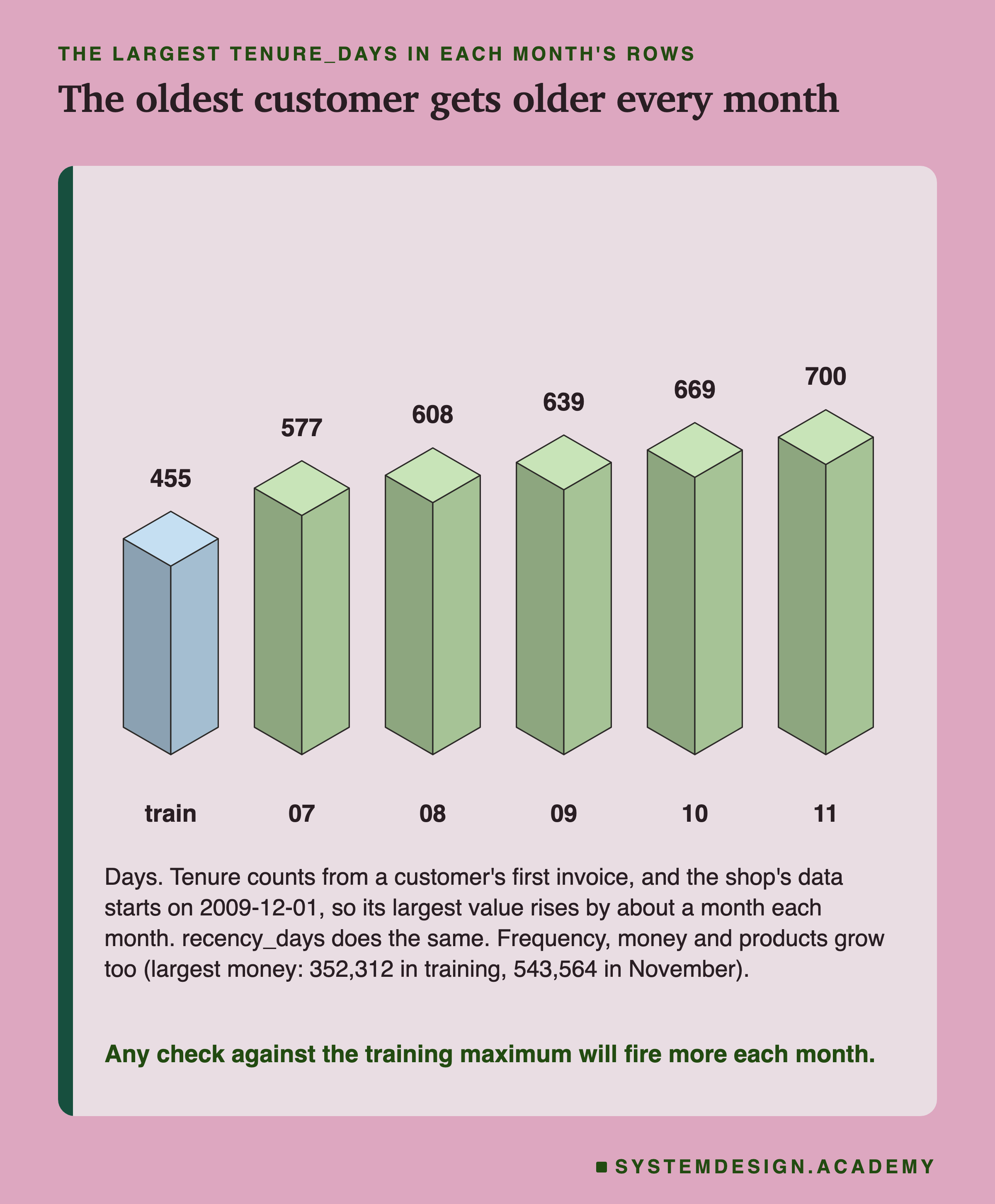
Tenure counts the days since a customer's first invoice. The shop's data begins on 1 December 2009, so the oldest possible customer gets one month older every month. In training, the largest tenure was 455 days. By November 2011 it was 700. Recency does the same for customers who stopped buying long ago.
The other columns grow too. Frequency, money and products are totals over a customer's whole history, and totals only go up. The largest money total was 352,312 in training and 543,564 in November.
So the training range is out of date the day the model goes live, and more so every month. The features chapter met the same effect from another side. In feature versioning and backfill, a drift alarm against the training months rang in every test month with no definition change at all.
I also tried, after the results, the two widest slacks in my list, 1.0 and 2.0. At 1.0 the range check was quiet on clean months. But I could only know that by looking at the test months, which the chapter's rule forbids, so treat it as the best case. Even then it missed three swaps, all among recency, tenure and products, and it missed ints and text.
Rules That Cannot Go Stale
The range check failed because it was built from the data. So, after the results, I wrote a different check, built from what each column means. I wrote its design into the lab before it ran, and the lab, the report and this lesson label it as added after the results. It was written after I had seen these faults, so treat it as a best case.
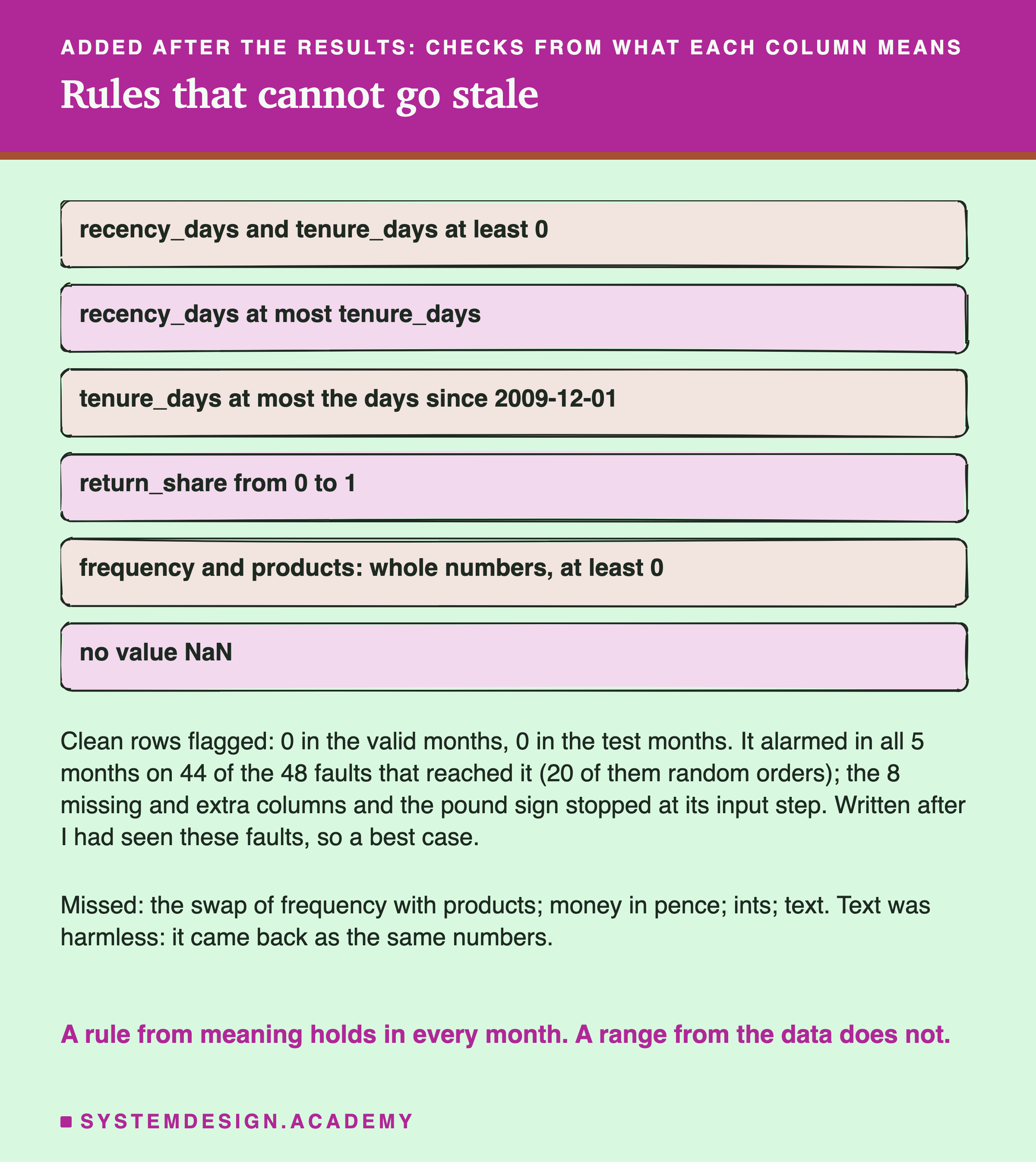
Each rule is a fact that must be true for any real customer. The last purchase cannot be before the first, so recency is at most tenure. Nobody can be a customer for longer than the data has existed, so tenure is at most the days since 1 December 2009. A share is between 0 and 1. A count is a whole number. These rules need the date of the month being scored, which serving always knows.
On clean rows, the rule check flagged none: 0 in the validation months and 0 in the test months. Any check must get this right first.
On the faults, it alarmed in all 5 months for 44 of the 48 faults that reached it. 20 of those 48 are random orders, so the count leans on one kind of fault. A swap almost always breaks a rule: a fraction lands in a count, or a recency lands above a tenure. Days as hours broke the tenure limit. And every NaN column broke the last rule.
It missed four. The swap of frequency with products, two whole-number counts, looks valid either way. Ints look valid too. Text was harmless. And money in pence broke no rule, because no rule says how large a customer's spending may be. No check in this lesson caught money in pence.
Who Lands on the Contact List
AP is an average. A shop that calls its top fifth each month sees something more direct: which people are on the list.
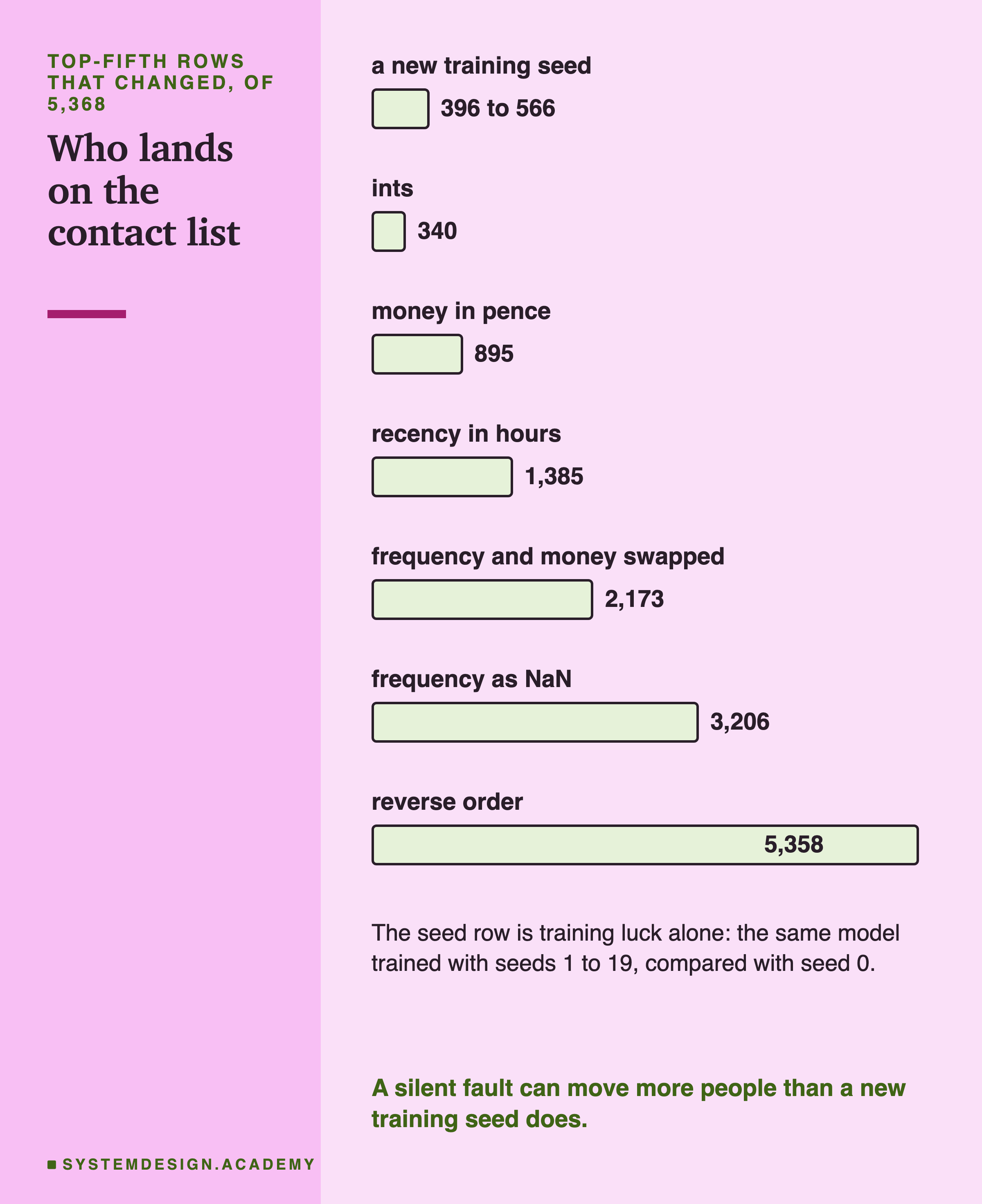
To read these counts I need a yardstick. If I train the same model with a different seed and change nothing else, 396 to 566 of the 5,368 places change. That is training luck alone.
Against that yardstick, ints moved 340 people, less than a new seed. Money in pence moved 895, more than any seed did. Recency in hours moved 1,385. Swapping frequency and money moved 2,173. Frequency as NaN moved 3,206. The reversed order moved 5,358, nearly the whole list.
So even the faults with a small AP cost, like money in pence, change who gets the phone call. A team that watches only the average score could miss it.
My Guesses Before the Run, Checked
I wrote seven guesses into the lab before it ran. Here they are against the results, quoted from the docstring and shortened only where marked.
-
"numpy predict returns silently for every swap, reverse, unit, int and NaN fault and for text ... it raises ValueError for missing and extra columns ... and for text_money". Right, every part.
-
"most swaps drop test AP far, many below 0.40; reverse falls near a random order (about 0.20)." Half right. 5 of the 15 swaps fell below 0.40. The reverse fell further than I guessed, to 0.1268, below the base rate.
-
"money_pence costs a little: 0.02 to 0.08 of AP. days_as_hours costs a lot: below 0.35." Wrong both times. Money in pence cost less than 0.01, and days as hours scored 0.4401.
-
"ints costs under 0.01 of AP. Each nan:c costs something; nan:recency_days the most." The first half was right. The second was wrong: frequency cost the most, and two NaN columns raised AP a little.
-
"pandas with names that travel raises ValueError for every order fault ... with pasted names it catches nothing". Right, including the warning for a plain array.
-
"MLflow, column signature: a frame with names that travel is put back in order by name ... ints raise ... text raises, NaN and units pass". Right on every point for what I sent, including the tensor signature. The ints I sent were int64; a check after the review showed int32 passes.
-
"the range check at tol 0.10 alarms on clean test months ... it catches fewer than half of the 15 swaps; the naive form misses every NaN fault." The first part was right and made the rest meaningless: it alarmed on everything.
Try It Yourself
The full lab needs two venvs and MLflow. I wrote a small demo that shows the heart of it with only numpy, pandas and scikit-learn.
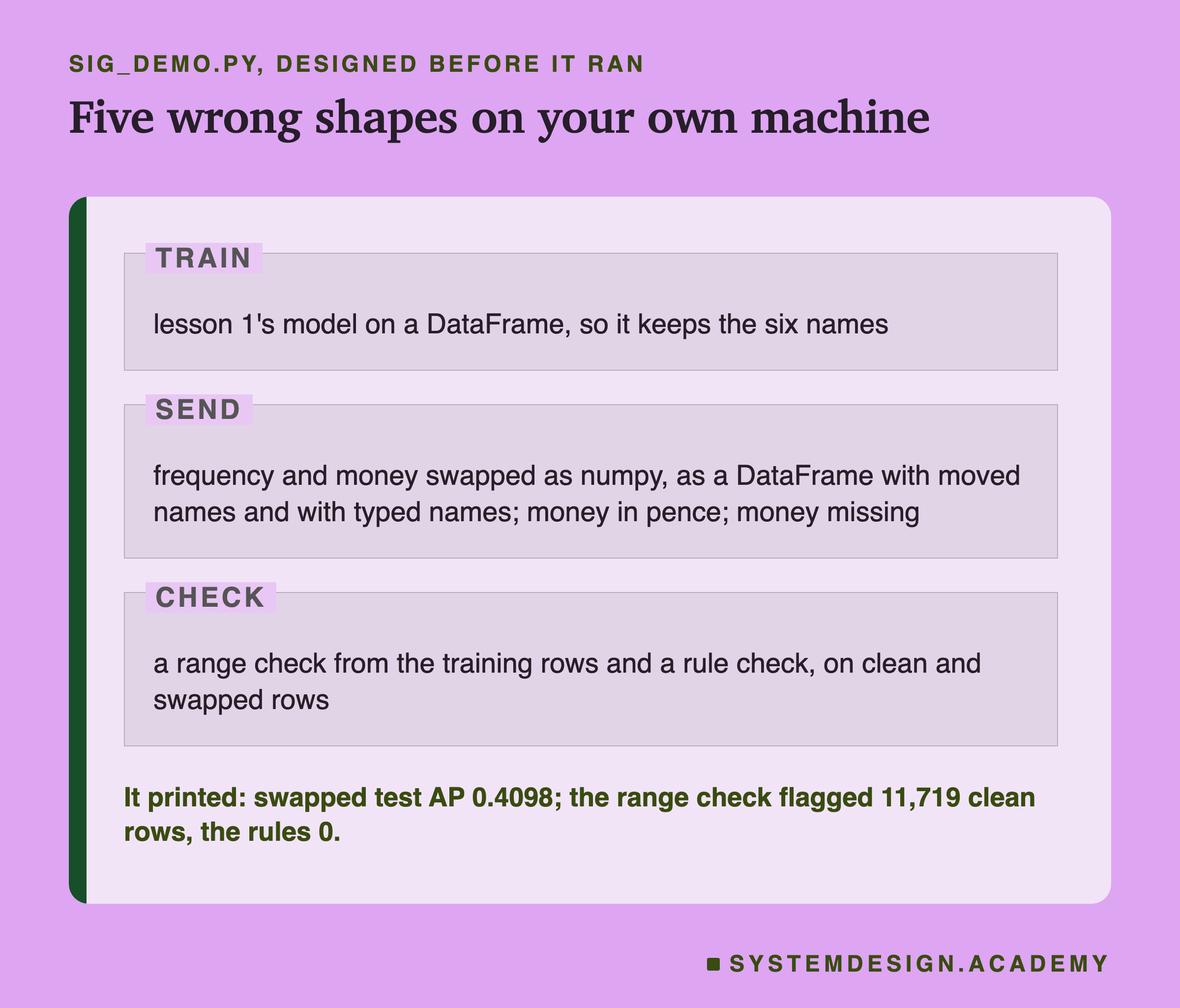
I wrote the demo's design into its docstring after the lab had run and before the demo first ran. It trains the model on a DataFrame. Then it swaps frequency and money and sends them three ways. The first is a numpy array, the second a DataFrame whose names moved, and the third has the right names typed on top. It sends money in pence, then a row with money missing. Finally it runs both value checks on clean and swapped rows. It prints the real error text whenever a call raises.
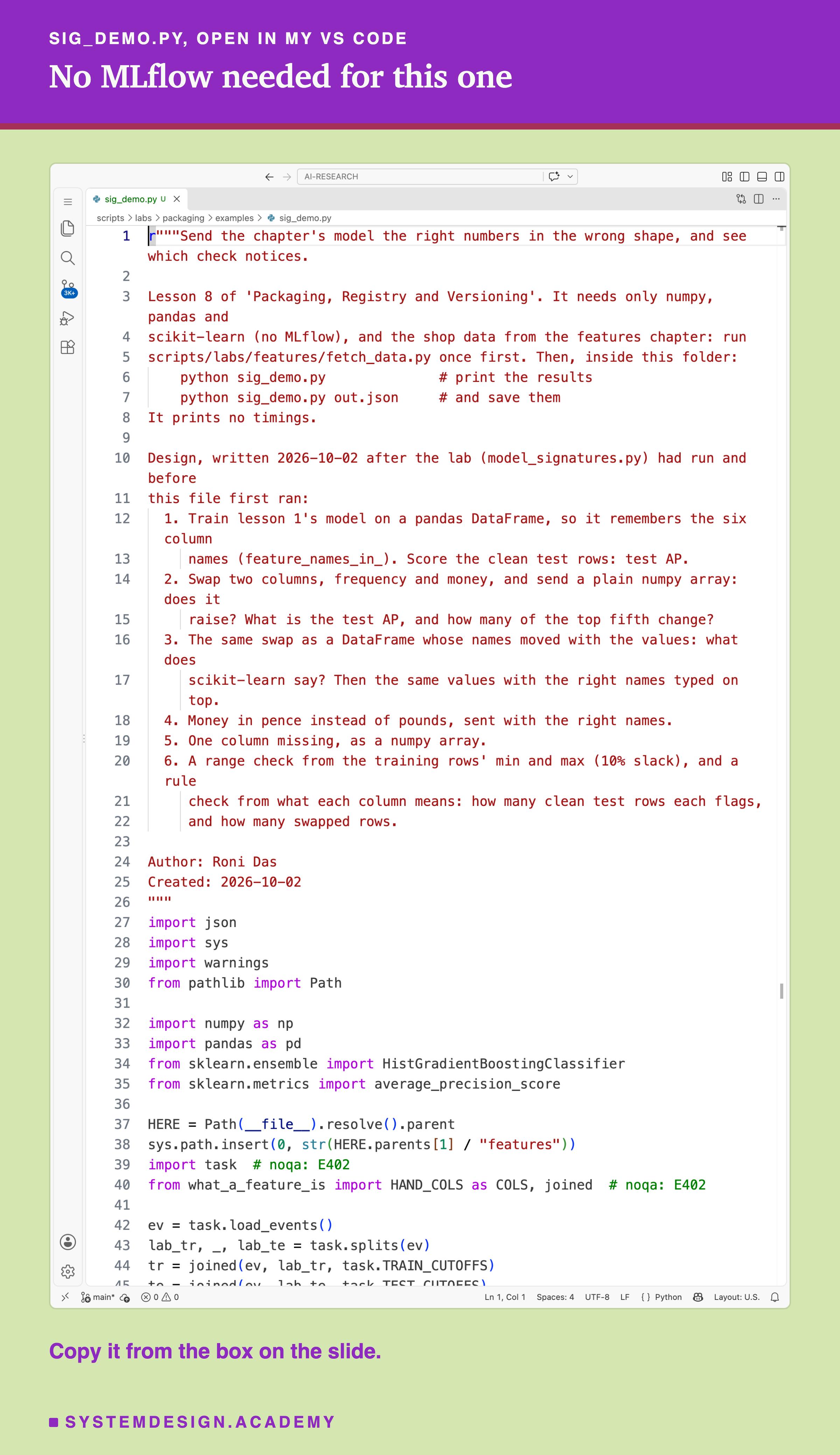
Before you run this lab. This demo needs Python with numpy, pandas, pyarrow and scikit-learn 1.9.1. Install them with pip install numpy pandas pyarrow scikit-learn==1.9.1. Then run python fetch_data.py once from the scripts/labs/features folder; it downloads the shop data, about 46 MB. Then, inside the examples folder, run python sig_demo.py. It needs no MLflow.
r"""Send the chapter's model the right numbers in the wrong shape, and see which check notices.

Lesson 8 of 'Packaging, Registry and Versioning'. It needs only numpy, pandas and
scikit-learn (no MLflow), and the shop data from the features chapter: run
scripts/labs/features/fetch_data.py once first. Then, inside this folder:
    python sig_demo.py              # print the results
    python sig_demo.py out.json     # and save them
It prints no timings.

Design, written 2026-10-02 after the lab (model_signatures.py) had run and before
this file first ran:
  1. Train lesson 1's model on a pandas DataFrame, so it remembers the six column
     names (feature_names_in_). Score the clean test rows: test AP.
  2. Swap two columns, frequency and money, and send a plain numpy array: does it
     raise? What is the test AP, and how many of the top fifth change?
  3. The same swap as a DataFrame whose names moved with the values: what does
     scikit-learn say? Then the same values with the right names typed on top.
  4. Money in pence instead of pounds, sent with the right names.
  5. One column missing, as a numpy array.
  6. A range check from the training rows' min and max (10% slack), and a rule
     check from what each column means: how many clean test rows each flags,
     and how many swapped rows.

Author: Roni Das
Created: 2026-10-02
"""
import json
import sys
import warnings
from pathlib import Path

import numpy as np
import pandas as pd
from sklearn.ensemble import HistGradientBoostingClassifier
from sklearn.metrics import average_precision_score

HERE = Path(__file__).resolve().parent
sys.path.insert(0, str(HERE.parents[1] / "features"))
import task  # noqa: E402
from what_a_feature_is import HAND_COLS as COLS, joined  # noqa: E402

ev = task.load_events()
lab_tr, _, lab_te = task.splits(ev)
tr = joined(ev, lab_tr, task.TRAIN_CUTOFFS)
te = joined(ev, lab_te, task.TEST_CUTOFFS)
y, cut = te["label"].to_numpy(), te["cutoff"].to_numpy()
clean = te[COLS].astype(float).reset_index(drop=True)


def test_ap(p):
    """Test AP: the plain mean of the five per-month APs, as in the features chapter."""
    return float(np.mean([average_precision_score(y[cut == c], p[cut == c]) for c in np.unique(cut)]))


def top_fifth(p):
    """The top n // 5 rows of each test month (ties broken by row order)."""
    out = set()
    for c in np.unique(cut):
        idx = np.flatnonzero(cut == c)
        out |= set(idx[np.argsort(-p[idx], kind="stable")][: len(idx) // 5].tolist())
    return out


def send(label, x):
    """Ask the model for chances; print what came back, or the error."""
    try:
        with warnings.catch_warnings(record=True) as w:
            warnings.simplefilter("always")
            p = model.predict_proba(x)[:, 1]
        moved = len(top - top_fifth(p))
        note = f"  (warning: {w[0].message})" if w else ""
        print(f"{label}: no error, test AP {test_ap(p):.4f}, top fifth moved {moved}{note}")
        return {"ap": test_ap(p), "moved": moved, "error": None}
    except ValueError as e:
        msg = " ".join(str(e).split())
        print(f"{label}: ValueError: {msg}")
        return {"ap": None, "moved": None, "error": msg}


out = {}
# 1. the model, trained on a DataFrame so it keeps the column names
model = HistGradientBoostingClassifier(random_state=0).fit(tr[COLS].astype(float), tr["label"])
print(f"feature_names_in_: {list(model.feature_names_in_)}")
p_clean = model.predict_proba(clean)[:, 1]
top = top_fifth(p_clean)
out["clean_ap"] = test_ap(p_clean)
print(f"clean rows: test AP {out['clean_ap']:.4f}, top fifth {len(top)} rows\n")

# 2. frequency and money swap places, sent as a plain numpy array
swapped = clean[["recency_days", "money", "frequency", "return_share", "tenure_days", "products"]]
out["numpy_swap"] = send("numpy, swapped", swapped.to_numpy())

# 3. the same swap as a DataFrame: names moved with the values, then names typed on top
out["names_moved"] = send("DataFrame, names moved", swapped)
out["names_typed"] = send("DataFrame, names typed on top", pd.DataFrame(swapped.to_numpy(), columns=COLS))

# 4. money in pence, with the right names
pence = clean.assign(money=clean["money"] * 100)
out["pence"] = send("DataFrame, money in pence", pence)

# 5. one column missing, as numpy
out["missing"] = send("numpy, money missing", clean.drop(columns=["money"]).to_numpy())

# 6. two checks I wrote, in front of the model
x_tr = tr[COLS].to_numpy(float)
lo, hi = x_tr.min(axis=0), x_tr.max(axis=0)
lo, hi = lo - 0.1 * (hi - lo), hi + 0.1 * (hi - lo)


def range_flags(x):
    """Rows with any value outside the training min and max, plus 10% slack (NaN is flagged)."""
    return ~((x >= lo) & (x <= hi)).all(axis=1)


def rule_flags(x):
    """Rows that break a rule from what the columns mean."""
    rec, freq, money, share, ten, prod = x.T
    max_days = (pd.to_datetime(cut) - pd.Timestamp("2009-12-01")).total_seconds().to_numpy() / 86400
    ok = ((rec >= 0) & (ten >= 0) & (rec <= ten) & (ten <= max_days + 1e-9) & (share >= 0) & (share <= 1)
          & (freq >= 0) & (prod >= 0) & (freq == np.floor(freq)) & (prod == np.floor(prod)) & ~np.isnan(money))
    return ~ok


print()
out["checks"] = {}
for name, x in (("clean", clean.to_numpy()), ("swapped", swapped.to_numpy())):
    r, u = int(range_flags(x).sum()), int(rule_flags(x).sum())
    out["checks"][name] = {"range": r, "rules": u}
    print(f"{name:8s} rows {len(x):,}: range check flags {r:,}, rule check flags {u:,}")

if len(sys.argv) > 1:
    json.dump(out, open(sys.argv[1], "w"), indent=1)
Send a Fault Yourself
This box holds the real results from the lab. It needs nothing but Python, so it runs in your browser. It has no model inside; it looks up what the lab measured for each fault and each check.
Press Run. It shows what plain numpy did with the swap of frequency and money. Then change CHECK to "pandas", "pandas_typed" or "mlflow_columns", and FAULT to "money_pence", "ints" or "nan:frequency", and run again.
The report script writes this box from the lab's stored results, runs it for several settings, and checks what it prints against the lab. Try FAULT = "money_pence" with every check in turn: the last line says which checks would stop or flag it, and for money in pence it says none.
The Lab's Code, Piece by Piece
The lab is one file, scripts/labs/packaging/model_signatures.py, run in two venvs.
build makes the features chapter's tables and trains the two copies of the model, on numpy and on a DataFrame. It stops unless both score 0.5450 and predict the very same chances. faults makes every fault as a DataFrame whose column names are the true names of the values in it. From each one it makes the plain array, and, for order faults, the version with the right names typed on top.
call runs one prediction and keeps whatever happens: the chances, or the exception's type and full text, plus every warning and every MLflow log line. outcome turns that into a verdict, the test AP per month, the change against clean, and the top-fifth churn.
range_check and month_alarms are the range check and its 1 percent alarm. weighted_ap and boot_draws do the paired bootstrap of the 20-seed mean. The lab first checks weighted_ap against scikit-learn's own AP on two resamples.
main runs numpy, pandas, the range check, the 20 seeds and the bootstrap, and writes . runs in the MLflow venv, logs the two models, sends every fault and adds its results to the same file. holds the labelled questions asked after the results: why the range fired, the two widest slacks, and the rule check. describes one customer and the model's splits for the figures. downloads the docs at each release commit and searches the installed source for every quote.
How to Guard a Model's Inputs
Here is how I would protect a model like this one, using only what this lab measured.
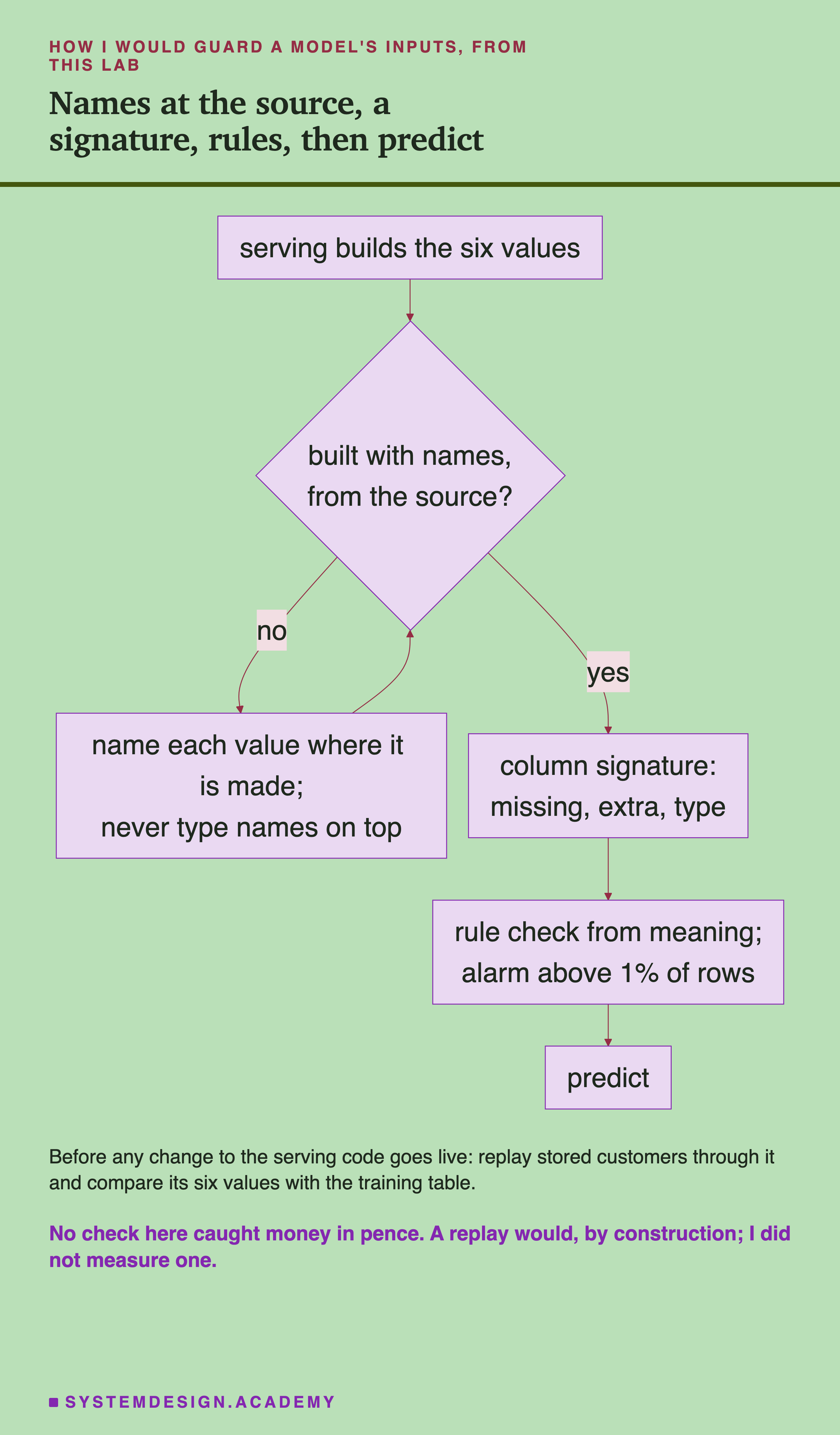
The chart starts where the values are made and ends at the prediction. Each step answers one row of the coverage table. Here are the same steps in words, each with the number from this lab behind it.
-
Build the input with names, where the values are made. A dictionary or a DataFrame built from named values. Here, names that moved with the values caught all 36 order faults; names typed on later caught none.
-
Log the model with a column signature, not a tensor signature. Here the column signature fixed all 36 moved orders, refused int64 columns and text, and refused bare arrays. It accepted int32.
-
Add a rule check written from what each column means. Here it flagged no clean row in eight months. It caught 44 of the 48 faults that reached it, 20 of them random orders (written after I had seen these faults, so a best case).
-
Do not build a range check from the training rows alone for columns that grow with time. Here it flagged 11,719 clean test rows.
-
Replay stored customers through any changed serving code and compare the six values it builds with the training table. No check here caught money in pence. A replay would see the hundredfold change by construction, but I did not measure one, so this step is advice, not a result.
When a Signature Helps, and When It Does Not
Use a column signature whenever a model is served by code someone else may change. It turns a wrong order into a fixed order, and an int64 or text column into an error, at almost no cost. Here it never changed a clean prediction.
Use names from the source, not names typed later. Typed-on names make a check look green while it checks nothing.
Use rules from meaning for the faults that names cannot see. Most order faults, days as hours and NaN feeds broke a rule here; money in pence did not. Neither did the swap of frequency with products (written after I had seen these faults, so a best case).
Do not expect any signature to catch a unit change. Here no name or type check caught money in pence, days as hours, or a NaN column, in scikit-learn or MLflow.
Do not trust a check you never saw fail on clean data. The range check looked sensible and was useless. Run every new check on clean months first, and count its false alarms.
Do not rely on errors alone. Only 9 of the 57 faults raised an error in plain numpy. A model that answers is not a model that was asked the right question.
What This Lab Cannot Tell You
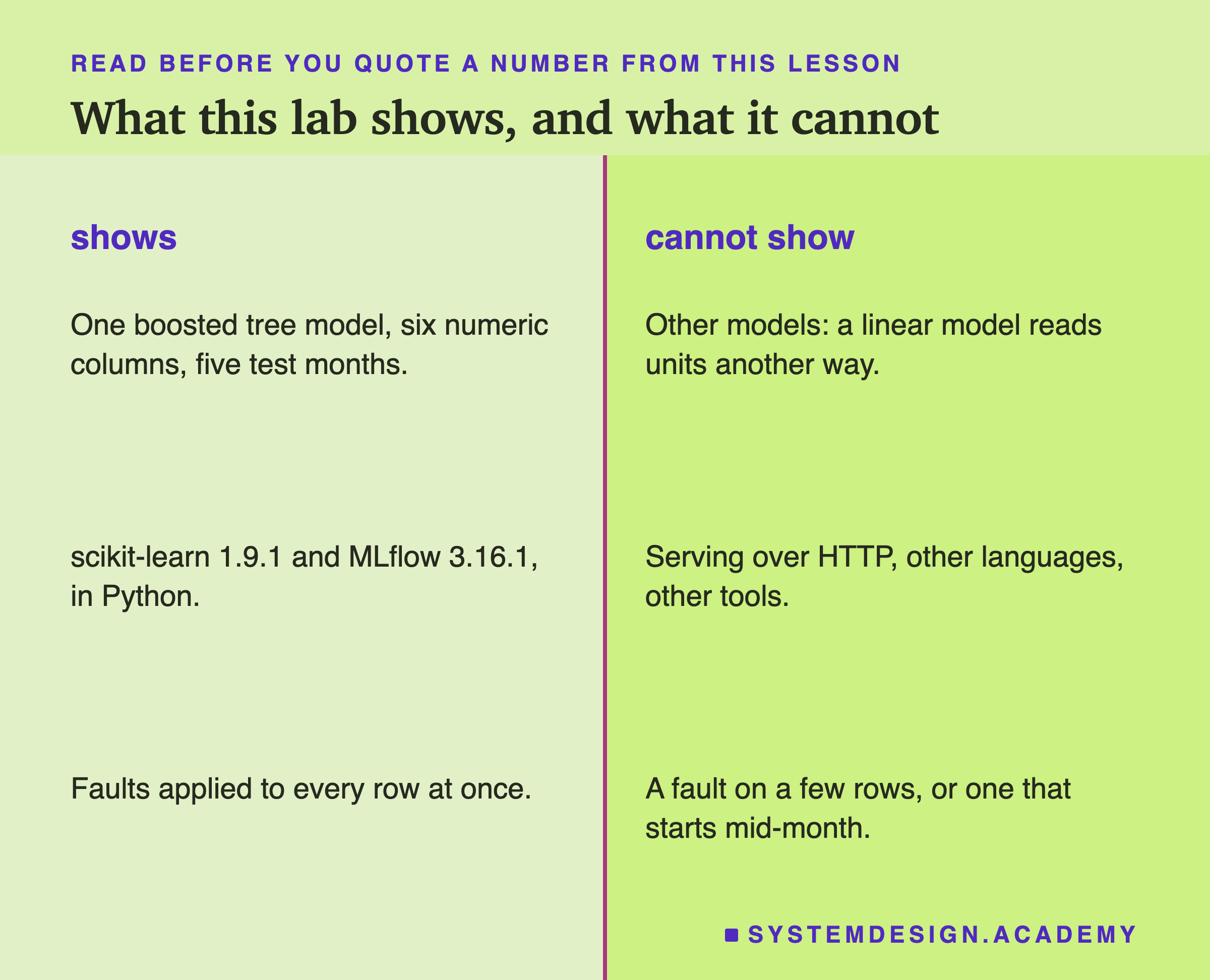
One model. Everything here is one gradient boosted tree model. A tree only cares on which side of a split a value falls. A linear model multiplies values by weights, so a unit change would hit it in another way. I did not test one.
Two libraries, one language. scikit-learn 1.9.1 and MLflow 3.16.1, called from Python. MLflow's REST server, other serving tools and other languages may check differently.
Whole-month faults. Every fault hit every row at once. A fault on a few rows, or one that starts in the middle of a month, would move the 1 percent alarm line in other ways.
Rules I wrote for this data. The rule check works because I know what these six columns mean. For other features, someone has to write other rules.
No timings. My laptop was busy, so nothing was timed.
Labelled additions. Five things were asked after the main results: the rule check, the two widest slacks, why the range fired, the one-customer slide and the split thresholds. They are labelled in the lab, the report and here. One change was made after the first MLflow run: it now also stores each model's address, so the report can load the same models. I ran it again, and every verdict was the same. After an independent review I added one more labelled check: which int columns MLflow's column signature accepts.
What to Do on Monday
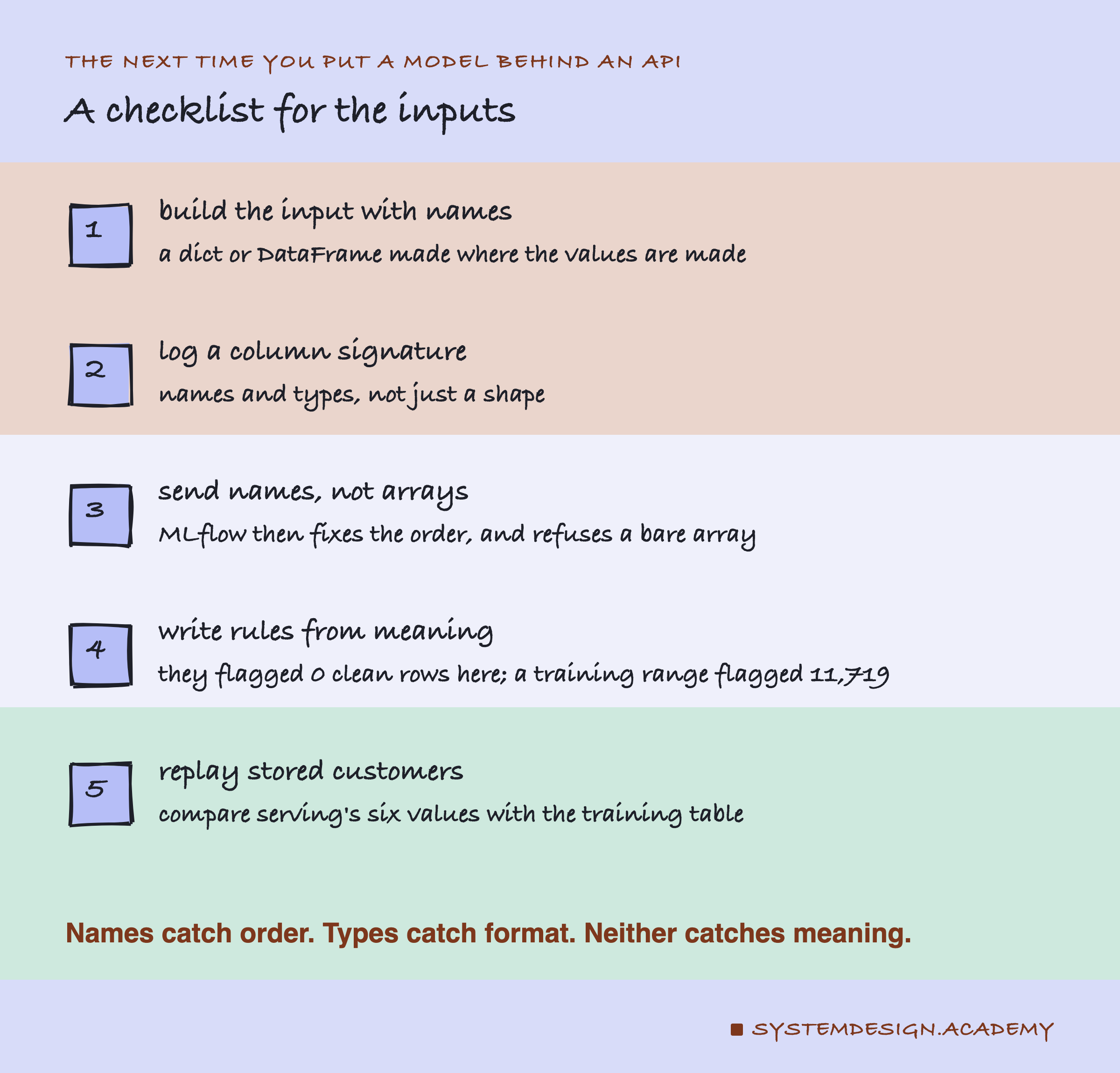
If you take one thing to work on Monday, open the code that builds your model's input and find the line that makes the array or the DataFrame. If it builds a plain array and adds names afterwards, change it to build named values from the start. That one change turns every order fault in this lab from silent into caught.
Then write down, for each input column, one or two facts that must always be true. Run them on a month of clean data first, and count how many rows they flag. Here a good rule flagged none.
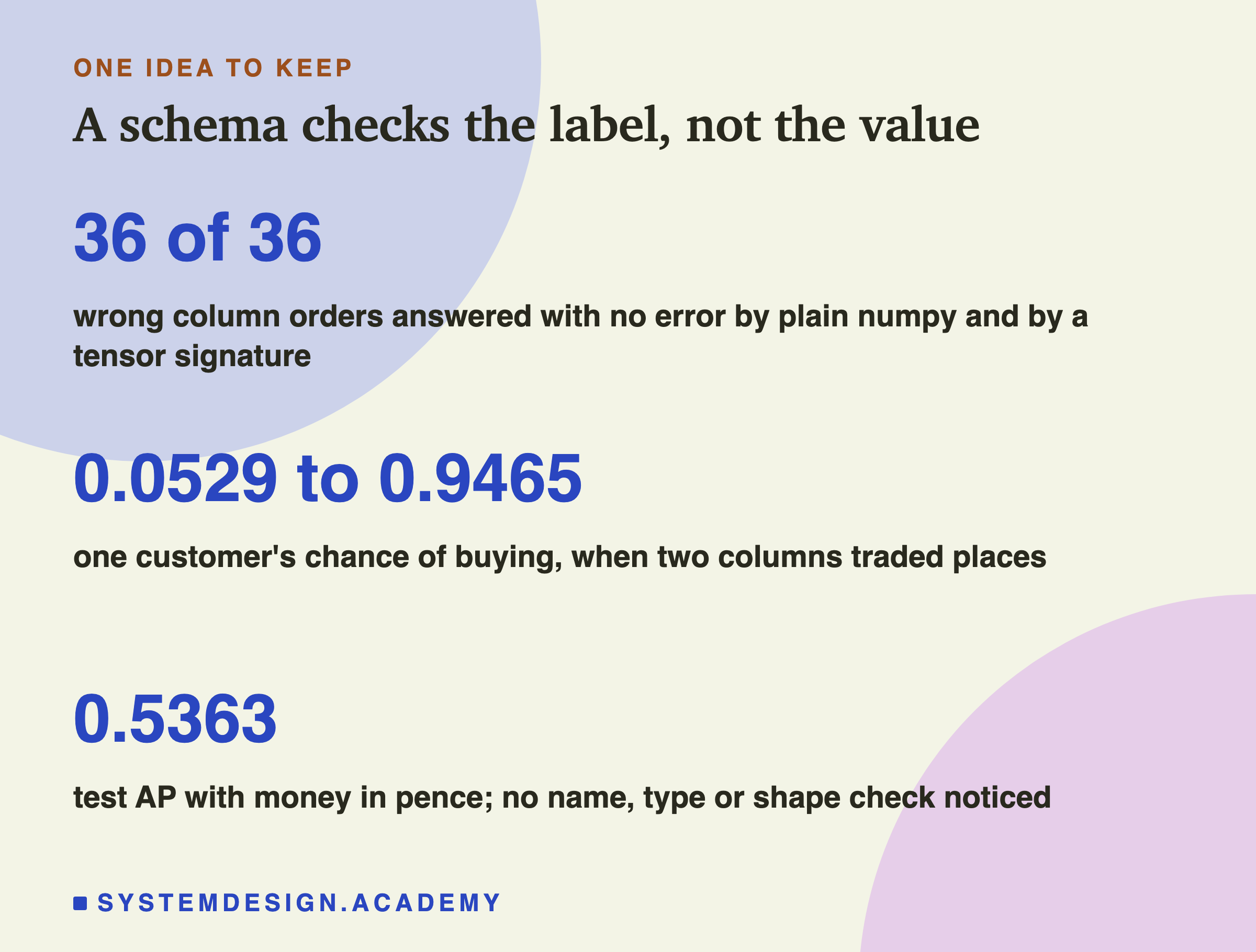
The one idea to keep: a schema checks the label on each number, not the number. Plain numpy and a tensor signature answered all 36 wrong orders with no error. Names caught order, but only when the names travelled with the values. Types caught format. Nothing that reads names and types caught a unit or a missing feed. To catch those, write down what each column means, and check that.
Knowledge Check
Knowledge Check
4 questions - Score 80% to pass
The lab swapped frequency and money and sent the rows as a plain numpy array. What happened?
The serving code built swapped values as an array, then typed the right six names on top. What did the names check do?
Which fault passed every name and type check in both scikit-learn and MLflow?
Why was the range check from the training rows useless here?