Is This the Bag You Packed?
Let me start at an airport.
You hand your suitcase to the airline. Many hours later, at the other end, a suitcase comes out on the belt. It looks like yours. How do you know it is yours, and that nobody opened it on the way?
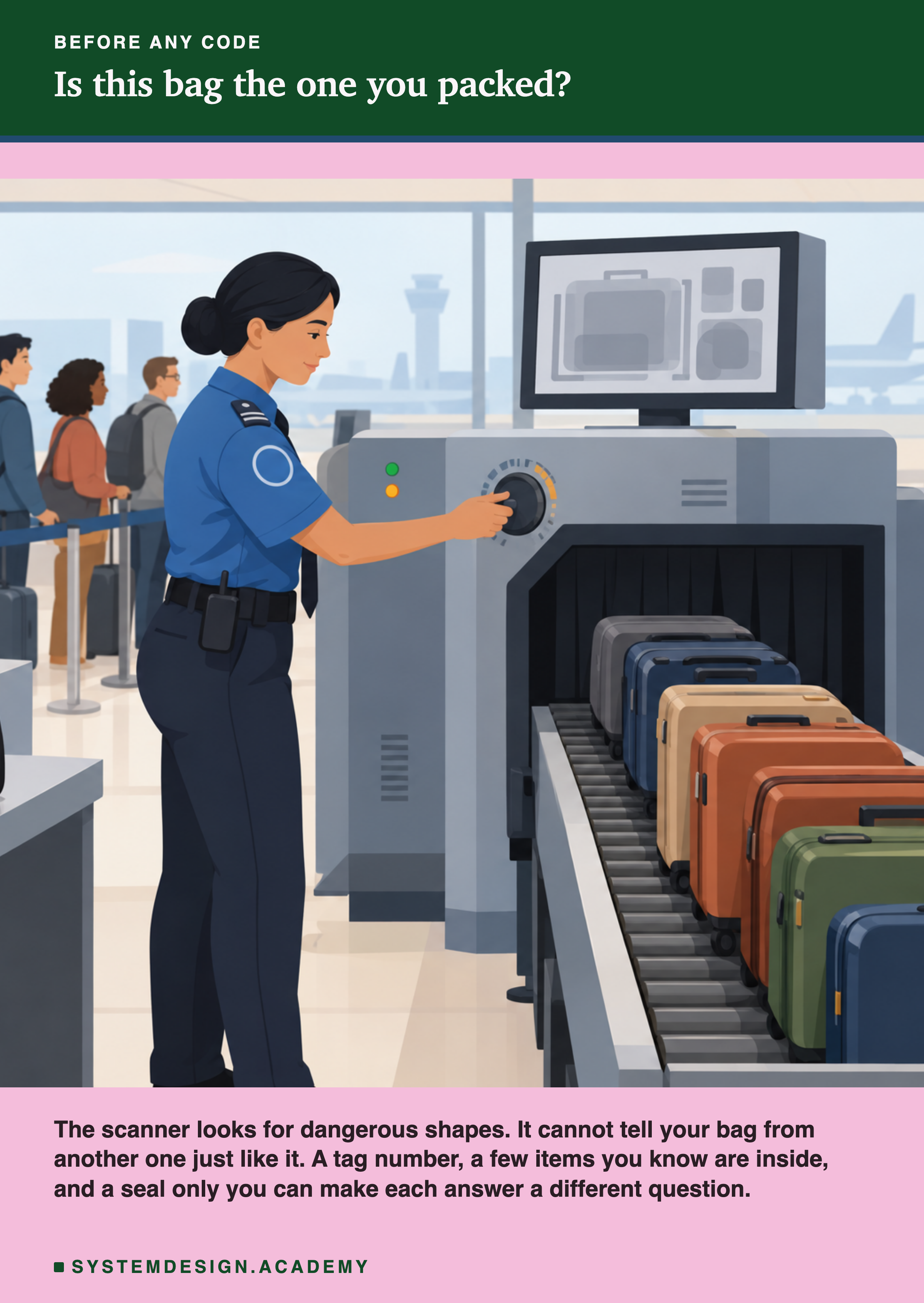
The officer in the picture runs every bag through a scanner. The scanner looks for dangerous shapes, like a knife. It is useful, but it cannot tell you whether a bag is yours. Two bags with the same clothes look the same to it.
So you use other checks. The tag has a number that must match your ticket. You can open the bag and look for a few things you know you packed. And if you had put a seal on the zip that only you can make, a broken or different seal tells you someone else was there.
A trained model is a file that travels too. It goes from the training machine to a registry, then into a container, then onto a server. In this lesson I change copies of a real model file in five ways, and I measure which check notices which change.
Where This Lesson Starts
This lesson uses the model from the features chapter. If it is new to you, please read what a feature is first. That lesson built six features for each customer of a real online shop, from the customer's past invoices. The question is: at the start of a month, will this customer buy something in the next 30 days? The model is a gradient boosted tree model from scikit-learn, and it scored a test AP of 0.5450. AP, average precision, is a score from 0 to 1 for how well the model ranks the buyers above the others.
This is the last lesson of the chapter, and it uses four earlier ones. What is in a model file showed that a pickle file is mostly the raw bytes of number arrays, and that loading it runs code. Pinning dependencies used hashes to lock the libraries. Reproducible artifacts found that the thread count changes one byte of the file. And a model registry, hands on showed that a registry stores whatever tags you give it.
Here I bring them together around one question: how do you know the file you load is the file you trained?
The Words You Need First
Please read this slide slowly if any word is new. Every slide after it uses these words.
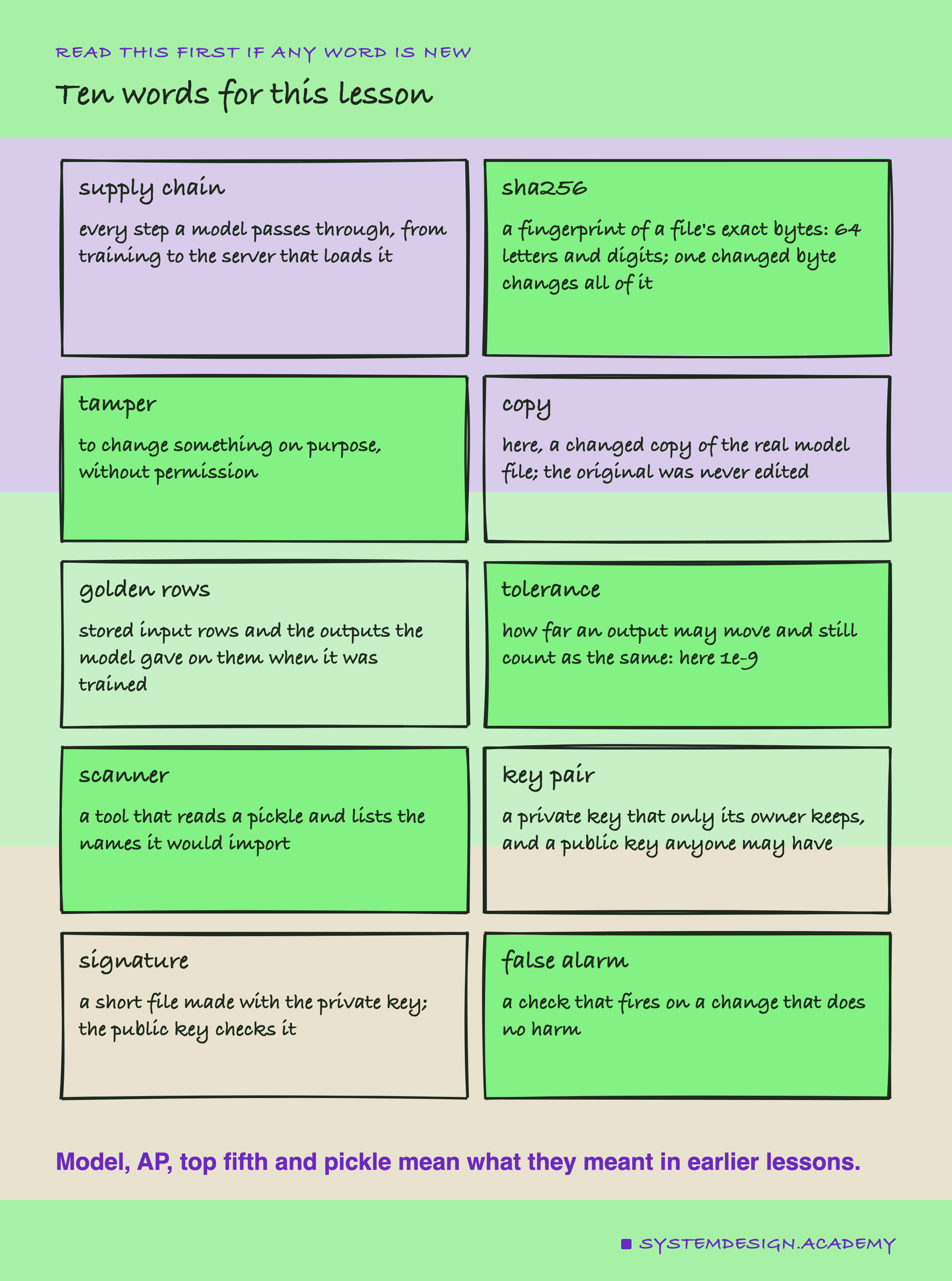
A supply chain is the path something takes from the place it is made to the place it is used. For a model, it is training, saving, the registry, the container image and the server. Each step is a chance for the file to change, by accident or on purpose.
A sha256 is a fingerprint of a file. A program reads every byte and gives back 64 letters and digits. If even one byte changes, the fingerprint changes completely. Lesson 6 used it to compare files.
Golden rows are a few input rows that I keep, together with the answers the model gave on them on the day it was trained. Later, I can ask the loaded model again and compare. The tolerance is how far an answer may move and still count as the same. I chose 0.000000001, written 1e-9. Lesson 5 found that a container on Linux gave answers at most 1.1e-16 away from my Mac. So 1e-9 leaves plenty of room for that, and still catches any real change.
A key pair is two linked keys. The private key stays with its owner. The public key can be given to anyone. A signature made with the private key can be checked with the public key, and nobody without the private key can make one that passes.
What the Sources Say
Before measuring, I read what the people who build these tools say. I downloaded each source file at a fixed version and found every quote in it word for word. They are all in results/sha-factcheck.json.
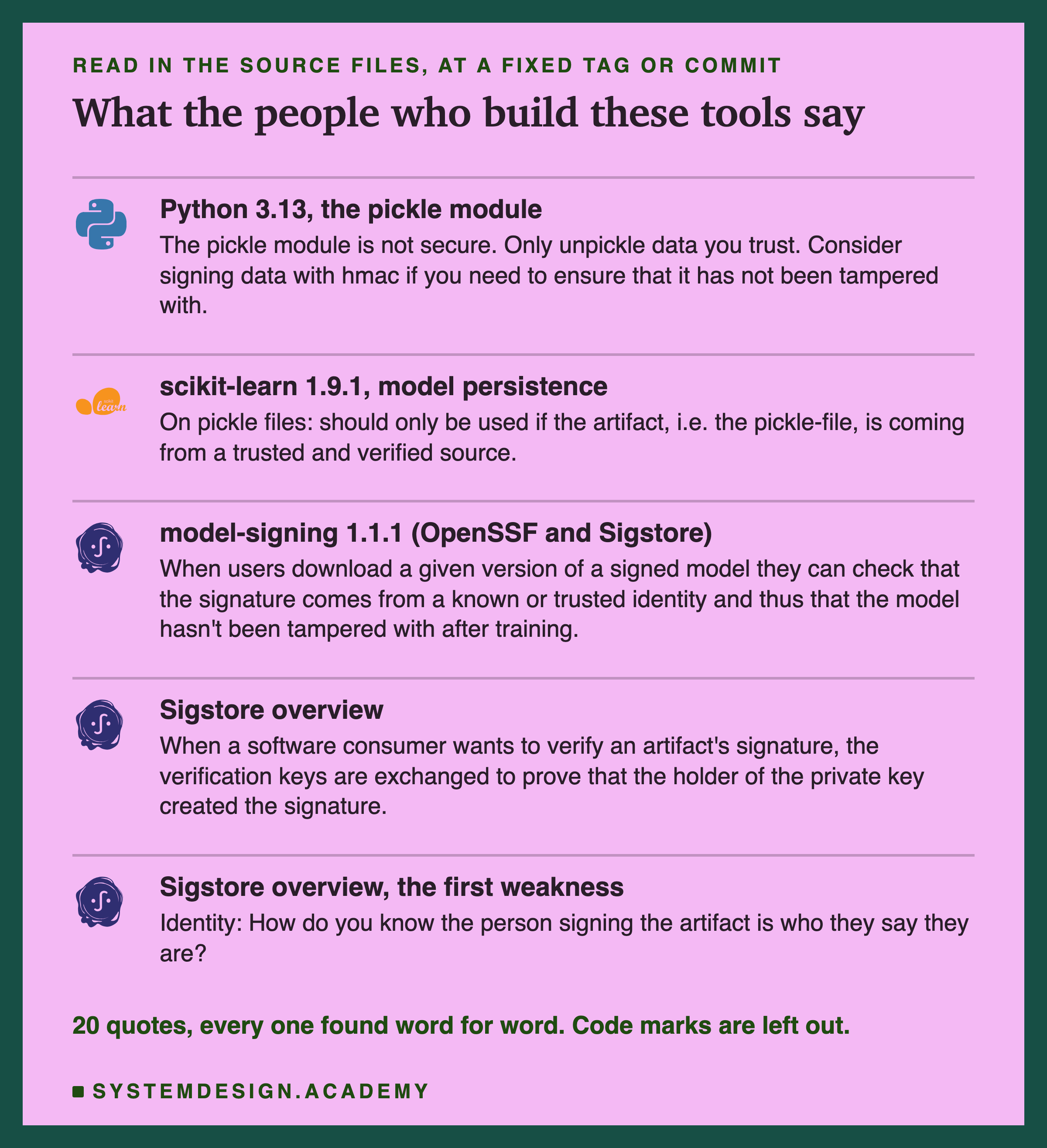
Python's own documentation warns: "The pickle module is not secure. Only unpickle data you trust." It also gives a hint: "Consider signing data with hmac if you need to ensure that it has not been tampered with." HMAC is a signature made with a shared secret.
scikit-learn says pickle "should only be used if the artifact, i.e. the pickle-file, is coming from a trusted and verified source."
Model signing is a project of the Sigstore community, which is backed by the OpenSSF, the Open Source Security Foundation. Its README says it builds "verifiable claims about the integrity and provenance" of models. Integrity means the file is unchanged. Provenance means where it came from. It adds: "When users download a given version of a signed model they can check that the signature comes from a known or trusted identity and thus that the model hasn't been tampered with after training."
Sigstore's own overview explains classic signing: the public key is used "to prove that the holder of the private key created the signature." And it names the first weakness of that: "How do you know the person signing the artifact is who they say they are?" I come back to that question at the end.
How the Lab Was Built
I wrote the lab's design into the docstring of scripts/labs/packaging/model_supply_chain.py before it first ran. Before that, I had trained a tiny 3-tree toy model on random numbers, to read how scikit-learn stores a tree. I had also installed the signing tool and read its README and source. I had not changed, signed or loaded any copy of the chapter model.
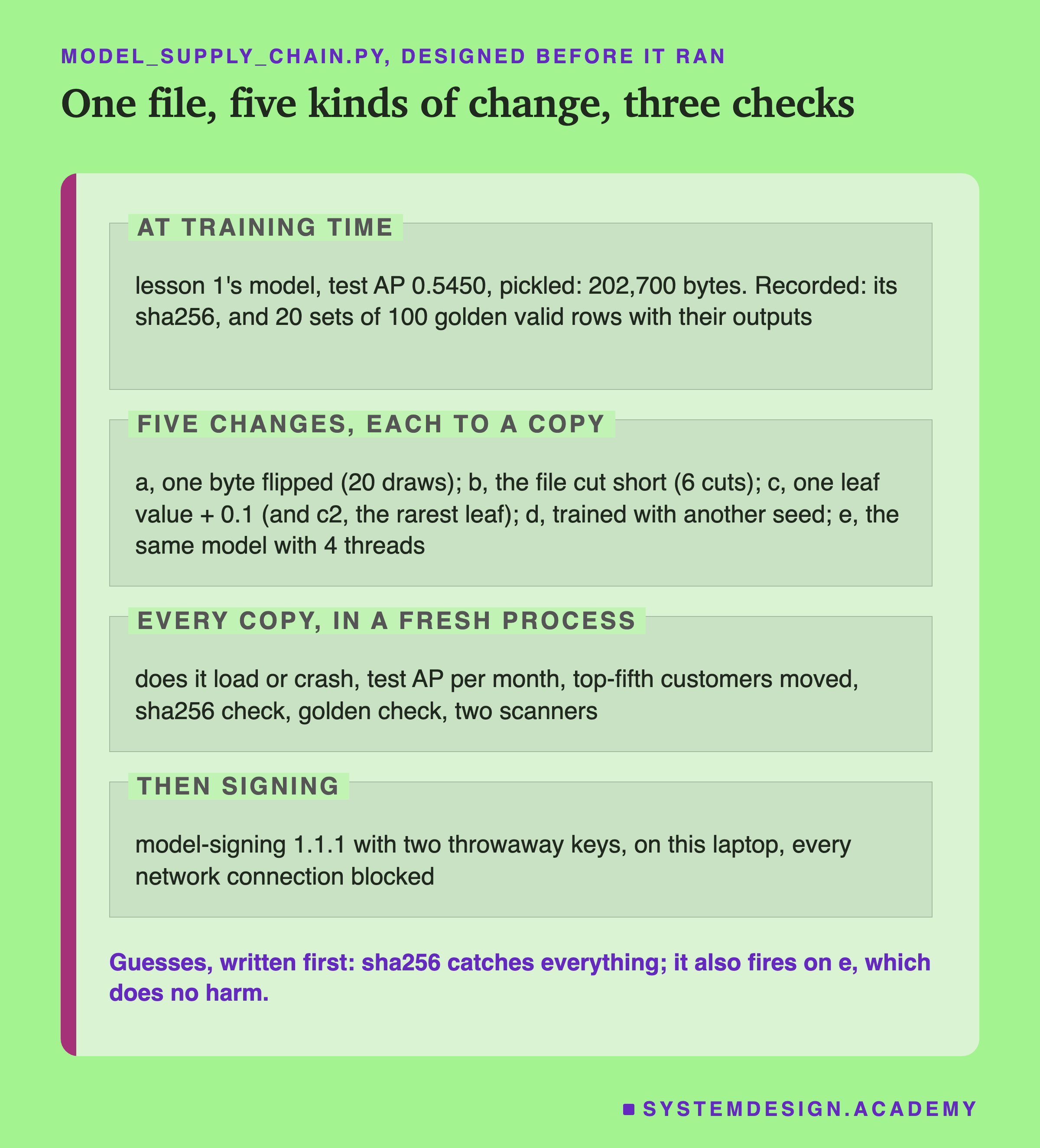
Safety first. No file in this lab carries code. Every changed file is a copy of the real model. Its bytes were flipped or cut off, or one number inside it was changed in memory and the model was saved again. The original file was never edited. Nothing was uploaded anywhere, and the signing step ran with Python's network connect calls blocked in code. It tried to connect 0 times.
At training time. The lab trains lesson 1's model and stops unless its test AP is exactly 0.5450. It saves it with pickle, which gave a file of 202,700 bytes. Then it records two things, as a registry tag from lesson 7 could hold them. One is the file's sha256. The other is golden rows: 100 rows drawn at random from the validation months, with the model's answers. Which 100 rows I keep is luck, so the lab draws 20 different sets of 100 and checks every one.
Five kinds of change. (a) One byte flipped somewhere in the number arrays, 20 times at 20 random places. (b) The file cut short, at 6 places. (c) One leaf value in the first tree raised by 0.1, a quiet kind of poisoning: a change meant to bend the model's answers without breaking anything. (d) The model trained again with another random seed. (e) The same model trained with 4 threads instead of 10, the harmless change from lesson 6.
Every copy is loaded in a fresh process, so if one crashes, it does not take the lab with it.
The Lab's Report, Running
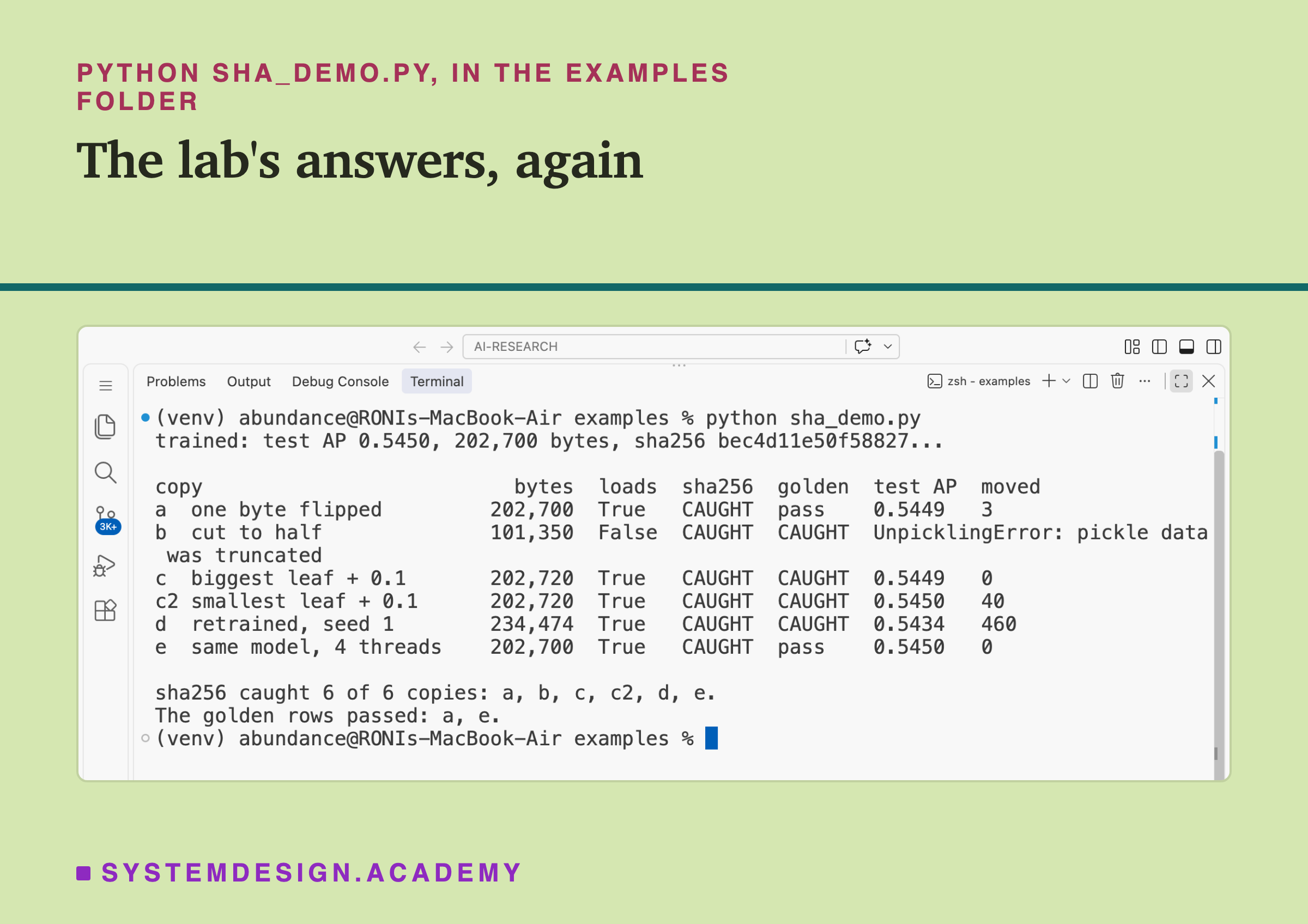
This is a real recording of the report script, sha_report.py, on the laptop where the lab ran.
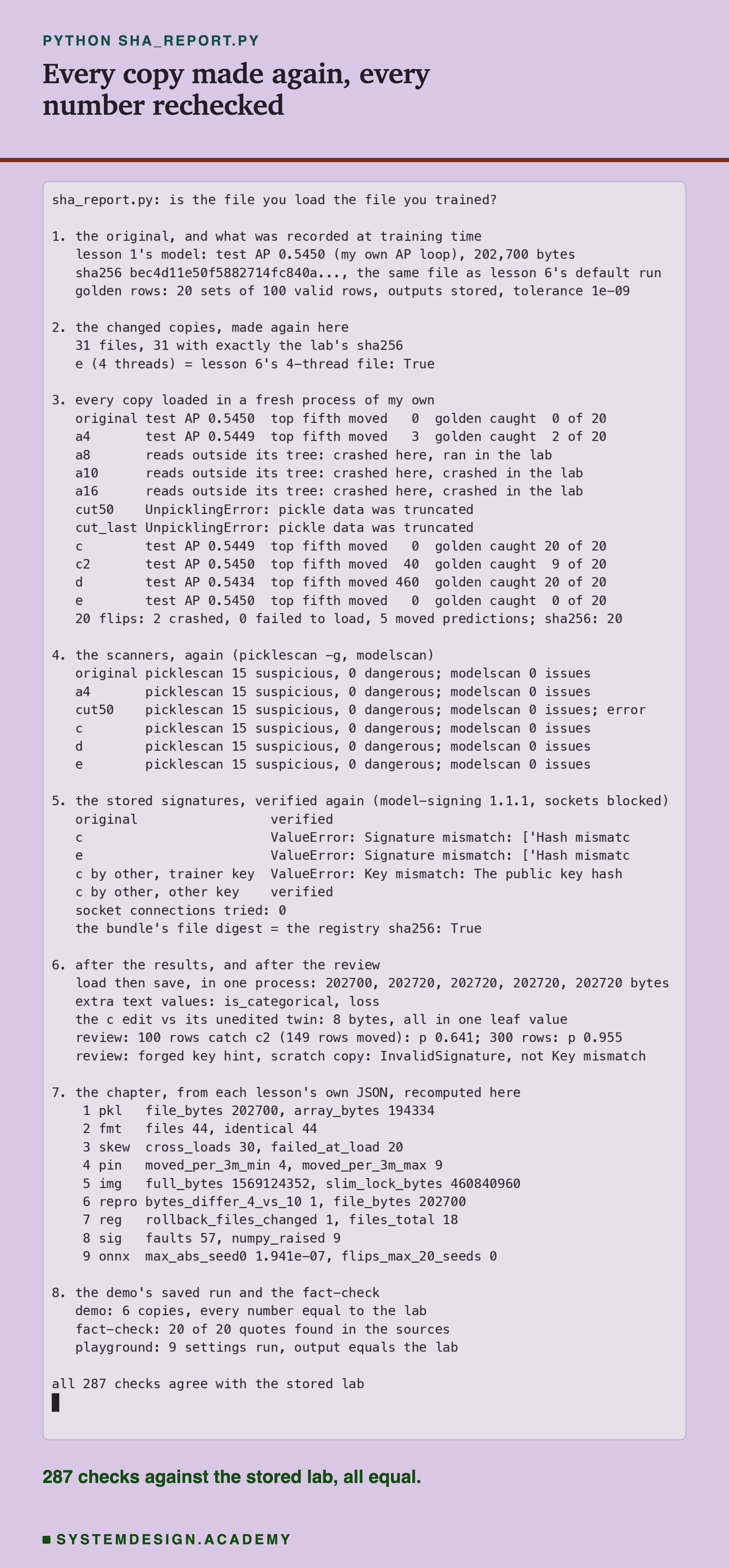
The report does not trust the lab. It never imports the lab's code. It trains lesson 1's model with the features chapter's own code, then makes every changed copy again with its own code. Each copy must have exactly the lab's sha256, and all 31 files did: the original and its 30 copies. It loads every copy in a fresh process of its own and scores it with an AP loop written apart from scikit-learn's. It also runs both scanners again and checks the stored signatures again with the signing tool.
One line in section 3 is different from the lab, on purpose. Copy a8 crashed in this recorded run, while in the lab it ran and gave scores. It looped in three other logged runs of the report. I explain why on a later slide. The report counts it as undefined, not as a match or a mismatch, and writes every run's outcome into .
The Headline: Which Check Noticed Which Change
Here is the main result in one table. Each row is one changed copy. The last three columns are the three checks.
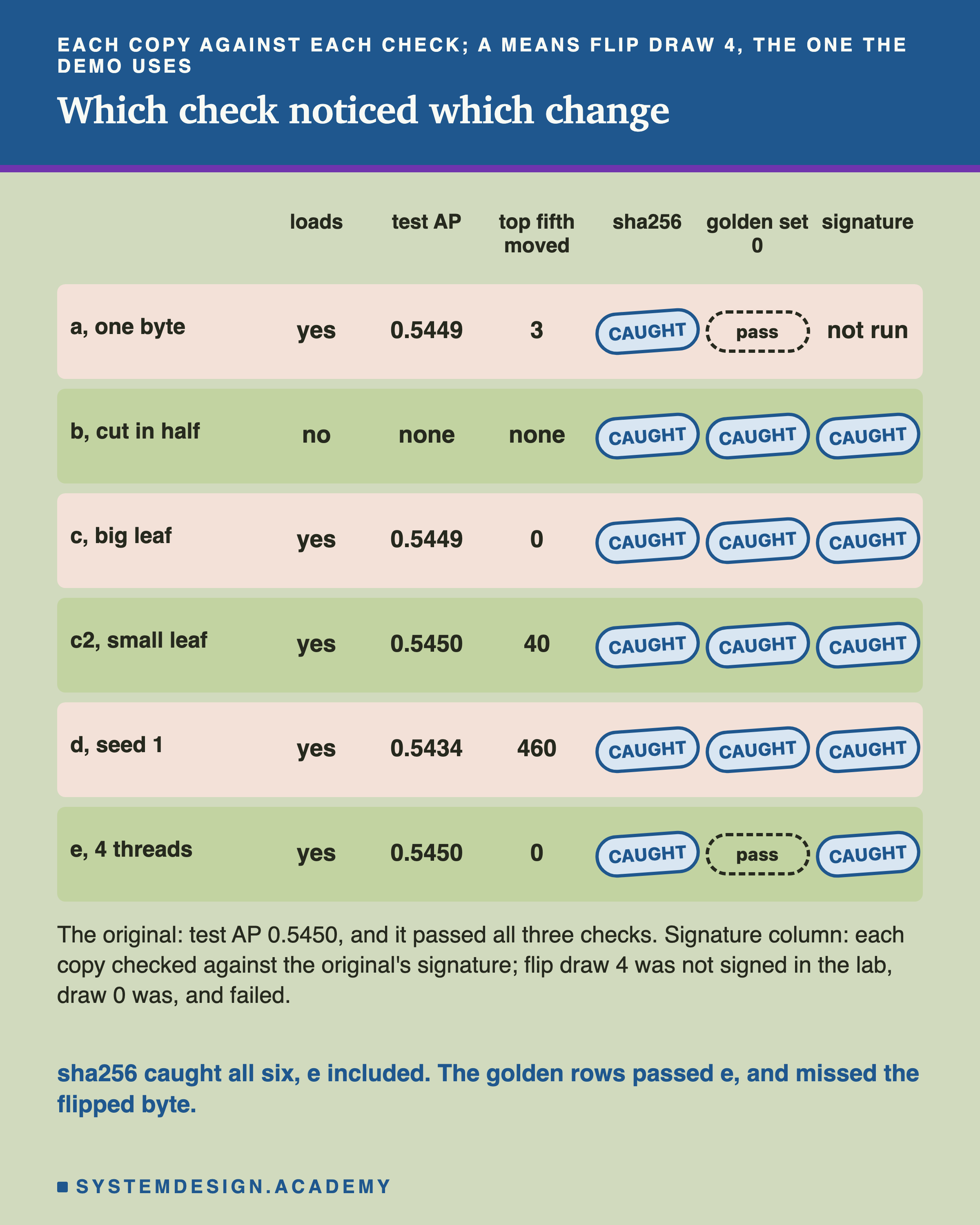
The sha256 check caught every copy. That includes all 20 flipped bytes and all 6 cut files, not only the six rows shown. A fingerprint changes when any byte changes, and every copy had at least one changed byte.
It also caught copy e, which does no harm. Copy e is the same model trained with 4 threads. Its predictions were equal to the original's to the last bit. The sha256 fired anyway. This is a false alarm, and it is the main cost of a sha256 check.
The golden rows told e apart. All 100 rows gave the same answers, so the golden check passed it, in all 20 sets. But the same check also passed copy a, a flipped byte that moved 28 test rows, because none of its 100 rows took the changed path.
The signature refused every copy it was asked about, e included. I explain what it adds on its own slides.
Why Most Flipped Bytes Changed Nothing
Before the flips, it helps to see what a tree looks like inside the file. Each tree is a list of nodes, and each node is a small record of 56 bytes.
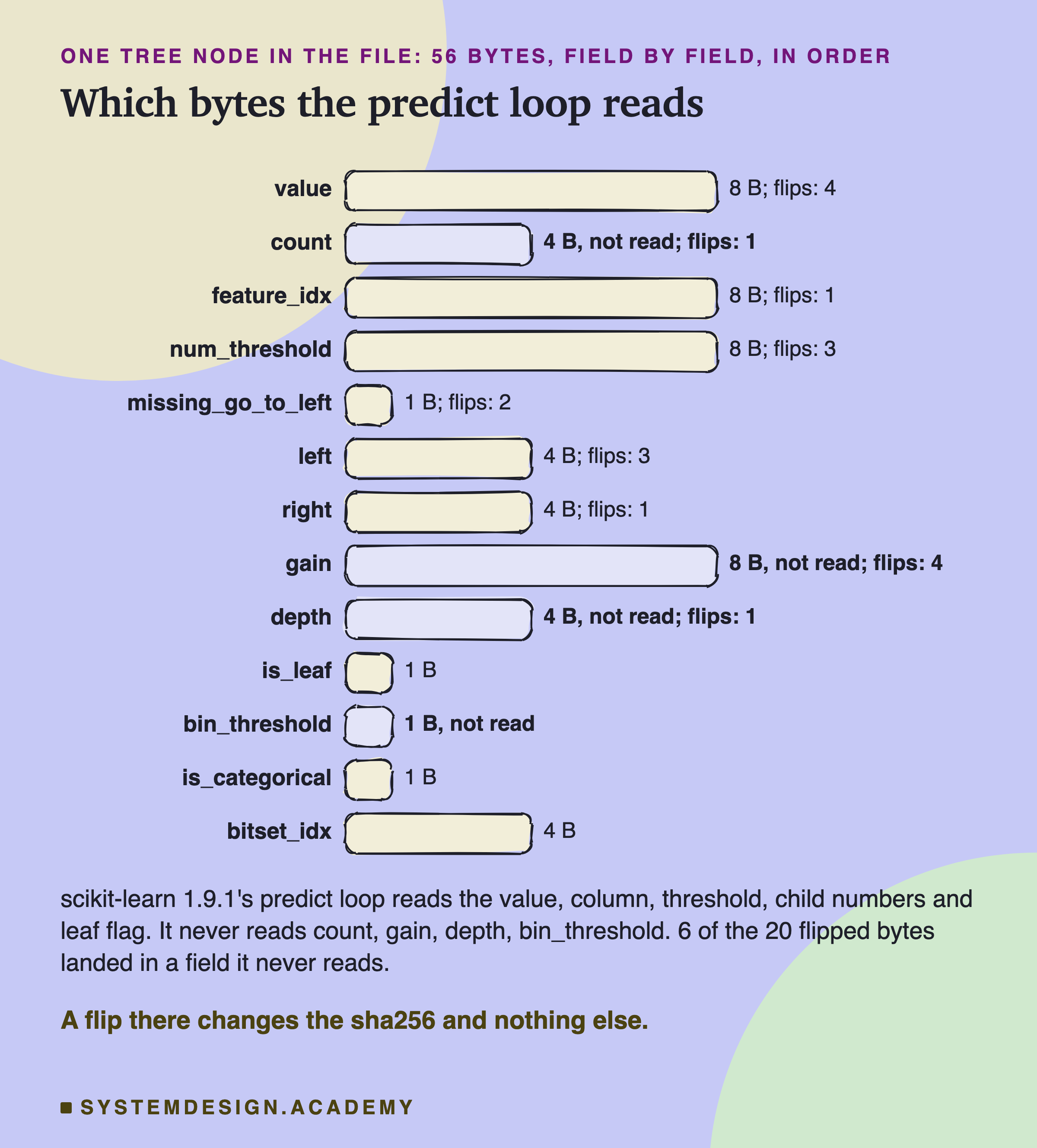
A node either asks a question or gives an answer. A split node asks one: "is column feature_idx at most num_threshold?" Then it sends the row to its left or right child, by the child's number in the list. A leaf gives the answer: its value is added to the score.
I read scikit-learn 1.9.1's predict loop in its source. It reads value, feature_idx, num_threshold, left, right and is_leaf, plus three fields only used for missing values and categories. It never reads , or . Those are notes the model kept from training.
Twenty Flipped Bytes
Here are the 20 flips. The lab picked each byte at random from the 194,318 bytes inside the model's 175 big number arrays, and flipped it in its own copy.
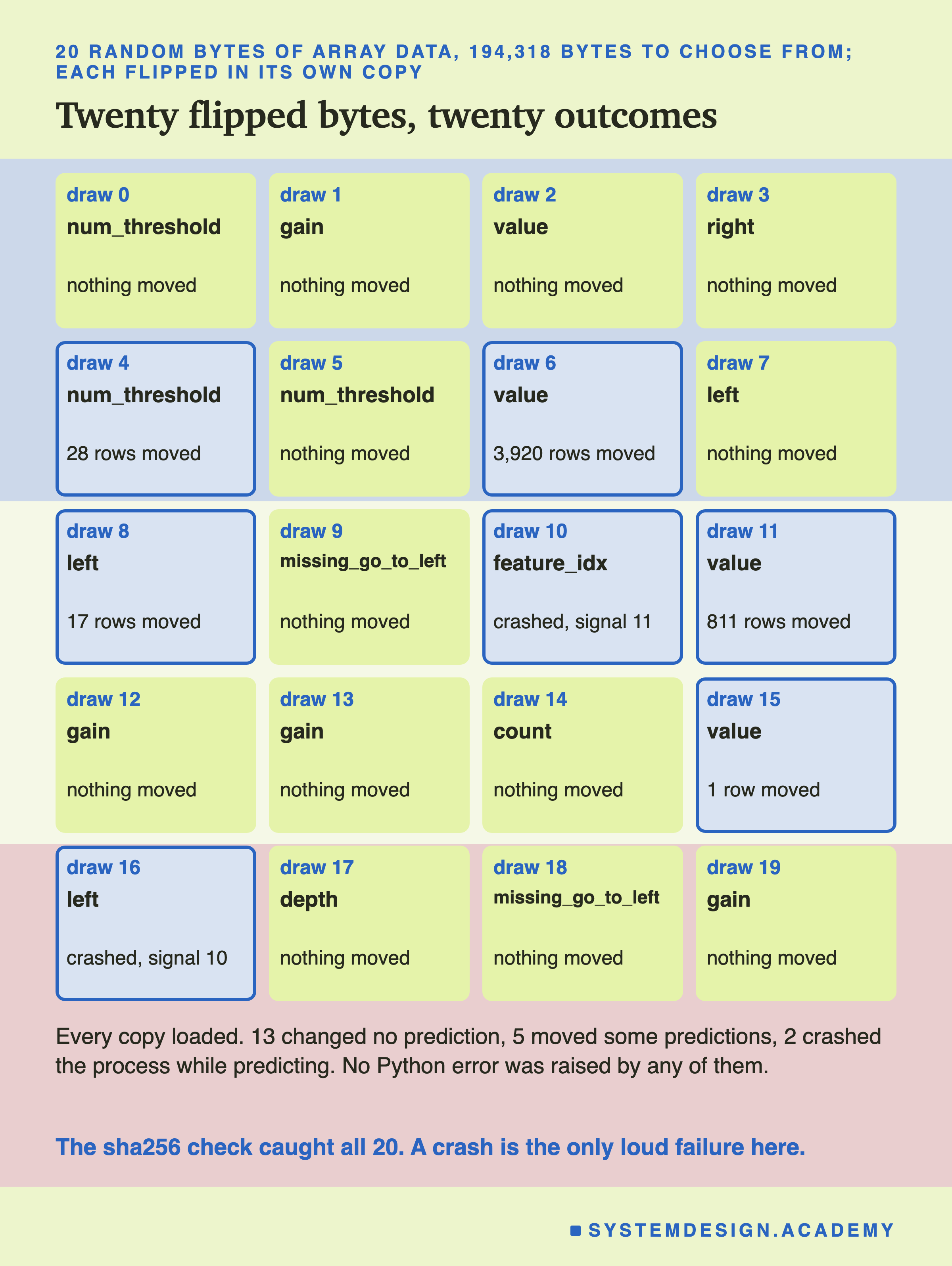
All 20 copies loaded. A flipped number inside an array does not break the pickle's structure, so loading never noticed.
13 changed no prediction at all, on any of the 26,851 test rows or 14,673 validation rows. The previous slide gives the reasons.
5 moved some predictions. Three of them flipped a byte of a leaf's value and moved answers by tiny amounts, at most 0.0000000029, on 3,920, 811 and 1 rows. Those moves are smaller than my 1e-9 tolerance in two of the three cases, so even a careful golden check would call them "the same".
2 crashed the process while predicting. Draw 10 changed a node's column number to one far past the sixth column. Draw 16 changed a child number to one far past the end of the tree. In both, the program read memory it did not own, and the operating system stopped it: signal 11, a segmentation fault, and signal 10, a bus error. No Python error came first. scikit-learn builds this loop with Cython's bounds checks turned off for speed, which I confirmed in its build file.
One Flip Read Memory Outside the Tree
Of the five flips that moved a prediction, four moved very little. One did not.
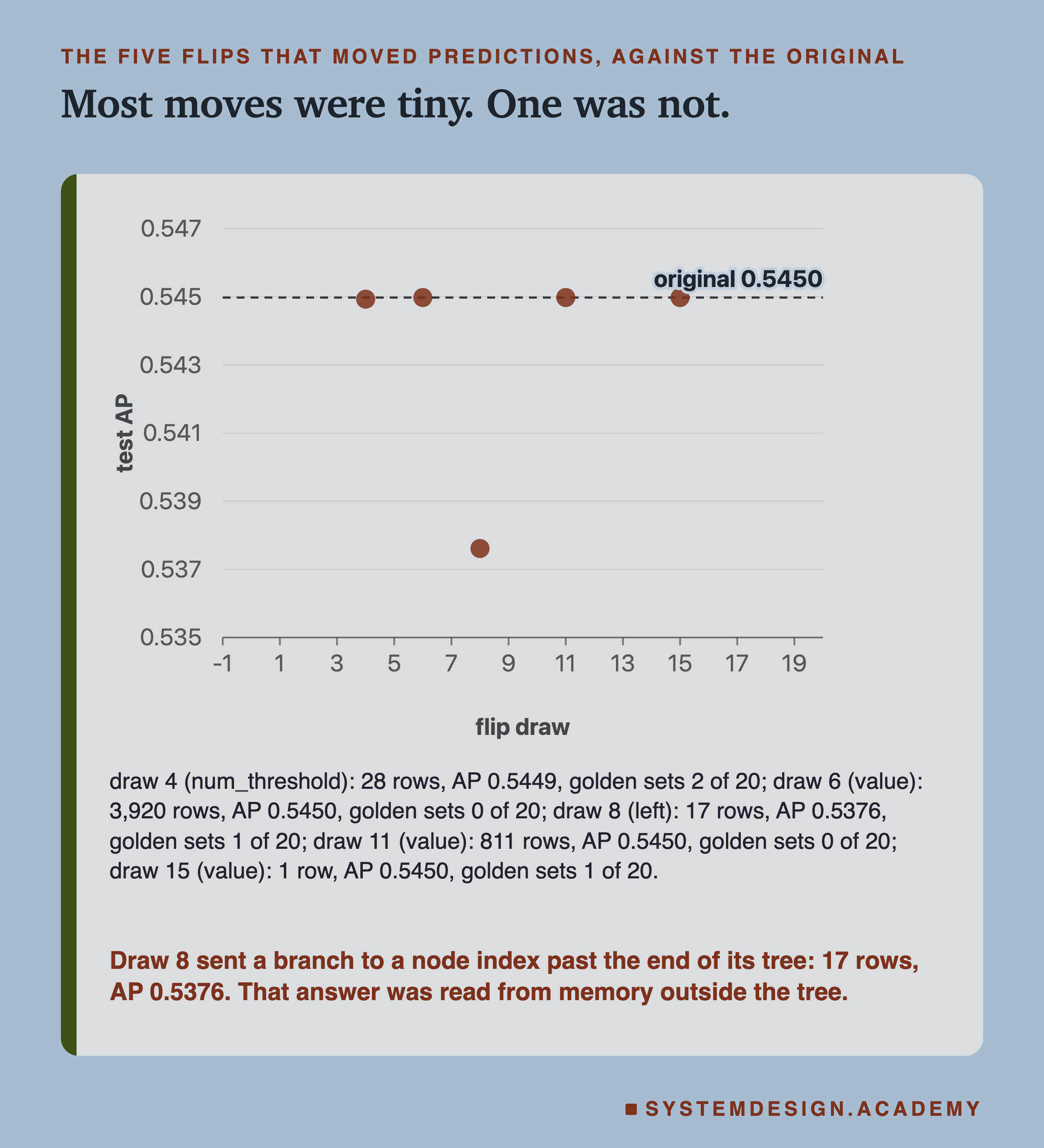
Draw 8 flipped a byte of a left child number. The new number pointed far past the 61 nodes of that tree. In the lab, 17 test rows took that branch. The program read whatever bytes sat there in memory as if they were a node. Those 17 rows got answers up to 0.72 away from the original model's answers. Test AP fell from 0.5450 to 0.5376, with no error and no warning.
Then the report ran the same copy again, and got something else each time. Its first run, before the report had a time limit, looped until I stopped it by hand after about 22 minutes. Two later runs looped until the 180-second limit stopped them. Two others crashed the process, one of them the recorded run on the lab-report slide. The memory outside the tree held different bytes each time: sometimes they sent the loop round in a circle, sometimes they pointed somewhere the operating system refused. Every run's outcome is in results/sha-a8-runs.json.
This is what undefined behaviour means: once a program reads memory that is not its own, any result is possible, and the next run can differ. I do not report draw 8's AP as a property of the copy. I report that one random byte in twenty gave three different outcomes. It gave silent wrong scores in the lab, an endless loop in three logged report runs, and a crash in two others.
Only 1 of the 20 golden sets caught it in the lab. The golden rows are validation rows, and draw 8 changed only 2 of the 14,673 of them. So 100 random rows rarely include either: about 1.4% of the time, by the exact odds.
A Cut File Never Loaded
Copy b is the file cut short, as a broken download or a full disk might leave it. I cut it at six places.
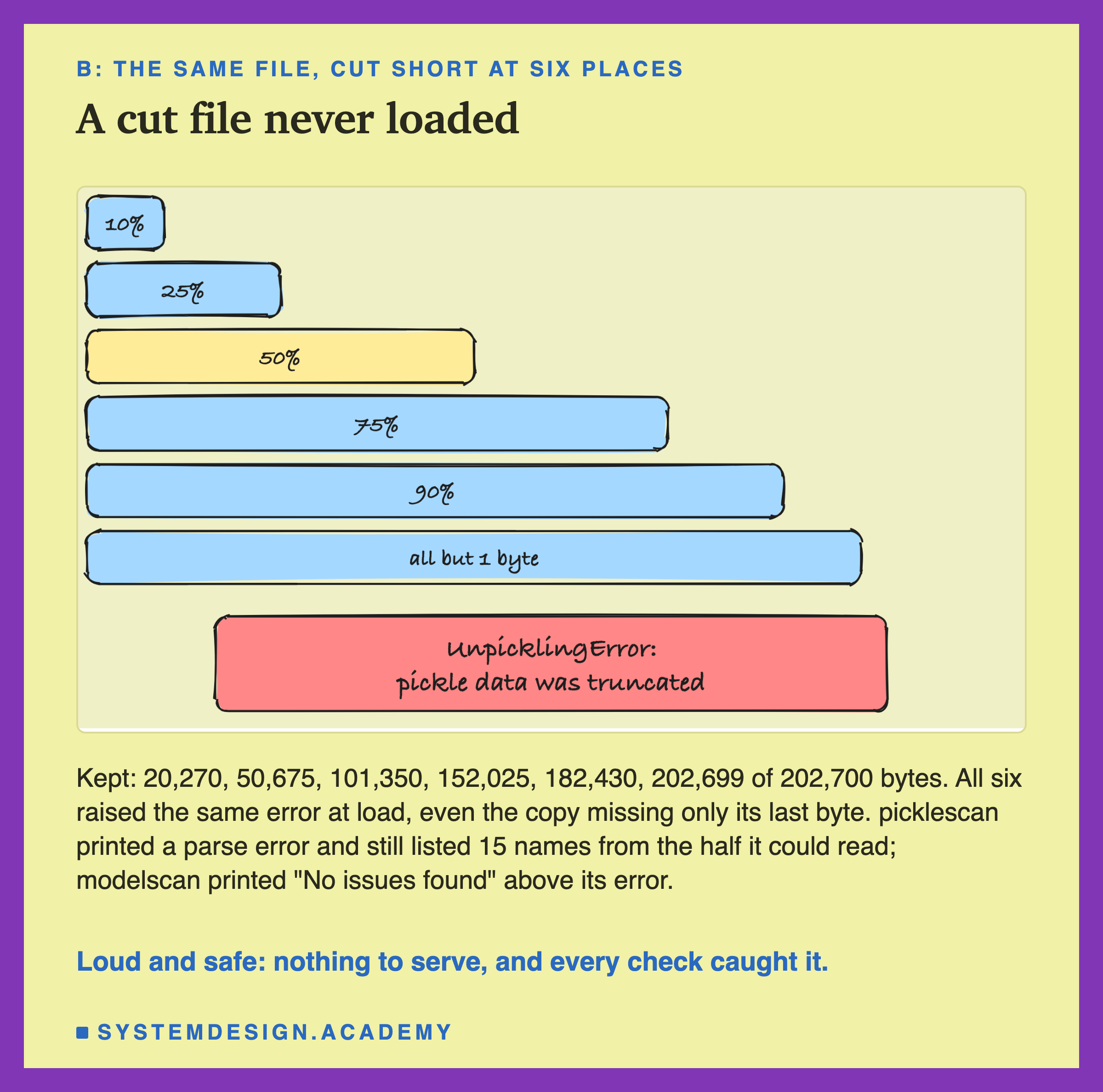
Every cut failed to load, with the same error: "pickle data was truncated". Even the copy that lost only its last byte failed. The last byte of a pickle is a STOP instruction, and without it, loading never finishes.
This is the easy case. The error is loud, and the model never reaches the server. Every check catches it: the sha256 differs, the golden rows cannot even run, and the signature check fails.
The scanners did something worth knowing. picklescan printed a parse error, then still reported 15 suspicious names, from the part of the file it could read. modelscan printed "No issues found!" and then, further down, its error. If a script only reads the first line of a scanner's report, a broken file can look clean.
A Quiet Change of One Number
Copy c is the case I worried about most: a change that loads, predicts and raises nothing. I opened a copy of the model in memory, changed one number, and saved it again.
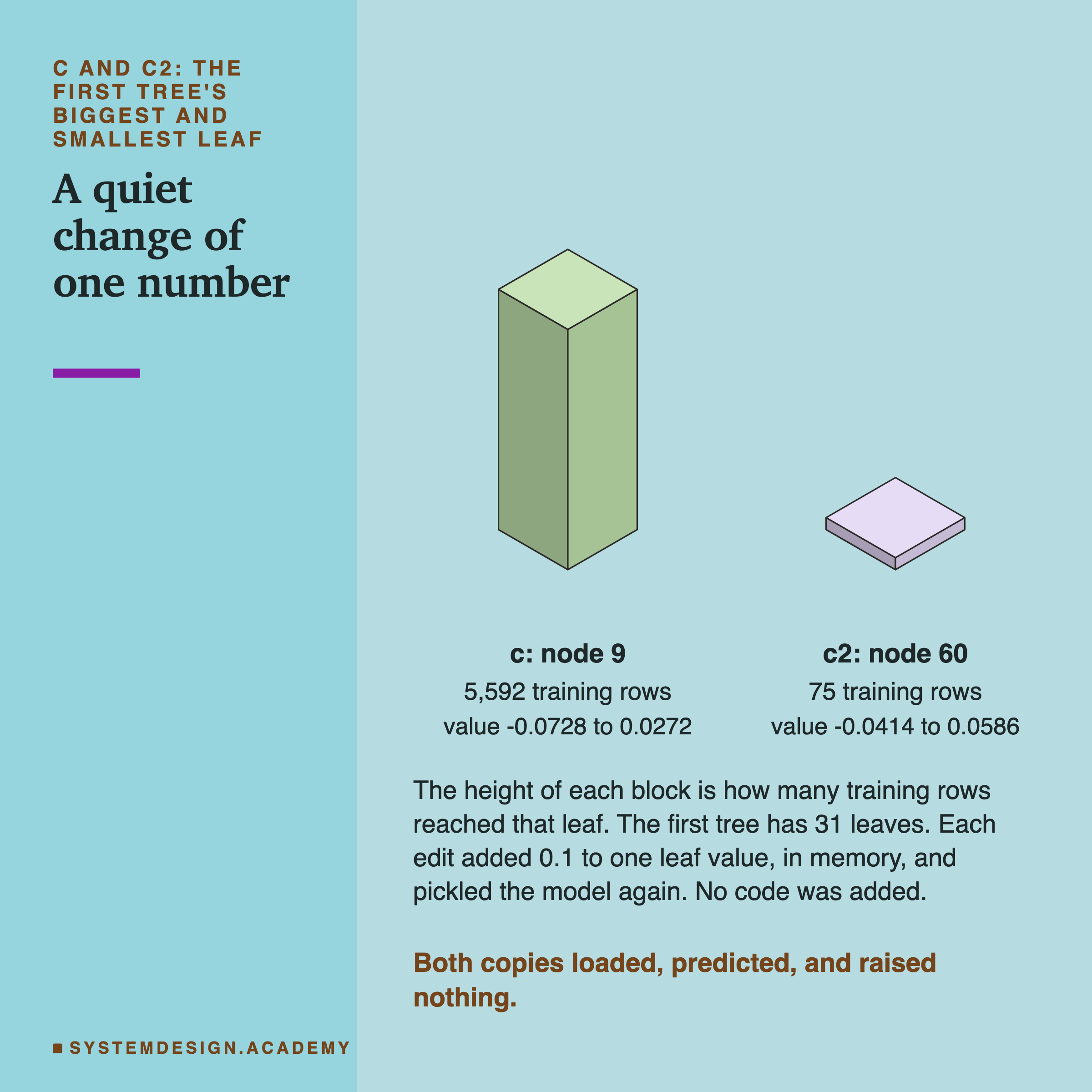
The number is one leaf value in the first of the model's 54 trees. Every customer whose path ends at that leaf gets that value added to their score. I raised it by 0.1, which pushes those customers a little toward "will buy".
I made two versions. Copy c changed the leaf that the most training rows reached: 5,592 of them. Copy c2 changed the leaf that the fewest reached: 75. I declared c2 in the design before the run, because I expected the golden rows to have trouble with a leaf that few rows reach.
Both copies loaded, predicted every row, and gave no error and no warning. To a server, they look exactly like the real model. Only one number of 202,700 bytes changed. (A second, harmless difference in the file comes from saving again, and it gets its own slide.)
The Rare Leaf Moved More of the Top Fifth
What did the two edits do to the ranking? The top fifth is the 20% of customers the model ranks highest each month, the ones a shop would contact first.
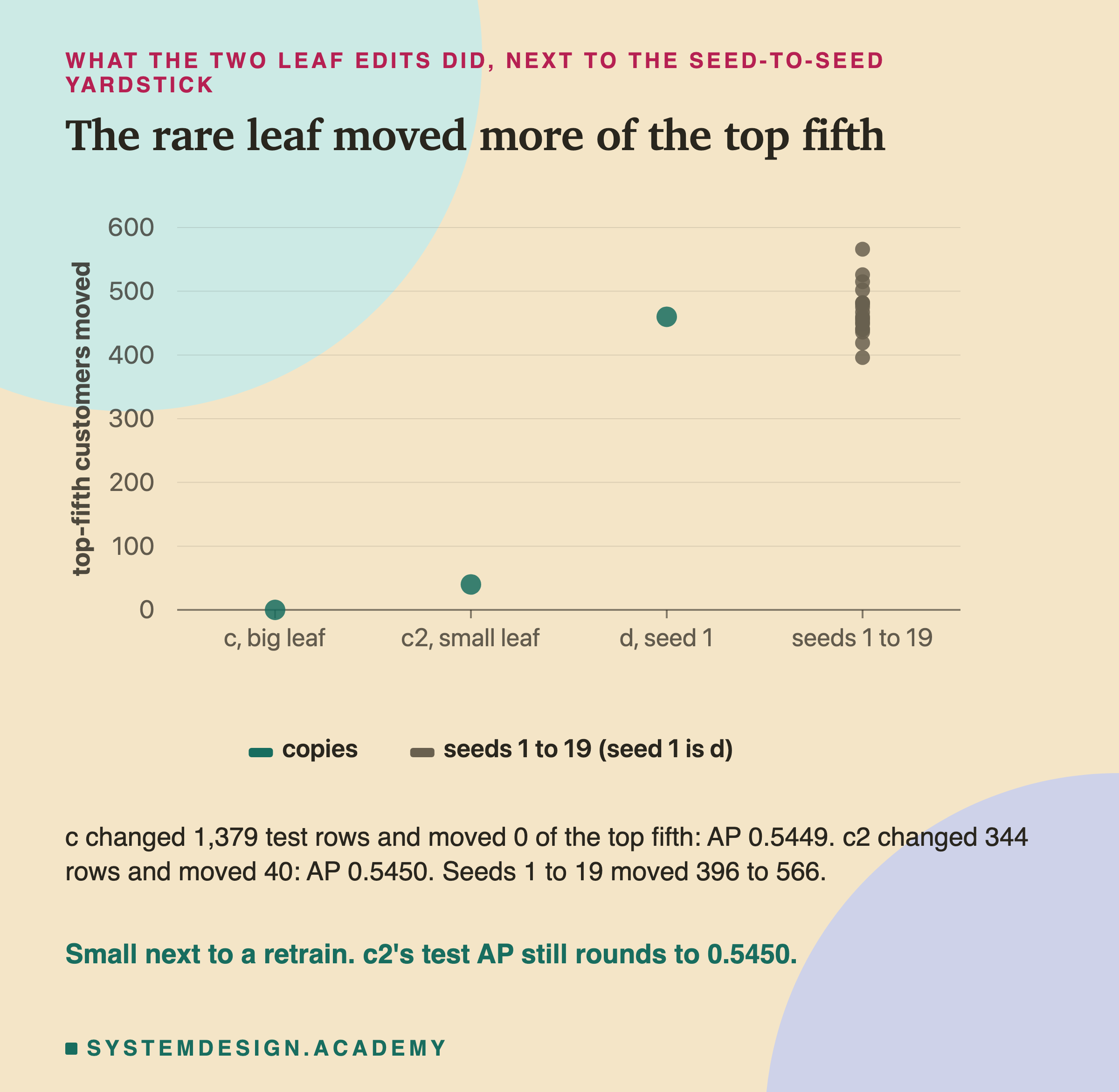
Copy c changed 1,379 test rows, yet moved nobody in or out of the top fifth. One possible reason: the customers at that leaf all sat well below the top fifth, and 0.1 did not lift any of them across the line. I did not trace the leaf's customers to check. Test AP went from 0.54498 to 0.54486.
Copy c2 changed only 344 rows, and moved 40 customers into the top fifth, pushing 40 others out. Its test AP rounded to 0.5450, the same as the original's. So AP alone would not show this edit at all.
For scale, I trained the model with 19 other seeds. Each one moved between 396 and 566 top-fifth customers compared with seed 0. So both edits are small next to an honest retrain. But an honest retrain is a choice you made. Forty customers chosen by somebody else is not.
Golden Rows Only See Their Own Paths
Now the golden check. Each set is 100 validation rows. If any of the 100 answers moved by more than 1e-9, the set catches the copy.
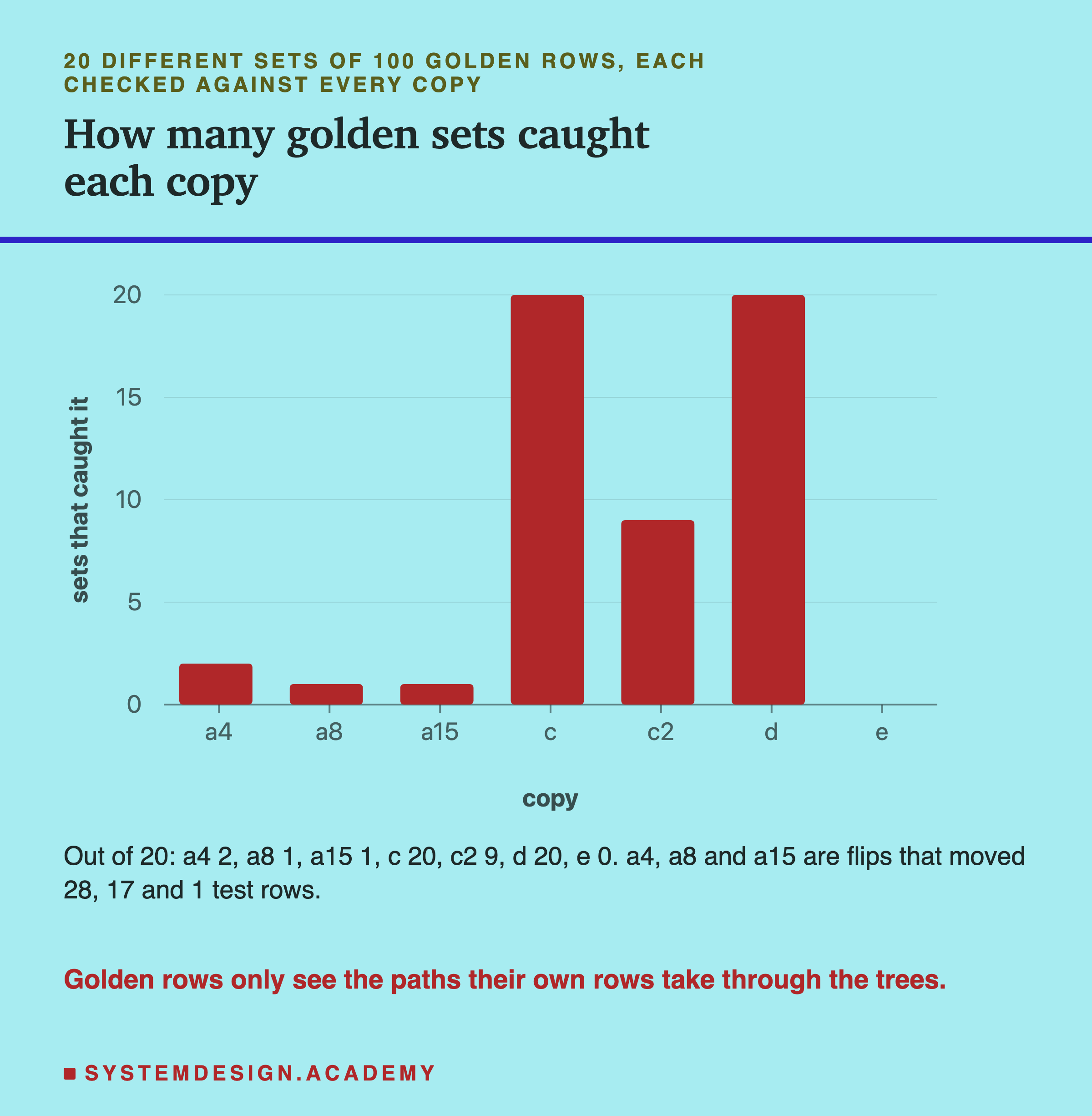
Copy c and copy d were caught by all 20 sets. The big leaf was reached by so many rows that any 100 included some. The other seed changed every row.
Copy c2 was caught by 9 of the 20 sets. The other 11 held no row that reached that rare leaf, so they passed it. My guess before the run was that most sets would miss it; 11 of 20 is "most", but only just. After an independent review, I worked out the exact odds. c2 moved 149 of the 14,673 validation rows. So a random set of 100 holds at least one of them 64% of the time. This means about 12.8 sets in 20 on average, so 9 was a little unlucky. With 300 rows the chance is 95%, and with 1,000 it is almost certain.
The flips that moved a few rows were caught by 1 or 2 sets of 20. Set 0, the one the main table uses, caught none of them.
So golden rows answer "does the model still behave the same on these rows?" They cannot answer "is any part of the model different?" A bigger set would catch more. In this lab, the 20 sets together covered 1,866 different validation rows, and the check is only as wide as its rows.
A False Alarm, and the Check That Told It Apart
Copy e needs a slide of its own, because it is the change you will meet most often in real work.
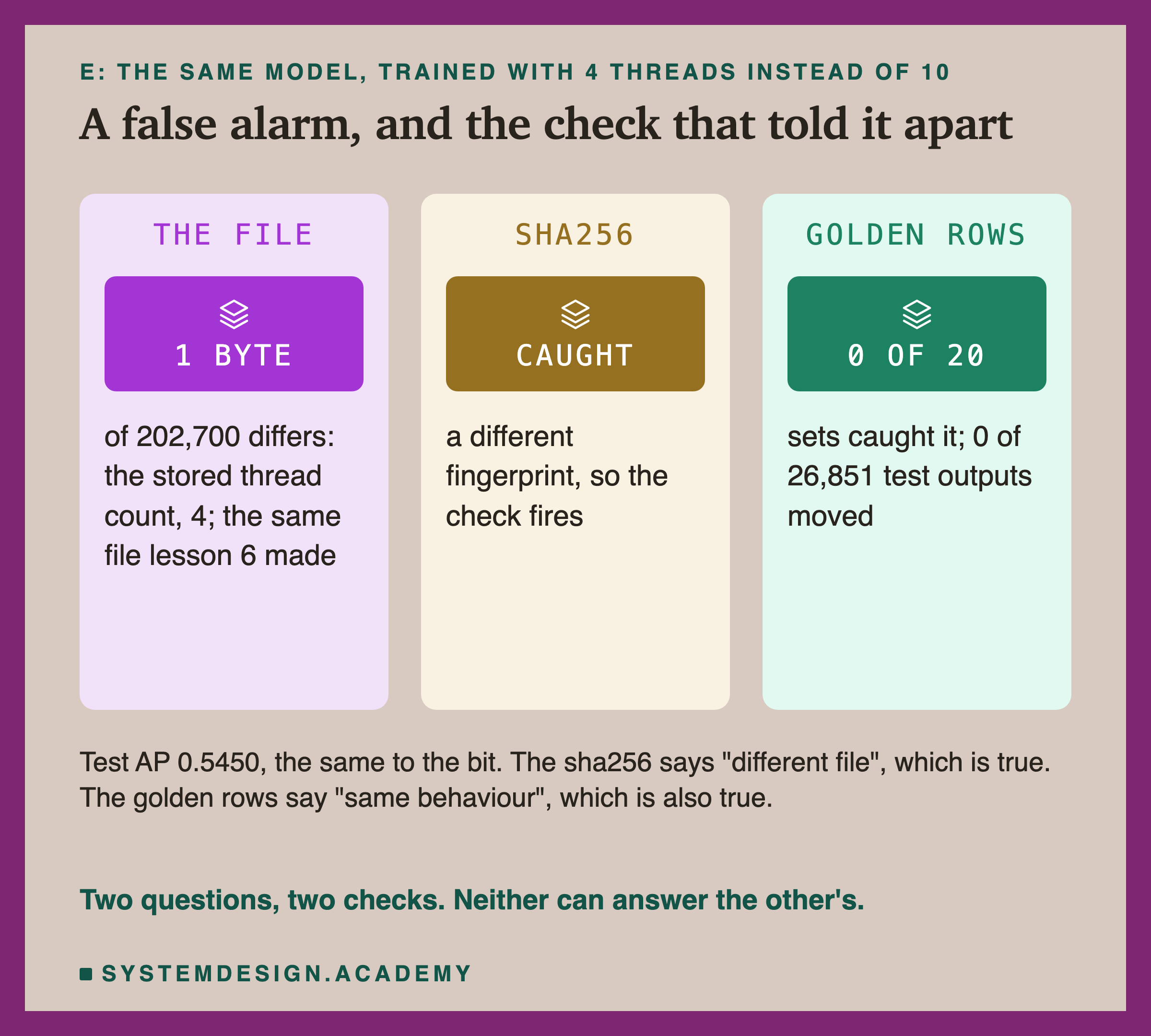
I trained the same model with the same seed, but limited it to 4 threads. Lesson 6 showed the model stores the thread count it trained with. The file came out exactly equal to lesson 6's 4-thread file, and it differed from the original in 1 byte.
The sha256 check fired, as it should: the file is different. The golden rows passed it in all 20 sets, as they should: not one of the 26,851 test answers moved.
This is why one check is not enough. If you use only a sha256, a teammate who rebuilds the model on a machine with another core count will set off an alarm. After a few such alarms, people stop trusting the check, or turn it off. If you use only golden rows, quiet changes on rare paths get through. The two together tell you which kind of change you have.
Saving a Loaded Model Changed Its Bytes
This slide is a finding I did not plan. The lab labels it as asked after the results.
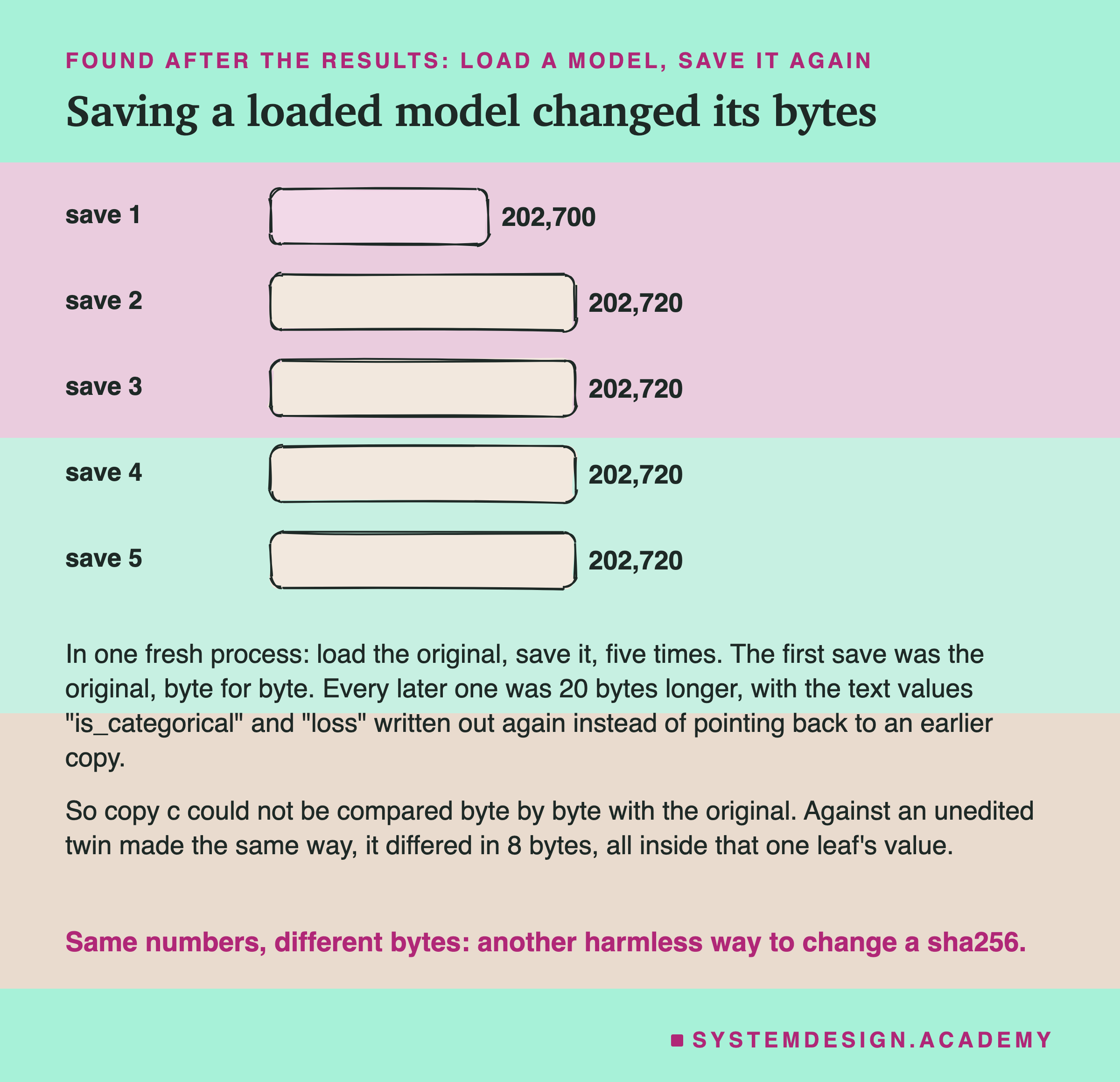
Copy c came out 20 bytes longer than the original, though I had changed only one number. So I tested saving with no change at all. In a fresh process, I loaded the original and saved it again, five times.
The first save was the original, byte for byte. Every later save was 202,720 bytes. I compared the pickle instructions, and here is one likely reason. Pickle writes a piece of text once and later points back to it, but only when the two are the same object in memory. After the first load, two short texts, loss and is_categorical, became separate objects. So pickle wrote each of them out a second time.
Then I made copy c again, next to an unedited twin made the same way. They differed in exactly 8 bytes, and all 8 were inside that one leaf's value. So the edit was one number, as designed.
The lesson for real work: loading a model and saving it again can change its sha256, even when nothing in it changed.
The Scanners Saw No Difference
Lesson 1 ran two scanners on this model. I ran them again on every copy, with the same versions.
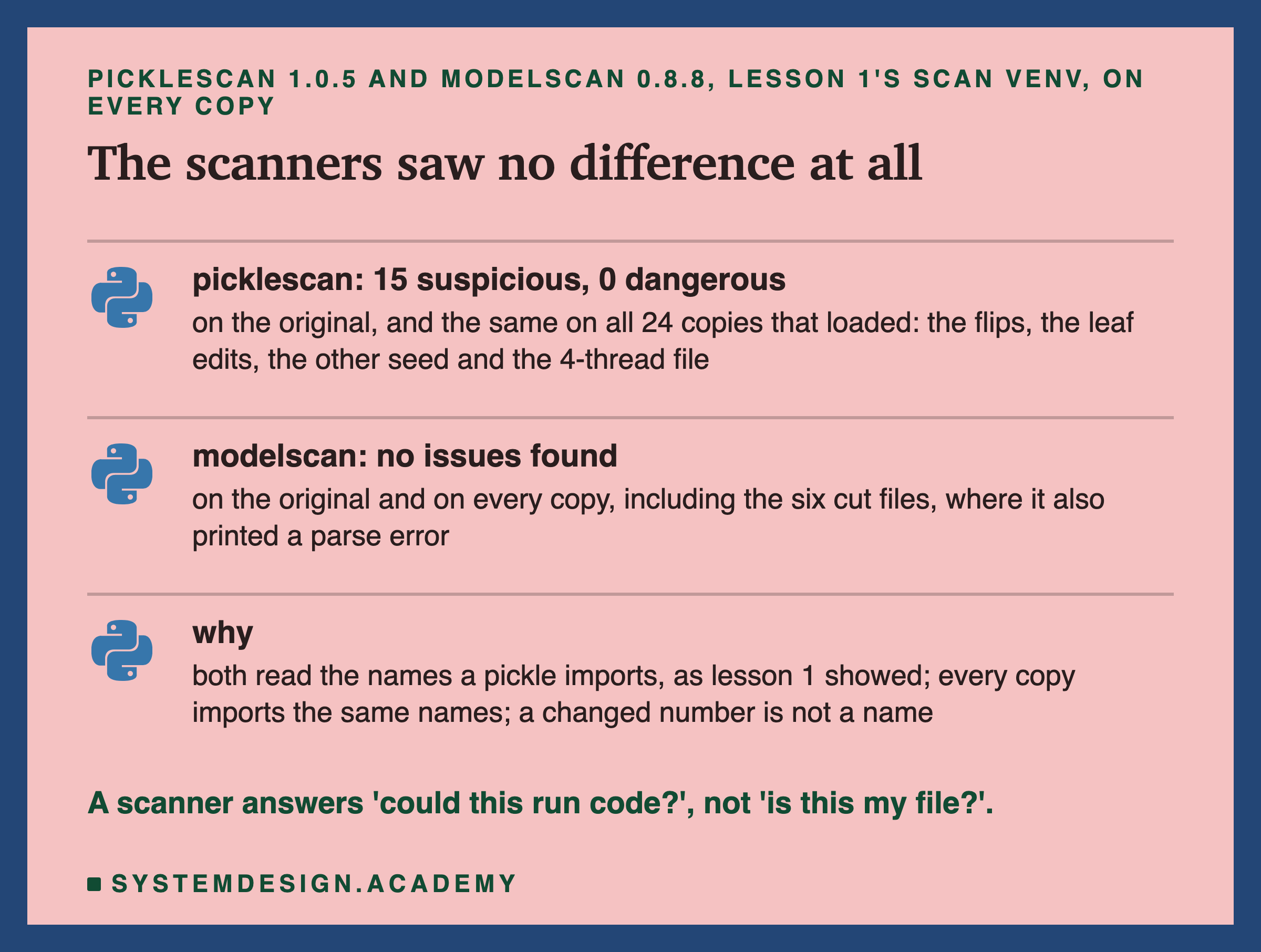
picklescan gave the same counts on every copy that loaded: 15 suspicious names, 0 dangerous. The original got exactly the same counts. modelscan found no issues in any copy.
The scanners did nothing wrong here. Lesson 1 showed that they work from lists of names: which classes and functions a pickle asks to import. None of my copies added a name. They changed numbers, cut bytes, or were trained again. A scanner is like the airport scanner from the first slide: it can find a knife, but it cannot tell your bag from someone else's.
So a scanner and a fingerprint answer different questions. The scanner asks "could loading this run code I did not expect?" The fingerprint asks "is this the exact file I made?" A real supply chain needs both.
What a Signature Adds
A sha256 tells you whether a file changed. It does not tell you who made it. A signature does that job.
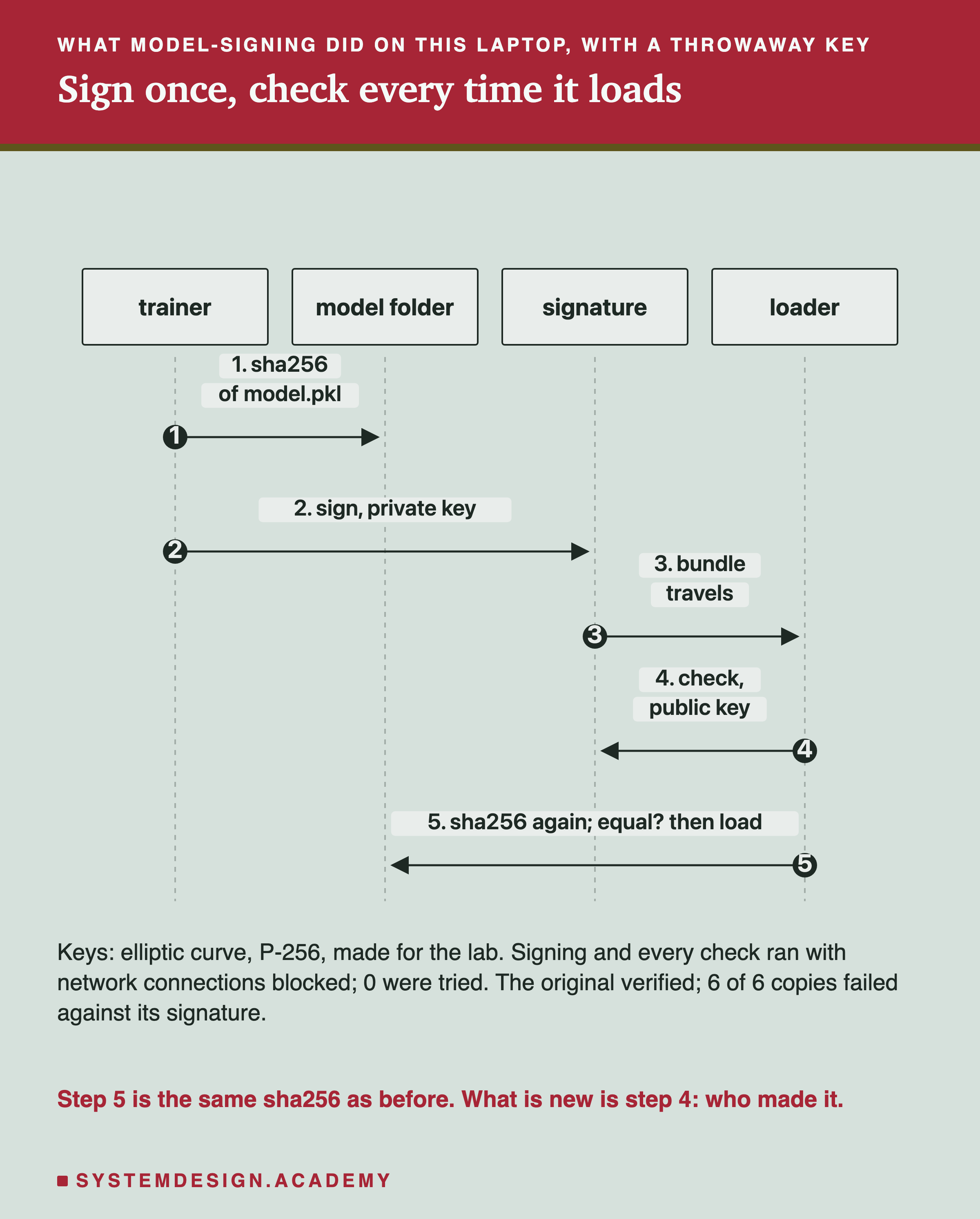
I used model-signing 1.1.1, the tool from the OpenSSF model-signing project. It is a pip install. It can sign in two ways. The first, Sigstore, needs an identity: an account sign-in through a web page, or a CI system's identity token. It also writes a record to a public log on the internet. I did not use it. The second signs with a key file on your own machine. I used that one. I made two throwaway key pairs for the lab, one for "the trainer" and one for "someone else".
The trainer signed the folder with the original model. The tool takes the sha256 of every file in the folder, writes them into a small statement, and signs the statement with the private key.
To check, the loader needs only the public key and the signature file. The tool checks that the signature was made by that key, then takes the sha256 of each file again and compares. The original passed. All six copies I checked failed with "Signature mismatch: Hash mismatch for 'model.pkl'", copy e included.
So for "did the file change?", a signature gives the same answer as the sha256, false alarm and all.
Inside the Signature File
The signature is a small JSON file, which the tool calls a bundle. Here is what was inside, decoded.
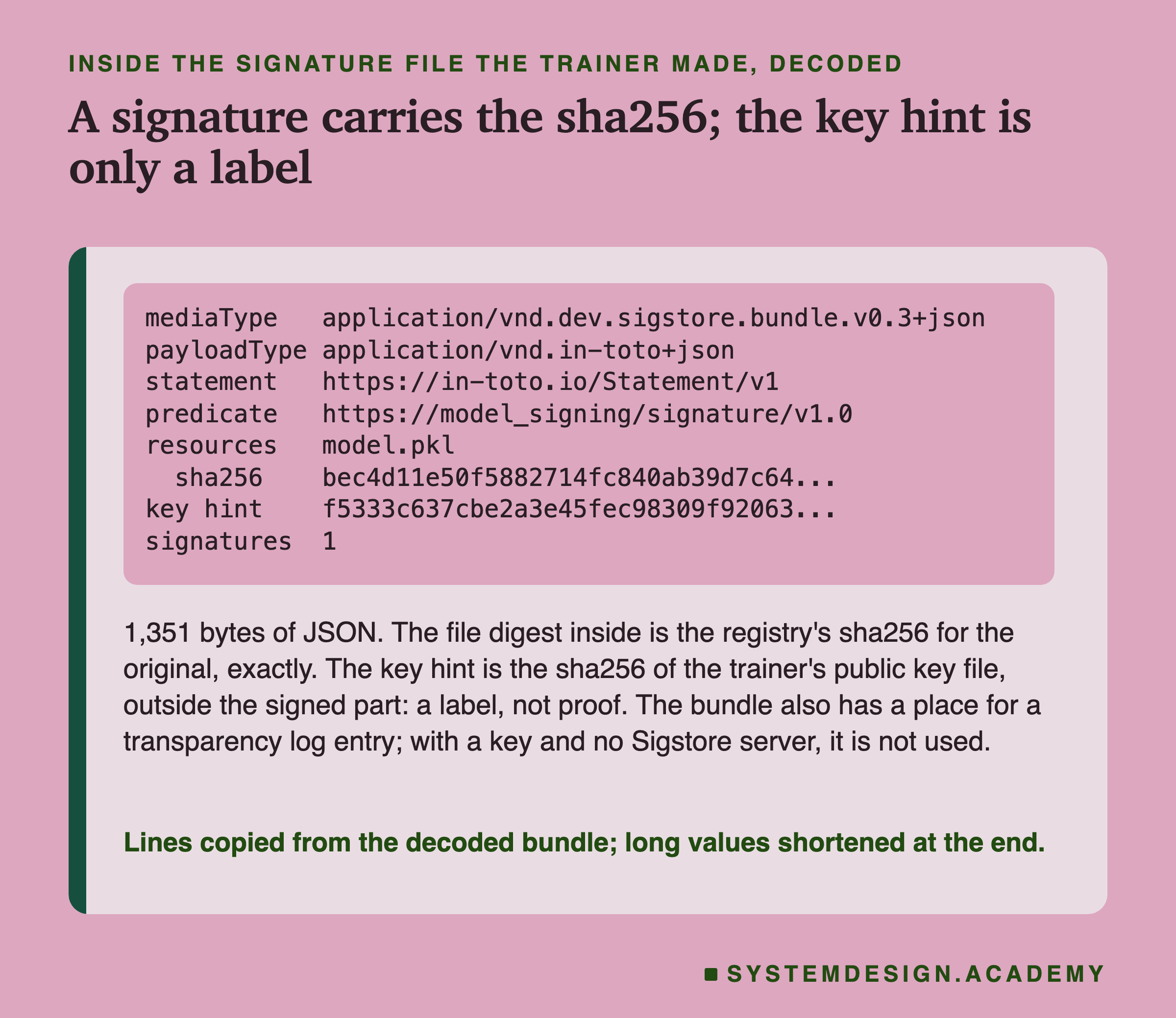
The bundle was 1,351 bytes. Inside it is a statement in a standard format called in-toto. It lists each file of the model with its sha256. For model.pkl, the sha256 in the statement was exactly the one I had recorded at training time.
It also holds a key hint: the sha256 of the public key that made the signature. When I checked, the hint equalled the sha256 of the trainer's public key file. So the bundle carries the file's fingerprint and the name of the key that vouched for it. But the hint is only a label; the real test is the signature maths. The hint sits outside the part the signature covers. After an independent review, I tested this on a scratch copy. I replaced the other person's hint with the trainer's. The check with the trainer's key still failed, now with InvalidSignature.
One field was empty: a place for a transparency log entry. With Sigstore, every signing is written to a public log that anyone can read, so a signing nobody expected can be noticed. With a plain key file, there is no log. I describe Sigstore from its documentation; I did not run it.
A Hash Next to the File Can Be Replaced Too
Here is the case where a signature does something a sha256 cannot. Someone replaces the model with copy c, and also covers their tracks.
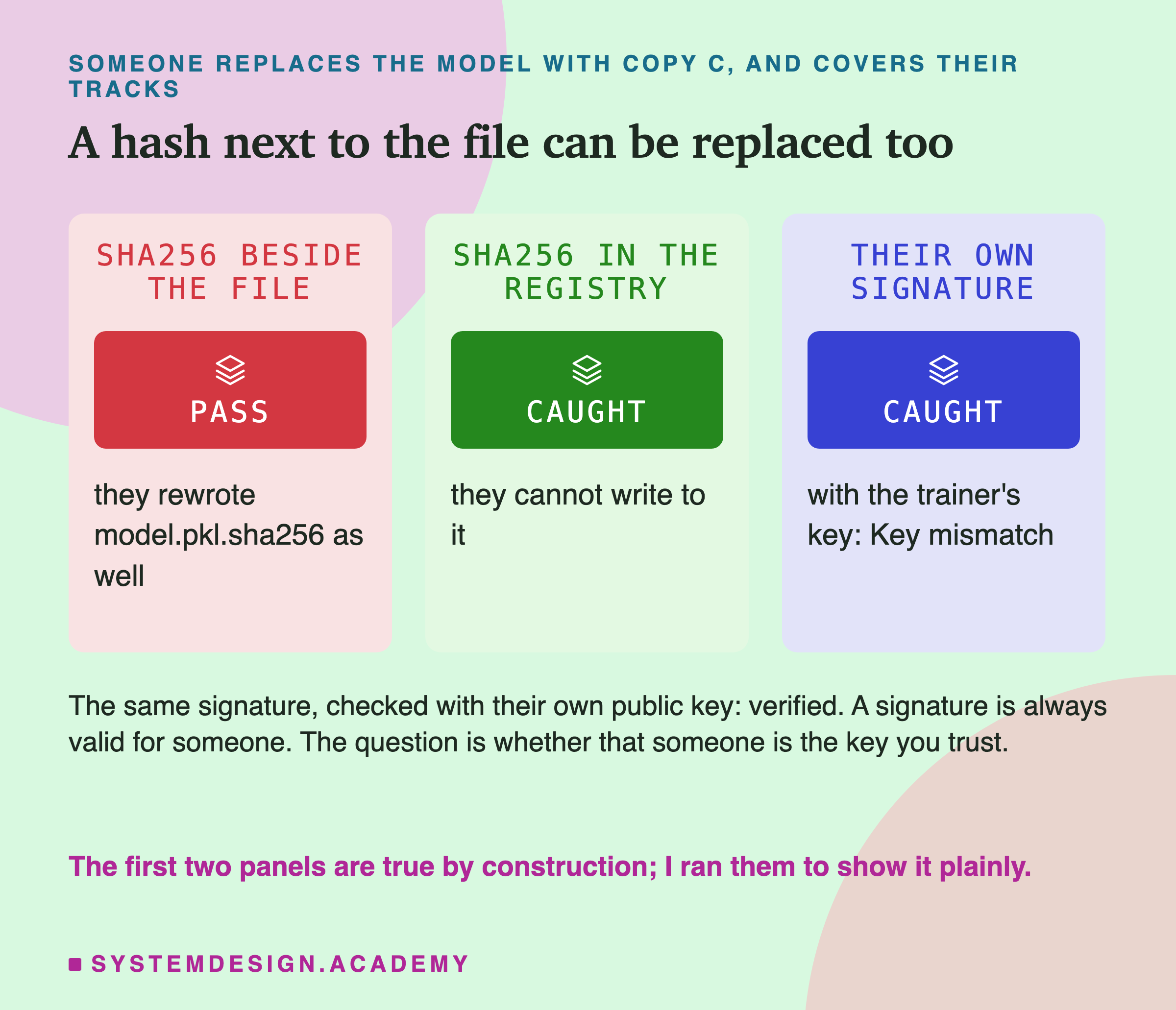
Many projects keep a sha256 in a small text file next to the model. If someone can replace the model, they can usually replace that text file too. I did exactly that: I put copy c in place and wrote its own sha256 beside it. The check against the file next to it passed. The check against the sha256 in the registry, which they could not write to, caught it. Both results are true by construction; I ran them only to show it plainly.
Then the signature. The other person signed copy c with their own key, so the bundle was perfectly valid. Checked with the trainer's public key, it failed: "Key mismatch: The public key hash in the signature's verification material does not match the provided public key." Checked with their own public key, it passed. The words "Key mismatch" come from comparing the hint, which is only a label. The real test is the signature maths, and it failed too when I forged the hint, as the previous slide says.
Here is what a signature really checks. Any key can sign any file. The check is whether the key is one you decided to trust, and that public key must reach the loader by a path the other person cannot change. Last, I had the trainer sign copy e, the harmless rebuild. That signature verified. A trusted person can vouch for a new file, and the check accepts it.
My Guesses Before the Run, Checked
I wrote eight guesses into the lab before it ran. Here they are against the results.
-
"the original reproduces 0.5450 and its sha256 equals lesson 6's default pickle." Right.
-
"(a) every flip loads; most flips leave every prediction the same; some move predictions; a few crash or raise. sha256 catches 20 of 20; golden set 0 catches only the flips that moved a prediction." Mostly right: 13 of 20 moved nothing, 5 moved something, 2 crashed and none raised. Wrong at the end: golden set 0 caught only the 2 crashes, and none of the 5 that moved predictions.
-
"(b) every cut raises at load; caught by both checks." Right.
-
"(c) loads, raises nothing, test AP moves in the 3rd or 4th decimal, a few hundred top-fifth customers move; both checks catch it. (c2): sha256 catches it, most golden sets miss it." Half right. c moved 0 of the top fifth, not a few hundred. c2 was missed by 11 of 20 sets.
-
"(d) loads; test AP within the 20-seed range; top-fifth moved about as much as any other seed; both checks catch it." Right: AP 0.5434, inside 0.5385 to 0.5488, and 460 moved.
-
"(e) differs in 1 byte and equals lesson 6's 4-thread file; predictions identical; sha256 raises a false alarm; golden rows pass it in all 20 sets." Right.
-
"scanners report the same counts for every copy that parses; a truncated file makes them report an error or nothing." Right, with a twist: they reported an error and a clean summary together.
-
"signing: the original verifies; every copy fails, (e) included; someone else's signature fails with the trainer's key and passes with theirs; the trainer's signature on (e) verifies; 0 socket attempts." Right.
Try It Yourself
The full lab makes 30 changed copies, runs two scanners and signs with two keys. I wrote a small demo that does the heart of it in memory.
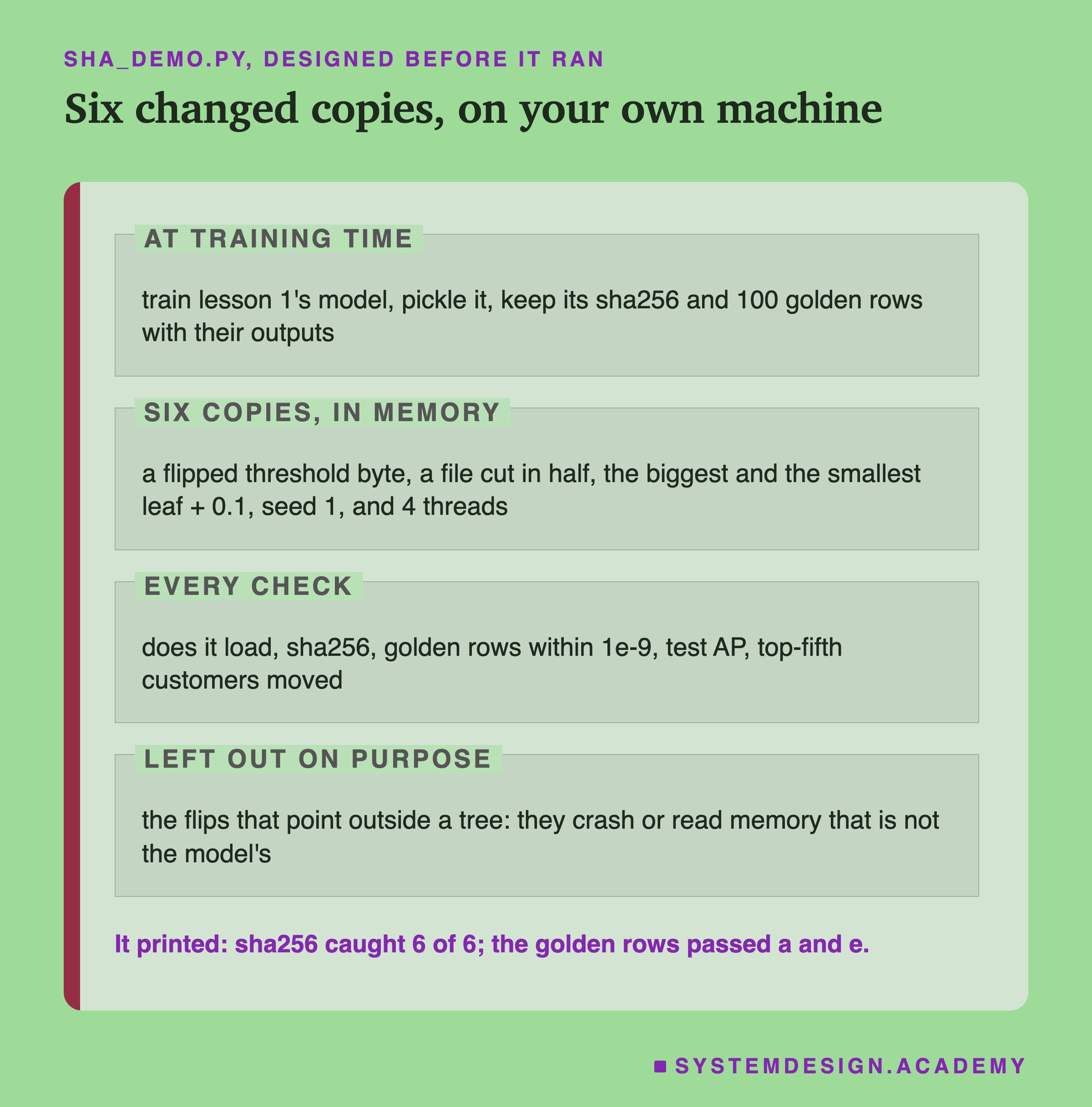
I wrote the demo's design into its docstring after the lab had run and before the demo first ran. It trains the model, records its sha256 and one set of 100 golden rows, then makes six changed copies in memory. For the flipped byte it uses the lab's draw 4, a threshold byte that moved 28 rows. It leaves out the three flips that point outside a tree, because they crash or give answers that change from run to run.
After an independent review, I changed two things before the stored run. Copy e now uses a thread count that differs from your machine's own. Here that is 4. On a machine with 4 or fewer cores it is one fewer than the cores, and a 1-core machine skips copy e. And the demo checks that the byte it flips is the lab's before flipping it. It writes nothing to disk unless you ask it to save its numbers.
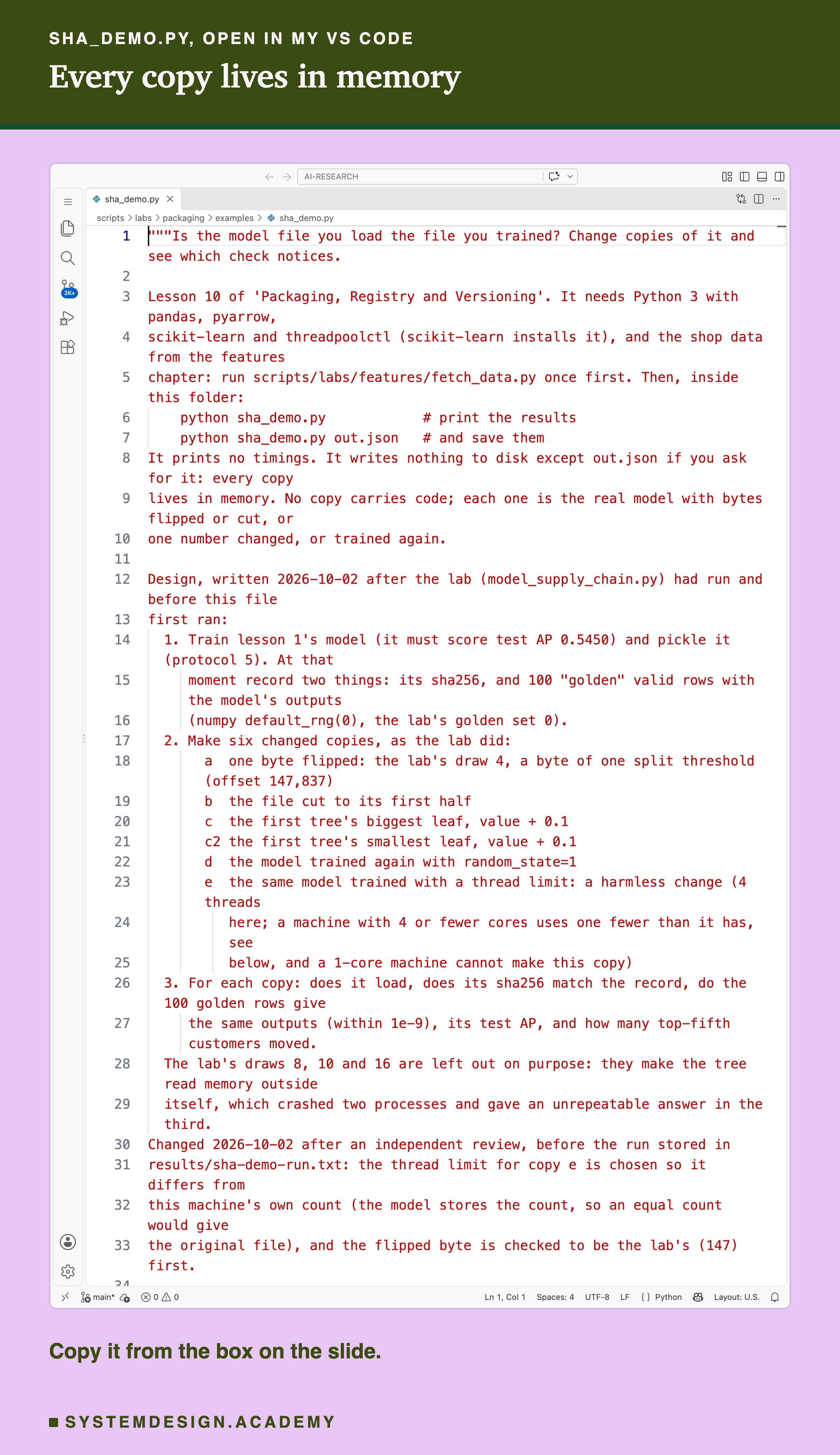
Before you run this lab. You need Python 3 with pandas, pyarrow and scikit-learn: pip install pandas pyarrow scikit-learn openpyxl. scikit-learn installs threadpoolctl too. First run python fetch_data.py from the scripts/labs/features folder. It downloads the shop data once, about 46 MB, and writes one cleaned file. Then, inside the examples folder, run python sha_demo.py. It needs no GPU. I ran it with scikit-learn 1.9.1 and Python 3.13 on a Mac with 10 cores. On your computer the sha256 will almost surely differ from mine, because the model stores your thread count. The pattern should hold: every copy fails the sha256 check, and the golden rows pass copy e.
Change a Copy, Pick a Check
This box holds the real results from the lab. It needs nothing but Python, so it runs in your browser. It has no model inside; it looks up what the lab measured. It does compute one real sha256 itself, of the text in TEXT.
Press Run. Then change CHANGE to "c2" and try SET values from 0 to 19: some sets catch it, some do not. Try CHANGE = "a" with DRAW = 8 or 10. Then change one letter of TEXT and see the whole fingerprint change.
The report script writes this box from the lab's stored results, runs it for several settings, and checks what it prints against the lab. With CHANGE = "e" and CHECK = "sha256", it prints CAUGHT for a copy whose answers did not move at all.
The Lab's Code, Piece by Piece
The lab is one file, scripts/labs/packaging/model_supply_chain.py, with the signing part in sha_files/sign_child.py.
main trains lesson 1's model and stops unless its test AP is exactly 0.5450. It saves the pickle and writes the training-time record: the sha256 and the golden rows. Then it builds every copy. payloads finds the 175 number arrays inside the pickle by reading its instructions with pickletools. model_arrays matches each array to its place in the model, so a flipped byte can be named, such as "tree 38, node 18, field left".
run_child loads one copy in a fresh Python process with --child-load. That child writes down whether loading worked before it predicts anything, so a crash still leaves a record. moved counts top-fifth customers, the same rule lesson 8 used. scan_both runs picklescan and modelscan from lesson 1's scan environment.
sign_child.py runs in its own venv with model-signing 1.1.1. Its first lines replace Python's network connect functions with ones that refuse and count, before the signing tool is even imported. Then it makes the two key pairs, signs, and checks.
holds the question asked after the results: what saving a loaded model does to its bytes. reads one or two numbers from each earlier lesson's result file, by name, for the last slide. downloads each source at a fixed version and searches for every quote.
How to Load a Model File Safely
Here is the order I would use to load a model like this one, using only what this lab measured.
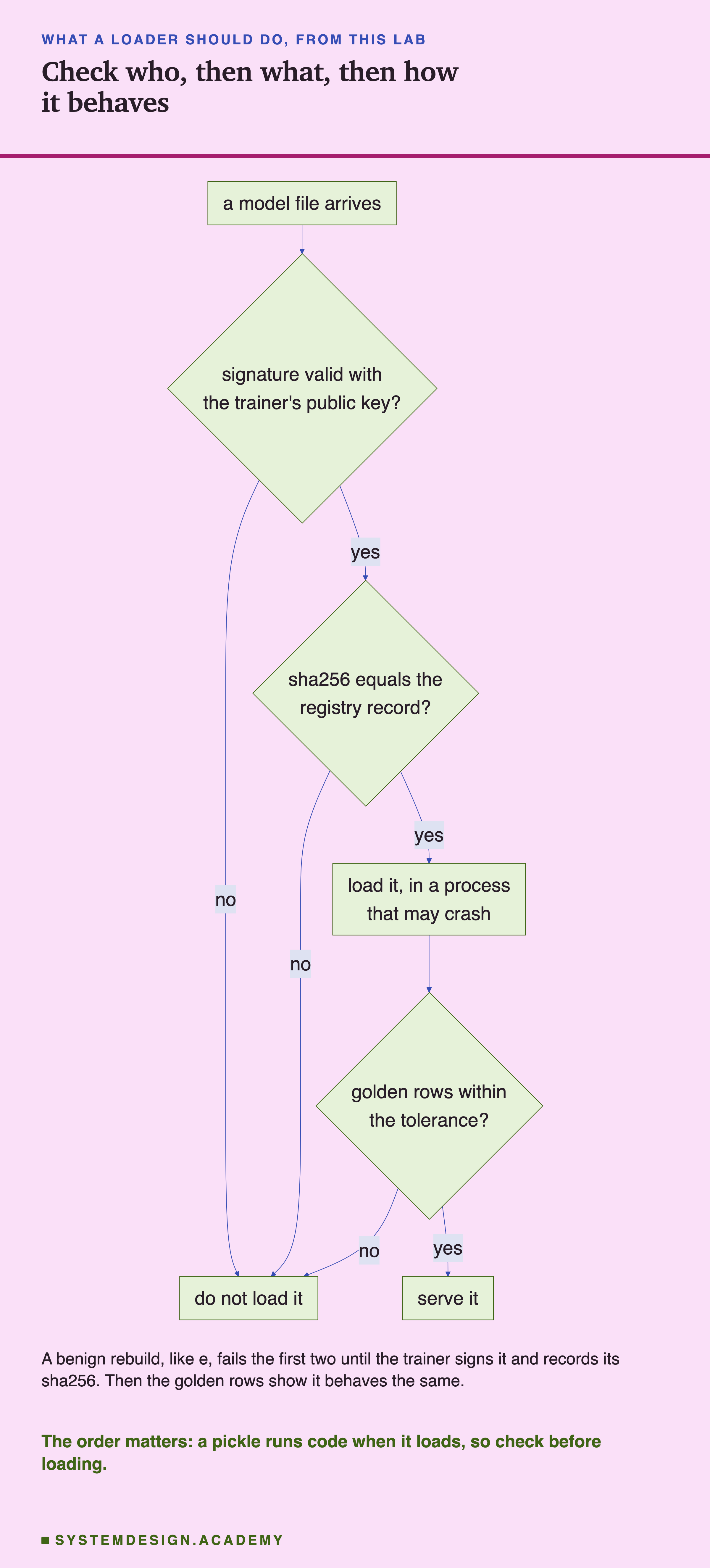
The chart puts the two checks that need no loading first, because lesson 1 showed that loading a pickle runs code. Here are the same steps in words, each with the number from this lab behind it.
-
Record two things at training time: the file's sha256 and a set of golden rows with their answers. Keep them where the file's sender cannot write, such as the registry from lesson 7.
-
Check the signature first, with a public key you got by a separate, trusted path. Here, someone else's valid signature failed with "Key mismatch".
-
Then compare the sha256 with the registry record, before loading. Here it caught all 30 copies.
-
Load in a process that is allowed to die. Here, 2 of 20 flipped bytes killed the process with no Python error. A separate process keeps a crash away from your server. But it is not a sandbox: a harmful pickle runs its code there just the same, so steps 2 and 3 come first.
-
Then run the golden rows. Here they told the harmless rebuild apart. Use more than 100 rows: here 100 rows missed a rare leaf 11 times in 20. By the exact odds for that leaf, 100 random rows catch it 64% of the time, 300 rows 95%, and 1,000 rows almost always.
When Each Check Helps, and When It Does Not
Use a sha256 check always. It is cheap and it caught every change here, 30 of 30. Compare against a record that the file's sender cannot change.
Expect it to fire on harmless changes. A different thread count changed one byte here. Saving a loaded model again added 20 bytes. Fix the thread count in code, as lesson 6 showed, and never re-save a model you did not mean to change.
Use golden rows to judge behaviour, not identity. They passed the harmless rebuild and caught the retrain. But they missed changes on paths their rows never take: a rare leaf in 11 of 20 sets, and a wild branch in 19 of 20. More rows help: 300 rows would catch that rare leaf 95% of the time instead of 64%.
Use a scanner to ask whether a pickle could run unexpected code, as lesson 1 showed. Do not use it to ask whether a file is yours. It gave every copy here the same counts as the original.
Use a signature when files cross a boundary: from one team to another, from your laptop to a server, or from the internet to you. It is the only check here that said who made the file.
Do not expect a signature to say a file is good. The trainer's signature on copy e verified, and it would have verified on copy c if the trainer had signed c (true by construction; I did not run that). A signature says who vouched for the file, not that the file is right.
The Whole Chapter on One Page
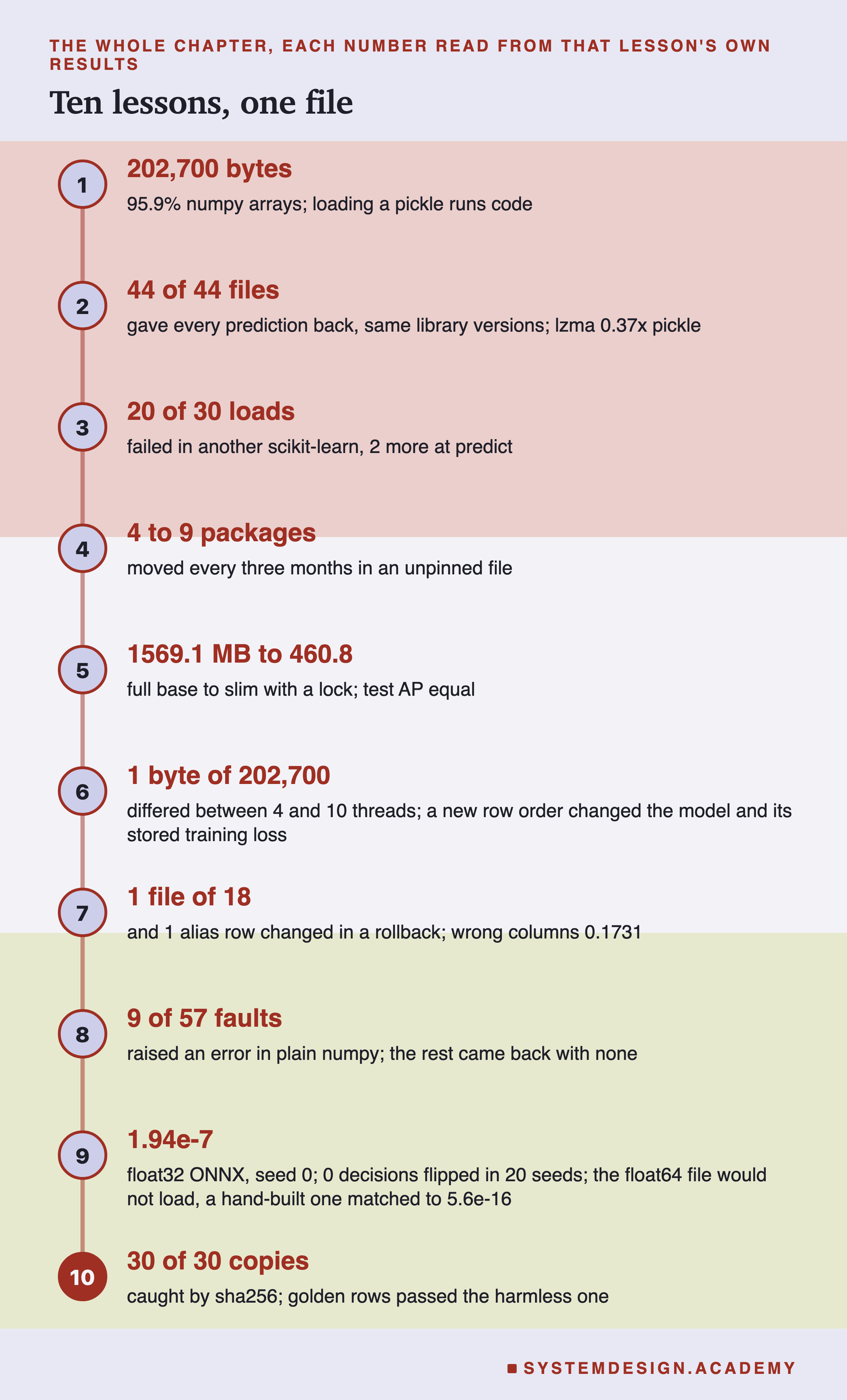
This is the last lesson of the chapter, so here is all of it on one page. Each number is read from that lesson's own results file, by name, and the report checks it again.
-
What is in a model file. The pickle was 202,700 bytes, 95.9% of them raw number arrays, and it imported 16 names. Loading a pickle runs code. Scanners judge it by those names: picklescan called 15 of them suspicious and 0 dangerous.
-
Saving formats compared. 44 of 44 saved files gave every prediction back to the last bit, with the same library versions. Size moved a lot: lzma was 0.37 times the pickle, skops 2.15 times.
-
Library version skew. Of 30 loads into another scikit-learn, 20 failed at load and 2 more at the first prediction.
-
Pinning dependencies. An unpinned five-line file installed 4 to 9 changed packages every three months. A hash lock held, but an edited hash made the installer build from source until stopped it.
What This Lab Cannot Tell You
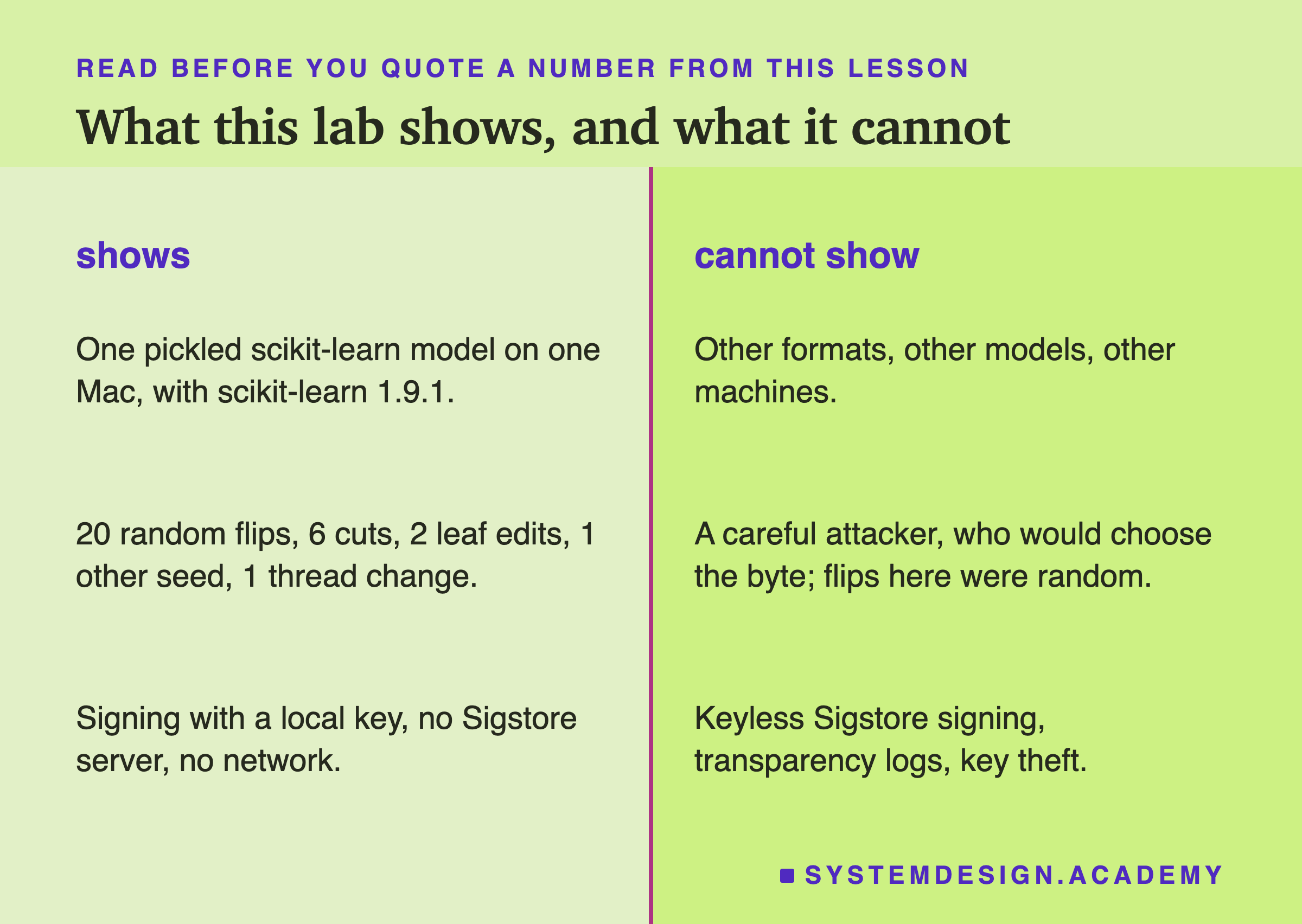
One model, one format, one machine. Everything here is one pickled scikit-learn 1.9.1 model on one Mac. A neural network or a skops file stores other things, and a flipped byte in it can behave differently.
Random changes, not an attacker. The flips were random draws. A careful attacker would choose the byte, and could choose a rare path on purpose, as copy c2 did by my rule. Twenty draws show the spread of what random damage does, not the worst case.
Undefined results. Three flips made the program read memory outside the tree. What they did, a crash, garbage scores or an endless loop, may differ on your machine and from run to run.
Signing with a local key only. I did not run Sigstore's keyless signing, its public log, or any key storage. I describe them from their documentation. Keeping the private key safe, and getting the public key to the loader safely, are the hard parts, and I did not test them.
No timings. Nothing was timed, so this lesson says nothing about speed.
Labelled additions. The re-save question was asked after the results. One flag was computed from the wrong digest in the run and corrected afterwards from the stored bundle. The chapter recap was refreshed after lessons 8 and 9 went live. All are labelled in the lab.
What to Do on Monday
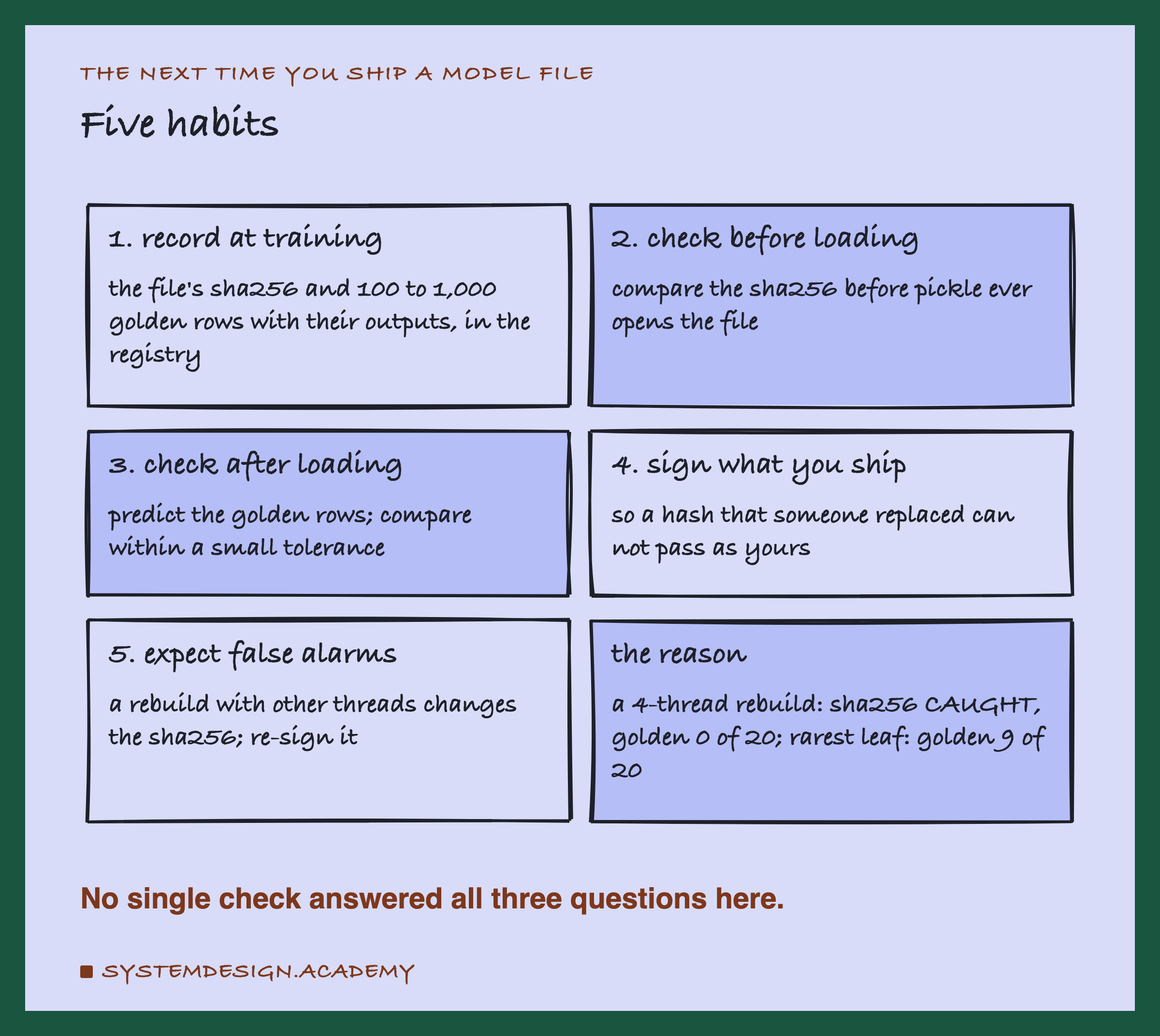
If you take one thing to work on Monday, find the line in your serving code that loads the model, and look at what happens just before it. If nothing is checked, add a sha256 comparison against the value your registry recorded at training time. It costs one line and it caught every change in this lab.
Then add golden rows, so that a harmless rebuild does not make your team turn the check off. When your models cross a boundary between teams or machines, sign them, and give the loader the public key by a path nobody else can change.
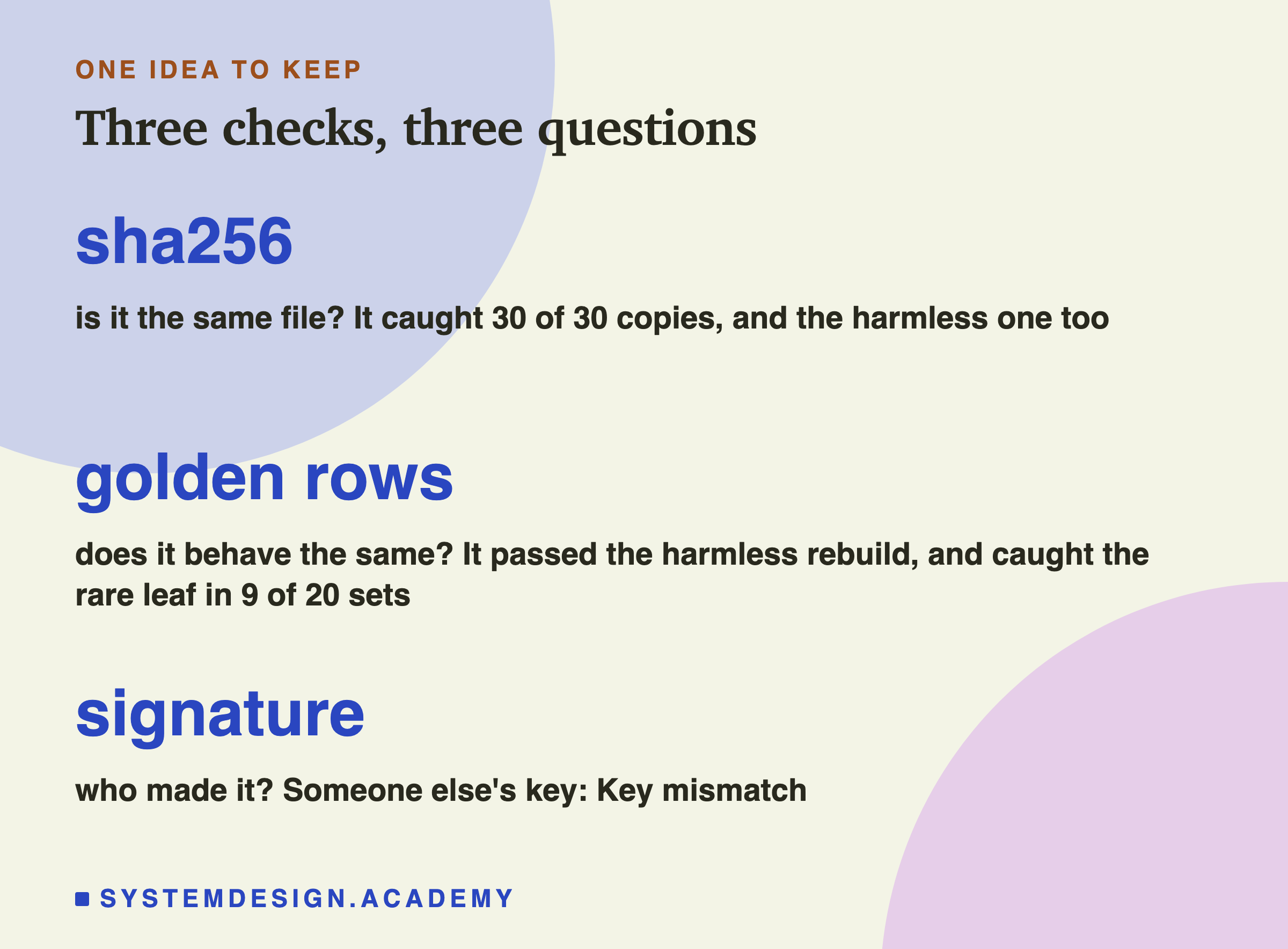
The one idea to keep: "is this my model?" is three questions, not one. Is it the same file? A sha256 answers that, and it will also fire on harmless changes. Does it behave the same? Golden rows answer that, but only on the paths their rows take. Who made it? Only a signature answers that, and only if you trust the key. In this chapter we followed one file from training to serving. Checking it at the end is how you know the journey did not change it.
Knowledge Check
Knowledge Check
4 questions - Score 80% to pass
Copy e was the same model trained with 4 threads. What did the checks say?
One leaf reached by only 75 training rows was raised by 0.1 (copy c2). What happened?
Someone replaced the model with copy c and signed it with their own key. What did the lab find?
Why did picklescan and modelscan report the same result for every changed copy that loaded?