Grafana
A visualization platform for creating dashboards from any data source. Connects to Prometheus, Elasticsearch, CloudWatch, and dozens more to display metrics, logs, and traces.
What is Grafana?
In short
Grafana is an open-source visualization and dashboarding tool that connects to time-series databases, log stores, and cloud monitoring services, then renders their metrics, logs, and traces as interactive charts, tables, and alerts. It does not store data itself; it queries data sources like Prometheus, Loki, Elasticsearch, and CloudWatch and displays the results.
What Grafana actually is
Grafana is a web application you point at one or more data sources to build dashboards. A dashboard is a grid of panels, and each panel runs a query against a data source and draws the result as a time-series graph, a gauge, a heatmap, a table, or a single stat. You build panels through a query editor and arrange them with drag and drop, then save the dashboard as JSON.
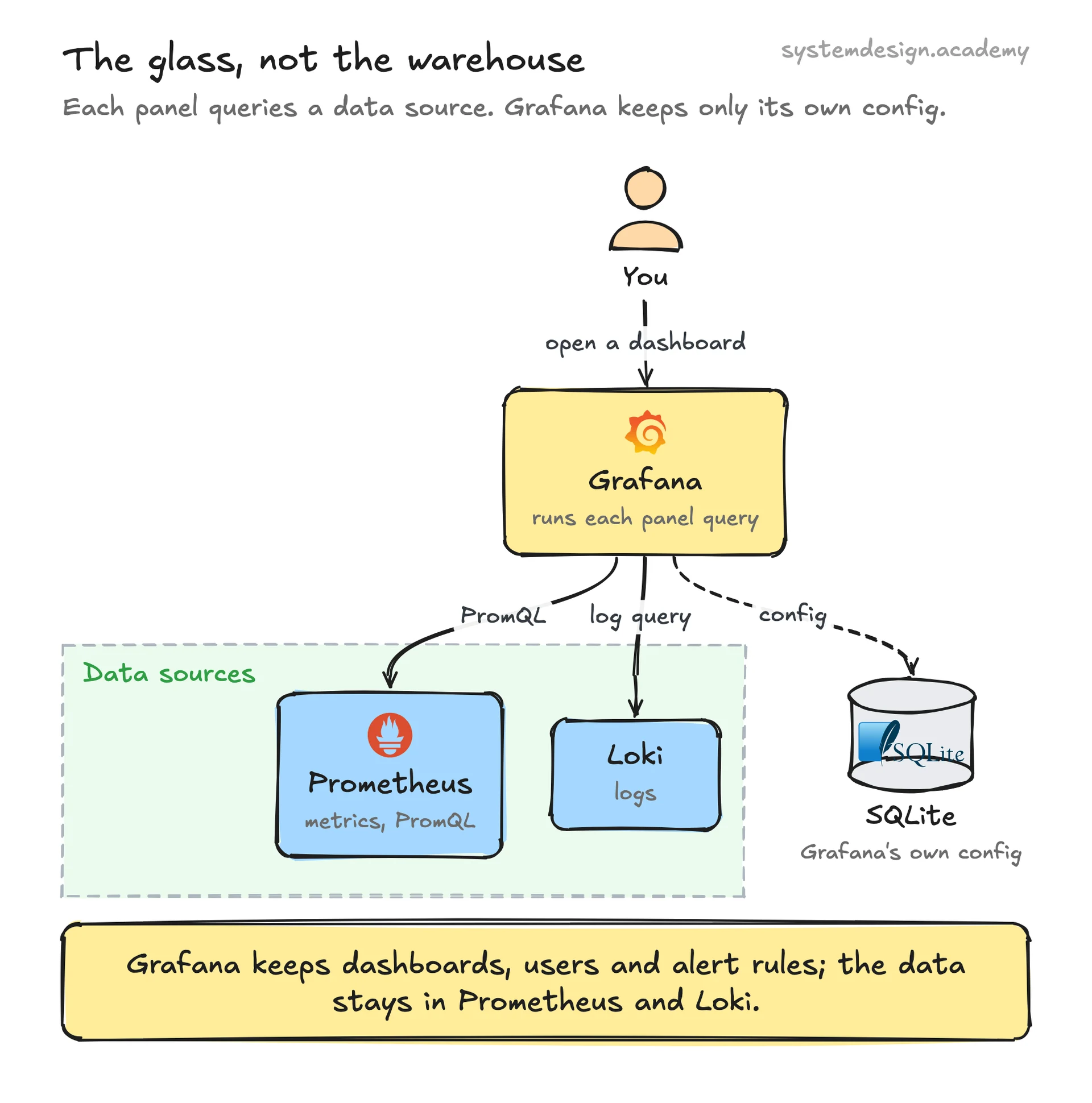
The key thing to understand is that Grafana stores almost nothing about your metrics. It keeps its own configuration (dashboards, users, alert rules, data source connections) in a small relational database, usually SQLite for single-node setups or Postgres and MySQL for production. The actual metrics and logs live in whatever backend you connected: Prometheus for metrics, Loki for logs, Tempo or Jaeger for traces, Elasticsearch, InfluxDB, CloudWatch, and dozens more.
This separation is why one Grafana instance can show CPU usage from Prometheus, application logs from Loki, and billing data from a Postgres database all on the same screen. Grafana is the glass, not the warehouse.
How it works under the hood
When you open a dashboard, the Grafana backend takes each panel's query and the current time range, then sends a request to the matching data source plugin. For Prometheus that means a PromQL query over HTTP to the Prometheus server; for CloudWatch it is an AWS API call. The data source returns rows of timestamped values, and the frontend renders them in the browser.
Queries re-run on a refresh interval you set per dashboard, commonly 10 to 60 seconds, or on demand when you change the time range. Template variables let one dashboard serve many targets: a variable like $instance becomes a dropdown of hostnames, and the panels rewrite their queries to whatever you pick, so you reuse one dashboard for hundreds of servers.
Grafana also has its own alerting engine. Alert rules evaluate a query on a schedule, and when a condition holds (for example, error rate above 5 percent for 5 minutes), Grafana fires a notification to Slack, PagerDuty, email, or a webhook through a contact point. Alerting state is tracked in Grafana's database, separate from the metrics it watches.
When to use it and the trade-offs
Reach for Grafana when you already have a metrics or logs backend and need a flexible, shared place to visualize and alert on it. It is the default front end for Prometheus, and the Prometheus plus Grafana pairing is the most common open-source monitoring stack in the Kubernetes world. It shines when you want one pane of glass across many data sources.
The main trade-off is that Grafana is a viewer, not a collector. It will not scrape, store, or retain your data, so you still need Prometheus, Loki, or a cloud service doing the heavy lifting. If your queries are slow or your backend is undersized, Grafana dashboards feel slow, because the bottleneck is the data source, not Grafana.
Dashboards also drift. Teams accumulate hundreds of hand-built dashboards that go stale, so disciplined shops manage dashboard JSON in Git and provision it as code. Grafana supports provisioning files exactly for this. The hosted Grafana Cloud product removes the operational burden but adds per-active-series and per-user billing that can climb quickly at scale.
Where it is used in production
Prometheus users on Kubernetes
Grafana is the standard visualization layer for Prometheus, shipped together in the kube-prometheus-stack Helm chart that most clusters run.
Grafana Labs (Grafana Cloud)
The company behind Grafana runs a hosted version with managed Prometheus-compatible storage, Loki for logs, and Tempo for traces.
PayPal
Has publicly described using Grafana dashboards to monitor service health and latency across its infrastructure.
Amazon Web Services
Offers Amazon Managed Grafana, a fully hosted Grafana service that plugs into CloudWatch, X-Ray, and other AWS data sources.
Frequently asked questions
- Is Grafana a database?
- No. Grafana stores only its own settings such as dashboards, users, and alert rules in a small relational database. Your metrics and logs live in separate backends like Prometheus, Loki, or CloudWatch that Grafana queries on demand.
- What is the difference between Grafana and Prometheus?
- Prometheus collects and stores time-series metrics and answers PromQL queries. Grafana visualizes that data as dashboards and charts. Prometheus is the database and collector; Grafana is the front end. They are commonly run together.
- Can Grafana send alerts?
- Yes. Grafana has a built-in alerting engine that evaluates queries on a schedule and fires notifications to Slack, PagerDuty, email, or webhooks through contact points when a condition is met.
- Is Grafana free?
- The core Grafana software is open source under the AGPLv3 license and free to self-host. Grafana Labs also sells Grafana Cloud, a managed version, and Grafana Enterprise with extra plugins and support, both of which are paid.
- What data sources does Grafana support?
- Dozens, including Prometheus, Loki, Tempo, Elasticsearch, InfluxDB, Graphite, CloudWatch, Azure Monitor, Google Cloud Monitoring, Postgres, MySQL, and many more through official and community plugins.
Learn Grafana hands-on
This page explains the idea. The full lesson lets you step through the ring as servers join and leave, read the implementation, and check yourself with a quiz. It is one of 760+ lessons in the System Design Masterclass, from your first API call to distributed consensus. Eleven Foundation lessons are free, no signup. Lifetime access is ₹499 in India or $7.99 worldwide, one payment, no subscription.
See also
Related glossary terms you might want to look up next.
Prometheus
An open-source monitoring system that scrapes metrics endpoints, stores time-series data, and supports powerful PromQL queries. The de facto standard for Kubernetes monitoring.
Metrics
Numerical measurements collected over time that describe system behavior: request rate, error rate, latency percentiles, CPU utilization. Prometheus is the standard collector.
Observability
The ability to understand a system's internal state from its external outputs. Built on three pillars: metrics, logs, and traces.
Health Check
An endpoint or mechanism that reports whether a service is running and healthy. Load balancers use health checks to route traffic away from unhealthy instances.
Distributed Tracing
Tracking a request as it flows through multiple services in a distributed system. Each service adds its trace, creating a full picture of the request journey.
Logging
Recording discrete events with timestamps, severity levels, and context. Structured logs (JSON) are searchable; unstructured logs (plaintext) are not. Ship them to a central system.