System design interview guide
Design Google Calendar: Recurring Events, Time Zones, Free/Busy and Sync
Two courses by the author of this page:
770 lessons · 18 free to read
₹499 in India · $49 elsewhere, once
Get System DesignYou own this course
204 lessons · 10 free to read
₹999 in India · $49 elsewhere, once
Get AI EngineeringYou own this course
A calendar looks like a simple list of meetings. Then one weekly meeting has no end date, its organizer is in New York, a guest is in London, the clocks change on different Sundays in the two cities, one Monday was cancelled and another was moved. Assume 100 million people open their calendar each day. Each makes about 2 changes a day, and each change has to reach every guest's calendar, every one of their phones, and a reminder that must fire on the right minute. That is about 600 million calendar updates and 400 million reminders a day. Most of them land on the hour or the half hour.
To design Google Calendar, store each event once, on the calendar of the person who organized it. Give every guest's calendar a small row that points to that event and holds their own answer (yes, no, maybe) and their own reminders. Store a repeating meeting as one rule plus its exceptions. The rule is written in the iCalendar format from RFC 5545, for example RRULE:FREQ=WEEKLY;BYDAY=MO, which means every Monday. An exception is one changed or cancelled date. Keep the rule's start time in the organizer's time zone, such as America/New_York, and not as a UTC time. UTC is the world reference clock that never changes for summer time, so a meeting stored in UTC moves by an hour for local people twice a year. Turn the rule into real dates (instances) only for the time window someone asks for. Also keep the instances for the next 12 months or so in an index, because free/busy searches and reminders need fast lookups by time. Free/busy means the list of times a person is busy. Find a free slot by merging everyone's busy times and looking at the gaps. Send each change to every guest's calendar through a queue, so one slow guest never blocks the organizer. Reminders go into a delayed-job scheduler: a store of jobs sorted by the minute they must fire. Phones stay in sync with a sync token: a bookmark into a per-calendar list of changes, so a phone downloads only what changed since its last visit. Split the data across machines by calendar id.

Where it shows up
This question is asked in system design interviews for backend and full-stack roles. It comes in several forms: design Google Calendar, design a calendar system, design a meeting scheduler, or design a room booking system. We do not list companies here, because we could not find a public source we trust that says which companies ask it.
Spec sheetGoogle Calendar
- 01Users
- 300 million with calendars, 100 million active a day
- 02Changes (writes)
- about 2,300 a second, 6,900 at peak
- 03Calendar updates after fan-out
- about 6,900 a second, 20,800 at peak
- 04Sync requests
- about 69,000 a second, 208,000 at peak
worked through below, with the maths
Why this question is asked
The question looks easy, so it shows quickly who has thought about time. A weak answer stores every meeting as a row with a start and an end in UTC and stops there. That answer breaks on the first repeating meeting with no end date, on the first change to summer time, and on the first moved or cancelled week. A strong answer finds the four real problems on its own. First, how to store a series that never ends. Second, why a repeating meeting must be stored in a local time zone. Third, how one event appears on many people's calendars without many copies drifting apart. Fourth, how millions of phones learn about a change without downloading everything again. On top of that the interviewer can test classic skills: interval merging for free/busy, a delayed-job scheduler for reminders, fan-out with back-pressure for big meetings, and sharding by a key that keeps one person's week on one machine. There is also a public standard to reason from, iCalendar, so a candidate who knows RRULE, EXDATE and RECURRENCE-ID stands out.
This page is the free part.
The course goes deeper on the Google Calendar design
₹499 in India$49 everywhere elseonce, for the whole course
The System Design course covers the Google Calendar design across a run of lessons, not one page. These 4 alone are about 72 minutes of step-by-step reading, every one with a quiz.
- Delayed Queue
Schedule messages for future delivery, process them later, not now.
- Push Notifications
Deliver messages to users even when they're not actively using your app.
- Fan-Out/Fan-In
The fan-out/fan-in pattern splits work across parallel workers and combines the results. Includes a search across shards example and a sequence view.
- Idempotent Consumer
Design consumers that produce the same result whether a message is processed once or ten times.
all part of
System Design Masterclass
770 lessons · about 283 hours · 18 free to read
₹499in India, by UPI
$49everywhere else, by PayPal
The concepts were explained in a clear and structured way, with practical examples that made even complex system design topics easier to understand. I especially liked the focus on real-world architecture, scalability, trade-offs. The content was well designed, engaging, and highly useful for anyone looking to strengthen their system design skills. Highly recommended for software engineers preparing for system design interviews or wanting to build a stronger foundation in designing scalable systems.
You own this course
Continue with Delayed Queuepay once,
yours for life
Live from the course bench
Before you design Google Calendar, try the questions it rests on.
Real interview questions, live diagrams and measured lab results, pulled at random from the lessons. A new set every time you come back.

Requirements
Always clarify these in the first 5 minutes of the interview. Do not start drawing boxes until both lists are agreed.
Functional requirements
- Create, edit and delete events with a title, start, end, time zone, place and description
- Create repeating events (daily, weekly, monthly, yearly, every second Tuesday, and so on), with or without an end date
- Change or cancel one date of a series, the whole series, or this date and every date after it
- Invite guests. Each guest sees the event on their own calendar and answers yes, no or maybe
- Show a day, week or month view of one or more calendars in the viewer's own time zone
- Answer free/busy questions: when are these 8 people all free next week for 30 minutes?
- Warn about a clash with another event; refuse a double booking of a meeting room
- Send reminders a chosen number of minutes before an event, by phone notification or email
- Keep every device (phones, laptops, other calendar apps) in sync, quickly and without downloading everything
- Share a calendar with other people, with read or edit rights
Non-functional requirements
- A saved event is never lost. The organizer's write is the source of truth
- Opening a week view answers in well under a second, from one machine where possible
- Guests see a change within seconds. A short delay is fine; a lost update is not
- A reminder fires within about a minute of its time, even when millions fire in one minute
- Recurring meetings keep their local time when summer time starts or ends
- A meeting room can never be booked twice for overlapping times
- One huge meeting or one very popular shared calendar must not slow down everyone else
Back-of-envelope scale estimates
Show your math. Pulling numbers from thin air signals you have not thought about the load.
Users
300 million with calendars, 100 million active a day
Google has not published Calendar's user counts, so these are interview assumptions. Say them to the interviewer before you use them. Everything below is built from them.
Changes (writes)
about 2,300 a second, 6,900 at peak
Each active user makes about 2 changes a day: create an event, move one, answer an invite. 100,000,000 x 2 = 200 million changes a day. 200,000,000 / 86,400 seconds = 2,315 a second on average. Work days start in waves, so plan for a peak of 3 times that: about 6,900 a second.
Calendar updates after fan-out
about 6,900 a second, 20,800 at peak
Assume an event has 2 guests on average, so one change must update 3 calendars: the organizer's and two guests'. 200 million x 3 = 600 million calendar updates a day. 600,000,000 / 86,400 = 6,944 a second, and 3 times that at peak is 20,833 a second. Each update also writes a line to that calendar's change log, which is what phones sync from.
Sync requests
about 69,000 a second, 208,000 at peak
Assume each active user has 3 devices and each device asks 'what changed?' 20 times a day. 100,000,000 x 3 x 20 = 6 billion requests a day. 6,000,000,000 / 86,400 = 69,444 a second; at a 3 times peak, 208,333 a second. Most answers are 'nothing changed', which costs one small read, so reads are many but cheap.
Reminders
about 4,600 a second on average, 133,000 a second in the busiest minute
Assume each active user gets 4 reminders a day: 100,000,000 x 4 = 400 million a day, or 400,000,000 / 86,400 = 4,630 a second on average. But meetings start on the hour or the half hour, so reminders bunch up. If the busiest minute holds 2% of a day's reminders, that is 8,000,000 in 60 seconds, or 133,333 a second: almost 29 times the average. The scheduler is sized for that minute, not for the average.
Storage
about 330 TB per copy, about 1 PB with 3 copies
Assume each user has 500 event records over the years. A repeating series counts as one record plus one per exception. 300,000,000 x 500 = 150 billion events. At about 2 KB each (title, description, rule, guest list): 150 billion x 2 KB = 300 TB. Guest rows: 150 billion x 2 guests = 300 billion rows x 100 bytes = 30 TB. Total 330 TB. Three copies on three machines: 990 TB, about 1 PB.
Instance index for the next 12 months
312 billion rows, about 31 TB
Assume each user's calendar shows 20 live weekly series (their own and the ones they were invited to). 300,000,000 x 20 = 6 billion series on calendars. Expanding each into 52 weekly dates for the next year gives 6 billion x 52 = 312 billion rows. At about 100 bytes each (calendar id, start, end, event id, busy or free) that is 31.2 TB. Storing the rule alone is 52 times fewer rows, and a series with no end date cannot be stored as rows at all. That is why the rule is the truth and the index is only a window.
High-level architecture
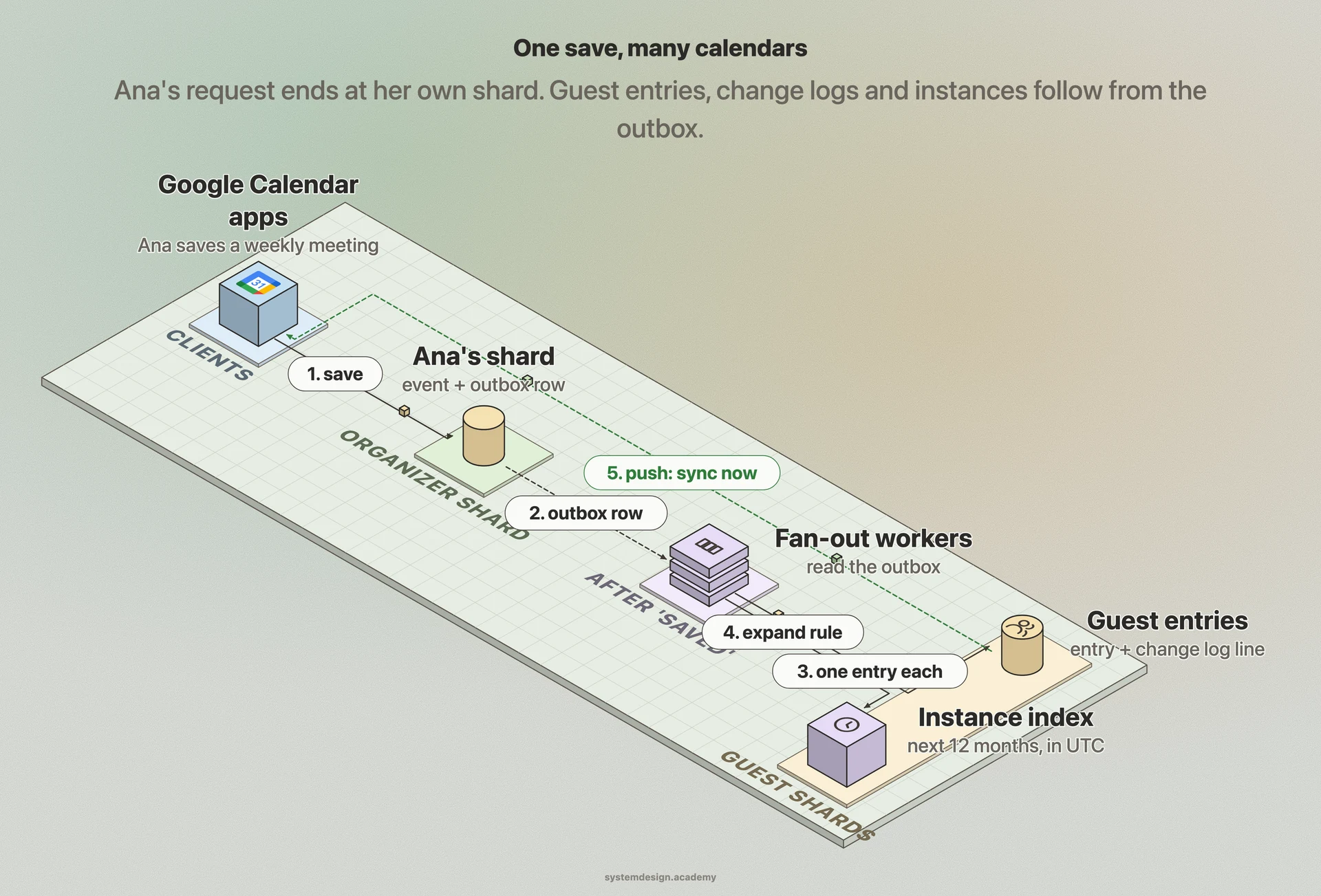
Draw the clients first: the web app, phone apps and other calendar apps that speak CalDAV (RFC 4791, the open standard for reading and writing calendars over the web). They call an API layer that checks who the user is and what they may see. Behind it sit five services. The event service owns writes. It saves the event on the organizer's shard, a shard being one slice of the database on its own machines. In that database transaction (a group of writes that either all happen or none do) it writes an outbox row: a note that says 'this change still has to be sent out'. Because both are written together, a crash can never save the event and forget to tell the guests. Fan-out workers read the outbox. For each guest they update that guest's calendar entry on the guest's own shard, append a line to the guest calendar's change log, and expand the event into the instance index if it repeats. The instance index holds real start and end times in UTC for the next 12 months or so. It serves the free/busy service, which merges busy times to find gaps. A reminder planner also reads the index and puts reminder jobs into a delayed-job scheduler, where jobs are sorted by the minute they must fire. When a job comes due, the notification service sends a phone notification or an email. For syncing, every calendar has a change log with a growing sequence number. A phone keeps the last number it saw as its sync token and asks only for what came after. A push channel tells the phone that something changed, so it does not have to poll all the time. All per-calendar data (entries, change log, instance index) lives on one shard chosen by a hash of the calendar id (a number computed from the id), so one person's week is one read on one machine.
In a real interview, sketch this on the whiteboard before diving into any single box.
One weekly meeting, from 'Save' to a reminder on a guest's phone
Ana, in New York, creates a weekly Monday 9:00 meeting and invites Ben and Chen. Follow it through the system. This is a good order to explain it in an interview.
- 1
Saved
The event service writes one event row on Ana's shard: title, guests, start 2026-10-19 09:00 in America/New_York, and the rule FREQ=WEEKLY;BYDAY=MO. In that transaction it writes an outbox row and a line in Ana's change log. Ana gets 'saved' back.
- 2
Fanned out
A fan-out worker reads the outbox row. It writes a calendar entry for Ben on Ben's shard and one for Chen on Chen's shard. Each entry has the event id, a copy of the title and times, and the guest's answer, set to 'needs action'. Each write also appends a line to that guest calendar's change log.
- 3
Expanded
The worker turns the rule into real dates for the next 12 months: 52 Mondays, each converted from 9:00 New York time to UTC. These rows go into the instance index on each of the three calendars' shards.
- 4
Reminders planned
The reminder planner sees new instances starting in the next day and adds jobs to the delayed-job scheduler, for example 'tell Ben at 08:50 New York time on Monday'. Later Mondays are planned as they come closer.
- 5
Phones told
The push service tells Ben's devices that his calendar changed. The message carries no event data. Each device asks for changes since its sync token, gets the new event, and saves the new token.
- 6
Answered
Ben taps yes. His answer is sent to the event on Ana's shard, then fanned out again, so Ana and Chen see that Ben is coming.
- 7
Reminded
At 08:50 on Monday the job comes due. The worker checks that the event still exists and has not moved, then the notification service sends Ben a phone notification.
Core components
Walk through each service. The interviewer wants to hear what each one owns, not just the names.
Event service
Owns every create, edit and delete. It writes the event on the organizer's shard together with an outbox row and a change log line, in one transaction. It increases the event's version number on each change. That number is how a guest's copy, a reminder job or a phone can tell that what it holds is out of date.
Recurrence expander
A library, used by several services, that turns a rule plus its exceptions into real dates inside a time window. It reads time zone rules from the IANA tz database (the public list of every region's clock changes), so 9:00 in New York becomes the correct UTC time on each date. It must give one answer everywhere it runs, so every service uses one version of the library and of the tz data.
Fan-out workers
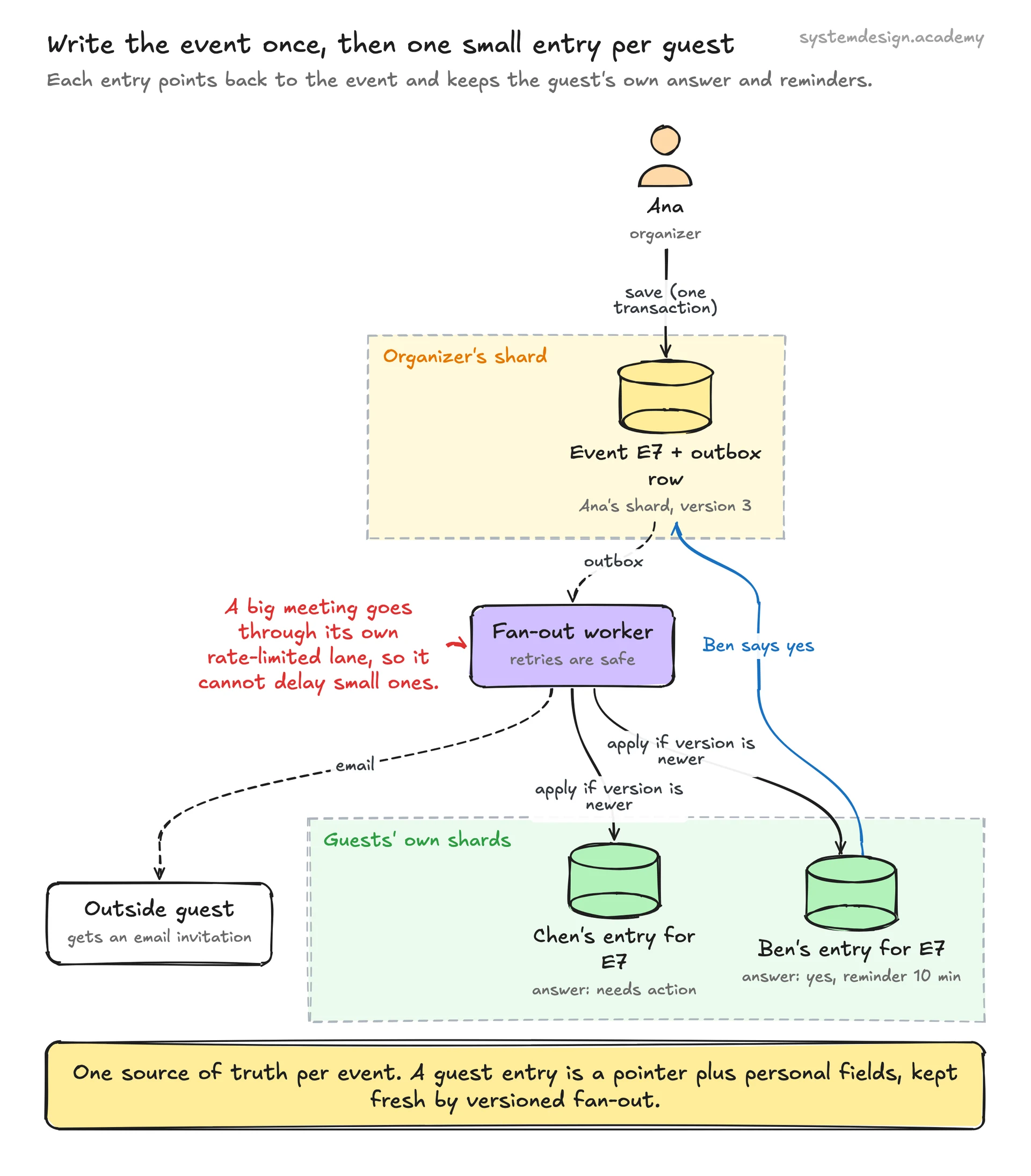
Read the outbox and copy each change to every guest's calendar entry, on the guest's own shard. Every write is idempotent: doing it twice has the effect of doing it once. They key each entry by (calendar id, event id) and only apply a change whose version is newer than the one stored. So a retry after a crash, or two changes arriving out of order, never leaves a guest with an older version.
Instance index
Rows of (calendar id, start in UTC, end in UTC, event id, original start, busy or free) for a rolling window, such as the next 12 months. It answers 'what is on this calendar between Monday and Friday?' and 'is Ben busy at 10:00?' with one range read. It is a cache, a fast copy that can be thrown away and rebuilt from the rules at any time. A daily job moves the window forward by one day for every series.
Free/busy service
Takes a list of calendars and a time range, reads each calendar's busy instances from its shard in parallel, merges them, and returns busy blocks or free gaps. It never returns titles or details, only times, so people can see when a colleague is busy without seeing what the meeting is.
Reminder planner and delayed-job scheduler
The planner turns upcoming instances into jobs keyed by the minute they must fire, only for the next day or so. The scheduler stores jobs in time buckets spread over many shards, and workers claim each minute's jobs as it arrives. The site's distributed job scheduler guide covers this part in depth.
Notification service
Sends the reminder or invitation by phone notification or email, with retries and a limit per user. It is a shared service, the subject of the notification system guide on this site.
Sync service and push channels
Serves 'what changed after token N?' from each calendar's change log, including deletions. Push channels tell devices and other servers that a calendar changed, with no data in the message, so the device then calls sync.
Data model
Pick the right store per table. Justify each choice with the access pattern, not by reflex.
events (on the organizer's shard)event_idorganizer_calendar_idical_uidtitle, description, placestart_local, end_local, time_zonerrule, exdatesversion, sequencestatus, transparencyOne row per event or per series. start_local plus time_zone (for example 2026-10-19 09:00 and America/New_York) is the truth; UTC is computed. rrule holds lines such as RRULE:FREQ=WEEKLY;BYDAY=MO. ical_uid is the iCalendar id used to match the event across calendar systems. transparency says whether the event blocks time (busy) or not (free).
event_overrides (exceptions to a series)event_idoriginal_startnew start / endchanged fieldsstatus (cancelled or confirmed)One row per changed or cancelled date. original_start is the date the rule would have produced; iCalendar calls it RECURRENCE-ID and Google's API calls it originalStartTime. It stays fixed even when the date is moved, so it is the stable key for that one occurrence.
attendeesevent_idguest (user id or email)response (needs action, yes, no, maybe)optionalis_organizerThe guest list of an event, kept with the event on the organizer's shard. Google's API uses the answers needsAction, accepted, declined and tentative.
calendar_entries (on each guest's shard)calendar_idevent_idmy_responsemy_reminderscolour, hiddencopy of title, start, end, rruleversionThe guest's view of an event. Personal fields (answer, reminders, colour) live only here. The copied title and times let a week view load from one shard; fan-out refreshes them on every change, and version stops an old update from overwriting a newer one.
instance_indexcalendar_idstart_utcend_utcevent_idoriginal_startbusyExpanded dates for a rolling window, ordered by (calendar_id, start_utc). Rebuilt from the rules whenever a series, an exception, or the tz database changes.
change_log (per calendar)calendar_idseq (grows by 1)event_idkind (upsert or delete)atEvery change to a calendar appends one line inside the transaction that makes the change, so there are no gaps. A sync token is just an encoded (calendar_id, seq). Old lines are trimmed after some weeks; a token older than the trim point gets a 'start again' answer.
reminder_jobsfire_minute_utcbucket (0..N)calendar_idevent_idoriginal_startminutes_beforeevent_versionOnly for the next day or so. Spread over N buckets per minute so no single machine owns the 9:50 rush. event_version is checked when the job fires, so a job for a meeting that has since moved does nothing.
Deep dives
These are the conversations the interviewer is steering you toward. Practice each one until you can talk through it without notes.
Recurring events: a rule plus exceptions, materialized rows, or both
A repeating meeting can be stored in two ways. The first way stores the rule. iCalendar (RFC 5545) is the open standard most calendar apps share, and it describes a series with a start time (DTSTART) and a rule (RRULE), such as FREQ=WEEKLY;BYDAY=MO for every Monday. The standard says the start time always counts as the first occurrence. A series ends with COUNT (a number of times) or UNTIL (a last date), never both, and with neither it repeats forever. A cancelled date is listed in EXDATE. A date that was changed is stored as a separate override, identified by RECURRENCE-ID: the original start time that the rule produced for it. Google's API works this way too. Its recurrence field holds RRULE, EXRULE, RDATE and EXDATE lines, and each instance carries recurringEventId (the series it belongs to) and originalStartTime, which Google says identifies the instance even if it was moved. The second way is to materialize: write one row per date. Reads become simple range scans, but a series with no end date cannot be written out, and changing the series means rewriting every row. The answer most designs reach is a hybrid. The rule and its overrides are the truth. A rolling window of expanded rows, say the next 12 months, is kept as an index for the things that need fast lookups by time: free/busy, conflict checks and reminders. Anything outside the window, such as 'show me March 2029', is expanded when someone asks. Edits come in three kinds. 'This event only' adds an override. 'All events' changes the rule and rebuilds the window. 'This and following events' is usually done by splitting the series: the old series gets an UNTIL just before the chosen date, and a new series starts on that date. iCalendar also has RANGE=THISANDFUTURE for this, but a split keeps each series simple. One trap: when a rule changes, old overrides may no longer match any date the new rule produces. Decide up front whether to drop them or keep them, and tell the user. Another trap: a moved date can move into the window you asked for from outside it, so a range read must also check overrides whose new time falls inside the window.
from datetime import datetime, timezone
from zoneinfo import ZoneInfo
from dateutil.rrule import rrulestr

NY = ZoneInfo("America/New_York")
start = datetime(2026, 10, 19, 9, 0, tzinfo=NY)        # first Monday, 9:00 in New York
rule = rrulestr("FREQ=WEEKLY;BYDAY=MO", dtstart=start)  # the stored rule
exdates = {datetime(2026, 11, 9, 9, 0, tzinfo=NY)}      # one Monday cancelled
moved = {datetime(2026, 10, 26, 9, 0, tzinfo=NY):       # one Monday moved to 11:00
         datetime(2026, 10, 26, 11, 0, tzinfo=NY)}

lo = datetime(2026, 10, 19, tzinfo=timezone.utc)        # the window asked for
hi = datetime(2026, 11, 17, tzinfo=timezone.utc)
for t in rule.between(lo, hi, inc=True):
    if t in exdates:
        continue
    t = moved.get(t, t)
    print(t.strftime("%b %d %H:%M %Z"), "=", t.astimezone(timezone.utc).strftime("%H:%M UTC"))

# Oct 19 09:00 EDT = 13:00 UTC
# Oct 26 11:00 EDT = 15:00 UTC
# Nov 02 09:00 EST = 14:00 UTC
# Nov 16 09:00 EST = 14:00 UTC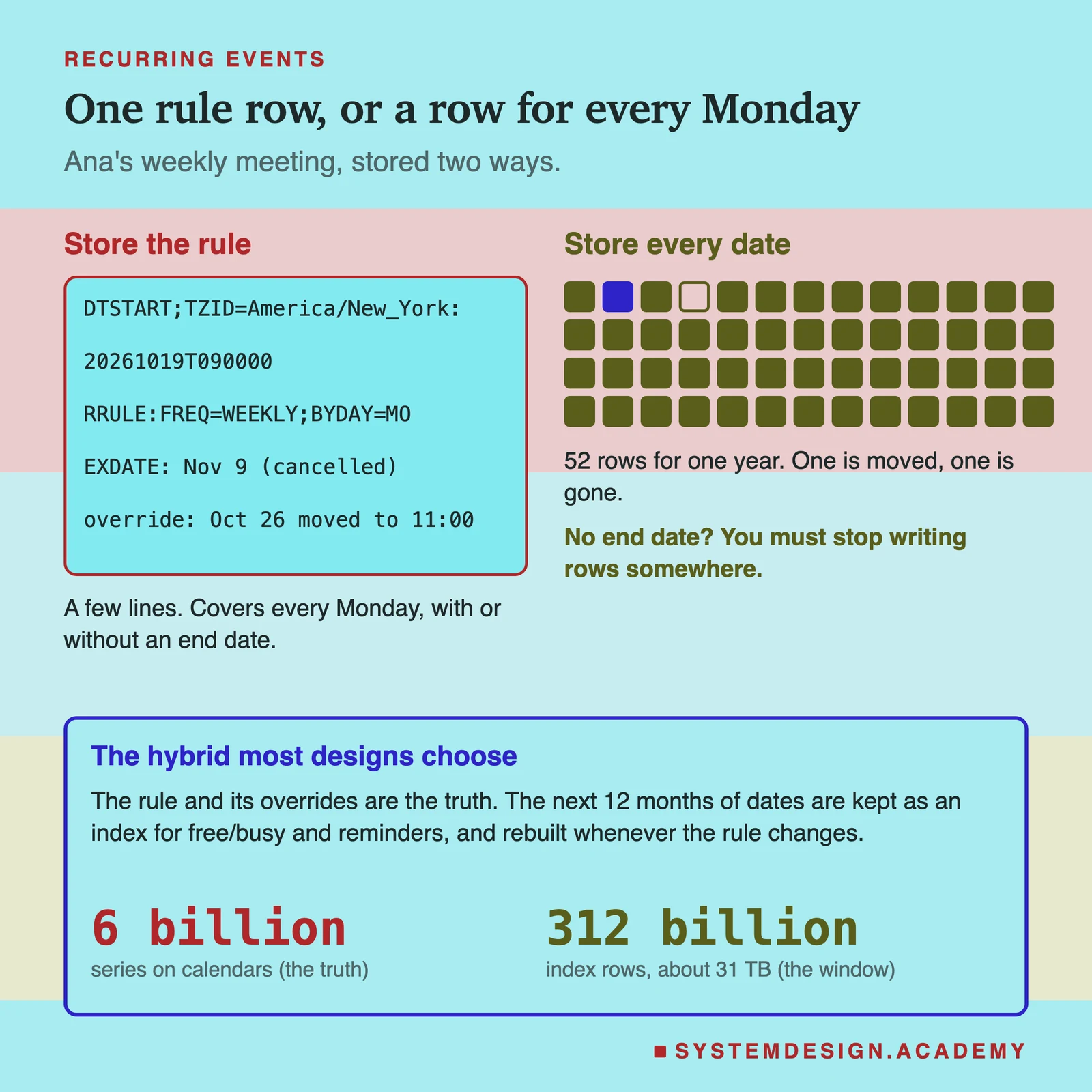
Time zones and daylight saving: why UTC alone breaks repeating meetings
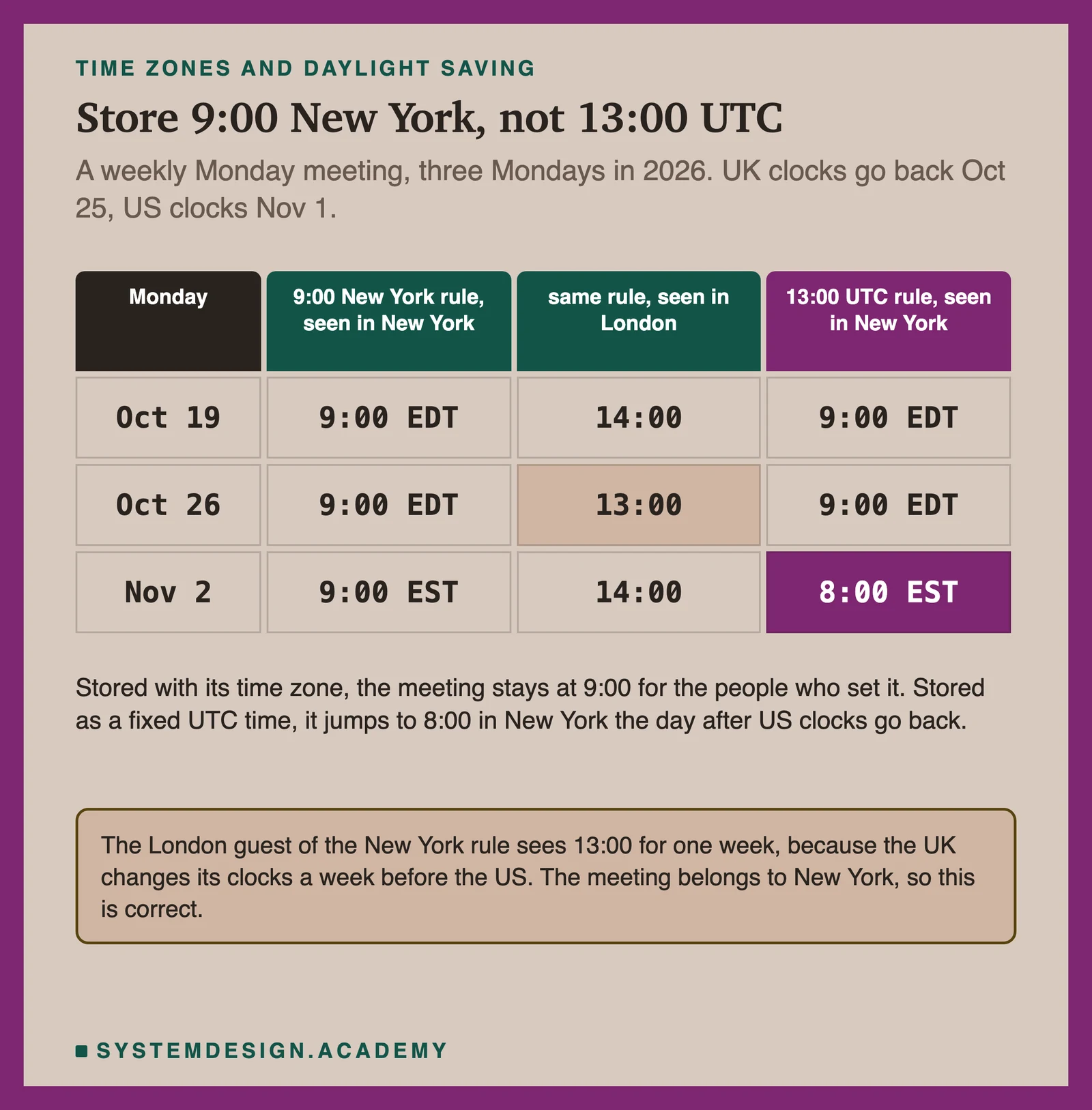
UTC (Coordinated Universal Time) is the world's reference clock. It never jumps forward or back. Storing a single meeting in UTC is fine, because that meeting happens at one moment. A repeating meeting is different, because people agree on a local time: 9:00 every Monday in New York. Daylight saving time (DST), also called summer time, moves local clocks by an hour twice a year, so 9:00 in New York is 13:00 UTC in summer and 14:00 UTC in winter. New York's summer time is called EDT (UTC minus 4 hours) and its winter time EST (UTC minus 5 hours). In 2026, US clocks go back on Sunday November 1. If you store the series as '13:00 UTC every Monday', the meeting shows at 8:00 in New York from November 2. So the rule must be stored as a local time plus a time zone name, such as America/New_York, and turned into UTC date by date. RFC 5545 does this with DTSTART;TZID=America/New_York, and its own example of a daily 9:00 meeting reads 9:00 AM EDT in October and 9:00 AM EST from October 26, 1997. Google's API puts it in plain words: for recurring events the time zone is required, and it is the zone in which the recurrence is expanded. Use the organizer's zone, because the meeting belongs to the organizer's working day. Guests in other countries will see it move. A London guest of the New York meeting sees 14:00, then 13:00 for one week (the UK changes its clocks on October 25, 2026, a week before the US), then 14:00 again. That is correct behaviour, and your interviewer may ask about it. Three more details matter. First, some local times do not exist: on the night clocks jump forward, 2:30 AM never happens. RFC 5545 says a recurrence instance that falls on a nonexistent local time, or on an impossible date such as February 30, must be ignored and not counted. Second, the rules change. The IANA tz database, the public list of every region's offsets and clock changes, has no fixed release schedule and usually publishes a new release every few months, and governments sometimes change their rules with little notice. When new tz data arrives, rebuild the instance index and the reminder jobs for the affected zones. Third, all-day events, like a birthday, have no time zone at all. They are a date, and must stay on that date wherever the viewer is.
Free/busy queries and conflict detection
A free/busy query asks: when is each of these people busy between two times? Google's API has this as one call, freebusy.query. It takes timeMin, timeMax and a list of calendars, and returns, for each calendar, a list of busy periods with a start and an end. Only times are returned, never titles. The call can expand a group into its members, up to 100 (groupExpansionMax), and look up at most 50 calendars (calendarExpansionMax). iCalendar has a matching component, VFREEBUSY. The server answers it from the instance index. For each calendar it reads the instances in the range that count as busy: the event blocks time (Google's transparency field is opaque, shown as Busy), the event is not cancelled, and the person has not declined. Each calendar is one range read on one shard (a read of the rows between two keys, here two times), so 8 people means 8 reads in parallel. To find a slot for everyone, put all the busy periods in one list, sort them by start, and join any that touch or overlap. The gaps between the joined blocks, inside working hours, are the free slots. Sorting a few hundred periods takes almost no time. Conflict detection uses the index too. Two periods overlap when each one starts before the other ends: a.start < b.end and b.start < a.end. For a person, a clash is only a warning, because people do double-book on purpose. A meeting room is different: it must never be booked twice. Treat each room as a calendar of its own and do the check and the insert in one transaction on the room's shard, locking the room's row first. Two people trying to book one room at one moment are then served one after the other, and the second one sees the clash.
def merge(busy):                      # busy: list of (start, end) in minutes
    out = []
    for s, e in sorted(busy):
        if out and s <= out[-1][1]:   # touches or overlaps the last block
            out[-1][1] = max(out[-1][1], e)
        else:
            out.append([s, e])
    return out

def free_slots(busy, day_start, day_end, need):
    slots, t = [], day_start
    for s, e in merge(busy):
        if s - t >= need:
            slots.append((t, s))
        t = max(t, e)
    if day_end - t >= need:
        slots.append((t, day_end))
    return slots

ana  = [(540, 600), (660, 720)]       # 9:00-10:00, 11:00-12:00
ben  = [(570, 630), (780, 840)]       # 9:30-10:30, 13:00-14:00
chen = [(720, 750)]                   # 12:00-12:30
print(free_slots(ana + ben + chen, 540, 1020, 30))
# [(630, 660), (750, 780), (840, 1020)]  -> 10:30-11:00, 12:30-13:00, 14:00-17:00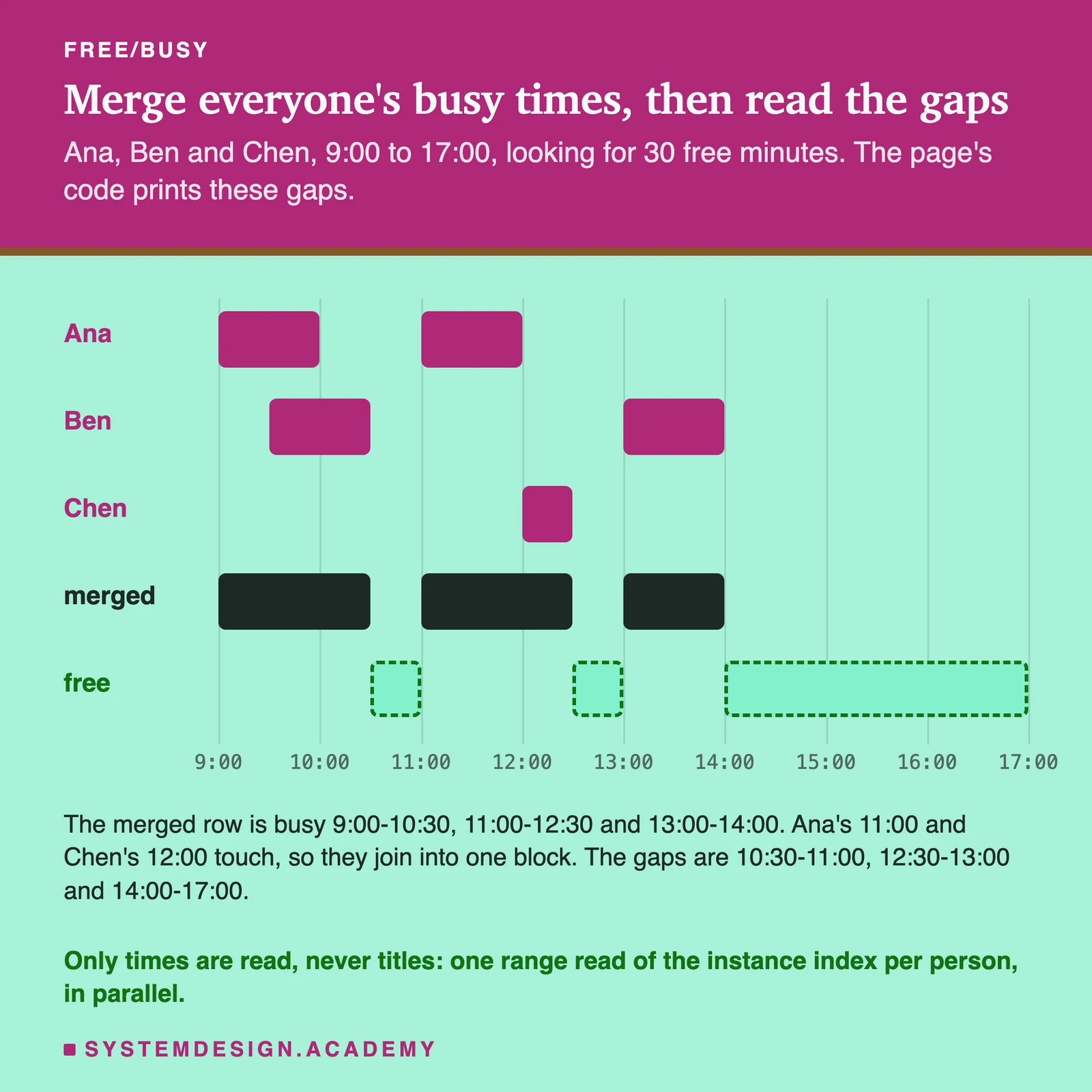
Invitations and attendee fan-out: one event, many calendars
When Ana invites Ben, the meeting has to appear on Ben's calendar. Google's guide says that an event you create appears on the primary calendars of all the guests you included, with one event ID shared by every copy. There are two ways to build that. One way gives each guest a full, separate copy. Reads are easy, but copies drift apart, and every edit must rewrite every copy in full. The other way keeps one event on the organizer's shard and gives each guest a small calendar entry that points to it. The entry holds what is personal to the guest: their answer, their reminders, their colour. To keep a week view fast, it also holds a copy of the title and times. That copy is a cache, refreshed on every change. The change is spread by fan-out: the event service writes the event and an outbox row in one transaction, and workers then update each guest's entry and change log. Fan-out is asynchronous, which means it runs after Ana's request has returned. So Ben may see the change a second or two later, which is fine for a calendar. Every fan-out write carries the event's version number, and an entry only accepts a newer version. A retried message or two changes that arrive out of order then cannot leave Ben with an old title. Answers travel the other way: Ben's 'yes' updates the attendee row on Ana's shard, which bumps the version and fans out again, so Chen sees Ben's answer too. iCalendar has a field for this called SEQUENCE: the organizer increases it on each significant change, and an answer names the sequence it refers to, so an answer to an old version can be spotted. Guests outside the system, such as a person on another email provider, get an email invitation instead of an entry. Google's API sends these when sendUpdates is set to all or externalOnly. Big meetings need care. A company meeting with 10,000 guests is 10,000 entry writes for every edit. Send them through a queue with a rate limit, so one big meeting fills its own lane and does not delay everyone else's small ones. That is back-pressure: the system slows the producer down when consumers fall behind. Google also caps abuse: its Workspace limits say a user who sends about 10,000 invitations to people outside their domain in a short period gets throttled.
Reminders at scale: a delayed-job scheduler
A reminder is a job that must run at a set time in the future: 'tell Ben at 08:50'. Google lets each event override the calendar's default reminders with up to 5 of its own, from 0 to 40,320 minutes (4 weeks) before the start, sent as a popup or an email. Reminders are personal, so they belong to the guest's entry, not to the event. A system with 400 million reminders a day cannot scan every event every minute. It needs a delayed-job scheduler, the pattern in the site's distributed job scheduler guide. A planner turns upcoming instances into jobs, but only for a short horizon such as the next 24 hours. Planning a year ahead would mean replanning a year of jobs every time a series changes. A sweep job runs every hour and plans the next slice. Each job goes into a time bucket keyed by the UTC minute it fires and by a bucket number from 0 to N, so the 08:50 rush is spread over N partitions and N workers. Reminders bunch hard on the hour and half hour: in our estimate the busiest minute runs at about 133,000 a second against an average of 4,600, so the scheduler is sized for that minute. When a minute arrives, workers claim its buckets, and each claimed job is checked before anything is sent. Does the event still exist? Is the version unchanged since the job was planned? Did Ben decline? If anything changed, the job is dropped and the planner makes a fresh one. This check at fire time is much simpler than hunting down and deleting every old job each time an event moves. Jobs may run twice after a worker crash, so the send is made idempotent with a key such as (calendar, event, original start, minutes before), and the notification service skips a key it has already sent. The course lesson on the Delayed Queue pattern teaches this structure on its own.
WITH due AS (
  SELECT job_id
  FROM reminder_jobs
  WHERE bucket = $1
    AND fire_minute_utc <= now()
    AND state = 'planned'
  ORDER BY fire_minute_utc
  LIMIT 500
  FOR UPDATE SKIP LOCKED
)
UPDATE reminder_jobs r
SET state = 'claimed', claimed_at = now()
FROM due
WHERE r.job_id = due.job_id
RETURNING r.job_id, r.calendar_id, r.event_id,
          r.original_start, r.event_version;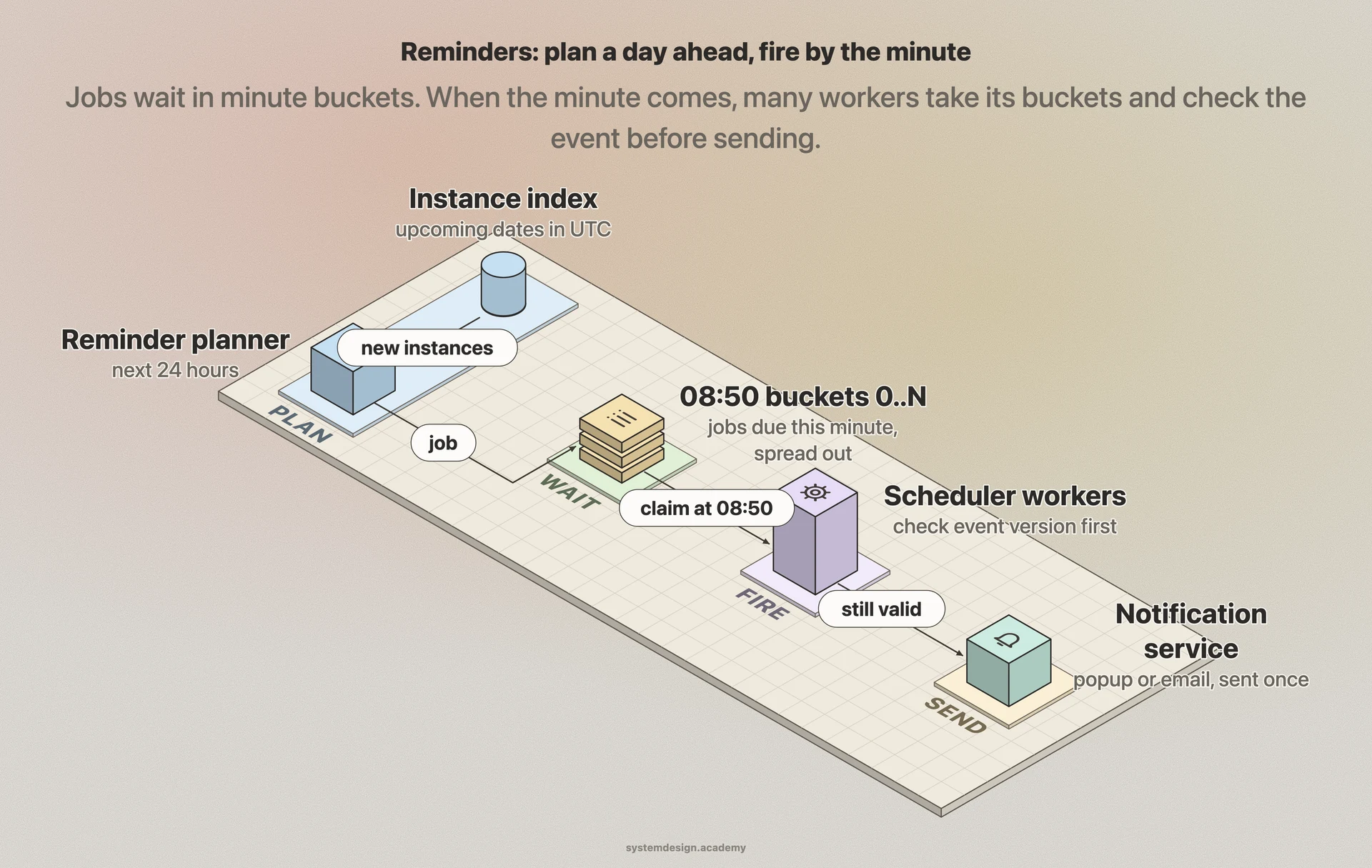
Incremental sync: change logs and sync tokens
A phone keeps a copy of the calendar so it works offline. The question is how it learns what changed without downloading everything again. Google's answer is the sync token. The first time, the phone lists everything and gets a nextSyncToken on the last page. Next time it sends that token and gets only the events changed since then. Google's guide says the result always includes deleted entries, so the phone can remove them too. If the token has expired, the server answers 410 Gone, and the phone must wipe its copy and do a full sync. The server side of this is a change log per calendar. Every change to a calendar appends a line with a sequence number one higher than the last, inside the transaction that makes the change. A sync token is an encoded (calendar id, sequence number). 'Changes after 41' is one range read on one shard, ordered by sequence, a page at a time. Only the newest line per event needs to be sent, and a deleted event is sent as a tombstone: a marker that says 'this event is gone'. The log cannot grow forever, so lines older than some weeks are trimmed, and a token older than the trim point gets 410. A token also has to stay meaningful. That is why Google does not let a sync request add filters such as timeMin, timeMax or a search query: a token that meant 'all changes after 41' cannot quietly start to mean 'some changes'. Polling 20 times a day per device is wasteful, so there are push channels as well. In Google's API, a watch request registers a web address, and a POST (a web request that carries data to that address) is sent to it when the calendar changes. The message has no body and no details; the receiver must call sync to learn what changed. Channels expire (the default lifetime is 604,800 seconds, 7 days) and must be renewed. Google also warns that notifications are not 100% reliable and a small share is dropped. So a good client does both: sync when pushed, and sync on a slow timer anyway.
SELECT DISTINCT ON (event_id) event_id, seq, kind
FROM change_log
WHERE calendar_id = $1
  AND seq > $2            -- the sequence number inside the sync token
  AND seq <= $3           -- upper bound fixed on the first page
ORDER BY event_id, seq DESC;
-- new token = (calendar_id, $3); if $2 is older than the trim point: 410 Gone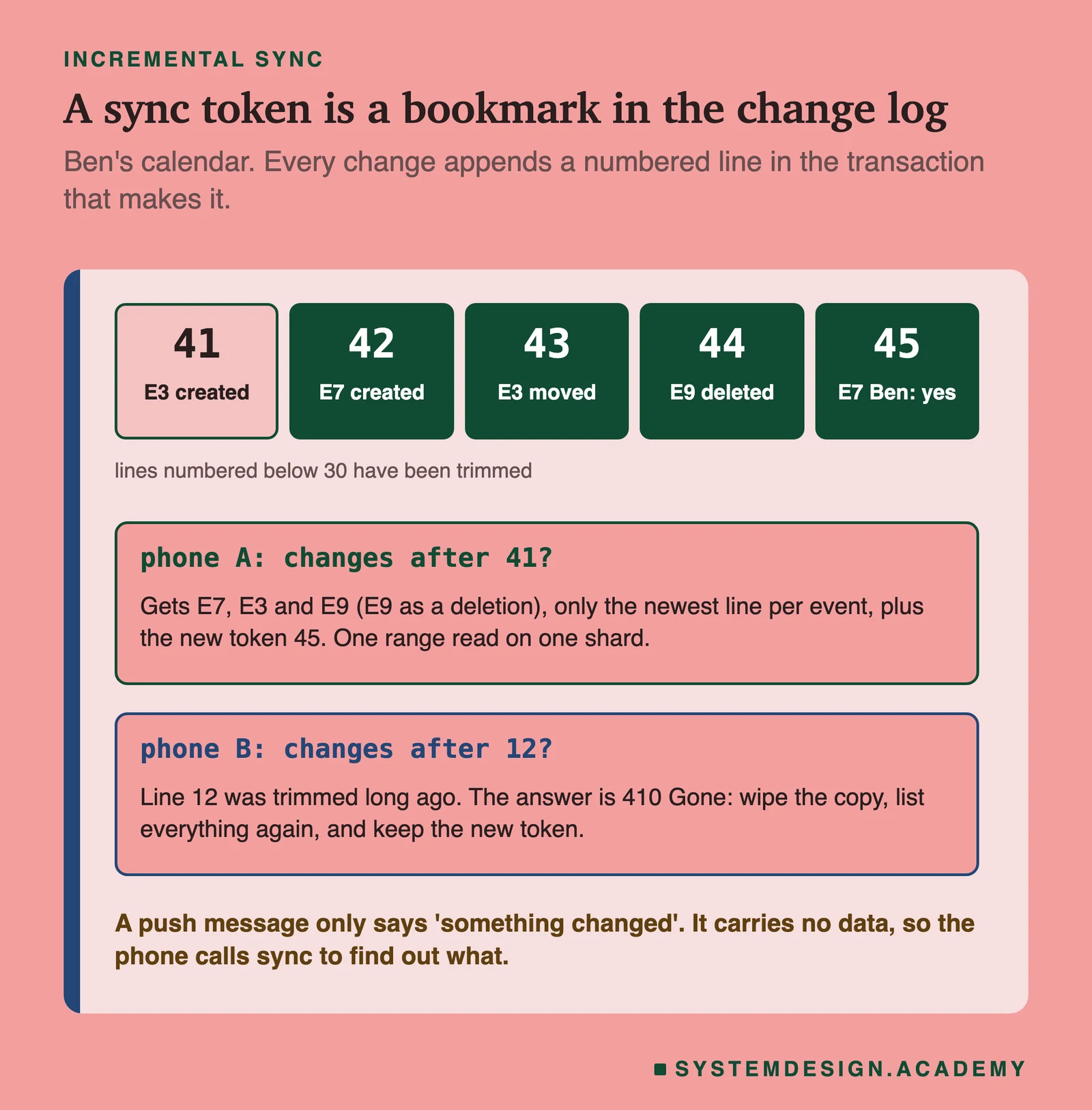
Sharding, hot calendars and huge meetings
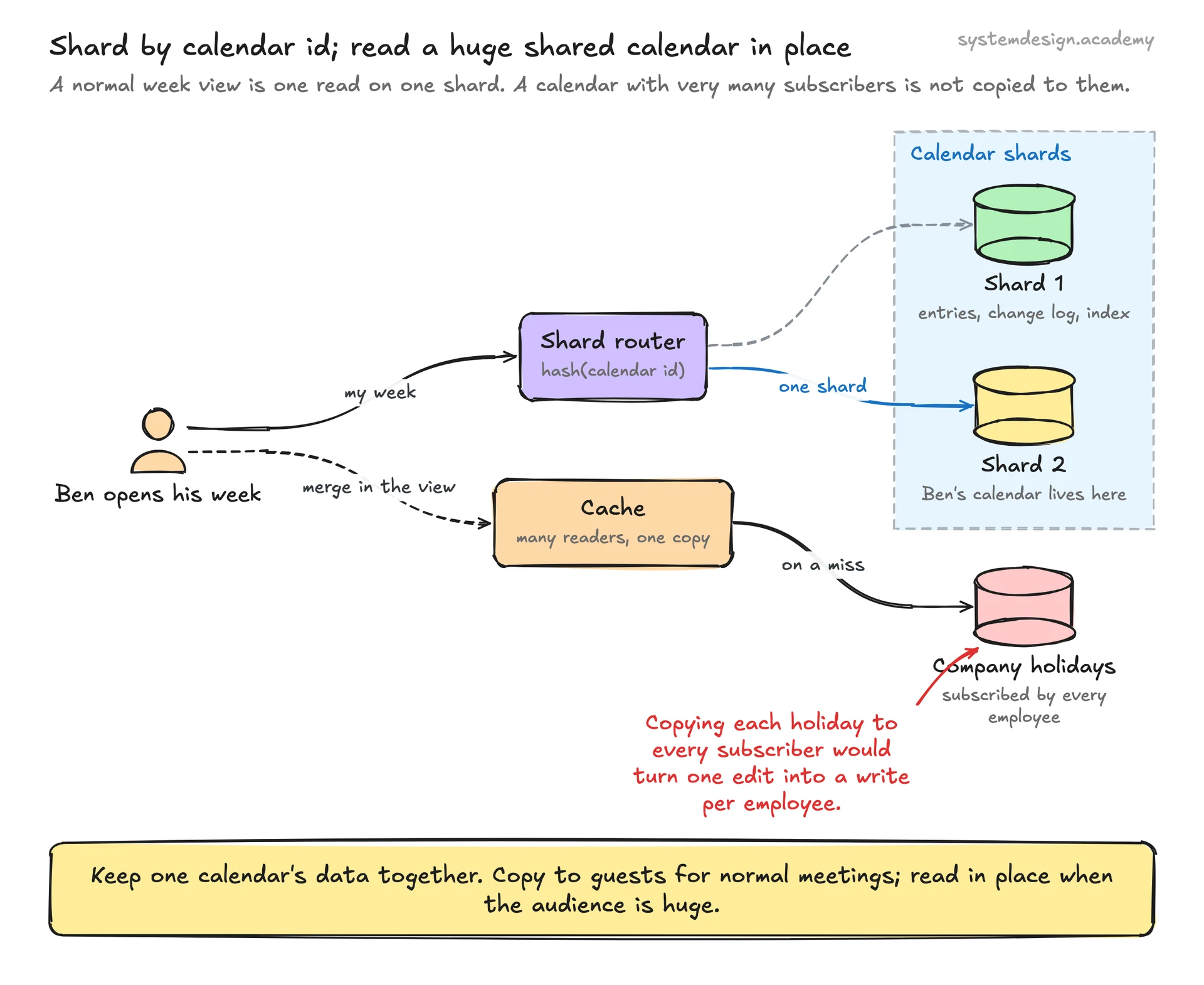
Sharding means splitting the data across many machines, each holding a slice. The shard key is the value that decides which slice a row goes to. Here the key is the calendar id. Everything about one calendar sits together: its entries, its change log and its instance index. The most common reads, 'show my week' and 'what changed on my calendar?', then touch one shard. Hash the calendar id with consistent hashing, a way of mapping keys to machines so that adding a machine moves only a small share of keys. The event row itself lives on the organizer's calendar shard, which is why a change to Ana's meeting starts on Ana's shard and fans out to the others. Free/busy for 8 people is 8 shards read in parallel, which is fine at that size, and it is one reason Google caps a free/busy call at 50 calendars. Two shapes break the simple plan. The first is a calendar with a very large number of readers, such as a company holiday calendar that every employee subscribes to. Copying each holiday into every subscriber's entries would turn one edit into a huge number of writes. So a subscribed calendar is read in place: the client merges it into the view, and a cache in front of its shard serves the many reads. Social feeds face a similar choice for accounts with millions of followers. The second is a meeting with thousands of guests, handled by a rate-limited fan-out lane as described in the invitations section. Also watch for skew in time: on a Monday morning, every time zone's working day starts within a few hours, so reads and writes surge together. Size for the 3 times peak, and keep the expensive work, fan-out and expansion, in queues that can fall a little behind without anyone losing data.
Trade-offs to discuss
Every senior interviewer expects you to surface at least 3 of these. Pick the decisions, state the alternatives, and justify your choice.
Store the rule, store every instance, or both
Rules are small and handle series with no end date, but every read must expand them. Rows make reads simple, but cannot hold a series that never ends and make every series edit expensive. The hybrid keeps the rule as the truth and a 12-month window of rows as an index: 52 times more rows for weekly series, but fast free/busy and reminders. Choose the hybrid and say why.
Store times in UTC, or as local time plus a time zone
UTC is right for one-off events and for the index, because it sorts and compares simply. For a repeating series, UTC alone moves the meeting by an hour for local people when clocks change. Store the series in the organizer's local time and zone, and compute UTC per date. The price is that tz data updates force a rebuild of the index and reminders.
One event plus small guest entries, or a full copy per guest
Full copies make each guest's reads trivial but drift apart and make every edit a full rewrite of every copy. One event plus small entries keeps one source of truth and lets personal fields live with the guest. The copied title and times in each entry are a cache, kept fresh by versioned fan-out.
Fan out at write time, or read the organizer's event at read time
Fan-out at write time makes the week view a one-shard read and costs extra writes per guest. Reading at view time saves writes but turns every week view into reads on many organizers' shards. Fan out for normal meetings; read in place for calendars with very many subscribers.
Plan reminder jobs far ahead, or a day ahead
Planning far ahead means every series edit must find and replace many jobs. Planning a day ahead keeps the job store small and the replanning cheap, at the cost of an hourly sweep. Either way, check the event version when the job fires.
Push to devices, or let them poll
Polling is simple and always works, but wastes requests and adds delay. Push gives near-instant updates but channels expire and some messages are dropped. Use push to say 'something changed', the sync token to fetch it, and a slow poll as the safety net.
Free PDF · 18 pages
Get the free System Design Interview Cheat Sheet
The interview in seven stages, the numbers worth knowing by heart, and twelve classic systems on one page each, every line linked to the lesson it comes from.
Follow-up questions to expect
After the main design, the interviewer usually picks one part and asks more. Here is what to say.
The organizer moves one Monday of a weekly series. What changes in storage?
Add one override row keyed by the original start of that Monday, with the new times. The rule is untouched. The fan-out updates each guest's entry and change log, the index row for that Monday is replaced, and the reminder job for it no longer matches the event version, so it is dropped and replanned.
A government moves its daylight saving date with two weeks' notice. What do you do?
Roll out the new IANA tz data to every service at once, then rebuild the instance index and the reminder jobs for series in that zone. Because the rules are stored in local time with a zone name, the rules themselves need no change.
Two people book the last free slot of a meeting room at once. Who wins?
Whoever commits first. The room is a calendar on one shard; the booking locks the room's row, checks for an overlap and inserts in one transaction. The second request then sees the clash and is refused.
A phone has been off for three months. What happens when it syncs?
Its sync token points before the trimmed part of the change log, so the server answers 410 Gone. The phone deletes its copy and does a full sync, then continues with the new token.
How do you find a slot for 40 people across three time zones?
Read each person's busy instances in UTC from their shards in parallel, merge them, and look for gaps. Then keep only gaps inside the overlap of everyone's working hours, each turned into UTC from their own zone for that date.
Your users are spread over several continents. Where does the data live?
Give each calendar a home region near its owner and keep its shard there, so the owner's reads and writes stay local. Fan-out to a guest whose calendar lives in another region goes through the queue like any other guest, so the organizer never waits on a long network hop.
Why not expand recurring events on the phone only?
Phones can expand a series for display. But the server still needs instances for free/busy queries, room conflict checks and reminders, so it needs its own expander and one shared copy of the tz data.
How Google Calendar actually does it
Google has not published how Calendar stores data inside, so this page designs a system that behaves like Google Calendar's public API, and names each place the API shows the idea. Recurring events: the API stores RRULE, EXRULE, RDATE and EXDATE lines from RFC 5545, requires a time zone for a recurring event and expands the rule in it, and identifies each instance by recurringEventId and originalStartTime. events.list returns the series and its exceptions, and singleEvents=true expands them into instances instead. Guests: an event appears on the primary calendars of all its guests with one shared event ID, answers are needsAction, accepted, declined or tentative, and sendUpdates controls the email to guests. Reminders: up to 5 per event, 0 to 40,320 minutes ahead, by popup or email. Free/busy: freebusy.query returns only busy periods and caps groups at 100 members and calls at 50 calendars. Sync: a nextSyncToken on the last page, deleted entries always included, a restricted set of filters, and 410 for an expired token. Push: watch channels with empty messages, a default lifetime of 7 days, and a warning that some messages are dropped. Limits: the API allows 10,000 requests per minute per project and 600 per minute per user per project, and Google Workspace throttles a user after about 10,000 invitations to outside guests or more than 100,000 new events in a short period. The open standards describe these ideas in their own terms. RFC 5545 defines RRULE, EXDATE, RECURRENCE-ID, SEQUENCE and VFREEBUSY, and its examples use America/New_York to show a 9:00 meeting moving from EDT to EST. RFC 4791, CalDAV, says that all parts of a series with one UID (the event's unique id) must be stored in one calendar object, and gives clients a choice: ask the server to expand a series into instances for a time range, or receive the series and its overrides. The IANA tz database holds the history of every region's offsets and clock changes and ships a new release every few months.
Sources
- RFC 5545: iCalendar (RRULE, EXDATE, RECURRENCE-ID, SEQUENCE, VFREEBUSY)
- RFC 4791: CalDAV, calendaring extensions to WebDAV
- Google Calendar API: Events resource
- Google Calendar API: Recurring events
- Google Calendar API: Create events (guests and sendUpdates)
- Google Calendar API: events.list (singleEvents, syncToken)
- Google Calendar API: events.instances
- Google Calendar API: Synchronize resources efficiently (sync tokens)
- Google Calendar API: Push notifications
- Google Calendar API: events.watch
- Google Calendar API: freebusy.query
- Google Calendar API: Usage limits
- Google Workspace: Avoid Calendar use limits
- IANA: Sources for time zone and daylight saving time data
Lessons to study before this interview
If any of these topics are fuzzy, the interviewer will catch it. Each lesson is 15 to 60 minutes with diagrams, code, and a quiz.
Delayed Queue
intermediate / messaging event systems
Push Notifications
intermediate / messaging event systems
Fan-Out/Fan-In
intermediate / messaging event systems
Idempotent Consumer
intermediate / messaging event systems
Transactional Outbox Pattern
intermediate / messaging event systems
Webhooks
intermediate / messaging event systems
Change Data Capture (CDC)
intermediate / data replication distribution
Consistent Hashing
intermediate / data replication distribution
Database Sharding
foundation / database fundamentals
Database Denormalization
foundation / database fundamentals
Tombstoning
foundation / database fundamentals
Exactly-Once Semantics
advanced / stream batch processing
Design a Distributed Task Scheduler
capstone / capstone
Design a Notification System
capstone / capstone
Frequently asked questions
Practice with 770 system design lessons
Lifetime access for ₹499 in India or $49 elsewhere. Interactive diagrams, quizzes, and 20 capstone projects to practise on.