Prompt Engineering Interview Questions and Answers
Here are 25 prompt engineering interview questions, with short answers in simple English. They go past writing a clever prompt, into testing, cost and security. Where our course measured something, you see the number and the lesson.

How to answer a prompt engineering question
Show the prompt idea, then say how you would check it works on many inputs, not just one. Measuring a prompt is what companies pay for.
1. Prompt basics
Interviewers often start by checking that you can write a clear prompt and explain why each part is there.
What is prompt engineering?
Prompt engineering means designing the text you give a language model so it does the task well and reliably. A prompt is the full input: instructions, context, examples and the question.
In real products it also means testing prompts, versioning them, and measuring every change.
What makes a good prompt?
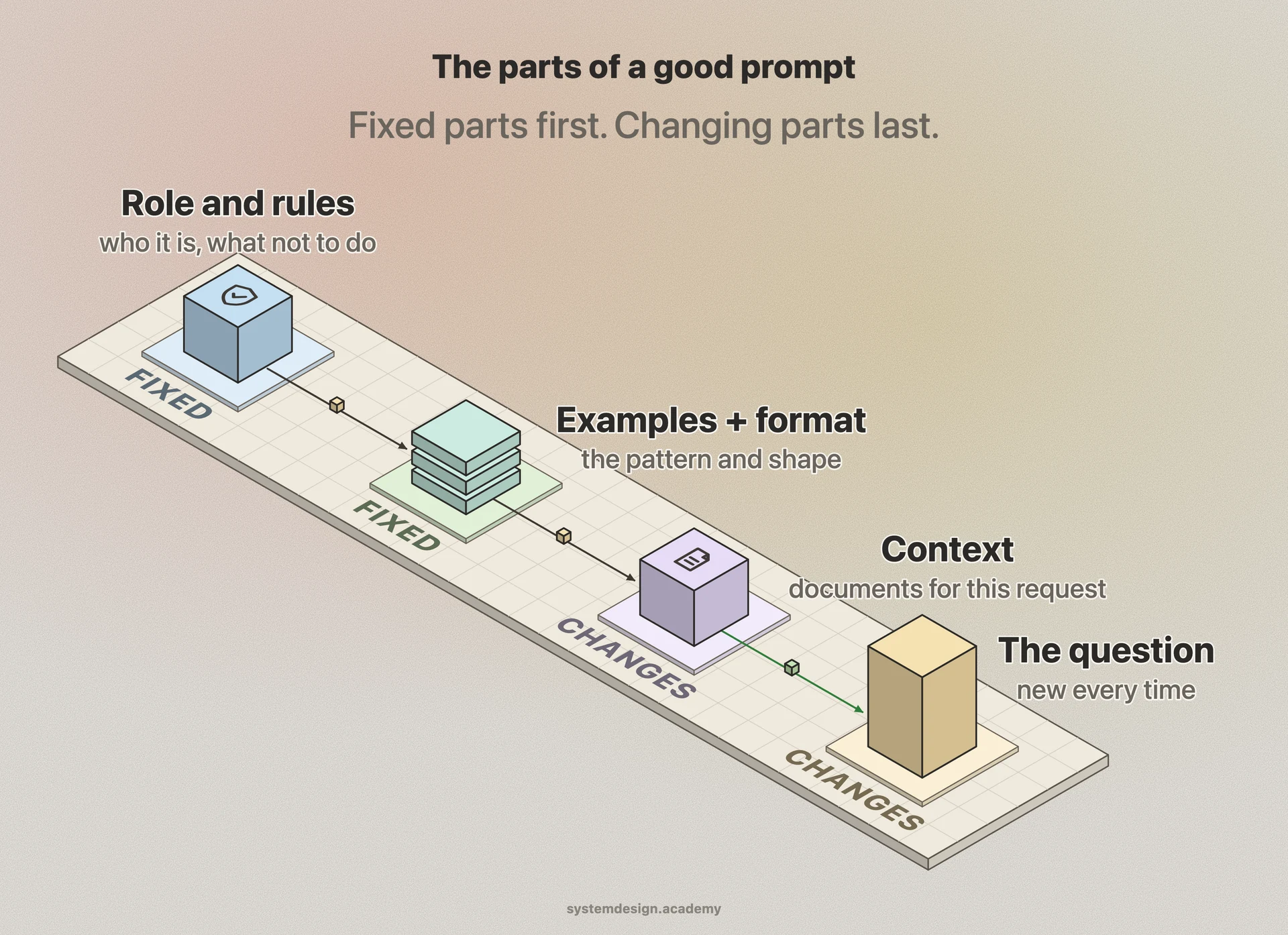
Say who the model should act as, what the task is, and what it must not do. Give the context it needs, and describe the exact output format.
Be specific. "Summarise in 3 bullet points of under 15 words each" works better than "summarise briefly".
What is the difference between a system prompt and a user prompt?
The system prompt holds the app's fixed instructions, such as the role, rules and output format. The user prompt holds what the user types for this request.
Many chat models are trained to give system instructions more weight. It is not a security boundary: text in the user prompt can still override them.
What is few-shot prompting, and when does it help?
Few-shot prompting means showing a few solved examples in the prompt, so the model copies the pattern. Zero-shot means giving no examples.
Order and balance matter. The model can copy the last example, or the label most examples share.
It helps most when the format is unusual or the task is hard to describe in words. Choose varied examples, or the model may copy their quirks too.
When is prompting not enough?
When the model needs knowledge it does not have, use RAG. RAG finds the right text and adds it to the prompt. If prompts cannot fix a behaviour, consider fine-tuning. That means training the model a little more on your own examples.
Try a better prompt first. It is the cheapest and fastest to change.
2. Getting reliable output
The goal is a prompt that works on thousands of different inputs, not just the one you tried.
How do you get valid JSON every time?
Use the provider's structured output feature where it exists, and give a schema: the allowed fields and their types. Then check every reply in code, and retry or fail cleanly when it is wrong.
For tasks that need thinking, give a field for the working before the answer field.
What we measured: Writing freely, two small models got 46 and 70 of 70 right. The 70 included hidden thinking that leaked into the reply. With only an answer field, they got 1 and 5. A steps field first brought most back, but check that it is not left empty.
Why put the data in the prompt between clear markers?
Markers, such as tags or triple quotes, show the model where your instructions end and the data begins. That makes the prompt clearer.
Do not rely on them for security. In our tests, a fixed tag around a document stopped almost no attacks.
How do you stop the model from making things up?
Give it the source text, and tell it to answer only from that text. Tell it exactly what to say when the answer is not there, such as "I could not find this".
Ask it to quote or cite the part it used, and check that part exists.
What temperature should you use?
Temperature controls how random the model's word choice is. Most APIs take a value from 0 upward, often up to 1 or 2. Use a low value for extraction, classification and grading, where you want the same kind of answer each time. Use a higher value for creative writing.
Always set it on purpose, because the default is often not 0. Some reasoning models do not let you set it at all. Even 0 can vary a little on hosted services.
What we measured: We sent one borderline answer, neither clearly good nor bad, to a grading model 20 times. The temperature was not set. It gave PASS twice and FAIL 18 times. At temperature 0, it failed all 20 times.
3. Reasoning and multi-step prompts
Harder tasks need the model to work in steps. These patterns come up in interviews about agents too.
What is chain-of-thought prompting?
Chain-of-thought means asking the model to write out its steps before the final answer. Each step becomes text the model can use for the next one. Text is counted in tokens, small pieces of about three quarters of a word.
It often helps with maths and logic, but it uses more tokens. Reasoning models are trained to do it by themselves, so they usually need no such request.
What is ReAct, and how is it different from plan-and-execute?
ReAct (reason and act) is a pattern for agents: models that can call tools, such as a search. The model reasons, calls a tool, reads the result, and repeats. It thinks before every step, which is flexible but costs more.
Plan-and-execute writes a plan once, then runs the steps more cheaply. A common default is to plan first and plan again only when a step fails.
Does asking the model to check its own answer help?
Self-critique alone often barely helps, and it can make answers worse. The model may change a correct answer into a wrong one.
It works much better against a real check. Examples are running the code, validating the JSON, or comparing with a source.
Why split a big task into smaller prompts?
A long chain of steps in one prompt is more likely to fail somewhere. And it is hard to see where. Small prompts, each with one job, are easier to test and fix.
Let normal code decide what runs next, and use the model only where you need language.
4. Long prompts and context
Prompts in real apps get long: instructions, chat history and documents. Length brings its own problems.
What is prompt caching, and how do you use it?
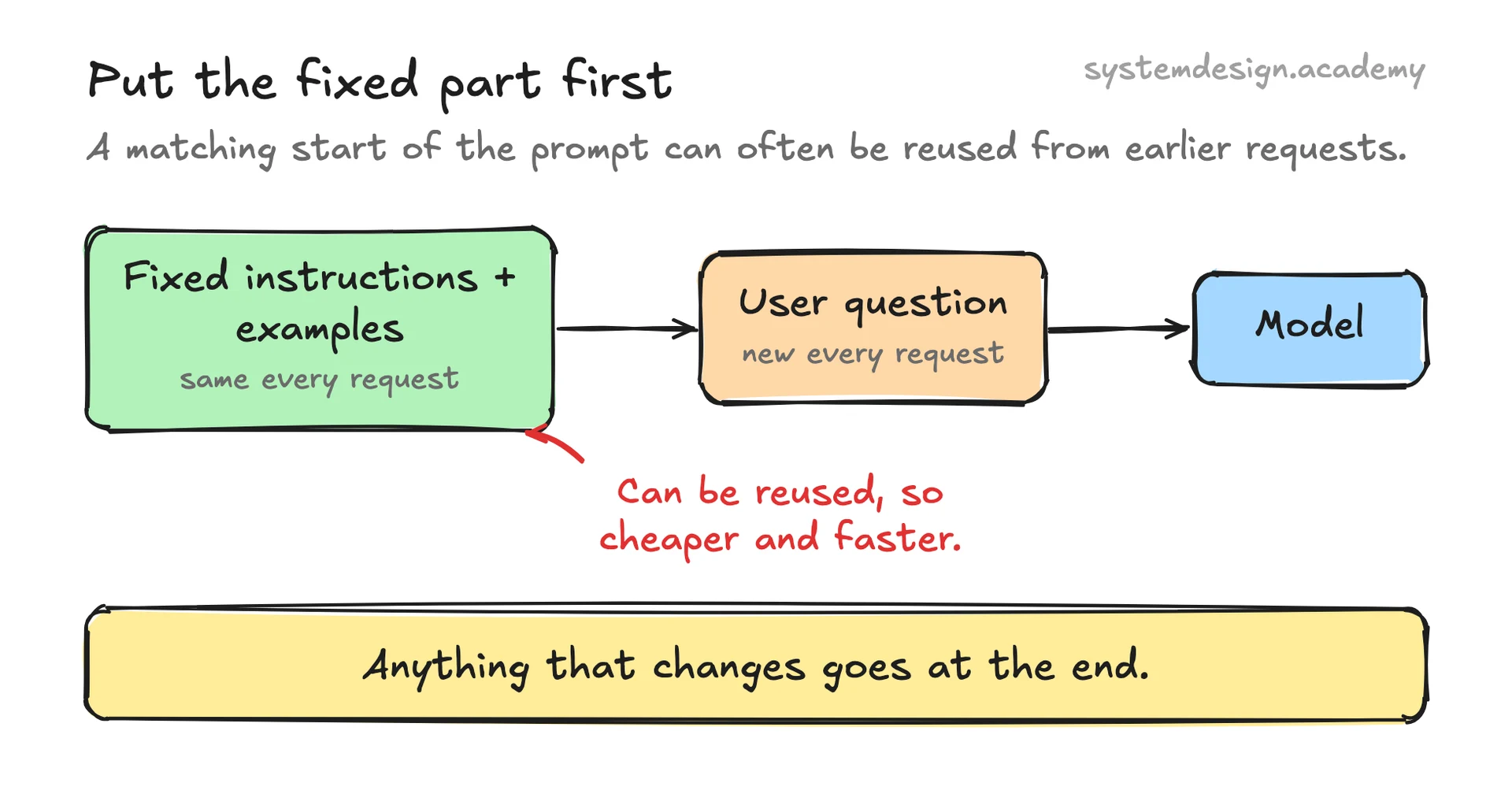
Many providers can reuse the start of a prompt when it exactly matches an earlier request. That part then costs less and is processed faster.
So put fixed instructions, examples and tool descriptions first. Put the user's question and other changing text last.
Is a longer prompt always better?
No. A longer prompt costs more, is slower, and can bury the important part. Models often use the start and end of a long prompt better than the middle.
Keep only what helps, and put the most important information near the start or the end.
Does the order of documents in the prompt matter?
It can. The same documents in a different order can change the answer. So test the order on your own model, and save it in your logs.
What we measured: One small model, 10 documents, 14 questions. We asked which document holds the answer. With the right one in position 6, the model picked it 4 times out of 14. In position 10, it picked it every time. But position 10 was also its usual guess, so that is an upper bound.
5. Testing and versioning prompts
Small wording changes can move results a lot. So prompts need the same testing as code.
Why should prompts be versioned like code?
A one-word change in a prompt can quietly break answers. So give each prompt a version, and test every change against a fixed set of inputs. Keep a quick way to roll back.
Log which prompt version made each answer, so you can trace a bad answer to its prompt.
Will a prompt keep working after the model is upgraded?
Not always. The same prompt can behave differently on a new model version. So pin the exact model version in production.
Before you switch, run your test set on the new version and compare.
How do you know a prompt change made things better?
Run the same test inputs with the old prompt and the new one. Then compare the scores on the same cases. Use enough cases, because small sets move a lot by chance.
Run the old prompt twice as well, to see how much the score moves with no change at all.
Can the wording of a grading prompt change the result?
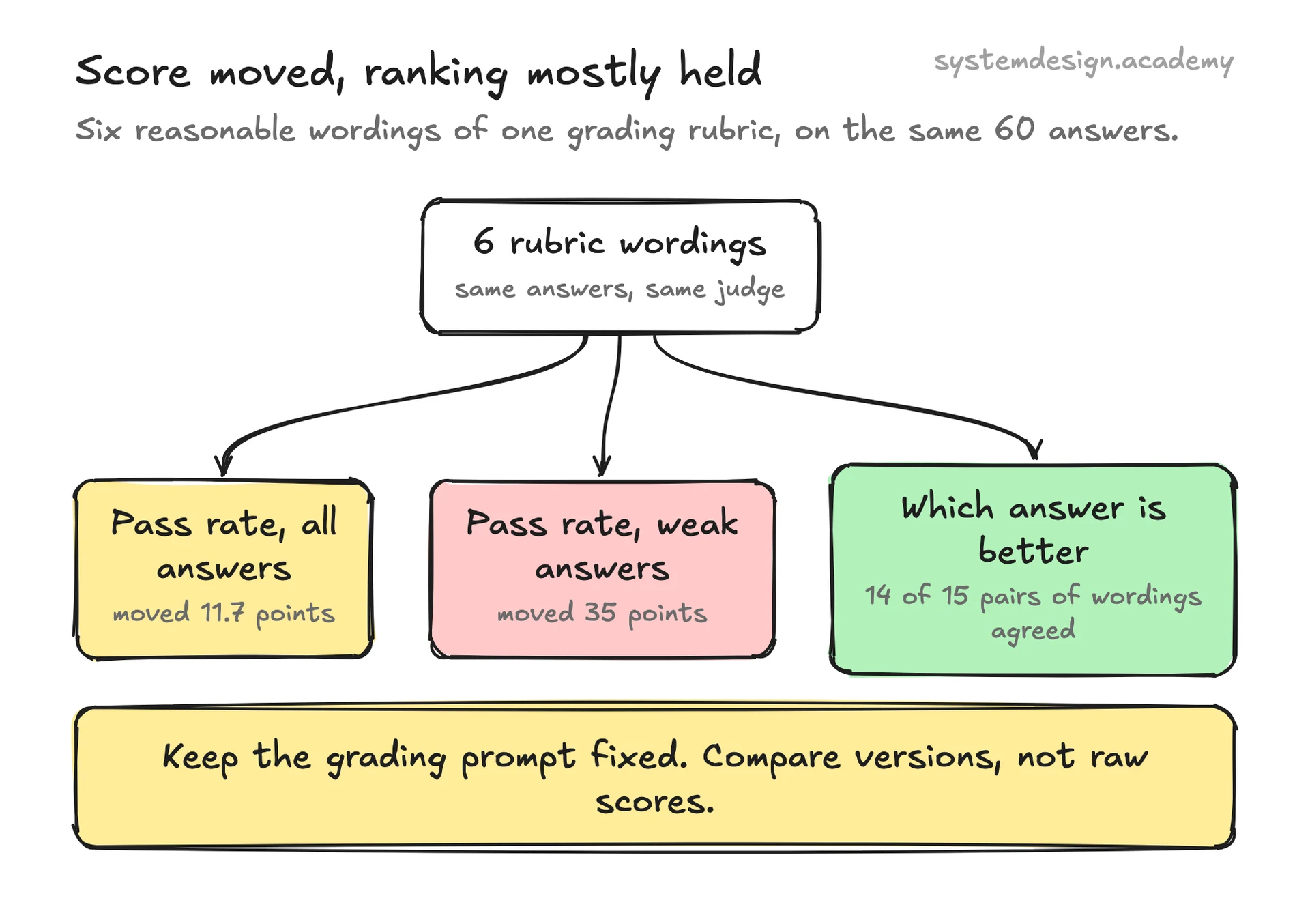
Yes, a lot. An LLM judge is a model that grades answers, following a rubric: written grading rules. The rubric's wording changes how strict it is. So keep the rubric fixed when you compare versions.
Ranking is more stable than the score. So use a fixed rubric to compare versions, rather than trusting one absolute number.
What we measured: We tried six reasonable rubric wordings on the same 60 answers. The pass rate moved 11.7 percentage points, and 35 on the weak answers. Yet 14 of 15 pairs of wordings agreed on which answers were better.
Can one extra sentence change a grader's verdicts?
Yes. A line that tells the judge which answer is yours can push it toward that answer. This happens even when both answers say the same.
Keep the grader blind to which version is which.
What we measured: We used 30 pairs of answers that said the same thing, each judged in both orders: 60 verdicts. One line naming which answer came from our system changed 24. A neutral line changed 4.
6. Prompt security
Any text the model reads can try to give it orders. A prompt engineer must plan for that.
What is prompt injection?
Prompt injection is text that tries to override your instructions, such as "ignore the rules above". It can come from the user, or hide in a web page, email or file the model reads.
There is no complete fix today, because the model cannot fully separate your instructions from the data.
Can users see my system prompt?
Assume they can. Users can often trick a model into repeating its instructions. This is called prompt leaking.
So never put secrets, keys or private data in a prompt. Keep them in your code and data systems instead.
Does marking untrusted text in the prompt help?
Some ways help. A plain tag around the document helped little in our tests. Datamarking puts a marker between every word of the untrusted text. Compared with no marking, it clearly cut attacks.
Use it as one layer, together with limits on what the app can do.
What we measured: We hid one attack in each of 44 documents. On one small model, 22 attacks worked with no marking. Datamarking cut that to 9, and a random marker to 4. Only the random marker was clearly better than a plain tag. Clean answers stayed 42 to 44 right out of 44.
How do you defend an app against prompt injection?
Use several layers. Keep instructions and data apart, and give the model only the tools it needs. Check its output before acting, and ask a person before risky actions.
Most important: never give one agent private data, untrusted text and a way to send data out, all at once.
Learn it properly, not just the answers
Every answer on this page comes from our AI Engineering course: 112 lessons on RAG, evals, agents, serving, security and MLOps. Many of them are built around a real experiment. You learn why the answer is right, which is what an interviewer checks with the second question. 10 lessons are free to read, with no card needed.