System design interview guide
Design an Email Service like Gmail: SMTP, Mailbox Storage, Search and Spam Filtering
Short answer
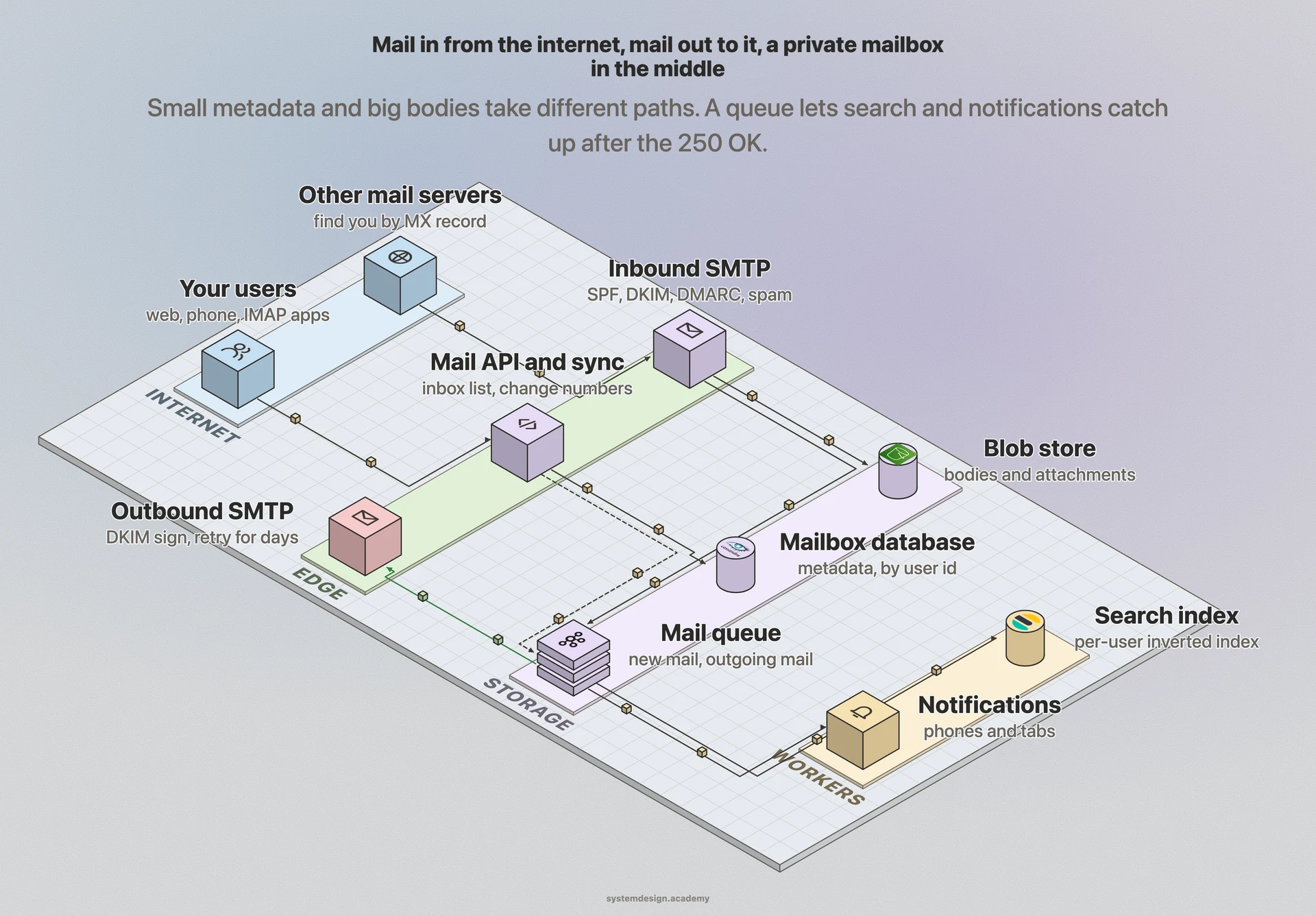
An email service has three paths. Inbound: other servers find yours through MX records and deliver over SMTP. Your servers check the sender, run SPF, DKIM, DMARC and the spam filter, store the message durably, and only then reply 250 OK. Storage: a small metadata row per message in a database partitioned by user (labels, flags, thread, a pointer), and the body and attachments in a blob store. Read and send: a mail API and a change-number sync for every device, a per-user inverted index for search, and an outbound queue that signs with DKIM and retries for days.
Asked to design sending alerts by email, SMS and push instead? See the notification system design guide
Two courses by the author of this page:
770 lessons · 18 free to read
₹1,777 in India · $49 elsewhere, once
Get System DesignYou own this course
210 lessons · 10 free to read
₹2,777 in India · $49 elsewhere, once
Get AI EngineeringYou own this course
Save your progress and get the interview checklist PDF
Email is one of the oldest systems on the internet, and it still carries password resets, bank statements, job offers and a great deal of spam. When you design an email service like Gmail, you are building two systems that meet in the middle. One talks to the rest of the world: it receives mail from any server on the internet and sends your mail out to theirs, using rules written decades ago. The other is a private product: your inbox, your folders and labels, your search box, the same mailbox on your phone and your laptop. Take an interview-sized service with 50 million mailboxes. About 23,000 messages arrive every second on average, half of them spam, and the service keeps about 100 TB of new mail every day. A message the server has said yes to must never be lost, and a user must find a five-year-old receipt in under a second.
An email service receives, stores, sends and searches mail for its users. First, some terms. SMTP (Simple Mail Transfer Protocol) is how mail servers hand a message to each other. An MX record is a DNS entry that says which server accepts mail for a domain, so a sender looks up the MX record of gmail.com to know where to deliver. An MTA (mail transfer agent) is a server that sends and receives mail over SMTP. A mailbox is one user's stored mail, organised into folders or labels. Users read mail through the web app, a mobile app, or older protocols such as IMAP, which let any mail app sync a mailbox. The design splits each message into two parts. The small metadata (sender, subject, date, labels, read or unread) goes in a database, indexed for fast listing. The large body and attachments go in a blob store, a store for large files such as object storage. A per-user search index lets users find old mail. Spam filtering decides which mail reaches the inbox. Three sender checks help it. SPF asks: is this server allowed to send for that domain? DKIM asks: is the message signed by that domain? DMARC says what to do when those checks fail. Outgoing mail waits in a queue and is retried when the other side is busy.

Where it shows up
Asked as 'design Gmail', 'design an email service', 'design an email system', 'design a distributed email service' or 'design Outlook'. Big tech and SaaS companies ask it for senior backend roles. It also comes up as 'design the inbox' at companies that build messaging, and as a follow-up after a notification system question.
Spec sheetan email service like Gmail
- 01Inbound mail
- about 23,000 a second on average, 46,000 at peak
- 02Outbound mail
- about 2,900 a second
- 03Mail kept each day
- 1 billion messages, about 100 TB
- 04Storage per year
- about 37 PB, about 110 PB with 3 copies
worked through below, with the maths
Why this question is asked
It tests whether you can mix an old open protocol with a modern product. A weak answer draws a database of messages and stops. A strong answer explains how mail arrives from strangers, through MX records and SMTP. It says the server may reply 'accepted' only after the message is safely stored. It explains why bodies and metadata live in different stores, and how one mailbox stays in sync on many devices. It also covers search per user, and how spam and spoofing are fought. It also tests numbers: storage grows by petabytes a year, so you must talk about compression, removing duplicate attachments and cheaper storage for old mail.
This page is the free part.
The course goes deeper on the email service like Gmail design
₹1,777 in India$49 everywhere elseonce, for the whole course
The System Design course covers the email service like Gmail design across a run of lessons, not one page. These 4 alone are about 62 minutes of step-by-step reading, every one with a quiz.
- Message Queues
Decouple producers from consumers with a buffer that holds messages until they're processed.
- Blob Storage
Binary Large Objects, the raw bytes behind media, backups, and unstructured data.
- Object Storage
The storage model that powers the modern internet, flat, scalable, and dirt cheap.
- Inverted Index
The data structure powering every search engine, mapping words to the documents that contain them.
all part of
System Design Masterclass
770 lessons · about 283 hours · 18 free to read
₹1,777in India, by UPI
$49everywhere else, by PayPal
It is really nice and good Please join the course
You own this course
Continue with Message Queuespay once,
yours for life
Live from the course bench
Before you design Email Service like Gmail, try the questions it rests on.
Real interview questions, live diagrams and measured lab results, pulled at random from the lessons. A new set every time you come back.

Requirements
Always clarify these in the first 5 minutes of the interview. Do not start drawing boxes until both lists are agreed.
Functional requirements
- Receive mail from any server on the internet for the service's domains
- Send mail to any address, with attachments up to a size limit, and retry when the other side is not ready
- Store each user's mail in folders or labels, with read and unread, starred, archived and deleted states
- Show the same mailbox on the web, on phones and in other mail apps, kept in sync
- Group replies into conversations (threads)
- Search a user's own mail by words, sender, date and attachment
- Filter spam, phishing and viruses, and let users report spam
Non-functional requirements
- Durability: once the service accepts a message, it is never lost
- Availability for receiving: other servers will retry, but a long outage still delays everyone's mail
- Low latency for reading: the inbox list in well under a second, search in about a second
- Huge, growing storage at a sensible cost, with old mail on cheaper storage
- Privacy and isolation: one user can never see another user's mail, including in search
- Good sender reputation, so mail sent from the service is not marked as spam elsewhere
Back-of-envelope scale estimates
Show your math. Pulling numbers from thin air signals you have not thought about the load.
Inbound mail
about 23,000 a second on average, 46,000 at peak
Interview assumptions: 50 million mailboxes, each receiving 40 messages a day, spam included. 50,000,000 x 40 = 2 billion a day. 2,000,000,000 / 86,400 = 23,148 a second. Assume the busiest hour runs at twice the average: 46,296 a second. Say these assumptions out loud first.
Outbound mail
about 2,900 a second
Interview assumption: each mailbox sends 5 messages a day. 50,000,000 x 5 = 250 million a day = 2,894 a second. Sending is much smaller than receiving, but it is where retries and sender reputation live.
Mail kept each day
1 billion messages, about 100 TB
Interview assumptions: half of inbound mail is spam or rejected at the door, and the average stored message, attachments included, is 100 KB. 2,000,000,000 x 0.5 = 1 billion kept. 1,000,000,000 x 100 KB = 100 TB a day before compression.
Storage per year
about 37 PB, about 110 PB with 3 copies
100 TB x 365 = 36.5 PB a year of new mail. Keeping 3 copies for durability makes 109.5 PB. This is why compression, storing each identical attachment once, and moving old mail to cheaper storage are part of the design, not extras.
Metadata
about 1 TB a day
Interview assumption: 1 KB per message for ids, folder, labels, flags, sender, subject and a short preview. 1,000,000,000 x 1 KB = 1 TB a day. Small next to the bodies, but it is read on every inbox open, so it lives in a fast, well-indexed database.
Attachment size on the wire
25 MB becomes about 34 MB
Gmail's limit for personal accounts is 25 MB. Email carries files as base64 text, which turns every 3 bytes into 4 characters, plus line breaks. Measured for this page: 25 MB of bytes became 33.8 MB as MIME base64, 1.35 times larger. Size limits must count the encoded size.
Retrying a busy server
up to 192 tries over 4 days
RFC 5321 says the retry interval should be at least 30 minutes and the give-up time generally at least 4 to 5 days. One try every 30 minutes for 4 days is 4 x 24 x 60 / 30 = 192 tries at most. Real senders back off, so the gap grows over time and the count is lower.
High-level architecture
Draw the outside world on the left and the users on the right. Inbound path: another mail server looks up the MX record for your domain and connects to one of your inbound SMTP servers, behind a load balancer. The SMTP server checks the sender's IP reputation and rate, receives the message, and runs quick checks: is the recipient a real user, is the message under the size limit? It then runs the sender checks (SPF, DKIM, DMARC) and passes the message to the spam and virus filter. Only after the message is written durably does the SMTP server reply '250 OK'. Writing durably here means the body goes to the blob store and a record goes to an inbound queue. A mailbox writer reads the queue and applies the user's filters. It writes the message metadata into the mailbox database, with the right folder or labels and the thread it belongs to. The same event goes to the search indexer, which adds the words to that user's search index. It also goes to a notification service, which tells the user's phone and open browser tabs that new mail has arrived. Read path: the web and mobile apps call a mail API. It lists the inbox from the metadata database, and fetches a body from the blob store only when the user opens a message. Searches go to the search index. A sync service gives each device the changes since its last sync, and an IMAP gateway lets other mail apps connect. Outbound path: when a user sends, the API stores the message in Sent, then puts it on an outbound queue. Outbound SMTP servers look up the recipient's MX record, sign the message with DKIM, deliver it, and retry with growing gaps if the other side says 'try later'. After the last retry fails, the sender gets a bounce message.
In a real interview, sketch this on the whiteboard before diving into any single box.
One message, from a stranger's server to Asha's phone
A shop sends Asha a receipt with a PDF attached. Follow the message from the moment the shop's server looks for Asha's mail server.
- 1
Find the server
The shop's server looks up the MX records for Asha's domain and connects to the one with the lowest preference number. If that one does not answer, it tries the next.
- 2
Check the sender
The inbound SMTP server checks the connecting IP address against reputation lists and rate limits, then checks that Asha's address exists before it accepts the message body.
- 3
Check the signature
SPF confirms the shop's server is allowed to send for the shop's domain. DKIM checks the signature in the header with the shop's public key from DNS. DMARC says what to do if either fails. Here both pass.
- 4
Filter
The spam filter scores the message from the sender's reputation, the content and the links, and the virus scanner checks the PDF. The score is low, so it goes to the inbox.
- 5
Store, then say yes
The body and the PDF go to the blob store, and a record goes onto the inbound queue. Only then does the server answer 250 OK. From this moment the shop's server will not retry, so the message must not be lost.
- 6
File it
The mailbox writer applies Asha's filters, adds the 'Receipts' label, links the message to its thread, and writes the metadata row. The indexer adds the words to Asha's search index.
- 7
Tell the devices
The notification service pushes a 'new mail' event to Asha's phone. Her app asks the sync service for changes since its last sync and gets one new message header. The body is fetched only when she opens it.
Core components
Walk through each service. The interviewer wants to hear what each one owns, not just the names.
Inbound SMTP servers
Accept mail from the internet for your domains, behind MX records and a load balancer. They check sender reputation, recipients and size, and reply 'accepted' only after the message is stored durably. They hold no state, so you can add more.
Sender checks and spam filter
Run SPF, DKIM and DMARC on every message, then score it for spam and phishing from sender reputation, content, links and user reports, and scan attachments for viruses. The score decides inbox, spam folder or reject.
Blob store
Holds message bodies and attachments, which are most of the bytes. An object store with several copies. Store each identical attachment once, by its content hash, and move old mail to a cheaper storage class.
Mailbox database
Holds metadata: one row per message per mailbox, with folder or labels, flags, thread id, sender, subject, date and a pointer to the body. Partitioned by user id, so one user's mailbox lives together and listing the inbox is one indexed read.
Search indexer and index
Turns each new message into words and adds them to an inverted index (a map from each word to the messages that contain it) for that user only. Every search is limited to the user's own mailbox, which keeps it fast and private.
Sync service and IMAP gateway
Gives each device the changes since its last sync, using a change number that grows per mailbox, and pushes 'new mail' events. The IMAP gateway lets third-party mail apps read the same mailbox.
Outbound queue and SMTP senders
Hold outgoing mail, look up each recipient's MX record, sign with DKIM, deliver, and retry with growing gaps when the other server says 'try later'. They protect the service's sending IP reputation with per-user sending limits.
Data model
Pick the right store per table. Justify each choice with the access pattern, not by reflex.
messages (metadata)user_id (partition key)message_idthread_idlabels or folderflags: read, starredfrom, to, subject, datesnippetbody_ref (blob key)sizePartitioned by user_id, sorted by date within a user, so the inbox is one range read. Moving to another folder or adding a label changes this small row, never the body.
message bodies (blob store)body_refraw MIME message (headers, text, HTML)attachment refs by content hashWritten once and never changed. Stored compressed, with several copies. A large attachment sent to many users is stored once and counted by reference.
threadsuser_idthread_idsubjectparticipantslast_message_atmessage_countBuilt from the Message-ID, In-Reply-To and References headers, with the subject as a fallback. One row per conversation makes the conversation view a single read.
mailbox changesuser_idchange_number (grows by one per change)message_idchange type: added, flags, moved, deletedEach device remembers the last change number it saw and asks for everything after it. This is how a phone that was offline for a week catches up without downloading the whole mailbox.
outbound queuedelivery_idmessage_refrecipient domainattemptsnext_attempt_atlast_errorOne row per recipient domain. A message to three domains becomes three deliveries that retry on their own, so one slow domain does not hold up the others.
search index (per user)user_idwordlist of message_ids that contain itAn inverted index scoped to one mailbox. Deleting a message marks it deleted in the index, and the index is cleaned up in the background.
Deep dives
These are the conversations the interviewer is steering you toward. Practice each one until you can talk through it without notes.
How mail finds your server: MX records and SMTP
Email has no central switchboard. When a server wants to deliver a message to asha@example.com, it asks DNS for the MX records of example.com. RFC 5321, the SMTP standard, says the sender tries the MX with the lowest preference number first, and moves to higher numbers if it cannot connect. If a domain has no MX record at all, the sender treats the domain's own address as if it were an MX with preference 0. So you publish two or more MX records pointing at load balancers in different places, and any of them can take mail. The SMTP conversation itself is a short exchange of text commands. The sender says who it is (HELO or EHLO) and who the mail is from (MAIL FROM). It says who the mail is for (RCPT TO, once per recipient), and then sends the message (DATA). The receiver answers each step with a number: 250 means OK, a 4xx number means 'try again later', and a 5xx number means 'no, and do not retry'. This gives you cheap ways to defend yourself early. Check the recipient at RCPT TO and reject unknown users with a 5xx before the body is sent. Check the connecting IP against reputation lists and rate limits before anything else. And when you are overloaded, answer 4xx: the sender keeps the message and comes back later. RFC 5321 says senders should wait at least 30 minutes between tries and keep trying for at least 4 to 5 days. So a short outage on your side delays mail but does not lose it.
Accepting a message: store first, then say yes
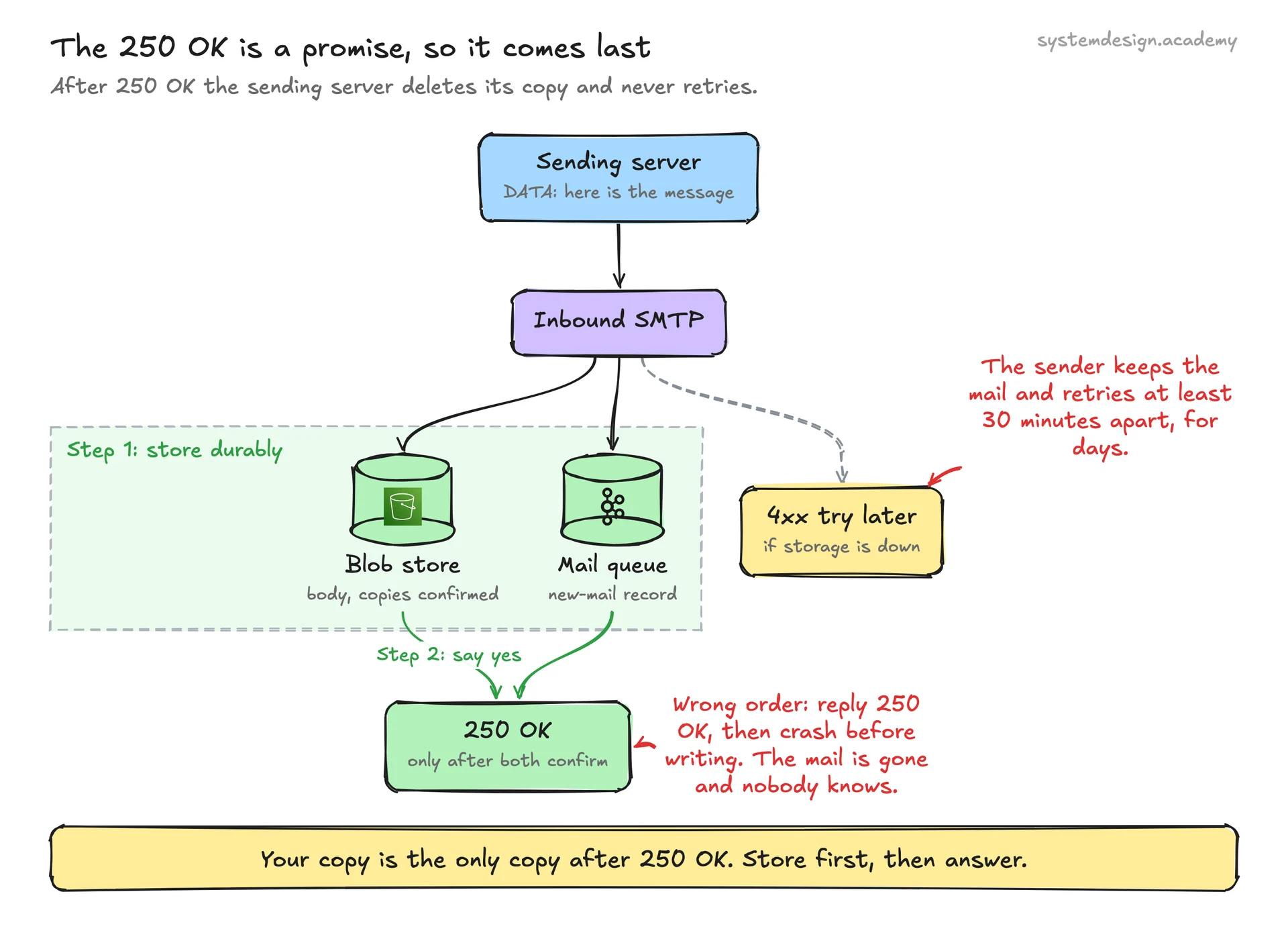
The most important line in the inbound path is the order of two steps. When the inbound server replies 250 OK to the DATA command, the sending server deletes its copy and will never retry. From that moment, your copy is the only copy. So the rule is: write the message durably, then reply. Durably here means the body is in the blob store with its copies confirmed, and a record of the new message is in a durable queue. If the server replies first and then crashes, the message is lost and nobody will ever know. If the blob store or the queue is slow or down, reply with a temporary 4xx error instead, and the sender will try again later. Notice what is NOT on this path: filing into folders, building the thread, updating the search index, and notifying devices. Those all read from the queue afterwards, through the mailbox writer and the indexer. That keeps the time the sender waits short, and it means a slow search cluster delays search results for a minute but never causes lost mail. A message can be read from the queue more than once, for example after a worker crash. So the mailbox writer must be idempotent: use the message's id within the mailbox as the key, and writing it twice leaves one copy.
Mailbox storage: metadata apart from bodies
Look at what users actually do. They open the inbox and see a list of 50 subjects, senders and dates, many times a day. They open a few full messages. They rarely open an old attachment. So split each message into two parts. The metadata row is small, about 1 KB in our estimate. It holds everything the list needs: sender, subject, date, a short preview, labels or folder, read and starred flags, the thread id and a pointer to the body. Keep it in a database partitioned by user id and sorted by date within each user, such as a wide-column store or a sharded relational database. Then the inbox is one indexed range read on one partition. The body and attachments are large: 100 KB on average in our estimate, up to tens of MB. They never change after they arrive. So keep them in a blob store, such as object storage, under an id that the metadata row points to. This split pays off everywhere. Moving a message to a folder, starring it or marking it read changes only the small row. The inbox list never touches the big bytes. And the big bytes can go to cheaper storage as they age. Now the numbers: 100 TB of new mail a day is 36.5 PB a year, and about 110 PB with 3 copies. So compress bodies, and store each attachment once by the hash of its contents: when the same 5 MB file is sent to 1,000 employees, store it once and keep 1,000 small references. Labels, as in Gmail, are just a set on the metadata row; folders are labels where a message can have only one.
One mailbox on many devices: sync
Asha has the web app open, the app on her phone, and maybe a desktop mail app. If she reads a message on her phone, it must show as read on her laptop. The simple and reliable way is a change log per mailbox. Every change (a new message, a flag change, a move, a delete) gets the next change number for that mailbox, and is written to a changes table. Each device remembers the last change number it has seen. When it wakes up, it asks: 'give me every change after number 4,512'. It gets a short list and applies it. A phone that was offline for a week catches up with a few hundred small changes instead of downloading the whole mailbox. To make new mail appear at once, a notification service pushes a small 'mailbox changed' signal. It goes to the phone through the phone platform's push service, and to open browser tabs through a WebSocket. The device then asks for the changes. Bodies are fetched only when a message is opened. Older mail apps speak IMAP (RFC 9051), which has its own folder and flag model; an IMAP gateway translates it to your internal model. A newer standard, JMAP (RFC 8620), is built around the same idea of asking for changes since a known state.
Search inside a mailbox
Users expect to type 'invoice march' and find a message from years ago in about a second. The tool for this is an inverted index: for every word, a list of the messages that contain it. To answer 'invoice march', the engine reads the list for 'invoice', the list for 'march', and keeps the messages on both lists. The design choice that matters most is that every search is limited to one user. So build the index per user, or put the user id first in every index entry, and route each search only to that user's part of the index. This keeps each search small, because one mailbox has thousands or millions of messages, not billions. It also makes privacy simple, because a search can only ever see its own user's entries. The indexer reads new messages from the queue and adds them, so a new message becomes searchable a few seconds after it arrives. Index the sender, recipients, subject, body text and attachment names, and the text inside common attachment types if you can. Filters such as 'from:', 'has:attachment' and date ranges are fields on each entry. Deleting a message marks it deleted in the index at once and removes it for good in a later background clean-up, which is how engines like Lucene and Elasticsearch handle deletes.
Fighting spoofing: SPF, DKIM and DMARC
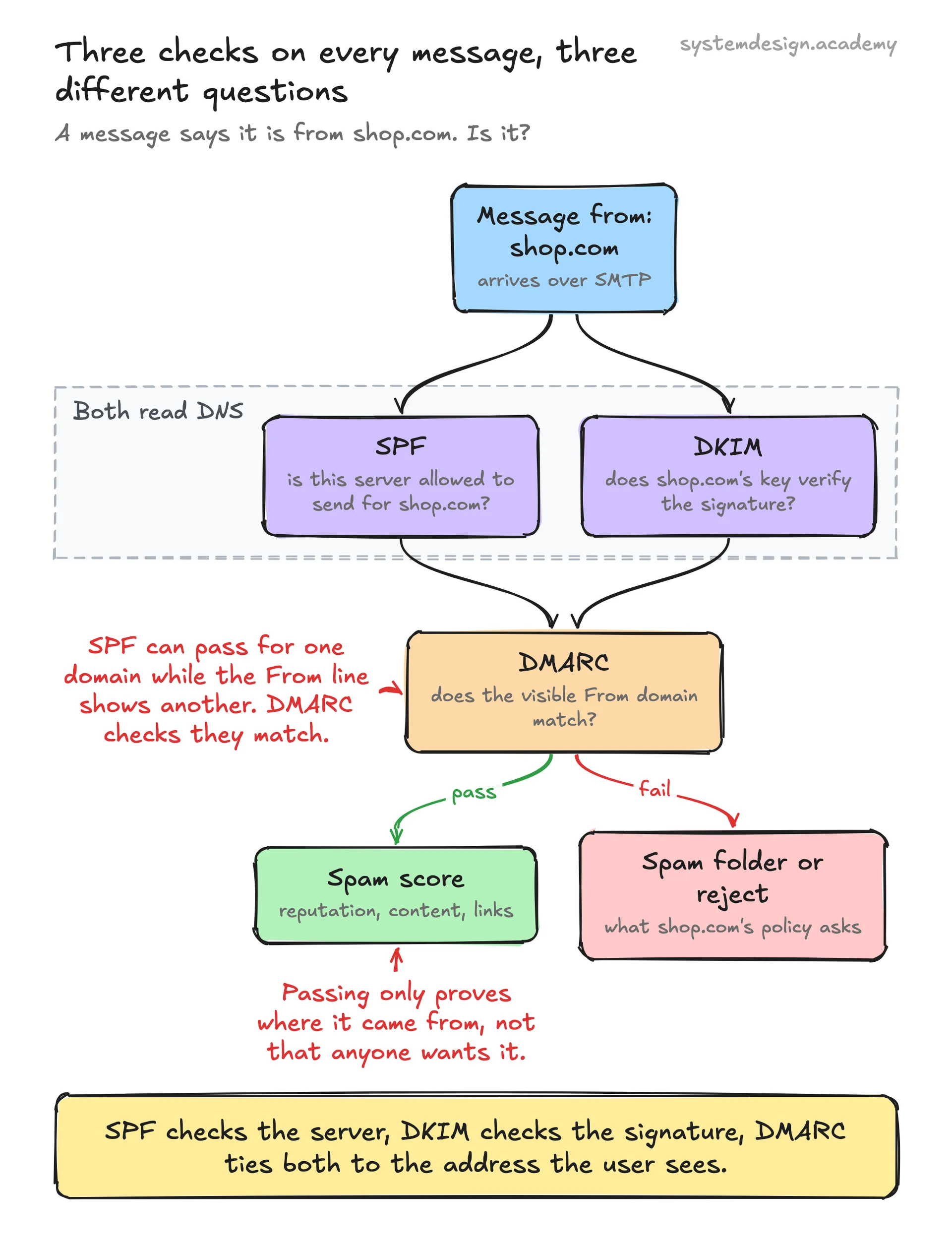
Anyone can type any 'From' address into an email. Three DNS-based checks let a receiver see whether a message really came from the domain it claims. SPF (Sender Policy Framework, RFC 7208): the domain publishes a list of servers allowed to send its mail, and the receiver checks the connecting IP address against it. DKIM (DomainKeys Identified Mail, RFC 6376): the sending domain signs parts of the message with a private key and adds the signature as a header. The receiver fetches the public key from the domain's DNS and checks the signature. This also shows the message was not changed on the way. DMARC (RFC 7489): the domain publishes a policy that ties the two together. It requires that the domain in the visible From address matches the domain that passed SPF or DKIM. It also says what to do when the check fails: none (just report), quarantine (send to spam) or reject. Your service must do both sides. As a receiver, run all three on every message and feed the result into the spam score. As a sender, publish SPF, sign every outgoing message with DKIM and publish a DMARC policy for your domains, or your users' mail will land in spam elsewhere. Large receivers now require it. Gmail's sender guidelines say that from 1 February 2024, anyone sending more than 5,000 messages a day to personal Gmail accounts must set up SPF, DKIM and DMARC. They must also offer one-click unsubscribe in marketing mail, and keep their reported spam rate below 0.30%. Passing these checks does not make a message wanted. It only proves where it came from, so the spam filter still runs.
Spam filtering and sending reputation
In our estimate, half of inbound mail is spam, so the filter is on the hot path for 23,000 messages a second. Make it a pipeline of cheap checks first and expensive ones last. At connection time, reject or slow down IP addresses with a bad reputation and senders that open too many connections. After the sender checks, compute a score from many signals: the sender's history with your users, the SPF, DKIM and DMARC results, links to known bad sites, the content, and the attachment types. A trained model combines these signals, and it learns from users: every 'report spam' and 'not spam' click is a label. Viruses are a separate check: scan attachments and block risky file types. The result decides inbox, spam folder, or reject. Outbound has the opposite problem. If one of your users sends spam, other providers will mark mail from your servers as spam for everyone. So limit how many messages and recipients each account can send per hour, and watch for accounts that suddenly send to many strangers. Send personal mail and bulk mail from different IP addresses. And handle bounces: stop sending to addresses that do not exist.
Trade-offs to discuss
Every senior interviewer expects you to surface at least 3 of these. Pick the decisions, state the alternatives, and justify your choice.
Metadata and bodies together vs apart
One store for everything is simpler, but every inbox list would read big rows, and old bodies could not move to cheap storage. Splitting them makes the inbox a small indexed read and lets bodies sit in a blob store, at the cost of two writes per message and a pointer to keep correct.
Accept then process vs process then accept
Doing all the filing, threading and indexing before replying 250 OK would make senders wait and tie acceptance to the slowest part. Storing durably, replying, and processing from a queue keeps acceptance fast and safe, at the cost of a few seconds before new mail is searchable.
Reject spam at the door vs deliver to the spam folder
Rejecting during the SMTP conversation saves storage and tells real senders their mail failed. Delivering to a spam folder lets users rescue a wrongly flagged message. Reject only what you are very sure of; send the doubtful rest to the spam folder.
Search index per user vs one shared index
A shared index is easier to run but makes every search look through everyone's entries and makes a privacy bug possible. Per-user scoping keeps each search small and private, at the cost of many small index parts to manage.
Push to devices vs devices polling
Polling every minute is simple but wastes battery and delays mail. A small push signal followed by 'give me changes since N' makes mail appear at once and keeps the data on the normal sync path, at the cost of keeping push connections open.
Free PDF · 18 pages
Get the free System Design Interview Cheat Sheet
The interview in seven stages, the numbers worth knowing by heart, and twelve classic systems on one page each, every line linked to the lesson it comes from.
Follow-up questions to expect
After the main design, the interviewer usually picks one part and asks more. Here is what to say.
Your blob store is down for 10 minutes. What happens to incoming mail?
Inbound servers cannot store messages durably, so they must reply with a temporary 4xx error instead of 250 OK. Senders keep the mail and retry, at least 30 minutes apart, for days. Mail is delayed, not lost. Never reply 250 OK before storing.
A company sends the same 5 MB attachment to 10,000 employees. How do you avoid storing 50 GB?
Store attachments by the hash of their contents. The first copy is written once; the other 9,999 messages keep a small reference to the same blob. Count references, and delete the blob only when the last message pointing to it is deleted.
Mail from your users starts landing in spam at other providers. Where do you look?
Check that SPF, DKIM and DMARC are set up and passing for your domains, then look for accounts sending bulk or spam mail that hurt your IP reputation. Add per-account sending limits, and send bulk mail from separate IP addresses.
How does a phone that was offline for a week catch up without downloading everything?
Every mailbox change gets a growing change number. The phone remembers the last number it saw and asks for every change after it: new message headers, flag changes, moves and deletes. Bodies are fetched only when opened.
How do you make search work for one user's 10 years of mail?
Use an inverted index scoped to that user, built as messages arrive. A search reads the lists for each word in the query and keeps messages on all of them, inside that user's part of the index only, so it never scans anyone else's mail.
How an email service like Gmail actually does it
The protocol rules on this page come from the standards every mail server follows. RFC 5321 defines SMTP: how a sender picks the MX with the lowest preference number, and the implicit MX when none exists. It also sets the retry rules: at least 30 minutes between tries, and at least 4 to 5 days before giving up. SPF, DKIM and DMARC are defined in RFC 7208, RFC 6376 and RFC 7489, IMAP in RFC 9051 and JMAP in RFC 8620. Gmail's public sender guidelines set the rules for bulk senders from 1 February 2024: SPF, DKIM and DMARC, one-click unsubscribe, and a spam rate below 0.30%. Gmail's help pages set a 25 MB attachment limit for personal accounts, and send larger files as a Google Drive link instead. The capacity numbers and the base64 measurement are our own, shown in full; Google has not published how Gmail is built inside, and this page does not guess.
Sources
- RFC 5321: Simple Mail Transfer Protocol
- Gmail Help: Email sender guidelines
- Gmail Help: Attachment size limits
- RFC 7208: Sender Policy Framework (SPF)
- RFC 6376: DomainKeys Identified Mail (DKIM)
- RFC 7489: DMARC
- RFC 8620: JMAP core
- Elastic: Elasticsearch from the Bottom Up (inverted index, segments, deletes)
Lessons to study before this interview
If any of these topics are fuzzy, the interviewer will catch it. Each lesson is 15 to 60 minutes with diagrams, code, and a quiz.
Message Queues
intermediate / messaging event systems
Blob Storage
intermediate / database types storage
Object Storage
intermediate / database types storage
Inverted Index
intermediate / database types storage
Full-Text Search
intermediate / database types storage
Push Notifications
intermediate / messaging event systems
Idempotent Consumer
intermediate / messaging event systems
Dead Letter Queue
intermediate / messaging event systems
Data Partitioning
intermediate / data replication distribution
Email Notifications
advanced / reliability resilience
Design a Notification System
capstone / capstone
Frequently asked questions
Go deeper
This guide is built on these 6 lessons. Each one teaches one piece of the email service like Gmail design above, step by step.
- Message QueuesSystem Design · messaging event systems · 20 min
- Blob StorageSystem Design · database types storage · 10 min
- Object StorageSystem Design · database types storage · 14 min
- Inverted IndexSystem Design · database types storage · 18 min
- Full-Text SearchSystem Design · database types storage · 20 min
- Push NotificationsSystem Design · messaging event systems · 14 min
Practice with 770 system design lessons
Lifetime access for ₹1,777 in India or $49 elsewhere. Interactive diagrams, quizzes, and 20 capstone projects to practise on.

This one question is not enough for the interview.
Get all 200 questions in the System Design and Distributed Systems pack
Each question has why it is asked, a full answer, what the interviewer listens for, the follow-ups, the common mistakes and a diagram (268 diagrams in all). A PDF you keep, junior to staff level.
India: UPI, cards or netbanking through Razorpay. Elsewhere: card or PayPal. Download at once from My packs.
NEWSystem Design Hands-On
Included in the System Design course: real systems, built live
Postgres Sharding: Complete Hands-On (PgBouncer + Citus). 2 h 36 min and 20 chapters: one PostgreSQL loaded until it breaks, then four shards behind a router you write, PgBouncer and Citus, with the 139-page slide deck. The first 15 minutes are free to watch.