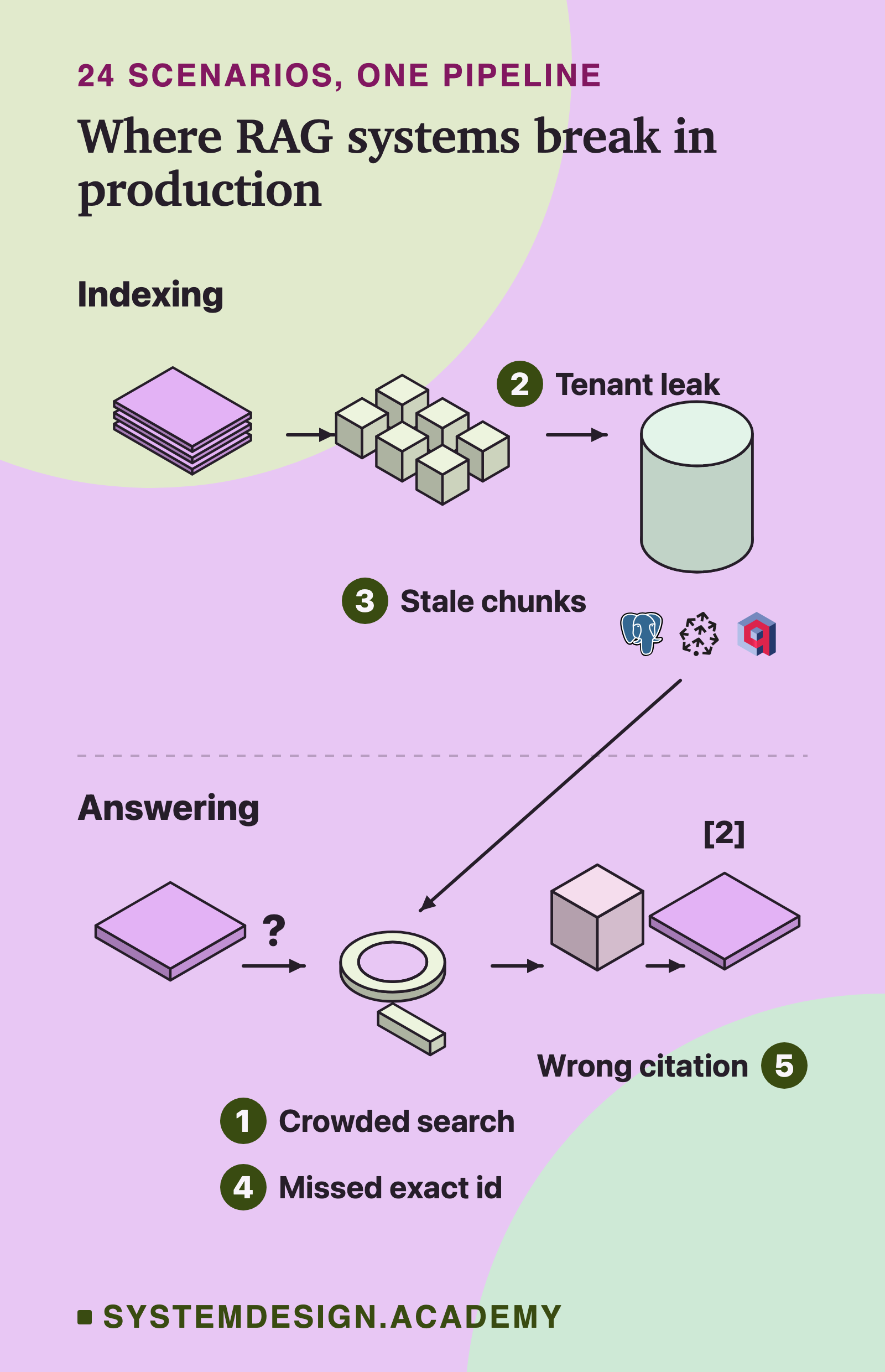
Scenario 1 · free walkthrough
RAG works at 5,000 documents and breaks at 500,000. What breaks, how do you find it, and what do you change?
Your team built a RAG assistant over 5,000 internal documents, and it answered well. Then the company loaded the full archive of 500,000 documents. Nothing errors, no alert fires and latency looks normal. But users now say the answers are vague or plain wrong.
What they are testing: Whether you find a silent failure by measuring each stage instead of guessing. And whether you know which fix attacks which cause, and what each fix costs.
Short answer
Search got crowded. Chunks are the small pieces of documents that you search. With 100 times more of them, many more similar but wrong ones compete for the few top places. Index settings tuned for a small collection also miss more true matches.
Measure it on real questions with marked answers. Recall@k is how often search puts the right chunk in its top k results. Faithfulness is how much of each answer the chunks support. Let those numbers set the order of fixes: index settings and broken chunks first, then filters, keyword search and a reranker, a second model that reorders a wider list.
How to diagnose it
Three words first. A chunk is a piece of a document that you store and search. Recall@k is the share of test questions where the right chunk is somewhere in the top k results. Faithfulness is the share of claims in the answer that the retrieved chunks support. Search and answer can fail separately, so you measure them separately. One more term: an embedding is a list of numbers (a vector) that a model makes from a chunk's text, so chunks with similar meaning get similar numbers. Search compares the question's vector with each chunk's vector.
Assume 8 chunks per document (count your own)
5,000 docs x 8 = 40,000 chunks
500,000 docs x 8 = 4,000,000 chunks
Per chunk, 1,536 numbers x 4 bytes = 6,144 bytes
Per chunk, links in the HNSW graph index (explained below), each chunk keeping 16 neighbours (M = 16): 16 x 2 x 4 = 128 bytes
6,144 + 128 = 6,272 bytes per chunk
40,000 x 6,272 bytes = about 0.25 GB
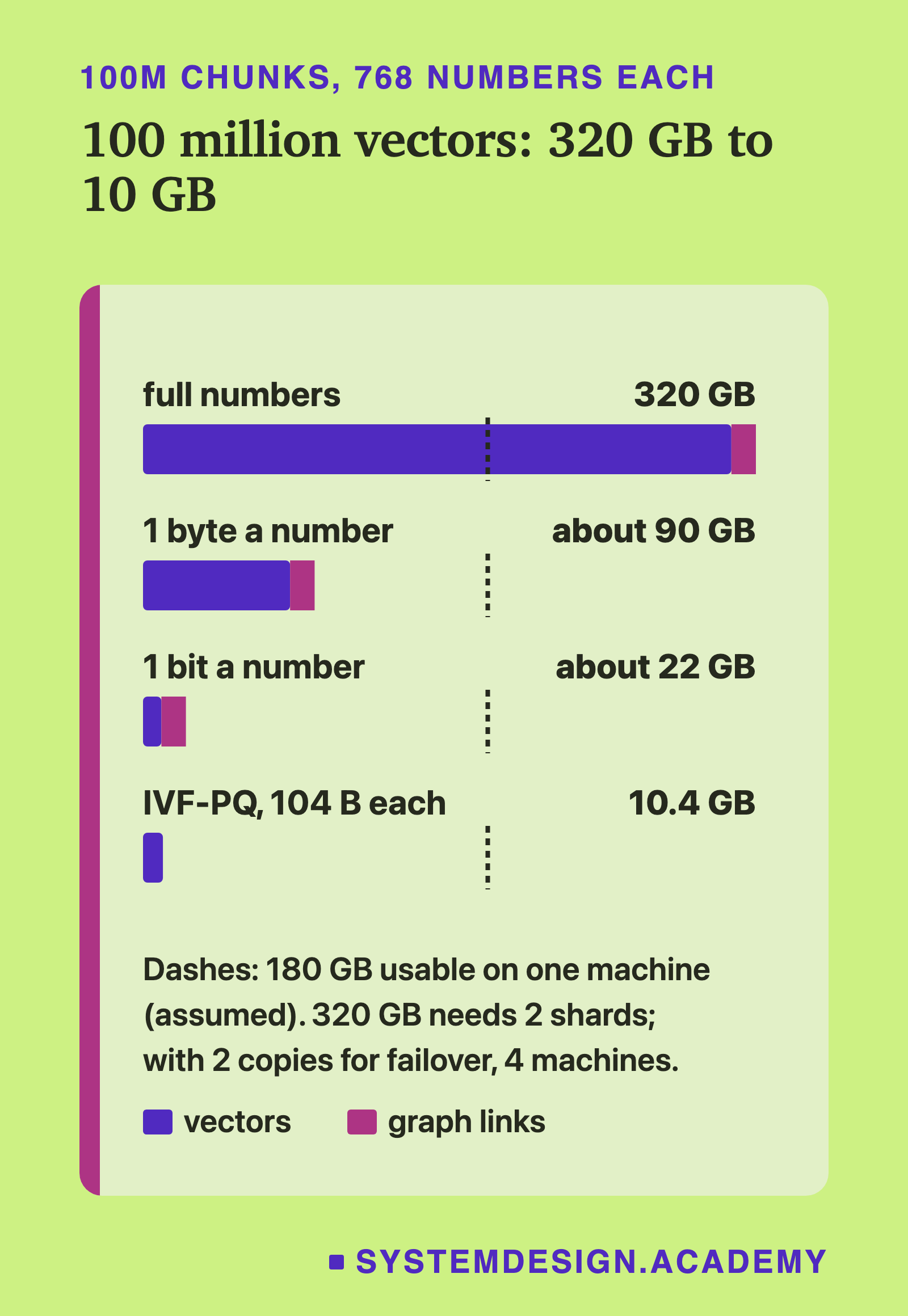
4,000,000 x 6,272 bytes = about 25 GBStart with that memory jump, because it is a plain operations problem. HNSW (Hierarchical Navigable Small World) is a graph index: each vector links to its near neighbours, and a search walks along those links. It is fast while the graph sits in memory. If 25 GB no longer fits in RAM, the search reads from disk and gets much slower. Latency looks normal here, so the index probably still fits today. Check it anyway, with the cache hit rate for the index pages. The next doubling of the corpus can push it out, and the slowest requests will jump before anything errors.
Next, the quiet problem: crowding. The right chunk did not change, but it now has 100 times more neighbours. Each new chunk is one more chance to score above it. A simple model from the course makes this concrete. Call p the chance that one random chunk beats the right chunk. Then the expected number of chunks that beat it is lambda = N x p, where N is the number of chunks. When many chunks each have a tiny chance, the Poisson formula gives the chance that 4 or fewer of them beat the right one. That is what keeps it in the top 5.
Toy model: p = 1 in a million is made up, to show the shape
At 40,000 chunks: lambda = 40,000 x 0.000001 = 0.04
At 4,000,000 chunks: lambda = 4,000,000 x 0.000001 = 4
Right chunk is in the top 5 only if 4 or fewer chunks beat it
Poisson P(4 or fewer), lambda 0.04 = about 1.00
Poisson P(4 or fewer), lambda 4 = about 0.63Third, the index settings. Approximate search, called ANN (approximate nearest neighbour), trades a little accuracy for a lot of speed. In pgvector, the vector search add-on for Postgres, the setting hnsw.ef_search (default 40) is how many candidates the search keeps while it walks the graph. A value that was fine at 40,000 chunks finds fewer of the true neighbours at 4 million. Measure it: for 200 sample questions, compare the exact top 10 with the approximate top 10.
Fourth, what grew with the data. Old and new versions of the same policy. Copies of one page in several folders. New file types, such as scanned PDFs or slides, that the parser reads badly. Read 50 random chunks by eye. Also check chunk length against the embedding model's real input limit. Some servers, such as Ollama with its defaults, drop text past the limit with no error. Hosted APIs such as OpenAI's reject the input instead.
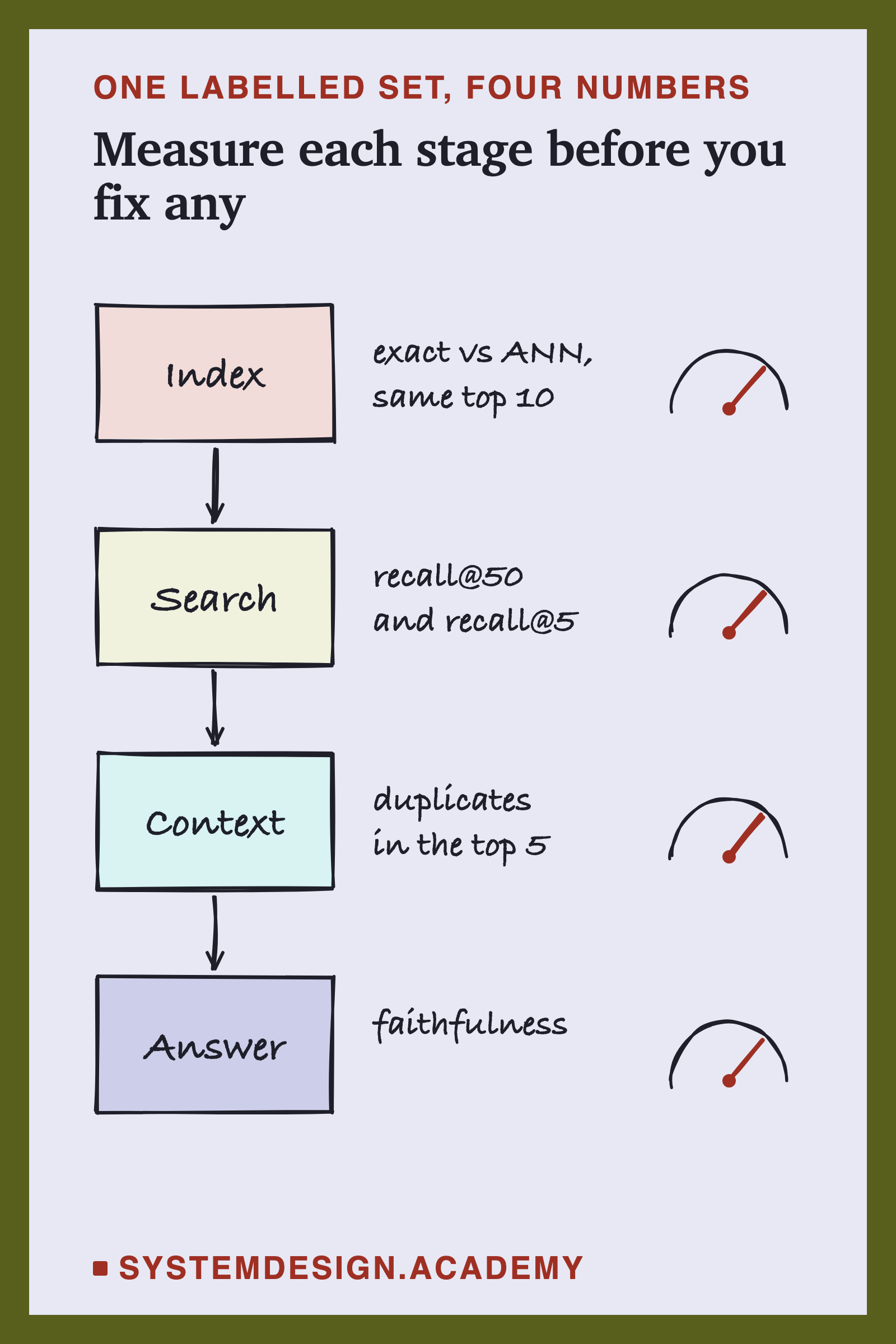
Fifth, the answer half. Collect 100 to 200 real user questions. For each, label the document and the exact answer text, not a chunk id. A result counts as a hit if its chunk contains that text. Chunk ids change every time you re-chunk or remove copies, so a set labelled by chunk id goes stale after the first fix you try. For each question record three things: was the right chunk in the top 50, was it in the final 5, and was the answer faithful. One row per stage tells you where the drop is.
| Stage | Measure | Points to |
|---|---|---|
| Index | exact vs ANN top-10 overlap | ef_search, RAM |
| Search | recall@50 and recall@5 | filters, keyword plus vector search |
| Context | duplicates in top 5 | remove copies, rerank |
| Answer | faithfulness | prompt, k |
Last, the prompt. A token is a small piece of text, often part of a word. Models read, write and bill by tokens.
Prompt size: k chunks sent x tokens per chunk
5 chunks x 400 tokens = 2,000 tokens
20 chunks x 400 tokens = 8,000 tokens
Nightly full re-embed: 4,000,000 x 400 = 1.6 billion tokens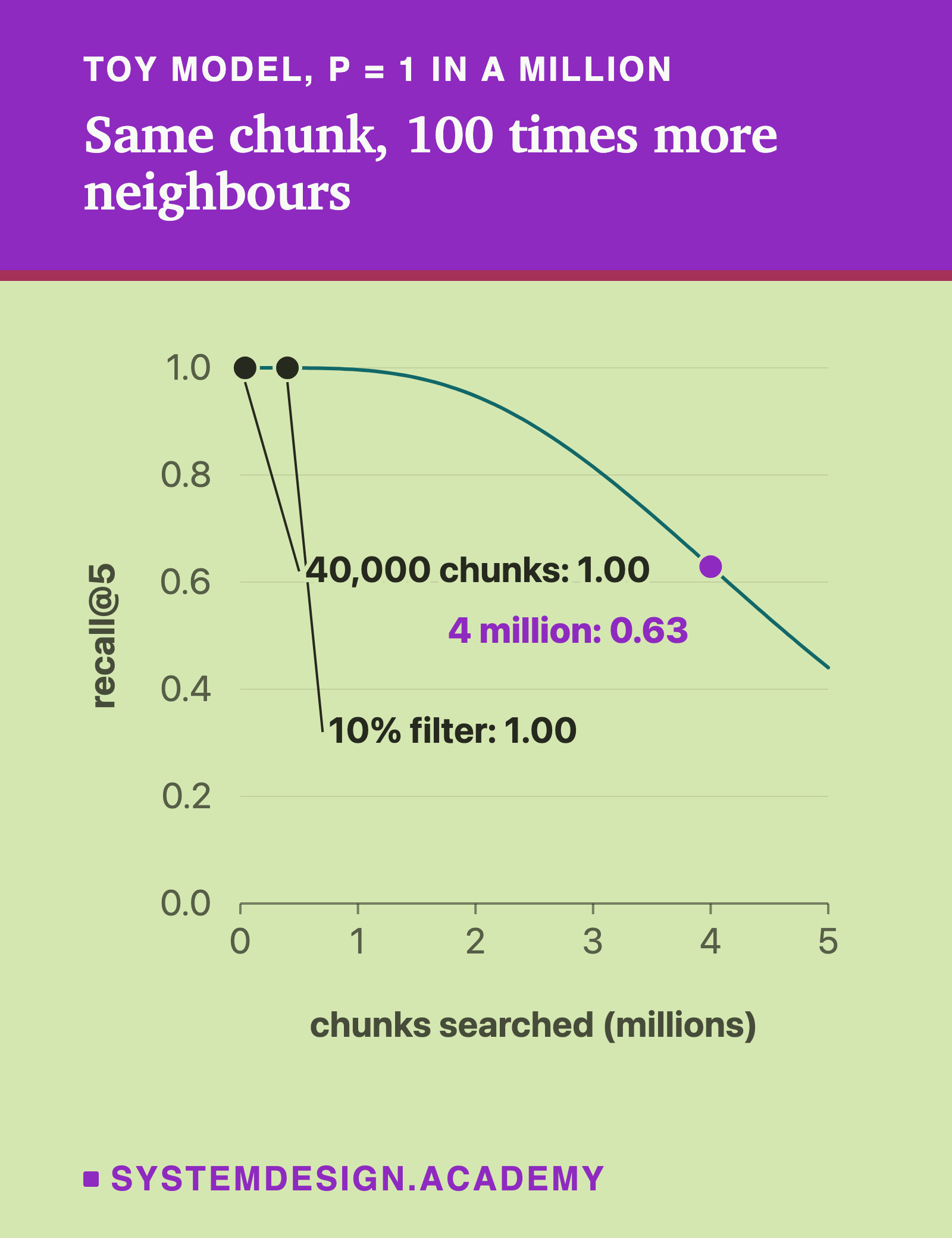
The fixes, in the order you would try them
1. Retune the index and its memory
If the overlap between exact and approximate top 10 is low, raise ef_search until it is back at your target. That is a setting, not a new system, so try it first. Make sure the index fits in RAM, or shrink it by storing each number in 2 bytes or 1 byte instead of 4. If one machine is not enough, shard: split the index over several machines and query them all.
Trade-off: Higher ef_search is slower. Shards add a fan-out, and every query waits for the slowest shard.
2. Clean the corpus and update it incrementally
If chunks are broken, such as cut at the model's limit, badly parsed or duplicated, fix ingestion next, because no search fix helps wrong text. Remove exact and near-duplicate copies, store a version field, and re-embed only chunks whose content hash (a short fingerprint computed from the text) changed. Cache query embeddings and frequent answers, keyed by index version so a re-index clears them.
Trade-off: A loose rule for removing copies (dedup) deletes documents that look alike but say different things.
3. Filter before you rank
Most questions carry a fact you already know: the team, product, region or date. Store such facts as labels on each chunk, called metadata, and filter on them inside the search. Then the right chunk competes with thousands of chunks, not millions. In the toy model, a filter that keeps 10% of chunks cuts lambda from 4 to 0.4, and recall@5 goes back to about 1.00. But check how your store filters. In pgvector with default settings, the filter runs after the index scan: 40 candidates x 10% = about 4 rows survive, fewer than the 5 you asked for. Turn on iterative scans (pgvector 0.8 or later); the filtered-search scenario below has the arithmetic.
Trade-off: Needs clean metadata, and the store must filter during the search, not after it.
4. Add keyword search (hybrid)
BM25 is a keyword ranking formula: it scores shared words and gives rare words more weight. Run it next to vector search and merge the two lists with Reciprocal Rank Fusion (RRF). RRF gives each chunk 1 / (60 + rank) from each list and adds the two scores. It rescues product codes, names and error IDs that embeddings blur.
Trade-off: You run and tune two indexes. When users and documents use different words, keyword hits can push good results down.
5. Fetch wide, then rerank
Fetch the top 50, score each one against the question with a cross-encoder reranker, and keep 5. A cross-encoder reads the question and one chunk together, so it judges better than vector distance. In the toy model, recall@50 is about 1.00 even at lambda 4. So the reranker only has to lift the right chunk from the 50 into the top 5.
Trade-off: A second model on every query, with its own latency. Set ef_search at least as high as the number you fetch.
6. Prove it
Change one thing at a time and rerun the same labelled set. Keep the per-stage table for each run. Ship only changes that moved a number, and keep the set growing from real traffic.
Trade-off: Slower than changing five things at once, but you learn which change worked.
Weak answer vs strong answer
Weak
"I would switch to a better vector database and a bigger embedding model." No measurement, no cause, and a vendor swap does not change the crowding. It is the same geometry in any store.
Strong
"Nothing errored, so I would measure each stage on a labelled set: ANN overlap with exact search, recall@50, recall@5, duplicates in the context, and faithfulness. If ANN overlap is low, I raise ef_search first, and I check the index still fits in RAM at about 25 GB. I fix broken chunks next. 100 times more chunks means more near misses, so then I filter by metadata, add BM25 with RRF, and fetch 50 and rerank to 5. One change at a time, same set, and I keep the numbers."
Follow-up questions
Recall@50 is fine, but recall@5 after the reranker is low. What now?
Then the reranker is the weak stage. Check that it fits your domain and language, and that it reads the whole chunk, since many rerankers cut long inputs: Cohere's cuts at 4,096 tokens by default. Compare it with a bigger reranker on the same 50 candidates. Fine-tuning a reranker on your labelled pairs is often cheaper than changing the embedding model, because you do not re-embed the corpus.
How do you know the ANN index is the problem and not the embeddings?
Run exact search, which compares the question with every vector, on a sample. If exact search finds the right chunk and ANN does not, it is the index. If exact search also misses, it is the embeddings, the chunking or the crowding.
When would you shard?
When the index plus headroom no longer fits one machine's RAM, or one machine cannot serve the query rate. Shard by tenant (one customer of a shared system) if you can, so most queries hit one shard instead of all of them.