The short answerHTTPS is HTTP sent inside an encrypted TLS connection, so machines between you and the website cannot read or change what you send, and the browser can check it is talking to the real site; plain HTTP sends everything as readable text, so use HTTPS for every site, always.
This page is the free part.
The course goes deeper on HTTP and HTTPS
₹499 in India/$49 everywhere elseonce, for the whole course
The System Design course covers HTTP and HTTPS across a run of lessons, not one page. These 4 alone are about 65 minutes of step-by-step reading, every one with a quiz.
Ive started this course by accident - LLM advised me this site. When I passed few free lessons, I had no doubt - this course should be bought. And I did it with special pleasent price and it was best decision of the month. Content is great, interesting to read and with a lot of practial cases (what makes it different from other souces and books) I hope to teach all the lessons, that will be my supergoal. Glad that I found this resource and speacial Thank You to Roni Das - Great Job!
Oleksander, Backend Engineer · System Design Masterclass · read 15 lessons · all reviews
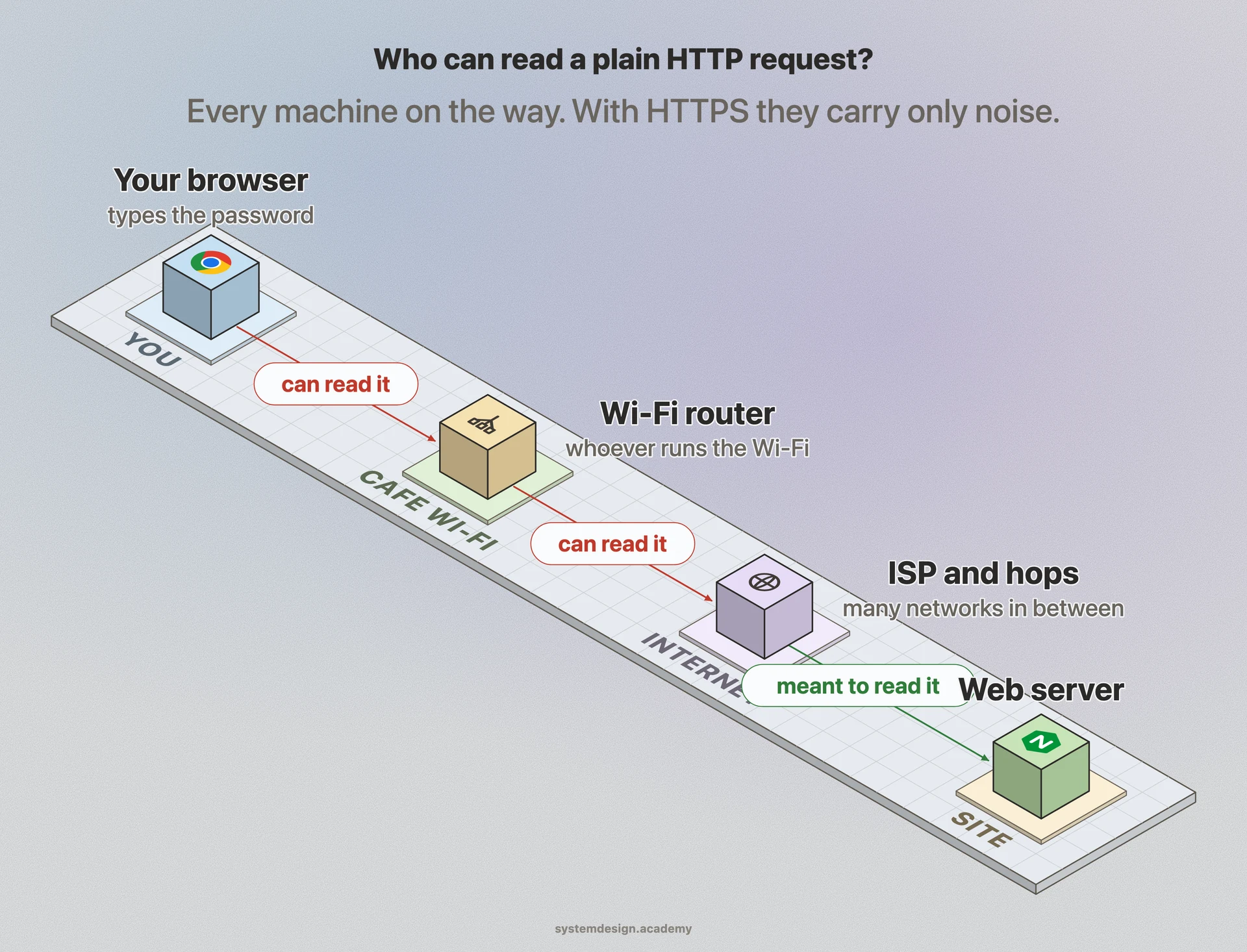
Anyone on the path can read it, and can change it.
No proof that the server is who it claims to be.
Default port 80. Browsers label it "Not secure".
vs
HTTP over TLS (Transport Layer Security)
HTTPS
the sealed, signed envelope
The same HTTP, inside an encrypted TLS connection.
The path sees noise: no password, no page, no URL path.
A certificate proves the server owns the domain name.
Default port 443. Costs one short handshake per new connection.
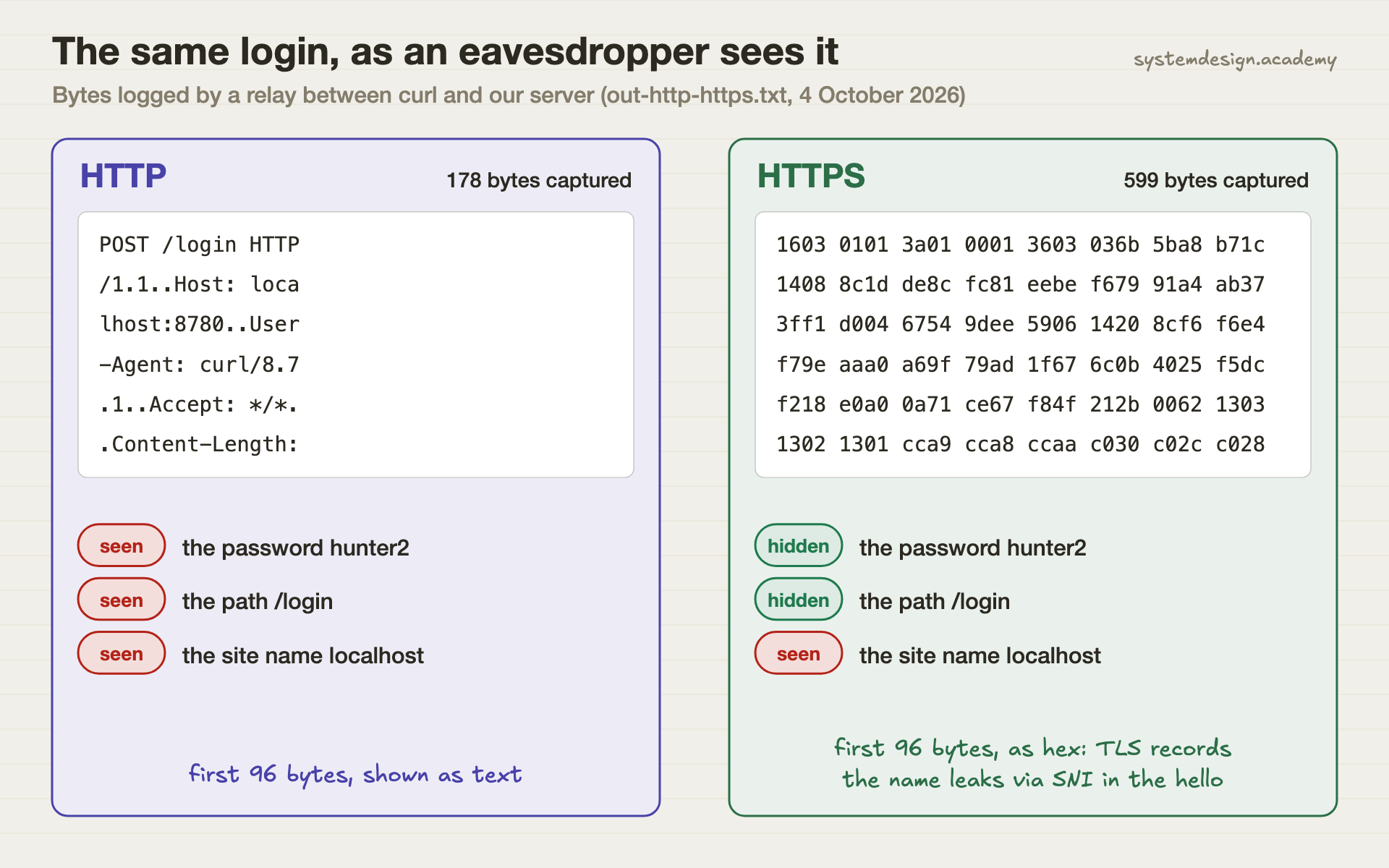
The same login, as an eavesdropper sees itOver HTTP the wiretap could read everything. Over HTTPS it could read only the site name; the password and the page path were encrypted.
HTTP vs HTTPS, side by side
Read across a row to compare one thing. Every word that may be new is explained just below the table.
HTTP compared with HTTPS
Aspect
HTTP
HTTPS
What travels on the wire
Readable text. Our wiretap saw POST /login and the password.
Encrypted TLS records. Our wiretap saw neither.
Can someone on the path change it?
Yes, silently: inject ads, scripts or a fake login form.
No. Any change breaks the encryption check and the connection fails.
Proof of the server's identity
None.
A certificate for the domain, checked by the browser. curl refused our self-signed one.
Default port
80
443
Extra setup cost
None.
A TLS handshake per new connection. TLS 1.3 needs one round trip. Ours: 0.82 ms of computing on one machine.
What still leaks
Everything.
The site name (via SNI and DNS), the server's IP address, sizes and timing. Not the path, headers or body.
Browser label
"Not secure" in Chrome since version 68 (July 2018).
No warning. A padlock or site-info icon.
Search ranking
No boost.
Google announced HTTPS as a ranking signal in August 2014.
Defined in
RFC 9110 (June 2022), the http URI scheme.
RFC 9110 for the https scheme, RFC 8446 (August 2018) for TLS 1.3.
Words on this page, in plain English
HTTP
The language browsers and servers use to ask for and send web pages: a request like GET /page, and a response.
TLS
Transport Layer Security: the protocol that encrypts a connection and proves who the server is. The old name was SSL.
Encryption
Scrambling data so only someone with the right key can turn it back into the original.
Certificate
A signed file that says "this public key belongs to this domain name". Browsers trust it if a known certificate authority signed it.
Certificate authority (CA)
An organisation browsers trust to check domain ownership and sign certificates, such as Let's Encrypt.
Self-signed certificate
A certificate signed by its own owner instead of a CA. Fine for a lab, rejected by browsers and curl unless you trust it by hand.
Handshake
The first messages of a TLS connection, where both sides agree on keys and the server shows its certificate.
SNI
Server Name Indication: the site name the browser sends in its first TLS message, before encryption starts, so one server can host many sites.
Eavesdropper
Anyone who can see your traffic on its way: a public Wi-Fi owner, a network provider, malware on the same network.
When to use HTTP, when to use HTTPS
Real situations, and the pick we would make in each one.
Pick HTTPS
A login page or anything with a password.
Over HTTP our wiretap read the password in plain text. Over HTTPS it could not.
Pick HTTPS
A blog or brochure site with no forms.
Without HTTPS anyone on the path can change the page, for example add a script. Browsers also mark it "Not secure".
Pick HTTPS
An API called by your mobile app.
API tokens are passwords too, and phones join public Wi-Fi all day. That is exactly the wiretap in our lab.
Pick HTTP
A local development server on your own laptop.
Traffic to 127.0.0.1 never leaves the machine, so plain HTTP is fine for quick tests. Use HTTPS once it is reachable from a network.
Pick Both
Port 80 on a public site.
Keep listening on port 80 only to redirect visitors to the HTTPS address. Serve nothing else over HTTP.
Pick HTTPS
Traffic between services inside one data centre.
Internal networks are not automatically safe. Many teams now encrypt service-to-service traffic too, often with mutual TLS.
Every machine on the path carries your requestYou do not choose the machines between you and a website. HTTPS makes it not matter who they are.
we ran this, here is what happened
Hands-on: We put a wiretap between curl and our server
Most pages say HTTP is "not secure". We wanted to show what that means in bytes.
We ran one small Python web server twice on one laptop: plain HTTP on one port, and HTTPS with a self-signed certificate on another. Then we sent the same login form, user=asha&password=hunter2, with curl -v and recorded what each side printed.
To see what a machine on the path sees, we placed a relay between curl and the server that writes down every byte the client sends. That is all a cafe Wi-Fi router or a network provider receives. We could not use tcpdump, because it needs admin rights on macOS. Finally we timed 20 fresh connections each way.
Where it ran: Apple M4, macOS 15.6, curl 8.7.1, OpenSSL 3.6.3 for the certificate, Python 3.13.15 http.server and ssl. Everything on 127.0.0.1. Two full runs on 4 October 2026.
The lines that matter from scripts/labs/compare/http_vs_https.sh. --connect-to sends curl through the relay while it still asks for localhost, so the certificate check works.
Real output of run 1 (out-http-https.txt), shortened only by removing lines. Run 2: HTTPS total 1.244 ms, handshake 0.819 ms, HTTP total 0.356 ms, and the same captured bytes.
The results
What we measured
HTTP
HTTPS
Password visible to the wiretapgrep for hunter2 in the captured bytes
yes, as plain text
no
URL path (/login) visiblethe path is inside the encrypted request
yes
no
Site name visiblesent before encryption, in the TLS hello (SNI)
yes
yes
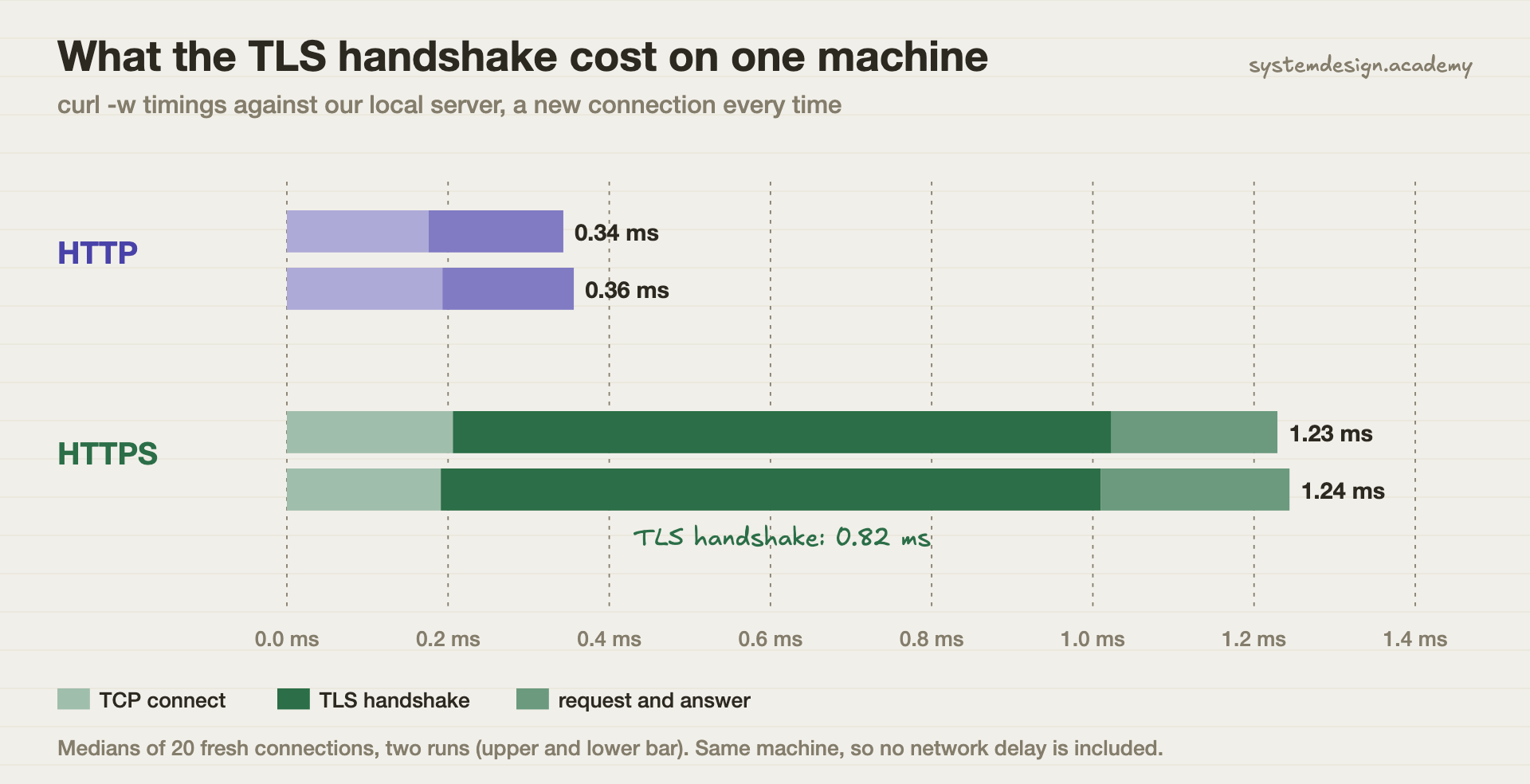
Median time per new connection (2 runs)the TLS handshake took about 0.82 ms
0.34 to 0.36 ms
1.23 to 1.24 ms
Self-signed certificate, not trustedthe identity check works
no check at all
refused (curl error 60)
What the TLS handshake cost on one machineAbout 0.8 ms of computing per new connection. On a real network, add one round trip with TLS 1.3.
What this shows
Over HTTP, the wiretap held our password in readable text after one request. Over HTTPS it held 599 bytes of noise, apart from the site name, which TLS sends in the clear so the server knows which certificate to show. The price was about 0.8 milliseconds of computing per new connection on this laptop. That is the whole trade, and it is not close.
What this test does not show: One machine, so there is no real network delay. On a real link the handshake also costs a round trip: with TLS 1.3 that is one extra trip before the first request, and resumed connections can skip most of it. A self-signed certificate stands in for a real one; the encryption is the same. The script is scripts/labs/compare/http_vs_https.sh in our repository.
Common mistakes
"My site has no logins, so HTTP is fine."
Anyone on the path can still change the page, add scripts or swap download links. HTTPS also stops that, not just snooping.
"HTTPS hides which sites I visit."
It hides the path and content, not the site name. Our wiretap still found localhost in the HTTPS bytes, because SNI is sent before encryption starts.
"HTTPS is too slow."
Our handshake cost 0.82 ms of computing. On a real network add one round trip per new connection with TLS 1.3, and keep-alive connections reuse it for many requests.
Turning off certificate checks (curl -k, verify=False) to make an error go away.
That keeps the encryption but drops the proof of who you are talking to, so an attacker can sit in the middle. Fix the certificate instead.
Serving the page over HTTPS but loading scripts over HTTP.
Browsers block or warn about this "mixed content", and a single HTTP script can be replaced to take over the page. Load everything over HTTPS.
Questions people ask
What is better, HTTPS or HTTP?
HTTPS, in every case that faces a network. It is the same HTTP inside encryption, so people on the path cannot read or change it, and the browser can check the site's certificate. Our test cost about 0.8 ms per new connection for that.
Why is HTTP not safe?
Because it travels as plain text. In our lab a simple relay saw the full request, including the password hunter2, after one login. Anyone running a Wi-Fi network or a router on the path can do the same, and can change the page on its way back.
Do websites still use HTTP?
Some old or internal sites do. Most public sites still listen on port 80, but only to redirect visitors to the HTTPS address. Chrome has marked every HTTP page "Not secure" since Chrome 68 in July 2018.
Why did HTTP change to HTTPS?
HTTP itself did not change; sites added TLS around it. Free certificates, browser warnings from 2018 and Google's 2014 announcement that HTTPS is a ranking signal pushed most of the web to switch.
Is HTTPS the same as SSL or TLS?
Not quite. TLS (the newer name for SSL) is the encryption layer. HTTPS is HTTP running on top of TLS. Our curl run used TLS 1.3, defined in RFC 8446.
Can my employer or Wi-Fi owner see HTTPS sites I visit?
They can usually see the site names (through SNI and DNS) and how much data moves, but not the pages, paths, searches or passwords. A device your employer controls is different: it can be set up to inspect traffic.
Lessons that go deeper
From the System Design course, in the order we would read them.
HTTP vs HTTPS is one row in a much bigger table. Our System Design course has 770 lessons on networks, databases, caching, scaling, messaging, security and reliability, each drawn step by step, so you can explain the trade-off in an interview and pick right at work. 18 lessons are free to read, with no card needed.
the hands-on parts are real runs, like this one
course 1
System Design Masterclass
From absolute beginner to principal engineer, drawn step by step.