The short answerOLTP databases such as PostgreSQL and MySQL handle many tiny reads and writes of single rows while your app runs; OLAP engines such as DuckDB, Snowflake and BigQuery scan millions of rows to answer summary questions, so use OLTP to run the business and OLAP to study it.
This page is the free part.
The course goes deeper on OLTP and OLAP
₹499 in India/$49 everywhere elseonce, for the whole course
The System Design course covers OLTP and OLAP across a run of lessons, not one page. These 4 alone are about 79 minutes of step-by-step reading, every one with a quiz.
The planner stopped using an index somewhere between 19.7 and 39.8 percent of the table. A query on the second column of a composite index took 37.269 ms against 0.054, and five indexes took the same inserts from 160 ms to 751.
The material has been designed with a lot of effort and dedication. It has covered vast range of topic with sufficient content and diagrams wherever required. It complements well with other system design materials.
Som · System Design Masterclass · read 75 lessons · all reviews
Thousands of small jobs: place an order, update a balance.
Each job touches one row or a handful of rows.
Must answer in milliseconds, while customers wait.
Stores each row together, so one row is one quick read.
vs
Online Analytical Processing
OLAP
the back office
A few big questions: revenue per country this year.
Each question reads millions of rows, but only a few columns.
Seconds are fine. Analysts and dashboards are the users.
Stores each column together, so it reads only what it needs.
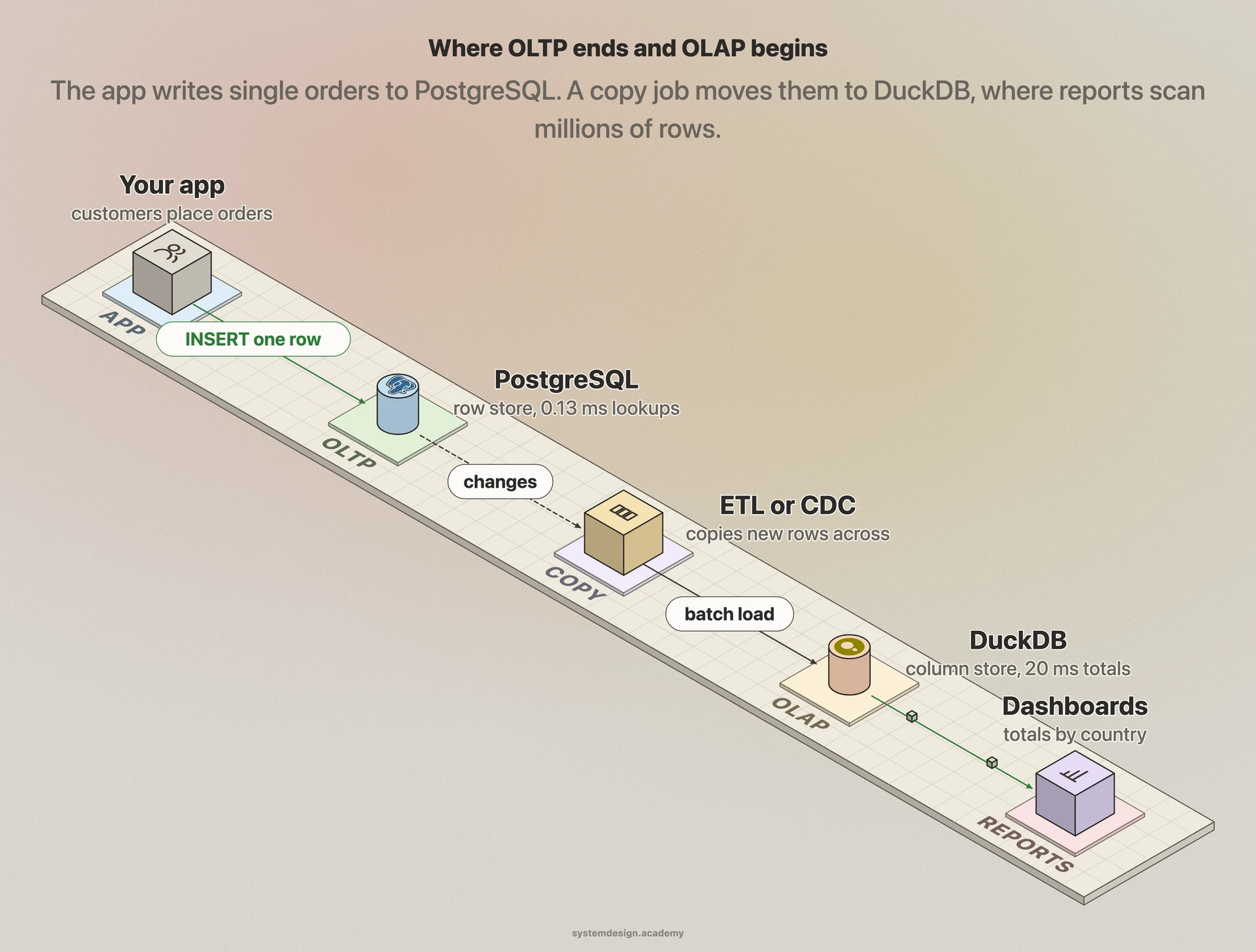
Where OLTP ends and OLAP beginsThe app talks only to the OLTP database. A copy job, often called ETL or CDC, moves the data across. Reports and dashboards read the OLAP side, so they never slow down a customer.
OLTP vs OLAP, side by side
Read across a row to compare one thing. Every word that may be new is explained just below the table.
OLTP compared with OLAP
Aspect
OLTP
OLAP
Main job
Run the live app: record what happens, one event at a time.
Answer questions about everything that already happened.
Typical query
Get order 4,812,113. Insert one new order.
Sum revenue by country for 2025 over every order.
Rows touched per query
One to a few hundred.
Millions to billions.
Writes
Constant small inserts and updates, many users at once.
Big batch loads, often every hour or every night.
Storage layout
Row store: a whole row sits together on a page.
Column store: each column sits together, compressed.
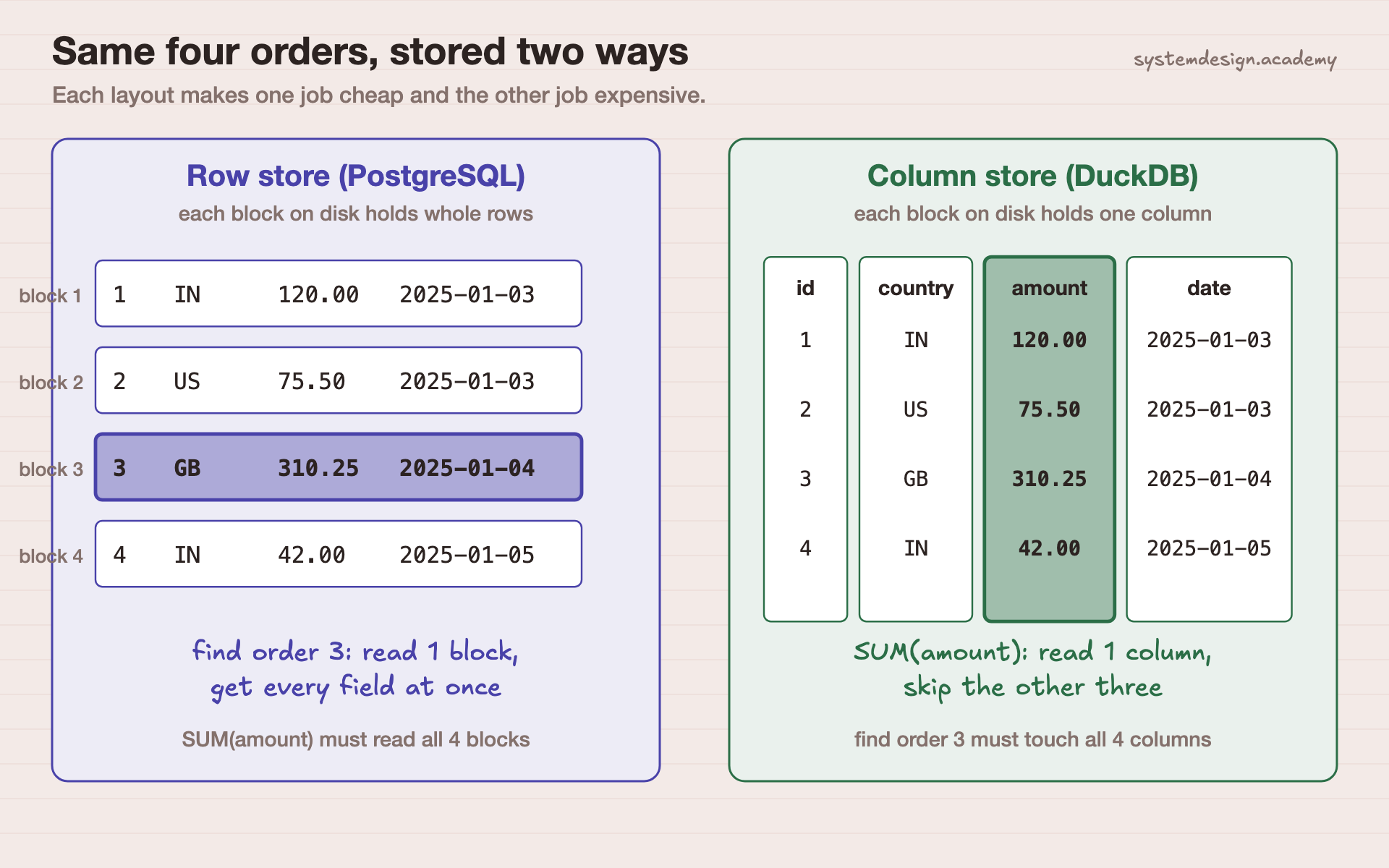
Same four orders, stored two waysA row store reads one block to fetch one whole order. A column store reads one column to total all orders. Each layout makes one job cheap and the other expensive.
Words on this page, in plain English
Transaction
A group of database changes that succeed together or fail together, like taking money from one account and adding it to another.
Row
One record in a table, such as one order with its id, customer, amount and date.
Column
One field across every record, such as the amount of every order.
Row store
A database that keeps all the fields of one row next to each other on disk. PostgreSQL works this way.
Column store
A database that keeps all the values of one column next to each other. DuckDB, Snowflake and BigQuery work this way.
Index
A sorted lookup structure, like the index at the back of a book, that finds a row without reading the whole table.
Aggregate
A summary over many rows: a count, a sum, an average.
ETL
Extract, transform, load: copying data out of one system, cleaning it, and loading it into another.
Data warehouse
A database built for OLAP, where a company keeps cleaned history for reports.
When to use OLTP, when to use OLAP
Real situations, and the pick we would make in each one.
Pick OLTP
A customer places an order in your app.
One small write that must be safe and fast. This is the textbook OLTP job.
Pick OLTP
Show a user their last ten orders.
An index finds a handful of rows for one customer in well under a millisecond.
Pick OLAP
The finance team wants revenue per country, per month, for three years.
That reads every order but only three columns. A column store skips everything else.
Pick OLAP
A dashboard that refreshes every few minutes over all sales.
Repeated big scans on your live database would slow down real customers. Point the dashboard at a copy.
Pick Both
Fraud checks on each payment as it happens.
The check itself is a fast OLTP read. The rules behind it are usually learned from history in an OLAP system.
Pick OLTP
A small startup with one database and a few thousand rows.
At this size PostgreSQL answers the reports too. Add an OLAP engine when reports start to hurt the app.
we ran this, here is what happened
Hands-on: The same 5 million orders in PostgreSQL and DuckDB
We made one table of 5,000,000 fake orders: id, customer, country, status, amount and date. Both engines loaded the exact same CSV file, so they hold identical data.
PostgreSQL 18 is a row store and a classic OLTP database. DuckDB 1.5 is a column store built for OLAP. Both had a primary key on the order id, which gives each one an index on it.
Then we timed three jobs on each: find one order by id (1,000 random ids), add up revenue per country for 2025 (every row), and insert 1,000 new orders one at a time.
Where it ran: Apple M4, macOS 15.6, PostgreSQL 18.6 (Homebrew, default settings) and DuckDB 1.5.6 (pip), Python 3.12. Two full runs on 4 October 2026; the table shows run 1 and the range across both.
AGG_SQL = """
SELECT country, count(*) AS orders, round(sum(amount), 2) AS revenue
FROM orders
WHERE created_at >= TIMESTAMP '2025-01-01' AND created_at < TIMESTAMP '2026-01-01'
GROUP BY country ORDER BY revenue DESC
"""

# point lookup, 1,000 random ids (PostgreSQL shown; DuckDB uses ? instead of %s)
for i in ids:
    t0 = time.perf_counter()
    con.execute("SELECT * FROM orders WHERE order_id = %s", (i,)).fetchone()
    lat.append(ms(t0))

# 1,000 single-row inserts, each its own transaction
for k in range(1000):
    con.execute(
        "INSERT INTO orders VALUES (%s, 1, 'IN', 'placed', 99.00, TIMESTAMP '2026-10-04 10:00:00')",
        (ROWS + 1 + k,),
    )
The timed parts of scripts/labs/compare/oltp_vs_olap.py. Both engines get the same SQL.
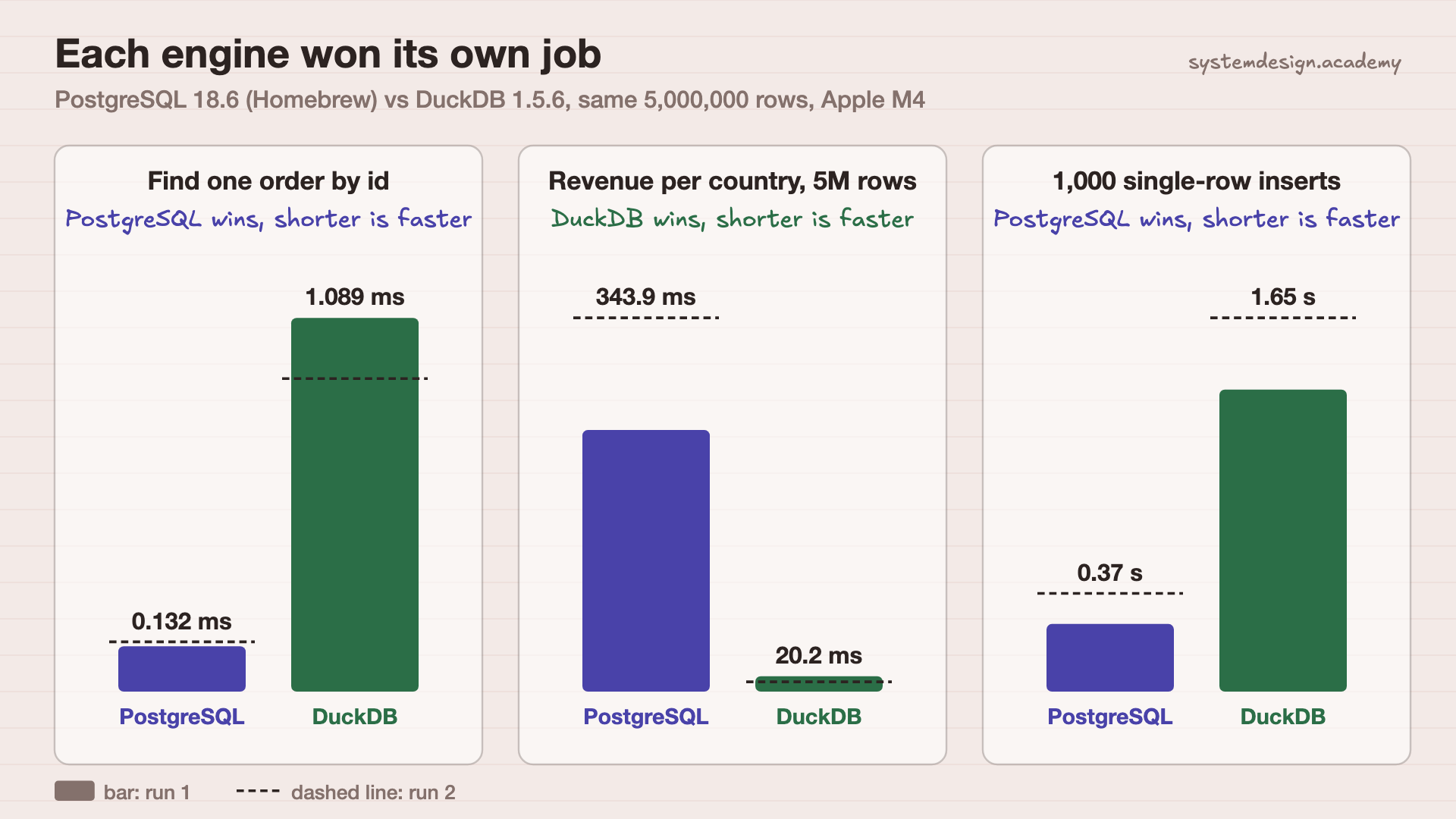
Real output of run 1 (out-oltp-olap.json), trimmed. Both engines returned the same totals to the cent. Run 2: PostgreSQL 0.145 ms / 491 ms / 0.54 s, DuckDB 0.912 ms / 12.8 ms / 2.04 s.
The results
What we measured
OLTP
OLAP
Find one order by id (median)PostgreSQL about 6 to 8 times faster
0.13 to 0.15 ms
0.91 to 1.09 ms
Revenue per country, all 5M rows (median)DuckDB about 17 to 38 times faster
344 to 491 ms
13 to 20 ms
1,000 single-row insertsPostgreSQL about 4 times faster
0.37 to 0.54 s
1.65 to 2.04 s
Size of the table on diskthe column store compressed it to about a quarter
454 MB
121 MB
Each engine won its own jobShorter is faster. PostgreSQL won the two single-row jobs. DuckDB won the big total by a wide margin.
What this shows
Each engine won the job it was built for. PostgreSQL found one row and saved one row faster, because a whole row sits in one place and its index points straight at it. DuckDB added up 5 million rows 17 to 38 times faster, because it read only the date, country and amount columns, packed tightly together. Same data, same SQL, opposite winners.
What this test does not show: One laptop, warm caches, one user at a time. A real OLTP system serves thousands of users at once, which is where PostgreSQL's design pays off even more. DuckDB is an in-process engine; Snowflake and BigQuery are cloud services with the same column idea but different costs. The script is scripts/labs/compare/oltp_vs_olap.py in our repository.
Common mistakes
Running big reports on the live app database.
One heavy scan can push customer queries out of memory and slow everyone. Send reports to a read replica or an OLAP copy.
"OLAP means a cube."
Older OLAP tools pre-built cubes of totals. Most modern OLAP is simply a column store that scans fast, so you can ask new questions without building anything first.
Using a warehouse as the app's database.
Column stores are slow at single-row writes. In our test DuckDB took about 4 times longer for 1,000 small inserts. Keep live writes in an OLTP database.
"SQL means OLTP."
SQL is just the language. PostgreSQL, DuckDB, Snowflake and BigQuery all speak it. What differs is how the data is stored underneath.
Copying everything every night when only a little changed.
Use change data capture (CDC), which streams only new and changed rows from the OLTP database to the OLAP one.
Questions people ask
What is the main difference between OLTP and OLAP?
OLTP records the business as it happens, with many small, fast reads and writes of single rows. OLAP analyses what happened, with a few big queries that read millions of rows. That is why OLTP stores rows together and OLAP stores columns together.
Is SQL OLTP or OLAP?
Neither. SQL is a query language used by both. PostgreSQL (OLTP) and DuckDB (OLAP) ran the exact same SQL in our test and returned the same totals. They just stored the data differently.
Is Snowflake OLAP or OLTP?
Snowflake is mainly an OLAP data warehouse, with column storage built for analysis. It also offers hybrid tables, a row-based storage engine Snowflake describes for transactional work such as high-concurrency updates.
Is MySQL OLAP or OLTP?
MySQL is an OLTP database. Its default storage engine, InnoDB, is built around transactions that follow the ACID rules, with row-level locking so many users can write at once. Teams often copy MySQL data into a warehouse for analysis.
Is OLAP obsolete?
No. The old idea of pre-built cubes has faded, but OLAP itself has grown: column stores like BigQuery, Snowflake, ClickHouse and DuckDB are OLAP engines, and they are widely used.
Can one database do both OLTP and OLAP?
For small data, yes: PostgreSQL handled a 5-million-row total in a third to half a second in our test. Products called HTAP (hybrid transactional and analytical processing) try to do both at scale. Most large companies still keep two systems.
Lessons that go deeper
From the System Design course, in the order we would read them.
OLTP vs OLAP is one row in a much bigger table. Our System Design course has 769 lessons on networks, databases, caching, scaling, messaging, security and reliability, each drawn step by step, so you can explain the trade-off in an interview and pick right at work. 18 lessons are free to read, with no card needed.
the hands-on parts are real runs, like this one
course 1
System Design Masterclass
From absolute beginner to principal engineer, drawn step by step.