The short answerTCP makes sure every byte arrives, in order, and slows the sender down when the other side cannot keep up; UDP sends each message once and never checks, so pick TCP when every byte must arrive (web pages, payments, files) and UDP when late data is useless (live calls, games, quick lookups).
This page is the free part.
The course goes deeper on TCP and UDP
₹499 in India/$49 everywhere elseonce, for the whole course
The System Design course covers TCP and UDP across a run of lessons, not one page. These 4 alone are about 81 minutes of step-by-step reading, every one with a quiz.
The material has been designed with a lot of effort and dedication. It has covered vast range of topic with sufficient content and diagrams wherever required. It complements well with other system design materials.
Som · System Design Masterclass · read 75 lessons · all reviews
Says hello first: a three-step handshake before any data.
Numbers every byte and resends what goes missing.
Hands bytes to the app in the order they were sent.
Slows the sender when the reader or the network is full.
vs
User Datagram Protocol
UDP
the postcard
No hello. The first packet already carries data.
Sends each message once. No resend, no receipt.
Messages can arrive late, twice, out of order, or never.
Tiny 8-byte header, so the app decides what matters.
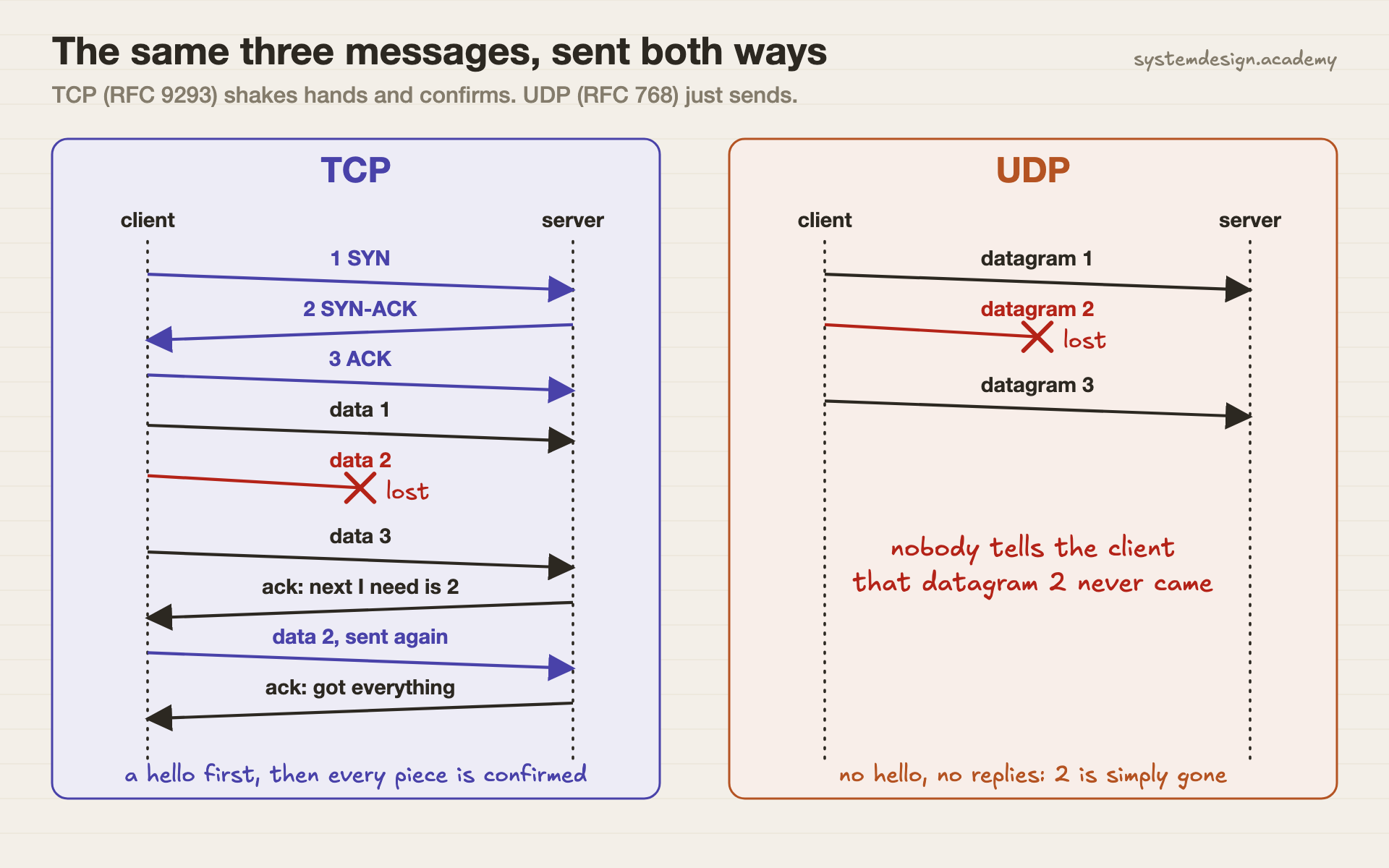
The same three messages, sent both waysTCP spends one round trip saying hello, then confirms every piece and resends the lost one. UDP just sends. When datagram 2 is lost, nobody knows, unless the app checks for itself.
TCP vs UDP, side by side
Read across a row to compare one thing. Every word that may be new is explained just below the table.
TCP compared with UDP
Aspect
TCP
UDP
Connection
Yes. A three-way handshake (SYN, SYN-ACK, ACK) before data.
None. The first packet already carries data.
Delivery
Every byte arrives, or the app is told the connection broke.
Best effort. A lost datagram is simply gone, and nobody is told.
Order
Kept. Bytes reach the app in the order they were sent.
Not kept. The app must sort messages itself if it cares.
Shape of the data
One long stream of bytes. Message edges are not kept.
Separate messages. Each datagram arrives whole or not at all.
Header size
20 bytes at least, up to 60 with options.
8 bytes, always.
Speed control
Flow control and congestion control slow the sender down.
None. The sender goes as fast as it likes.
Time to first byte
Waits one round trip for the handshake (more with TLS).
No wait. Data leaves at once.
Broadcast, multicast
No. One connection joins exactly two programs.
Yes. One datagram can go to many receivers.
Common uses
Web pages over HTTP/1.1 and HTTP/2, SSH, email, database connections.
DNS lookups, voice and video calls, online games, QUIC and HTTP/3.
Defined in
RFC 9293 (August 2022), which replaced RFC 793 from 1981.
RFC 768 (August 1980). Three pages long.
Words on this page, in plain English
Protocol
A set of rules two computers agree on so they can understand each other.
Packet
One small chunk of data sent across a network, with an address on the front.
Datagram
UDP's name for one self-contained message. It travels alone and is never joined to the next one.
Port
A number that says which program on a computer should get the data, like a flat number in a building.
Handshake
Messages two sides swap before real data, to agree that both are ready. TCP's has three steps: SYN, SYN-ACK, ACK.
Flow control
TCP's way of making the sender wait when the reader's buffer is full.
Congestion control
TCP's way of sending less when the network itself looks overloaded.
Buffer
A waiting area in memory where data sits until the program reads it.
QUIC
A newer transport, used by HTTP/3, that runs on top of UDP and adds its own resends and ordering.
When to use TCP, when to use UDP
Real situations, and the pick we would make in each one.
Pick TCP
A payment API, or your app talking to its database.
A missing byte here means a wrong amount or a broken query. TCP's resends are exactly what you want.
Pick TCP
A file download or a web page.
Every byte matters and a short wait is fine. HTTP/1.1 and HTTP/2 both run on TCP.
Pick UDP
A live voice or video call.
A sound that arrives half a second late is worse than a tiny gap. Resending old audio only adds delay.
Pick UDP
A multiplayer game sending player positions 30 times a second.
The next update replaces the last one, so a lost update does not need to come back.
Pick UDP
A DNS lookup (turning a name into an IP address).
One small question, one small answer, no handshake to wait for. Servers must also support TCP for big answers (RFC 7766).
Pick Both
A modern website on HTTP/3.
HTTP/3 uses QUIC, which runs on UDP but rebuilds resends and order itself. You get UDP's speed and TCP-like safety.
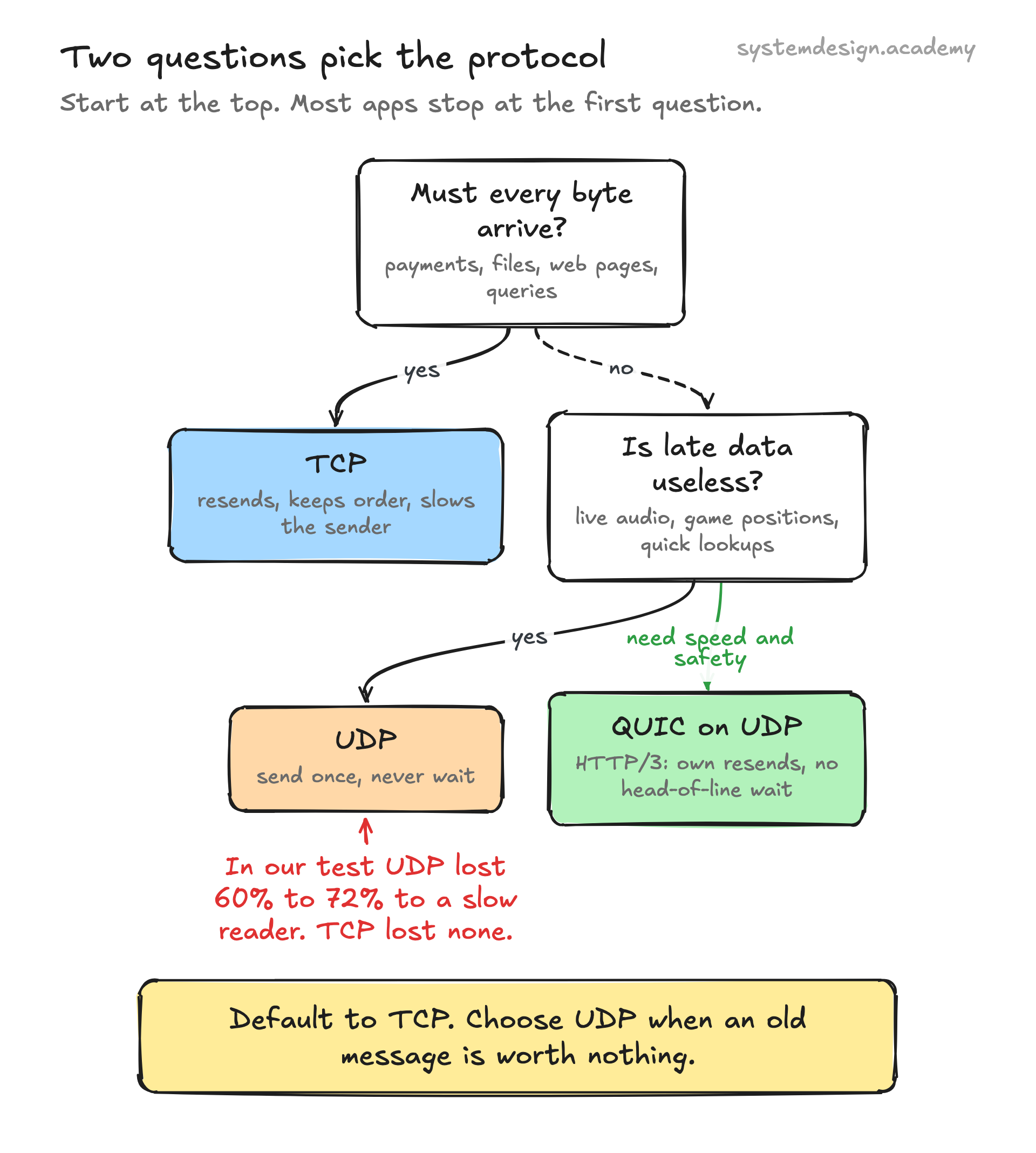
Two questions pick the protocolMost apps stop at the first question and choose TCP. Live media and games reach the second one.
we ran this, here is what happened
Hands-on: We sent 20,000 messages to a slow reader
Most pages say UDP "may lose data". We wanted to see it happen, on a normal laptop, with no tricks.
We wrote one small Python script. It sends 20,000 numbered messages of 512 bytes from one program to another on the same Mac. The reader is slow on purpose: it pauses for 1 millisecond after every 50 messages. Many real apps are slow like this when they are busy.
We ran the same test twice, once over UDP and once over TCP, and counted which numbers arrived. Nothing is simulated. Any loss you see is the real operating system throwing data away.
Where it ran: Apple M4, macOS 15.6, Python 3.12.14, 127.0.0.1 (the same machine). Receive buffer set to 64 KB. Three full runs on 4 October 2026.
# UDP: the sender never waits for the reader
for i in range(N):
    tx.sendto(struct.pack("!I", i) + body, (HOST, port))

# the reader: slow on purpose
data, _ = sock.recvfrom(4 + PAYLOAD)
got.append(struct.unpack("!I", data[:4])[0])
if pause and len(got) % READ_PAUSE_EVERY == 0:
    time.sleep(0.001)

# TCP: the same messages over a connection
tx.connect((HOST, port))  # the three-way handshake happens here
for i in range(N):
    tx.sendall(struct.pack("!I", i) + body)
The lines that matter from scripts/labs/compare/tcp_vs_udp.py. Each message starts with its own number, so the reader can see exactly which ones went missing.
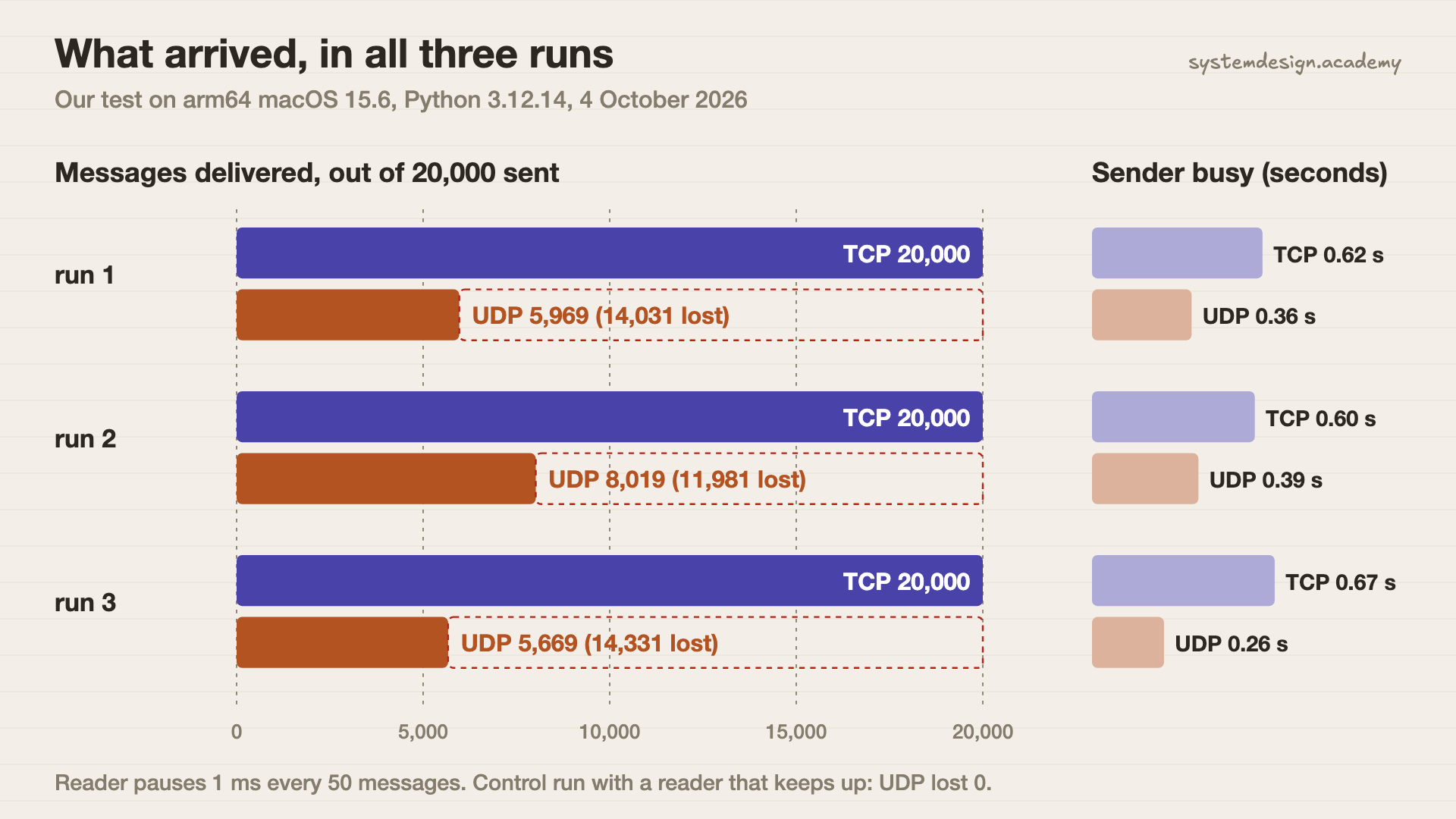
Real output of run 1, trimmed to the fields discussed here (out-tcp-udp-run1.json). Runs 2 and 3 lost 11,981 and 14,331 UDP messages; TCP lost none in all three.
The results
What we measured
TCP
UDP
Messages that arrived (of 20,000)UDP lost 60% to 72% across three runs
20,000 in all 3 runs
5,669 to 8,019
In the order they were senton one machine UDP did not reorder; across a real network it can
Yes, every time
Yes, but with gaps
Time the sender spent sendingTCP waited for the slow reader; UDP did not
0.60 to 0.67 s
0.26 to 0.39 s
Connection left behind after closingread from netstat
TIME_WAIT
nothing
What arrived, in all three runsSame messages, same slow reader. TCP delivered all of them and took longer. UDP finished sending sooner and most of its messages were thrown away.
What this shows
UDP was faster for the sender because it never waited. That speed is exactly why 70% of the messages were thrown away. TCP took about twice as long and delivered all 20,000, in order. Then a control run settled one more thing: with a reader that keeps up, UDP lost nothing. UDP is not broken. It just never protects you from a full buffer.
What this test does not show: This is one machine, so there is no real network in between. Loss here comes from a full buffer, not from a bad Wi-Fi link. We could not capture packets with tcpdump, because that needs admin rights on macOS. Instead we read TCP's connection states from netstat. The script is scripts/labs/compare/tcp_vs_udp.py in our repository.
Common mistakes
"UDP is faster, so use it for speed."
UDP saves the handshake and the waiting. If you then need every message, you must rebuild resends yourself, and that is most of TCP. Measure before you switch.
"UDP always loses data."
In our control run, with a reader that kept up, UDP delivered all 20,000 messages. It loses data when something is full or a link is bad, and it does not tell you.
"TCP means my message arrives as one piece."
TCP is a byte stream. Two sends can arrive in one read, or one send in two reads. Put a length or a separator in front of each message.
"HTTP is always TCP."
HTTP/1.1 and HTTP/2 run on TCP. HTTP/3 runs on QUIC, which runs on UDP. The IANA port list has port 443 registered for both.
Ignoring head-of-line blocking.
On TCP, one lost packet makes every later byte wait for the resend. That is a big reason QUIC was built on UDP with separate streams.
Questions people ask
Should you use TCP or UDP?
Use TCP unless you have a clear reason not to. Choose UDP when old data is worthless (live audio, game positions), when you need broadcast, or when you use a protocol like QUIC that adds its own reliability on top of UDP.
Is UDP faster than TCP?
UDP starts sooner, because it has no handshake, and the sender never waits. In our test the UDP sender finished in about 0.3 seconds and the TCP sender in about 0.6. But the UDP run lost 60% to 72% of the messages. Fast and complete are different things.
Is port 443 a TCP or UDP port?
Both. IANA, the group that keeps the official port list, registers port 443 (HTTPS) for TCP and for UDP. Classic HTTPS uses TCP 443. HTTP/3 runs over QUIC, which uses UDP.
Is Netflix TCP or UDP?
Netflix says its Open Connect servers send video over HTTP and HTTPS, which normally run on TCP. A movie can buffer seconds ahead, so a resent packet costs nothing you can see. Live calls cannot buffer like that, which is why they prefer UDP.
Can TCP and UDP use the same port number?
Yes. TCP and UDP keep separate lists of ports. DNS is a good example: port 53 is registered for both, and RFC 7766 says DNS servers must support both.
Does UDP check for errors at all?
A little. RFC 768 gives UDP a checksum, a small number used to spot a damaged datagram. A damaged one is dropped. Nothing is resent, and the sender is never told.
Lessons that go deeper
From the System Design course, in the order we would read them.
TCP vs UDP is one row in a much bigger table. Our System Design course has 769 lessons on networks, databases, caching, scaling, messaging, security and reliability, each drawn step by step, so you can explain the trade-off in an interview and pick right at work. 18 lessons are free to read, with no card needed.
the hands-on parts are real runs, like this one
course 1
System Design Masterclass
From absolute beginner to principal engineer, drawn step by step.