System design interview guide
Design a CDN (Content Delivery Network): Routing, Caching, Purge and Origin Shield
Short answer
A CDN is a set of servers in many cities that keep copies of a website's files close to users. They sit in front of the website's own server, called the origin. DNS or anycast routing sends each user to a nearby group of these servers, called a PoP (point of presence). The PoP ends TLS, the encryption of HTTPS. It builds a cache key from the URL and sends a stored copy if it has one. If it has no copy (a miss), it asks a regional shield, a second cache layer. The shield turns many misses for the same file into one request to the origin. The origin's Cache-Control header sets how long copies stay fresh. stale-while-revalidate lets users get the old copy at once while a new one is fetched, so nobody waits when a copy expires. A purge removes changed files from every PoP. The hit ratio decides the origin's load: at 95% the origin gets five times more requests than at 99%.
Two courses by the author of this page:
770 lessons · 18 free to read
₹499 in India · $49 elsewhere, once
Get System DesignYou own this course
210 lessons · 10 free to read
₹999 in India · $49 elsewhere, once
Get AI EngineeringYou own this course
Save your progress and get the interview checklist PDF
A user in Mumbai opens a shopping app whose servers are in Virginia, about 13,000 km away. A round trip is one message going out and its answer coming back. Light in glass fibre covers about 200,000 km a second, so one round trip to Virginia takes at least 130 ms. A new secure connection needs three round trips before the first byte of a photo arrives: about 390 ms at best. A server 10 ms away from the user does the same three trips in 30 ms. A CDN puts copies of the photos in hundreds of places near users. The hard part is not the copying. It is sending each user to a good place, and keeping hundreds of copies correct. It is also making sure that when a million people ask for one new photo in the same second, the server in Virginia sees one request, not a million.
A CDN (content delivery network) is a set of servers in many cities. Each server keeps copies of a website's files so it can answer users without asking the website's own server. Keeping copies like this is called caching. The website's own server is called the origin. A group of CDN servers in one city is a PoP (point of presence). A user reaches a nearby PoP in one of two ways. With DNS mapping, the CDN's DNS server (the internet's phone book, which turns a name into an address) picks a PoP for the user. With anycast, every PoP announces the same IP address, and internet routing carries each user to one of them. At the PoP, the server ends TLS, the encryption that makes HTTP into HTTPS. Then it builds a cache key: the label it files a stored copy under, usually the host name, the path and some query parameters (the part of a URL after the ?). If it has a copy, that is a hit, and it answers at once. If not, that is a miss. A miss goes to a regional cache layer called the origin shield, and only the shield asks the origin. The shield also does request collapsing: many misses for the same file become one request to the origin. The origin's Cache-Control header (a line of extra information sent with the response) says how long a copy stays fresh. stale-while-revalidate lets the edge send an old copy at once while it fetches a new one. stale-if-error lets it send an old copy when the origin is down. When content changes, a purge removes the old copies from every PoP. File names that change with the content (app.3f9a.js) avoid most purges. The numbers to watch are the hit ratio (the share of requests answered from a copy), the load left on the origin, and how fast a purge reaches every PoP.

Where it shows up
This is a common question in backend, infrastructure and site reliability interviews. It is asked as 'design a CDN', 'design a content delivery network' or 'design an edge caching layer'. It is natural at companies that run a CDN, sell cloud services, or serve a lot of video and images. It also appears inside bigger questions. In 'design Netflix' or 'design YouTube', the interviewer often asks how video reaches millions of viewers without overloading the origin.
Spec sheeta CDN
- 01Traffic at peak
- 20 million requests a second, about 8 Tbps
- 02Per PoP
- about 67,000 requests a second on average, 200,000 at the busiest PoP
- 03Servers in the busiest PoP
- 4 to carry the load, 6 with spares
- 04Hit ratio and origin load
- 95% hit: 1,000,000 misses a second. 99% hit: 200,000. Five times less
worked through below, with the maths
Why this question is asked
Almost every engineer has used a CDN, so the interviewer can quickly ask detailed questions. A CDN touches five areas. Networking: how a user reaches a server. Caching: what to store, for how long, and under which key. Consistency: how hundreds of copies learn that the content changed. Load: how to protect one origin from many edge servers. Security: TLS certificates for many customer domains, and absorbing attacks. A weak answer draws 'users, CDN box, origin' and stops. A strong answer explains why the cache key decides the hit ratio. It shows that a 95% hit ratio leaves 5% of requests as misses and a 99% hit ratio leaves 1%, so the origin gets five times more traffic at 95%. It explains why a second cache layer and request collapsing exist. And it says what happens when the origin is slow or down. Note the difference from a distributed cache. A distributed cache sits next to your database inside one data centre. A CDN is spread across the world, sits in front of someone else's server, and must follow HTTP's caching rules (HTTP is the protocol browsers and servers use to ask for and send web pages).
This page is the free part.
The course goes deeper on the CDN design
₹499 in India$49 everywhere elseonce, for the whole course
The System Design course covers the CDN design across a run of lessons, not one page. These 4 alone are about 141 minutes of step-by-step reading, every one with a quiz.
- Design a Content Delivery Network
Design a CDN from scratch - edge caching, origin shield, cache purging, anycast routing, TLS termination, and global distribution.
- Content Delivery Network (CDN)
A CDN is thousands of caches you do not operate, and the cache key decides everything about whether it helps you.
- Anycast Routing
One-to-nearest routing, how the same IP address serves users from hundreds of locations.
- DNS Load Balancing
Using DNS to distribute traffic across servers, the simplest form of global load balancing.
all part of
System Design Masterclass
770 lessons · about 283 hours · 18 free to read
₹499in India, by UPI
$49everywhere else, by PayPal
The concepts were explained in a clear and structured way, with practical examples that made even complex system design topics easier to understand. I especially liked the focus on real-world architecture, scalability, trade-offs. The content was well designed, engaging, and highly useful for anyone looking to strengthen their system design skills. Highly recommended for software engineers preparing for system design interviews or wanting to build a stronger foundation in designing scalable systems.
You own this course
Continue with Design a Content Delivery Networkpay once,
yours for life
Live from the course bench
Before you design CDN (Content Delivery Network), try the questions it rests on.
Real interview questions, live diagrams and measured lab results, pulled at random from the lessons. A new set every time you come back.

Requirements
Always clarify these in the first 5 minutes of the interview. Do not start drawing boxes until both lists are agreed.
Functional requirements
- Serve static files (images, scripts, style sheets, video segments) from a PoP near the user
- On a miss, fetch the file from the customer's origin, store it, and serve it (this is called pull)
- Follow the origin's HTTP caching headers (Cache-Control, ETag, Vary), and let customers override them with rules
- Purge (remove) content on request: one URL, everything with a tag, or a whole site
- Serve HTTPS for customer domains, with certificates the CDN stores and renews
- Keep logs of every request, and show customers hit ratio, traffic and errors
- Protect the origin: absorb attack traffic and limit request rates
Non-functional requirements
- Low latency (the wait before an answer arrives): a hit answered from a nearby PoP in tens of milliseconds
- High hit ratio and, more important, low origin load: the origin sees only a small share of requests
- Fast purge: a purge reaches every PoP within seconds
- Availability: one server or one whole PoP can fail and users barely notice
- Scale: tens of millions of requests a second and terabits a second of traffic at peak
- Safety: a response meant for one user is never served to another user
Back-of-envelope scale estimates
Show your math. Pulling numbers from thin air signals you have not thought about the load.
Traffic at peak
20 million requests a second, about 8 Tbps
Interview assumptions: 20 million requests a second at the busiest hour, average response 50 KB (images, scripts and small video segments mixed). 20,000,000 x 50 KB = 1,000,000,000 KB = 1 TB a second. 1 TB x 8 = 8 terabits a second (Tbps).
Per PoP
about 67,000 requests a second on average, 200,000 at the busiest PoP
Assume 300 PoPs. 20,000,000 / 300 = 66,667 requests a second each if traffic were even. It is not: big cities get much more. Plan the busiest PoP at 3 times the average: 200,000 requests a second, and 200,000 x 50 KB = 10 GB a second = 80 Gbps.
Servers in the busiest PoP
4 to carry the load, 6 with spares
Assume one cache server can safely send 20 Gbps (an assumption; measure your own hardware). 80 / 20 = 4 servers. Add 2 spares so one can fail and one can be updated while the PoP still carries its peak. That is 6.
Hit ratio and origin load
95% hit: 1,000,000 misses a second. 99% hit: 200,000. Five times less
Misses = requests x (1 - hit ratio). 20,000,000 x 0.05 = 1,000,000 a second leave the edges. 20,000,000 x 0.01 = 200,000. If a shield tier answers 80% of edge misses (an assumption), the origin sees 200,000 or 40,000 requests a second. Four points of hit ratio change the origin's load five times.
Disk in the busiest PoP
about 130 TB, about 22 TB a server
The busiest PoP sends 10 GB a second, which is 10 x 86,400 = 864 TB a day. Assume 5% of those bytes are files it had not stored before: 43 TB of new files a day. Keeping 3 days of them is about 130 TB, so 130 / 6 = about 22 TB of SSD (fast flash storage) per server. The hottest files also sit in RAM, the server's working memory, which is faster still but much smaller.
Logs
about 864 TB a day raw, about 86 TB compressed
One log line of about 500 bytes per request. 20,000,000 x 500 bytes = 10 GB a second. 10 GB x 86,400 seconds = 864 TB a day. Logs compress well; assume 10 times, so about 86 TB a day.
Latency gain
about 390 ms to first byte from Virginia, about 30 ms from a nearby PoP
Mumbai to Virginia is about 13,000 km. Light in fibre travels about 200,000 km a second, so 13,000 / 200,000 = 65 ms one way, 130 ms a round trip. A new HTTPS request over TCP (the protocol that gives a reliable stream of data between two machines) needs a TCP handshake, a TLS 1.3 handshake and the request itself: 3 round trips, 390 ms. Real cable paths are longer than a straight line. At a PoP 10 ms away (round trip), the same 3 trips take 30 ms.
High-level architecture
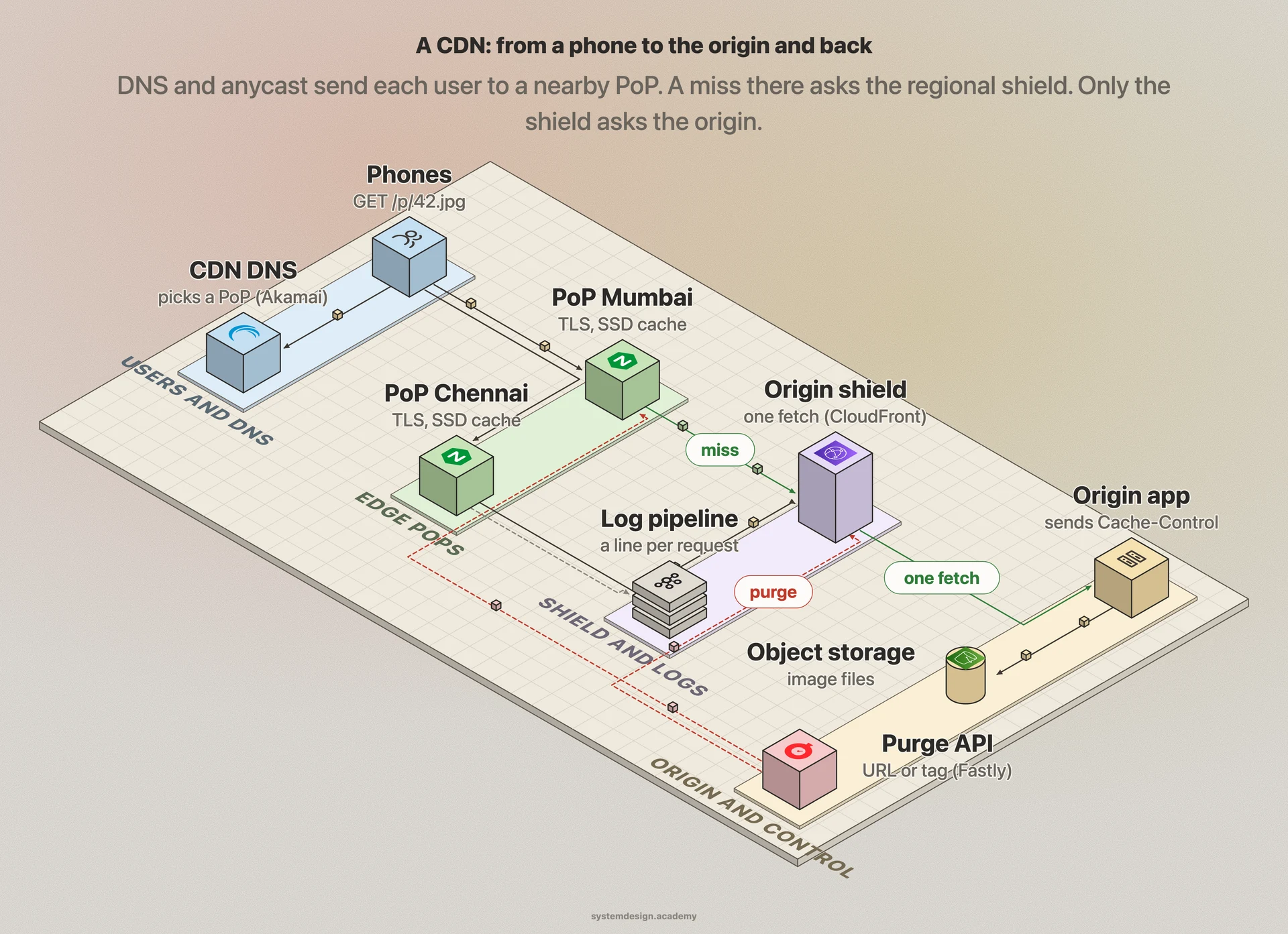
Draw five parts. First, routing. This is the CDN's authoritative DNS servers (the servers that give the final answer for a domain name) and, often, one anycast IP address announced from every PoP. A customer points its domain, for example img.shop.in, at the CDN with a DNS CNAME record, an alias that says 'this name is really that name'. Second, the edge PoPs. The edge means the CDN servers closest to users. Each PoP is a rack of cache servers behind a load balancer. Each server ends TLS and applies the customer's rules: redirects, header changes, access checks, and a web application firewall, which blocks requests that look like known attacks. Then it builds the cache key, and keeps files in RAM and on SSD. Inside a PoP, consistent hashing (explained in a deep dive below) sends each file to one server, so the PoP stores one copy, not one per server. Third, the regional tier: a few bigger caches. Akamai calls them parent clusters, Cloudflare calls them upper tiers, and CloudFront calls its version Origin Shield. Edge misses go here first. Fourth, the customer's origin: their web servers and object storage, a service such as Amazon S3 that stores whole files by name. Only the regional tier talks to the origin, over connections that stay open. Fifth, the control plane, meaning the systems that manage the CDN rather than serve users. It has three parts. A configuration service pushes each customer's rules and certificates to every PoP. A purge service sends invalidations out. A log pipeline ships one record per request to analytics and billing.
In a real interview, sketch this on the whiteboard before diving into any single box.
One image request from a phone, end to end
Follow GET https://img.shop.in/p/42.jpg from a phone in Mumbai. This is a good order to explain it in an interview.
- 1
DNS
The phone asks its DNS resolver (a server, usually run by the internet provider, that looks names up for it) for img.shop.in. The shop's DNS says it is an alias (CNAME) for a CDN name. The CDN's DNS answers with an address: either a nearby PoP chosen from the resolver's location, or one anycast address that every PoP announces.
- 2
Reach a PoP
The phone connects to that address. Data travels in small pieces called packets. With anycast, BGP, the protocol networks use to tell each other which addresses they can reach, carries the packets to one PoP, usually a near one in network terms; here, Mumbai. A load balancer in the PoP hands the connection to one server.
- 3
TLS
The phone starts TLS and names img.shop.in in the handshake (this field is called SNI). The edge server picks the shop's certificate from its store and finishes the handshake in one round trip with TLS 1.3. The trip is short because the PoP is close.
- 4
Rules and cache key
The server applies the shop's rules, then builds the cache key: method, host, path, and only the query parameters that change the image. Tracking parameters such as utm_source are dropped.
- 5
Edge lookup
Consistent hashing names the server in this PoP that owns the key. If it holds a fresh copy, it streams the bytes back. This is a hit, and most requests end here.
- 6
Edge miss
If the copy is missing, the edge asks the regional shield for the same key, over a connection that is already open.
- 7
Shield and collapsing
The shield checks its own cache. On a miss, it starts one fetch to the origin. Other requests for the same key that arrive meanwhile, from any PoP, wait for that one fetch instead of starting their own.
- 8
Origin
The origin reads 42.jpg from object storage and replies 200 OK, the code for success. With it come Cache-Control: public, max-age=86400 (keep it for one day), an ETag (a version tag for the file), and a Surrogate-Key or Cache-Tag header such as product-42 for later purges.
- 9
Store and reply
The shield stores the image and answers every waiting request. The Mumbai edge stores it too and sends it to the phone. The phone's browser may keep its own copy, for as long as max-age allows.
- 10
Log
The edge writes one log line: time, customer, cache key, status (HIT, MISS, EXPIRED), bytes, and time taken. Logs go to the pipeline in batches.
Core components
Walk through each service. The interviewer wants to hear what each one owns, not just the names.
Request router (DNS mapping and anycast)
Decides which PoP serves each user. The DNS mapper uses measurements of network paths and PoP load to answer each resolver with a good PoP. Anycast lets one IP address be served by every PoP, with BGP routing picking one.
Edge server
A reverse proxy with a cache. A reverse proxy is a server that receives requests on behalf of other servers. NGINX with proxy_cache and Varnish are this kind of software. It ends TLS, applies the customer's rules, builds the cache key, serves hits from RAM or SSD, and forwards misses up the tiers. It also enforces rate limits and firewall rules.
In-PoP load balancer and hash ring
Spreads connections over the servers in a PoP. It uses consistent hashing so that each file lives on one server, or on a few if it is very popular.
Regional tier (origin shield)
A smaller set of large caches between the edges and the origin. Edge misses ask it first, and only it asks the origin. It collapses misses for one file that arrive together into one origin fetch, and keeps a few connections to each origin open.
Configuration service
Stores each customer's setup: origin addresses, cache rules, cache key settings, header rules and firewall rules. It versions every change and pushes it to every PoP.
Purge service
Accepts purge requests by URL, by tag, by host or for everything. It writes each purge to a log, sends it to the shield tier and to every PoP, and reports when all of them have applied it.
Certificate manager
Holds TLS certificates and private keys for every customer domain. It renews them before they expire (Let's Encrypt certificates last 90 days today) and sends them to PoPs in encrypted form.
Log and analytics pipeline
Collects one record per request from every server, ships them in compressed batches, and builds hit ratio, traffic, error and billing reports. It must never slow down requests: if the pipeline is behind, the edge buffers or keeps only a sample.
Data model
Pick the right store per table. Justify each choice with the access pattern, not by reflex.
customer_config (per site, pushed to every PoP)site_idhostnamesorigin addressescache rulescache key settingsversionThe rules for one customer: which paths are cached and for how long, which query parameters and headers enter the cache key, redirects and header changes. Each change gets a new version number. Every PoP reports the version it runs, so a rollout can be watched and rolled back.
cache entry (on one edge server)cache_key hashheadersbody location (RAM or SSD offset)stored_atexpires_atetag / last_modifiedtagsThe key is hashed to a fixed size. The entry keeps the response headers, so the edge can send the right Cache-Control and Age. It also keeps the validators (ETag, Last-Modified) for revalidation. When the response has a Vary header, the request header values it names are stored too.
tag index (on one edge server)tagcache_key hashesMaps a tag such as product-42 to every stored file that carries it, so a purge by tag can find them without scanning the cache.
purge_log (control plane)purge_idsite_idtype (url, tag, host, all)targetsoft or hardcreated_attiers and PoPs doneAn ordered log of purges. A PoP that was offline replays the purges it missed before it serves that site again.
certificate storehostnamecertificate chainencrypted private keynot_afterrenew_atLooked up by the SNI name in each TLS handshake. Renewal starts well before not_after; Let's Encrypt recommends renewing its 90-day certificates every 60 days.
request log recordtimesite_idpopcache_keystatus (HIT, MISS, EXPIRED, BYPASS)bytesduration_msclient networkAbout 500 bytes before compression. Hit ratio is computed per site, per PoP and per status from these records. Alert on origin requests a second, not on the hit ratio alone.
Deep dives
These are the conversations the interviewer is steering you toward. Practice each one until you can talk through it without notes.
Request routing: DNS mapping vs anycast
The first job of a CDN is to send each user to a good PoP. There are two common ways, and many CDNs use both. The first is DNS mapping. The customer's name, img.shop.in, is an alias for a CDN name. When the user's DNS resolver asks for that name, the CDN's DNS server looks at the resolver's address and picks a cluster of servers to answer with. Akamai's engineers describe exactly this. Their name server decides 'based primarily on' the resolver's address, or on the EDNS client subnet, which is part of the user's own address that some resolvers pass along. A second step then picks servers inside the cluster with consistent hashing. DNS mapping gives fine control: the mapper can use live measurements and PoP load. It has two weak points. The resolver may be far from the user. And a change waits for the DNS answer's TTL to run out in caches. A TTL (time to live) is how many seconds a stored copy may be used. The second way is anycast. Every PoP announces the same block of IP addresses with BGP. Each network's routers pick one of those announcements, so a user's packets reach one PoP. Cloudflare's post 'Load Balancing without Load Balancers' describes this: a data centre can be lost, and packets flow to the next closest one. Two cautions belong in an interview. First, BGP picks the most preferred route, and each network sets its own preferences. It is not the lowest-latency route. Our anycast lesson measured the same client reaching Fastly's Kolkata site in 9 ms and Cloudflare's Mumbai site in 37 ms: four times apart, decided by routing, not by distance alone. Second, a route can change in the middle of a TCP connection. The new PoP has never seen that connection, so it resets it. QUIC, the transport under HTTP/3, carries a connection ID in each packet, which makes it possible, with extra work, to survive such a change. Failover is the big strength of anycast. A PoP that fails its own health check stops announcing, and traffic usually moves within seconds to a minute, with no DNS change. A PoP that is half broken but still announcing keeps attracting users. So health checks must withdraw the route on errors, not only when a machine is dead.
Cache keys, Vary and normalising the URL
The cache key decides when two requests may share one stored copy. RFC 9111 is the HTTP caching standard (an RFC is a numbered document that defines an internet standard). It says the key is at least the request method and the full URL. The key sets the hit ratio more than anything else. If the key has too many parts, the same bytes are stored many times and few requests hit. If it has too few parts, one user can get another user's content. The commonest too-many-parts mistake is tracking parameters (labels that only record where a click came from): ?utm_source=ad and ?utm_source=mail are different URLs. So a landing page linked from 100 campaigns becomes 100 cache entries holding identical bytes. Our CDN lesson asked four public CDNs and got four answers: one stored a second copy for the extra parameter, one ignored it, one did not cache the URL that carried the parameter, and one was inconclusive. So a design should normalise the URL at the edge before building the key. Drop parameters that do not change the response. Sort the rest, so that ?a=1&b=2 and ?b=2&a=1 are one key. The Vary response header is the other half. It tells a cache that the response depends on a request header, so the cache keeps one copy per value of that header. Vary: Accept-Encoding is correct and cheap once the edge normalises the header to a few values (br, gzip, zstd, none). Vary: User-Agent and Vary: Cookie are expensive. The User-Agent header names the browser and device, and there are thousands of different strings. A cookie is a small value the site stores in the browser, and there is one per session. Our edge caching lesson measured this. The same 200 URLs became 200 cache entries with no Vary. They became 501 with Accept-Encoding, 7,628 with User-Agent, and 18,404 with Cookie. The hit ratio fell from 99.0% to 6.5%. The fix is to key on the real difference, not the raw header. For example, map the user agent to 'mobile' or 'desktop' at the edge, as Cloudflare's 'cache by device type' does. There is also a security side. A header that changes the response but is left out of the key is called unkeyed. PortSwigger's research on web cache poisoning shows an attacker sending X-Forwarded-Host: evil.com, getting a page with a link to evil.com, and the cache serving that page to everyone. Cloudflare's default key includes x-forwarded-host for this reason. Finally, the safety rule. A response that depends on who is asking must say Cache-Control: private (RFC 9111 says a shared cache must not store it) or no-store. If the origin marks a personal page public, the CDN will serve it to the next user, and nothing in the CDN can know it was personal.
from urllib.parse import urlsplit, parse_qsl, urlencode

DROP = {"gclid", "fbclid"}                          # ad click ids: same page

def cache_key(method, url, headers):
    u = urlsplit(url)
    params = [(k, v) for k, v in parse_qsl(u.query, keep_blank_values=True)
              if k not in DROP and not k.startswith("utm_")]
    query = urlencode(sorted(params))                # same params, same order
    enc = headers.get("accept-encoding", "")
    enc = "br" if "br" in enc else "gzip" if "gzip" in enc else "none"
    ua = headers.get("user-agent", "")
    device = "mobile" if "Mobile" in ua else "desktop"
    return f"{method}|{u.hostname}|{u.path}?{query}|{enc}|{device}"

h = {"accept-encoding": "gzip, br", "user-agent": "Mozilla/5.0 (iPhone) Mobile"}
print(cache_key("GET", "https://img.shop.in/p/42.jpg?w=400&utm_source=ad", h))
print(cache_key("GET", "https://IMG.shop.in/p/42.jpg?utm_campaign=x&w=400", h))Freshness: TTLs, revalidation, stale-while-revalidate and stale-if-error
A stored copy is fresh for a while. After that it is stale, which means old enough that it should be checked before use. The origin decides how long with the Cache-Control header. max-age is the time in seconds a copy stays fresh. s-maxage does the same only for shared caches such as a CDN, and overrides max-age there (RFC 9111). Give the edge a long life, because the edge can be purged. Give browsers a short max-age, because a copy in a browser can never be taken back. One catch: s-maxage also forbids a shared cache from serving stale copies (RFC 9111), so it cannot be combined with stale-while-revalidate or stale-if-error. To give the edge its own lifetime and still allow stale serving, send a CDN-only header such as CDN-Cache-Control (RFC 9213) or Fastly's Surrogate-Control. RFC 9213 says a CDN that sees CDN-Cache-Control ignores Cache-Control for that response, and other caches ignore the new header. The Age header tells the client how old the copy is. When a copy goes stale, the edge does not have to download it again. It can revalidate: send a conditional request with If-None-Match and the stored ETag, or If-Modified-Since. If nothing changed, the origin answers 304 Not Modified with no body, and the edge marks its copy fresh again. That costs one round trip and almost no bytes. RFC 5861 adds two directives that matter a lot for a CDN. stale-while-revalidate=300 lets a cache keep serving a stale copy for up to 300 seconds after it went stale, while it revalidates in the background. Users never wait at the moment of expiry. stale-if-error=86400 lets a cache serve a stale copy for up to a day after it went stale, if the origin returns an error or cannot be reached. Three more rules. First, if the origin sends no Cache-Control at all, a cache may guess a lifetime. This is called heuristic freshness, and RFC 9111 calls 10% of the time since Last-Modified a typical setting. So always send the header, and never leave the guess to the cache. Second, 404 Not Found is cacheable by default (RFC 9110 lists it as heuristically cacheable). Caching a missing file for a short time, say 10 seconds, stops a flood of requests for a missing file from reaching the origin. Third, a short TTL is much better than none. A dynamic response is one built fresh for each request. If one is requested many times a second, one edge refills it at most once per TTL. So a 1-second TTL removes almost all of its origin load at that edge; our CDN lesson's chart shows 95% saved at 1 second for a response asked for 20 times a second. Also add jitter, a small random change, to long TTLs, so files stored together do not all expire together.
# Versioned asset: the name changes when the content changes
/static/app.3f9a2c.js
Cache-Control: public, max-age=31536000, immutable

# Product image: browser 1 hour, edge 1 day, both may serve stale on errors
/p/42.jpg
Cache-Control: public, max-age=3600, stale-if-error=86400
CDN-Cache-Control: max-age=86400, stale-if-error=86400

# Home page: stale at once in browsers; edge fresh 60 s, then stale for
# up to 5 min while it refreshes in the background
/
Cache-Control: public, max-age=0
CDN-Cache-Control: max-age=60, stale-while-revalidate=300

# Personal page: never stored by a shared cache
/account
Cache-Control: private, no-store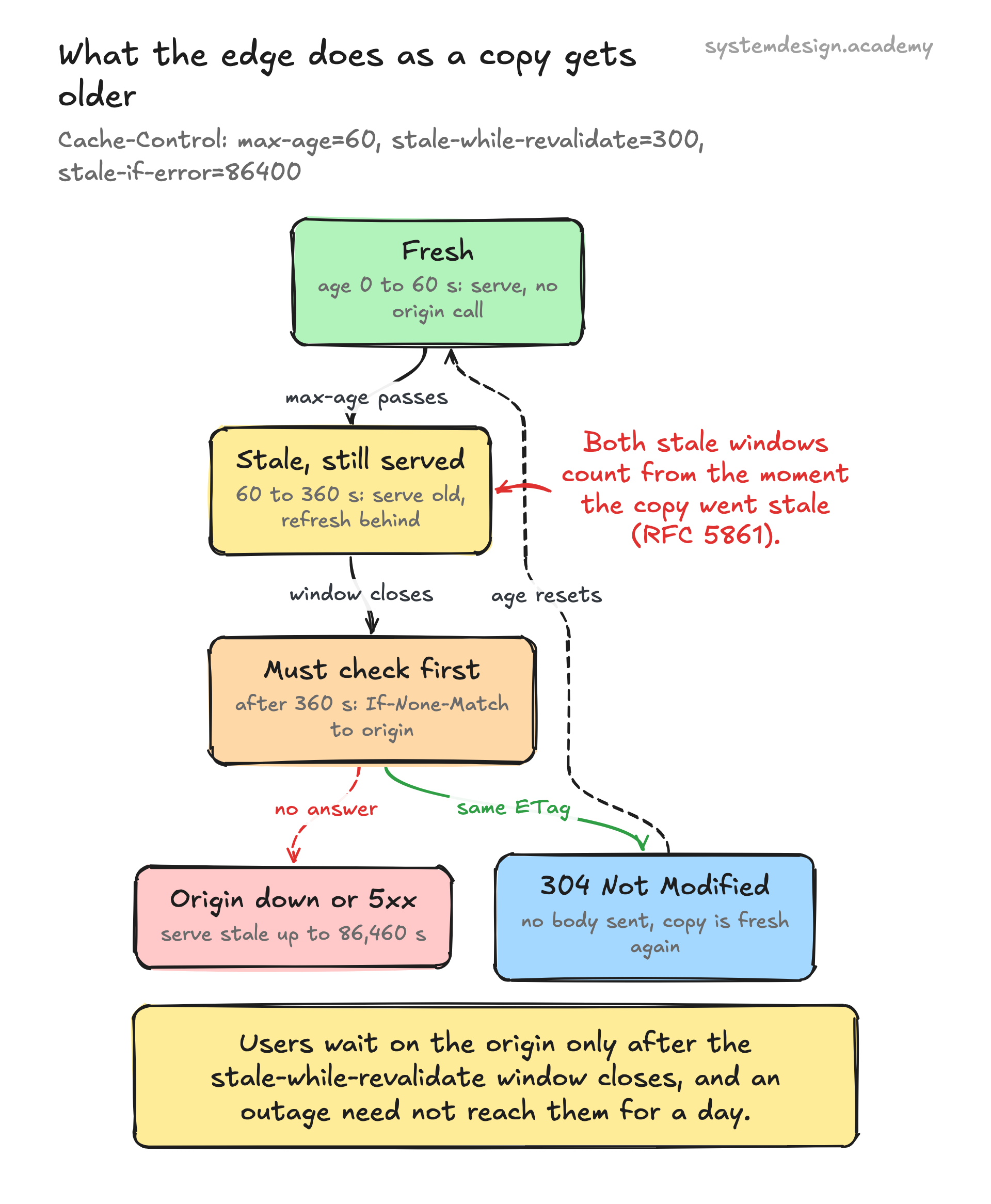
Tiered caching, origin shield and request collapsing
Edges do not share their caches. Google's Cloud CDN docs say it plainly: an object stored in one cache does not automatically copy into other caches, and a cache is filled only when a client asks for something. So, with no tier between the edges and the origin, a new file costs one origin request per PoP: 300 PoPs, 300 fetches, every time the file is new or expires. A tiered cache fixes this. It puts a smaller layer of bigger caches between the edges and the origin. Cloudflare's Tiered Cache docs describe lower tiers near users and upper tiers behind them. A lower tier that lacks a file must ask an upper tier, and only the upper tier can ask the origin. Akamai's 2010 paper calls these parent clusters. It reports origin offload (the share of requests the CDN answers without the origin) 'in the high 90's', even for customers with very large libraries. CloudFront has edge locations backed by regional edge caches, and adds an optional third layer, Origin Shield, which AWS describes as one extra layer that all requests to the origin go through. AWS says it consolidates misses for the same file into 'as few as one request' to the origin. AWS advises putting the shield in the region with the lowest latency to the origin. It also says the shield is not a good fit for dynamic or rarely requested content. The second idea is request collapsing. Even with one shield, 1,000 requests for a new file can arrive in the same 50 ms, before the first fetch returns. Fastly's docs define request collapsing as combining many requests for the same object into one request to the origin. Later requests join a waiting list. When the response arrives and is cacheable, it is served to all of them. The docs list the catches. If the response turns out to be uncacheable or private, only the first request can use it. The waiting requests then go to the origin one after another, which can take minutes. To stop that happening again, Fastly stores a hit-for-pass marker. The marker means 'do not collapse requests for this object; send each one straight to the origin'. By default it lasts 2 minutes. So the edge should skip collapsing for requests it already knows are uncacheable. Tiers have costs too. A miss now makes one more hop. Fastly's shielding docs give three warnings. Edge code runs twice, once at the edge and once at the shield. The shield sees the edge's IP address instead of the user's. And requests which miss at both tiers cross Fastly's network twice.
import asyncio

inflight = {}                                   # cache key -> pending origin fetch

async def fetch_once(key, fetch_from_origin):
    task = inflight.get(key)
    if task is None:                            # first miss: this one goes to origin
        task = asyncio.ensure_future(fetch_from_origin(key))
        inflight[key] = task
        task.add_done_callback(lambda _: inflight.pop(key, None))
    # one client leaving must not cancel the fetch for the rest
    return await asyncio.shield(task)

calls = 0
async def origin(key):
    global calls
    calls += 1
    await asyncio.sleep(0.05)                   # 50 ms to fetch from the origin
    return f"bytes of {key}"

async def main():
    await asyncio.gather(*(fetch_once("/p/42.jpg", origin) for _ in range(1000)))
    print("origin fetches:", calls)             # prints: origin fetches: 1

asyncio.run(main())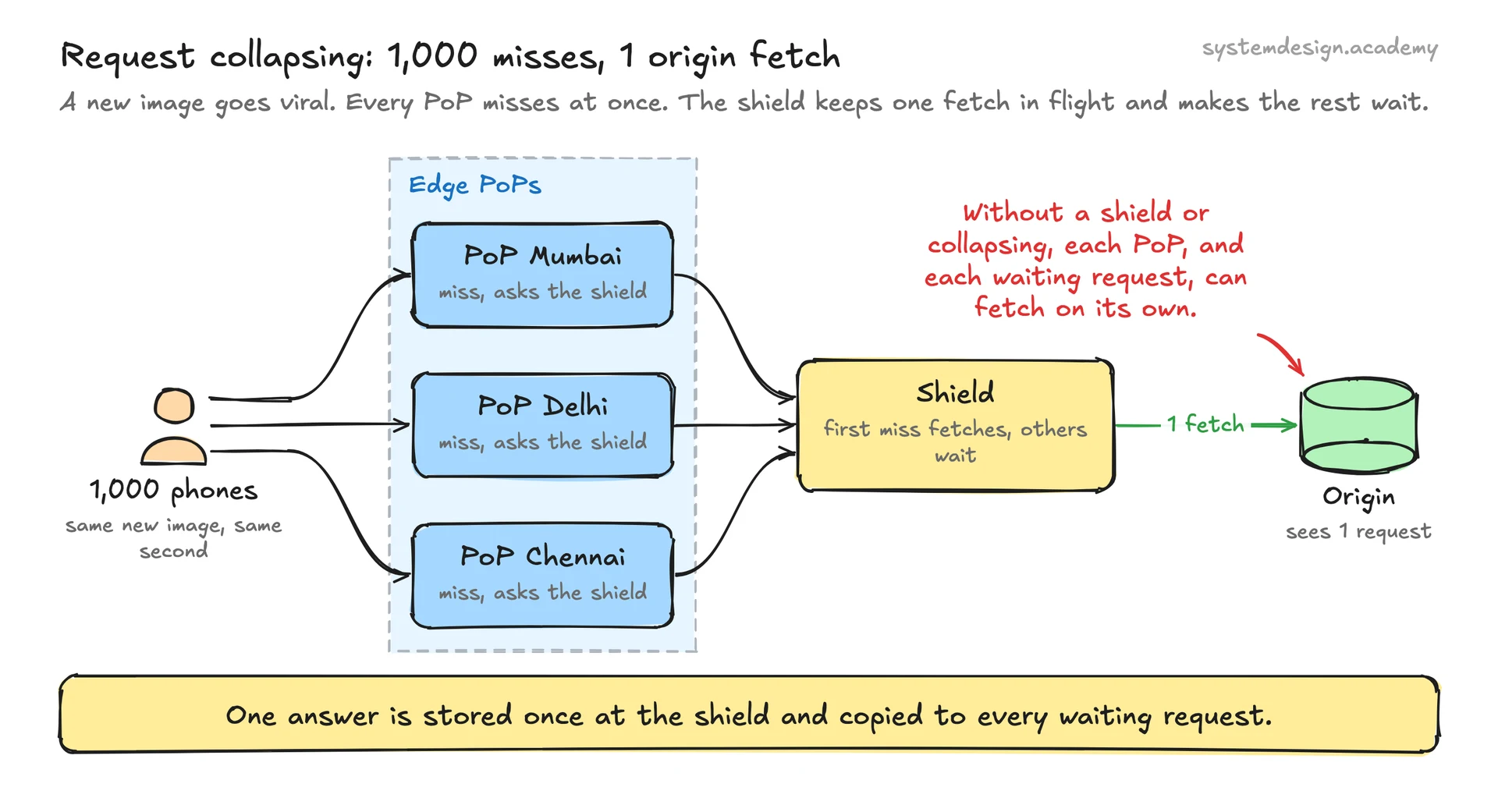
Purging at global scale
A purge tells every PoP to drop a file before its TTL ends. Customers send purges to a purge API, a web address their own code can call. There are four kinds of purge. By URL removes one file. By tag removes every file labelled with a tag, a short name the origin attaches to related files. Fastly calls these tags surrogate keys. The origin adds a Surrogate-Key header such as 'product-42 shoes' to each response. Fastly records the keys and removes the header before the response reaches users. One key purge then removes every file with that key, so one product change can clear the product page, its images and its API responses together. By host or prefix removes a site or a path. Purge everything removes a whole site, and it should be rare. Every file becomes a miss at once, which is a self-made flood on the origin. To deliver purges, the purge service writes each one to an ordered log and pushes it to every PoP over connections that are already open. The purge must reach the shield tier as well, and land there no later than at the edges. Otherwise an edge that has just dropped the file refetches the old copy from the shield. Each PoP applies the purge, using its tag index to find files, and acknowledges. The service reports a purge as done when every tier and PoP has acknowledged. A PoP that was cut off must replay the purges it missed before it serves that site again. Cloudflare's docs add two honest details. First, a 200 answer to a purge request does not prove anything was removed; check that the status is no longer HIT. Second, purges are rate limited per account. On the free plan, tag, host and prefix purges are limited to 5 requests a minute. On Enterprise the limit is 50 a second. Two design choices reduce the pain. A soft purge marks files stale instead of deleting them. The edge can then revalidate with a cheap 304, and can still serve the old copy if the origin fails. And the best purge is none. Put a content hash in the file name of every script, style sheet and image (app.3f9a2c.js). A new version has a new name, so it is a new cache key. Nothing old needs removing, and the old file can be cached for a year. Browsers are the reason it matters: a purge reaches every PoP but never reaches a copy already in a user's browser.
Inside a PoP: consistent hashing, RAM and disk, small files and video
A PoP is many servers, and the design inside it matters as much as the design between PoPs. First, which server holds which file. If any server could store any file, a popular file would be stored on every server, and the PoP's disk would hold far fewer different files. So files are spread with consistent hashing. Servers and files are hashed onto a circle, and a file belongs to the next server clockwise. When a server fails, only its files move. Akamai's engineers describe using consistent hashing inside each cluster. A standard refinement maps each server to several points on the circle, which evens out the load. Very popular files are a special case. In a flash crowd (a sudden rush of users to one thing), one server cannot carry one file alone. So Akamai maps a hot file to the first k servers on the circle, and k grows with popularity. Each customer gets its own random order of servers, so two hot files from different customers rarely land on the same servers. Second, what to store. Akamai studied logs from one 45-server cluster over two days. About 400 million different objects were requested. 74% were requested only once, and 90% fewer than four times. Storing one-hit files wastes disk space and disk writes. Their fix is cache-on-second-hit. The server remembers recently requested keys in a Bloom filter, a small structure that answers 'seen before?' and is rarely wrong. It stores a file only on its second request. When they turned it on, byte hit ratio (the share of bytes, not requests, served from the cache) rose from about 74% to 83%. Third, RAM and SSD. Keep the hottest files in RAM and the rest on SSD. Evict (remove) old files with LRU, which removes the least recently used file first, or a smarter policy. Fourth, large files and video. A client can ask for part of a file with a Range header, and the server answers 206 Partial Content (RFC 9110). For very large files, a CDN can fetch and store them in fixed pieces. NGINX's slice module, for example, splits a response into cacheable slices, such as 1 MB each. Streaming formats such as HLS (RFC 8216) cut a video into short segments listed in a playlist file. Each segment is fetched with an ordinary HTTP request. So video becomes many medium-sized cacheable files, and a CDN can treat it like any other content. The differences are size and timing. A live event creates a burst of requests for a segment that did not exist a second ago, which is where request collapsing at the shield is most useful. For on-demand video, a service can push files to the edge ahead of time, which is called warming, instead of waiting for misses. Netflix's Open Connect does this. It places its own appliances inside internet providers' networks, free of charge to qualifying providers, and fills them nightly.
TLS at the edge and certificates
TLS is the encryption under HTTPS. Before any data flows, the client and server do a handshake to agree on keys. The CDN ends TLS at the edge, for two reasons. First, the handshake costs round trips, and a round trip to a nearby PoP is short; TLS 1.3 (RFC 8446) needs one round trip for a full handshake. Second, the edge must see the request (URL and headers) to build a cache key and apply rules, and it cannot do that inside an encrypted stream. HTTP/3 saves one more round trip on a new connection. It runs over QUIC, which combines the transport and encryption handshakes into one (RFC 9000), so there is no separate TCP handshake. Ending TLS at the edge means the CDN holds the customer's certificate and private key. A TLS certificate is a signed file that proves to the browser that the server really is img.shop.in. One CDN serves millions of domains on shared IP addresses, so how does it know which certificate to show? The client names the host in the first handshake message, an extension called SNI (server name indication, RFC 6066). The edge looks up the certificate for that name. So the design needs a certificate store: certificates and encrypted private keys for every customer domain, loaded at the PoP when first needed, and renewed automatically. Let's Encrypt certificates are valid for 90 days, and the project recommends renewing every 60. So with an assumed million domains, the CDN renews more than 16,000 certificates a day (1,000,000 / 60). That number will grow as certificate lifetimes shrink across the industry. The CA/Browser Forum voted in 2025 to cut the maximum from 398 days to 47 days by 2029, and Let's Encrypt plans 45-day certificates by 2028. The private keys are the most sensitive data in the system. Encrypt them at rest, which means they are stored encrypted on disk. Keep them in memory only on the servers that need them. Some customers will not hand over their key at all. Cloudflare's Keyless SSL handles this. The key stays on a key server the customer runs, and the edge asks that server to do the one private-key step in each handshake. TLS 1.3 also allows 0-RTT data: a returning client sends its request in the very first message. RFC 8446 warns that 0-RTT data can be replayed, which means an attacker can copy the message and send it again. So allow it only for safe, repeatable requests such as GET. Finally, encrypt the hop from the CDN to the origin too. It crosses the public internet unless the origin is inside the CDN's network. The shield keeps its connections to the origin open, so the cost of those handshakes is paid rarely.
DDoS absorption and protecting the origin
A DDoS (distributed denial of service) attack floods a target with traffic from many machines at once. Often these are a botnet: thousands of hacked computers controlled by one attacker. A CDN is a natural place to stop it, because all traffic to the customer already passes through the CDN. There are two kinds of attack. Network floods (layers 3 and 4, the packet and connection levels) send huge numbers of packets to fill links and machines. A SYN flood sends endless requests to open TCP connections and never finishes them. A UDP flood sends a stream of packets that need no connection at all. Anycast helps here in a simple way. Each attacking machine's packets go to whichever PoP its own network prefers. So a botnet spread over the world is spread over the CDN's PoPs too. No single site takes the whole attack. Application floods (layer 7, the HTTP level) send requests that look normal, such as millions of GETs for a search page. These need request-level defences: rate limits per IP address or per network, challenges for suspicious clients, firewall rules and bot detection. A flood for cached files is answered from the edge. Uncacheable URLs are the danger, because every request reaches the origin. That is why the cache key and Cache-Control matter for security too. A page that could be cached for 1 second, but is not, turns an attack on the CDN into an attack on the origin. Three more protections belong in the design. First, lock the origin down. It should accept traffic only from the CDN's shield addresses, or only with a secret header the CDN adds. Otherwise an attacker can skip the CDN and hit the origin directly. Second, protect private files with signed URLs or signed cookies. The customer's app signs a URL with a key for a user who is allowed to see the file. CloudFront checks the signature and an expiry time on each request, and rejects the request if either fails. Third, keep serving when the origin struggles. stale-if-error and soft purges let the edge answer from old copies while the origin recovers.
Trade-offs to discuss
Every senior interviewer expects you to surface at least 3 of these. Pick the decisions, state the alternatives, and justify your choice.
DNS mapping vs anycast for routing
DNS mapping gives fine control and can use live load and latency data. But it sees the resolver, not the user, and changes wait for DNS TTLs. Anycast fails over in seconds and spreads attacks automatically. But routing follows each network's preferences, not latency, and a route change can reset a live TCP connection. Many CDNs use DNS to pick a region and anycast within it.
Pull vs push
Pull (fetch on the first miss) needs no publishing step and stores only what users ask for, so it is the default. Push (upload to every PoP ahead of time) costs storage for files nobody may request. But it avoids a slow first view, which is why video services such as Netflix's Open Connect fill their appliances ahead of demand.
One cache tier vs tiered caching
A shield or upper tier raises origin offload and collapses misses. The cost is one more hop on a miss, more traffic between tiers, and edge code that runs twice. It pays off for cacheable content with many PoPs, and much less for dynamic content with a low hit ratio.
Purging vs versioned URLs
Purging keeps URLs stable. But it depends on every tier and PoP getting the message, never reaches browsers, and is rate limited. Versioned file names need a build step that rewrites references, but make every change a new cache key, so nothing has to be removed. Use versioned names for assets, and purge by tag for pages and API responses.
Long TTL vs short TTL
A long TTL gives a higher hit ratio and less origin load, but stale content lasts longer if a purge is missed. A short TTL limits staleness but adds revalidations. stale-while-revalidate gets most of both: a short freshness time, and no user ever waits at expiry.
Hard purge vs soft purge
A hard purge deletes the file, so the next request is a full miss, and if the origin is down users see an error. A soft purge marks it stale, so the next request can revalidate with a cheap 304, and the old copy can still be served on error. Use a hard purge when old content must never be shown again, for example a legal takedown.
More vs fewer parts in the cache key
A key with fewer parts gives more hits but risks serving the wrong version, or one user's page to another. A key with more parts (more headers, all query parameters, cookies) is safer but can destroy the hit ratio. Include only what changes the response, and normalise headers to the difference that matters, such as mobile or desktop.
Free PDF · 18 pages
Get the free System Design Interview Cheat Sheet
The interview in seven stages, the numbers worth knowing by heart, and twelve classic systems on one page each, every line linked to the lesson it comes from.
Follow-up questions to expect
After the main design, the interviewer usually picks one part and asks more. Here is what to say.
The origin's load doubled, but the CDN dashboard shows the hit ratio barely moved. What happened?
Hit ratio counts requests, and the origin feels misses. A small drop, from 99% to 98%, doubles the misses. Look at origin requests a second and break the misses down by status: MISS (not stored), EXPIRED (TTL ended), BYPASS (a rule said do not cache). Common causes are a new query parameter or a Vary header that split the cache key, a lower TTL, or a big purge.
A user reports seeing another user's account page. How could a CDN do that?
The origin sent a personal page with Cache-Control: public, or with no header and a rule that cached it. So the edge stored it under a key without the user's identity and served it to the next person. Fix the origin: personal responses must send private or no-store. Then purge. Add a CDN rule that never caches paths such as /account, or responses that carry Set-Cookie, as a second safety check.
A new video goes viral and the origin falls over. How do you prevent it next time?
Put a shield in front of the origin, so 300 PoPs become one requester. Turn on request collapsing there, so 1,000 misses that arrive together become one fetch. Send stale-if-error so edges keep serving if the origin struggles. For a known launch, warm the caches ahead of time by requesting the files through the shield, or push them.
How do you know a purge reached every PoP?
Give each purge an ID and a position in an ordered purge log. The shield tier and each PoP acknowledge after applying it, and the API reports done only when all have acknowledged. A PoP that missed purges while offline replays the log before serving that site again. To check from outside, request the URL from several PoPs and check the cache status is no longer HIT.
Can a CDN help with responses that cannot be cached?
Yes, in three ways. TLS ends at a nearby PoP, so the user's handshake round trips are short. The PoP sends the request to the origin over connections that are already open, so it skips the TCP and TLS setup. And the CDN can carry the request over better paths through its own servers, called overlay paths. Maggs and Sitaraman (2015) describe how Akamai picks them. Even a 1-second TTL on a busy dynamic response removes most of its origin load at each edge.
How a CDN actually does it
Akamai's engineers have described their network in two papers: about 61,000 servers in 70 countries in 2010, and more than 170,000 edge servers in 102 countries in 2015, with DNS mapping, parent clusters, consistent hashing inside each cluster and cache-on-second-hit. Cloudflare runs every service on every server behind anycast. Fastly documents request collapsing, shielding and surrogate keys. CloudFront adds an optional Origin Shield layer. Netflix's Open Connect places its own appliances inside internet providers' networks. The rules all of them follow come from RFC 9111, RFC 5861 and RFC 9213.
Sources
- RFC 9111: HTTP Caching
- RFC 5861: HTTP Cache-Control Extensions for Stale Content
- RFC 9213: Targeted HTTP Cache Control (CDN-Cache-Control)
- RFC 9110: HTTP Semantics (range requests, heuristically cacheable status codes)
- Nygren, Sitaraman, Sun: The Akamai Network, A Platform for High-Performance Internet Applications (2010)
- Maggs, Sitaraman: Algorithmic Nuggets in Content Delivery (ACM CCR, 2015)
- Amazon CloudFront: Use Origin Shield
- Amazon CloudFront: Use signed URLs
- Cloudflare docs: Tiered Cache
- Cloudflare docs: Cache Keys
- Cloudflare docs: Purge cache
- Cloudflare docs: Revalidation
- Cloudflare blog: Load Balancing without Load Balancers (anycast)
- Cloudflare blog: Keyless SSL, the nitty gritty technical details
- Fastly docs: Request collapsing
- Fastly docs: Shielding
- Fastly docs: Working with surrogate keys
- Fastly docs: HTTP caching semantics (Surrogate-Control)
- Google Cloud CDN overview
- Netflix Open Connect
- NGINX docs: ngx_http_slice_module
- PortSwigger Web Security Academy: Web cache poisoning
- RFC 8446: The Transport Layer Security (TLS) Protocol Version 1.3
- RFC 9000: QUIC, a UDP-based multiplexed and secure transport
- RFC 6066: TLS Extensions (server name indication)
- RFC 8216: HTTP Live Streaming
- Let's Encrypt FAQ (certificate lifetime)
- Let's Encrypt: Decreasing Certificate Lifetimes to 45 Days
- CA/Browser Forum: Ballot SC081v3, reducing certificate validity periods
Lessons to study before this interview
If any of these topics are fuzzy, the interviewer will catch it. Each lesson is 15 to 60 minutes with diagrams, code, and a quiz.
Design a Content Delivery Network
capstone / capstone
Content Delivery Network (CDN)
foundation / load balancing proxies
Anycast Routing
foundation / load balancing proxies
DNS Load Balancing
foundation / load balancing proxies
Global Server Load Balancing (GSLB)
foundation / load balancing proxies
Edge Caching
foundation / caching strategies
Cache Invalidation
foundation / caching strategies
Cache Stampede Prevention
foundation / caching strategies
Time To Live (TTL)
foundation / caching strategies
Varnish Cache
foundation / caching strategies
Consistent Hashing
intermediate / data replication distribution
Transport Layer Security (TLS)
intermediate / security architecture
DDoS Protection
intermediate / security architecture
Adaptive Bitrate Streaming
intermediate / web content delivery
Frequently asked questions
Go deeper
This guide is built on these 6 lessons. Each one teaches one piece of the CDN design above, step by step.
- Design a Content Delivery NetworkSystem Design · capstone · 65 min
- Content Delivery Network (CDN)System Design · load balancing proxies · 26 min
- Anycast RoutingSystem Design · load balancing proxies · 32 min
- DNS Load BalancingSystem Design · load balancing proxies · 18 min
- Global Server Load Balancing (GSLB)System Design · load balancing proxies · 26 min
- Edge CachingSystem Design · caching strategies · 25 min
Practice with 770 system design lessons
Lifetime access for ₹499 in India or $49 elsewhere. Interactive diagrams, quizzes, and 20 capstone projects to practise on.
Interview prep packs
This one question is not enough for the interview.
Our System Design interview pack is being written and is not on sale yet. Until it is out, the System Design course teaches this end to end, and these interview packs are on sale now, each question with a full answer and a diagram.


System Design and Distributed Systems: about 200 questions, coming soon. Not on sale yet.