What REA is, in plain words
“See a feature you like. Understand how it works, down to the binary level.”
Say you use an app and you like one feature. Maybe it is how a note app searches, or how a game moves its bullets. You want to build something like it, but the company never shared its code. You only have the finished app on your computer.
Working out how that app works from the outside is called reverse engineering. People have done it for decades with tools called disassemblers and decompilers. A disassembler turns the machine code inside a program back into readable instructions. A decompiler goes one step further and turns them into something close to normal code. Ghidra (free, from the US National Security Agency), Hopper and IDA are the well-known ones. They are powerful, but hard to learn.
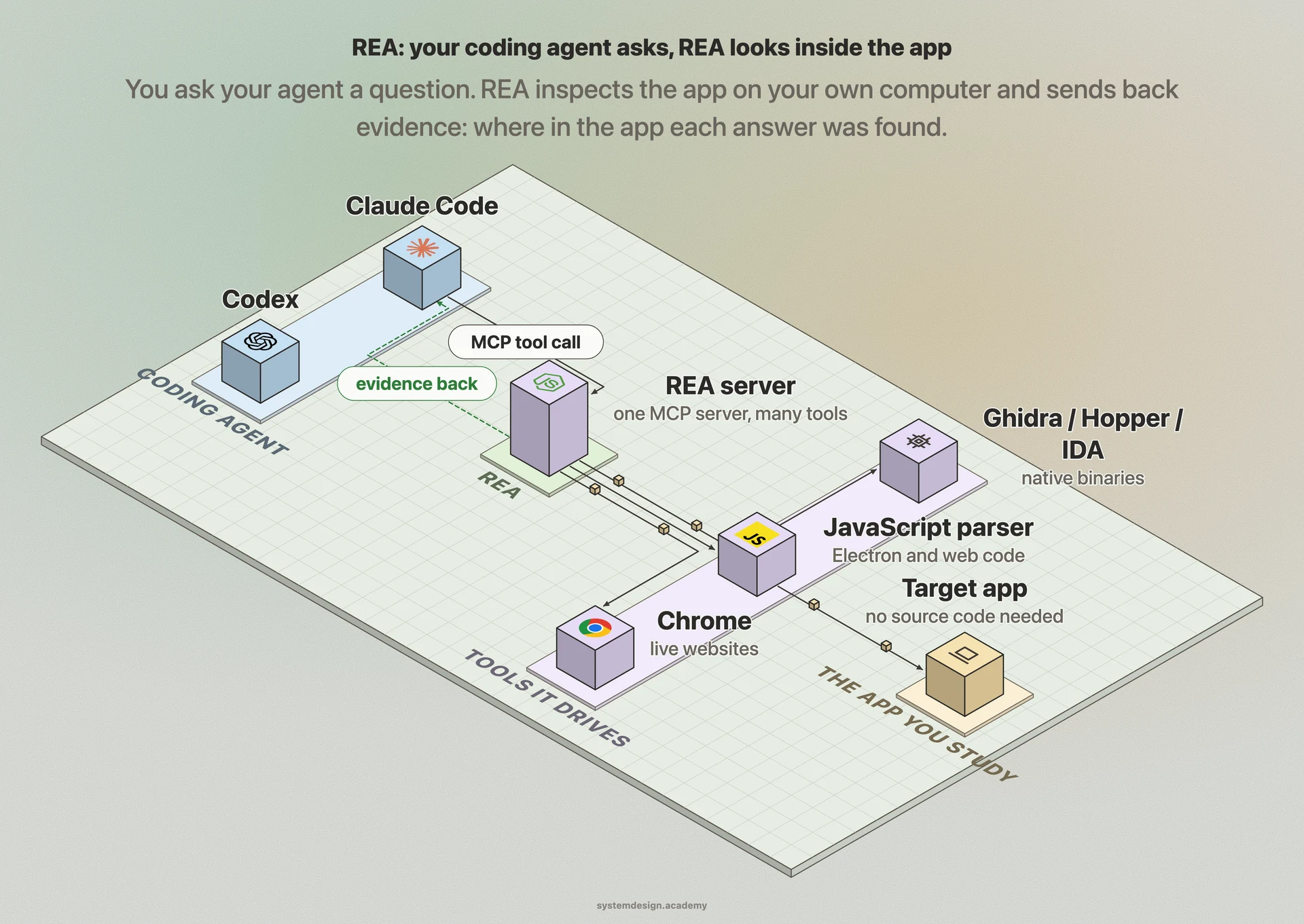
REA, short for Reverse Engineer Anything, puts an AI coding agent in front of those tools. You ask your agent a normal question, such as "how does search work in this app?". The agent calls REA, REA runs the right tool on the app, and it sends back what it found plus where it found it. The agent reads that evidence, explains the feature in plain words, and can write a similar feature for your own project.
REA connects to the agent through MCP, the Model Context Protocol. MCP is an open standard that lets an AI agent call tools outside itself, in the same way a phone app calls a web API. So any agent that speaks MCP can use REA. The README names Claude Code, Codex, Cursor, Gemini CLI and Grok Build.