Connection Pool
A cache of reusable database connections that avoids the overhead of opening and closing a new connection for every query. Critical for high-throughput applications.
What is Connection Pool?
In short
A connection pool is a cache of open, ready-to-use database connections that an application borrows for a query and returns instead of closing. It removes the cost of opening a new TCP and authentication handshake for every request, which is what lets one app server handle thousands of queries per second against a database that can only hold a few hundred connections.
What a connection pool actually is
Opening a database connection is expensive. The client opens a TCP socket, runs a TLS handshake if encryption is on, authenticates the user, and the database forks or assigns a backend process to serve it. On Postgres that handshake plus backend startup can take 20 to 50 milliseconds, which is often longer than the query itself. Doing that for every request would waste most of your time on setup.
A connection pool solves this by opening a fixed set of connections once, keeping them alive, and lending them out. When your code needs to run a query, it asks the pool for a connection (a checkout), uses it, and hands it back (a checkin). The connection stays open the whole time, so the next request skips the handshake entirely.
The pool is just a managed list of connection objects plus a small amount of bookkeeping: which ones are idle, which are in use, and a queue of callers waiting when none are free. It lives inside your application process or in a separate proxy that sits between the app and the database.
How it works under the hood
A pool is configured with a minimum and maximum size. On startup it may open the minimum number of connections so the first requests are fast. When traffic rises and all connections are busy, it opens more up to the maximum. When a caller asks for a connection and the pool is at its max with none idle, that caller waits in a queue until one is returned or a timeout fires.
Each idle connection is health-checked before it is handed out, often with a cheap query like SELECT 1, because databases and network gear drop idle TCP connections after a few minutes. Pools also enforce a max lifetime, recycling a connection after, say, 30 minutes so a long-lived connection cannot accumulate server-side state or memory leaks.
The key tuning numbers are pool size, checkout timeout, idle timeout, and max lifetime. Pool size is the one that bites people: a database has a hard cap on total backends (Postgres defaults to 100), and every app instance multiplies its own pool against that single limit. Ten app servers each holding a pool of 20 means 200 connections, which already exceeds the default.
When to use it and the trade-offs
Use a connection pool for essentially any application that talks to a relational database under real traffic. The benefit is largest for short queries at high request rates, where handshake cost would otherwise dominate. It is also how you protect the database itself: the pool caps concurrency so a traffic spike queues inside your app instead of opening thousands of connections and crashing the database under memory pressure.
The main trade-off is sizing. Too small and requests queue and time out even though the database is idle. Too large and you exhaust the database's connection limit, and because each Postgres connection holds work_mem and a backend process, you can run the server out of memory. A common rule of thumb is to keep the total across all instances comfortably under the server max and let it queue rather than overrun.
The other trap is serverless and many-instance deployments. Functions that scale to hundreds of instances each open their own pool, and the math explodes. The fix is an external pooler such as PgBouncer or a managed equivalent, which multiplexes thousands of client connections onto a small number of real database connections.
A concrete example
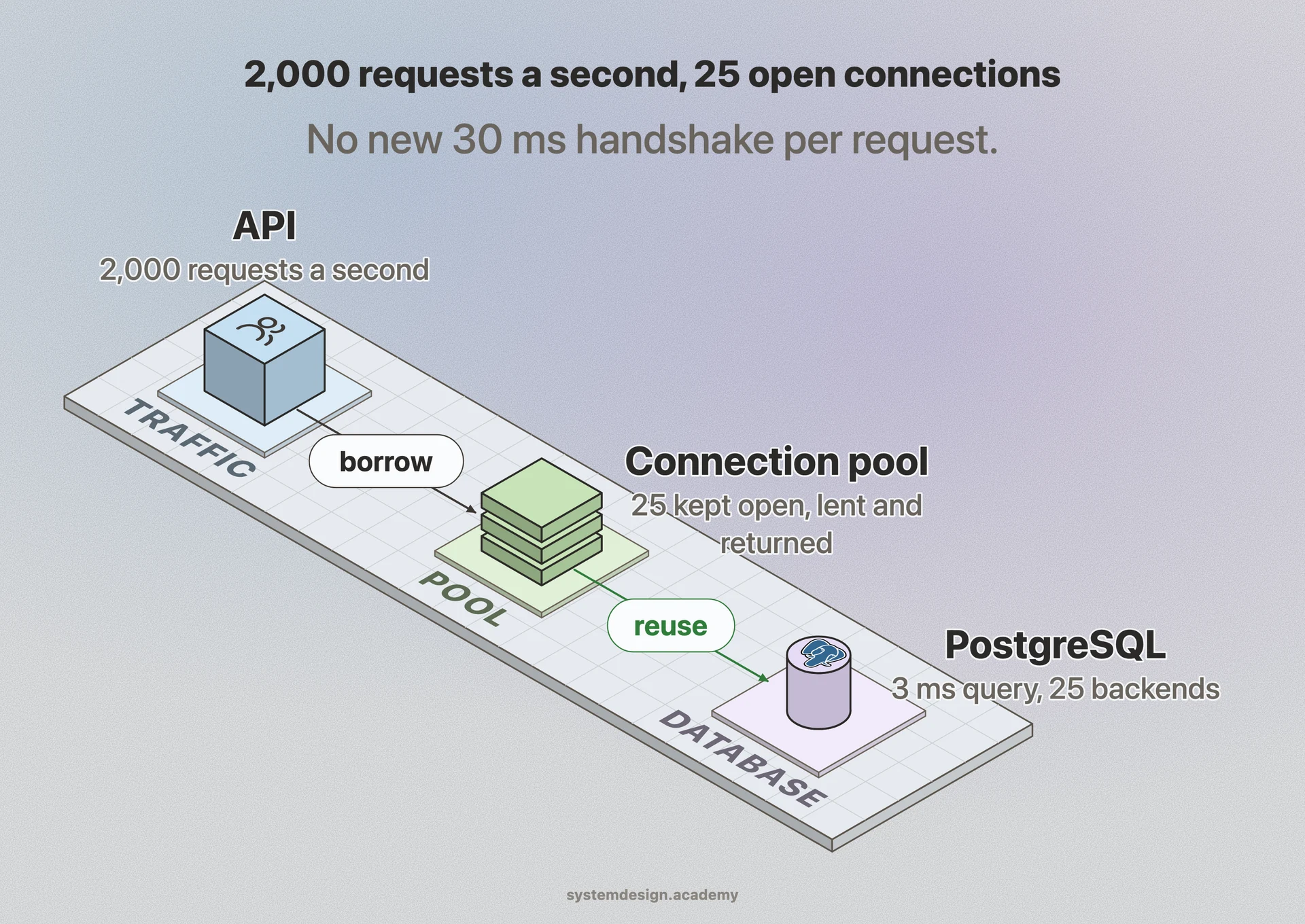
Picture an API serving 2,000 requests per second, each running one 3 millisecond query. Without pooling, every request pays roughly 30 milliseconds of handshake, so a single connection could serve only about 30 requests per second and you would need to open and tear down 2,000 connections a second, which no database tolerates.
With a pool, you might hold 25 open connections. Each can run 3 millisecond queries back to back, so 25 connections handle far more than 2,000 queries per second, and the handshake happens 25 times total at startup rather than 2,000 times per second. Latency drops from tens of milliseconds to near the raw query time, and the database sees a stable, bounded number of backends.
This is why HikariCP, the default pool in Spring Boot, and node-postgres' Pool, and SQLAlchemy's QueuePool ship pooling on by default. The connection pool is invisible plumbing, but it is the difference between a database that survives production and one that falls over on the first traffic spike.
Where it is used in production
PgBouncer
A lightweight external pooler for Postgres that multiplexes thousands of client connections onto a few server connections, widely used in front of Neon, Supabase, and self-hosted Postgres.
HikariCP (Spring Boot)
The default JDBC connection pool in Spring Boot, known for very low checkout overhead and aggressive connection health checks.
Amazon RDS Proxy
A managed pooler from AWS that sits in front of RDS and Aurora so Lambda functions and autoscaling fleets do not each open their own pool and exhaust the database.
node-postgres (pg.Pool)
The standard Postgres client for Node.js, whose Pool class hands out and recycles connections for high-throughput web servers.
Frequently asked questions
- What is the difference between a connection pool and a single connection?
- A single connection serves one query at a time and pays the open and close cost each time you reconnect. A pool keeps several connections open permanently and lends them out, so concurrent requests can run in parallel and none of them pay handshake cost after startup.
- How do I choose the right pool size?
- Start small. A good baseline for a CPU-bound database is roughly the number of CPU cores times two, plus a little for disk waits, which often lands between 10 and 30 per instance. Then make sure the total across all app instances stays under the database's max connection limit, and increase only if you see checkout timeouts while the database itself is not saturated.
- Why do I get connection timeout errors when the database looks idle?
- That usually means the pool is exhausted, not the database. Every connection is checked out and a new caller is waiting past the checkout timeout. It is often caused by code that borrows a connection and forgets to return it (a leak) or by long-running queries holding connections too long. Set a max pool size large enough for your concurrency and audit for connections that are never released.
- Do I still need a pool with serverless functions?
- Yes, but an in-process pool can backfire because each function instance opens its own. Hundreds of cold-started instances times a pool of 10 will blow past the database limit. Use a small per-instance pool combined with an external pooler like PgBouncer or RDS Proxy that consolidates everything into a bounded number of real connections.
- Does connection pooling work with transactions?
- Yes, but be careful with transaction-level poolers like PgBouncer in transaction mode. They can hand the same physical connection to different clients between transactions, so session-level features such as prepared statements, temporary tables, and SET commands may not behave as expected. For full session features use session mode or an in-process pool.
Learn Connection Pool hands-on
This page explains the idea. The full lesson lets you step through the ring as servers join and leave, read the implementation, and check yourself with a quiz. It is one of 760+ lessons in the System Design Masterclass, from your first API call to distributed consensus. Eleven Foundation lessons are free, no signup. Lifetime access is ₹499 in India or $7.99 worldwide, one payment, no subscription.
Related lessons
Lessons that touch on Connection Pool as part of a larger topic.
Thread Pooling
Reuse threads instead of creating them, the pattern that makes web servers handle thousands of concurrent connections
advanced · consistency models
Database Connection Pooling
PgBouncer, HikariCP, and why opening a new database connection per request is a recipe for disaster
foundation · database fundamentals
Connection Reuse
Pool and reuse connections across your application to maximize throughput and minimize overhead
intermediate · api design protocols
Network Optimization
Reduce latency and bandwidth usage, compression, connection pooling, and protocol tuning
advanced · reliability resilience
Ambassador Container Pattern
A specialized sidecar that handles outbound connectivity, connection pooling, retries, and protocol translation for external services
intermediate · microservices architecture
See also
Related glossary terms you might want to look up next.
Database
An organized collection of data that can be easily accessed, managed, and updated. The backbone of almost every application.
ORM
Object-Relational Mapping: a library that lets you interact with a database using your programming language's objects instead of raw SQL. Drizzle, Prisma, and SQLAlchemy are ORMs.
Throughput
The number of operations a system can handle per unit of time. Think of it as how many cars a highway can move per hour.
SQL
Structured Query Language for managing relational databases. Tables, rows, columns, and powerful joins to query related data.
NoSQL
Databases that don't use traditional table-based relational models. Includes document stores, key-value, graph, and column-family databases.
ACID
Four guarantees for database transactions: Atomicity (all or nothing), Consistency (valid states only), Isolation (no interference), Durability (changes persist).