Kubernetes Namespace
A virtual cluster within a physical K8s cluster that isolates resources. Use namespaces to separate environments (dev, staging, prod) or teams.
What is Kubernetes Namespace?
In short
A Kubernetes namespace is a logical partition inside a single physical cluster that scopes the names of resources like pods, services, and config maps, so the same object name can exist independently in different namespaces. Teams use namespaces to separate environments and projects, and to attach access control and resource limits to each group.
What a namespace actually is
A namespace is a name scope, not a security boundary by default. When you create a pod in the namespace called staging and another team creates a pod with the same name in the namespace called prod, Kubernetes treats them as two completely separate objects. The full identity of a resource is the combination of its namespace, its kind, and its name.
Most things you create in Kubernetes are namespaced: pods, deployments, services, config maps, secrets, persistent volume claims, and roles. A handful of things are cluster-wide and live outside any namespace, including nodes, persistent volumes, storage classes, namespaces themselves, and cluster roles. If a resource describes shared infrastructure, it is usually cluster-scoped.
Every cluster starts with four namespaces. The default namespace is where objects land if you do not specify one. kube-system holds the control plane components like the DNS pods and the kube-proxy. kube-public is readable by everyone and mostly holds cluster info. kube-node-lease tracks node heartbeats for faster failure detection.
How it works under the hood
Namespaces are stored in etcd like any other object, and the API server enforces the scope on every request. When you run a command against a namespace, the API server keys lookups by the namespace plus name pair, which is why names only need to be unique inside one namespace rather than across the whole cluster.
DNS inside the cluster reflects the namespace directly. A service named payments in the namespace shop is reachable from inside that namespace as payments, and from anywhere in the cluster as payments.shop.svc.cluster.local. This naming is what lets the same chart deploy cleanly into dev, staging, and prod without renaming services.
Namespaces are the natural attachment point for policy. A ResourceQuota caps total CPU, memory, and object counts in a namespace. A LimitRange sets per-pod defaults. A RoleBinding grants a team rights only inside their namespace. A NetworkPolicy can restrict traffic so pods in one namespace cannot reach another. None of these apply unless you create them, which is the common mistake.
When to use them and the trade-offs
Reach for namespaces to split teams, projects, or environments inside one cluster, and to give each group its own quota and access. This is far cheaper than running a separate cluster per team, since one control plane is shared. Many companies run dev, staging, and prod as namespaces in the same cluster for non-critical workloads.
The main trap is treating a namespace as a hard wall. By default, a pod in one namespace can open a network connection to a pod in another, and a secret in namespace A is not visible from namespace B but the cluster admin can read both. Real isolation needs NetworkPolicies, RBAC, and quotas layered on top. For strong tenant isolation, such as untrusted customer workloads, a separate cluster or virtual cluster is often safer.
Operationally, namespaces add a small tax. You must remember to target the right one or set a context, deleting a namespace cascades and removes everything inside it, and cross-namespace references need fully qualified DNS names. These are minor compared to the organization they buy you.
A concrete example
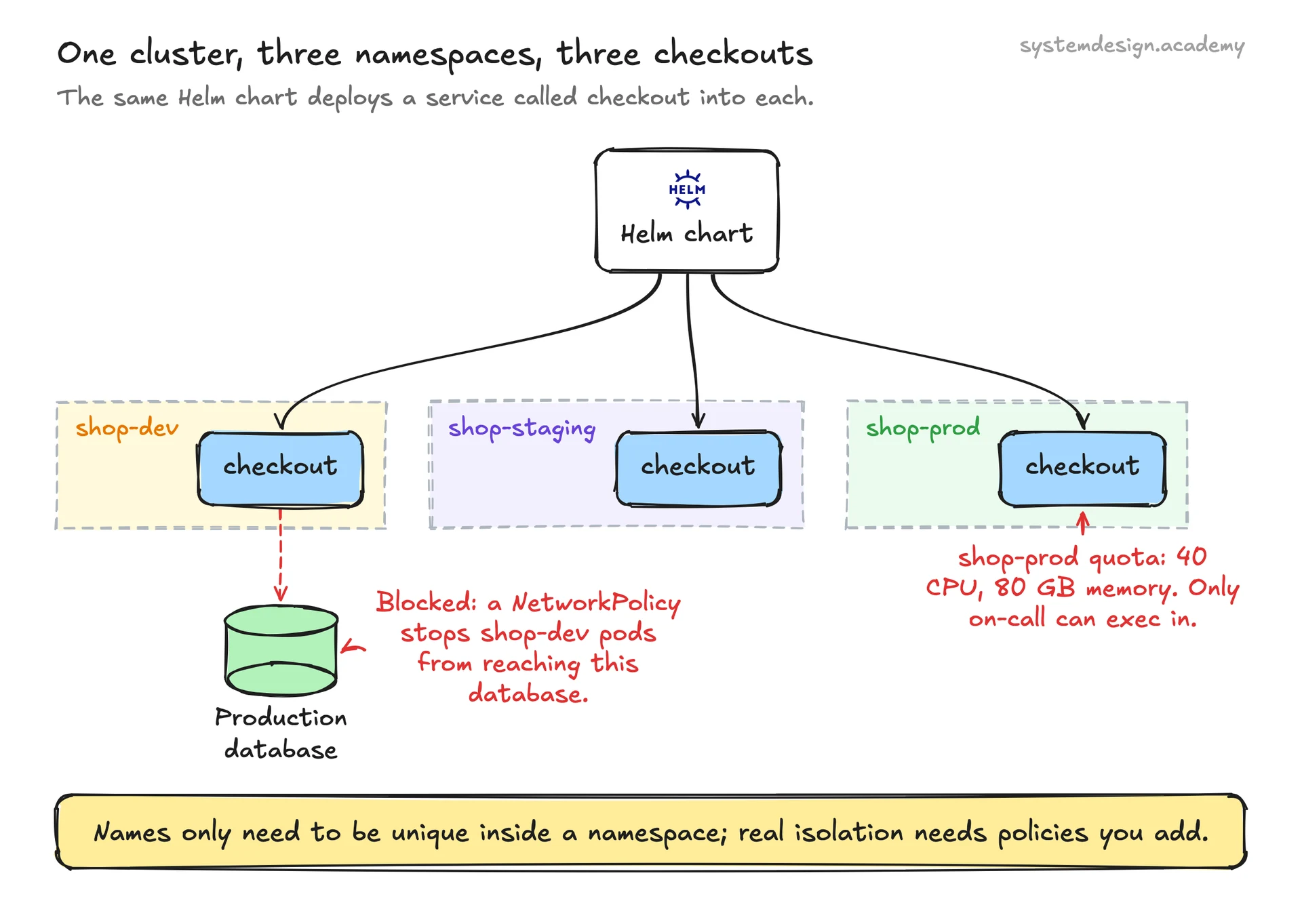
Picture an online store running on one cluster. The platform team creates three namespaces: shop-dev, shop-staging, and shop-prod. The same Helm chart deploys a catalog service and a checkout service into each, and because names are scoped, all three have a service simply called checkout with no collision.
On shop-prod they attach a ResourceQuota of 40 CPU and 80 gigabytes of memory so a runaway deploy cannot starve the node pool, and a RoleBinding that lets only the on-call engineers exec into pods. A NetworkPolicy blocks shop-dev pods from reaching the production database. When a developer runs kubectl get pods without a flag, they see only their own namespace, which keeps the blast radius of a mistake small.
Where it is used in production
Kubernetes
Ships namespaces as a core API object and uses kube-system, kube-public, and kube-node-lease to organize its own control plane.
Spotify
Runs many teams on shared clusters and gives each squad its own namespace with quotas and RBAC through its internal Backstage tooling.
Amazon EKS
Managed Kubernetes on AWS where customers carve clusters into namespaces per environment and apply IAM-mapped RBAC at the namespace level.
Rancher
Adds projects on top of Kubernetes that group several namespaces together so policy and quota apply across a team's whole set of namespaces.
Frequently asked questions
- Is a namespace a security boundary?
- Not on its own. It scopes names and is the place you attach RBAC, quotas, and network policies, but by default pods in different namespaces can still reach each other over the network and a cluster admin can read every namespace. You get isolation only after adding NetworkPolicies and RBAC.
- What is the difference between a namespace and a cluster?
- A cluster is the physical set of machines and one control plane. A namespace is a logical slice inside that one cluster. Namespaces share the same nodes and API server, so they are much cheaper than running a separate cluster per team but offer weaker isolation.
- Can one resource belong to two namespaces?
- No. A namespaced object lives in exactly one namespace. If you want the same workload in two namespaces, you deploy a copy into each, which is exactly how the same Helm chart populates dev, staging, and prod.
- How do I call a service in another namespace?
- Use its fully qualified DNS name in the form service.namespace.svc.cluster.local. Inside the same namespace the short name service is enough, but across namespaces you must include the namespace segment.
- What happens when I delete a namespace?
- Kubernetes deletes everything inside it: pods, deployments, services, config maps, secrets, and PVCs. The delete cascades and is not reversible, so deleting a namespace is a fast way to tear down an entire environment in one command.
Learn Kubernetes Namespace hands-on
This page explains the idea. The full lesson lets you step through the ring as servers join and leave, read the implementation, and check yourself with a quiz. It is one of 760+ lessons in the System Design Masterclass, from your first API call to distributed consensus. Eleven Foundation lessons are free, no signup. Lifetime access is ₹499 in India or $7.99 worldwide, one payment, no subscription.
See also
Related glossary terms you might want to look up next.
Kubernetes
An orchestration platform that automates deploying, scaling, and managing containerized applications. K8s is the operating system for your cloud.
Kubernetes Pod
The smallest deployable unit in Kubernetes: one or more containers sharing network and storage. Pods are ephemeral; if one dies, K8s creates a replacement.
Kubernetes Service
A stable network endpoint that load-balances traffic across a set of pods. Pods come and go, but the Service's IP and DNS name stay constant.
Docker
A platform for packaging applications into lightweight, portable containers. 'Works on my machine' becomes 'works everywhere.'
Container
A lightweight, isolated environment that packages an application with its dependencies. Shares the host OS kernel, unlike VMs. Starts in milliseconds.
Kubernetes Deployment
A K8s resource that manages rolling updates and rollbacks for a set of pods. You declare the desired state and K8s converges to it.