AI Engineering · Intermediate · Serving and Inference
Workers vs Threads: What Is a Worker Process?
A separate copy of a program that does work in parallel with other copies, with its own memory. Unlike threads, worker processes do not share memory, so one crash does not take down the rest.
Free PDF: the AI Engineering cheat sheet, 12 pagesGet it free →
In short
A worker is a separate copy of your program that does work in parallel with other copies. A worker process has its own memory, so one crash does not take down the others. It can also use its own CPU core. Threads run inside one process and share its memory, which is lighter but riskier. In Python, threads do not speed up pure CPU work. A lock lets only one thread run Python code at a time. So servers such as Gunicorn run several worker processes. In system design, 'workers' also means background processes that take jobs from a queue.
In short
A worker is a separate copy of your program that does work in parallel with other copies. A worker process has its own memory, so one crash does not take down the others. It can also use its own CPU core. Threads run inside one process and share its memory, which is lighter but riskier. In Python, threads do not speed up pure CPU work. A lock lets only one thread run Python code at a time. So servers such as Gunicorn run several worker processes. In system design, 'workers' also means background processes that take jobs from a queue.
The course goes deeper on Worker Process (Workers vs Threads)
₹2,777 in India/$49 everywhere elseonce, for the whole course
The AI Engineering course covers Worker Process across a run of lessons, not one page. These 4 alone are about 332 minutes of step-by-step reading, every one with code you run in the browser, all with a quiz.
Should a small model's service run more worker processes, more OpenMP threads, or both? My AWS account allows one vCPU at a time, so I measured the question on one core: 11 settings of 1, 2 or 4 uvicorn workers with 1, 2, 4 or 8 OpenMP threads, 5 rounds, the client on the same core. One worker with one thread gave the most answers, 1,071 a second; every other setting gave fewer, told apart. Four started workers (2 or 3 of them got connections) gave 0.981 of that and used 4.14 times the memory. One thread per worker mattered far more: predict_proba on one row took 510.5 us with 1 thread and 1,627.6 us with 4, and one worker with 4 threads gave only 0.454 of the answers. predict_proba let Python's lock go, but beside a busy Python thread each of its 54 trees waited about 5 ms to take it back, so one call took 270.2 ms instead of 52.6. All 1,109,009 scores were equal to the bit. Every AWS step is recorded so you can build the box yourself.
Does training twice give the same FILE, not just the same scores? I trained the features chapter's model in 55 fresh processes and saved every copy five ways. In one process, in five fresh processes, under five hash seeds, 1 minute apart, and again in a separate report 52 minutes later, every setting gave byte-identical files. The thread count did not: the model stores it, so 1, 2, 4, 8 and 10 threads gave five different files that differ in exactly one byte, with identical predictions. Changing the row order changed the model itself, through early stopping, and even with the held-out rows fixed it changed one stored training score in its last digit. Fixing the threads in code with threadpool_limits made the same file in 5 of 5 fresh processes.
I put many copies of a model on one small rented computer (1 core, 1.9 GB of memory) and measured how much each took, how many fit, and what happened when one more did not. A 14.3 MB model file took 15.1 MB of memory once loaded, but Python and its tool libraries took 198 MB before any model. Under a 537 MB limit, 27 copies fit. The computer then stopped the program while it loaded the 28th, with no error message. Four copies of a service that loaded the models once and then copied themselves used 385 MB, against 1,080 MB when each loaded its own. One clean-up by Python's memory cleaner copied 45 MB more per copy, and one setting (gc.freeze) stopped that. When only 4 of 16 models fit and the disk was slow, even requests whose model was ready waited up to 87 ms behind loads. Loading in the background cut that to 6 ms. Every step on the rented computer is recorded, so you can build it yourself.
What does a fresh copy of a model service do before its first answer, and what does the first request pay? I started the chapter's service 80 times on a one-core EC2 box, in ten ways, with a clock reading at every step. A bare process with its files in memory answered first after 1,499 ms, and 96.9% of the time until its port opened was Python importing libraries: scikit-learn alone took 824 ms, while reading and unpickling the model took 2.0 ms. With the page cache emptied the start took 2.81 times as long. The container image, whose Python is a different build, added 539 ms (container and build not separated), and an image with a compiled standard library gave 200 ms of that back. The first request took 4,680 us against 1,849 us for the second; one warm-up request before a readiness check brought it to 1,655 us. Under 539 random arrivals a second, a warmed service and a cold one could not be told apart. As a check that every way of starting served the right model on the right rows, all 32,379 scores were equal to the bit. Every AWS step is recorded so you can build the box yourself.
A web server receives many requests at once. If one copy of the program handles them one after another, a slow request makes everyone behind it wait, and a machine with 8 CPU cores uses only one of them. We need the work to happen side by side. There are two basic ways to do that.
Think of a restaurant kitchen. You can hire more cooks, each with their own station and tools (more processes). Or you can ask one cook to juggle several pans at once (more threads in one process). Separate stations cost more space, but if one cook drops a pan, the others keep cooking. One cook with many pans is cheaper, but a single mistake can spoil everything on that stove.
Worker processes vs threads
A process is a running program with its own private memory. Worker processes do not share variables, so a bug or crash in one does not damage the others, and the operating system can run each one on a different CPU core. The cost is memory: each worker loads its own copy of the app.
A thread is a line of execution inside a process. Threads in one process share the same memory, so they are cheap to start and can share data such as a cache. The cost is that one bad thread can corrupt data for all of them, and shared data needs locks.
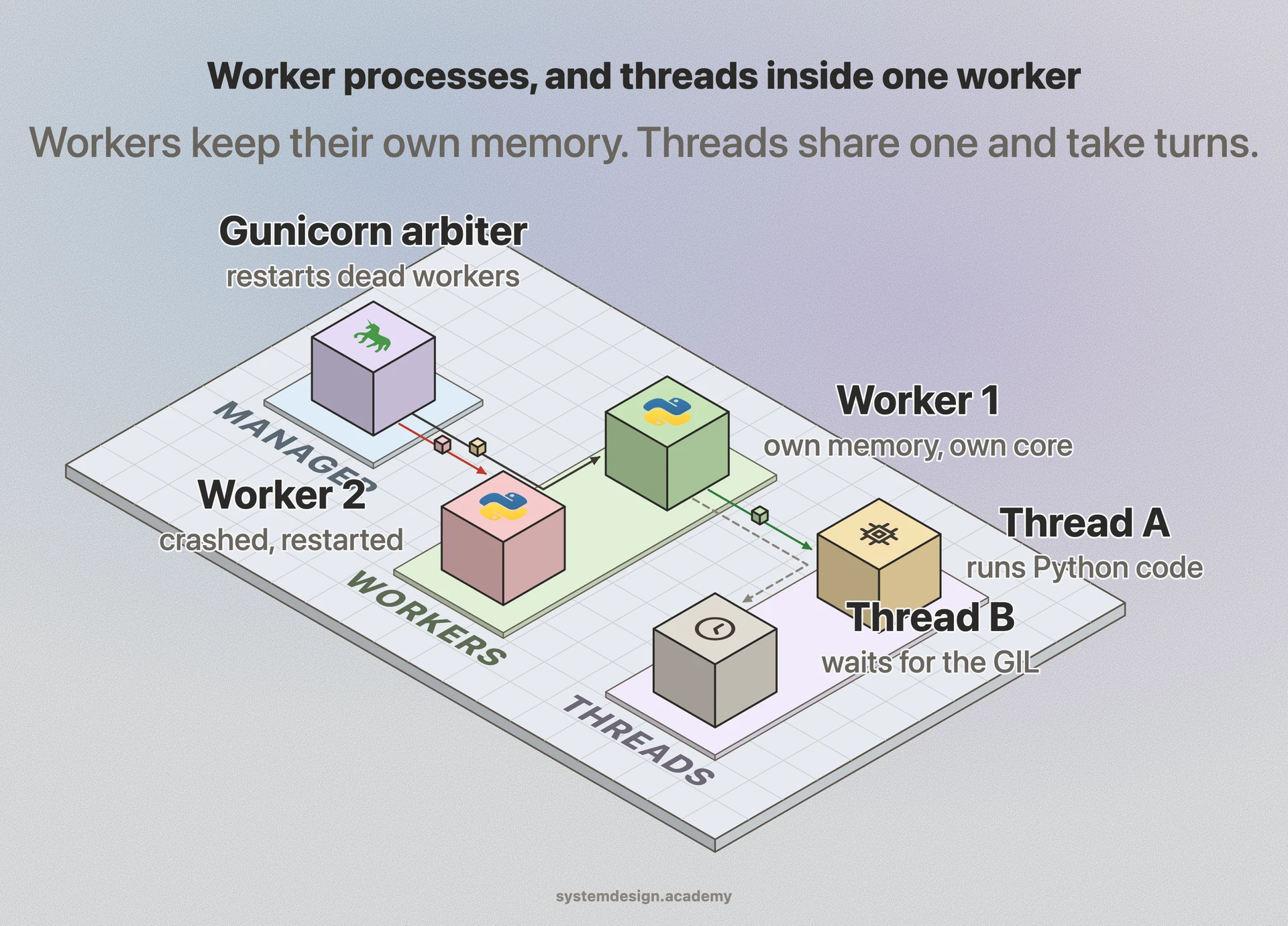
Most servers mix both. Gunicorn, a common Python web server, uses a pre-fork model: one manager process (the arbiter) starts and watches a pool of worker processes and restarts any that die. With its gthread worker type, each worker process also runs a few threads. Its docs sum it up: threads share memory, so they use less of it; workers isolate failures, so they are more fault tolerant.
Separate memory and separate cores, or shared memory and taking turns.
Why Python threads do not speed up CPU work
Standard Python (CPython) has a global interpreter lock, the GIL. The Python glossary defines it as the mechanism that makes sure only one thread runs Python bytecode at a time. So four threads doing pure Python calculations take turns on one core, and finish no faster than one thread doing all the work. The GIL is released while a thread waits for I/O (the network, a disk, a database), and some libraries release it during heavy work such as compression or hashing. That is why threads still help a lot when requests spend most of their time waiting. Python 3.13 added an optional free-threaded build where the GIL can be turned off, but the normal build still has it.
We measured this for this page with a small script on an Apple M4 laptop, Python 3.13. One job of pure Python arithmetic took 0.16 seconds. Four of the same jobs on 4 threads took 0.58 to 0.64 seconds over four runs, about four times one job, so the threads gave no speed-up. The same four jobs on 4 worker processes took 0.22 to 0.33 seconds, including the time to start the processes.
Real services are less simple, so measure your own. In our workers and threads lesson, a small machine learning model served on one AWS vCPU gave the most answers a second, 1,071, with one worker and one thread. Four workers gave 0.981 of that and used 4.14 times the memory: on one core, extra workers add memory but no extra CPU. One worker with 4 threads gave only 0.454 of it, because the threads fought over the one core and the GIL.
import time, platform, sys
from concurrent.futures import ThreadPoolExecutor, ProcessPoolExecutor

def work(n):                          # pure Python CPU work: holds the GIL the whole time
    total = 0
    for i in range(n):
        total += i * i
    return total

def timed(pool_cls, jobs, n):
    with pool_cls(max_workers=jobs) as pool:
        start = time.perf_counter()
        list(pool.map(work, [n] * jobs))
        return time.perf_counter() - start

if __name__ == "__main__":
    n, jobs = 5_000_000, 4
    t0 = time.perf_counter(); work(n); one = time.perf_counter() - t0
    th = timed(ThreadPoolExecutor, jobs, n)
    pr = timed(ProcessPoolExecutor, jobs, n)
    print(f"Python {sys.version.split()[0]} on {platform.machine()}")
    print(f"1 job alone:       {one:.2f} s")
    print(f"4 jobs, 4 threads: {th:.2f} s")
    print(f"4 jobs, 4 workers: {pr:.2f} s")
Output, first run, Apple M4, captured 2026-10-23
Python 3.13.15 on arm64
1 job alone:       0.16 s
4 jobs, 4 threads: 0.61 s
4 jobs, 4 workers: 0.33 s
Three more runs on the same machine gave 0.58, 0.59 and 0.64 seconds for threads, and 0.24, 0.22 and 0.22 seconds for worker processes. The threads always took about four times one job: they took turns.
How many workers should you run?
Gunicorn's docs give a starting point, not a rule: workers = (2 x CPU cores) + 1, then adjust under real load. They also say that Gunicorn usually needs only 4 to 12 workers for heavy traffic, and that too many workers waste resources and can lower throughput. On a 4-core server the formula gives 9.
The right number depends on what a request spends its time on. If requests mostly wait on a database or another service, add threads (or use an async worker), because waiting costs almost no CPU. If requests do heavy CPU work, such as running a model, keep workers near the number of cores, and make sure each worker's own math library does not also start many threads, or they will fight over the same cores. Node.js has the same split: its docs say worker threads help with CPU-heavy JavaScript and do not help much with I/O, which Node already handles well on its own.
The other meaning: background workers
In a system design interview, 'workers' often means something else: background processes that take jobs from a queue. The web server puts a job, such as 'send this email' or 'resize this image', onto a message queue and answers the user at once. A pool of worker processes on other machines pulls jobs and does them. Celery with Redis or RabbitMQ is a common Python setup.
This pattern lets you scale the slow work on its own (add workers when the queue grows), retry failed jobs, and keep the website fast. Workers should be idempotent, meaning that running the same job twice does no harm, because a worker can crash after doing a job but before marking it done. See it in the distributed job scheduler guide. For the browser kind of worker, which is a different thing, see service worker.
Where it is used in production
Gunicorn
Pre-fork Python server: an arbiter manages worker processes; suggests (2 x CPU cores) + 1 workers as a starting point.
Python
The GIL lets one thread run Python code at a time, so CPU-heavy Python scales with processes, not threads.
Node.js
worker_threads are for CPU-heavy JavaScript; the event loop already handles I/O-heavy work well.
Celery
Background job workers in Python that pull tasks from a broker such as Redis or RabbitMQ.
the question most readers have next
Where does Worker Process go wrong once real traffic hits it?
Most terms in system design are easy to define and easy to misuse. The lessons below show the failure cases, starting with "Workers and Threads: Processes, Threads, or Both on One Core?".
Should a small model's service run more worker processes, more OpenMP threads, or both? My AWS account allows one vCPU at a time, so I measured the question on one core: 11 settings of 1, 2 or 4 uvicorn workers with 1, 2, 4 or 8 OpenMP threads, 5 rounds, the client on the same core. One worker with one thread gave the most answers, 1,071 a second; every other setting gave fewer, told apart. Four started workers (2 or 3 of them got connections) gave 0.981 of that and used 4.14 times the memory. One thread per worker mattered far more: predict_proba on one row took 510.5 us with 1 thread and 1,627.6 us with 4, and one worker with 4 threads gave only 0.454 of the answers. predict_proba let Python's lock go, but beside a busy Python thread each of its 54 trees waited about 5 ms to take it back, so one call took 270.2 ms instead of 52.6. All 1,109,009 scores were equal to the bit. Every AWS step is recorded so you can build the box yourself.
Does training twice give the same FILE, not just the same scores? I trained the features chapter's model in 55 fresh processes and saved every copy five ways. In one process, in five fresh processes, under five hash seeds, 1 minute apart, and again in a separate report 52 minutes later, every setting gave byte-identical files. The thread count did not: the model stores it, so 1, 2, 4, 8 and 10 threads gave five different files that differ in exactly one byte, with identical predictions. Changing the row order changed the model itself, through early stopping, and even with the held-out rows fixed it changed one stored training score in its last digit. Fixing the threads in code with threadpool_limits made the same file in 5 of 5 fresh processes.
I put many copies of a model on one small rented computer (1 core, 1.9 GB of memory) and measured how much each took, how many fit, and what happened when one more did not. A 14.3 MB model file took 15.1 MB of memory once loaded, but Python and its tool libraries took 198 MB before any model. Under a 537 MB limit, 27 copies fit. The computer then stopped the program while it loaded the 28th, with no error message. Four copies of a service that loaded the models once and then copied themselves used 385 MB, against 1,080 MB when each loaded its own. One clean-up by Python's memory cleaner copied 45 MB more per copy, and one setting (gc.freeze) stopped that. When only 4 of 16 models fit and the disk was slow, even requests whose model was ready waited up to 87 ms behind loads. Loading in the background cut that to 6 ms. Every step on the rented computer is recorded, so you can build it yourself.
What does a fresh copy of a model service do before its first answer, and what does the first request pay? I started the chapter's service 80 times on a one-core EC2 box, in ten ways, with a clock reading at every step. A bare process with its files in memory answered first after 1,499 ms, and 96.9% of the time until its port opened was Python importing libraries: scikit-learn alone took 824 ms, while reading and unpickling the model took 2.0 ms. With the page cache emptied the start took 2.81 times as long. The container image, whose Python is a different build, added 539 ms (container and build not separated), and an image with a compiled standard library gave 200 ms of that back. The first request took 4,680 us against 1,849 us for the second; one warm-up request before a readiness check brought it to 1,655 us. Under 539 random arrivals a second, a warmed service and a cold one could not be told apart. As a check that every way of starting served the right model on the right rows, all 32,379 scores were equal to the bit. Every AWS step is recorded so you can build the box yourself.
Separate processes that do work in parallel. In a web server, worker processes each handle requests. In a background job system, workers pull jobs, such as sending emails, from a queue. The web request returns quickly, and the slow work scales on its own.
What is the difference between workers and threads?
Each worker process has its own memory and can run on its own CPU core. One crash does not stop the others. The cost is more memory. Threads share one process's memory, so they are lighter. But one bad thread can affect the rest, and shared data needs locks.
How many Gunicorn workers should I use?
Start with (2 x CPU cores) + 1, as Gunicorn's docs suggest, then measure under real load. Gunicorn usually needs only 4 to 12 workers. Use fewer for CPU-heavy work such as model serving, and add threads for requests that mostly wait on I/O.
Why don't Python threads use all CPU cores?
Because of the global interpreter lock (GIL) in standard CPython, only one thread runs Python code at a time. Threads still help when they wait for the network or disk, because the GIL is released during I/O. For CPU-heavy Python, use multiple processes.
Should I use worker threads or child processes in Node.js?
Use worker threads for CPU-heavy JavaScript that would block the event loop. Use child processes or the cluster module when you want separate processes, each with its own memory. For I/O-heavy work, neither is needed: Node's own async I/O is more efficient.
This page explains the idea. The "Workers and Threads: Processes, Threads, or Both on One Core?" lesson builds it up step by step, with diagrams. It is part of the AI Engineering course, which has 210 lessons. 10 of them are free to read. You pay once and keep it for life, with no subscription.
Asked about Worker Process (Workers vs Threads) in an interview?
Get all 120 questions in the Inference Engineering pack
Each question has why it is asked, a full answer, what the interviewer listens for, the follow-ups, the common mistakes and a diagram (141 diagrams in all). A PDF you keep, junior to staff level.